Introduction to
DBMS
Chapter-1
Database Systems
Database
A collection of inter-related data that is organized in such a way that it
can be easily accessed, managed and modified.
DBMS
It is a set of computer programs to access the data from a collection of
related data which store, update and manage all those data
Eg. MS Access, MySQL, MS SQL Server, Oracle, FoxPro, Dbase and so
on
Database System
It is a collection of interrelated data and a set of programs to access
2
DBMS
A collection of general-purpose, application-independent programs providing services
to
● define the structure of a database, i.e., data types and constraints that the data
will have to satisfy
● manage the storage of data, safely for long periods of time, on some storage
medium controlled by the DBMS
● manipulate a database, with client user interfaces to query the database to
retrieve specific data, update the database to reflect changes in the world, generate
reports from the data
● manage database usage, users with their access rights, performance optimization,
sharing of data among several users, security from accidents or unauthorized use
● monitor and analyze database usage
3
Database System Applications
1. Banking
2. Airlines
3. Universities
4. Telecommunications
5. Sales
6. Manufacturing and Inventory
7. Human resources
4
Drawbacks of Using Traditional File
Systems● Data Redundancy and Inconsistency
● Difficulty in accessing data
● Data Isolation
● Integrity problem
● Concurrent access anomalies
● Atomicity Problems
● Security Problems
5
Drawbacks of Using Traditional File
Systems
1. Data Redundancy and Inconsistency
○ Same information may be duplicated in different files
○ Redundancy leads to higher storage and access cost
○ Changes in one record may not be changed in other same records
concurrently
2. Difficulty in accessing data
○ Conventional file systems do not allow to access only required data
○ Needs to access whole data even if only required few data causing in
difficulty of access
6
Drawbacks of Using Traditional File
Systems
3. Data Isolation
○ Data is scattered in various files and files may be in different formats causing
data isolation
4. Integrity problem
○ While storing data,, it needs to satisfy certain condition s
○ Eg. in bank, an account should have minimum balance
5. Concurrent access anomalies
○ Multiple users need to use and update data for overall performance and faster
response
○ There is not any mechanism to support this in traditional file system
7
Drawbacks of Using Traditional File
Systems
6. Atomicity Problems
○ Any operations, to be atomic, should happen in its entirety or not at all
○ Atomic operations ensures that the system is in consistent state
7. Security Problems
○ Needs to reveal the whole information while requiring some information
○ No mechanism to support identification, authentication and authorization
8
Advantages of DBMS
● No data Redundancy
● Data Consistency
● Sharing of data
● Enforcing data integrity
● Concurrency control
● Program-data Independence(Separation of data structure of database
and application program)
● Data security
● Backup and Recovery
9
Data Abstraction
● Hiding the complexity from the users through several level of abstraction
● To provide users with an abstract view of data
1. Physical level
2. logical/Conceptual level
3. View level
10
Data Abstraction
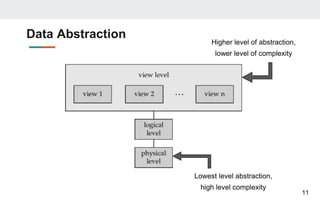
11
Lowest level abstraction,
high level complexity
Higher level of abstraction,
lower level of complexity
Levels of Data Abstraction
1. Physical level
○ describes how records are stored into database
○ Also includes the database format and its storage like tree, hashing, indexing
2. Logical level
○ describes data stored in database, and the relationships among the data.
○ Database Administrators uses it for deciding what information to keep in the
database
3. View level
○ Different users can view different data from the database according to their
need.
○ application programs hide details of data types.
○ Views can also hide information (e.g., salary) for confidentiality and security.
12
Schema and Instances
Schema
● Overall design of the database
● Logical Structure of data in a database
● Analogous to type of a variable
● It may be physical schema, logical schema or sub-schema
1. Physical Schema: describes the database design at the physical level
2. Logical Schema: describes the database design at the logical level
● Physical schema is hidden beneath the logical schema and can be
changed easily without affecting the application program.
13
Schema and Instances
Instances
○ Actual content of database at a particular point in time
○ Analogous to the values of a variable
14
Data Independence
● Applications insulated from how data is structured and stored.
1. Logical data independence
○ Protection from changes in logical structure of data.
2. Physical data independence
○ Protection from changes in physical structure of data.
15
Database Design
● Logical Design : Deciding on the database schema.
○ Business decision – What attributes should we record in the
database?
○ Computer Science decision – What relation schemas should we
have and how should the attributes be distributed among the various
relation schemas?
● Physical Design : Deciding on the physical layout of the database
16
Data Models
● Conceptual model for defining structure and behavior
○ structure: data types, relationships, constraints
○ behavior: basic operations for retrievals and updates
● A collection of tools for describing
○ Data
○ data relationships
○ data semantics
○ data constraints
17
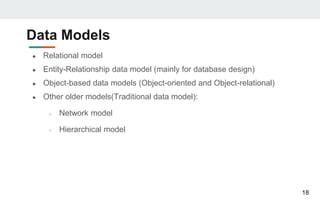
Data Models
● Relational model
● Entity-Relationship data model (mainly for database design)
● Object-based data models (Object-oriented and Object-relational)
● Other older models(Traditional data model):
○ Network model
○ Hierarchical model
18
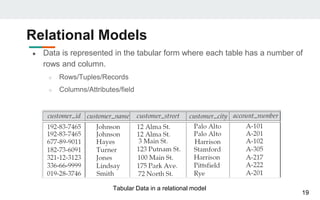
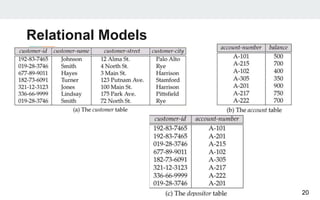
Relational Models
● Data is represented in the tabular form where each table has a number of
rows and column.
○ Rows/Tuples/Records
○ Columns/Attributes/field
19
Tabular Data in a relational model
Relational Models
20
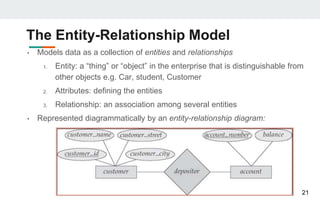
The Entity-Relationship Model
• Models data as a collection of entities and relationships
1. Entity: a “thing” or “object” in the enterprise that is distinguishable from
other objects e.g. Car, student, Customer
2. Attributes: defining the entities
3. Relationship: an association among several entities
• Represented diagrammatically by an entity-relationship diagram:
21
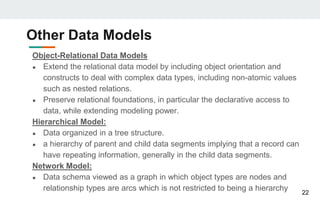
Other Data Models
Object-Relational Data Models
● Extend the relational data model by including object orientation and
constructs to deal with complex data types, including non-atomic values
such as nested relations.
● Preserve relational foundations, in particular the declarative access to
data, while extending modeling power.
Hierarchical Model:
● Data organized in a tree structure.
● a hierarchy of parent and child data segments implying that a record can
have repeating information, generally in the child data segments.
Network Model:
● Data schema viewed as a graph in which object types are nodes and
relationship types are arcs which is not restricted to being a hierarchy
22
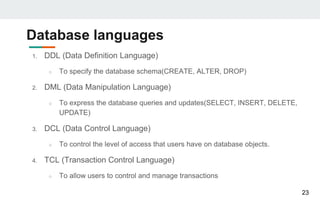
Database languages
1. DDL (Data Definition Language)
○ To specify the database schema(CREATE, ALTER, DROP)
2. DML (Data Manipulation Language)
○ To express the database queries and updates(SELECT, INSERT, DELETE,
UPDATE)
3. DCL (Data Control Language)
○ To control the level of access that users have on database objects.
4. TCL (Transaction Control Language)
○ To allow users to control and manage transactions
23
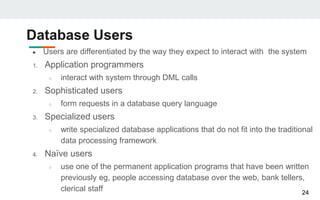
Database Users
● Users are differentiated by the way they expect to interact with the system
1. Application programmers
○ interact with system through DML calls
2. Sophisticated users
○ form requests in a database query language
3. Specialized users
○ write specialized database applications that do not fit into the traditional
data processing framework
4. Naïve users
○ use one of the permanent application programs that have been written
previously eg, people accessing database over the web, bank tellers,
clerical staff 24
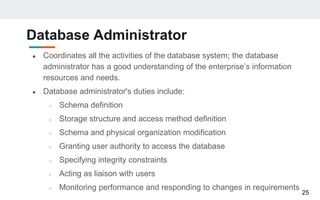
Database Administrator
● Coordinates all the activities of the database system; the database
administrator has a good understanding of the enterprise’s information
resources and needs.
● Database administrator's duties include:
○ Schema definition
○ Storage structure and access method definition
○ Schema and physical organization modification
○ Granting user authority to access the database
○ Specifying integrity constraints
○ Acting as liaison with users
○ Monitoring performance and responding to changes in requirements
25
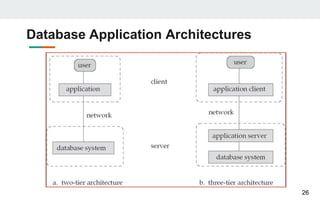
Database Application Architectures
26
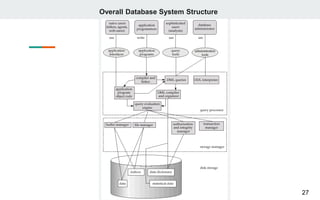
Overall Database System Structure
27

Introduction to database

  • 1.
  • 2.
    Database Systems Database A collectionof inter-related data that is organized in such a way that it can be easily accessed, managed and modified. DBMS It is a set of computer programs to access the data from a collection of related data which store, update and manage all those data Eg. MS Access, MySQL, MS SQL Server, Oracle, FoxPro, Dbase and so on Database System It is a collection of interrelated data and a set of programs to access 2
  • 3.
    DBMS A collection ofgeneral-purpose, application-independent programs providing services to ● define the structure of a database, i.e., data types and constraints that the data will have to satisfy ● manage the storage of data, safely for long periods of time, on some storage medium controlled by the DBMS ● manipulate a database, with client user interfaces to query the database to retrieve specific data, update the database to reflect changes in the world, generate reports from the data ● manage database usage, users with their access rights, performance optimization, sharing of data among several users, security from accidents or unauthorized use ● monitor and analyze database usage 3
  • 4.
    Database System Applications 1.Banking 2. Airlines 3. Universities 4. Telecommunications 5. Sales 6. Manufacturing and Inventory 7. Human resources 4
  • 5.
    Drawbacks of UsingTraditional File Systems● Data Redundancy and Inconsistency ● Difficulty in accessing data ● Data Isolation ● Integrity problem ● Concurrent access anomalies ● Atomicity Problems ● Security Problems 5
  • 6.
    Drawbacks of UsingTraditional File Systems 1. Data Redundancy and Inconsistency ○ Same information may be duplicated in different files ○ Redundancy leads to higher storage and access cost ○ Changes in one record may not be changed in other same records concurrently 2. Difficulty in accessing data ○ Conventional file systems do not allow to access only required data ○ Needs to access whole data even if only required few data causing in difficulty of access 6
  • 7.
    Drawbacks of UsingTraditional File Systems 3. Data Isolation ○ Data is scattered in various files and files may be in different formats causing data isolation 4. Integrity problem ○ While storing data,, it needs to satisfy certain condition s ○ Eg. in bank, an account should have minimum balance 5. Concurrent access anomalies ○ Multiple users need to use and update data for overall performance and faster response ○ There is not any mechanism to support this in traditional file system 7
  • 8.
    Drawbacks of UsingTraditional File Systems 6. Atomicity Problems ○ Any operations, to be atomic, should happen in its entirety or not at all ○ Atomic operations ensures that the system is in consistent state 7. Security Problems ○ Needs to reveal the whole information while requiring some information ○ No mechanism to support identification, authentication and authorization 8
  • 9.
    Advantages of DBMS ●No data Redundancy ● Data Consistency ● Sharing of data ● Enforcing data integrity ● Concurrency control ● Program-data Independence(Separation of data structure of database and application program) ● Data security ● Backup and Recovery 9
  • 10.
    Data Abstraction ● Hidingthe complexity from the users through several level of abstraction ● To provide users with an abstract view of data 1. Physical level 2. logical/Conceptual level 3. View level 10
  • 11.
    Data Abstraction 11 Lowest levelabstraction, high level complexity Higher level of abstraction, lower level of complexity
  • 12.
    Levels of DataAbstraction 1. Physical level ○ describes how records are stored into database ○ Also includes the database format and its storage like tree, hashing, indexing 2. Logical level ○ describes data stored in database, and the relationships among the data. ○ Database Administrators uses it for deciding what information to keep in the database 3. View level ○ Different users can view different data from the database according to their need. ○ application programs hide details of data types. ○ Views can also hide information (e.g., salary) for confidentiality and security. 12
  • 13.
    Schema and Instances Schema ●Overall design of the database ● Logical Structure of data in a database ● Analogous to type of a variable ● It may be physical schema, logical schema or sub-schema 1. Physical Schema: describes the database design at the physical level 2. Logical Schema: describes the database design at the logical level ● Physical schema is hidden beneath the logical schema and can be changed easily without affecting the application program. 13
  • 14.
    Schema and Instances Instances ○Actual content of database at a particular point in time ○ Analogous to the values of a variable 14
  • 15.
    Data Independence ● Applicationsinsulated from how data is structured and stored. 1. Logical data independence ○ Protection from changes in logical structure of data. 2. Physical data independence ○ Protection from changes in physical structure of data. 15
  • 16.
    Database Design ● LogicalDesign : Deciding on the database schema. ○ Business decision – What attributes should we record in the database? ○ Computer Science decision – What relation schemas should we have and how should the attributes be distributed among the various relation schemas? ● Physical Design : Deciding on the physical layout of the database 16
  • 17.
    Data Models ● Conceptualmodel for defining structure and behavior ○ structure: data types, relationships, constraints ○ behavior: basic operations for retrievals and updates ● A collection of tools for describing ○ Data ○ data relationships ○ data semantics ○ data constraints 17
  • 18.
    Data Models ● Relationalmodel ● Entity-Relationship data model (mainly for database design) ● Object-based data models (Object-oriented and Object-relational) ● Other older models(Traditional data model): ○ Network model ○ Hierarchical model 18
  • 19.
    Relational Models ● Datais represented in the tabular form where each table has a number of rows and column. ○ Rows/Tuples/Records ○ Columns/Attributes/field 19 Tabular Data in a relational model
  • 20.
  • 21.
    The Entity-Relationship Model •Models data as a collection of entities and relationships 1. Entity: a “thing” or “object” in the enterprise that is distinguishable from other objects e.g. Car, student, Customer 2. Attributes: defining the entities 3. Relationship: an association among several entities • Represented diagrammatically by an entity-relationship diagram: 21
  • 22.
    Other Data Models Object-RelationalData Models ● Extend the relational data model by including object orientation and constructs to deal with complex data types, including non-atomic values such as nested relations. ● Preserve relational foundations, in particular the declarative access to data, while extending modeling power. Hierarchical Model: ● Data organized in a tree structure. ● a hierarchy of parent and child data segments implying that a record can have repeating information, generally in the child data segments. Network Model: ● Data schema viewed as a graph in which object types are nodes and relationship types are arcs which is not restricted to being a hierarchy 22
  • 23.
    Database languages 1. DDL(Data Definition Language) ○ To specify the database schema(CREATE, ALTER, DROP) 2. DML (Data Manipulation Language) ○ To express the database queries and updates(SELECT, INSERT, DELETE, UPDATE) 3. DCL (Data Control Language) ○ To control the level of access that users have on database objects. 4. TCL (Transaction Control Language) ○ To allow users to control and manage transactions 23
  • 24.
    Database Users ● Usersare differentiated by the way they expect to interact with the system 1. Application programmers ○ interact with system through DML calls 2. Sophisticated users ○ form requests in a database query language 3. Specialized users ○ write specialized database applications that do not fit into the traditional data processing framework 4. Naïve users ○ use one of the permanent application programs that have been written previously eg, people accessing database over the web, bank tellers, clerical staff 24
  • 25.
    Database Administrator ● Coordinatesall the activities of the database system; the database administrator has a good understanding of the enterprise’s information resources and needs. ● Database administrator's duties include: ○ Schema definition ○ Storage structure and access method definition ○ Schema and physical organization modification ○ Granting user authority to access the database ○ Specifying integrity constraints ○ Acting as liaison with users ○ Monitoring performance and responding to changes in requirements 25
  • 26.
  • 27.