DATABASES
CHAPTER 1
INTRODUCTION TO
DATABASE SYSTEMS
2
Where do we begin?
 What is ‘data’?
 Data
 raw facts
 text, graphics, images, sound and video
segments that have meaning in the users’
environment.
 Information
 data processed to increase knowledge in the
person using the data
3
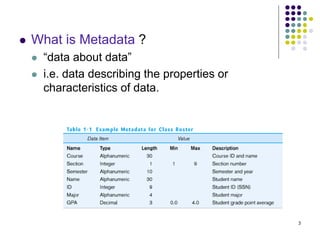
 What is Metadata ?
 “data about data”
 i.e. data describing the properties or
characteristics of data.
4
What is a database?
 Database
 An organized collection of logically related data
 Users of a database can do:
 Add new files to the database.
 Remove (Delete) files from the database.
 Insert data into existing files.
 Retrieve data from existing files.
 Change/Delete data in existing files.
5
What is a DBMS?
 DBMS (Database Management System)
 A software for creating and managing large
databases efficiently.
 E.g.
 Oracle
 MSAccess
 Sybase
 MySQL
6
Need for a DBMS
 To be able to appreciate why we need a DBMS, we must look at what are
the limitations of the file processing system (FPS) traditionally used for
accessing huge amount of data.
 So, what is a FPS?
 One of the ways to store, manipulate and retrieve large files of data.
 For example : a savings bank.
 Two types of files
 Account File
 Customer File.
 A separate computer program is written to accomplish the
following tasks
 Debit or Credit an Account
 Add a new account.
 Find an account balance.
 Generate monthly statements.
 Each program defines and manages its own data.
 Development of the system proceeds as follows:
 New application programs must be written as the need arises.
 New permanent files are created as required.
7
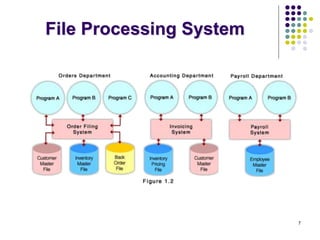
File Processing System
8
1. Program-data dependence
Since in a TFPS, each application program accesses the
data files directly, programs are dependent on how data is
structured and stored giving rise to the following problems.
 Each application program needs to include code for the
metadata of each file
 Each application program must have its own processing
routines for reading, inserting, updating and deleting
data
 Lack of coordination and central control
 Non-standard file formats
 Changes in data structuring requires changing all the
application programs that reference it.
So, what are the problems with the
straight file-processing approach?
9
2. Difficulty in accessing data
 May have to write a new application program to
satisfy an unusual request.
 E.g. find all customers with the same postal
code.
 Could generate this data manually, but a long
job...
3. Data redundancy and inconsistency
 Since in FPS, new files are created as
required, same information may be duplicated in
several places leading to data redundancy.
 All copies may not be updated properly resulting
in inconsistent data.
10
4. Multiple Users
 Want concurrency for faster response time.
 Need protection for concurrent updates.
 E.g. two customers withdrawing funds from the
same account at the same time - account has
$500 in it, and they withdraw $100 and $50.
The result could be $350, $400 or $450 if no
protection.
5. Security problems
 Every user of the system should be able to
access only the data they are permitted to see.
 E.g. payroll people only handle employee
records, and cannot see customer accounts;
tellers only access account data and cannot
see payroll data.
 Difficult to enforce this with application
programs.
11
6. Integrity problems
 Data may be required to satisfy constraints.
 E.g. no account balance below $25.00.
 Again, difficult to enforce or to change
constraints with the file-processing approach.
 These problems and others led to the development
of database management systems.
12
SOLUTION: The DATABASE
Approach
 Central repository of shared data
 Data is managed by a controlling agent (a
Database Management System (DBMS).
 Stored in a standardized, convenient form
13
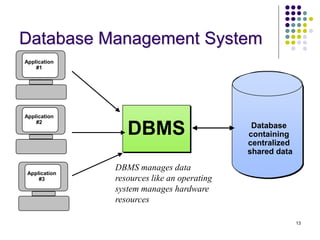
DBMS manages data
resources like an operating
system manages hardware
resources
DBMS Database
containing
centralized
shared data
Application
#1
Application
#2
Application
#3
Database Management System
14
Functions of DBMS
 Data Abstraction
 The major purpose of a database system is to
provide users with an abstract view of the
system.
 The system hides the details of how data is stored
and created and maintained.
 There are three levels of abstraction:
 Physical Level:
 Conceptual Level:
 View Level:
15
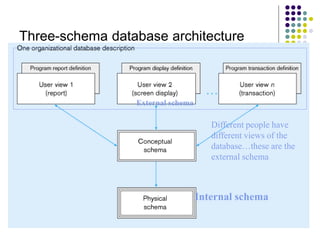
External schema
Different people have
different views of the
database…these are the
external schema
Internal schema
Three-schema database architecture
16
Three levels of data abstraction
 Physical Schema:
 Is concerned with how the data is stored in the computer’s hard-disk.
 Lowest level of abstraction.
 Complex low-level structures described in detail.
 Conceptual Schema:
 Next highest level of abstraction.
 a detailed specification of the overall structural organization of the
data.
 Specifically, what data is stored in the database and the relationships
among the data (ER Models).
 Database administrator level.
 External Schema or User-View Schema:
 Highest level.
 Describes part of the database for a particular group of users.
 Can be many different views of a database.
 E.g. tellers in a bank get a view of customer accounts, but not of
payroll data.
17
Advantages of Database
Approach
1. Program-Data Independence
 Metadata is stored in DBMS, so applications don’t
need to worry about data formats.
 Data queries/updates are managed by DBMS so
programs don’t need to process data access
routines
 Allows the physical and (or) conceptual database
schema to be altered without having to rewrite the
application programs.
18
Advantages of Database
Approach
2. Minimal Data Redundancy
 Leads to increased data integrity/consistency
3. Improved Data Sharing
 Different users get different views of the data
4. Enforcement of Standards
 All data access is done in the same way
19
Advantages of Database
Approach
5. Improved Data Quality
 Constraints, data validation rules
6. Better Data Accessibility/ Responsiveness
 Use of standard data query language (SQL)
7. Security, Backup/Recovery, Concurrency
 Disaster recovery is easier
20
The Database Approach
 Database Application (DA)
 application program used to perform a series of
database operations or activities on behalf of database
user.
E.g create, read, update, delete
21
Types of Database Application
 Personal Computer Database
 support one user (standalone desktop database)
 Workgroup Database
 small team of people work together on the same project
or application (LAN <25 users)
 Department Database
 functional unit within an organization (LAN 25-100 users)
 Enterprise Database
 support organization-wide operation and decision
making (WAN hundreds/ thousands of users)
22
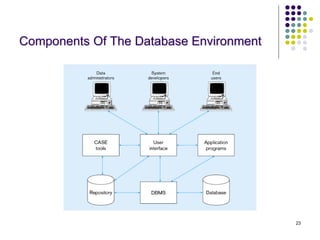
Component of Database Environment
 CASE (Computer Aided Software Engineering Tools)
 tools used to design databases and application programs.
 Categories:
 Upper-CASE
 Lower-CASE
 Integrated-CASE
 Repository
 centralized knowledge base of all data definitions, screen, data relationships, report
formats and other system components.
 DBMS
 Database – storehouse of the data
 Application programs
 User Interface
 Data Administrators – personnel responsible for maintaining the database
 System developers – personnel responsible for designing databases and software
 End users
23
Components Of The Database Environment
24
“Users” of a Database
 End Users
 use application programs, queries or reports
prepared by developers (e.g. users of ATM)
 Application programmers / developers
 are computer professionals who write the
application programs, reports, queries, etc.
 Database administrator
 handle security & authorization, recovery from
crashes, tuning for performance, etc
END..
Exercise
 Find ONE example of database system for
each of the following.
 Personal Computer Database
 Workgroup Database
 Department Database
 Enterprise Database
 Capture the interface and briefly describe for
each.
26

Chap1-Introduction to database systems.ppt

  • 1.
  • 2.
    2 Where do webegin?  What is ‘data’?  Data  raw facts  text, graphics, images, sound and video segments that have meaning in the users’ environment.  Information  data processed to increase knowledge in the person using the data
  • 3.
    3  What isMetadata ?  “data about data”  i.e. data describing the properties or characteristics of data.
  • 4.
    4 What is adatabase?  Database  An organized collection of logically related data  Users of a database can do:  Add new files to the database.  Remove (Delete) files from the database.  Insert data into existing files.  Retrieve data from existing files.  Change/Delete data in existing files.
  • 5.
    5 What is aDBMS?  DBMS (Database Management System)  A software for creating and managing large databases efficiently.  E.g.  Oracle  MSAccess  Sybase  MySQL
  • 6.
    6 Need for aDBMS  To be able to appreciate why we need a DBMS, we must look at what are the limitations of the file processing system (FPS) traditionally used for accessing huge amount of data.  So, what is a FPS?  One of the ways to store, manipulate and retrieve large files of data.  For example : a savings bank.  Two types of files  Account File  Customer File.  A separate computer program is written to accomplish the following tasks  Debit or Credit an Account  Add a new account.  Find an account balance.  Generate monthly statements.  Each program defines and manages its own data.  Development of the system proceeds as follows:  New application programs must be written as the need arises.  New permanent files are created as required.
  • 7.
  • 8.
    8 1. Program-data dependence Sincein a TFPS, each application program accesses the data files directly, programs are dependent on how data is structured and stored giving rise to the following problems.  Each application program needs to include code for the metadata of each file  Each application program must have its own processing routines for reading, inserting, updating and deleting data  Lack of coordination and central control  Non-standard file formats  Changes in data structuring requires changing all the application programs that reference it. So, what are the problems with the straight file-processing approach?
  • 9.
    9 2. Difficulty inaccessing data  May have to write a new application program to satisfy an unusual request.  E.g. find all customers with the same postal code.  Could generate this data manually, but a long job... 3. Data redundancy and inconsistency  Since in FPS, new files are created as required, same information may be duplicated in several places leading to data redundancy.  All copies may not be updated properly resulting in inconsistent data.
  • 10.
    10 4. Multiple Users Want concurrency for faster response time.  Need protection for concurrent updates.  E.g. two customers withdrawing funds from the same account at the same time - account has $500 in it, and they withdraw $100 and $50. The result could be $350, $400 or $450 if no protection. 5. Security problems  Every user of the system should be able to access only the data they are permitted to see.  E.g. payroll people only handle employee records, and cannot see customer accounts; tellers only access account data and cannot see payroll data.  Difficult to enforce this with application programs.
  • 11.
    11 6. Integrity problems Data may be required to satisfy constraints.  E.g. no account balance below $25.00.  Again, difficult to enforce or to change constraints with the file-processing approach.  These problems and others led to the development of database management systems.
  • 12.
    12 SOLUTION: The DATABASE Approach Central repository of shared data  Data is managed by a controlling agent (a Database Management System (DBMS).  Stored in a standardized, convenient form
  • 13.
    13 DBMS manages data resourceslike an operating system manages hardware resources DBMS Database containing centralized shared data Application #1 Application #2 Application #3 Database Management System
  • 14.
    14 Functions of DBMS Data Abstraction  The major purpose of a database system is to provide users with an abstract view of the system.  The system hides the details of how data is stored and created and maintained.  There are three levels of abstraction:  Physical Level:  Conceptual Level:  View Level:
  • 15.
    15 External schema Different peoplehave different views of the database…these are the external schema Internal schema Three-schema database architecture
  • 16.
    16 Three levels ofdata abstraction  Physical Schema:  Is concerned with how the data is stored in the computer’s hard-disk.  Lowest level of abstraction.  Complex low-level structures described in detail.  Conceptual Schema:  Next highest level of abstraction.  a detailed specification of the overall structural organization of the data.  Specifically, what data is stored in the database and the relationships among the data (ER Models).  Database administrator level.  External Schema or User-View Schema:  Highest level.  Describes part of the database for a particular group of users.  Can be many different views of a database.  E.g. tellers in a bank get a view of customer accounts, but not of payroll data.
  • 17.
    17 Advantages of Database Approach 1.Program-Data Independence  Metadata is stored in DBMS, so applications don’t need to worry about data formats.  Data queries/updates are managed by DBMS so programs don’t need to process data access routines  Allows the physical and (or) conceptual database schema to be altered without having to rewrite the application programs.
  • 18.
    18 Advantages of Database Approach 2.Minimal Data Redundancy  Leads to increased data integrity/consistency 3. Improved Data Sharing  Different users get different views of the data 4. Enforcement of Standards  All data access is done in the same way
  • 19.
    19 Advantages of Database Approach 5.Improved Data Quality  Constraints, data validation rules 6. Better Data Accessibility/ Responsiveness  Use of standard data query language (SQL) 7. Security, Backup/Recovery, Concurrency  Disaster recovery is easier
  • 20.
    20 The Database Approach Database Application (DA)  application program used to perform a series of database operations or activities on behalf of database user. E.g create, read, update, delete
  • 21.
    21 Types of DatabaseApplication  Personal Computer Database  support one user (standalone desktop database)  Workgroup Database  small team of people work together on the same project or application (LAN <25 users)  Department Database  functional unit within an organization (LAN 25-100 users)  Enterprise Database  support organization-wide operation and decision making (WAN hundreds/ thousands of users)
  • 22.
    22 Component of DatabaseEnvironment  CASE (Computer Aided Software Engineering Tools)  tools used to design databases and application programs.  Categories:  Upper-CASE  Lower-CASE  Integrated-CASE  Repository  centralized knowledge base of all data definitions, screen, data relationships, report formats and other system components.  DBMS  Database – storehouse of the data  Application programs  User Interface  Data Administrators – personnel responsible for maintaining the database  System developers – personnel responsible for designing databases and software  End users
  • 23.
    23 Components Of TheDatabase Environment
  • 24.
    24 “Users” of aDatabase  End Users  use application programs, queries or reports prepared by developers (e.g. users of ATM)  Application programmers / developers  are computer professionals who write the application programs, reports, queries, etc.  Database administrator  handle security & authorization, recovery from crashes, tuning for performance, etc
  • 25.
  • 26.
    Exercise  Find ONEexample of database system for each of the following.  Personal Computer Database  Workgroup Database  Department Database  Enterprise Database  Capture the interface and briefly describe for each. 26