Introduction to DBMS
 DBMS contains information about a particular enterprise
 Collection of interrelated data
 Set of programs to access the data
 An environment that is both convenient and efficient to use
 Database Applications:
 Banking: all transactions
 Airlines: reservations, schedules
 Universities: registration, grades
 Sales: customers, products, purchases
 Online retailers: order tracking, customized recommendations
 Manufacturing: production, inventory, orders, supply chain
 Human resources: employee records, salaries, tax deductions
Drawbacks of File Management
System
 Data redundancy and inconsistency
 Multiple file formats, duplication of information in
different files
 Difficulty in accessing data
 Need to write a new program to carry out each new task
 Data isolation — multiple files and formats
 Integrity problems
 Integrity constraints (e.g. account balance > 0)
 Hard to add new constraints or change existing ones
Continue ….
 Atomicity of updates
 Failures may leave database in an inconsistent state with
partial updates carried out
 Example: Transfer of funds from one account to another
should either complete or not happen at all
 Concurrent access by multiple users
 Concurrent accessed needed for performance
 Uncontrolled concurrent accesses can lead to
inconsistencies
 Example: Two people reading a balance and updating
it at the same time
 Security problems
 Hard to provide user access to some, but not all, data
DATABASE LANGUAGES
 DDL
 DML
 DCL
Transaction Management
 A transaction is a collection of operations that performs a
single logical function in a database application
 Transaction-management component ensures that the
database remains in a consistent (correct) state despite
system failures (e.g., power failures and operating system
crashes) and transaction failures.
 Concurrency-control manager controls the interaction
among the concurrent transactions, to ensure the
consistency of the database.
Schemas, Instances, and Database
State
 Database Schema
 The description of the database
 Specified during database design
 Expected to change when requirements change
 Schema Diagram
 Most data models have certain conventions for
displaying schemas as diagrams
 Displays only some aspects of a schema, such as names
of record types and data items
 Some constraints are difficult to represent
 Schema Construct
 Each object in the schema (e.g., student, course)
Example
Database State or Snapshot
 Actual data in the database may change frequently
 The data in the database at a particular moment in time is
called a database state or snapshot
 Also called the current set of occurrences or instances in
the database
Database Schema vs. Database State
 The distinction is very important
 When we define a database, we specify its database
schema only to the DBMS
 Database state is the empty state (w/ no data)
 Initial state: when the database is first populated or
loaded with initial data
 Current State: State at any point in time. Every time an
update operation is applied to the database, database
state changes
Database Schema vs. Database State
 Valid State: A state that satisfies the structure and the
constraints specified in the schema
 The schema is sometimes called the intension, and a
database state is called an extension of the schema
Three-Schema Architecture
 The goal is to separate user applications and physical database
 Defines DBMS schema at three levels:
 Internal schema at the internal level to describe data storage structures and
access paths. Typically uses a physical data model.
 Conceptual schema at the conceptual level to describe the structure and
constraints for the whole database. Uses a conceptual or an implementation
data model.
 External schema at the external level to describe the various user views.
Usually uses the same data model as the conceptual level.
 Mapping: Process of transforming requests and results between levels
Levels of Abstraction
 A major purpose of database system is to provide
users with an abstract view of the data
 Physical level: describes how a record (e.g.,
customer) is stored.
 Logical level: describes data stored in database,
and the relationships among the data.
 View level: application programs hide details of
data types. Views can also hide information
(such as an employee’s salary) for security
purposes.
View of Data
An architecture for a database system
DATABASE SYSTEM STRUCTURE
 Storage Manager
 It is a program module that provides the interface between the
low level data stored in the database, the application programs
and the queries submitted to the system
 Query Processor
 It helps in accessing data from a database in a simple manner
Architecture
 Defines the structure of the system
 Identify the Components
 Define function of each component
 Inter-relation and interactions between each
components defined
Database Architecture
 Centralized DBMS Architecture
 Client/Server Architecture
 Two-Tier
 Client – Query Server (or Transaction Server)
 ODBC, JDBC
 Client – Data Server
 Three-Tier and n-Tier for Web applications
 Introduces middle-tier (application server or web
server)
 Business rules
Centralized System Architecture
 Run on a single computer system and do not interact with
other computer systems
 General-purpose computer system
 Single-user system
 Multi-user system
A Centralized Computer System
Advantages of Client-Server
Architecture
 More efficient division of labor
 Ability to use familiar tools on client machine
 Full DBMS functionality provided to client machines
 Proper Utilization of Resources
 Better System performance/price
Data Independence
 Definition: Capacity to change the schema at one level
without having to change the schema at the next higher
level (mappings may change)
 Logical Data Independence: The capacity to change the
conceptual schema without
having to change the external schemas and their
application programs.
Ex:
By adding or removing a record type or data item to
· expand the database
· reduce the database
 Physical Data Independence: The capacity to change the
internal schema without having to change the conceptual
schema.
 Ex:
 Reorganize physical files to improve performance
2-7a 27
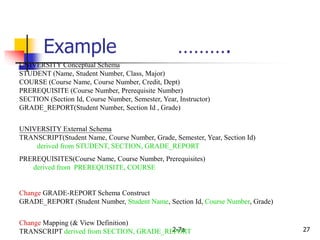
UNIVERSITY Conceptual Schema
STUDENT (Name, Student Number, Class, Major)
COURSE (Course Name, Course Number, Credit, Dept)
PREREQUISITE (Course Number, Prerequisite Number)
SECTION (Section Id, Course Number, Semester, Year, Instructor)
GRADE_REPORT(Student Number, Section Id , Grade)
UNIVERSITY External Schema
TRANSCRIPT(Student Name, Course Number, Grade, Semester, Year, Section Id)
derived from STUDENT, SECTION, GRADE_REPORT
PREREQUISITES(Course Name, Course Number, Prerequisites)
derived from PREREQUISITE, COURSE
Change GRADE-REPORT Schema Construct
GRADE_REPORT (Student Number, Student Name, Section Id, Course Number, Grade)
Change Mapping (& View Definition)
TRANSCRIPT derived from SECTION, GRADE_REPORT
Example ……….
DB Development Life Cycle………
 Database planning
 System definition
 Requirement collection and analysis
 Database design
 DBMS selection
 Application design
 Prototyping
 Implementation
 Data conversion and loading
 Testing
 Operational maintenance
DBMS Interfaces ……….
 Stand-alone query language interfaces. (casual end user)
 Programmer interfaces for embedding DML in programming languages:
(programmer)
 Pre-compiler Approach
 Procedure (Subroutine) Call Approach
 User-friendly interfaces:
 Menu-based Interfaces for Browsing.
 Forms-based Interfaces.
 Graphical User Interfaces
 Natural language Interfaces
Combination of the above
 Interfaces for the DBA:
 Creating accounts, granting authorizations
 Setting system parameters
 Changing schemas or access path
Database Users
Users are differentiated by the way they expect to interact
with
the system
 Application programmers – interact with system through
DML calls
 Sophisticated users – form requests in a database query
language
 Specialized users – write specialized database applications
that do not fit into the traditional data processing
framework
 Naïve users – invoke one of the permanent application
programs that have been written previously
 Examples, people accessing database over the web,
bank tellers, clerical staff
Database Administrator
 Coordinates all the activities of the database system; the
database administrator has a good understanding of the
enterprise’s information resources and needs.
 Database administrator's duties include:
 Schema definition
 Storage structure and access method definition
 Schema and physical organization modification
 Granting user authority to access the database
 Specifying integrity constraints
 Monitoring performance and responding to changes in
requirements
DATA MODELS
CONCEPT
What to Model ????
 Static Information
 Data --- Entities
 Associations --Relationships among entities
 Dynamic Information
 Processes – Operations/Transactions
 Integrity Constraints – Business
rules/regulations and data meanings
What is Data Model
 A collection of tools for Describing
 Data
 Data Relationships
 Data semantics
 Data constraints
System Model Tools
 Data Flow Diagram (DFD)
 Hierarchical input process and output
(HIPO)
 State Transition Diagrams (STD)
 Entity Relationship (ER) Diagrams
Basic Terms in Data Model
 Entity : Something that exists and can be distinguished
from other entities
 Ex:
 Student entity with unique roll number
 Account Entity with unique account number
 Entity Set : A set of entities of the same type
 Ex:
 All the student entities in a college
 Entity sets need not be disjoint.
Types of Entities
 Entities with physical Existance
 Ex: Student,Book,Customer
 Entities with logical Existance
 Ex: sale, University,course
 Relationship: An association among two or more
entities
 Relationship set: A set of relationship of the same
type
 Attribute: A characteristic of an entity
 Domain of Attribute: A set of possible values for
an attribute
The Entity-Relationship Model
 The overall logical structure of a database can be
expressed graphically by an E-R diagram
 Models an enterprise as a collection of entities and
relationships among these entities
 E-R diagram is used in conceptual design and it gives
pictorial representation for all the requirements
 This must be shown to the user for evaluation purpose
and it must be done iteratively till to get valid E-R
diagram
Components of E-R diagram
 Entities
 Relationship
 Attributes
Notations used in E-R diagram
 Rectangles- represents entity set
 Ecllipses- represents attribute
 Diamonds- represents relationships among entity
set
 Lines- represents link between entity sets and
entity sets to relationships
Relational Model
 It uses a collection of tables to represent both data and the
relationships among those data
 Each table has multiple columns, and each column has
unique name
 The relational model hides low-level implementation
details from database developers and users
 The relational model is the most widely used model
 The relational model is at a lower level of abstraction than
E-R model
 Database designs are carried out in the E-R model and then
translated to the relational model
Other Data Models
 Object-oriented model : Extending E-R model
 Object-relational model : features of the object-
oriented Data model and relational data model
 Semi-structured Data model : permits the
specification of data where individual data items
of the same type may have different sets of
attributes, Ex: XML
 Network Data Model:
 Hierarchical Data Model:

data base

  • 1.
    Introduction to DBMS DBMS contains information about a particular enterprise  Collection of interrelated data  Set of programs to access the data  An environment that is both convenient and efficient to use  Database Applications:  Banking: all transactions  Airlines: reservations, schedules  Universities: registration, grades  Sales: customers, products, purchases  Online retailers: order tracking, customized recommendations  Manufacturing: production, inventory, orders, supply chain  Human resources: employee records, salaries, tax deductions
  • 2.
    Drawbacks of FileManagement System  Data redundancy and inconsistency  Multiple file formats, duplication of information in different files  Difficulty in accessing data  Need to write a new program to carry out each new task  Data isolation — multiple files and formats  Integrity problems  Integrity constraints (e.g. account balance > 0)  Hard to add new constraints or change existing ones
  • 3.
    Continue ….  Atomicityof updates  Failures may leave database in an inconsistent state with partial updates carried out  Example: Transfer of funds from one account to another should either complete or not happen at all  Concurrent access by multiple users  Concurrent accessed needed for performance  Uncontrolled concurrent accesses can lead to inconsistencies  Example: Two people reading a balance and updating it at the same time  Security problems  Hard to provide user access to some, but not all, data
  • 4.
  • 5.
    Transaction Management  Atransaction is a collection of operations that performs a single logical function in a database application  Transaction-management component ensures that the database remains in a consistent (correct) state despite system failures (e.g., power failures and operating system crashes) and transaction failures.  Concurrency-control manager controls the interaction among the concurrent transactions, to ensure the consistency of the database.
  • 6.
    Schemas, Instances, andDatabase State  Database Schema  The description of the database  Specified during database design  Expected to change when requirements change  Schema Diagram  Most data models have certain conventions for displaying schemas as diagrams  Displays only some aspects of a schema, such as names of record types and data items  Some constraints are difficult to represent  Schema Construct  Each object in the schema (e.g., student, course)
  • 7.
  • 8.
    Database State orSnapshot  Actual data in the database may change frequently  The data in the database at a particular moment in time is called a database state or snapshot  Also called the current set of occurrences or instances in the database
  • 9.
    Database Schema vs.Database State  The distinction is very important  When we define a database, we specify its database schema only to the DBMS  Database state is the empty state (w/ no data)  Initial state: when the database is first populated or loaded with initial data  Current State: State at any point in time. Every time an update operation is applied to the database, database state changes
  • 10.
    Database Schema vs.Database State  Valid State: A state that satisfies the structure and the constraints specified in the schema  The schema is sometimes called the intension, and a database state is called an extension of the schema
  • 11.
    Three-Schema Architecture  Thegoal is to separate user applications and physical database  Defines DBMS schema at three levels:  Internal schema at the internal level to describe data storage structures and access paths. Typically uses a physical data model.  Conceptual schema at the conceptual level to describe the structure and constraints for the whole database. Uses a conceptual or an implementation data model.  External schema at the external level to describe the various user views. Usually uses the same data model as the conceptual level.  Mapping: Process of transforming requests and results between levels
  • 13.
    Levels of Abstraction A major purpose of database system is to provide users with an abstract view of the data  Physical level: describes how a record (e.g., customer) is stored.  Logical level: describes data stored in database, and the relationships among the data.  View level: application programs hide details of data types. Views can also hide information (such as an employee’s salary) for security purposes.
  • 14.
    View of Data Anarchitecture for a database system
  • 15.
    DATABASE SYSTEM STRUCTURE Storage Manager  It is a program module that provides the interface between the low level data stored in the database, the application programs and the queries submitted to the system  Query Processor  It helps in accessing data from a database in a simple manner
  • 17.
    Architecture  Defines thestructure of the system  Identify the Components  Define function of each component  Inter-relation and interactions between each components defined
  • 18.
    Database Architecture  CentralizedDBMS Architecture  Client/Server Architecture  Two-Tier  Client – Query Server (or Transaction Server)  ODBC, JDBC  Client – Data Server  Three-Tier and n-Tier for Web applications  Introduces middle-tier (application server or web server)  Business rules
  • 19.
    Centralized System Architecture Run on a single computer system and do not interact with other computer systems  General-purpose computer system  Single-user system  Multi-user system
  • 20.
  • 24.
    Advantages of Client-Server Architecture More efficient division of labor  Ability to use familiar tools on client machine  Full DBMS functionality provided to client machines  Proper Utilization of Resources  Better System performance/price
  • 25.
    Data Independence  Definition:Capacity to change the schema at one level without having to change the schema at the next higher level (mappings may change)  Logical Data Independence: The capacity to change the conceptual schema without having to change the external schemas and their application programs. Ex: By adding or removing a record type or data item to · expand the database · reduce the database
  • 26.
     Physical DataIndependence: The capacity to change the internal schema without having to change the conceptual schema.  Ex:  Reorganize physical files to improve performance
  • 27.
    2-7a 27 UNIVERSITY ConceptualSchema STUDENT (Name, Student Number, Class, Major) COURSE (Course Name, Course Number, Credit, Dept) PREREQUISITE (Course Number, Prerequisite Number) SECTION (Section Id, Course Number, Semester, Year, Instructor) GRADE_REPORT(Student Number, Section Id , Grade) UNIVERSITY External Schema TRANSCRIPT(Student Name, Course Number, Grade, Semester, Year, Section Id) derived from STUDENT, SECTION, GRADE_REPORT PREREQUISITES(Course Name, Course Number, Prerequisites) derived from PREREQUISITE, COURSE Change GRADE-REPORT Schema Construct GRADE_REPORT (Student Number, Student Name, Section Id, Course Number, Grade) Change Mapping (& View Definition) TRANSCRIPT derived from SECTION, GRADE_REPORT Example ……….
  • 28.
    DB Development LifeCycle………  Database planning  System definition  Requirement collection and analysis  Database design  DBMS selection  Application design  Prototyping  Implementation  Data conversion and loading  Testing  Operational maintenance
  • 29.
    DBMS Interfaces ………. Stand-alone query language interfaces. (casual end user)  Programmer interfaces for embedding DML in programming languages: (programmer)  Pre-compiler Approach  Procedure (Subroutine) Call Approach  User-friendly interfaces:  Menu-based Interfaces for Browsing.  Forms-based Interfaces.  Graphical User Interfaces  Natural language Interfaces Combination of the above  Interfaces for the DBA:  Creating accounts, granting authorizations  Setting system parameters  Changing schemas or access path
  • 30.
    Database Users Users aredifferentiated by the way they expect to interact with the system  Application programmers – interact with system through DML calls  Sophisticated users – form requests in a database query language  Specialized users – write specialized database applications that do not fit into the traditional data processing framework  Naïve users – invoke one of the permanent application programs that have been written previously  Examples, people accessing database over the web, bank tellers, clerical staff
  • 31.
    Database Administrator  Coordinatesall the activities of the database system; the database administrator has a good understanding of the enterprise’s information resources and needs.  Database administrator's duties include:  Schema definition  Storage structure and access method definition  Schema and physical organization modification  Granting user authority to access the database  Specifying integrity constraints  Monitoring performance and responding to changes in requirements
  • 32.
  • 33.
    What to Model????  Static Information  Data --- Entities  Associations --Relationships among entities  Dynamic Information  Processes – Operations/Transactions  Integrity Constraints – Business rules/regulations and data meanings
  • 34.
    What is DataModel  A collection of tools for Describing  Data  Data Relationships  Data semantics  Data constraints
  • 35.
    System Model Tools Data Flow Diagram (DFD)  Hierarchical input process and output (HIPO)  State Transition Diagrams (STD)  Entity Relationship (ER) Diagrams
  • 36.
    Basic Terms inData Model  Entity : Something that exists and can be distinguished from other entities  Ex:  Student entity with unique roll number  Account Entity with unique account number  Entity Set : A set of entities of the same type  Ex:  All the student entities in a college  Entity sets need not be disjoint.
  • 37.
    Types of Entities Entities with physical Existance  Ex: Student,Book,Customer  Entities with logical Existance  Ex: sale, University,course
  • 38.
     Relationship: Anassociation among two or more entities  Relationship set: A set of relationship of the same type  Attribute: A characteristic of an entity  Domain of Attribute: A set of possible values for an attribute
  • 39.
    The Entity-Relationship Model The overall logical structure of a database can be expressed graphically by an E-R diagram  Models an enterprise as a collection of entities and relationships among these entities  E-R diagram is used in conceptual design and it gives pictorial representation for all the requirements  This must be shown to the user for evaluation purpose and it must be done iteratively till to get valid E-R diagram
  • 40.
    Components of E-Rdiagram  Entities  Relationship  Attributes
  • 41.
    Notations used inE-R diagram  Rectangles- represents entity set  Ecllipses- represents attribute  Diamonds- represents relationships among entity set  Lines- represents link between entity sets and entity sets to relationships
  • 42.
    Relational Model  Ituses a collection of tables to represent both data and the relationships among those data  Each table has multiple columns, and each column has unique name  The relational model hides low-level implementation details from database developers and users  The relational model is the most widely used model  The relational model is at a lower level of abstraction than E-R model  Database designs are carried out in the E-R model and then translated to the relational model
  • 43.
    Other Data Models Object-oriented model : Extending E-R model  Object-relational model : features of the object- oriented Data model and relational data model  Semi-structured Data model : permits the specification of data where individual data items of the same type may have different sets of attributes, Ex: XML  Network Data Model:  Hierarchical Data Model: