2-
Process
1
Operating
Systems
2. Process Concept
Process: The
Concept
2-
Process
2
• Process = A program in execution
– Execution progress in a sequential fashion
• Example processes
– OS kernel
– OS shell
– Program executing after compilation
– www-browser
• Process management by OS
– Allocate resources
 Processor, main memory, I/O modules, timers, …
– Schedule: Interleave their execution
 Watch for processor utilization, response time
– Inter-process communication, synchronization
 Check potential deadlocks
 Interleaving and non determinism imply increased
difficulties!
The
Process
2-
Process
3
A process consists of multiple parts
• Program code, also called text section
• Current activity including program counter, processor
registers
• Stack containing temporary data
– Function parameters, return addresses, local variables
• Data section containing global variables
• Heap containing memory dynamically allocated during run
time
Process Address
Space
• A list of memory locations from some min (usually 0) to some
max that a process can read and write
2-
Process
4
Relation Between Program And
Process
2-
Process
5
• Program is passive entity, process is active
– Program: Static code + static data
– Process: Dynamic instantiation of code + data + more
• Program becomes process when executable file loaded
into memory
• No 1 to 1 mapping between program and process
– One program may run many processes
 Separate execution sequences
– Multiple users may execute the same program
 Text section is equivalent
Process Control
Block
• OS keeps all the data it needs about a process in the
process control block (PCB)
– Process state
– Program counter
– CPU registers
– CPU scheduling information
– Memory-management information
– Accounting information
– I/O status information
2-
Process
6
Process Control
Block
• Distinction between processes
• Knowledge on processes ready
to execute
• Discriminate between
processes
• Know the next instruction to
execute
• Find the program and data stored
in memory
• Keep information about registers
• Keep track about resources, e.g.,
I/O devices
• Collect information on utilization
of the system
2-
Process
7
Dispatcher/
Scheduler
• OS program that decides
which process to run next
• Uses Process Block Control
(PBC) information
– Decision what is the
next process to
execute
2-
Process
8
How Does the Dispatcher Gains
Control?
• Register interrupt
handlers
– Timeout
– I/O request
2-
Process
9
Execution with
Timeouts
• On timeout dispatcher gains control
• Decides which process to execute next
• Dispatcher should perform as few instructions as
possible
Timeou
t
2-
Process
10
Timeou
t
Timeou
t
P1
P2
D
t
Two-State Process
Model
• At any time a process is either being executed by a
processor or not
2-
Process
11
How to Use States for
Scheduling?
• Queue of not-running
processes
• Queues
– FIFO, Priority Queue
• Design goal
– Execute only few operations
2-
Process
12
Is Two Process Model
Sufficient?
 a := 1
b := a + 1
c := b + 1
read a file
a := b - c
c := c * b
b := 0
 a := 1
b := a + 1
c := b + 1
a := b - c
c := c * b
b := 0
c := 0
 a := 1
read a file
b := a + 1
c := b + 1
a := b - c
c := c * b
b := 0
2-
Process
13
Read
y
Read
y
Read
y
Is Two Process Model
Sufficient?
➔ a := 1
b := a + 1
c := b + 1
read a file
a := b - c
c := c * b
b := 0
 a := 1
b := a + 1
c := b + 1
a := b - c
c := c * b
b := 0
c := 0
 a := 1
read a file
b := a + 1
c := b + 1
a := b - c
c := c * b
b := 0
Runnin
g
Read
y
Read
y
a := 1
➔ b := a + 1
c := b + 1
read a file
a := b - c
c := c * b
b := 0
a := 1
b := a + 1
 c := b + 1
read a file
a := b - c
c := c * b
b := 0
Timeout
2-
Process
14
Is Two Process Model
Sufficient?
a := 1
b := a + 1
c := b + 1
 read a file
a := b - c
c := c * b
b := 0
 a := 1
b := a + 1
c := b + 1
a := b - c
c := c * b
b := 0
c := 0
➔ a := 1
read a file
b := a + 1
c := b + 1
a := b - c
c := c * b
b := 0
Read
y
Runnin
g
Read
y
a := 1
 read a file
b := a + 1
c := b + 1
a := b - c
c := c * b
b := 0
I/O
2-
Process
15
Is Two Process Model
Sufficient?
a := 1
 read a file
b := a + 1
c := b + 1
a := b - c
c := c * b
b := 0
a := 1
b := a + 1
c := b + 1
 read a file
a := b - c
c := c * b
b := 0
➔ a := 1
b := a + 1
c := b + 1
a := b - c
c := c * b
b := 0
c := 0
Read
y
Blocke
d
Runnin
g
Timeout
a := 1
➔ b := a + 1
c := b + 1
a := b - c
c := c * b
b := 0
c := 0
a := 1
b := a + 1
 c := b + 1
a := b - c
c := c * b
b := 0
c := 0
2-
Process
16
Is Two Process Model
Sufficient?
a := 1
b := a + 1
c := b + 1
 a := b - c
c := c * b
b := 0
c := 0
a := 1
 read a file
b := a + 1
c := b + 1
a := b - c
c := c * b
b := 0
a := 1
b := a + 1
c := b + 1
 read a file
a := b - c
c := c * b
b := 0
Runnin
g
Blocke
d
Read
y
I/O
2-
Process
17
Is Two Process Model
Sufficient?
a := 1
 read a file
b := a + 1
c := b + 1
a := b - c
c := c * b
b := 0
a := 1
b := a + 1
c := b + 1
 read a file
a := b - c
c := c * b
b := 0
Blocke
d
Blocke
d
Running
a := 1
b := a + 1
c := b + 1
➔ a := b - c
c := c * b
b := 0
c := 0
The Next Process
to
2-
Process
18
Run cannot be
simply
selected from
the
fron
t
Is Two Process Model
Sufficient?
a := 1
 read a file
b := a + 1
a := 1
b := a + 1
c := b + 1
Blocke
d
Blocke
d
Runnin
g a := 1
b := a + 1
c := b + 1
➔ a := b - c
c := c * b
b := 0
c := 0
a := 1
b := a + 1
c := b + 1
➔ read a file c := b + 1
a := b - c
a := b - c a := b - c
c := c * b c := c * b ➔ c := c *
b
b := 0 b := 0 b := 0
c := 0
Suppose the Green process finishes
I/O
2-
Process
19
Is Two Process Model
Sufficient?
a := 1
read a file
 b := a + 1
c := b + 1
a := b - c
c := c * b
b := 0
a := 1
b := a + 1
c := b + 1
 read a file
a := b - c
c := c * b
b := 0
Blocke
d
Read
y
Runnin
g a := 1
b := a + 1
c := b + 1
➔ a := b - c
c := c * b
b := 0
c := 0
a := 1
b := a + 1
c := b + 1
a := b - c
➔ c := c * b
b := 0
c := 0
a := 1
b := a + 1
c := b + 1
a := b - c
c := c * b
 b := 0
c := 0
Timeout
2-
Process
20
Is Two Process Model
Sufficient?
a := 1
b := a + 1
c := b + 1
a := b - c
c := c * b
b := 0
 c := 0
a := 1
b := a + 1
c := b + 1
 read a file
a := b - c
c := c * b
b := 0
Blocke
d
Runnin
g
Read
y
a := 1
read a file
➔ b := a + 1
c := b + 1
a := b - c
c := c * b
b := 0
a := 1
read a file
b := a + 1
➔ c := b + 1
a := b - c
c := c * b
b := 0
a := 1
read a
file
b := a + 1
c := b + 1
➔ a := b - c
c := c * b
b := 0
Timeout
2-
Process
21
Limitations of Two Process
Model
2-
Process
22
• Timeouts: The process with highest priority will be
dispatched to the CPU (… regardless of its capabilities!)
• Wasteful in case of
– Waiting for I/O operations
– Waiting for access to a resource
– In this case dispatcher cannot select the process at the front
– In worst case dispatcher has to scan the whole queue
• Add more states …
– Waiting (i.e., blocked), ready
Five State
Model
• Admittance to control resource usage
• Processes which need to wait for events can be
blocked
Waiting
Terminated
2-
Process
23
How Can the Dispatcher Use the Five
States?
• Maintain different queues
– One for ready processes
– One/many for blocked processes
• How expensive is it to transfer a process from blocked to
ready state?
2-
Process
24
Using Multiple
Queues
• Dispatcher can efficiently react to distinct events in the
operating system …
• One queue per event
• O(1) operation to
transfer process
from running to
blocked state
• O(1) operation to
transfer process
from blocked to
ready state
• Low dispatch
latency
2-
Process
25
Using Multiple Queues: Ready And I/O
Queues
2-
Process
26
Limitations of the Five State
Model
2-
Process
27
• Available resource usage depends on the number of
processes deployed
– For example, the available memory drops with the number of
actively running processes
– Low hit rate in accessing the memory hierarchy and slow
performance
• Idea: Swap some processes to disk
– For example, free up more memory and achieve higher hit rate
for other processes
• Process is in suspend state when swapped to disk
– Nothing of the process image resides in main memory!
Process state transition diagram with
suspend states
Unix V Process State
Transition
2-
Process
29
Context
Switching
2-
Process
30
• Context of a process represented in the PCB
• When CPU switches to another process, OS must
– Save context of processor including program counter and
other registers (in PCB)
– Move PCB to appropriate queue (ready, blocked, …)
– Select another process for execution
– Update the PCB of the process selected
– Update memory-management data structures
– Restore context (in processor) of the selected process
• Context switch time is overhead
– The system does no useful work while switching
– Time is also dependent on hardware support
 For example, some hardware provides multiple sets of
registers per CPU
Context
Switching
2-
Process
31
Process
Creation
2-
Process
32
Process
Creation
1. Assign a unique identifier (pid) to the new
process
2. Allocate space for the process
3. Initialize PCB Process
table
Process
A
Process
B
2-
Process
33
Process
Creation
1. Assign a unique identifier (pid) to the new
process
2. Allocate space for the process
3. Initialize PCB
4. Setup appropriate linkage
– E.g., add to ready or ready suspend queue
5. Create or expand other data structures
Process
table
Process
A
Process
B
2-
Process
34
Process
Creation
2-
Process
35
• Traditionally, the OS created all processes
• But it can be useful to let a running process create
another
• This action is called process spawning
– Parent Process is the original, creating, process
– Child Process is the new process
Process
Creation
2-
Process
36
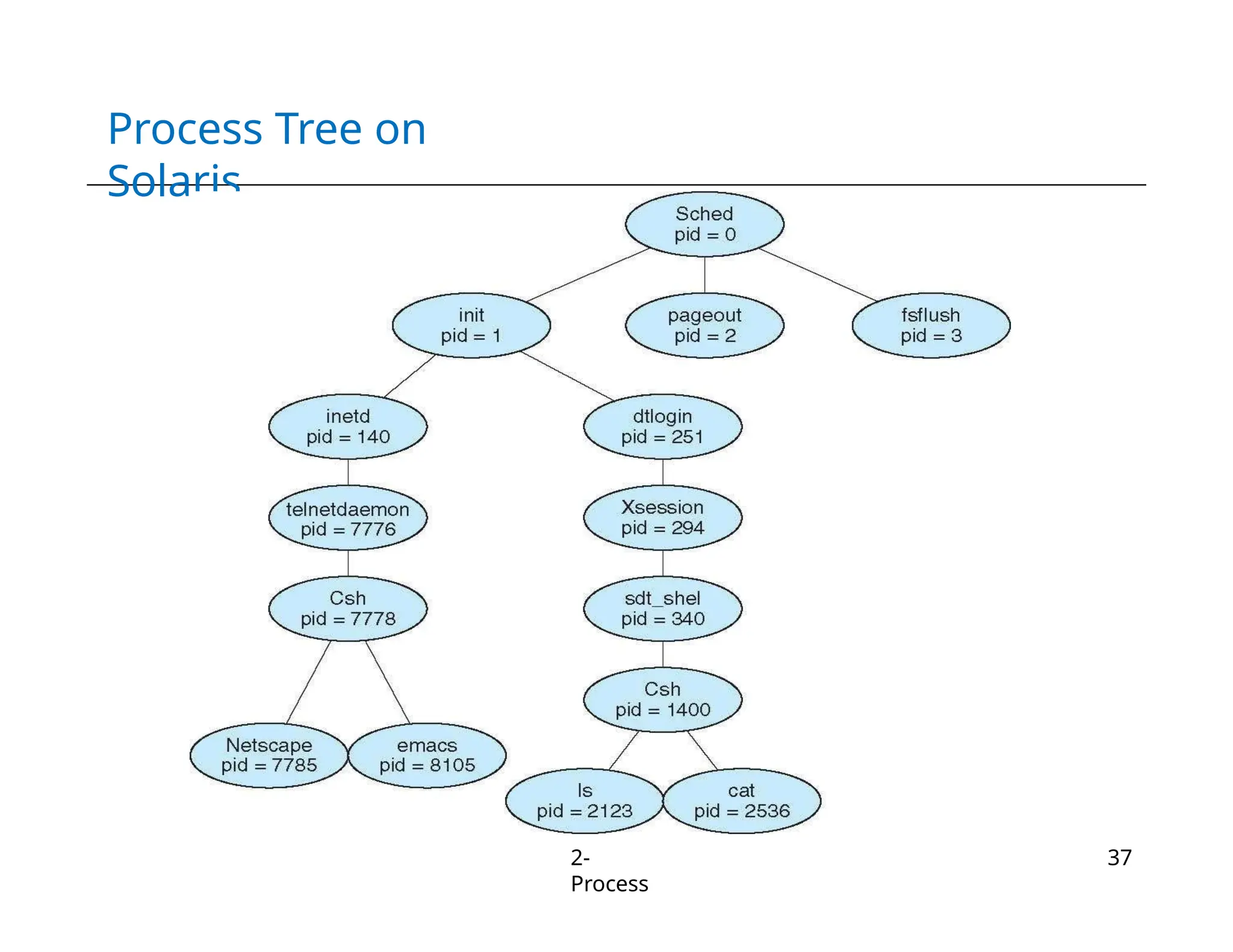
• Parent process create child processes, which, in turn create
other processes, forming a tree of processes
– Process identified and managed via a process identifier (pid)
• Resource sharing
– Parent and children share all resources
– Children share subset of parent’s resources
– Parent and child share no resources
• Execution
– Parent and children execute concurrently
– Parent waits until children terminate
• Address space
– Child duplicate of parent
– Child has a program loaded into it
Process Tree on
Solaris
2-
Process
37
int pid;
int status = 0;
pid = fork();
if (pid>0) {
/*
parent
*/
……
pid =
wait(&s
tatus);
} else {
/*
child
*/
……
exit(status);
}
Parent uses wait
to sleep until the
child exits; wait
returns
child pid and status.
wait variants
allow wait on a
specific child, or
notification
of stops and
other signals
Process Creation in
Linux
• fork system call creates new
process
Child process
passes status back
to parent
on exit, to
report
success/failure
The fork syscall
returns a zero to
the child and the
child
process ID to
the parent
fork creates an
exact copy of
the parent
process
2-
Process
38
fork() System
Call
2-
Process
39
• Child process inherits
– Stack
– Memory
– Environment
– Open file descriptors
– Current working directory
– Resource limits
– Root directory
• Child process does not inherits
– Process ID and parent process ID
– Timers and pending signals
– Resource utilization and CPU times (initialized to
zero)
– Memory and file locks
Zombie (or Defunct)
Process
2-
Process
40
• A process that has completed execution but still has an entry in
the process table
• Process table entry is needed to allow the parent process to
read the child's exit status
– Parent can read the status by executing the wait() system call
• No memory allocated to zombie process except for the
process table entry
– On exit, all of the memory and resources are deallocated
– However, process table can only have limited number of
entries
Orphan
Process
2-
Process
41
• An orphan process is a process that is still executing, but
whose parent has terminated
– If the parent terminates without calling wait(), the child is
adopted by init
• Orphan processes do not become zombie processes
– init periodically executes the wait() system call to avoid
zombie processes
exec() System
Call
• Enable child process to run other program
• Replaces process’s memory space with a new
program
– Loads binary file into memory and starts its
execution
• Cannot create new process
– Typically used after fork()
Steps in executing the command ls issued to the
shell 2-
Process
42
exec() System Call
Example
2-
Process
42
int main(int argc, char *argv[])
{
pid_t cpid;
cpid = fork();
if (cpid == -
1){
perror("fork");
exit(EXIT_FAILURE);
}
if (cpid == 0) {
/* Child code */
execlp (“/bin/ls”,
“ls”, NULL);
/* Why no exit
statement*/
}
else {
/* parent code */
wait(NULL);
printf(“child finished”);
exit(EXIT_SUCCESS);
}
}
exec() System Call
Example
2-
Process
44
Any Question So
Far?
2-
Process
91

Chapter 2 - Operating System Processes(1).pptx

  • 1.
  • 2.
    Process: The Concept 2- Process 2 • Process= A program in execution – Execution progress in a sequential fashion • Example processes – OS kernel – OS shell – Program executing after compilation – www-browser • Process management by OS – Allocate resources  Processor, main memory, I/O modules, timers, … – Schedule: Interleave their execution  Watch for processor utilization, response time – Inter-process communication, synchronization  Check potential deadlocks  Interleaving and non determinism imply increased difficulties!
  • 3.
    The Process 2- Process 3 A process consistsof multiple parts • Program code, also called text section • Current activity including program counter, processor registers • Stack containing temporary data – Function parameters, return addresses, local variables • Data section containing global variables • Heap containing memory dynamically allocated during run time
  • 4.
    Process Address Space • Alist of memory locations from some min (usually 0) to some max that a process can read and write 2- Process 4
  • 5.
    Relation Between ProgramAnd Process 2- Process 5 • Program is passive entity, process is active – Program: Static code + static data – Process: Dynamic instantiation of code + data + more • Program becomes process when executable file loaded into memory • No 1 to 1 mapping between program and process – One program may run many processes  Separate execution sequences – Multiple users may execute the same program  Text section is equivalent
  • 6.
    Process Control Block • OSkeeps all the data it needs about a process in the process control block (PCB) – Process state – Program counter – CPU registers – CPU scheduling information – Memory-management information – Accounting information – I/O status information 2- Process 6
  • 7.
    Process Control Block • Distinctionbetween processes • Knowledge on processes ready to execute • Discriminate between processes • Know the next instruction to execute • Find the program and data stored in memory • Keep information about registers • Keep track about resources, e.g., I/O devices • Collect information on utilization of the system 2- Process 7
  • 8.
    Dispatcher/ Scheduler • OS programthat decides which process to run next • Uses Process Block Control (PBC) information – Decision what is the next process to execute 2- Process 8
  • 9.
    How Does theDispatcher Gains Control? • Register interrupt handlers – Timeout – I/O request 2- Process 9
  • 10.
    Execution with Timeouts • Ontimeout dispatcher gains control • Decides which process to execute next • Dispatcher should perform as few instructions as possible Timeou t 2- Process 10 Timeou t Timeou t P1 P2 D t
  • 11.
    Two-State Process Model • Atany time a process is either being executed by a processor or not 2- Process 11
  • 12.
    How to UseStates for Scheduling? • Queue of not-running processes • Queues – FIFO, Priority Queue • Design goal – Execute only few operations 2- Process 12
  • 13.
    Is Two ProcessModel Sufficient?  a := 1 b := a + 1 c := b + 1 read a file a := b - c c := c * b b := 0  a := 1 b := a + 1 c := b + 1 a := b - c c := c * b b := 0 c := 0  a := 1 read a file b := a + 1 c := b + 1 a := b - c c := c * b b := 0 2- Process 13 Read y Read y Read y
  • 14.
    Is Two ProcessModel Sufficient? ➔ a := 1 b := a + 1 c := b + 1 read a file a := b - c c := c * b b := 0  a := 1 b := a + 1 c := b + 1 a := b - c c := c * b b := 0 c := 0  a := 1 read a file b := a + 1 c := b + 1 a := b - c c := c * b b := 0 Runnin g Read y Read y a := 1 ➔ b := a + 1 c := b + 1 read a file a := b - c c := c * b b := 0 a := 1 b := a + 1  c := b + 1 read a file a := b - c c := c * b b := 0 Timeout 2- Process 14
  • 15.
    Is Two ProcessModel Sufficient? a := 1 b := a + 1 c := b + 1  read a file a := b - c c := c * b b := 0  a := 1 b := a + 1 c := b + 1 a := b - c c := c * b b := 0 c := 0 ➔ a := 1 read a file b := a + 1 c := b + 1 a := b - c c := c * b b := 0 Read y Runnin g Read y a := 1  read a file b := a + 1 c := b + 1 a := b - c c := c * b b := 0 I/O 2- Process 15
  • 16.
    Is Two ProcessModel Sufficient? a := 1  read a file b := a + 1 c := b + 1 a := b - c c := c * b b := 0 a := 1 b := a + 1 c := b + 1  read a file a := b - c c := c * b b := 0 ➔ a := 1 b := a + 1 c := b + 1 a := b - c c := c * b b := 0 c := 0 Read y Blocke d Runnin g Timeout a := 1 ➔ b := a + 1 c := b + 1 a := b - c c := c * b b := 0 c := 0 a := 1 b := a + 1  c := b + 1 a := b - c c := c * b b := 0 c := 0 2- Process 16
  • 17.
    Is Two ProcessModel Sufficient? a := 1 b := a + 1 c := b + 1  a := b - c c := c * b b := 0 c := 0 a := 1  read a file b := a + 1 c := b + 1 a := b - c c := c * b b := 0 a := 1 b := a + 1 c := b + 1  read a file a := b - c c := c * b b := 0 Runnin g Blocke d Read y I/O 2- Process 17
  • 18.
    Is Two ProcessModel Sufficient? a := 1  read a file b := a + 1 c := b + 1 a := b - c c := c * b b := 0 a := 1 b := a + 1 c := b + 1  read a file a := b - c c := c * b b := 0 Blocke d Blocke d Running a := 1 b := a + 1 c := b + 1 ➔ a := b - c c := c * b b := 0 c := 0 The Next Process to 2- Process 18 Run cannot be simply selected from the fron t
  • 19.
    Is Two ProcessModel Sufficient? a := 1  read a file b := a + 1 a := 1 b := a + 1 c := b + 1 Blocke d Blocke d Runnin g a := 1 b := a + 1 c := b + 1 ➔ a := b - c c := c * b b := 0 c := 0 a := 1 b := a + 1 c := b + 1 ➔ read a file c := b + 1 a := b - c a := b - c a := b - c c := c * b c := c * b ➔ c := c * b b := 0 b := 0 b := 0 c := 0 Suppose the Green process finishes I/O 2- Process 19
  • 20.
    Is Two ProcessModel Sufficient? a := 1 read a file  b := a + 1 c := b + 1 a := b - c c := c * b b := 0 a := 1 b := a + 1 c := b + 1  read a file a := b - c c := c * b b := 0 Blocke d Read y Runnin g a := 1 b := a + 1 c := b + 1 ➔ a := b - c c := c * b b := 0 c := 0 a := 1 b := a + 1 c := b + 1 a := b - c ➔ c := c * b b := 0 c := 0 a := 1 b := a + 1 c := b + 1 a := b - c c := c * b  b := 0 c := 0 Timeout 2- Process 20
  • 21.
    Is Two ProcessModel Sufficient? a := 1 b := a + 1 c := b + 1 a := b - c c := c * b b := 0  c := 0 a := 1 b := a + 1 c := b + 1  read a file a := b - c c := c * b b := 0 Blocke d Runnin g Read y a := 1 read a file ➔ b := a + 1 c := b + 1 a := b - c c := c * b b := 0 a := 1 read a file b := a + 1 ➔ c := b + 1 a := b - c c := c * b b := 0 a := 1 read a file b := a + 1 c := b + 1 ➔ a := b - c c := c * b b := 0 Timeout 2- Process 21
  • 22.
    Limitations of TwoProcess Model 2- Process 22 • Timeouts: The process with highest priority will be dispatched to the CPU (… regardless of its capabilities!) • Wasteful in case of – Waiting for I/O operations – Waiting for access to a resource – In this case dispatcher cannot select the process at the front – In worst case dispatcher has to scan the whole queue • Add more states … – Waiting (i.e., blocked), ready
  • 23.
    Five State Model • Admittanceto control resource usage • Processes which need to wait for events can be blocked Waiting Terminated 2- Process 23
  • 24.
    How Can theDispatcher Use the Five States? • Maintain different queues – One for ready processes – One/many for blocked processes • How expensive is it to transfer a process from blocked to ready state? 2- Process 24
  • 25.
    Using Multiple Queues • Dispatchercan efficiently react to distinct events in the operating system … • One queue per event • O(1) operation to transfer process from running to blocked state • O(1) operation to transfer process from blocked to ready state • Low dispatch latency 2- Process 25
  • 26.
    Using Multiple Queues:Ready And I/O Queues 2- Process 26
  • 27.
    Limitations of theFive State Model 2- Process 27 • Available resource usage depends on the number of processes deployed – For example, the available memory drops with the number of actively running processes – Low hit rate in accessing the memory hierarchy and slow performance • Idea: Swap some processes to disk – For example, free up more memory and achieve higher hit rate for other processes • Process is in suspend state when swapped to disk – Nothing of the process image resides in main memory!
  • 28.
    Process state transitiondiagram with suspend states
  • 29.
    Unix V ProcessState Transition 2- Process 29
  • 30.
    Context Switching 2- Process 30 • Context ofa process represented in the PCB • When CPU switches to another process, OS must – Save context of processor including program counter and other registers (in PCB) – Move PCB to appropriate queue (ready, blocked, …) – Select another process for execution – Update the PCB of the process selected – Update memory-management data structures – Restore context (in processor) of the selected process • Context switch time is overhead – The system does no useful work while switching – Time is also dependent on hardware support  For example, some hardware provides multiple sets of registers per CPU
  • 31.
  • 32.
  • 33.
    Process Creation 1. Assign aunique identifier (pid) to the new process 2. Allocate space for the process 3. Initialize PCB Process table Process A Process B 2- Process 33
  • 34.
    Process Creation 1. Assign aunique identifier (pid) to the new process 2. Allocate space for the process 3. Initialize PCB 4. Setup appropriate linkage – E.g., add to ready or ready suspend queue 5. Create or expand other data structures Process table Process A Process B 2- Process 34
  • 35.
    Process Creation 2- Process 35 • Traditionally, theOS created all processes • But it can be useful to let a running process create another • This action is called process spawning – Parent Process is the original, creating, process – Child Process is the new process
  • 36.
    Process Creation 2- Process 36 • Parent processcreate child processes, which, in turn create other processes, forming a tree of processes – Process identified and managed via a process identifier (pid) • Resource sharing – Parent and children share all resources – Children share subset of parent’s resources – Parent and child share no resources • Execution – Parent and children execute concurrently – Parent waits until children terminate • Address space – Child duplicate of parent – Child has a program loaded into it
  • 37.
  • 38.
    int pid; int status= 0; pid = fork(); if (pid>0) { /* parent */ …… pid = wait(&s tatus); } else { /* child */ …… exit(status); } Parent uses wait to sleep until the child exits; wait returns child pid and status. wait variants allow wait on a specific child, or notification of stops and other signals Process Creation in Linux • fork system call creates new process Child process passes status back to parent on exit, to report success/failure The fork syscall returns a zero to the child and the child process ID to the parent fork creates an exact copy of the parent process 2- Process 38
  • 39.
    fork() System Call 2- Process 39 • Childprocess inherits – Stack – Memory – Environment – Open file descriptors – Current working directory – Resource limits – Root directory • Child process does not inherits – Process ID and parent process ID – Timers and pending signals – Resource utilization and CPU times (initialized to zero) – Memory and file locks
  • 40.
    Zombie (or Defunct) Process 2- Process 40 •A process that has completed execution but still has an entry in the process table • Process table entry is needed to allow the parent process to read the child's exit status – Parent can read the status by executing the wait() system call • No memory allocated to zombie process except for the process table entry – On exit, all of the memory and resources are deallocated – However, process table can only have limited number of entries
  • 41.
    Orphan Process 2- Process 41 • An orphanprocess is a process that is still executing, but whose parent has terminated – If the parent terminates without calling wait(), the child is adopted by init • Orphan processes do not become zombie processes – init periodically executes the wait() system call to avoid zombie processes
  • 42.
    exec() System Call • Enablechild process to run other program • Replaces process’s memory space with a new program – Loads binary file into memory and starts its execution • Cannot create new process – Typically used after fork() Steps in executing the command ls issued to the shell 2- Process 42
  • 43.
    exec() System Call Example 2- Process 42 intmain(int argc, char *argv[]) { pid_t cpid; cpid = fork(); if (cpid == - 1){ perror("fork"); exit(EXIT_FAILURE); } if (cpid == 0) { /* Child code */ execlp (“/bin/ls”, “ls”, NULL); /* Why no exit statement*/ } else { /* parent code */ wait(NULL); printf(“child finished”); exit(EXIT_SUCCESS); } }
  • 44.
  • 45.