Operating
Systems
1-
Introduction
1
1. Introduction
Operating System
Services
1-
Introduction
2
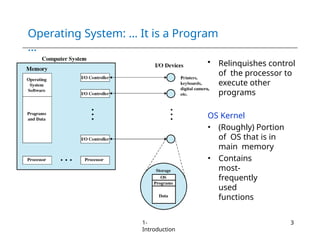
Operating System: … It is a Program
…
• Relinquishes control
of the processor to
execute other
programs
OS Kernel
• (Roughly) Portion
of OS that is in
main memory
• Contains
most-
frequently
used
functions
1-
Introduction
3
Operating System in
Action
1-
Introduction
4
• OS is a program, just like any other program
• On computer start, bootstrap program is loaded from ROM
• Boot program activates OS kernel (permanent system
process)
– Shell (is not kernel): Program to let the user initiate processes
• Boot program
– Examine/check machine configuration, e.g.,
 Number of CPUs
 How much memory
 Number and type of HW devices
– Build configuration structure describing the HW
– Locates and Loads the OS
– The control transfers to the OS
Operating System
Services
1-
Introduction
5
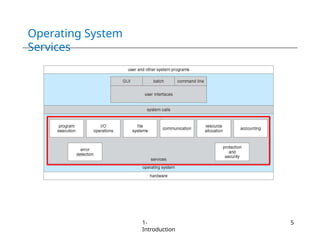
Operating System Services –
Helper
1-
Introduction
6
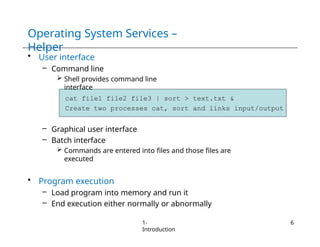
• User interface
– Command line
 Shell provides command line
interface
cat file1 file2 file3 | sort > text.txt &
Create two processes cat, sort and links input/output
– Graphical user interface
– Batch interface
 Commands are entered into files and those files are
executed
• Program execution
– Load program into memory and run it
– End execution either normally or abnormally
Operating System Services –
Helper
1-
Introduction
7
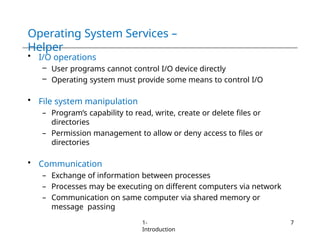
• I/O operations
– User programs cannot control I/O device directly
– Operating system must provide some means to control I/O
• File system manipulation
– Program’s capability to read, write, create or delete files or
directories
– Permission management to allow or deny access to files or
directories
• Communication
– Exchange of information between processes
– Processes may be executing on different computers via network
– Communication on same computer via shared memory or
message passing
Operating System Services –
Helper
1-
Introduction
8
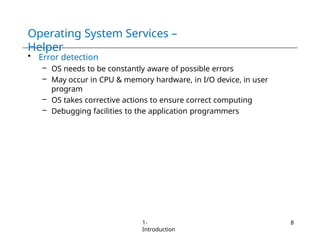
• Error detection
– OS needs to be constantly aware of possible errors
– May occur in CPU & memory hardware, in I/O device, in user
program
– OS takes corrective actions to ensure correct computing
– Debugging facilities to the application programmers
Operating System Services – Efficient
Operations
1-
Introduction
9
• Resource allocation
– Resource allocation to concurrently running jobs
– Resources such as CPU cycles, main memory, file storage
etc.
• Accounting
– Track usage of computer resources
– For billing or simply for accumulating usage statistics
• Protection and security
– Protect access to system resources is controlled
– Security from the outsiders, e.g., user authentication
System
Calls
1-
Introduction
10
System
Calls
1-
Introduction
11
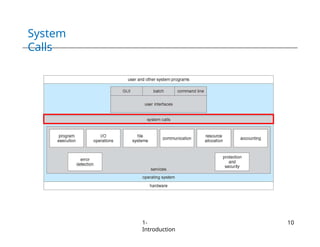
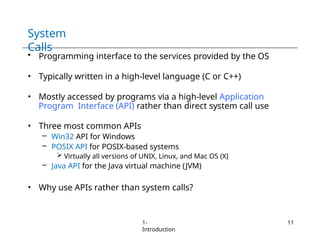
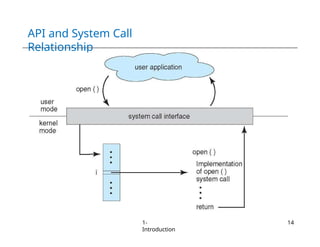
• Programming interface to the services provided by the OS
• Typically written in a high-level language (C or C++)
• Mostly accessed by programs via a high-level Application
Program Interface (API) rather than direct system call use
• Three most common APIs
– Win32 API for Windows
– POSIX API for POSIX-based systems
 Virtually all versions of UNIX, Linux, and Mac OS (X)
– Java API for the Java virtual machine (JVM)
• Why use APIs rather than system calls?
System Call –
Example
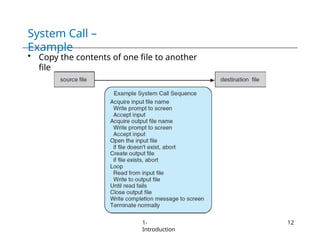
• Copy the contents of one file to another
file
1-
Introduction
12
Win32 API
Example
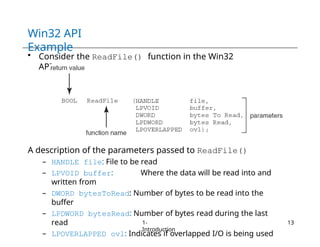
• Consider the ReadFile() function in the Win32
API
A description of the parameters passed to ReadFile()
– HANDLE file: File to be read
– LPVOID buffer: Where the data will be read into and
written from
– DWORD bytesToRead: Number of bytes to be read into the
buffer
– LPDWORD bytesRead: Number of bytes read during the last
read
– LPOVERLAPPED ovl: Indicates if overlapped I/O is being used
1-
Introduction
13
API and System Call
Relationship
1-
Introduction
14
Standard C Library
Example
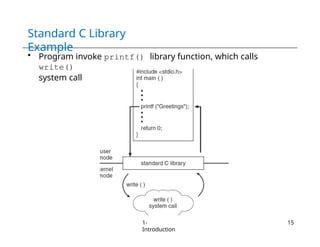
• Program invoke printf() library function, which calls
write()
system call
1-
Introduction
15
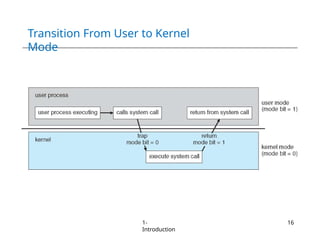
Transition From User to Kernel
Mode
1-
Introduction
16
System Call – Parameter
Passing
1-
Introduction
17
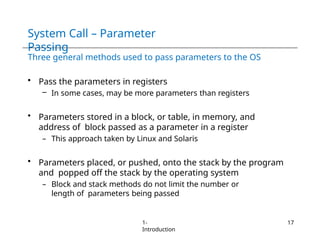
Three general methods used to pass parameters to the OS
• Pass the parameters in registers
– In some cases, may be more parameters than registers
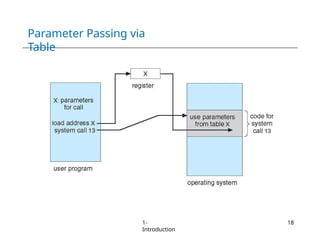
• Parameters stored in a block, or table, in memory, and
address of block passed as a parameter in a register
– This approach taken by Linux and Solaris
• Parameters placed, or pushed, onto the stack by the program
and popped off the stack by the operating system
– Block and stack methods do not limit the number or
length of parameters being passed
Parameter Passing via
Table
1-
Introduction
18
Types of System
Calls
1-
Introduction
19
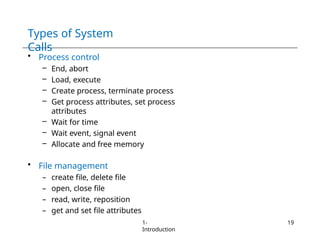
• Process control
– End, abort
– Load, execute
– Create process, terminate process
– Get process attributes, set process
attributes
– Wait for time
– Wait event, signal event
– Allocate and free memory
• File management
– create file, delete file
– open, close file
– read, write, reposition
– get and set file attributes
Types of System
Calls
1-
Introduction
20
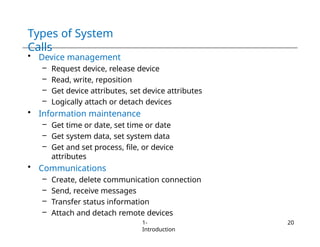
• Device management
– Request device, release device
– Read, write, reposition
– Get device attributes, set device attributes
– Logically attach or detach devices
• Information maintenance
– Get time or date, set time or date
– Get system data, set system data
– Get and set process, file, or device
attributes
• Communications
– Create, delete communication connection
– Send, receive messages
– Transfer status information
– Attach and detach remote devices
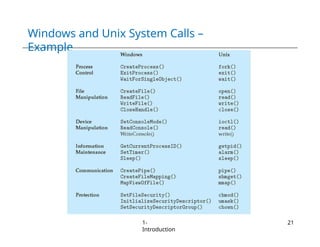
Windows and Unix System Calls –
Example
1-
Introduction
21
Operating System
Structure
1-
Introduction
22
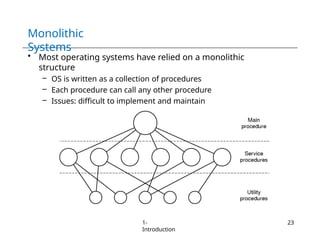
Monolithic
Systems
• Most operating systems have relied on a monolithic
structure
– OS is written as a collection of procedures
– Each procedure can call any other procedure
– Issues: difficult to implement and maintain
1-
Introduction
23
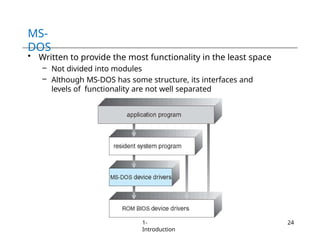
MS-
DOS
• Written to provide the most functionality in the least space
– Not divided into modules
– Although MS-DOS has some structure, its interfaces and
levels of functionality are not well separated
1-
Introduction
24
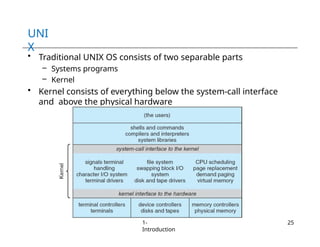
UNI
X
• Traditional UNIX OS consists of two separable parts
– Systems programs
– Kernel
• Kernel consists of everything below the system-call interface
and above the physical hardware
1-
Introduction
25
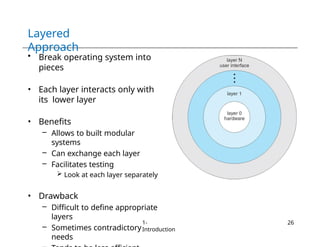
Layered
Approach
• Break operating system into
pieces
• Each layer interacts only with
its lower layer
• Benefits
– Allows to built modular
systems
– Can exchange each layer
– Facilitates testing
 Look at each layer separately
• Drawback
– Difficult to define appropriate
layers
– Sometimes contradictory
needs
1-
Introduction
26
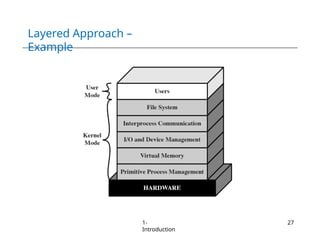
Layered Approach –
Example
1-
Introduction
27
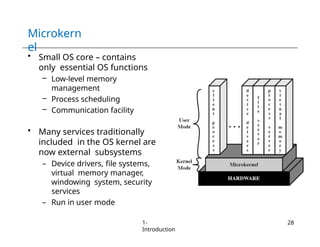
Microkern
el
• Small OS core – contains
only essential OS functions
– Low-level memory
management
– Process scheduling
– Communication facility
• Many services traditionally
included in the OS kernel are
now external subsystems
– Device drivers, file systems,
virtual memory manager,
windowing system, security
services
– Run in user mode
1-
Introduction
28
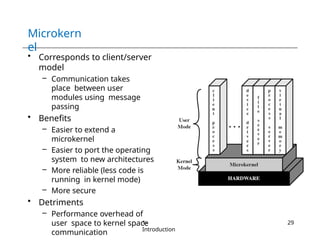
Microkern
el
• Corresponds to client/server
model
– Communication takes
place between user
modules using message
passing
• Benefits
– Easier to extend a
microkernel
– Easier to port the operating
system to new architectures
– More reliable (less code is
running in kernel mode)
– More secure
• Detriments
– Performance overhead of
user space to kernel space
communication
1-
Introduction
29
Windows
2000
1-
Introduction
30
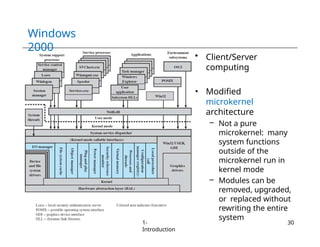
• Client/Server
computing
• Modified
microkernel
architecture
– Not a pure
microkernel: many
system functions
outside of the
microkernel run in
kernel mode
– Modules can be
removed, upgraded,
or replaced without
rewriting the entire
system
Module
s
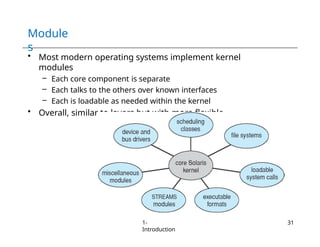
• Most modern operating systems implement kernel
modules
– Each core component is separate
– Each talks to the others over known interfaces
– Each is loadable as needed within the kernel
• Overall, similar to layers but with more flexible
1-
Introduction
31
Modular Approach in Modern UNIX
Instances
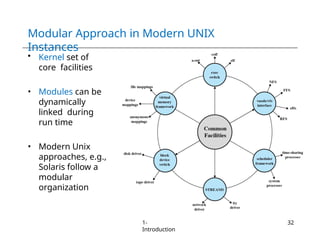
• Kernel set of
core facilities
• Modules can be
dynamically
linked during
run time
• Modern Unix
approaches, e.g.,
Solaris follow a
modular
organization
1-
Introduction
32
Virtual
Machines
1-
Introduction
33
• Abstract the hardware of a single computer into several
different execution environment
– CPU, memory, disk drives, network interface cards and so forth
• Creates the illusion that each execution environment is
running its own private computer
• A virtual machine provides interface identical to underlying
bare hardware
– I.e., all devices, interrupts, memory, page tables, etc.
• Virtual Machine Operating System creates illusion of
multiple processors
– Each capable of executing independently
– No sharing, except via network protocols
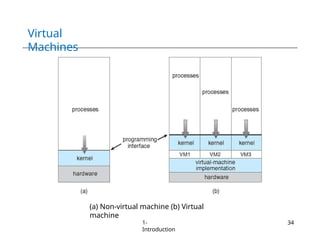
Virtual
Machines
(a) Non-virtual machine (b) Virtual
machine
1-
Introduction
34
Java Virtual
Machine
1-
Introduction
35
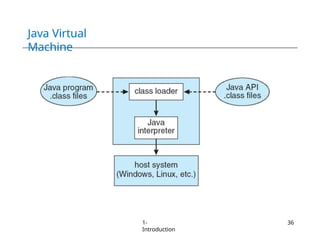
• Compiled Java programs are platform-neutral byte-
codes
– Executed by a Java Virtual Machine (JVM)
• JVM consists of
– Class loader
– Class verifier
– Runtime interpreter
• Class verifier checks
– .class file is valid Java byte code
– Does not overflow or underflow the stack
– Byte code does not perform illegal memory access
• Just-In-Time (JIT) compilers increase performance
Java Virtual
Machine
1-
Introduction
36
Any Question So
Far?
1-
Introduction
37

Chapter 1 - Operating Systems Introduction.pptx

  • 1.
  • 2.
  • 3.
    Operating System: …It is a Program … • Relinquishes control of the processor to execute other programs OS Kernel • (Roughly) Portion of OS that is in main memory • Contains most- frequently used functions 1- Introduction 3
  • 4.
    Operating System in Action 1- Introduction 4 •OS is a program, just like any other program • On computer start, bootstrap program is loaded from ROM • Boot program activates OS kernel (permanent system process) – Shell (is not kernel): Program to let the user initiate processes • Boot program – Examine/check machine configuration, e.g.,  Number of CPUs  How much memory  Number and type of HW devices – Build configuration structure describing the HW – Locates and Loads the OS – The control transfers to the OS
  • 5.
  • 6.
    Operating System Services– Helper 1- Introduction 6 • User interface – Command line  Shell provides command line interface cat file1 file2 file3 | sort > text.txt & Create two processes cat, sort and links input/output – Graphical user interface – Batch interface  Commands are entered into files and those files are executed • Program execution – Load program into memory and run it – End execution either normally or abnormally
  • 7.
    Operating System Services– Helper 1- Introduction 7 • I/O operations – User programs cannot control I/O device directly – Operating system must provide some means to control I/O • File system manipulation – Program’s capability to read, write, create or delete files or directories – Permission management to allow or deny access to files or directories • Communication – Exchange of information between processes – Processes may be executing on different computers via network – Communication on same computer via shared memory or message passing
  • 8.
    Operating System Services– Helper 1- Introduction 8 • Error detection – OS needs to be constantly aware of possible errors – May occur in CPU & memory hardware, in I/O device, in user program – OS takes corrective actions to ensure correct computing – Debugging facilities to the application programmers
  • 9.
    Operating System Services– Efficient Operations 1- Introduction 9 • Resource allocation – Resource allocation to concurrently running jobs – Resources such as CPU cycles, main memory, file storage etc. • Accounting – Track usage of computer resources – For billing or simply for accumulating usage statistics • Protection and security – Protect access to system resources is controlled – Security from the outsiders, e.g., user authentication
  • 10.
  • 11.
    System Calls 1- Introduction 11 • Programming interfaceto the services provided by the OS • Typically written in a high-level language (C or C++) • Mostly accessed by programs via a high-level Application Program Interface (API) rather than direct system call use • Three most common APIs – Win32 API for Windows – POSIX API for POSIX-based systems  Virtually all versions of UNIX, Linux, and Mac OS (X) – Java API for the Java virtual machine (JVM) • Why use APIs rather than system calls?
  • 12.
    System Call – Example •Copy the contents of one file to another file 1- Introduction 12
  • 13.
    Win32 API Example • Considerthe ReadFile() function in the Win32 API A description of the parameters passed to ReadFile() – HANDLE file: File to be read – LPVOID buffer: Where the data will be read into and written from – DWORD bytesToRead: Number of bytes to be read into the buffer – LPDWORD bytesRead: Number of bytes read during the last read – LPOVERLAPPED ovl: Indicates if overlapped I/O is being used 1- Introduction 13
  • 14.
    API and SystemCall Relationship 1- Introduction 14
  • 15.
    Standard C Library Example •Program invoke printf() library function, which calls write() system call 1- Introduction 15
  • 16.
    Transition From Userto Kernel Mode 1- Introduction 16
  • 17.
    System Call –Parameter Passing 1- Introduction 17 Three general methods used to pass parameters to the OS • Pass the parameters in registers – In some cases, may be more parameters than registers • Parameters stored in a block, or table, in memory, and address of block passed as a parameter in a register – This approach taken by Linux and Solaris • Parameters placed, or pushed, onto the stack by the program and popped off the stack by the operating system – Block and stack methods do not limit the number or length of parameters being passed
  • 18.
  • 19.
    Types of System Calls 1- Introduction 19 •Process control – End, abort – Load, execute – Create process, terminate process – Get process attributes, set process attributes – Wait for time – Wait event, signal event – Allocate and free memory • File management – create file, delete file – open, close file – read, write, reposition – get and set file attributes
  • 20.
    Types of System Calls 1- Introduction 20 •Device management – Request device, release device – Read, write, reposition – Get device attributes, set device attributes – Logically attach or detach devices • Information maintenance – Get time or date, set time or date – Get system data, set system data – Get and set process, file, or device attributes • Communications – Create, delete communication connection – Send, receive messages – Transfer status information – Attach and detach remote devices
  • 21.
    Windows and UnixSystem Calls – Example 1- Introduction 21
  • 22.
  • 23.
    Monolithic Systems • Most operatingsystems have relied on a monolithic structure – OS is written as a collection of procedures – Each procedure can call any other procedure – Issues: difficult to implement and maintain 1- Introduction 23
  • 24.
    MS- DOS • Written toprovide the most functionality in the least space – Not divided into modules – Although MS-DOS has some structure, its interfaces and levels of functionality are not well separated 1- Introduction 24
  • 25.
    UNI X • Traditional UNIXOS consists of two separable parts – Systems programs – Kernel • Kernel consists of everything below the system-call interface and above the physical hardware 1- Introduction 25
  • 26.
    Layered Approach • Break operatingsystem into pieces • Each layer interacts only with its lower layer • Benefits – Allows to built modular systems – Can exchange each layer – Facilitates testing  Look at each layer separately • Drawback – Difficult to define appropriate layers – Sometimes contradictory needs 1- Introduction 26
  • 27.
  • 28.
    Microkern el • Small OScore – contains only essential OS functions – Low-level memory management – Process scheduling – Communication facility • Many services traditionally included in the OS kernel are now external subsystems – Device drivers, file systems, virtual memory manager, windowing system, security services – Run in user mode 1- Introduction 28
  • 29.
    Microkern el • Corresponds toclient/server model – Communication takes place between user modules using message passing • Benefits – Easier to extend a microkernel – Easier to port the operating system to new architectures – More reliable (less code is running in kernel mode) – More secure • Detriments – Performance overhead of user space to kernel space communication 1- Introduction 29
  • 30.
    Windows 2000 1- Introduction 30 • Client/Server computing • Modified microkernel architecture –Not a pure microkernel: many system functions outside of the microkernel run in kernel mode – Modules can be removed, upgraded, or replaced without rewriting the entire system
  • 31.
    Module s • Most modernoperating systems implement kernel modules – Each core component is separate – Each talks to the others over known interfaces – Each is loadable as needed within the kernel • Overall, similar to layers but with more flexible 1- Introduction 31
  • 32.
    Modular Approach inModern UNIX Instances • Kernel set of core facilities • Modules can be dynamically linked during run time • Modern Unix approaches, e.g., Solaris follow a modular organization 1- Introduction 32
  • 33.
    Virtual Machines 1- Introduction 33 • Abstract thehardware of a single computer into several different execution environment – CPU, memory, disk drives, network interface cards and so forth • Creates the illusion that each execution environment is running its own private computer • A virtual machine provides interface identical to underlying bare hardware – I.e., all devices, interrupts, memory, page tables, etc. • Virtual Machine Operating System creates illusion of multiple processors – Each capable of executing independently – No sharing, except via network protocols
  • 34.
    Virtual Machines (a) Non-virtual machine(b) Virtual machine 1- Introduction 34
  • 35.
    Java Virtual Machine 1- Introduction 35 • CompiledJava programs are platform-neutral byte- codes – Executed by a Java Virtual Machine (JVM) • JVM consists of – Class loader – Class verifier – Runtime interpreter • Class verifier checks – .class file is valid Java byte code – Does not overflow or underflow the stack – Byte code does not perform illegal memory access • Just-In-Time (JIT) compilers increase performance
  • 36.
  • 37.