Operating
Systems
4-
Threads
1
4. Multithreaded Programming
Recall the Main Concepts Behind
Processes
4-
Threads
2
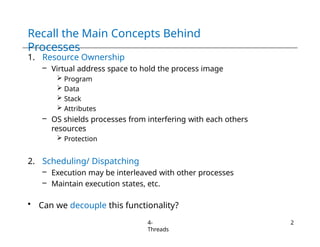
1. Resource Ownership
– Virtual address space to hold the process image
 Program
 Data
 Stack
 Attributes
– OS shields processes from interfering with each others
resources
 Protection
2. Scheduling/ Dispatching
– Execution may be interleaved with other processes
– Maintain execution states, etc.
• Can we decouple this functionality?
Processes and
Threads
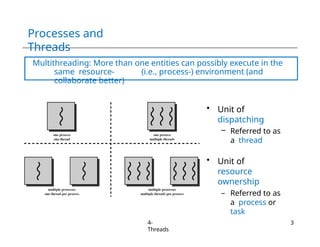
Multithreading: More than one entities can possibly execute in the
same resource- (i.e., process-) environment (and
collaborate better)
• Unit of
dispatching
– Referred to as
a thread
• Unit of
resource
ownership
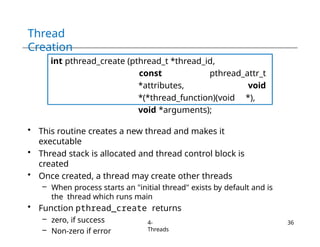
– Referred to as
a process or
task
4-
Threads
3
Processes vs.
Threads
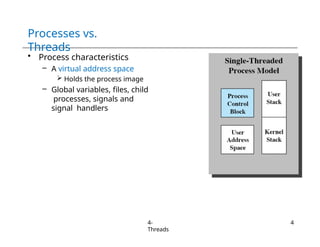
• Process characteristics
– A virtual address space
 Holds the process image
– Global variables, files, child
processes, signals and
signal handlers
4-
Threads
4
Processes vs.
Threads
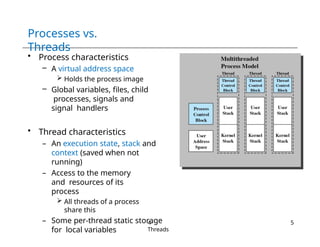
• Process characteristics
– A virtual address space
 Holds the process image
– Global variables, files, child
processes, signals and
signal handlers
• Thread characteristics
– An execution state, stack and
context (saved when not
running)
– Access to the memory
and resources of its
process
 All threads of a process
share this
– Some per-thread static storage
for local variables
4-
Threads
5
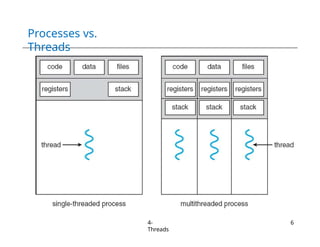
Processes vs.
Threads
4-
Threads
6
Processes vs.
Threads
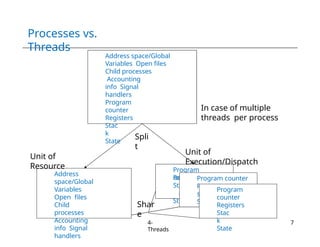
Address space/Global
Variables Open files
Child processes
Accounting
info Signal
handlers
Program
counter
Registers
Stac
k
State
Address
space/Global
Variables
Open files
Child
processes
Accounting
info Signal
handlers
Program
counter
Re
St
St
gister
s ack
ate
Register
s Stack
State
Spli
t
Program counter
Program
counter
Registers
Stac
k
State
Unit of
Resource
Unit of
Execution/Dispatch
In case of multiple
threads per process
Shar
e
4-
Threads
7
Benefits of
Threads
4-
Threads
8
• Easy/Lightweight Communication
– Threads within the same process share memory and files
– Communication does not invoke the kernel
• May allow parallelization within a process
– I/O and computation to overlap
 Recall historical evolution from uni-programming to
multiprogramming
– Concurrent execution in multiprocessors
• Takes less time to
– Create/terminate a thread than a process
– Switch between two threads within the same process
Uses of
Threads
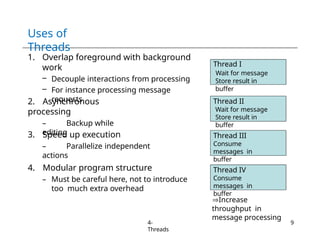
1. Overlap foreground with background
work
– Decouple interactions from processing
– For instance processing message
requests
2. Asynchronous
processing
– Backup while
editing
3. Speed up execution
– Parallelize independent
actions
4. Modular program structure
– Must be careful here, not to introduce
too much extra overhead
Thread I
Wait for message
Store result in
buffer
Thread II
Wait for message
Store result in
buffer
Thread III
Consume
messages in
buffer
Increase
throughput in
message processing
Thread IV
Consume
messages in
buffer
4-
Threads
9
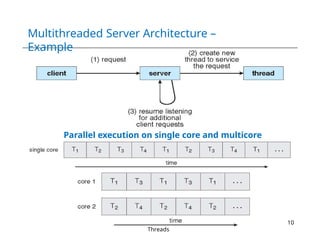
Multithreaded Server Architecture –
Example
4-
Threads
10
Parallel execution on single core and multicore
Effect of
Suspension/Termination
4-
Threads
11
• Suspending a process involves suspending all threads of
the process since all threads share the same address
space
• Termination of a process, terminates all threads within
the process
Types Of Threads
• User Level Threads
• Kernel Level Threads
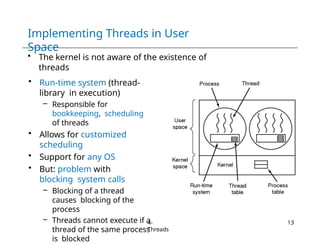
Implementing Threads in User
Space
• The kernel is not aware of the existence of
threads
• Run-time system (thread-
library in execution)
– Responsible for
bookkeeping, scheduling
of threads
• Allows for customized
scheduling
• Support for any OS
• But: problem with
blocking system calls
– Blocking of a thread
causes blocking of the
process
– Threads cannot execute if a
thread of the same process
is blocked
4-
Threads
13
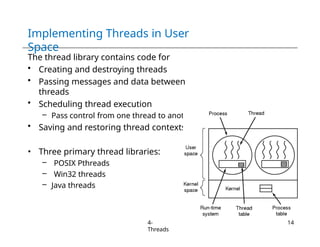
Implementing Threads in User
Space
The thread library contains code for
• Creating and destroying threads
• Passing messages and data between
threads
• Scheduling thread execution
– Pass control from one thread to another
• Saving and restoring thread contexts
• Three primary thread libraries:
– POSIX Pthreads
– Win32 threads
– Java threads
4-
Threads
14
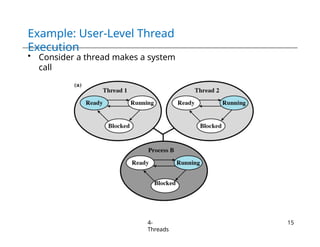
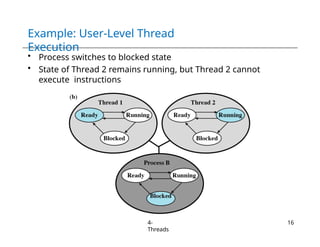
Example: User-Level Thread
Execution
• Consider a thread makes a system
call
4-
Threads
15
Example: User-Level Thread
Execution
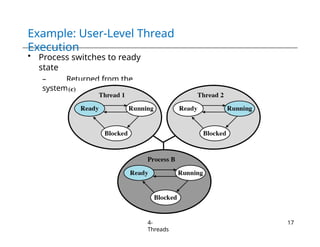
• Process switches to blocked state
• State of Thread 2 remains running, but Thread 2 cannot
execute instructions
4-
Threads
16
Example: User-Level Thread
Execution
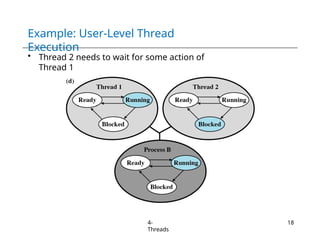
• Process switches to ready
state
– Returned from the
system call
4-
Threads
17
Example: User-Level Thread
Execution
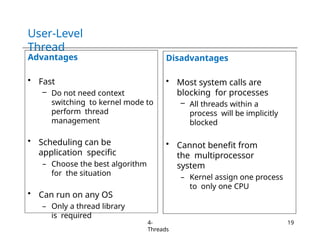
• Thread 2 needs to wait for some action of
Thread 1
4-
Threads
18
User-Level
Thread
Advantages
• Fast
– Do not need context
switching to kernel mode to
perform thread
management
• Scheduling can be
application specific
– Choose the best algorithm
for the situation
• Can run on any OS
– Only a thread library
is required
Disadvantages
• Most system calls are
blocking for processes
– All threads within a
process will be implicitly
blocked
• Cannot benefit from
the multiprocessor
system
– Kernel assign one process
to only one CPU
4-
Threads
19
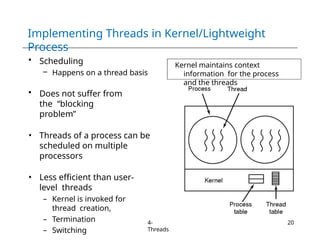
Implementing Threads in Kernel/Lightweight
Process
Kernel maintains context
information for the process
and the threads
• Scheduling
– Happens on a thread basis
• Does not suffer from
the “blocking
problem”
• Threads of a process can be
scheduled on multiple
processors
• Less efficient than user-
level threads
– Kernel is invoked for
thread creation,
– Termination
– Switching
4-
Threads
20
Kernel-Level Thread
Support
4-
Threads
21
• Windows
XP/2000
• Solaris
• Linux
• Tru64 UNIX
• Mac OS X
Kernel-Level
Thread
Advantages
• In multiprocessor system,
mutiple threads from the
same process can be
scheduled on multiple
processors
• Blocking at thread level,
not process level
– If a thread blocks, the CPU
can be assigned to
another thread in the
same process
• Even the kernel routines
can be multithreaded
Disadvantages
• Thread switching
always involves the
kernel
– Two context switches
per thread switch
• Slower compared to
User Level Threads
– Faster than a full
process switch
4-
Threads
22
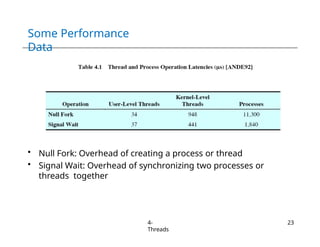
Some Performance
Data
• Null Fork: Overhead of creating a process or thread
• Signal Wait: Overhead of synchronizing two processes or
threads together
4-
Threads
23
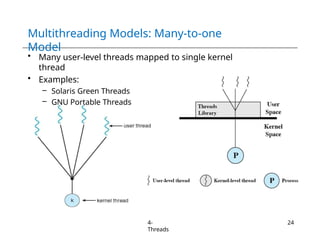
Multithreading Models: Many-to-one
Model
• Many user-level threads mapped to single kernel
thread
• Examples:
– Solaris Green Threads
– GNU Portable Threads
4-
Threads
24
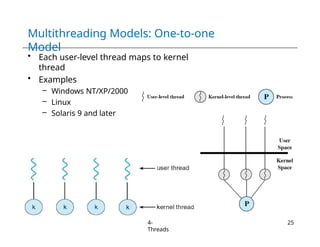
Multithreading Models: One-to-one
Model
• Each user-level thread maps to kernel
thread
• Examples
– Windows NT/XP/2000
– Linux
– Solaris 9 and later
4-
Threads
25
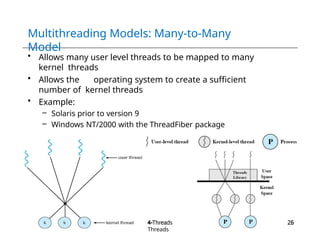
Multithreading Models: Many-to-Many
Model
• Allows many user level threads to be mapped to many
kernel threads
• Allows the operating system to create a sufficient
number of kernel threads
• Example:
– Solaris prior to version 9
– Windows NT/2000 with the ThreadFiber package
4-
Threads
26
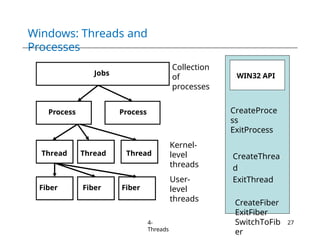
Windows: Threads and
Processes
CreateProce
ss
ExitProcess
CreateThrea
d
ExitThread
CreateFiber
ExitFiber
SwitchToFib
er
Jobs
Process
Thread
Process
Thread Thread
Fiber Fiber Fiber
WIN32 API
4-
Threads
27
Collection
of
processes
Kernel-
level
threads
User-
level
threads
Windows XP: Threads and
Processes
4-
Threads
28
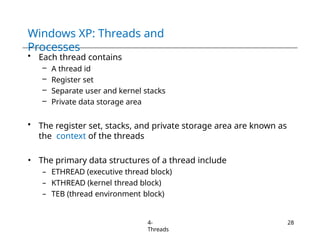
• Each thread contains
– A thread id
– Register set
– Separate user and kernel stacks
– Private data storage area
• The register set, stacks, and private storage area are known as
the context of the threads
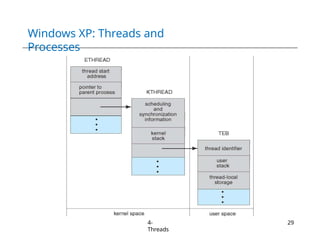
• The primary data structures of a thread include
– ETHREAD (executive thread block)
– KTHREAD (kernel thread block)
– TEB (thread environment block)
Windows XP: Threads and
Processes
4-
Threads
29
Linux Task
Management
4-
Threads
30
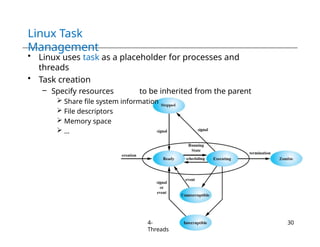
• Linux uses task as a placeholder for processes and
threads
• Task creation
– Specify resources to be inherited from the parent
 Share file system information
 File descriptors
 Memory space
 …
Linux Task
Management
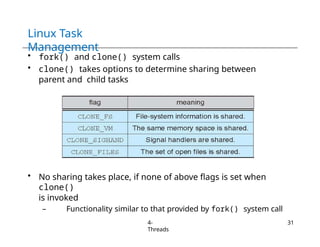
• fork() and clone() system calls
• clone() takes options to determine sharing between
parent and child tasks
• No sharing takes place, if none of above flags is set when
clone()
is invoked
– Functionality similar to that provided by fork() system call
4-
Threads
31
Linux Task
Management
4-
Threads
32
• Unique kernel data structure (struct task_struct) for each
task
– Instead of storing data, contains pointers to other data structures
– For example, data structure that represent
 open files
 Signal handlers
 Virtual memory
• When fork() is invoked
– New task is created with copy of all associated data structures of
the parent process (task)
• When clone() is invoked
– New task points to the data structure of the parent process (task)
– Depending on the set of flags passed to clone( )
Thread
Libraries
4-
Threads
33
• Thread library provides programmer with API for creating
and managing threads
• Two primary ways of implementing
– Library entirely in user space
– Kernel-level library supported by the OS
Thread
Libraries
4-
Threads
34
• POSIX threads (Pthreads)
– Execution model for threads (specified by IEEE)
– Specifies application programming interface
– Implementation (using user-/kernel-level threads) is up to
developers
– More common in UNIX systems
• Win32 thread library
– Kernel-level library, windows systems
• Java threads
– Supported by the JVM
– Java thread API is implemented using a thread library available on
the host operating system, e.g., Pthreads, Win32
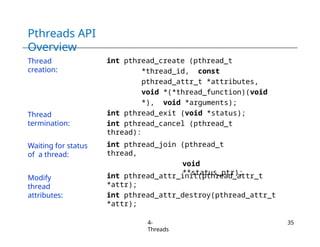
Pthreads API
Overview
4-
Threads
35
Thread
creation:
int pthread_create (pthread_t
*thread_id, const
pthread_attr_t *attributes,
void *(*thread_function)(void
*), void *arguments);
int pthread_exit (void *status);
int pthread_cancel (pthread_t
thread):
int pthread_join (pthread_t
thread,
void
**status_ptr);
int pthread_attr_init(pthread_attr_t
*attr);
int pthread_attr_destroy(pthread_attr_t
*attr);
Thread
termination:
Waiting for status
of a thread:
Modify
thread
attributes:
Thread
Creation
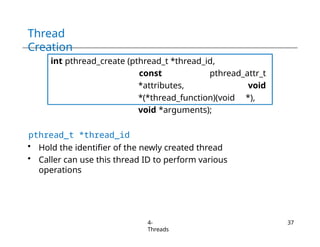
int pthread_create (pthread_t *thread_id,
const pthread_attr_t
*attributes, void
*(*thread_function)(void *),
void *arguments);
• This routine creates a new thread and makes it
executable
• Thread stack is allocated and thread control block is
created
• Once created, a thread may create other threads
– When process starts an "initial thread" exists by default and is
the thread which runs main
• Function pthread_create returns
– zero, if success
– Non-zero if error
4-
Threads
36
Thread
Creation
int pthread_create (pthread_t *thread_id,
const pthread_attr_t
*attributes, void
*(*thread_function)(void *),
void *arguments);
pthread_t *thread_id
• Hold the identifier of the newly created thread
• Caller can use this thread ID to perform various
operations
4-
Threads
37
Thread
Creation
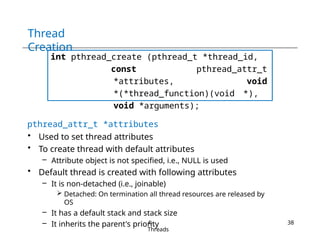
int pthread_create (pthread_t *thread_id,
const pthread_attr_t
*attributes, void
*(*thread_function)(void *),
void *arguments);
pthread_attr_t *attributes
• Used to set thread attributes
• To create thread with default attributes
– Attribute object is not specified, i.e., NULL is used
• Default thread is created with following attributes
– It is non-detached (i.e., joinable)
 Detached: On termination all thread resources are released by
OS
– It has a default stack and stack size
– It inherits the parent's priority
4-
Threads
38
Thread
Creation
int pthread_create (pthread_t *thread_id,
const pthread_attr_t
*attributes, void
*(*thread_function)(void *),
void *arguments);
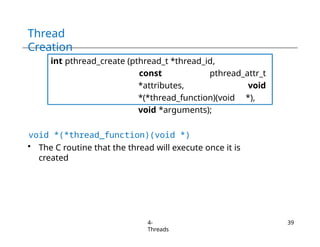
void *(*thread_function)(void *)
• The C routine that the thread will execute once it is
created
4-
Threads
39
Thread
Creation
int pthread_create (pthread_t *thread_id,
const pthread_attr_t
*attributes, void
*(*thread_function)(void *),
void *arguments);
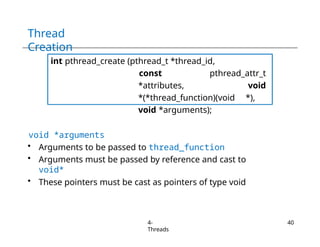
void *arguments
• Arguments to be passed to thread_function
• Arguments must be passed by reference and cast to
void*
• These pointers must be cast as pointers of type void
4-
Threads
40
Thread Creation:
Example
4-
Threads
41
#include
<pthread.h>
#define NUM_THREADS
5
void * PrintHello(void *threadid)
{ printf("n%d: Hello World!n",
threadid);
}
int main() {
pthread_t threads[NUM_THREADS];
int rc, t;
for(t=0;t < NUM_THREADS; t++) {
printf("Creating thread %d
n", t);
rc =
pthread_create(&threads[t
], NULL, PrintHello,
(void *)&t);
if (rc){
printf("ERROR; return code from pthread_create() is %dn",
rc); exit(-1);
Possible Output
Sequence
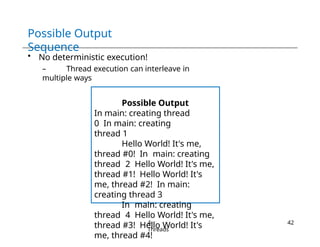
• No deterministic execution!
– Thread execution can interleave in
multiple ways
Possible Output
In main: creating thread
0 In main: creating
thread 1
Hello World! It's me,
thread #0! In main: creating
thread 2 Hello World! It's me,
thread #1! Hello World! It's
me, thread #2! In main:
creating thread 3
In main: creating
thread 4 Hello World! It's me,
thread #3! Hello World! It's
me, thread #4!
4-
Threads
42
Thread
Creation
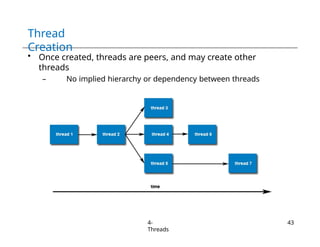
• Once created, threads are peers, and may create other
threads
– No implied hierarchy or dependency between threads
4-
Threads
43
Thread
Termination
4-
Threads
44
Several ways of termination
• The thread makes a call to the pthread_exit() routine
• The thread is canceled by another thread via
pthread_cancel()
routine
• The entire process is terminated due to a call to the exit()
• The thread returns from its starting routine/function
– Same as if there was an implicit call to pthread_exit() using
the return value of thread function as the exit status
– Behavior of thread executing main() differs
 Effect: Implicit call to exit() using the return value of main() as
the exit status
Thread
Termination
int pthread_exit (void *status);
• The pthread_exit() routine does not close files
– Any files opened inside the thread will remain open after the
thread is terminated
• If the "initial thread" exits with pthread_exit() instead of
exit(), other threads will continue to execute
• The programmer may specify a termination status
– Stored as a void pointer for any thread that may join the
calling thread i.e., wait for this thread
4-
Threads
45
Thread Termination:
Example
#include
<pthread.h>
#define NUM_THREADS
5
void * PrintHello(void *threadid)
{ printf("n%d: Hello World!n",
threadid); pthread_exit(NULL);
}
int main() {
pthread_t threads[NUM_THREADS];
int rc, t;
for(t=0;t < NUM_THREADS; t++) {
printf("Creating thread %d
n", t);
rc =
pthread_create(&threads[t
], NULL, PrintHello,
(void *)&t);
if (rc){
printf("ERROR; return code from pthread_create() is %dn",
rc); exit(-1);
}
}
4-
Threads
45
Passing Arguments to
Threads
4-
Threads
47
• The pthread_create permits the programmer to
pass one argument to the thread start function
– Argument must be passed by reference and cast to (void
*)
• What if we want to pass multiple arguments?
– Create a structure which contains all of the arguments
– Pass a pointer to the structure in the pthread_create
• Once created threads have non-deterministic start-up &
scheduling
– How to safely pass data/argument to newly created
threads?
– Make sure that all passed data is thread safe
 i.e., it cannot be changed by other threads
– The calling function must ensure that argument remains valid for
the new thread throughout its lifetime
 At least until thread has finished accessing it
Passing Arguments to
Threads
4-
Threads
48
• Incorrectly passed arguments
for(t=0;t < NUM_THREADS;t++) {
printf("Creating thread %dn", t);
rc = pthread_create(&threads[t], NULL, printHello,(void
*) &t);
...
}
• Correctly passed arguments
int *tids[NUM_THREADS];
for(t=0;t < NUM_THREADS;t++)
{
tids[t] = new int;
*tids[t] = t;
printf("Creating thread
%dn", t);
rc =
pthread_create(&threads[
t],NULL,PrintHello,
(void*)tid[t]);
Passing Structure as
Argument
struct thread_data {
int thread_id;
int sum;
};
thread_data
thread_data_array[N
UM_THREADS];
int main() { ...
thread_data_array[t].thread_id =
t; thread_data_array[t].sum =
sum;
rc = pthread_create(&threads[t],
NULL, PrintHello,
(void )&thread_data_array[t]) ;
...
}
void *PrintHello(void *threadarg) {
thread_data *my_data;
my_data = (struct thread_data *) threadarg;
taskid = my_data->thread_id;
} 4-Threads
48
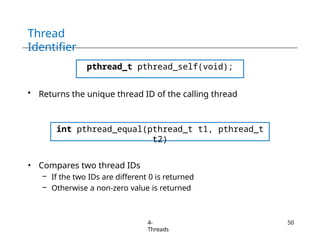
Thread
Identifier
pthread_t pthread_self(void);
• Returns the unique thread ID of the calling thread
int pthread_equal(pthread_t t1, pthread_t
t2)
• Compares two thread IDs
– If the two IDs are different 0 is returned
– Otherwise a non-zero value is returned
4-
Threads
50
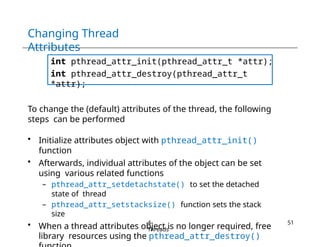
Changing Thread
Attributes
int pthread_attr_init(pthread_attr_t *attr);
int pthread_attr_destroy(pthread_attr_t
*attr);
To change the (default) attributes of the thread, the following
steps can be performed
• Initialize attributes object with pthread_attr_init()
function
• Afterwards, individual attributes of the object can be set
using various related functions
– pthread_attr_setdetachstate() to set the detached
state of thread
– pthread_attr_setstacksize() function sets the stack
size
• When a thread attributes object is no longer required, free
library resources using the pthread_attr_destroy()
4-
Threads
51
Changing Thread Attributes:
Example
#define NUM_THREADS 5
#define MEGEXTRA 1000000
#define N 1000
Pthread_attr_t attr;
int main() {
pthread_t
threads[NUM_THREADS]; int
rc, t;
size_t stacksize
pthread_attr_init( &attr);
pthread_attr_getstacksize(&attr,
&stacksize); printf(“Default stack size -
%lin”, stacksize); stacksize =
sizeof(double) * N * N + MEGEXTRA;
pthread_attr_setstacksize (&attr,
stacksize); for(t=0;t < NUM_THREADS; t++) {
printf("Creating thread with stacksize -
%lin", stacksize);
rc = pthread_create(&threads[t], &attr,
PrintHello, (void *)&t);
. . .
}
pthread_attr_destroy(&attr):
. .
.
4-
Threads
51
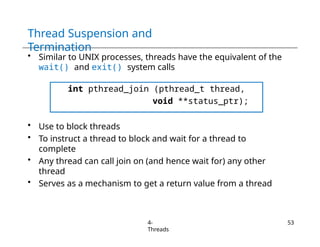
Thread Suspension and
Termination
• Similar to UNIX processes, threads have the equivalent of the
wait() and exit() system calls
int pthread_join (pthread_t thread,
void **status_ptr);
• Use to block threads
• To instruct a thread to block and wait for a thread to
complete
• Any thread can call join on (and hence wait for) any other
thread
• Serves as a mechanism to get a return value from a thread
4-
Threads
53
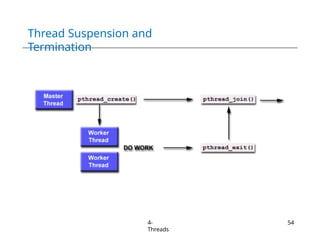
Thread Suspension and
Termination
4-
Threads
54
Joinable
Threads
4-
Threads
55
• When a thread is created, one of its attributes defines whether
it is joinable or detached
– Only threads that are created as joinable can be joined
– If a thread is created as detached, it can never be joined
• Detached Thread
– On termination all thread resources are released by the OS
– A detached thread cannot be joined
– No way to get at the return value of the thread
• Joinable Thread
– On thread termination thread ID and exit status are saved by the
OS
– Joining a thread means waiting for a thread with a certain ID
 One way to accomplish synchronization between threads
Joinable
Threads
4-
Threads
56
• Multiple threads cannot wait for the same thread to terminate
• If multiple thread simultaneously try to join, the results
are undefined
– For example, only one thread returns successfully
– The other threads fail with an error of ESRCH or EINVAL
• After pthread_join()returns, any stack storage associated
with the thread can be reclaimed by the process
• Threads which have exited but have not been joined are
equivalent to zombie processes
– Their resources cannot be fully recovered
Joinable Threads:
Example
#include <stdio.h>
#include
<pthread.h>
int x = 5;
int child_code()
{
while (x>0)
{ x=x-1;
printf("x
has
changed
to %d”
,x);
}
return 0;
}
int main(int
argc, char
*argv[])
{
int rc;
void** status=0;
pthread_t
/* Set threads properties */
pthread_attr_init(&attr);
pthread_attr_setdetachstate(&at
tr, PTHREAD_CREATE_JOINABLE);
/* Create new thread */
rc =
pthread_create(&child_thread,
&attr, (void*) &child_code,
NULL);
/* Free attributes object */
pthread_attr_destroy(&attr);
/* concurrent computation
*/ x=x+5;
printf("x has change to
%dn",x);
/*wait for thread to terminate
*/ pthread_join(child_thread,
status); pthread_exit(NULL);
}
4-
Threads
57
Possible
Outcome
4-
Threads
58
No deterministic execution!
• Two threads can interleave in multiple
ways
• Requires further synchronization
Child: x=5
while (x>0)
{ x=x-1;
printf("x
has
changed
to %d 
n",x);
}
Parent: x=3
x=x+5;
printf("x has changed to %d
n",x);
Child: x=3
while (x>0)
{ x=x-1;
printf("x
has
changed
to %d 
n",x);
}
• x has changed to
4
• x has changed to
3
• x has changed to
8
• x has changed to
7
…
• x has changed to
1
• x has changed to
0
Joinable Threads:
Example
#include
<pthread.h>
#define NUM_THREADS
4
void *BusyWork(void
*t){ long tid =
(long)t; double
result=0.0;
printf("Thread %ld
starting...n",tid);
for (int i=0; i<1000000; i++)
{ result = result + sin(i) *
tan(i);
}
printf("Thread %ld done.
Result = %en",tid,
result);
pthread_exit((void*) t);
}
int main (int argc, char
*argv[]) { pthread_t
thread[NUM_THREADS];
pthread_attr_t attr;
int rc;
long
void
*status;
/* Initialize & set thread
attribute */
pthread_attr_init(&attr);
pthread_attr_setdetachstate(&attr,
PTHREAD_CREATE_JOINABLE);
for(t=0; t<NUM_THREADS; t++) {
printf("Main:creating thread %ld
n", t);
pthread_create(&thread[t],
&attr, BusyWork, (void
*)t);
}
/* Free attribute & wait for
threads */
pthread_attr_destroy(&attr)
; for(t=0; t<NUM_THREADS;
t++) {
pthread_join(thread[t],
&status);
printf("Main: completed
join with thread
%ld with status %ldn", t,
(long)status);
}
printf("Main: program
}
4-
Threads
59
Possible
Output
4-
Threads
60
Main: creating thread
0 Main: creating
thread 1 Thread 0
starting...
Main: creating thread
2 Thread 1 starting...
Main: creating thread
3 Thread 2 starting...
Thread 3 starting...
Thread 1 done. Result = -
3.153838e+06 Thread 0 done. Result
= -3.153838e+06
Main: completed join with thread 0 with status
of 0 Main: completed join with thread 1 with
status of 1 Thread 3 done. Result = -
3.153838e+06
Thread 2 done. Result = -3.153838e+06
Main: completed join with thread 2 with status
of 2 Main: completed join with thread 3 with
status of 3 Main: program completed. Exiting.
Making a Thread
Detached
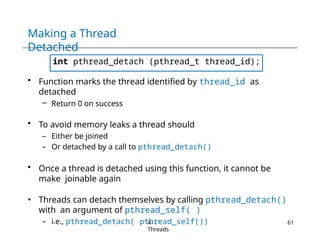
int pthread_detach (pthread_t thread_id);
• Function marks the thread identified by thread_id as
detached
– Return 0 on success
• To avoid memory leaks a thread should
– Either be joined
– Or detached by a call to pthread_detach()
• Once a thread is detached using this function, it cannot be
make joinable again
• Threads can detach themselves by calling pthread_detach()
with an argument of pthread_self( )
– i.e., pthread_detach( pthread_self())
4-
Threads
61
Any Question So
Far?
4-
Threads
62

Chapter 4 - Operating Systems Threads.pptx

  • 1.
  • 2.
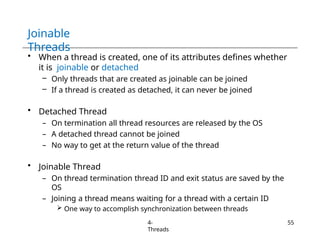
    Recall the MainConcepts Behind Processes 4- Threads 2 1. Resource Ownership – Virtual address space to hold the process image  Program  Data  Stack  Attributes – OS shields processes from interfering with each others resources  Protection 2. Scheduling/ Dispatching – Execution may be interleaved with other processes – Maintain execution states, etc. • Can we decouple this functionality?
  • 3.
    Processes and Threads Multithreading: Morethan one entities can possibly execute in the same resource- (i.e., process-) environment (and collaborate better) • Unit of dispatching – Referred to as a thread • Unit of resource ownership – Referred to as a process or task 4- Threads 3
  • 4.
    Processes vs. Threads • Processcharacteristics – A virtual address space  Holds the process image – Global variables, files, child processes, signals and signal handlers 4- Threads 4
  • 5.
    Processes vs. Threads • Processcharacteristics – A virtual address space  Holds the process image – Global variables, files, child processes, signals and signal handlers • Thread characteristics – An execution state, stack and context (saved when not running) – Access to the memory and resources of its process  All threads of a process share this – Some per-thread static storage for local variables 4- Threads 5
  • 6.
  • 7.
    Processes vs. Threads Address space/Global VariablesOpen files Child processes Accounting info Signal handlers Program counter Registers Stac k State Address space/Global Variables Open files Child processes Accounting info Signal handlers Program counter Re St St gister s ack ate Register s Stack State Spli t Program counter Program counter Registers Stac k State Unit of Resource Unit of Execution/Dispatch In case of multiple threads per process Shar e 4- Threads 7
  • 8.
    Benefits of Threads 4- Threads 8 • Easy/LightweightCommunication – Threads within the same process share memory and files – Communication does not invoke the kernel • May allow parallelization within a process – I/O and computation to overlap  Recall historical evolution from uni-programming to multiprogramming – Concurrent execution in multiprocessors • Takes less time to – Create/terminate a thread than a process – Switch between two threads within the same process
  • 9.
    Uses of Threads 1. Overlapforeground with background work – Decouple interactions from processing – For instance processing message requests 2. Asynchronous processing – Backup while editing 3. Speed up execution – Parallelize independent actions 4. Modular program structure – Must be careful here, not to introduce too much extra overhead Thread I Wait for message Store result in buffer Thread II Wait for message Store result in buffer Thread III Consume messages in buffer Increase throughput in message processing Thread IV Consume messages in buffer 4- Threads 9
  • 10.
    Multithreaded Server Architecture– Example 4- Threads 10 Parallel execution on single core and multicore
  • 11.
    Effect of Suspension/Termination 4- Threads 11 • Suspendinga process involves suspending all threads of the process since all threads share the same address space • Termination of a process, terminates all threads within the process
  • 12.
    Types Of Threads •User Level Threads • Kernel Level Threads
  • 13.
    Implementing Threads inUser Space • The kernel is not aware of the existence of threads • Run-time system (thread- library in execution) – Responsible for bookkeeping, scheduling of threads • Allows for customized scheduling • Support for any OS • But: problem with blocking system calls – Blocking of a thread causes blocking of the process – Threads cannot execute if a thread of the same process is blocked 4- Threads 13
  • 14.
    Implementing Threads inUser Space The thread library contains code for • Creating and destroying threads • Passing messages and data between threads • Scheduling thread execution – Pass control from one thread to another • Saving and restoring thread contexts • Three primary thread libraries: – POSIX Pthreads – Win32 threads – Java threads 4- Threads 14
  • 15.
    Example: User-Level Thread Execution •Consider a thread makes a system call 4- Threads 15
  • 16.
    Example: User-Level Thread Execution •Process switches to blocked state • State of Thread 2 remains running, but Thread 2 cannot execute instructions 4- Threads 16
  • 17.
    Example: User-Level Thread Execution •Process switches to ready state – Returned from the system call 4- Threads 17
  • 18.
    Example: User-Level Thread Execution •Thread 2 needs to wait for some action of Thread 1 4- Threads 18
  • 19.
    User-Level Thread Advantages • Fast – Donot need context switching to kernel mode to perform thread management • Scheduling can be application specific – Choose the best algorithm for the situation • Can run on any OS – Only a thread library is required Disadvantages • Most system calls are blocking for processes – All threads within a process will be implicitly blocked • Cannot benefit from the multiprocessor system – Kernel assign one process to only one CPU 4- Threads 19
  • 20.
    Implementing Threads inKernel/Lightweight Process Kernel maintains context information for the process and the threads • Scheduling – Happens on a thread basis • Does not suffer from the “blocking problem” • Threads of a process can be scheduled on multiple processors • Less efficient than user- level threads – Kernel is invoked for thread creation, – Termination – Switching 4- Threads 20
  • 21.
    Kernel-Level Thread Support 4- Threads 21 • Windows XP/2000 •Solaris • Linux • Tru64 UNIX • Mac OS X
  • 22.
    Kernel-Level Thread Advantages • In multiprocessorsystem, mutiple threads from the same process can be scheduled on multiple processors • Blocking at thread level, not process level – If a thread blocks, the CPU can be assigned to another thread in the same process • Even the kernel routines can be multithreaded Disadvantages • Thread switching always involves the kernel – Two context switches per thread switch • Slower compared to User Level Threads – Faster than a full process switch 4- Threads 22
  • 23.
    Some Performance Data • NullFork: Overhead of creating a process or thread • Signal Wait: Overhead of synchronizing two processes or threads together 4- Threads 23
  • 24.
    Multithreading Models: Many-to-one Model •Many user-level threads mapped to single kernel thread • Examples: – Solaris Green Threads – GNU Portable Threads 4- Threads 24
  • 25.
    Multithreading Models: One-to-one Model •Each user-level thread maps to kernel thread • Examples – Windows NT/XP/2000 – Linux – Solaris 9 and later 4- Threads 25
  • 26.
    Multithreading Models: Many-to-Many Model •Allows many user level threads to be mapped to many kernel threads • Allows the operating system to create a sufficient number of kernel threads • Example: – Solaris prior to version 9 – Windows NT/2000 with the ThreadFiber package 4- Threads 26
  • 27.
    Windows: Threads and Processes CreateProce ss ExitProcess CreateThrea d ExitThread CreateFiber ExitFiber SwitchToFib er Jobs Process Thread Process ThreadThread Fiber Fiber Fiber WIN32 API 4- Threads 27 Collection of processes Kernel- level threads User- level threads
  • 28.
    Windows XP: Threadsand Processes 4- Threads 28 • Each thread contains – A thread id – Register set – Separate user and kernel stacks – Private data storage area • The register set, stacks, and private storage area are known as the context of the threads • The primary data structures of a thread include – ETHREAD (executive thread block) – KTHREAD (kernel thread block) – TEB (thread environment block)
  • 29.
    Windows XP: Threadsand Processes 4- Threads 29
  • 30.
    Linux Task Management 4- Threads 30 • Linuxuses task as a placeholder for processes and threads • Task creation – Specify resources to be inherited from the parent  Share file system information  File descriptors  Memory space  …
  • 31.
    Linux Task Management • fork()and clone() system calls • clone() takes options to determine sharing between parent and child tasks • No sharing takes place, if none of above flags is set when clone() is invoked – Functionality similar to that provided by fork() system call 4- Threads 31
  • 32.
    Linux Task Management 4- Threads 32 • Uniquekernel data structure (struct task_struct) for each task – Instead of storing data, contains pointers to other data structures – For example, data structure that represent  open files  Signal handlers  Virtual memory • When fork() is invoked – New task is created with copy of all associated data structures of the parent process (task) • When clone() is invoked – New task points to the data structure of the parent process (task) – Depending on the set of flags passed to clone( )
  • 33.
    Thread Libraries 4- Threads 33 • Thread libraryprovides programmer with API for creating and managing threads • Two primary ways of implementing – Library entirely in user space – Kernel-level library supported by the OS
  • 34.
    Thread Libraries 4- Threads 34 • POSIX threads(Pthreads) – Execution model for threads (specified by IEEE) – Specifies application programming interface – Implementation (using user-/kernel-level threads) is up to developers – More common in UNIX systems • Win32 thread library – Kernel-level library, windows systems • Java threads – Supported by the JVM – Java thread API is implemented using a thread library available on the host operating system, e.g., Pthreads, Win32
  • 35.
    Pthreads API Overview 4- Threads 35 Thread creation: int pthread_create(pthread_t *thread_id, const pthread_attr_t *attributes, void *(*thread_function)(void *), void *arguments); int pthread_exit (void *status); int pthread_cancel (pthread_t thread): int pthread_join (pthread_t thread, void **status_ptr); int pthread_attr_init(pthread_attr_t *attr); int pthread_attr_destroy(pthread_attr_t *attr); Thread termination: Waiting for status of a thread: Modify thread attributes:
  • 36.
    Thread Creation int pthread_create (pthread_t*thread_id, const pthread_attr_t *attributes, void *(*thread_function)(void *), void *arguments); • This routine creates a new thread and makes it executable • Thread stack is allocated and thread control block is created • Once created, a thread may create other threads – When process starts an "initial thread" exists by default and is the thread which runs main • Function pthread_create returns – zero, if success – Non-zero if error 4- Threads 36
  • 37.
    Thread Creation int pthread_create (pthread_t*thread_id, const pthread_attr_t *attributes, void *(*thread_function)(void *), void *arguments); pthread_t *thread_id • Hold the identifier of the newly created thread • Caller can use this thread ID to perform various operations 4- Threads 37
  • 38.
    Thread Creation int pthread_create (pthread_t*thread_id, const pthread_attr_t *attributes, void *(*thread_function)(void *), void *arguments); pthread_attr_t *attributes • Used to set thread attributes • To create thread with default attributes – Attribute object is not specified, i.e., NULL is used • Default thread is created with following attributes – It is non-detached (i.e., joinable)  Detached: On termination all thread resources are released by OS – It has a default stack and stack size – It inherits the parent's priority 4- Threads 38
  • 39.
    Thread Creation int pthread_create (pthread_t*thread_id, const pthread_attr_t *attributes, void *(*thread_function)(void *), void *arguments); void *(*thread_function)(void *) • The C routine that the thread will execute once it is created 4- Threads 39
  • 40.
    Thread Creation int pthread_create (pthread_t*thread_id, const pthread_attr_t *attributes, void *(*thread_function)(void *), void *arguments); void *arguments • Arguments to be passed to thread_function • Arguments must be passed by reference and cast to void* • These pointers must be cast as pointers of type void 4- Threads 40
  • 41.
    Thread Creation: Example 4- Threads 41 #include <pthread.h> #define NUM_THREADS 5 void* PrintHello(void *threadid) { printf("n%d: Hello World!n", threadid); } int main() { pthread_t threads[NUM_THREADS]; int rc, t; for(t=0;t < NUM_THREADS; t++) { printf("Creating thread %d n", t); rc = pthread_create(&threads[t ], NULL, PrintHello, (void *)&t); if (rc){ printf("ERROR; return code from pthread_create() is %dn", rc); exit(-1);
  • 42.
    Possible Output Sequence • Nodeterministic execution! – Thread execution can interleave in multiple ways Possible Output In main: creating thread 0 In main: creating thread 1 Hello World! It's me, thread #0! In main: creating thread 2 Hello World! It's me, thread #1! Hello World! It's me, thread #2! In main: creating thread 3 In main: creating thread 4 Hello World! It's me, thread #3! Hello World! It's me, thread #4! 4- Threads 42
  • 43.
    Thread Creation • Once created,threads are peers, and may create other threads – No implied hierarchy or dependency between threads 4- Threads 43
  • 44.
    Thread Termination 4- Threads 44 Several ways oftermination • The thread makes a call to the pthread_exit() routine • The thread is canceled by another thread via pthread_cancel() routine • The entire process is terminated due to a call to the exit() • The thread returns from its starting routine/function – Same as if there was an implicit call to pthread_exit() using the return value of thread function as the exit status – Behavior of thread executing main() differs  Effect: Implicit call to exit() using the return value of main() as the exit status
  • 45.
    Thread Termination int pthread_exit (void*status); • The pthread_exit() routine does not close files – Any files opened inside the thread will remain open after the thread is terminated • If the "initial thread" exits with pthread_exit() instead of exit(), other threads will continue to execute • The programmer may specify a termination status – Stored as a void pointer for any thread that may join the calling thread i.e., wait for this thread 4- Threads 45
  • 46.
    Thread Termination: Example #include <pthread.h> #define NUM_THREADS 5 void* PrintHello(void *threadid) { printf("n%d: Hello World!n", threadid); pthread_exit(NULL); } int main() { pthread_t threads[NUM_THREADS]; int rc, t; for(t=0;t < NUM_THREADS; t++) { printf("Creating thread %d n", t); rc = pthread_create(&threads[t ], NULL, PrintHello, (void *)&t); if (rc){ printf("ERROR; return code from pthread_create() is %dn", rc); exit(-1); } } 4- Threads 45
  • 47.
    Passing Arguments to Threads 4- Threads 47 •The pthread_create permits the programmer to pass one argument to the thread start function – Argument must be passed by reference and cast to (void *) • What if we want to pass multiple arguments? – Create a structure which contains all of the arguments – Pass a pointer to the structure in the pthread_create • Once created threads have non-deterministic start-up & scheduling – How to safely pass data/argument to newly created threads? – Make sure that all passed data is thread safe  i.e., it cannot be changed by other threads – The calling function must ensure that argument remains valid for the new thread throughout its lifetime  At least until thread has finished accessing it
  • 48.
    Passing Arguments to Threads 4- Threads 48 •Incorrectly passed arguments for(t=0;t < NUM_THREADS;t++) { printf("Creating thread %dn", t); rc = pthread_create(&threads[t], NULL, printHello,(void *) &t); ... } • Correctly passed arguments int *tids[NUM_THREADS]; for(t=0;t < NUM_THREADS;t++) { tids[t] = new int; *tids[t] = t; printf("Creating thread %dn", t); rc = pthread_create(&threads[ t],NULL,PrintHello, (void*)tid[t]);
  • 49.
    Passing Structure as Argument structthread_data { int thread_id; int sum; }; thread_data thread_data_array[N UM_THREADS]; int main() { ... thread_data_array[t].thread_id = t; thread_data_array[t].sum = sum; rc = pthread_create(&threads[t], NULL, PrintHello, (void )&thread_data_array[t]) ; ... } void *PrintHello(void *threadarg) { thread_data *my_data; my_data = (struct thread_data *) threadarg; taskid = my_data->thread_id; } 4-Threads 48
  • 50.
    Thread Identifier pthread_t pthread_self(void); • Returnsthe unique thread ID of the calling thread int pthread_equal(pthread_t t1, pthread_t t2) • Compares two thread IDs – If the two IDs are different 0 is returned – Otherwise a non-zero value is returned 4- Threads 50
  • 51.
    Changing Thread Attributes int pthread_attr_init(pthread_attr_t*attr); int pthread_attr_destroy(pthread_attr_t *attr); To change the (default) attributes of the thread, the following steps can be performed • Initialize attributes object with pthread_attr_init() function • Afterwards, individual attributes of the object can be set using various related functions – pthread_attr_setdetachstate() to set the detached state of thread – pthread_attr_setstacksize() function sets the stack size • When a thread attributes object is no longer required, free library resources using the pthread_attr_destroy() 4- Threads 51
  • 52.
    Changing Thread Attributes: Example #defineNUM_THREADS 5 #define MEGEXTRA 1000000 #define N 1000 Pthread_attr_t attr; int main() { pthread_t threads[NUM_THREADS]; int rc, t; size_t stacksize pthread_attr_init( &attr); pthread_attr_getstacksize(&attr, &stacksize); printf(“Default stack size - %lin”, stacksize); stacksize = sizeof(double) * N * N + MEGEXTRA; pthread_attr_setstacksize (&attr, stacksize); for(t=0;t < NUM_THREADS; t++) { printf("Creating thread with stacksize - %lin", stacksize); rc = pthread_create(&threads[t], &attr, PrintHello, (void *)&t); . . . } pthread_attr_destroy(&attr): . . . 4- Threads 51
  • 53.
    Thread Suspension and Termination •Similar to UNIX processes, threads have the equivalent of the wait() and exit() system calls int pthread_join (pthread_t thread, void **status_ptr); • Use to block threads • To instruct a thread to block and wait for a thread to complete • Any thread can call join on (and hence wait for) any other thread • Serves as a mechanism to get a return value from a thread 4- Threads 53
  • 54.
  • 55.
    Joinable Threads 4- Threads 55 • When athread is created, one of its attributes defines whether it is joinable or detached – Only threads that are created as joinable can be joined – If a thread is created as detached, it can never be joined • Detached Thread – On termination all thread resources are released by the OS – A detached thread cannot be joined – No way to get at the return value of the thread • Joinable Thread – On thread termination thread ID and exit status are saved by the OS – Joining a thread means waiting for a thread with a certain ID  One way to accomplish synchronization between threads
  • 56.
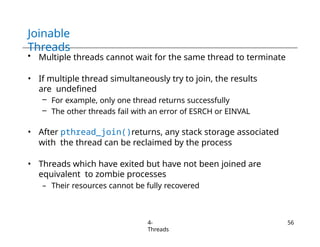
    Joinable Threads 4- Threads 56 • Multiple threadscannot wait for the same thread to terminate • If multiple thread simultaneously try to join, the results are undefined – For example, only one thread returns successfully – The other threads fail with an error of ESRCH or EINVAL • After pthread_join()returns, any stack storage associated with the thread can be reclaimed by the process • Threads which have exited but have not been joined are equivalent to zombie processes – Their resources cannot be fully recovered
  • 57.
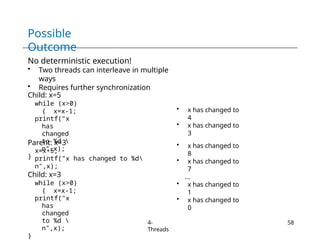
    Joinable Threads: Example #include <stdio.h> #include <pthread.h> intx = 5; int child_code() { while (x>0) { x=x-1; printf("x has changed to %d” ,x); } return 0; } int main(int argc, char *argv[]) { int rc; void** status=0; pthread_t /* Set threads properties */ pthread_attr_init(&attr); pthread_attr_setdetachstate(&at tr, PTHREAD_CREATE_JOINABLE); /* Create new thread */ rc = pthread_create(&child_thread, &attr, (void*) &child_code, NULL); /* Free attributes object */ pthread_attr_destroy(&attr); /* concurrent computation */ x=x+5; printf("x has change to %dn",x); /*wait for thread to terminate */ pthread_join(child_thread, status); pthread_exit(NULL); } 4- Threads 57
  • 58.
    Possible Outcome 4- Threads 58 No deterministic execution! •Two threads can interleave in multiple ways • Requires further synchronization Child: x=5 while (x>0) { x=x-1; printf("x has changed to %d n",x); } Parent: x=3 x=x+5; printf("x has changed to %d n",x); Child: x=3 while (x>0) { x=x-1; printf("x has changed to %d n",x); } • x has changed to 4 • x has changed to 3 • x has changed to 8 • x has changed to 7 … • x has changed to 1 • x has changed to 0
  • 59.
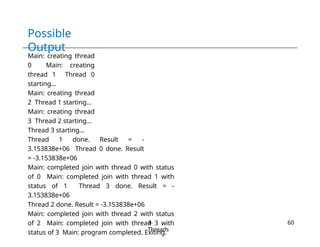
    Joinable Threads: Example #include <pthread.h> #define NUM_THREADS 4 void*BusyWork(void *t){ long tid = (long)t; double result=0.0; printf("Thread %ld starting...n",tid); for (int i=0; i<1000000; i++) { result = result + sin(i) * tan(i); } printf("Thread %ld done. Result = %en",tid, result); pthread_exit((void*) t); } int main (int argc, char *argv[]) { pthread_t thread[NUM_THREADS]; pthread_attr_t attr; int rc; long void *status; /* Initialize & set thread attribute */ pthread_attr_init(&attr); pthread_attr_setdetachstate(&attr, PTHREAD_CREATE_JOINABLE); for(t=0; t<NUM_THREADS; t++) { printf("Main:creating thread %ld n", t); pthread_create(&thread[t], &attr, BusyWork, (void *)t); } /* Free attribute & wait for threads */ pthread_attr_destroy(&attr) ; for(t=0; t<NUM_THREADS; t++) { pthread_join(thread[t], &status); printf("Main: completed join with thread %ld with status %ldn", t, (long)status); } printf("Main: program } 4- Threads 59
  • 60.
    Possible Output 4- Threads 60 Main: creating thread 0Main: creating thread 1 Thread 0 starting... Main: creating thread 2 Thread 1 starting... Main: creating thread 3 Thread 2 starting... Thread 3 starting... Thread 1 done. Result = - 3.153838e+06 Thread 0 done. Result = -3.153838e+06 Main: completed join with thread 0 with status of 0 Main: completed join with thread 1 with status of 1 Thread 3 done. Result = - 3.153838e+06 Thread 2 done. Result = -3.153838e+06 Main: completed join with thread 2 with status of 2 Main: completed join with thread 3 with status of 3 Main: program completed. Exiting.
  • 61.
    Making a Thread Detached intpthread_detach (pthread_t thread_id); • Function marks the thread identified by thread_id as detached – Return 0 on success • To avoid memory leaks a thread should – Either be joined – Or detached by a call to pthread_detach() • Once a thread is detached using this function, it cannot be make joinable again • Threads can detach themselves by calling pthread_detach() with an argument of pthread_self( ) – i.e., pthread_detach( pthread_self()) 4- Threads 61
  • 62.

Editor's Notes

  • #30 Interruptible Process (also known as "Interruptible Sleep" or "Interruptible State"): An interruptible process is a process that is capable of being interrupted by signals. When a process is in an interruptible state, it is typically waiting for some event to occur, such as I/O operations, and is receptive to signals from the kernel or other processes. The process can be paused or terminated by an external signal, and it can respond to signals like SIGINT (interrupt signal) or SIGTERM (terminate signal). Commonly, interruptible processes are in states such as "TASK_INTERRUPTIBLE" in the Linux kernel scheduling. Uninterruptible Process (also known as "Uninterruptible Sleep" or "Uninterruptible State"): An uninterruptible process is a process that is not receptive to most signals, including those that could lead to termination. These processes are typically in a critical section of code where they are waiting for a specific event, such as waiting for disk I/O to complete.
  • #44 When a thread returns from its entry function (the function specified when creating the thread), it is as if there was an implicit call to pthread_exit() using the return value of the thread function as the exit status. This means that returning from the thread function is equivalent to calling pthread_exit() with the return value of the function. Behavior of the thread executing main() differs: The thread executing the main() function is treated somewhat differently from other threads. When the main() function returns, it's as if there was an implicit call to exit() using the return value of main() as the exit status. This is how the entire process is typically terminated. Other threads may continue to execute unless explicitly terminated or unless they complete their work.
  • #48 Reasons for the issue: In this code snippet, you are passing a pointer to the t variable as the argument to the PrintHello function for each thread. This may seem intuitive at first, but it's incorrect for a couple of reasons: Reasons for the correction: In this corrected code snippet, you are creating an array of pointers to int called tids. Each element in this array is a dynamically allocated integer, and you correctly set its value to t. Here's why this is the right approach:
  • #56 It's essential to join or detach threads to avoid leaving zombie threads in your multithreaded application. If you don't join or detach threads, they may accumulate and potentially lead to resource exhaustion or memory leaks.