6.53
COMPUTER
ARCHITECTURE
LEARNING OBJECTIVES
At the end of this chapter, student should be
able to:
1. List the component of microprocessor
2. List the component and distinguish of CPU
3. Explain the difference between von
Neumann and Harvard architecture
2
WHAT IS PROCESSOR?
3
4
WHAT IS PERIPHERALS?
5
6
7
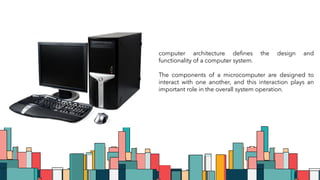
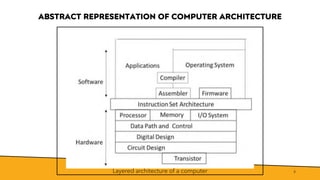
computer architecture defines the design and
functionality of a computer system.
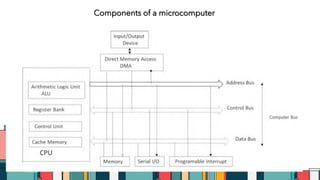
The components of a microcomputer are designed to
interact with one another, and this interaction plays an
important role in the overall system operation.
ABSTRACT REPRESENTATION OF COMPUTER ARCHITECTURE
8
Layered architecture of a computer
ABSTRACT REPRESENTATION OF COMPUTER ARCHITECTURE
9
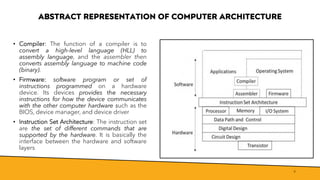
• Compiler: The function of a compiler is to
convert a high-level language (HLL) to
assembly language, and the assembler then
converts assembly language to machine code
(binary).
• Firmware: software program or set of
instructions programmed on a hardware
device. Its devices provides the necessary
instructions for how the device communicates
with the other computer hardware such as the
BIOS, device manager, and device driver
• Instruction Set Architecture: The instruction set
are the set of different commands that are
supported by the hardware. It is basically the
interface between the hardware and software
layers
ABSTRACT REPRESENTATION OF COMPUTER ARCHITECTURE
10
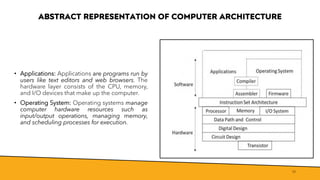
• Applications: Applications are programs run by
users like text editors and web browsers. The
hardware layer consists of the CPU, memory,
and I/O devices that make up the computer.
• Operating System: Operating systems manage
computer hardware resources such as
input/output operations, managing memory,
and scheduling processes for execution.
COMPONENT OF
MICROCOMPUTER
11
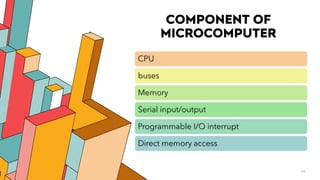
CPU
buses
Memory
Serial input/output
Programmable I/O interrupt
Direct memory access
7/1/20XX 12
Components of a microcomputer
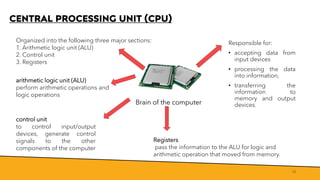
CENTRAL PROCESSING UNIT (CPU)
13
Brain of the computer
Responsible for:
• accepting data from
input devices
• processing the data
into information,
• transferring the
information to
memory and output
devices.
Organized into the following three major sections:
1. Arithmetic logic unit (ALU)
2. Control unit
3. Registers
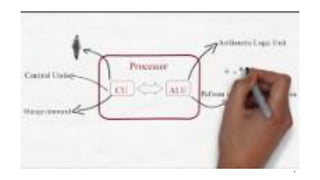
arithmetic logic unit (ALU)
perform arithmetic operations and
logic operations
Registers
pass the information to the ALU for logic and
arithmetic operation that moved from memory.
control unit
to control input/output
devices, generate control
signals to the other
components of the computer
REGISTER BANK
• Register is the fastest memory in a computer which holds information
14
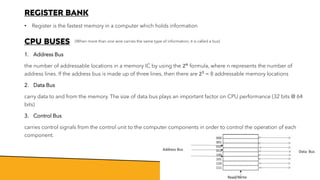
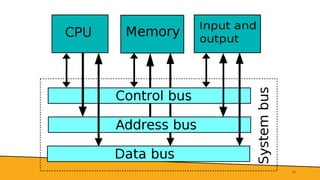
CPU BUSES
1. Address Bus
the number of addressable locations in a memory IC by using the 2𝑛
formula, where n represents the number of
address lines. If the address bus is made up of three lines, then there are 23
= 8 addressable memory locations
2. Data Bus
carry data to and from the memory. The size of data bus plays an important factor on CPU performance (32 bits @ 64
bits)
3. Control Bus
carries control signals from the control unit to the computer components in order to control the operation of each
component.
(When more than one wire carries the same type of information, it is called a bus)
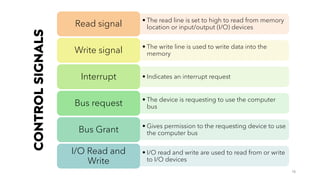
CONTROL
SIGNALS
15
• The read line is set to high to read from memory
location or input/output (I/O) devices
Read signal
• The write line is used to write data into the
memory
Write signal
• Indicates an interrupt request
Interrupt
• The device is requesting to use the computer
bus
Bus request
• Gives permission to the requesting device to use
the computer bus
Bus Grant
• I/O read and write are used to read from or write
to I/O devices
I/O Read and
Write
16
MEMORY
• Type of Dynamic
Random Access
Memory DRAM &
volatile and fast
• Called as
disk/secondary
storage. Include
storage devices (hard
disk / SSD)
• Slow and cheap
• Part of CPU & the
fastest type of
memory
• Made of Static
Random Access
Memory (SRAM)
• Located inside CPU
and hold
Register Cache
Main
Secondary
To interface with other devices, computers
need to use different kinds of serial input and
output interfaces. The most popular devices
that utilize input/output interfaces include
USB devices and PCI Express
17
SERIAL I/O
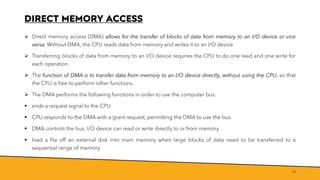
DIRECT MEMORY ACCESS
➢ Direct memory access (DMA) allows for the transfer of blocks of data from memory to an I/O device or vice
versa. Without DMA, the CPU reads data from memory and writes it to an I/O device.
➢ Transferring blocks of data from memory to an I/O device requires the CPU to do one read and one write for
each operation
➢ The function of DMA is to transfer data from memory to an I/O device directly, without using the CPU, so that
the CPU is free to perform other functions.
➢ The DMA performs the following functions in order to use the computer bus:
▪ ends a request signal to the CPU.
▪ CPU responds to the DMA with a grant request, permitting the DMA to use the bus.
▪ DMA controls the bus, I/O device can read or write directly to or from memory.
▪ load a file off an external disk into main memory when large blocks of data need to be transferred to a
sequential range of memory
18
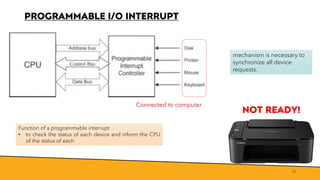
PROGRAMMABLE I/O INTERRUPT
19
mechanism is necessary to
synchronize all device
requests.
Function of a programmable interrupt
• to check the status of each device and inform the CPU
of the status of each
NOT READY!
Connected to computer
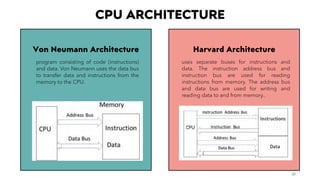
Harvard Architecture
CPU ARCHITECTURE
20
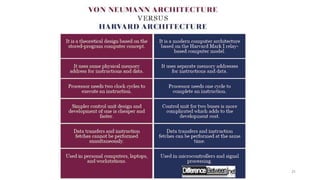
Von Neumann Architecture
program consisting of code (instructions)
and data. Von Neumann uses the data bus
to transfer data and instructions from the
memory to the CPU.
uses separate buses for instructions and
data. The instruction address bus and
instruction bus are used for reading
instructions from memory. The address bus
and data bus are used for writing and
reading data to and from memory..
21
SUMMARY
7/1/20XX 22
1. The components of a microcomputer are the CPU,
memory, parallel I/O, serial I/O, programmable
interrupt, and DMA.
2. The function of the CPU is executing instruction.
3. The components of the CPU are the arithmetic logic
unit (ALU), control unit, and registers.
4. Most computers use three types of memory: cache
memory (SRAM), main memory (DRAM or SDRAM),
and secondary memory (hard disk, tape drive, and
floppy disk).
THANK YOU
23

Chapter 1.pdf

  • 1.
  • 2.
    LEARNING OBJECTIVES At theend of this chapter, student should be able to: 1. List the component of microprocessor 2. List the component and distinguish of CPU 3. Explain the difference between von Neumann and Harvard architecture 2
  • 3.
  • 4.
  • 5.
  • 6.
  • 7.
    7 computer architecture definesthe design and functionality of a computer system. The components of a microcomputer are designed to interact with one another, and this interaction plays an important role in the overall system operation.
  • 8.
    ABSTRACT REPRESENTATION OFCOMPUTER ARCHITECTURE 8 Layered architecture of a computer
  • 9.
    ABSTRACT REPRESENTATION OFCOMPUTER ARCHITECTURE 9 • Compiler: The function of a compiler is to convert a high-level language (HLL) to assembly language, and the assembler then converts assembly language to machine code (binary). • Firmware: software program or set of instructions programmed on a hardware device. Its devices provides the necessary instructions for how the device communicates with the other computer hardware such as the BIOS, device manager, and device driver • Instruction Set Architecture: The instruction set are the set of different commands that are supported by the hardware. It is basically the interface between the hardware and software layers
  • 10.
    ABSTRACT REPRESENTATION OFCOMPUTER ARCHITECTURE 10 • Applications: Applications are programs run by users like text editors and web browsers. The hardware layer consists of the CPU, memory, and I/O devices that make up the computer. • Operating System: Operating systems manage computer hardware resources such as input/output operations, managing memory, and scheduling processes for execution.
  • 11.
  • 12.
  • 13.
    CENTRAL PROCESSING UNIT(CPU) 13 Brain of the computer Responsible for: • accepting data from input devices • processing the data into information, • transferring the information to memory and output devices. Organized into the following three major sections: 1. Arithmetic logic unit (ALU) 2. Control unit 3. Registers arithmetic logic unit (ALU) perform arithmetic operations and logic operations Registers pass the information to the ALU for logic and arithmetic operation that moved from memory. control unit to control input/output devices, generate control signals to the other components of the computer
  • 14.
    REGISTER BANK • Registeris the fastest memory in a computer which holds information 14 CPU BUSES 1. Address Bus the number of addressable locations in a memory IC by using the 2𝑛 formula, where n represents the number of address lines. If the address bus is made up of three lines, then there are 23 = 8 addressable memory locations 2. Data Bus carry data to and from the memory. The size of data bus plays an important factor on CPU performance (32 bits @ 64 bits) 3. Control Bus carries control signals from the control unit to the computer components in order to control the operation of each component. (When more than one wire carries the same type of information, it is called a bus)
  • 15.
    CONTROL SIGNALS 15 • The readline is set to high to read from memory location or input/output (I/O) devices Read signal • The write line is used to write data into the memory Write signal • Indicates an interrupt request Interrupt • The device is requesting to use the computer bus Bus request • Gives permission to the requesting device to use the computer bus Bus Grant • I/O read and write are used to read from or write to I/O devices I/O Read and Write
  • 16.
  • 17.
    MEMORY • Type ofDynamic Random Access Memory DRAM & volatile and fast • Called as disk/secondary storage. Include storage devices (hard disk / SSD) • Slow and cheap • Part of CPU & the fastest type of memory • Made of Static Random Access Memory (SRAM) • Located inside CPU and hold Register Cache Main Secondary To interface with other devices, computers need to use different kinds of serial input and output interfaces. The most popular devices that utilize input/output interfaces include USB devices and PCI Express 17 SERIAL I/O
  • 18.
    DIRECT MEMORY ACCESS ➢Direct memory access (DMA) allows for the transfer of blocks of data from memory to an I/O device or vice versa. Without DMA, the CPU reads data from memory and writes it to an I/O device. ➢ Transferring blocks of data from memory to an I/O device requires the CPU to do one read and one write for each operation ➢ The function of DMA is to transfer data from memory to an I/O device directly, without using the CPU, so that the CPU is free to perform other functions. ➢ The DMA performs the following functions in order to use the computer bus: ▪ ends a request signal to the CPU. ▪ CPU responds to the DMA with a grant request, permitting the DMA to use the bus. ▪ DMA controls the bus, I/O device can read or write directly to or from memory. ▪ load a file off an external disk into main memory when large blocks of data need to be transferred to a sequential range of memory 18
  • 19.
    PROGRAMMABLE I/O INTERRUPT 19 mechanismis necessary to synchronize all device requests. Function of a programmable interrupt • to check the status of each device and inform the CPU of the status of each NOT READY! Connected to computer
  • 20.
    Harvard Architecture CPU ARCHITECTURE 20 VonNeumann Architecture program consisting of code (instructions) and data. Von Neumann uses the data bus to transfer data and instructions from the memory to the CPU. uses separate buses for instructions and data. The instruction address bus and instruction bus are used for reading instructions from memory. The address bus and data bus are used for writing and reading data to and from memory..
  • 21.
  • 22.
    SUMMARY 7/1/20XX 22 1. Thecomponents of a microcomputer are the CPU, memory, parallel I/O, serial I/O, programmable interrupt, and DMA. 2. The function of the CPU is executing instruction. 3. The components of the CPU are the arithmetic logic unit (ALU), control unit, and registers. 4. Most computers use three types of memory: cache memory (SRAM), main memory (DRAM or SDRAM), and secondary memory (hard disk, tape drive, and floppy disk).
  • 23.