Microprocessors and Computer
Architecture
Dr. Sreenivasa Reddy Yeduri
Assistant Professor
Department of ECE
IIITDM Kurnool
Brief Introduction
Syllabus
• Evolution of processors. Harvard Versus Von-Neumann, RISC versus CISC, Register File,
General Instruction Types, Addressing Modes, and concept of pipelining and parallelism.
• Memory: Main memory Technologies (SRAM, DRAM), Cache memory organization,
improving cache performance. Input/Output Unit: access of I/O devices, I/O ports, and
I/O control mechanisms – Program Controlled I /O. Interrupt controlled I/O and DMA
controlled I/O
• 8086 Architecture, Register Organization, Memory segmentation, Pin configuration,
latching of address bus, Buffering of data bus. Minimum and Maximum mode
operations.
• 8086 INTERFACING Memory interfacing: RAM, EPROM IC Chips I/O interfacing: 8255 PPI,
8257 DMA interface interfacing programmable interval timers – 8253/8254
• Architecture of 8051, Pin configuration, built-in ROM & RAM organization, Stack
organization. Assembly language Programming with 8051: Instruction set, Data transfer,
Arithmetic, logical and branching instructions, Addressing modes.
Basic
Computer
Architectur
e
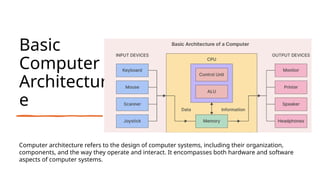
Computer architecture refers to the design of computer systems, including their organization,
components, and the way they operate and interact. It encompasses both hardware and software
aspects of computer systems.
Key components
and concepts of
computer
architecture:
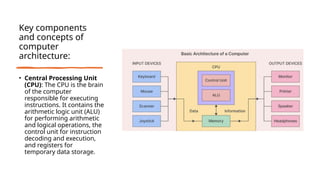
• Central Processing Unit
(CPU): The CPU is the brain
of the computer
responsible for executing
instructions. It contains the
arithmetic logic unit (ALU)
for performing arithmetic
and logical operations, the
control unit for instruction
decoding and execution,
and registers for
temporary data storage.
Key components
and concepts of
computer
architecture:
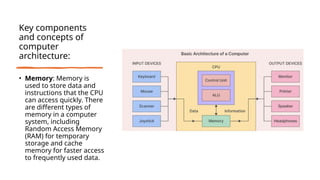
• Memory: Memory is
used to store data and
instructions that the CPU
can access quickly. There
are different types of
memory in a computer
system, including
Random Access Memory
(RAM) for temporary
storage and cache
memory for faster access
to frequently used data.
Key components
and concepts of
computer
architecture:
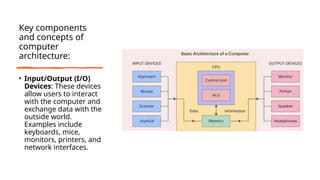
• Input/Output (I/O)
Devices: These devices
allow users to interact
with the computer and
exchange data with the
outside world.
Examples include
keyboards, mice,
monitors, printers, and
network interfaces.
Key components
and concepts of
computer
architecture:
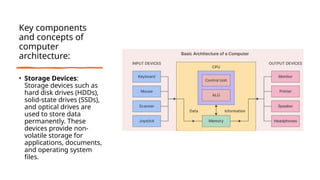
• Storage Devices:
Storage devices such as
hard disk drives (HDDs),
solid-state drives (SSDs),
and optical drives are
used to store data
permanently. These
devices provide non-
volatile storage for
applications, documents,
and operating system
files.
Key components
and concepts of
computer
architecture:
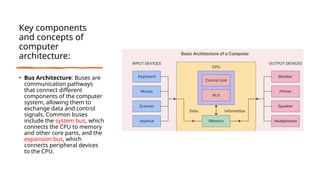
• Bus Architecture: Buses are
communication pathways
that connect different
components of the computer
system, allowing them to
exchange data and control
signals. Common buses
include the system bus, which
connects the CPU to memory
and other core parts, and the
expansion bus, which
connects peripheral devices
to the CPU.
Key components
and concepts of
computer
architecture:
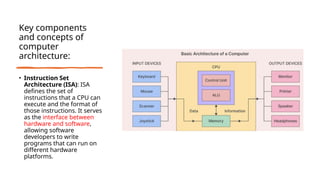
• Instruction Set
Architecture (ISA): ISA
defines the set of
instructions that a CPU can
execute and the format of
those instructions. It serves
as the interface between
hardware and software,
allowing software
developers to write
programs that can run on
different hardware
platforms.
Key components
and concepts of
computer
architecture:
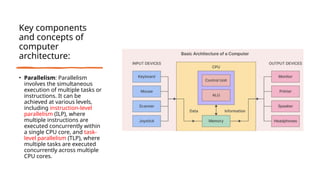
• Parallelism: Parallelism
involves the simultaneous
execution of multiple tasks or
instructions. It can be
achieved at various levels,
including instruction-level
parallelism (ILP), where
multiple instructions are
executed concurrently within
a single CPU core, and task-
level parallelism (TLP), where
multiple tasks are executed
concurrently across multiple
CPU cores.
Key components
and concepts of
computer
architecture:
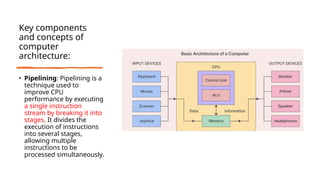
• Pipelining: Pipelining is a
technique used to
improve CPU
performance by executing
a single instruction
stream by breaking it into
stages. It divides the
execution of instructions
into several stages,
allowing multiple
instructions to be
processed simultaneously.
Key components
and concepts of
computer
architecture:
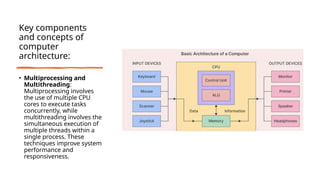
• Multiprocessing and
Multithreading:
Multiprocessing involves
the use of multiple CPU
cores to execute tasks
concurrently, while
multithreading involves the
simultaneous execution of
multiple threads within a
single process. These
techniques improve system
performance and
responsiveness.
Key components
and concepts of
computer
architecture:
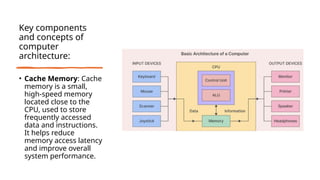
• Cache Memory: Cache
memory is a small,
high-speed memory
located close to the
CPU, used to store
frequently accessed
data and instructions.
It helps reduce
memory access latency
and improve overall
system performance.
Syllabus
• Evolution of processors. Harvard Versus Von-Neumann, RISC versus CISC, Register File,
General Instruction Types, Addressing Modes, and concept of pipelining and parallelism.
• Memory: Main memory Technologies (SRAM, DRAM), Cache memory organization,
improving cache performance. Input/Output Unit: access of I/O devices, I/O ports, and
I/O control mechanisms – Program Controlled I /O. Interrupt controlled I/O and DMA
controlled I/O
• 8086 Architecture, Register Organization, Memory segmentation, Pin configuration,
latching of address bus, Buffering of data bus. Minimum and Maximum mode
operations.
• 8086 INTERFACING Memory interfacing: RAM, EPROM IC Chips I/O interfacing: 8255 PPI,
8257 DMA interface interfacing programmable interval timers – 8253/8254
• Architecture of 8051, Pin configuration, built-in ROM & RAM organization, Stack
organization. Assembly language Programming with 8051: Instruction set, Data transfer,
Arithmetic, logical and branching instructions, Addressing modes.
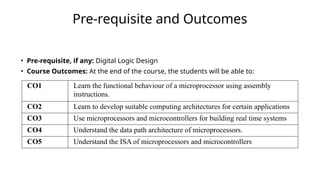
Pre-requisite and Outcomes
• Pre-requisite, if any: Digital Logic Design
• Course Outcomes: At the end of the course, the students will be able to:
CO1 Learn the functional behaviour of a microprocessor using assembly
instructions.
CO2 Learn to develop suitable computing architectures for certain applications
CO3 Use microprocessors and microcontrollers for building real time systems
CO4 Understand the data path architecture of microprocessors.
CO5 Understand the ISA of microprocessors and microcontrollers
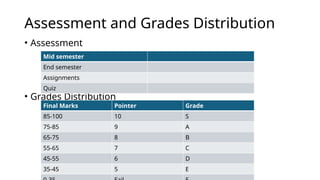
Assessment and Grades Distribution
• Assessment
• Grades Distribution
Mid semester
End semester
Assignments
Quiz
Final Marks Pointer Grade
85-100 10 S
75-85 9 A
65-75 8 B
55-65 7 C
45-55 6 D
35-45 5 E
Evolution of processors

Lecture 1 Microprocessor and Computer Architecture.pptx

  • 1.
    Microprocessors and Computer Architecture Dr.Sreenivasa Reddy Yeduri Assistant Professor Department of ECE IIITDM Kurnool
  • 2.
  • 3.
    Syllabus • Evolution ofprocessors. Harvard Versus Von-Neumann, RISC versus CISC, Register File, General Instruction Types, Addressing Modes, and concept of pipelining and parallelism. • Memory: Main memory Technologies (SRAM, DRAM), Cache memory organization, improving cache performance. Input/Output Unit: access of I/O devices, I/O ports, and I/O control mechanisms – Program Controlled I /O. Interrupt controlled I/O and DMA controlled I/O • 8086 Architecture, Register Organization, Memory segmentation, Pin configuration, latching of address bus, Buffering of data bus. Minimum and Maximum mode operations. • 8086 INTERFACING Memory interfacing: RAM, EPROM IC Chips I/O interfacing: 8255 PPI, 8257 DMA interface interfacing programmable interval timers – 8253/8254 • Architecture of 8051, Pin configuration, built-in ROM & RAM organization, Stack organization. Assembly language Programming with 8051: Instruction set, Data transfer, Arithmetic, logical and branching instructions, Addressing modes.
  • 4.
    Basic Computer Architectur e Computer architecture refersto the design of computer systems, including their organization, components, and the way they operate and interact. It encompasses both hardware and software aspects of computer systems.
  • 5.
    Key components and conceptsof computer architecture: • Central Processing Unit (CPU): The CPU is the brain of the computer responsible for executing instructions. It contains the arithmetic logic unit (ALU) for performing arithmetic and logical operations, the control unit for instruction decoding and execution, and registers for temporary data storage.
  • 6.
    Key components and conceptsof computer architecture: • Memory: Memory is used to store data and instructions that the CPU can access quickly. There are different types of memory in a computer system, including Random Access Memory (RAM) for temporary storage and cache memory for faster access to frequently used data.
  • 7.
    Key components and conceptsof computer architecture: • Input/Output (I/O) Devices: These devices allow users to interact with the computer and exchange data with the outside world. Examples include keyboards, mice, monitors, printers, and network interfaces.
  • 8.
    Key components and conceptsof computer architecture: • Storage Devices: Storage devices such as hard disk drives (HDDs), solid-state drives (SSDs), and optical drives are used to store data permanently. These devices provide non- volatile storage for applications, documents, and operating system files.
  • 9.
    Key components and conceptsof computer architecture: • Bus Architecture: Buses are communication pathways that connect different components of the computer system, allowing them to exchange data and control signals. Common buses include the system bus, which connects the CPU to memory and other core parts, and the expansion bus, which connects peripheral devices to the CPU.
  • 10.
    Key components and conceptsof computer architecture: • Instruction Set Architecture (ISA): ISA defines the set of instructions that a CPU can execute and the format of those instructions. It serves as the interface between hardware and software, allowing software developers to write programs that can run on different hardware platforms.
  • 11.
    Key components and conceptsof computer architecture: • Parallelism: Parallelism involves the simultaneous execution of multiple tasks or instructions. It can be achieved at various levels, including instruction-level parallelism (ILP), where multiple instructions are executed concurrently within a single CPU core, and task- level parallelism (TLP), where multiple tasks are executed concurrently across multiple CPU cores.
  • 12.
    Key components and conceptsof computer architecture: • Pipelining: Pipelining is a technique used to improve CPU performance by executing a single instruction stream by breaking it into stages. It divides the execution of instructions into several stages, allowing multiple instructions to be processed simultaneously.
  • 13.
    Key components and conceptsof computer architecture: • Multiprocessing and Multithreading: Multiprocessing involves the use of multiple CPU cores to execute tasks concurrently, while multithreading involves the simultaneous execution of multiple threads within a single process. These techniques improve system performance and responsiveness.
  • 14.
    Key components and conceptsof computer architecture: • Cache Memory: Cache memory is a small, high-speed memory located close to the CPU, used to store frequently accessed data and instructions. It helps reduce memory access latency and improve overall system performance.
  • 15.
    Syllabus • Evolution ofprocessors. Harvard Versus Von-Neumann, RISC versus CISC, Register File, General Instruction Types, Addressing Modes, and concept of pipelining and parallelism. • Memory: Main memory Technologies (SRAM, DRAM), Cache memory organization, improving cache performance. Input/Output Unit: access of I/O devices, I/O ports, and I/O control mechanisms – Program Controlled I /O. Interrupt controlled I/O and DMA controlled I/O • 8086 Architecture, Register Organization, Memory segmentation, Pin configuration, latching of address bus, Buffering of data bus. Minimum and Maximum mode operations. • 8086 INTERFACING Memory interfacing: RAM, EPROM IC Chips I/O interfacing: 8255 PPI, 8257 DMA interface interfacing programmable interval timers – 8253/8254 • Architecture of 8051, Pin configuration, built-in ROM & RAM organization, Stack organization. Assembly language Programming with 8051: Instruction set, Data transfer, Arithmetic, logical and branching instructions, Addressing modes.
  • 16.
    Pre-requisite and Outcomes •Pre-requisite, if any: Digital Logic Design • Course Outcomes: At the end of the course, the students will be able to: CO1 Learn the functional behaviour of a microprocessor using assembly instructions. CO2 Learn to develop suitable computing architectures for certain applications CO3 Use microprocessors and microcontrollers for building real time systems CO4 Understand the data path architecture of microprocessors. CO5 Understand the ISA of microprocessors and microcontrollers
  • 17.
    Assessment and GradesDistribution • Assessment • Grades Distribution Mid semester End semester Assignments Quiz Final Marks Pointer Grade 85-100 10 S 75-85 9 A 65-75 8 B 55-65 7 C 45-55 6 D 35-45 5 E
  • 18.