CHAPTER – 10
Animation
Amir Ibrahim
Nov-2021
●
What is Animation
●
Persistence of Vision
●
Types of Animation
●
The Process of 3D Animation
Topics
Animation
 The rapid display of a sequence of images of 2-D or 3-D artwork or model
positions in order to create an illusion of movement.
 Relies on persistence of vision to create the illusion of movement.
 In the early 1800’s, the phenomenon known as persistence of vision gave
mankind the first glimpse into the modern world of animation.
 Persistence of vision refers to the way our eyes retain images for a split
second longer than they actually appear, making a series of quick flashes
appear as one continuous picture.
Persistence of Vision
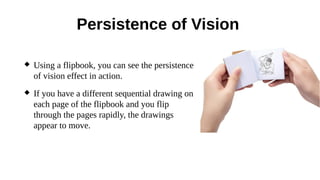
 Using a flipbook, you can see the persistence
of vision effect in action.
 If you have a different sequential drawing on
each page of the flipbook and you flip
through the pages rapidly, the drawings
appear to move.
Types of Animation
 Traditional animation (cel animation or hand-drawn animation)
 Stop motion animation (Claymation, Cut-outs)
 Motion Graphics (Typography, Animated logo)
 Computer animation
●
2D animation
●
3D animation
Types of Animation
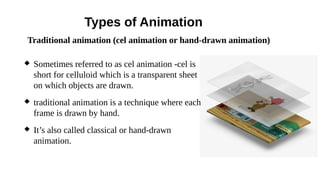
 Sometimes referred to as cel animation -cel is
short for celluloid which is a transparent sheet
on which objects are drawn.
 traditional animation is a technique where each
frame is drawn by hand.
 It’s also called classical or hand-drawn
animation.
Traditional animation (cel animation or hand-drawn animation)
Types of Animation
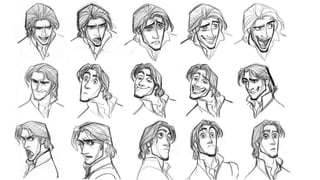
 The traditional approach is very fascinating for pencil lovers.
 The animation is drawn by hand for every frame, and each drawing is a
little bit different from the previous one.
 All the drawings are fed into plastic cells, filled with paint in the desired
colors, and are then photographed one-by-one into an animated sequence
on a painted background image.
Traditional animation (cel animation or hand-drawn animation)
Types of Animation
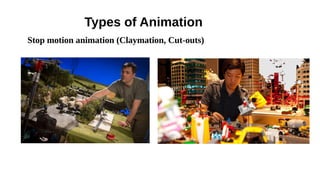
 Stop motion (also known as stop frame animation) is an animation
technique used to create animation sequences, by capturing one frame at a
time of any type of object that can be positioned and manipulated.
 The procedure is simple overall; just position an object in front of the
camera in its starting position, expose one frame of the film then slightly
move the object and expose a second frame.
 This process is repeated until the object reaches its final position.
 Finally, when frames are played in sequence, they give the viewer the
illusion of a moving object across the screen.
Stop motion animation (Claymation, Cut-outs)
Types of Animation
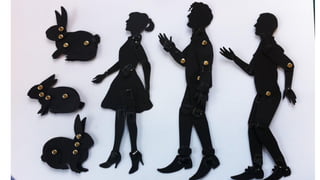
 Stop-motion animation techniques include
✔
object animation,
✔
clay animation,
✔
Lego animation,
✔
puppet animation,
✔
silhouette animation,
✔
pixilation and cutout animation.
Stop motion animation (Claymation, Cut-outs)
Types of Animation
Stop motion animation (Claymation, Cut-outs)
Types of Animation
 Motion Graphics means Graphics in Movement. Motion Graphics is
about bringing the design knowledge to new mediums by adding the
elements of time and space to it — i.e. creating movement.
 Unlike other animation fields, you don’t have a pre-defined or “natural”
way of animating things.
 But in Motion Design, there’s no natural reference to how shapes,
typography, and grids move. For this reason, motion designers study all
types of movements, acceleration, and speeds.
Motion Graphics (Typography, Animated logo)
Types of Animation
 Often thought of as traditional animation, 2D animation mostly works
with vector graphics through computer software, to create animated
images that could be used in advertisements, websites, films, or
computer games.
 The 2D animation process involves the creation of characters,
storyboards, and backgrounds in two-dimensional space.
 Objects in 2D animation move up, down, left and right, but they don’t
move towards or away from the camera, like in 3D animation.
 Most popular 2D animation software include Adobe Animate,
Photoshop, and After Effects.
2D Animation
Types of Animation
 3D animation the process of creating three-dimensional moving images
and placing them into a digital environment.
 These objects are generated in software designed specifically for 3D
animation.
 Such programs allow 3D Animators to create the illusion of movement
needed to bring objects to life.
 The process of giving movement and life to these objects is divided into
three main parts: modeling, layout and animation, and rendering.
3D Animation
The Process of 3D Animation
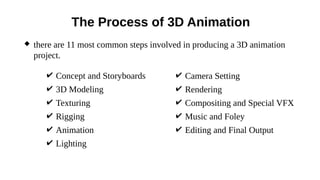
 there are 11 most common steps involved in producing a 3D animation
project.
✔ Concept and Storyboards
✔ 3D Modeling
✔ Texturing
✔ Rigging
✔ Animation
✔ Lighting
✔ Camera Setting
✔ Rendering
✔ Compositing and Special VFX
✔ Music and Foley
✔ Editing and Final Output
3D Modeling
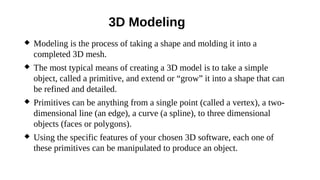
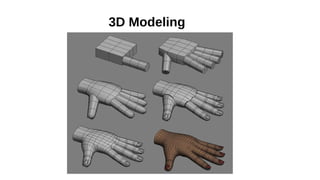
 Modeling is the process of taking a shape and molding it into a
completed 3D mesh.
 The most typical means of creating a 3D model is to take a simple
object, called a primitive, and extend or “grow” it into a shape that can
be refined and detailed.
 Primitives can be anything from a single point (called a vertex), a two-
dimensional line (an edge), a curve (a spline), to three dimensional
objects (faces or polygons).
 Using the specific features of your chosen 3D software, each one of
these primitives can be manipulated to produce an object.
3D Modeling
Texturing
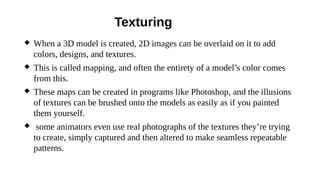
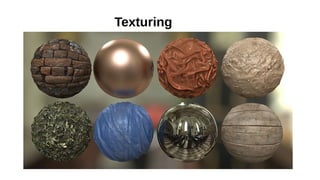
 When a 3D model is created, 2D images can be overlaid on it to add
colors, designs, and textures.
 This is called mapping, and often the entirety of a model’s color comes
from this.
 These maps can be created in programs like Photoshop, and the illusions
of textures can be brushed onto the models as easily as if you painted
them yourself.
 some animators even use real photographs of the textures they’re trying
to create, simply captured and then altered to make seamless repeatable
patterns.
Texturing
Rigging
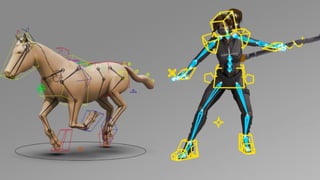
 We’ve got to put in those skeletons into a 3D character before he can
move.
 Setting up a character to walk and talk is the last stage before the process
of character animation can begin. This stage is called ‘rigging’ and is the
underlying system that drives the movement of a character to bring it to
life.
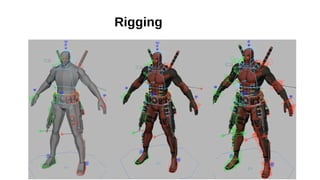
 Rigging is the process to setting up a controllable skeleton for the
character that is intended for animation.
 Depending on the subject matter, every rig is unique and so is the
corresponding set of controls.
Rigging
Animation
 Animation is the process of taking a 3D object and getting it to move.
 Animation comes in a few different flavors.
➢
keyframe animation: the animator manipulates the objects on a frame-
by-frame basis, similar to old hand-drawn cartoons.
➢
Path animation: include placing objects on splines and setting them to
follow the path of the curve, or importing motion capture data and
applying it to a character rig.
➢
physics animation :use your 3D application’s built-in physics engines,
such as when your scene requires that objects fall.
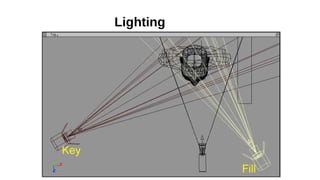
Lighting
 Lighting in a 3D world is just as essential as it is in real life.
 Lighting, (in combination with textures, camera angle etc.) is where a
scene has the potential to come alive. Used improperly, light can wash
out a scene, make objects appear hard or flat, and destroy all the hard
work.
 In 3D, lights don’t actually exist as they do in the real world.
 Lights in 3D are objects that are designed to simulate how lighting works
in real life, but in order to obtain the results you’re after, you have to
apply a number of settings, not only to the lights, but to the materials.
Lighting
Rendering
 3D rendering is the process of generating an image from a model by
means of computer software.
 the last step in the 3D production pipeline (but not the last step in the
overall production pipeline)
Compositing and Special FX
 This is where the final renders are brought into compositing programs to
edit, touch-up and add on special effects.
 Compositing includes everything from what you're probably normally
think of as special effects, where things explode, evaporate, morph, etc.
Music
 A music composer will create music soundtracks and accompaniment
music to set the mood for the animation.
Editing and final output
 This is where it all ends! This is where the composited renders, and
music are compiled and edited to ensure that everything is in
synchronization.
 Once satisfied, the compiled product is exported as one of the many
formats suitable for broadcasting standards and delivered to the client.
End of chapter - 10
Nov - 2021

CHAPTER – 10 Animation

  • 1.
  • 2.
    ● What is Animation ● Persistenceof Vision ● Types of Animation ● The Process of 3D Animation Topics
  • 3.
    Animation  The rapiddisplay of a sequence of images of 2-D or 3-D artwork or model positions in order to create an illusion of movement.  Relies on persistence of vision to create the illusion of movement.  In the early 1800’s, the phenomenon known as persistence of vision gave mankind the first glimpse into the modern world of animation.  Persistence of vision refers to the way our eyes retain images for a split second longer than they actually appear, making a series of quick flashes appear as one continuous picture.
  • 4.
    Persistence of Vision Using a flipbook, you can see the persistence of vision effect in action.  If you have a different sequential drawing on each page of the flipbook and you flip through the pages rapidly, the drawings appear to move.
  • 5.
    Types of Animation Traditional animation (cel animation or hand-drawn animation)  Stop motion animation (Claymation, Cut-outs)  Motion Graphics (Typography, Animated logo)  Computer animation ● 2D animation ● 3D animation
  • 6.
    Types of Animation Sometimes referred to as cel animation -cel is short for celluloid which is a transparent sheet on which objects are drawn.  traditional animation is a technique where each frame is drawn by hand.  It’s also called classical or hand-drawn animation. Traditional animation (cel animation or hand-drawn animation)
  • 7.
    Types of Animation The traditional approach is very fascinating for pencil lovers.  The animation is drawn by hand for every frame, and each drawing is a little bit different from the previous one.  All the drawings are fed into plastic cells, filled with paint in the desired colors, and are then photographed one-by-one into an animated sequence on a painted background image. Traditional animation (cel animation or hand-drawn animation)
  • 9.
    Types of Animation Stop motion (also known as stop frame animation) is an animation technique used to create animation sequences, by capturing one frame at a time of any type of object that can be positioned and manipulated.  The procedure is simple overall; just position an object in front of the camera in its starting position, expose one frame of the film then slightly move the object and expose a second frame.  This process is repeated until the object reaches its final position.  Finally, when frames are played in sequence, they give the viewer the illusion of a moving object across the screen. Stop motion animation (Claymation, Cut-outs)
  • 10.
    Types of Animation Stop-motion animation techniques include ✔ object animation, ✔ clay animation, ✔ Lego animation, ✔ puppet animation, ✔ silhouette animation, ✔ pixilation and cutout animation. Stop motion animation (Claymation, Cut-outs)
  • 11.
    Types of Animation Stopmotion animation (Claymation, Cut-outs)
  • 13.
    Types of Animation Motion Graphics means Graphics in Movement. Motion Graphics is about bringing the design knowledge to new mediums by adding the elements of time and space to it — i.e. creating movement.  Unlike other animation fields, you don’t have a pre-defined or “natural” way of animating things.  But in Motion Design, there’s no natural reference to how shapes, typography, and grids move. For this reason, motion designers study all types of movements, acceleration, and speeds. Motion Graphics (Typography, Animated logo)
  • 14.
    Types of Animation Often thought of as traditional animation, 2D animation mostly works with vector graphics through computer software, to create animated images that could be used in advertisements, websites, films, or computer games.  The 2D animation process involves the creation of characters, storyboards, and backgrounds in two-dimensional space.  Objects in 2D animation move up, down, left and right, but they don’t move towards or away from the camera, like in 3D animation.  Most popular 2D animation software include Adobe Animate, Photoshop, and After Effects. 2D Animation
  • 15.
    Types of Animation 3D animation the process of creating three-dimensional moving images and placing them into a digital environment.  These objects are generated in software designed specifically for 3D animation.  Such programs allow 3D Animators to create the illusion of movement needed to bring objects to life.  The process of giving movement and life to these objects is divided into three main parts: modeling, layout and animation, and rendering. 3D Animation
  • 17.
    The Process of3D Animation  there are 11 most common steps involved in producing a 3D animation project. ✔ Concept and Storyboards ✔ 3D Modeling ✔ Texturing ✔ Rigging ✔ Animation ✔ Lighting ✔ Camera Setting ✔ Rendering ✔ Compositing and Special VFX ✔ Music and Foley ✔ Editing and Final Output
  • 18.
    3D Modeling  Modelingis the process of taking a shape and molding it into a completed 3D mesh.  The most typical means of creating a 3D model is to take a simple object, called a primitive, and extend or “grow” it into a shape that can be refined and detailed.  Primitives can be anything from a single point (called a vertex), a two- dimensional line (an edge), a curve (a spline), to three dimensional objects (faces or polygons).  Using the specific features of your chosen 3D software, each one of these primitives can be manipulated to produce an object.
  • 19.
  • 20.
    Texturing  When a3D model is created, 2D images can be overlaid on it to add colors, designs, and textures.  This is called mapping, and often the entirety of a model’s color comes from this.  These maps can be created in programs like Photoshop, and the illusions of textures can be brushed onto the models as easily as if you painted them yourself.  some animators even use real photographs of the textures they’re trying to create, simply captured and then altered to make seamless repeatable patterns.
  • 21.
  • 22.
    Rigging  We’ve gotto put in those skeletons into a 3D character before he can move.  Setting up a character to walk and talk is the last stage before the process of character animation can begin. This stage is called ‘rigging’ and is the underlying system that drives the movement of a character to bring it to life.  Rigging is the process to setting up a controllable skeleton for the character that is intended for animation.  Depending on the subject matter, every rig is unique and so is the corresponding set of controls.
  • 23.
  • 24.
    Animation  Animation isthe process of taking a 3D object and getting it to move.  Animation comes in a few different flavors. ➢ keyframe animation: the animator manipulates the objects on a frame- by-frame basis, similar to old hand-drawn cartoons. ➢ Path animation: include placing objects on splines and setting them to follow the path of the curve, or importing motion capture data and applying it to a character rig. ➢ physics animation :use your 3D application’s built-in physics engines, such as when your scene requires that objects fall.
  • 25.
    Lighting  Lighting ina 3D world is just as essential as it is in real life.  Lighting, (in combination with textures, camera angle etc.) is where a scene has the potential to come alive. Used improperly, light can wash out a scene, make objects appear hard or flat, and destroy all the hard work.  In 3D, lights don’t actually exist as they do in the real world.  Lights in 3D are objects that are designed to simulate how lighting works in real life, but in order to obtain the results you’re after, you have to apply a number of settings, not only to the lights, but to the materials.
  • 26.
  • 27.
    Rendering  3D renderingis the process of generating an image from a model by means of computer software.  the last step in the 3D production pipeline (but not the last step in the overall production pipeline) Compositing and Special FX  This is where the final renders are brought into compositing programs to edit, touch-up and add on special effects.  Compositing includes everything from what you're probably normally think of as special effects, where things explode, evaporate, morph, etc.
  • 28.
    Music  A musiccomposer will create music soundtracks and accompaniment music to set the mood for the animation. Editing and final output  This is where it all ends! This is where the composited renders, and music are compiled and edited to ensure that everything is in synchronization.  Once satisfied, the compiled product is exported as one of the many formats suitable for broadcasting standards and delivered to the client.
  • 29.
    End of chapter- 10 Nov - 2021