CHAPTER – 2
Colors
Amir Ibrahim
Nov-2021
●
What is color?
●
The Color Wheel.
●
Hue, Saturation, Value
●
Tints, Tones, Shades
●
Color Standards(Mode)
●
Color Harmony
●
color codes
Topics
➢
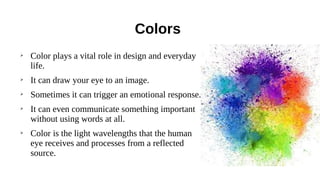
Color plays a vital role in design and everyday
life.
➢
It can draw your eye to an image.
➢
Sometimes it can trigger an emotional response.
➢
It can even communicate something important
without using words at all.
➢
Color is the light wavelengths that the human
eye receives and processes from a reflected
source.
Colors
The Color Wheel
Primary Colors: Red, yellow and blue
●
In traditional color theory (used in paint and pigments).
●
The 3 pigment colors that cannot be mixed or formed by any combination of
other colors.
●
All other colors are derived from these 3 hues.
Secondary Colors: Green, orange and purple
●
These are the colors formed by mixing the primary colors.
●
Red and yellow make orange; yellow and blue make green; and blue and
red make purple.
Tertiary Colors: Yellow-orange, red-orange, red-purple, blue-purple, blue-green &
yellow-green
●
These are the colors formed by mixing a primary and a secondary color.
●
That's why the hue is a two word name, such as blue-green, red-violet, and
yellow-orange.
Hue, Saturation, Value:
The Color Wheel
Hue, Saturation, Value
What Is Hue?
●
Hue refers to the origin of the colors we can see.
●
Primary and Secondary colors (Yellow, Orange, Red, Violet, Blue, and Green) are
considered hues; however, tertiary colors (mixed colors where neither color is
dominant) would also be considered hues.
●
It essentially refers to a color having full saturation.
●
When you refer to hue, you are referring to pure color, or the visible spectrum of
basic colors that can be seen in a rainbow.
Hue, Saturation, Value
What Is Saturation?
●
Color saturation is the purity and intensity of a color as displayed in an image.
●
The higher the saturation of a color, the more vivid and intense it is.
●
The lower a color’s saturation, or chroma, the closer it is to pure gray on the gray
scale
●
When a pigment hue is “toned,” both white and black (grey) are added to the color
to reduce the color’s saturation.
●
Saturation refers to intensity—in other words, whether the color appears more subtle
or more vibrant.
●
Highly saturated colors are brighter or richer. Desaturated colors have less pigment
and therefore less oomph.
Hue, Saturation, Value
What Is Color Value?
●
refers to the lightness or darkness of a color.
●
It indicates the quantity of light reflected.
●
dark values with black added are called “shades” of the given hue name.
●
Light values with white pigment added are called “tints” of the hue name
●
We perceive color value based on the quantity of light reflected off of a surface and
absorbed by the human eye.
●
We refer to the intensity of the light that reaches the eye as “luminance.”
Tints, Tones, Shades
●
Tint : refers to any hue or mixture of
pure colors to which white is added.
●
Shade : is a hue or mixture of pure colors
to which only black is added.
●
Tone : is a hue or mixture of pure colors
to which only pure gray is added (equal
amounts of black and white).
Color Standards(Mode)
RGB / CMYK/ Pantone color
RGB
●
RGB (Red, Green and Blue) is the color space for digital images.
●
Use the RGB color mode if your design is supposed to be displayed on any kind of
screen.
●
A light source within a device creates any color you need by mixing red, green and
blue and varying their intensity.
●
This is known as additive mixing: all colors begin as black darkness and then red,
green and blue light is added on top of each other to brighten it and create the
perfect pigment.
●
When red, green and blue light is mixed together at equal intensity, they create pure
white.
●
Designers can control aspects like saturation, vibrancy and shading by modifying
any of the three source colors. Because it’s done digitally
Magenta Cyan
Magenta
yellow
Color Standards(Mode) :
RGB / CMYK/ Pantone color
When to use RGB?
●
If the end destination of your design project is a digital screen, use the RGB color
mode.
●
This would go for anything that involves computers, smartphones, tablets, TVs,
cameras, etc.
●
Turn to RGB if your design project involves
– web & app design(icons, buttons, graphics)
– branding(online logos, online ads)
– social media(images for posts, profile pictures, profile backgrounds)
– visual content(video, digital graphics, infographics, photographs for website,
social media, or apps)
Color Standards(Mode) :
RGB / CMYK/ Pantone color
What are the best file formats for RGB?
●
JPEGs are ideal for RGB files because they’re a nice middle-ground between file
size and quality, and they’re readable almost anywhere.
●
PSD is the standard source file for RGB documents, assuming all team members are
working with Adobe Photoshop.
●
PNGs support transparency and are better for graphics that need to be superimposed
over others. Consider this file type for interface elements like buttons, icons or
banners.
●
GIFs capture motion, so if you’re using an animated element, such as a moving
logo or a bouncing icon, this file type would be ideal.
Color Standards(Mode) :
RGB / CMYK/ Pantone color
CMYK
●
CMYK (Cyan, Magenta, Yellow, Key/Black) is the color space for printed materials.
●
A printing machine creates images by combining CMYK colors to varying degrees
with physical ink.
●
This is known as subtractive mixing.
●
All colors start as blank white, and each layer of ink reduces the initial brightness to
create the preferred color.
●
When all colors are mixed together, they create pure black.
Color Standards(Mode) :
RGB / CMYK/ Pantone color
When to use CMYK?
●
Use CMYK for any project design that will be physically printed, not viewed on a
screen.
●
If you need to recreate your design with ink or paint, the CMYK color mode will
give you more accurate results.
●
Turn to CMYK if your project involves:
– Branding(business cards, stationary, stickers, signs & storefronts)
– Advertising(billboards, posters, flyers, vehicle wraps,brochures)
– Merchandise(t-shirts, hats and other branded clothing,promotional swag (pens,
mugs, etc.)
– Essential materials(product packaging, restaurant menus)
Color Standards(Mode) :
RGB / CMYK/ Pantone color
What are the best file formats for CMYK?
●
PDFs are ideal for CMYK files, because they are compatible with most programs.
●
AI is the standard source file for CMYK, assuming all team members are working
with Adobe Illustrator.
●
EPS can be a great source file alternative to AI because it is compatible with other
vector programs.
Color Standards(Mode) :
RGB / CMYK/ Pantone color
Phantom Colors
●
Pantone colors are vibrant and solid, which makes them perfect for logo designing.
●
Pantone offers true solid color which gives the flexibility to convert them into RGB
or CMYK, as needed.
●
This saves precious time and money. The best part is that colors will appear the
same in print form as they do on screen.
Color
and
Emotion
Color Harmony
●
In color theory, color harmony refers to the property that certain aesthetically
pleasing color combinations have.
●
These combinations create pleasing contrasts and consonances that are said to be
harmonious.
Common types of harmony
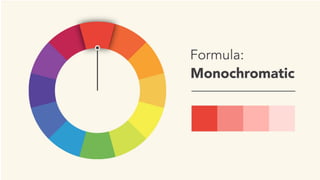
Monochromatic
●
The easiest formula for harmony is monochromatic because it only uses one
color or hue.
●
To create a monochromatic color scheme, pick a spot on the color wheel, then
use your knowledge of saturation and value to create variations.
●
The best thing about monochromatic color schemes is that they're guaranteed to
match.
●
The colors suit each other perfectly because they're all from the same family.
common types of harmony
Analogous
●
An analogous color scheme uses colors that are next to each other on the wheel,
like reds and oranges or blues and greens.
common types of harmony
Complementary
●
Complementary colors are opposite each other on the wheel; for instance, blue and
orange or the classic red and green.
common types of harmony
Split-complementary
●
A split-complementary color scheme uses the colors on either side of the
complement.
common types of harmony
Tetradic
●
Tetradic color schemes form a rectangle on the wheel, using not one but two
complementary color pairs.
●
This formula works best if you let one color dominate while the others serve as
an accent.
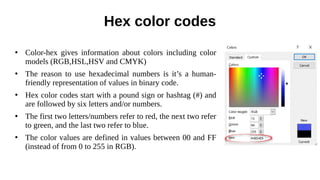
Hex color codes
●
Color-hex gives information about colors including color
models (RGB,HSL,HSV and CMYK)
●
The reason to use hexadecimal numbers is it’s a human-
friendly representation of values in binary code.
●
Hex color codes start with a pound sign or hashtag (#) and
are followed by six letters and/or numbers.
●
The first two letters/numbers refer to red, the next two refer
to green, and the last two refer to blue.
●
The color values are defined in values between 00 and FF
(instead of from 0 to 255 in RGB).
Hex color codes
●
Numbers are used when the value is 1-9. Letters are used when the value is higher
than 9.
A=10
B=11
C=12
D=13
E=14
F=15
Hex color codes
How to convert from decimal to hex
Conversion steps:
●
Divide the number by 16.
●
Get the integer quotient for the next iteration.
●
Get the remainder for the hex digit.
●
Repeat the steps until the quotient is equal to 0.
How to convert from hex to decimal
●
Multiply each digit of the hex number with its corresponding
power of 16 and sum:
Hex color codes
End of chapter - 2
Nov - 2021

CHAPTER – 2 Colors

  • 1.
    CHAPTER – 2 Colors AmirIbrahim Nov-2021
  • 2.
    ● What is color? ● TheColor Wheel. ● Hue, Saturation, Value ● Tints, Tones, Shades ● Color Standards(Mode) ● Color Harmony ● color codes Topics
  • 3.
    ➢ Color plays avital role in design and everyday life. ➢ It can draw your eye to an image. ➢ Sometimes it can trigger an emotional response. ➢ It can even communicate something important without using words at all. ➢ Color is the light wavelengths that the human eye receives and processes from a reflected source. Colors
  • 4.
    The Color Wheel PrimaryColors: Red, yellow and blue ● In traditional color theory (used in paint and pigments). ● The 3 pigment colors that cannot be mixed or formed by any combination of other colors. ● All other colors are derived from these 3 hues.
  • 5.
    Secondary Colors: Green,orange and purple ● These are the colors formed by mixing the primary colors. ● Red and yellow make orange; yellow and blue make green; and blue and red make purple. Tertiary Colors: Yellow-orange, red-orange, red-purple, blue-purple, blue-green & yellow-green ● These are the colors formed by mixing a primary and a secondary color. ● That's why the hue is a two word name, such as blue-green, red-violet, and yellow-orange. Hue, Saturation, Value: The Color Wheel
  • 6.
    Hue, Saturation, Value WhatIs Hue? ● Hue refers to the origin of the colors we can see. ● Primary and Secondary colors (Yellow, Orange, Red, Violet, Blue, and Green) are considered hues; however, tertiary colors (mixed colors where neither color is dominant) would also be considered hues. ● It essentially refers to a color having full saturation. ● When you refer to hue, you are referring to pure color, or the visible spectrum of basic colors that can be seen in a rainbow.
  • 8.
    Hue, Saturation, Value WhatIs Saturation? ● Color saturation is the purity and intensity of a color as displayed in an image. ● The higher the saturation of a color, the more vivid and intense it is. ● The lower a color’s saturation, or chroma, the closer it is to pure gray on the gray scale ● When a pigment hue is “toned,” both white and black (grey) are added to the color to reduce the color’s saturation. ● Saturation refers to intensity—in other words, whether the color appears more subtle or more vibrant. ● Highly saturated colors are brighter or richer. Desaturated colors have less pigment and therefore less oomph.
  • 10.
    Hue, Saturation, Value WhatIs Color Value? ● refers to the lightness or darkness of a color. ● It indicates the quantity of light reflected. ● dark values with black added are called “shades” of the given hue name. ● Light values with white pigment added are called “tints” of the hue name ● We perceive color value based on the quantity of light reflected off of a surface and absorbed by the human eye. ● We refer to the intensity of the light that reaches the eye as “luminance.”
  • 12.
    Tints, Tones, Shades ● Tint: refers to any hue or mixture of pure colors to which white is added. ● Shade : is a hue or mixture of pure colors to which only black is added. ● Tone : is a hue or mixture of pure colors to which only pure gray is added (equal amounts of black and white).
  • 13.
    Color Standards(Mode) RGB /CMYK/ Pantone color RGB ● RGB (Red, Green and Blue) is the color space for digital images. ● Use the RGB color mode if your design is supposed to be displayed on any kind of screen. ● A light source within a device creates any color you need by mixing red, green and blue and varying their intensity. ● This is known as additive mixing: all colors begin as black darkness and then red, green and blue light is added on top of each other to brighten it and create the perfect pigment. ● When red, green and blue light is mixed together at equal intensity, they create pure white. ● Designers can control aspects like saturation, vibrancy and shading by modifying any of the three source colors. Because it’s done digitally
  • 14.
  • 15.
    Color Standards(Mode) : RGB/ CMYK/ Pantone color When to use RGB? ● If the end destination of your design project is a digital screen, use the RGB color mode. ● This would go for anything that involves computers, smartphones, tablets, TVs, cameras, etc. ● Turn to RGB if your design project involves – web & app design(icons, buttons, graphics) – branding(online logos, online ads) – social media(images for posts, profile pictures, profile backgrounds) – visual content(video, digital graphics, infographics, photographs for website, social media, or apps)
  • 16.
    Color Standards(Mode) : RGB/ CMYK/ Pantone color What are the best file formats for RGB? ● JPEGs are ideal for RGB files because they’re a nice middle-ground between file size and quality, and they’re readable almost anywhere. ● PSD is the standard source file for RGB documents, assuming all team members are working with Adobe Photoshop. ● PNGs support transparency and are better for graphics that need to be superimposed over others. Consider this file type for interface elements like buttons, icons or banners. ● GIFs capture motion, so if you’re using an animated element, such as a moving logo or a bouncing icon, this file type would be ideal.
  • 17.
    Color Standards(Mode) : RGB/ CMYK/ Pantone color CMYK ● CMYK (Cyan, Magenta, Yellow, Key/Black) is the color space for printed materials. ● A printing machine creates images by combining CMYK colors to varying degrees with physical ink. ● This is known as subtractive mixing. ● All colors start as blank white, and each layer of ink reduces the initial brightness to create the preferred color. ● When all colors are mixed together, they create pure black.
  • 19.
    Color Standards(Mode) : RGB/ CMYK/ Pantone color When to use CMYK? ● Use CMYK for any project design that will be physically printed, not viewed on a screen. ● If you need to recreate your design with ink or paint, the CMYK color mode will give you more accurate results. ● Turn to CMYK if your project involves: – Branding(business cards, stationary, stickers, signs & storefronts) – Advertising(billboards, posters, flyers, vehicle wraps,brochures) – Merchandise(t-shirts, hats and other branded clothing,promotional swag (pens, mugs, etc.) – Essential materials(product packaging, restaurant menus)
  • 20.
    Color Standards(Mode) : RGB/ CMYK/ Pantone color What are the best file formats for CMYK? ● PDFs are ideal for CMYK files, because they are compatible with most programs. ● AI is the standard source file for CMYK, assuming all team members are working with Adobe Illustrator. ● EPS can be a great source file alternative to AI because it is compatible with other vector programs.
  • 21.
    Color Standards(Mode) : RGB/ CMYK/ Pantone color Phantom Colors ● Pantone colors are vibrant and solid, which makes them perfect for logo designing. ● Pantone offers true solid color which gives the flexibility to convert them into RGB or CMYK, as needed. ● This saves precious time and money. The best part is that colors will appear the same in print form as they do on screen.
  • 23.
  • 24.
    Color Harmony ● In colortheory, color harmony refers to the property that certain aesthetically pleasing color combinations have. ● These combinations create pleasing contrasts and consonances that are said to be harmonious.
  • 25.
    Common types ofharmony Monochromatic ● The easiest formula for harmony is monochromatic because it only uses one color or hue. ● To create a monochromatic color scheme, pick a spot on the color wheel, then use your knowledge of saturation and value to create variations. ● The best thing about monochromatic color schemes is that they're guaranteed to match. ● The colors suit each other perfectly because they're all from the same family.
  • 27.
    common types ofharmony Analogous ● An analogous color scheme uses colors that are next to each other on the wheel, like reds and oranges or blues and greens.
  • 29.
    common types ofharmony Complementary ● Complementary colors are opposite each other on the wheel; for instance, blue and orange or the classic red and green.
  • 31.
    common types ofharmony Split-complementary ● A split-complementary color scheme uses the colors on either side of the complement.
  • 33.
    common types ofharmony Tetradic ● Tetradic color schemes form a rectangle on the wheel, using not one but two complementary color pairs. ● This formula works best if you let one color dominate while the others serve as an accent.
  • 35.
    Hex color codes ● Color-hexgives information about colors including color models (RGB,HSL,HSV and CMYK) ● The reason to use hexadecimal numbers is it’s a human- friendly representation of values in binary code. ● Hex color codes start with a pound sign or hashtag (#) and are followed by six letters and/or numbers. ● The first two letters/numbers refer to red, the next two refer to green, and the last two refer to blue. ● The color values are defined in values between 00 and FF (instead of from 0 to 255 in RGB).
  • 36.
    Hex color codes ● Numbersare used when the value is 1-9. Letters are used when the value is higher than 9. A=10 B=11 C=12 D=13 E=14 F=15
  • 37.
    Hex color codes Howto convert from decimal to hex Conversion steps: ● Divide the number by 16. ● Get the integer quotient for the next iteration. ● Get the remainder for the hex digit. ● Repeat the steps until the quotient is equal to 0. How to convert from hex to decimal ● Multiply each digit of the hex number with its corresponding power of 16 and sum:
  • 38.
  • 39.
    End of chapter- 2 Nov - 2021