CHAPTER – 6
Video
Amir Ibrahim
Nov-2021
●
What is Video?
●
Calculating video file size
●
Codecs
●
Container formats
●
Aspect Ratio
●
Video editing softwares
Topics
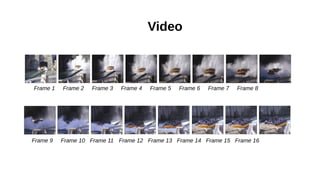
➢ Video is a collection of bit-mapped still images (called frames) that are
taken one after the other.
➢ When the file is played, these pictures are shown in quick succession to
give the impression of a moving image.
➢ The number of frames is called the frame rate and this is measured in
FPS (Frames per Second). The standard rate is 25 FPS.
Video
Video
Frame 1 Frame 2 Frame 3 Frame 4 Frame 5 Frame 6 Frame 7 Frame 8
Frame 9 Frame 10 Frame 11 Frame 12 Frame 13 Frame 14 Frame 15 Frame 16
➢ The bit-rate is the number of bits that are sent in one second when
transmitting a video file.
➢ If the data cannot be sent quickly enough then the video will not be
able to display in real-time.
➢ The resolution is the number of pixels in a given area, measured in
dpi.
➢ The size of code used to represent the colour of each pixel in a frame
will also affect the file size and picture quality. As with still images
this is called the bit-depth or colour depth.
Video
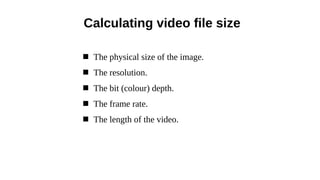
 The physical size of the image.
 The resolution.
 The bit (colour) depth.
 The frame rate.
 The length of the video.
Calculating video file size
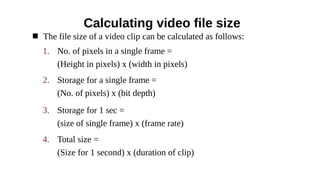
 The file size of a video clip can be calculated as follows:
Calculating video file size
1. No. of pixels in a single frame =
(Height in pixels) x (width in pixels)
2. Storage for a single frame =
(No. of pixels) x (bit depth)
3. Storage for 1 sec =
(size of single frame) x (frame rate)
4. Total size =
(Size for 1 second) x (duration of clip)
 Example
Calculating video file size
➢ What is the uncompressed file size of a 30 second video clip,
taken at 25 frames per second(fps). The resolution is 640 x
480 and the video was shot in 24-bit colour.
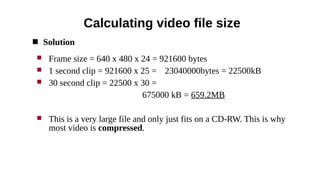
 Solution
Calculating video file size
 Frame size = 640 x 480 x 24 = 921600 bytes
 1 second clip = 921600 x 25 = 23040000bytes = 22500kB
 30 second clip = 22500 x 30 =
675000 kB = 659.2MB
 This is a very large file and only just fits on a CD-RW. This is why
most video is compressed.
Compression/Decompression(Codec)
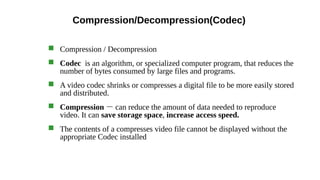
 Compression / Decompression
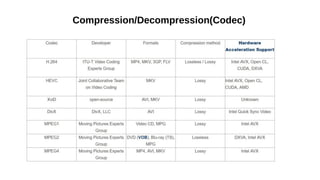
 Codec is an algorithm, or specialized computer program, that reduces the
number of bytes consumed by large files and programs.
 A video codec shrinks or compresses a digital file to be more easily stored
and distributed.
 Compression - can reduce the amount of data needed to reproduce
video. It can save storage space, increase access speed.
 The contents of a compresses video file cannot be displayed without the
appropriate Codec installed
Compression/Decompression(Codec)
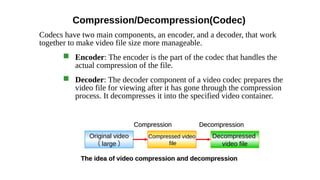
Codecs have two main components, an encoder, and a decoder, that work
together to make video file size more manageable.
 Encoder: The encoder is the part of the codec that handles the
actual compression of the file.
 Decoder: The decoder component of a video codec prepares the
video file for viewing after it has gone through the compression
process. It decompresses it into the specified video container.
Original video
( large )
Compressed video
file
Decompressed
video file
The idea of video compression and decompression
Decompression
Decompression
Compression
Compression
Compression/Decompression(Codec)
 Video codecs can be broadly split into two types:
✔ Frame-based codecs : compression takes place on each individual
frames of a video
✔ Temporal (or field-based) codecs: compression applies on a series of
frames , it takes advantages of areas of the image remain unchanged
from frame to frame.
Container formats
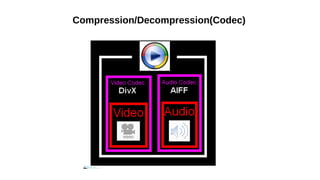
 a video container format stores the video codec, audio codec, and
metadata such as subtitles or preview images.
 The container holds all the components together and determines which
programs can accept the stream.
 This basically means that they contain codec compressed video and
audio in one easy to play file.
 Example : MP4, AVI, FLV, MOV, MKV, TS, OGG, WMV
Compression/Decompression(Codec)
Aspect Ratios
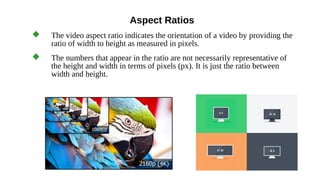
 The video aspect ratio indicates the orientation of a video by providing the
ratio of width to height as measured in pixels.
 The numbers that appear in the ratio are not necessarily representative of
the height and width in terms of pixels (px). It is just the ratio between
width and height.
Video editing softwares
Adobe Premiere Pro CyberLink PowerDirector Apple Final Cut Pro X
End of chapter - 6
Nov - 2021

CHAPTER – 6 Video

  • 1.
    CHAPTER – 6 Video AmirIbrahim Nov-2021
  • 2.
    ● What is Video? ● Calculatingvideo file size ● Codecs ● Container formats ● Aspect Ratio ● Video editing softwares Topics
  • 3.
    ➢ Video isa collection of bit-mapped still images (called frames) that are taken one after the other. ➢ When the file is played, these pictures are shown in quick succession to give the impression of a moving image. ➢ The number of frames is called the frame rate and this is measured in FPS (Frames per Second). The standard rate is 25 FPS. Video
  • 4.
    Video Frame 1 Frame2 Frame 3 Frame 4 Frame 5 Frame 6 Frame 7 Frame 8 Frame 9 Frame 10 Frame 11 Frame 12 Frame 13 Frame 14 Frame 15 Frame 16
  • 5.
    ➢ The bit-rateis the number of bits that are sent in one second when transmitting a video file. ➢ If the data cannot be sent quickly enough then the video will not be able to display in real-time. ➢ The resolution is the number of pixels in a given area, measured in dpi. ➢ The size of code used to represent the colour of each pixel in a frame will also affect the file size and picture quality. As with still images this is called the bit-depth or colour depth. Video
  • 6.
     The physicalsize of the image.  The resolution.  The bit (colour) depth.  The frame rate.  The length of the video. Calculating video file size
  • 7.
     The filesize of a video clip can be calculated as follows: Calculating video file size 1. No. of pixels in a single frame = (Height in pixels) x (width in pixels) 2. Storage for a single frame = (No. of pixels) x (bit depth) 3. Storage for 1 sec = (size of single frame) x (frame rate) 4. Total size = (Size for 1 second) x (duration of clip)
  • 8.
     Example Calculating videofile size ➢ What is the uncompressed file size of a 30 second video clip, taken at 25 frames per second(fps). The resolution is 640 x 480 and the video was shot in 24-bit colour.
  • 9.
     Solution Calculating videofile size  Frame size = 640 x 480 x 24 = 921600 bytes  1 second clip = 921600 x 25 = 23040000bytes = 22500kB  30 second clip = 22500 x 30 = 675000 kB = 659.2MB  This is a very large file and only just fits on a CD-RW. This is why most video is compressed.
  • 10.
    Compression/Decompression(Codec)  Compression /Decompression  Codec is an algorithm, or specialized computer program, that reduces the number of bytes consumed by large files and programs.  A video codec shrinks or compresses a digital file to be more easily stored and distributed.  Compression - can reduce the amount of data needed to reproduce video. It can save storage space, increase access speed.  The contents of a compresses video file cannot be displayed without the appropriate Codec installed
  • 11.
    Compression/Decompression(Codec) Codecs have twomain components, an encoder, and a decoder, that work together to make video file size more manageable.  Encoder: The encoder is the part of the codec that handles the actual compression of the file.  Decoder: The decoder component of a video codec prepares the video file for viewing after it has gone through the compression process. It decompresses it into the specified video container. Original video ( large ) Compressed video file Decompressed video file The idea of video compression and decompression The idea of video compression and decompression Decompression Decompression Compression Compression
  • 12.
    Compression/Decompression(Codec)  Video codecscan be broadly split into two types: ✔ Frame-based codecs : compression takes place on each individual frames of a video ✔ Temporal (or field-based) codecs: compression applies on a series of frames , it takes advantages of areas of the image remain unchanged from frame to frame.
  • 13.
    Container formats  avideo container format stores the video codec, audio codec, and metadata such as subtitles or preview images.  The container holds all the components together and determines which programs can accept the stream.  This basically means that they contain codec compressed video and audio in one easy to play file.  Example : MP4, AVI, FLV, MOV, MKV, TS, OGG, WMV
  • 14.
  • 15.
  • 16.
    Aspect Ratios  Thevideo aspect ratio indicates the orientation of a video by providing the ratio of width to height as measured in pixels.  The numbers that appear in the ratio are not necessarily representative of the height and width in terms of pixels (px). It is just the ratio between width and height.
  • 17.
    Video editing softwares AdobePremiere Pro CyberLink PowerDirector Apple Final Cut Pro X
  • 18.
    End of chapter- 6 Nov - 2021