Database
Microsoft
Access 2016
Databases
In this Information Age, we are surrounded
by huge amount of data.
To use this data effectively, it must be
stored in such a way that it can be retrieved
and interpreted with flexibility and
efficiency.
A database is a file composed of records
concerning a certain topic or business
application, each containing fields together
with a set of operations for searching,
sorting, recombining, and other functions.
Databases help organize related information
in a logical fashion for easy access and
retrieval.
Databases aren’t only for computers. There
are also manual databases; we simply refer
to these as manual filing systems or manual
database systems.
Database management system is a software
interface between a database and a user.
A database management system handles user
requests for database actions and allows for
control of security and data integrity
requirements.
Getting Familiar with Microsoft
Access 2016 for Windows
Microsoft Office Access 2016 is a
database software package and one of
the best database management systems
that can be used for all information
management.
It provides tools not only for storing,
retrieving, and manipulating data, but
also for creating useful forms and
reports, and sharing your database with
others.
Getting Started with Access 2016
1. Click the Start button on taskbar
2. Point to All Programs, click Microsoft
Office
3. Click Microsoft Office Access 2016
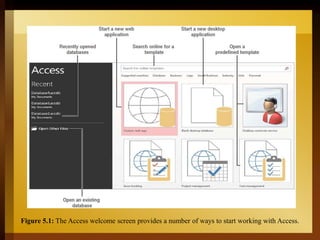
Figure 5.1: The Access welcome screen provides a number of ways to start working with Access.
Start a new database with:
• Access Templates
• New Blank database
• Microsoft Office Online
• Recently used database
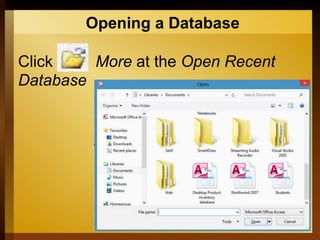
Opening a Database
Click More at the Open Recent
Database
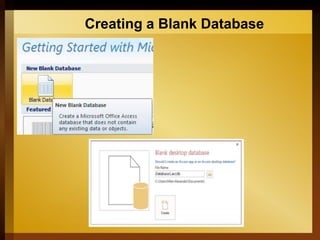
Creating a Blank Database
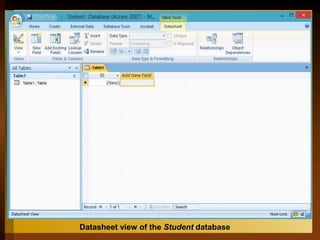
Datasheet view of the Student database
What is a Datasheet?
In Access, datasheet displays the
information stored in a table in columns
and rows.
You can use a datasheet to create a
table, enter data, retrieve data, and
perform other tasks.
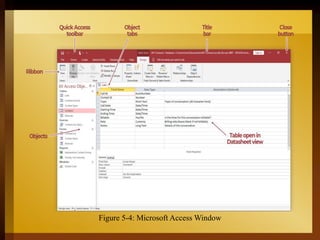
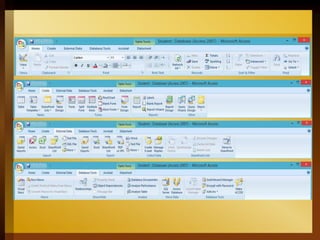
Figure 5-4: Microsoft Access Window
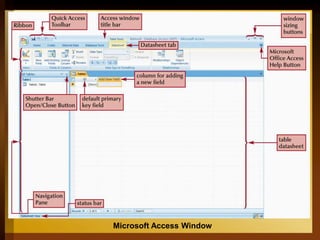
Microsoft Access Window
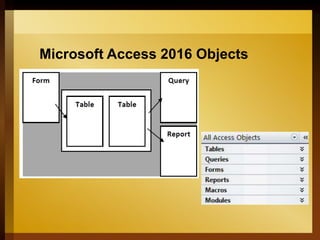
Microsoft Access 2016 Objects
Tables
Tables serve as the primary data repository
in an Access database.
Access tables store data in a variety of
forms, from simple lines of text to complex
data such as pictures, sounds, or video
images.
Access is a relational database
management system (RDBMS) that
stores data in related tables.
For instance, a table containing
employee data (names and addresses)
may be related to a table containing
payroll data (pay date, pay amount, and
check number).
After Access creates a blank database, it opens in
Datasheet view.
When you view a blank database for the first time in
Datasheet view, you see a column named ID.
This column is by default the primary key field.
A primary key is a field or combination of fields that
uniquely identify each record in a table.
• No two records in a table should have the same
values in every field.
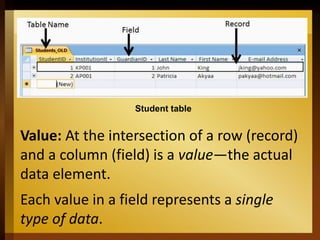
Student table
Value: At the intersection of a row (record)
and a column (field) is a value—the actual
data element.
Each value in a field represents a single
type of data.
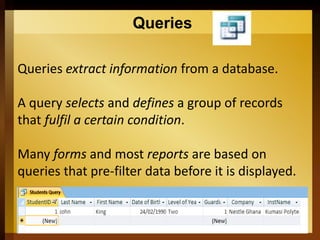
Queries
Queries extract information from a database.
A query selects and defines a group of records
that fulfil a certain condition.
Many forms and most reports are based on
queries that pre-filter data before it is displayed.
Forms
Forms help users get information into a
database table quickly, easily, and accurately.
Database records can be viewed, added,
changed, or deleted.
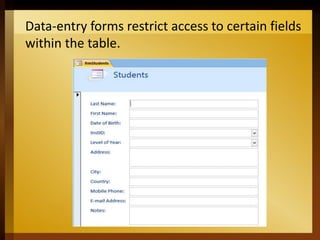
Entering data through the data-entry forms is
the most common way to get the data into
the database table.
Data-entry forms restrict access to certain fields
within the table.
Reports
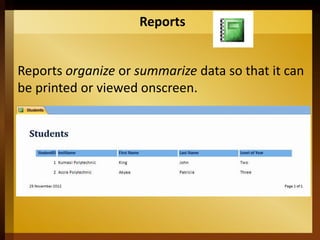
Reports organize or summarize data so that it can
be printed or viewed onscreen.
Macros
Macros give individuals the ability to
automate tasks.
One can use a macro to add functionality to a
form, report, or control.
END

Chapter 01 Introduction to Microsoft Access.ppt

  • 1.
  • 2.
    Databases In this InformationAge, we are surrounded by huge amount of data. To use this data effectively, it must be stored in such a way that it can be retrieved and interpreted with flexibility and efficiency.
  • 3.
    A database isa file composed of records concerning a certain topic or business application, each containing fields together with a set of operations for searching, sorting, recombining, and other functions.
  • 4.
    Databases help organizerelated information in a logical fashion for easy access and retrieval. Databases aren’t only for computers. There are also manual databases; we simply refer to these as manual filing systems or manual database systems.
  • 5.
    Database management systemis a software interface between a database and a user. A database management system handles user requests for database actions and allows for control of security and data integrity requirements.
  • 6.
    Getting Familiar withMicrosoft Access 2016 for Windows Microsoft Office Access 2016 is a database software package and one of the best database management systems that can be used for all information management.
  • 7.
    It provides toolsnot only for storing, retrieving, and manipulating data, but also for creating useful forms and reports, and sharing your database with others.
  • 8.
    Getting Started withAccess 2016 1. Click the Start button on taskbar 2. Point to All Programs, click Microsoft Office 3. Click Microsoft Office Access 2016
  • 9.
    Figure 5.1: TheAccess welcome screen provides a number of ways to start working with Access.
  • 10.
    Start a newdatabase with: • Access Templates • New Blank database • Microsoft Office Online • Recently used database
  • 11.
    Opening a Database ClickMore at the Open Recent Database
  • 12.
  • 13.
  • 14.
    Datasheet view ofthe Student database
  • 15.
    What is aDatasheet? In Access, datasheet displays the information stored in a table in columns and rows. You can use a datasheet to create a table, enter data, retrieve data, and perform other tasks.
  • 16.
    Figure 5-4: MicrosoftAccess Window
  • 17.
  • 19.
  • 20.
    Tables Tables serve asthe primary data repository in an Access database. Access tables store data in a variety of forms, from simple lines of text to complex data such as pictures, sounds, or video images.
  • 21.
    Access is arelational database management system (RDBMS) that stores data in related tables. For instance, a table containing employee data (names and addresses) may be related to a table containing payroll data (pay date, pay amount, and check number).
  • 22.
    After Access createsa blank database, it opens in Datasheet view. When you view a blank database for the first time in Datasheet view, you see a column named ID. This column is by default the primary key field. A primary key is a field or combination of fields that uniquely identify each record in a table. • No two records in a table should have the same values in every field.
  • 23.
    Student table Value: Atthe intersection of a row (record) and a column (field) is a value—the actual data element. Each value in a field represents a single type of data.
  • 24.
    Queries Queries extract informationfrom a database. A query selects and defines a group of records that fulfil a certain condition. Many forms and most reports are based on queries that pre-filter data before it is displayed.
  • 25.
    Forms Forms help usersget information into a database table quickly, easily, and accurately. Database records can be viewed, added, changed, or deleted. Entering data through the data-entry forms is the most common way to get the data into the database table.
  • 26.
    Data-entry forms restrictaccess to certain fields within the table.
  • 27.
    Reports Reports organize orsummarize data so that it can be printed or viewed onscreen.
  • 28.
    Macros Macros give individualsthe ability to automate tasks. One can use a macro to add functionality to a form, report, or control.
  • 29.