1 
CCHHAAPPTTEERR 77 
AAccttiivviittyy DDiiaaggrraammss 
Software System 
Engineering (260CT)
In This Lecture You Will Learn: 
2 
The purpose of activity diagrams 
The notation of activity diagrams 
How to draw activity diagrams
3 
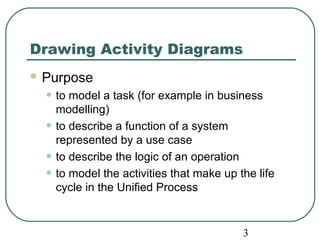
Drawing Activity Diagrams 
Purpose 
• to model a task (for example in business 
modelling) 
• to describe a function of a system 
represented by a use case 
• to describe the logic of an operation 
• to model the activities that make up the life 
cycle in the Unified Process
Notation of Activity Diagrams 
4 
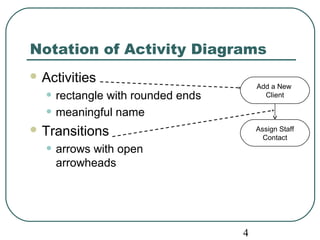
Activities 
• rectangle with rounded ends 
• meaningful name 
Transitions 
• arrows with open 
arrowheads 
Add a New 
Client 
Assign Staff 
Contact
Notation of Activity Diagrams 
Start state 
• Add a New 
black circle 
Client 
Decision points 
• Assign Staff 
diamond 
Contact 
Guard conditions 
• in square brackets 
Final state 
• black circle in white circle 
[campaign to add] 
5 
[no campaign to add] 
Add New 
Campaign
Notation of Activity Diagrams 
Alternative notation for 
branching: 
• alternative transitions 
[no campaign to add] 
Add a New 
Client 
Assign Staff 
Contact 
[campaign to add] 
6 
are shown leaving the 
activity with guard 
conditions 
Add New 
Campaign 
Note that guard conditions do not have 
to be mutually exclusive, but it is 
advisable that they should be
Notation of Activity Diagrams 
Object flows 
• dashed arrow 
Objects 
• rectangle 
• with name of object 
7 
Record completion 
of a campaign 
underlined 
• optionally shows the 
state of the object in 
square brackets 
:Campaign 
[Active] 
:Campaign 
[Completed]
Notation of Activity Diagrams 
8 
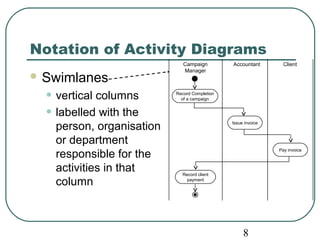
Swimlanes 
• vertical columns 
• labelled with the 
person, organisation 
or department 
responsible for the 
activities in that 
column 
Record Completion 
of a campaign 
Issue invoice 
Campaign 
Manager 
Accountant Client 
Pay invoice 
Record client 
payment
Drawing Activity Diagrams 
What is the purpose? 
• This will influence the kind of activities that 
9 
are shown 
What is being shown in the diagram? 
• What is the name of the business process, 
use case or operation? 
What level of detail is required? 
• Is it high level or more detailed?
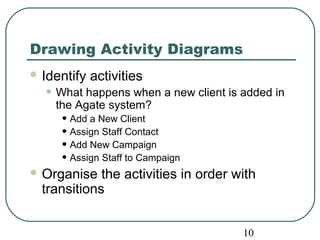
Drawing Activity Diagrams 
Identify activities 
• What happens when a new client is added in 
10 
the Agate system? 
• Add a New Client 
• Assign Staff Contact 
• Add New Campaign 
• Assign Staff to Campaign 
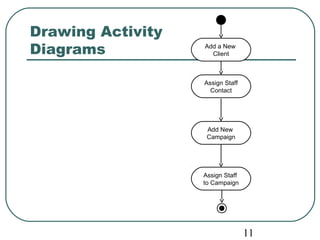
Organise the activities in order with 
transitions
11 
Drawing Activity 
Diagrams Add a New 
Client 
Assign Staff 
Contact 
Add New 
Campaign 
Assign Staff 
to Campaign
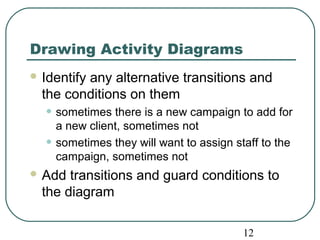
12 
Drawing Activity Diagrams 
Identify any alternative transitions and 
the conditions on them 
• sometimes there is a new campaign to add for 
a new client, sometimes not 
• sometimes they will want to assign staff to the 
campaign, sometimes not 
Add transitions and guard conditions to 
the diagram
13 
Drawing Activity 
Diagrams 
[campaign to add] 
[no staff to assign] 
Add a New 
Client 
Assign Staff 
Contact 
Add New 
Campaign 
[no campaign to add] 
[staff to assign] 
Assign Staff 
to Campaign
14 
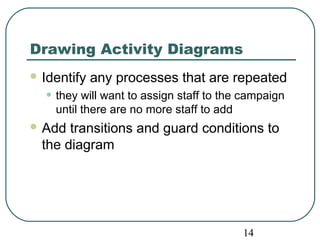
Drawing Activity Diagrams 
Identify any processes that are repeated 
• they will want to assign staff to the campaign 
until there are no more staff to add 
Add transitions and guard conditions to 
the diagram
15 
Drawing Activity 
Diagrams 
[campaign to add] 
[no staff to assign] 
[staff to assign] 
[no more staff to assign] 
Add a New 
Client 
Assign Staff 
Contact 
Add New 
Campaign 
[no campaign to add] 
Assign Staff 
to Campaign 
[more staff to assign]
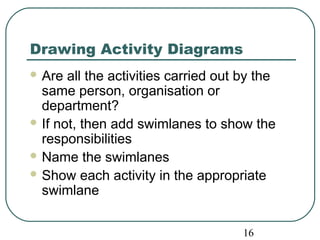
Drawing Activity Diagrams 
Are all the activities carried out by the 
same person, organisation or 
department? 
If not, then add swimlanes to show the 
responsibilities 
Name the swimlanes 
Show each activity in the appropriate 
swimlane 
16
Administrator Campaign Manager 
[campaign to add] 
[no staff to assign] 
17 
Add a New 
Client 
Assign Staff 
Contact 
Add New 
Campaign 
[no campaign to add] 
[staff to assign] 
Assign Staff 
to Campaign
18 
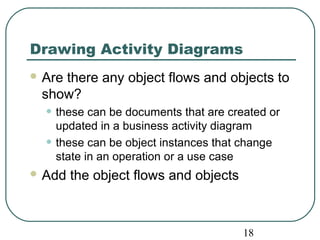
Drawing Activity Diagrams 
Are there any object flows and objects to 
show? 
• these can be documents that are created or 
updated in a business activity diagram 
• these can be object instances that change 
state in an operation or a use case 
Add the object flows and objects
Administrator Campaign Manager 
[campaign to add] 
[no staff to assign] 
19 
Add a New 
Client 
Assign Staff 
Contact 
Add New 
Campaign 
[no campaign to add] 
[staff to assign] 
Assign Staff 
to Campaign 
:Campaign 
[Commissioned] 
:Client 
[New]
Summary 
In this lecture you have learned about: 
The purpose of activity diagrams 
The notation of activity diagrams 
How to draw activity diagrams 
20

Software System Engineering - Chapter 7

  • 1.
    1 CCHHAAPPTTEERR 77 AAccttiivviittyy DDiiaaggrraammss Software System Engineering (260CT)
  • 2.
    In This LectureYou Will Learn: 2 The purpose of activity diagrams The notation of activity diagrams How to draw activity diagrams
  • 3.
    3 Drawing ActivityDiagrams Purpose • to model a task (for example in business modelling) • to describe a function of a system represented by a use case • to describe the logic of an operation • to model the activities that make up the life cycle in the Unified Process
  • 4.
    Notation of ActivityDiagrams 4 Activities • rectangle with rounded ends • meaningful name Transitions • arrows with open arrowheads Add a New Client Assign Staff Contact
  • 5.
    Notation of ActivityDiagrams Start state • Add a New black circle Client Decision points • Assign Staff diamond Contact Guard conditions • in square brackets Final state • black circle in white circle [campaign to add] 5 [no campaign to add] Add New Campaign
  • 6.
    Notation of ActivityDiagrams Alternative notation for branching: • alternative transitions [no campaign to add] Add a New Client Assign Staff Contact [campaign to add] 6 are shown leaving the activity with guard conditions Add New Campaign Note that guard conditions do not have to be mutually exclusive, but it is advisable that they should be
  • 7.
    Notation of ActivityDiagrams Object flows • dashed arrow Objects • rectangle • with name of object 7 Record completion of a campaign underlined • optionally shows the state of the object in square brackets :Campaign [Active] :Campaign [Completed]
  • 8.
    Notation of ActivityDiagrams 8 Swimlanes • vertical columns • labelled with the person, organisation or department responsible for the activities in that column Record Completion of a campaign Issue invoice Campaign Manager Accountant Client Pay invoice Record client payment
  • 9.
    Drawing Activity Diagrams What is the purpose? • This will influence the kind of activities that 9 are shown What is being shown in the diagram? • What is the name of the business process, use case or operation? What level of detail is required? • Is it high level or more detailed?
  • 10.
    Drawing Activity Diagrams Identify activities • What happens when a new client is added in 10 the Agate system? • Add a New Client • Assign Staff Contact • Add New Campaign • Assign Staff to Campaign Organise the activities in order with transitions
  • 11.
    11 Drawing Activity Diagrams Add a New Client Assign Staff Contact Add New Campaign Assign Staff to Campaign
  • 12.
    12 Drawing ActivityDiagrams Identify any alternative transitions and the conditions on them • sometimes there is a new campaign to add for a new client, sometimes not • sometimes they will want to assign staff to the campaign, sometimes not Add transitions and guard conditions to the diagram
  • 13.
    13 Drawing Activity Diagrams [campaign to add] [no staff to assign] Add a New Client Assign Staff Contact Add New Campaign [no campaign to add] [staff to assign] Assign Staff to Campaign
  • 14.
    14 Drawing ActivityDiagrams Identify any processes that are repeated • they will want to assign staff to the campaign until there are no more staff to add Add transitions and guard conditions to the diagram
  • 15.
    15 Drawing Activity Diagrams [campaign to add] [no staff to assign] [staff to assign] [no more staff to assign] Add a New Client Assign Staff Contact Add New Campaign [no campaign to add] Assign Staff to Campaign [more staff to assign]
  • 16.
    Drawing Activity Diagrams Are all the activities carried out by the same person, organisation or department? If not, then add swimlanes to show the responsibilities Name the swimlanes Show each activity in the appropriate swimlane 16
  • 17.
    Administrator Campaign Manager [campaign to add] [no staff to assign] 17 Add a New Client Assign Staff Contact Add New Campaign [no campaign to add] [staff to assign] Assign Staff to Campaign
  • 18.
    18 Drawing ActivityDiagrams Are there any object flows and objects to show? • these can be documents that are created or updated in a business activity diagram • these can be object instances that change state in an operation or a use case Add the object flows and objects
  • 19.
    Administrator Campaign Manager [campaign to add] [no staff to assign] 19 Add a New Client Assign Staff Contact Add New Campaign [no campaign to add] [staff to assign] Assign Staff to Campaign :Campaign [Commissioned] :Client [New]
  • 20.
    Summary In thislecture you have learned about: The purpose of activity diagrams The notation of activity diagrams How to draw activity diagrams 20