CHAPTER 10 
Requirements Analysis 
Software System 
Engineering (260CT) 
11/05/14 1
In This Lecture You Will Learn: 
 Why we analyse requirements 
 Technical terms used with class diagrams 
 How the UML class diagram expresses a 
detailed model of user requirements 
 How to realize use cases with collaboration 
diagrams and class diagrams 
 How the CRC technique helps identify classes 
and allocate responsibilities 
11/05/14 2
Why Analyse Requirements? 
Use case model alone is not enough 
• There may be repetition 
• Some parts may already exist as standard 
components 
Analysis aims to identify: 
• Common elements 
• Pre-existing elements 
• Interaction between different requirements 
11/05/14 3
What a Requirements Model 
Must Do 
A requirements model meets two main 
needs: 
 Confirms what users want a new 
system to do 
• Must be understandable for users 
• Must be correct and complete 
 Specifies what designers must design 
• Must be unambiguous 
11/05/14 4
What a Requirements Model 
Must Do 
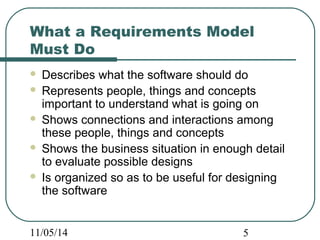
 Describes what the software should do 
 Represents people, things and concepts 
important to understand what is going on 
 Shows connections and interactions among 
these people, things and concepts 
 Shows the business situation in enough detail 
to evaluate possible designs 
 Is organized so as to be useful for designing 
the software 
11/05/14 5
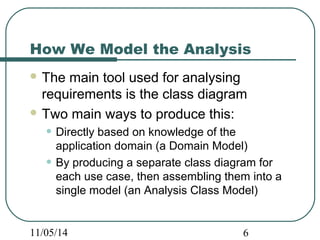
How We Model the Analysis 
The main tool used for analysing 
requirements is the class diagram 
Two main ways to produce this: 
• Directly based on knowledge of the 
application domain (a Domain Model) 
• By producing a separate class diagram for 
each use case, then assembling them into a 
single model (an Analysis Class Model) 
11/05/14 6
Class Diagram: Stereotypes 
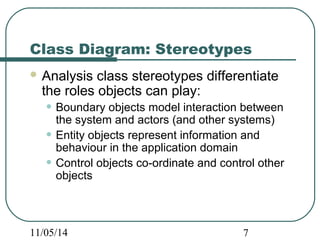
Analysis class stereotypes differentiate 
the roles objects can play: 
• Boundary objects model interaction between 
the system and actors (and other systems) 
• Entity objects represent information and 
behaviour in the application domain 
• Control objects co-ordinate and control other 
objects 
11/05/14 7
Class Diagram: Stereotypes 
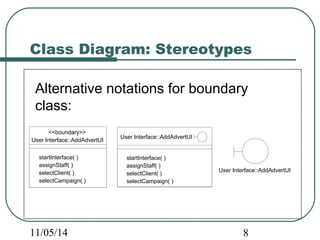
Alternative notations for boundary 
class: 
User Interface::AddAdvertUI 
<<boundary>> 
User Interface::AddAdvertUI 
startInterface( ) 
assignStaff( ) 
selectClient( ) 
selectCampaign( ) 
User Interface::AddAdvertUI 
startInterface( ) 
assignStaff( ) 
selectClient( ) 
selectCampaign( ) 
11/05/14 8
Class Diagram: Stereotypes 
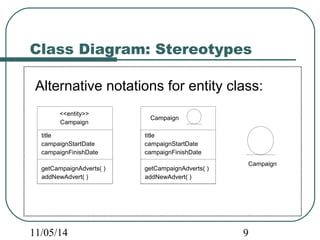
Alternative notations for entity class: 
Campaign 
<<entity>> 
Campaign 
title 
campaignStartDate 
campaignFinishDate 
getCampaignAdverts( ) 
addNewAdvert( ) 
Campaign 
title 
campaignStartDate 
campaignFinishDate 
getCampaignAdverts( ) 
addNewAdvert( ) 
11/05/14 9
Class Diagram: Stereotypes 
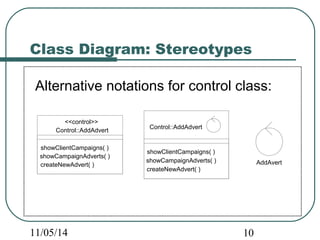
Alternative notations for control class: 
<<control>> 
11/05/14 10 
AddAvert 
Control::AddAdvert 
showClientCampaigns( ) 
showCampaignAdverts( ) 
createNewAdvert( ) 
Control::AddAdvert 
showClientCampaigns( ) 
showCampaignAdverts( ) 
createNewAdvert( )
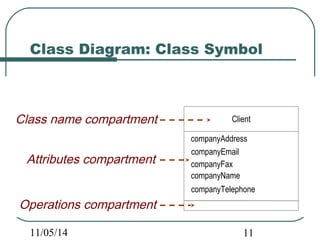
Class Diagram: Class Symbol 
Client 
companyAddress 
companyEmail 
companyFax 
companyName 
companyTelephone 
Class name compartment 
Attributes compartment 
Operations compartment 
11/05/14 11
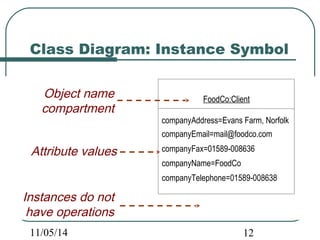
Class Diagram: Instance Symbol 
FoodCo:Client 
companyAddress=Evans Farm, Norfolk 
companyEmail=mail@foodco.com 
companyFax=01589-008636 
companyName=FoodCo 
companyTelephone=01589-008638 
Object name 
compartment 
Attribute values 
Instances do not 
have operations 
11/05/14 12
Class Diagram: Attributes 
Attributes are: 
Part of the essential description of a 
class 
The common structure of what the class 
can ‘know’ 
Each object has its own value for each 
attribute in its class 
11/05/14 13
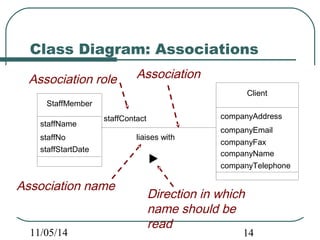
Class Diagram: Associations 
Association role Association 
StaffMember 
staffName 
staffNo 
staffStartDate 
Client 
companyAddress 
companyEmail 
companyFax 
companyName 
companyTelephone 
staffContact 
liaises with 
Association name Direction in which 
name should be 
read 
11/05/14 14
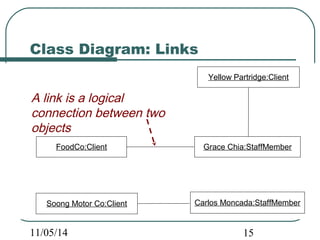
Class Diagram: Links 
A link is a logical 
connection between two 
objects 
FoodCo:Client 
Yellow Partridge:Client 
Soong Motor Co:Client 
Grace Chia:StaffMember 
Carlos Moncada:StaffMember 
11/05/14 15
Class Diagram: Associations 
Associations represent: 
The possibility of a logical relationship or 
connection between objects of one class 
and objects of another 
If two objects can be linked, their classes 
have an association 
11/05/14 16
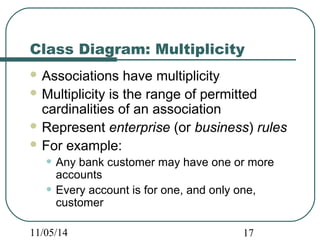
Class Diagram: Multiplicity 
Associations have multiplicity 
Multiplicity is the range of permitted 
cardinalities of an association 
Represent enterprise (or business) rules 
For example: 
• Any bank customer may have one or more 
accounts 
• Every account is for one, and only one, 
customer 
11/05/14 17
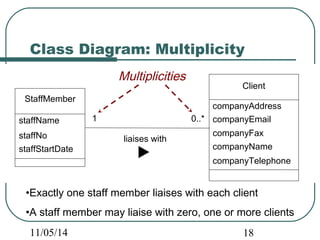
Class Diagram: Multiplicity 
StaffMember 
staffName 
staffNo 
staffStartDate 
Client 
companyAddress 
companyEmail 
companyFax 
companyName 
companyTelephone 
Multiplicities 
1 0..* 
liaises with 
•Exactly one staff member liaises with each client 
•A staff member may liaise with zero, one or more clients 
11/05/14 18
Class Diagram: Operations 
Operations are: 
An essential part of the description of a 
class 
The common behaviour shared by all 
objects of the class 
Services that objects of a class can 
provide to other objects 
11/05/14 19
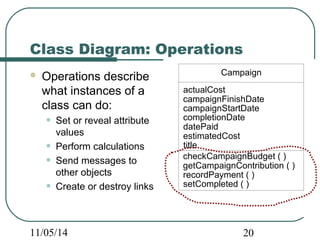
Class Diagram: Operations 
 Operations describe 
what instances of a 
class can do: 
• Set or reveal attribute 
values 
• Perform calculations 
• Send messages to 
other objects 
• Create or destroy links 
Campaign 
actualCost 
campaignFinishDate 
campaignStartDate 
completionDate 
datePaid 
estimatedCost 
title 
checkCampaignBudget ( ) 
getCampaignContribution ( ) 
recordPayment ( ) 
setCompleted ( ) 
11/05/14 20
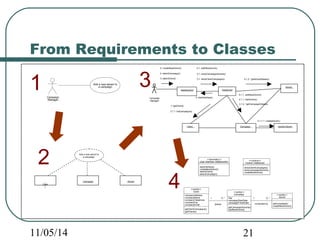
From Requirements to Classes 
Campaign 
Manager 
Add a new advert to 
a campaign 
Add a new advert to 
a campaign 
: 
Clien 
t 
:Campaign :Advert 
4: selectCampaign() 4.1: showCampaignAdverts() 
<<boundary>> 
4.1.2: *getAdvertDetails() 
5.1.1: addNewAdvert() 
<<entity>> 
<<entity>> 
<<control>> 
1:*getClient() 
11/05/14 21 
<<entity>> 
Advert 
setCompleted() 
createNewAdvert() 
User Interface::AddAdvertUI 
startInterface() 
createNewAdvert() 
selectClient() 
selectCampaign() 
Campaign 
title 
campaignStartDate 
campaignFinishDate 
getCampaignAdverts() 
addNewAdvert() 
1 0..* 
conducted by 
Client 
companyAddress 
companyName 
companyTelephone 
companyFax 
companyEmail 
getClientCampaigns() 
getClients() 
1 0..* 
places 
Control::AddAdvert 
showClientCampaigns() 
showCampaignAdverts() 
createNewAdvert() 
Campaign 
Manager 
3.1.2: *getCampaignDetails() 
5.1.1.1: createAdvert() 
:AddAdvertUI :AddAdvert 
:Client :Campaign 
:Advert 
3.1: showClientCampaigns(3: selectClient() ) 
4.1.1: listAdverts() 
5: createNewAdvert() 5.1: addNewAdvert() 
newAd:Advert 
2: startInterface() 
3.1.1: listCampaigns() 
1 
2 
3 
4
From Requirements to Classes 
Start with one use case 
Identify the likely classes involved (the 
use case collaboration) 
Draw a collaboration diagram that fulfils 
the needs of the use case 
Translate this collaboration into a class 
diagram 
Repeat for other use cases 
11/05/14 22
Reasonability Checks for 
Candidate Classes 
A number of tests help to check whether 
a candidate class is reasonable 
• Is it beyond the scope of the system? 
• Does it refer to the system as a whole? 
• Does it duplicate another class? 
• Is it too vague? 
• (More on next slide) 
11/05/14 23
Reasonability Checks for 
Candidate Classes (cont’d) 
• Is it too tied up with physical inputs and 
outputs? 
• Is it really an attribute? 
• Is it really an operation? 
• Is it really an association? 
If any answer is ‘Yes’, consider 
modelling the potential class in some 
other way (or do not model it at all) 
11/05/14 24
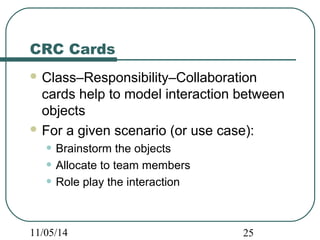
CRC Cards 
Class–Responsibility–Collaboration 
cards help to model interaction between 
objects 
For a given scenario (or use case): 
• Brainstorm the objects 
• Allocate to team members 
• Role play the interaction 
11/05/14 25
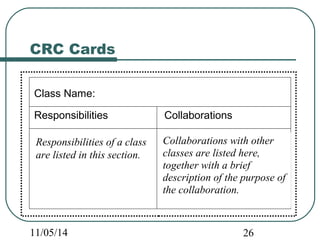
CRC Cards 
Class Name: 
Responsibilities Collaborations 
Responsibilities of a class 
are listed in this section. 
Collaborations with other 
classes are listed here, 
together with a brief 
description of the purpose of 
the collaboration. 
11/05/14 26
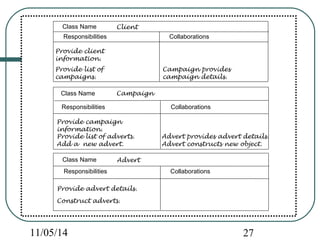
Class Name Client 
Responsibilities Collaborations 
Provide client 
information. 
Campaign provides 
campaign details. 
Provide list of 
campaigns. 
Class Name Campaign 
Responsibilities Collaborations 
Provide campaign 
information. 
Provide list of adverts. 
Add a new advert. 
Advert provides advert details. 
Advert constructs new object. 
Class Name Advert 
Responsibilities Collaborations 
Provide advert details. 
Construct adverts. 
11/05/14 27
CRC Cards 
 Effective role play depends on an explicit 
strategy for distributing responsibility among 
classes 
 For example: 
• Each role player tries to be lazy 
• Persuades other players their class should accept 
responsibility for a given task 
 May use ‘Paper CASE’ to document the 
associations and links 
11/05/14 28
Summary 
In this lecture you have learned: 
 Why we analyse requirements 
 Technical terms used with class diagrams 
 How the UML class diagram expresses a 
detailed model of user requirements 
 How to realize use cases with collaboration 
diagrams and class diagrams 
 How the CRC technique helps identify classes 
and allocate responsibilities 
11/05/14 29

Software System Engineering - Chapter 10

  • 1.
    CHAPTER 10 RequirementsAnalysis Software System Engineering (260CT) 11/05/14 1
  • 2.
    In This LectureYou Will Learn:  Why we analyse requirements  Technical terms used with class diagrams  How the UML class diagram expresses a detailed model of user requirements  How to realize use cases with collaboration diagrams and class diagrams  How the CRC technique helps identify classes and allocate responsibilities 11/05/14 2
  • 3.
    Why Analyse Requirements? Use case model alone is not enough • There may be repetition • Some parts may already exist as standard components Analysis aims to identify: • Common elements • Pre-existing elements • Interaction between different requirements 11/05/14 3
  • 4.
    What a RequirementsModel Must Do A requirements model meets two main needs:  Confirms what users want a new system to do • Must be understandable for users • Must be correct and complete  Specifies what designers must design • Must be unambiguous 11/05/14 4
  • 5.
    What a RequirementsModel Must Do  Describes what the software should do  Represents people, things and concepts important to understand what is going on  Shows connections and interactions among these people, things and concepts  Shows the business situation in enough detail to evaluate possible designs  Is organized so as to be useful for designing the software 11/05/14 5
  • 6.
    How We Modelthe Analysis The main tool used for analysing requirements is the class diagram Two main ways to produce this: • Directly based on knowledge of the application domain (a Domain Model) • By producing a separate class diagram for each use case, then assembling them into a single model (an Analysis Class Model) 11/05/14 6
  • 7.
    Class Diagram: Stereotypes Analysis class stereotypes differentiate the roles objects can play: • Boundary objects model interaction between the system and actors (and other systems) • Entity objects represent information and behaviour in the application domain • Control objects co-ordinate and control other objects 11/05/14 7
  • 8.
    Class Diagram: Stereotypes Alternative notations for boundary class: User Interface::AddAdvertUI <<boundary>> User Interface::AddAdvertUI startInterface( ) assignStaff( ) selectClient( ) selectCampaign( ) User Interface::AddAdvertUI startInterface( ) assignStaff( ) selectClient( ) selectCampaign( ) 11/05/14 8
  • 9.
    Class Diagram: Stereotypes Alternative notations for entity class: Campaign <<entity>> Campaign title campaignStartDate campaignFinishDate getCampaignAdverts( ) addNewAdvert( ) Campaign title campaignStartDate campaignFinishDate getCampaignAdverts( ) addNewAdvert( ) 11/05/14 9
  • 10.
    Class Diagram: Stereotypes Alternative notations for control class: <<control>> 11/05/14 10 AddAvert Control::AddAdvert showClientCampaigns( ) showCampaignAdverts( ) createNewAdvert( ) Control::AddAdvert showClientCampaigns( ) showCampaignAdverts( ) createNewAdvert( )
  • 11.
    Class Diagram: ClassSymbol Client companyAddress companyEmail companyFax companyName companyTelephone Class name compartment Attributes compartment Operations compartment 11/05/14 11
  • 12.
    Class Diagram: InstanceSymbol FoodCo:Client companyAddress=Evans Farm, Norfolk companyEmail=mail@foodco.com companyFax=01589-008636 companyName=FoodCo companyTelephone=01589-008638 Object name compartment Attribute values Instances do not have operations 11/05/14 12
  • 13.
    Class Diagram: Attributes Attributes are: Part of the essential description of a class The common structure of what the class can ‘know’ Each object has its own value for each attribute in its class 11/05/14 13
  • 14.
    Class Diagram: Associations Association role Association StaffMember staffName staffNo staffStartDate Client companyAddress companyEmail companyFax companyName companyTelephone staffContact liaises with Association name Direction in which name should be read 11/05/14 14
  • 15.
    Class Diagram: Links A link is a logical connection between two objects FoodCo:Client Yellow Partridge:Client Soong Motor Co:Client Grace Chia:StaffMember Carlos Moncada:StaffMember 11/05/14 15
  • 16.
    Class Diagram: Associations Associations represent: The possibility of a logical relationship or connection between objects of one class and objects of another If two objects can be linked, their classes have an association 11/05/14 16
  • 17.
    Class Diagram: Multiplicity Associations have multiplicity Multiplicity is the range of permitted cardinalities of an association Represent enterprise (or business) rules For example: • Any bank customer may have one or more accounts • Every account is for one, and only one, customer 11/05/14 17
  • 18.
    Class Diagram: Multiplicity StaffMember staffName staffNo staffStartDate Client companyAddress companyEmail companyFax companyName companyTelephone Multiplicities 1 0..* liaises with •Exactly one staff member liaises with each client •A staff member may liaise with zero, one or more clients 11/05/14 18
  • 19.
    Class Diagram: Operations Operations are: An essential part of the description of a class The common behaviour shared by all objects of the class Services that objects of a class can provide to other objects 11/05/14 19
  • 20.
    Class Diagram: Operations  Operations describe what instances of a class can do: • Set or reveal attribute values • Perform calculations • Send messages to other objects • Create or destroy links Campaign actualCost campaignFinishDate campaignStartDate completionDate datePaid estimatedCost title checkCampaignBudget ( ) getCampaignContribution ( ) recordPayment ( ) setCompleted ( ) 11/05/14 20
  • 21.
    From Requirements toClasses Campaign Manager Add a new advert to a campaign Add a new advert to a campaign : Clien t :Campaign :Advert 4: selectCampaign() 4.1: showCampaignAdverts() <<boundary>> 4.1.2: *getAdvertDetails() 5.1.1: addNewAdvert() <<entity>> <<entity>> <<control>> 1:*getClient() 11/05/14 21 <<entity>> Advert setCompleted() createNewAdvert() User Interface::AddAdvertUI startInterface() createNewAdvert() selectClient() selectCampaign() Campaign title campaignStartDate campaignFinishDate getCampaignAdverts() addNewAdvert() 1 0..* conducted by Client companyAddress companyName companyTelephone companyFax companyEmail getClientCampaigns() getClients() 1 0..* places Control::AddAdvert showClientCampaigns() showCampaignAdverts() createNewAdvert() Campaign Manager 3.1.2: *getCampaignDetails() 5.1.1.1: createAdvert() :AddAdvertUI :AddAdvert :Client :Campaign :Advert 3.1: showClientCampaigns(3: selectClient() ) 4.1.1: listAdverts() 5: createNewAdvert() 5.1: addNewAdvert() newAd:Advert 2: startInterface() 3.1.1: listCampaigns() 1 2 3 4
  • 22.
    From Requirements toClasses Start with one use case Identify the likely classes involved (the use case collaboration) Draw a collaboration diagram that fulfils the needs of the use case Translate this collaboration into a class diagram Repeat for other use cases 11/05/14 22
  • 23.
    Reasonability Checks for Candidate Classes A number of tests help to check whether a candidate class is reasonable • Is it beyond the scope of the system? • Does it refer to the system as a whole? • Does it duplicate another class? • Is it too vague? • (More on next slide) 11/05/14 23
  • 24.
    Reasonability Checks for Candidate Classes (cont’d) • Is it too tied up with physical inputs and outputs? • Is it really an attribute? • Is it really an operation? • Is it really an association? If any answer is ‘Yes’, consider modelling the potential class in some other way (or do not model it at all) 11/05/14 24
  • 25.
    CRC Cards Class–Responsibility–Collaboration cards help to model interaction between objects For a given scenario (or use case): • Brainstorm the objects • Allocate to team members • Role play the interaction 11/05/14 25
  • 26.
    CRC Cards ClassName: Responsibilities Collaborations Responsibilities of a class are listed in this section. Collaborations with other classes are listed here, together with a brief description of the purpose of the collaboration. 11/05/14 26
  • 27.
    Class Name Client Responsibilities Collaborations Provide client information. Campaign provides campaign details. Provide list of campaigns. Class Name Campaign Responsibilities Collaborations Provide campaign information. Provide list of adverts. Add a new advert. Advert provides advert details. Advert constructs new object. Class Name Advert Responsibilities Collaborations Provide advert details. Construct adverts. 11/05/14 27
  • 28.
    CRC Cards Effective role play depends on an explicit strategy for distributing responsibility among classes  For example: • Each role player tries to be lazy • Persuades other players their class should accept responsibility for a given task  May use ‘Paper CASE’ to document the associations and links 11/05/14 28
  • 29.
    Summary In thislecture you have learned:  Why we analyse requirements  Technical terms used with class diagrams  How the UML class diagram expresses a detailed model of user requirements  How to realize use cases with collaboration diagrams and class diagrams  How the CRC technique helps identify classes and allocate responsibilities 11/05/14 29

Editor's Notes

  • #3 For reasons of brevity, these slides do not cover in any detail the creation of a class diagram for a use case. Nor do they cover the assembly of an analysis class model from the various use case class diagrams. It is recommended that extra material is added on these topics. Or better, that time is spent on in-class exercises to illustrate the techniques and decisions involved.
  • #22 This will require some explanation, either on whiteboard or with prepared examples on a handout.