.
Enterprise System & Security
Session 2: Business Process Modelling
with Activity Diagrams
Business Process Modeling
with Activity Diagrams
Elements of an Activity Diagram
Guidelines for Creating Activity Diagrams
BPM With Activity Diagrams
• A number of activities support a business process
across several departments
• Activity diagrams model the behavior in a business
process
• Sophisticated data flow diagrams
• Addresses Parallel concurrent activities and complex
processes
What Is an Activity Diagram?
• An activity diagram is a logical model which describes
the business domain’s activities without suggesting
how they are conducted
• Activity diagrams are essentially flowcharts in an
object-oriented context.
• Activity diagrams are really most useful to model
business activities in the early stages of a project.
Activity Diagrams
• Purposes:
• to model a process or task (in business modelling)
• to describe a system function that is represented by a
use case
• to describe the logic of an operation
• to model the activities that make up the life cycle in
the Unified Software Development Process
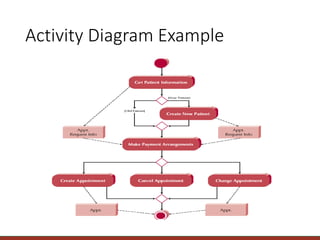
Activity Diagram Example
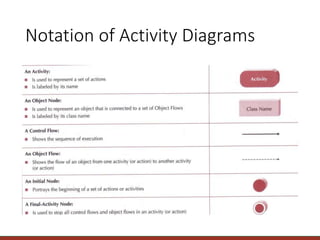
Notation of Activity Diagrams
• Activities
• rectangle with rounded ends
• meaningful name
• Transitions
• arrows with open
arrowheads
Fill in registration form
Register subject
Notation of Activity Diagrams
• Start state
• black circle
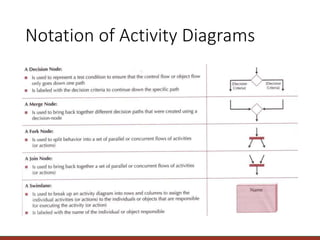
• Decision points
• diamond
• Guard conditions
• in square brackets
• Final state
• black circle in white circle
[available]
[not available]
Display customer
panel
select drink
Display
available
Notation of Activity Diagrams
• Swimlanes
• vertical columns
• labelled with the
person, organisation
or department
responsible for the
activities in that
column
Record Completion
of a campaign
Issue invoice
Campaign
Manager
Client
Accountant
Pay invoice
Record client
payment
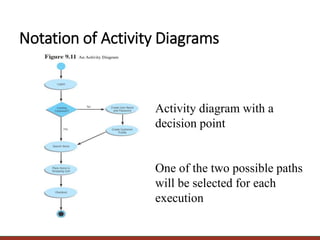
Activity diagram with a
decision point
One of the two possible paths
will be selected for each
execution
Notation of Activity Diagrams
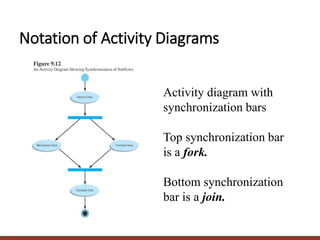
Activity diagram with
synchronization bars
Top synchronization bar
is a fork.
Bottom synchronization
bar is a join.
Notation of Activity Diagrams
Guidelines for Creating Activity
Diagrams
• Set the context or scope of the activity being modeled.
• Identify the activities and organize the activities in order
with transitions.
• Identify any decisions that are parts of the process being
modeled.
• Add the object flows and objects.
• Identify any prospects for parallelism in the process.
• Add swimlanes to show the responsibilities carried out by
the different person, organization or department.
• Draw the activity diagram.
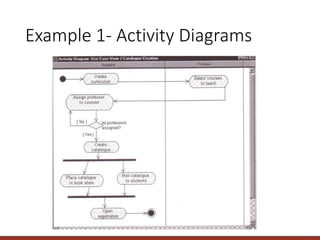
Example 1- Activity Diagrams
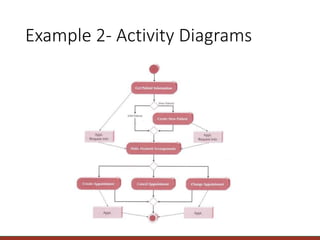
Example 2- Activity Diagrams
Let’s do
the
exercise
Dentist Office System
Create an activity diagram and a set of detail use case descriptions for the
following dentist office system, but do not bother to identify the flow of
events within each use case. Whenever new patients are seen for the first
time, they complete a patient information form that asks their name,
address, phone number and brief medical history, which are stored in the
patient information file. When a patient calls to schedule a new
appointment or change an existing appointment, the receptionist checks
the appointment file for an available time. Once a good time is found for
the patient, the appointment is scheduled. If the patient is a new patient,
an incomplete entry is made in the patient file; the full information will be
collected when they arrive for their appointment. Because appointments
are often made so far in advance, the receptionist usually mails a
reminder postcard to each patient two weeks before their appointment.
Dentist Office System
BPM - Activity diagram.pptx

BPM - Activity diagram.pptx

  • 1.
    . Enterprise System &Security Session 2: Business Process Modelling with Activity Diagrams
  • 2.
    Business Process Modeling withActivity Diagrams Elements of an Activity Diagram Guidelines for Creating Activity Diagrams
  • 3.
    BPM With ActivityDiagrams • A number of activities support a business process across several departments • Activity diagrams model the behavior in a business process • Sophisticated data flow diagrams • Addresses Parallel concurrent activities and complex processes
  • 4.
    What Is anActivity Diagram? • An activity diagram is a logical model which describes the business domain’s activities without suggesting how they are conducted • Activity diagrams are essentially flowcharts in an object-oriented context. • Activity diagrams are really most useful to model business activities in the early stages of a project.
  • 5.
    Activity Diagrams • Purposes: •to model a process or task (in business modelling) • to describe a system function that is represented by a use case • to describe the logic of an operation • to model the activities that make up the life cycle in the Unified Software Development Process
  • 6.
  • 7.
  • 8.
  • 9.
    Notation of ActivityDiagrams • Activities • rectangle with rounded ends • meaningful name • Transitions • arrows with open arrowheads Fill in registration form Register subject
  • 10.
    Notation of ActivityDiagrams • Start state • black circle • Decision points • diamond • Guard conditions • in square brackets • Final state • black circle in white circle [available] [not available] Display customer panel select drink Display available
  • 11.
    Notation of ActivityDiagrams • Swimlanes • vertical columns • labelled with the person, organisation or department responsible for the activities in that column Record Completion of a campaign Issue invoice Campaign Manager Client Accountant Pay invoice Record client payment
  • 12.
    Activity diagram witha decision point One of the two possible paths will be selected for each execution Notation of Activity Diagrams
  • 13.
    Activity diagram with synchronizationbars Top synchronization bar is a fork. Bottom synchronization bar is a join. Notation of Activity Diagrams
  • 14.
    Guidelines for CreatingActivity Diagrams • Set the context or scope of the activity being modeled. • Identify the activities and organize the activities in order with transitions. • Identify any decisions that are parts of the process being modeled. • Add the object flows and objects. • Identify any prospects for parallelism in the process. • Add swimlanes to show the responsibilities carried out by the different person, organization or department. • Draw the activity diagram.
  • 15.
  • 16.
  • 17.
  • 18.
    Dentist Office System Createan activity diagram and a set of detail use case descriptions for the following dentist office system, but do not bother to identify the flow of events within each use case. Whenever new patients are seen for the first time, they complete a patient information form that asks their name, address, phone number and brief medical history, which are stored in the patient information file. When a patient calls to schedule a new appointment or change an existing appointment, the receptionist checks the appointment file for an available time. Once a good time is found for the patient, the appointment is scheduled. If the patient is a new patient, an incomplete entry is made in the patient file; the full information will be collected when they arrive for their appointment. Because appointments are often made so far in advance, the receptionist usually mails a reminder postcard to each patient two weeks before their appointment.
  • 19.