Help! My Client Needs a VPAT
AND OTHER ACCESSIBILITY QUESTIONS
COURTNEY HEITMAN
TECHNICAL ACCESSIBILITY SPECIALIST
3
Opportunity
4
“THE POWER OF THE WEB
IS IN ITS UNIVERSALITY.”
Tim Berners-Lee,
Director of W3C and
Inventor of the World Wide Web
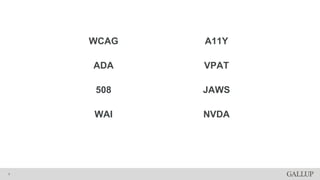
WCAG
ADA
508
WAI
A11Y
VPAT
JAWS
NVDA
5
WCAG
WEB CONTENT ACCESSIBILITY
GUIDELINES
6
CAN YOU USE IT WITH A
KEYBOARD?
WHAT WCAG COVERS
7
DO YOU HAVE A SKIP NAV?
WHAT WCAG COVERS
8
IS FOCUS VISIBLE?
WHAT WCAG COVERS
9
DO YOU DEPEND ON COLOR?
WHAT WCAG COVERS
10
IS THERE PROPER ERROR
MESSAGING?
WHAT WCAG COVERS
11
DO YOU HAVE CAPTIONING ON VIDEOS?
WHAT WCAG COVERS
12
DO YOU HAVE ALT TEXT?
WHAT WCAG COVERS
13
WILL THIS CAUSE
SEIZURES?
WHAT WCAG COVERS
14
WCAG 2.1
THE REFRESH
15
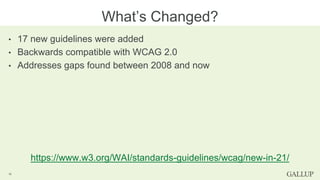
• 17 new guidelines were added
• Backwards compatible with WCAG 2.0
• Addresses gaps found between 2008 and now
https://www.w3.org/WAI/standards-guidelines/wcag/new-in-21/
What’s Changed?
16
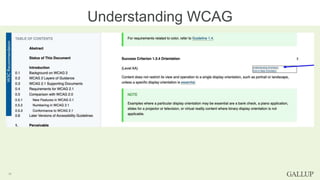
Understanding WCAG
17
Why Should My Company
Care?
18
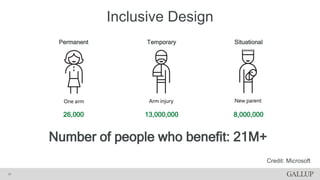
Inclusive Design
SOLVE FOR ONE, EXTEND TO MANY
19
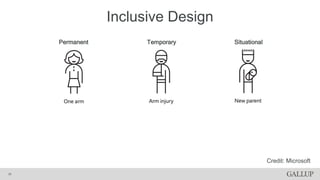
Inclusive Design
20
Permanent Temporary Situational
Credit: Microsoft
Inclusive Design
21
Permanent Temporary Situational
26,000 13,000,000 8,000,000
Number of people who benefit: 21M+
Credit: Microsoft
Search engines are a blind
user.
A MORE ACCESSIBLE SITE = BETTER
SEO
22
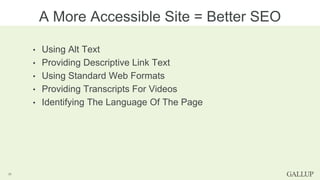
• Using Alt Text
• Providing Descriptive Link Text
• Using Standard Web Formats
• Providing Transcripts For Videos
• Identifying The Language Of The Page
A More Accessible Site = Better SEO
23
$$$$$
WEB A11Y IS THE NEW WHEELCHAIR
RAMP
24
WINN DIXIE
NOT JUST ANOTHER SALE
25
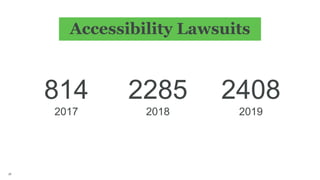
Accessibility Lawsuits
26
814
2017
2285
2018
2408
2019
DOMINOS
ONE HOT LAWSUIT
27
Well, that’s
scary
28
How do I protect myself
or my company?
VPATs
VOLUNTARY PRODUCT ACCESSIBILITY
TEMPLATE
29
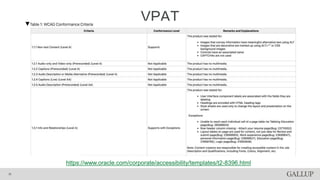
VPAT
30
https://www.oracle.com/corporate/accessibility/templates/t2-8396.html
Audits
31
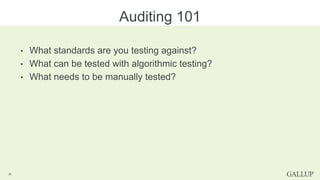
• What standards are you testing against?
• What can be tested with algorithmic testing?
• What needs to be manually tested?
Auditing 101
32
Tools
33
AXE
34
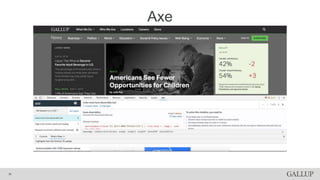
• Simple algorithmic automated testing
• Great “how to fix it” tools
• Can audit 20% of your site with a few clicks
Axe
35
Axe
36
ACCESSIBILITY INSIGHTS FOR
WEB
37
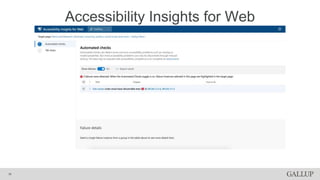
• Runs on aXe core
• Allows quick and in-depth audits
• Great for people who are just learning how
to audit
Accessibility Insights for Web
38
Accessibility Insights for Web
39
• KEYBOARD
• JAWS, NVDA, AND VOICEOVER
• COLOR ORACLE
Other Tools
40
How do I create a
VPAT?
41
Audit Your Site
AND REVIEW THE RESULTS
42
Create Your
VPAT
AND MARK THOSE EXCEPTIONS
43
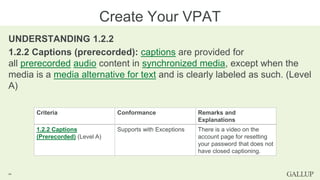
UNDERSTANDING 1.2.2
1.2.2 Captions (prerecorded): captions are provided for
all prerecorded audio content in synchronized media, except when the
media is a media alternative for text and is clearly labeled as such. (Level
A)
Create Your VPAT
44
Criteria Conformance Remarks and
Explanations
1.2.2 Captions
(Prerecorded) (Level A)
Supports with Exceptions There is a video on the
account page for resetting
your password that does not
have closed captioning.
Review Your VPAT
AND START SHOWING IT TO CLIENTS
45
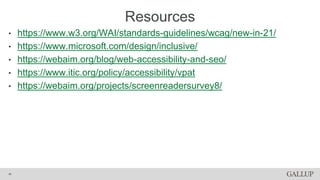
• https://www.w3.org/WAI/standards-guidelines/wcag/new-in-21/
• https://www.microsoft.com/design/inclusive/
• https://webaim.org/blog/web-accessibility-and-seo/
• https://www.itic.org/policy/accessibility/vpat
• https://webaim.org/projects/screenreadersurvey8/
Resources
46
Questions?
47
Thank you!
CONNECT
TWITTER: @COURTNEYXANN
GALLUP
INSTA: @LIFEATGALLUP
SLIDES
http://bit.ly/codemash-vpat

Help! My Client Needs a VPAT

Editor's Notes

  • #3 Today we will be learning about some of the basics about accessibility, what you need to know about the current accessibility landscape and how help your clients by auditing your site and creating VPATs. This is an advanced talk about accessibility, but I will do my best to explain some of the basics as we are going through.
  • #4 If you’re wondering what a Technical Accessibility Specialist does, my days consist of talking to clients, managing our accessibility roadmaps, helping developers with questions about accessible code, as well as driving accessibility initiatives such as color-blind friendly colors in the company. I’ve been at Gallup for almost 6 years now, and I’ve spent most of them specializing in parts of UX. I believe that accessibility is a subsect of user experience because we are just making the web a better user experience for people with disabilities. And a little disclaimer: I am not a lawyer, this is not legal advice. Please don’t sue me.
  • #5 According to W3C, web accessibility means that every person can perceive, understand, navigate, interact with, and contribute to the web. Website accessibility encompasses all conditions that affect access to the web, including visual, auditory, physical, speech, cognitive, and neurological disabilities. About 20% of the US, or 1 in 5 people, have some form of disability. Let’s talk about some acronyms you will hear…
  • #6 Web Content Accessibility Guidelines American’s for Disability Act Section 508 – US Government Web Accessibility Initiative Accessibility Voluntary Product Accessibility Template Job Access with Speech Non Visual Desktop Access
  • #7 Web Content Accessibility Guidelines developed through the W3C Web Accessibility Initiative. WCAG 2.0 came out 2008. Goal: provide a single shared standard for web content accessibility that meets the needs of individuals, organizations, and governments internationally. Three Levels (A, AA, AAA) Standards range from Minimum to Strict
  • #15 Three flashes in under 1 second.
  • #16 Introduced in June 2018. Worked on by the W3C WCAG group.
  • #17 17 new guidelines were added Backwards compatible with WCAG 2.0 They addressed gaps found between 2008 and now additional success criteria to address: mobile accessibility people with low vision people with cognitive and learning disabilities Some big ones include a different standard for Non Text Contrast, some basic principles of RWD, and target size. How many of you have ever looked at the WCAG success criterions? Let's look at how to understand WCAG SCs
  • #18 If you’re not familiar already with each SC of WCAG, I recommend reading them. The Understanding link is written in more common language, so I would start there. Deque and other sites do have courses on how to understand/test for each criterion. [TRANSITION] So we’ve gotten into the technical of accessibility, but like…
  • #19 There are several reasons that range from the ”do more good in the world” to the scary. Let’s start on the happy side.
  • #20 The more UX side of accessibility is Inclusive design… Inclusive design believes that we are all just temporarily abled. At any given point we can be situationally, temporarily or permanently disabled. Many of us will face permanent disabilities with our eyesight and hearing in our lifetimes, because of aging.
  • #21 Disability happens at the points of interaction between a person and society. Physical, cognitive, and social exclusion is the result of mismatched interactions. Each and everything we design should work for all people. Insights come from understanding those adaptations and the shared experiences that result. Let’s say that you are a new parent and you want to order some food because you’re hungry and you have a crying baby and you just don’t have the energy to cook. The app that you use would have hopefully considered that you might need to order food one handed. How many people does this affect?
  • #22 In the US. Stats from the United States Census Bureau, Limbs for Life Foundation, Amputee Coalition, MedicineHealth.com, CDC.gov, Disability Statistics Center at the UCSF That’s a lot of people, but my company is always watching out for the bottom line so I don’t know if I can get them behind this…
  • #23 You want to know who the biggest blind user is? Search engines. Search engines like Google and Bing will ding your SEO results if you’re missing things like alt text on images. Accessibility is also an easy way to get better search results.
  • #24 Alt text Descriptive link text - No click heres
  • #25 It’s also costly to go back and fix your websites, would you rather build a feature once or twice? And then there’s the possibility of being sued. Lawsuits are costly, even just the legal fees if you do win the case are costly. And frankly, most companies aren’t winning these lawsuits.
  • #26 Winn Dixie got in trouble a couple years ago (2016), because they had a radio ad saying that you could go to their website and look at this week’s coupons. Well, if you went on their website and happened to be blind, you could not see the specials because they were in a giant image with no alt text. They also had issues with the ability to refill your prescription medications online. The ADA requires that disabled individuals be provided ‘full and equal enjoyment of the goods, services, facilities, privileges, advantages, or accommodations of any place of public accommodation.’” Winn Dixie lost the battle, and this case spurred a bigger movement in accessible websites over the past three years.
  • #27 From 2017 to 2018 the number of accessibility lawsuits in the US almost tripled. The US saw 814 lawsuits in 2017, In 2018 there were 2285 federal ADA related Web lawsuits. There was a projected total of 2408 expected to be filed in 2019.
  • #28 One notable case from this year is the Dominos case. As some of you may have heard the SCOTUS chose to not hear the Dominos lawsuit and instead they agreed with the lower courts’ ruling. The background here is that a blind person was suing Domino’s because their website and mobile app are inaccessible. Domino’s counter point was that you could just call into the store. Well the court’s decided that that is not enough and that in fact websites are covered under the ADA as a place for equal opportunity. This court battle is still ongoing so stay tuned! [TRANSITION]
  • #29 Doing things like learning about accessibility and making sure you are applying those teachings to what is being developed is key. But there’s other ways to protect your company too.
  • #30 VPATs are a way of documenting what you know is and isn’t accessible on your website. More and more places are putting VPATs for their platforms on their websites, or making them available to any client or prospective client that asks. Worldwide standard from the ITI There’s three types: WCAG, 508 and EN 301 549
  • #31 They look like this. This is one of Oracle’s VPATs. To simplify things I’m only going to talk about the WCAG version, but everything I talk about can be applied to the other versions as well. But first we need to know about accessibility audits
  • #32 Audits can be done internally or by an external company
  • #34 How we do auditing
  • #41 JAWS and Chrome, NVDA and Firefox and VoiceOver and Safari.
  • #43 Questions To Ask What WCAG success criterions you are failing? Are they major or minor? Things To Do Create a priority ordered list of failing points Document any things that can’t be fixed
  • #44 Questions To Ask Did we document everything? How serious is this violation? Things To Do Mark any failing SC as Supports with Exceptions or Does Not Support Document where the failing points are happening Browse the web for examples Oracle, Adobe and Github all have their VPATs online
  • #49 Thank you. Any questions?