[Effective Java by Joshua Bloch]
   try {
   int i = 0;
   while(true)
   range[i++].climb();
   } catch(ArrayIndexOutOfBoundsException e) {
   }
   Because exceptions are designed for exceptional
    circumstances, they should only be used for exceptional
    behaviors and should not drive the control flow of any program.
   In the presence of an unrelated bug, the loop can fail silently
    and mask the bug.
   the computation in the body of the loop may invoke a method
    that performs an out-of-bounds access to some unrelated
    array, and kill the execution silently.
   exceptions ;as the name suggests ,should be used only for
    exceptional conditions; they should never be used for ordinary
    control flow.
   An API must not force its clients to use exceptions for ordinary
    control flow.

   A class with a “state-dependent” method that can be invoked only
    under certain unpredictable conditions should generally have a
    separate “state-testing” method indicating whether it is appropriate
    to invoke the state-dependent method.
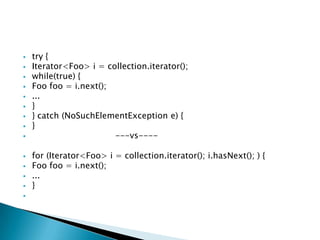
   try {
   Iterator<Foo> i = collection.iterator();
   while(true) {
   Foo foo = i.next();
   ...
   }
   } catch (NoSuchElementException e) {
   }
                       ---vs----

   for (Iterator<Foo> i = collection.iterator(); i.hasNext(); ) {
   Foo foo = i.next();
   ...
   }

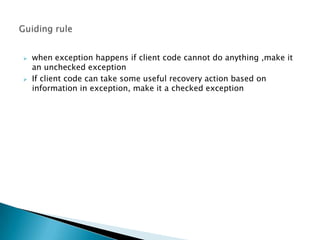
   when exception happens if client code cannot do anything ,make it
    an unchecked exception
   If client code can take some useful recovery action based on
    information in exception, make it a checked exception
   By throwing a checked exception, you force the caller to handle the
    exception in a catch clause or to propagate it outward.
   Each checked exception that a method is declared to throw is
    therefore a potent indication to the API user that the associated
    condition is a possible outcome of invoking the method.
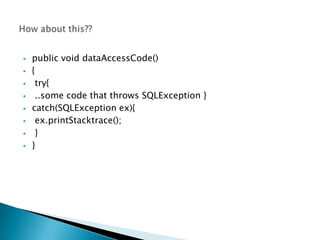
   public void dataAccessCode()
   {
    try{
    ..some code that throws SQLException }
   catch(SQLException ex){
    ex.printStacktrace();
    }
   }
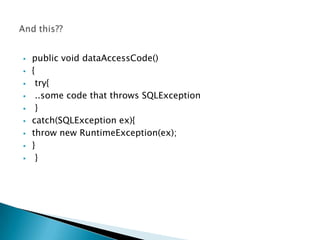
   public void dataAccessCode()
   {
    try{
    ..some code that throws SQLException
    }
   catch(SQLException ex){
   throw new RuntimeException(ex);
   }
    }
   import javax.swing.JOptionPane;
    public class DialogBoxInput
    {
      public static void main( String [] args )
      {
        // declare and initialize variables that will be
        // assigned values in the try block
        int n = 0;
        boolean goodInput = false; // flag variable
            // priming read
            String s = JOptionPane.showInputDialog( null, "Enter an integer" );
            do
            {
              try
              {
                // attempt to convert the String to an int
                n = Integer.parseInt( s );
                goodInput = true;
              }
              catch ( NumberFormatException nfe )
              {
                s = JOptionPane.showInputDialog( null,
                             s + " is not an integer. "
                             + "Enter an integer" );
              }
            } while ( !goodInput );
            JOptionPane.showMessageDialog( null, "The integer is " + n );
        }
    }
   Checked exceptions should be used if it allows the API user to
    recover from the exceptions.
   One technique for turning a checked exception into an unchecked
    exception is to break the method that throws the exception into two
    methods, the first of which returns a boolean that indicates whether
    the exception would be thrown. This API refactoring transforms the
    calling sequence from this:
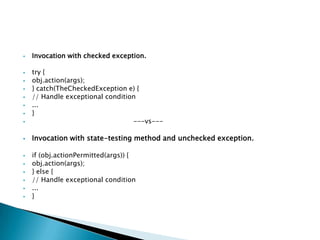
   Invocation with checked exception.

   try {
   obj.action(args);
   } catch(TheCheckedException e) {
   // Handle exceptional condition
   ...
   }
                                 ---vs---

   Invocation with state-testing method and unchecked exception.

   if (obj.actionPermitted(args)) {
   obj.action(args);
   } else {
   // Handle exceptional condition
   ...
   }
   if an object is to be accessed concurrently without external
    synchronization or it is subject to externally induced state
    transitions, this refactoring is inappropriate, as the object’s state
    may change between the invocations of actionPermitted and action.
   Makes our API easier to learn and use because it matches
    established conventions with which programmers are already
    familiar.
    Programs using our API are easier to read because they aren’t
    cluttered with unfamiliar exceptions.
   Fewer exception classes mean a smaller memory footprint and less
    time spent loading classes
   Higher layers should catch lower-level exceptions and, in
    their place, throw exceptions that can be explained in terms
    of the higher-level abstraction
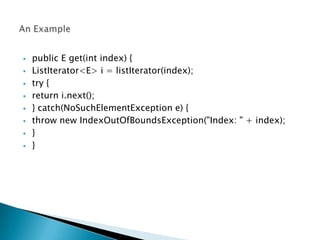
   public E get(int index) {
   ListIterator<E> i = listIterator(index);
   try {
   return i.next();
   } catch(NoSuchElementException e) {
   throw new IndexOutOfBoundsException("Index: " + index);
   }
   }
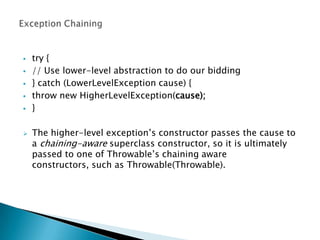
   try {
   // Use lower-level abstraction to do our bidding
   } catch (LowerLevelException cause) {
   throw new HigherLevelException(cause);
   }

   The higher-level exception’s constructor passes the cause to
    a chaining-aware superclass constructor, so it is ultimately
    passed to one of Throwable’s chaining aware
    constructors, such as Throwable(Throwable).
   Where possible, the best way to deal with exceptions from lower
    layers is to avoid them, by ensuring that lower-level methods
    succeed. Sometimes you can do this by checking the validity of the
    higher-level method’s parameters before passing them on to lower
    layers.
   Always declare checked exceptions individually, and document
    precisely the conditions under which each one is thrown using the
    Javadoc @throws tag.
   Use the Javadoc @throws tag to document each unchecked
    exception that a method can throw, but do not use the throws
    keyword to include unchecked exceptions in the method declaration.
   If an exception is thrown by many methods in a class for the same
    reason,it is acceptable to document the exception in the class’s
    documentation comment
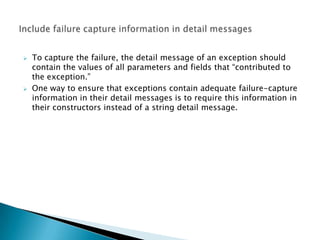
   To capture the failure, the detail message of an exception should
    contain the values of all parameters and fields that “contributed to
    the exception.”
   One way to ensure that exceptions contain adequate failure-capture
    information in their detail messages is to require this information in
    their constructors instead of a string detail message.
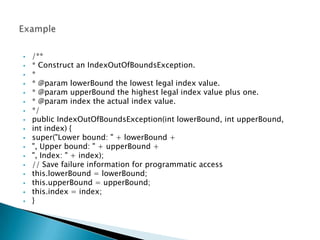
   /**
   * Construct an IndexOutOfBoundsException.
   *
   * @param lowerBound the lowest legal index value.
   * @param upperBound the highest legal index value plus one.
   * @param index the actual index value.
   */
   public IndexOutOfBoundsException(int lowerBound, int upperBound,
   int index) {
   super("Lower bound: " + lowerBound +
   ", Upper bound: " + upperBound +
   ", Index: " + index);
   // Save failure information for programmatic access
   this.lowerBound = lowerBound;
   this.upperBound = upperBound;
   this.index = index;
   }
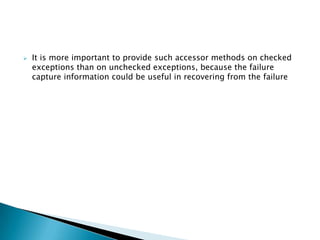
   It is more important to provide such accessor methods on checked
    exceptions than on unchecked exceptions, because the failure
    capture information could be useful in recovering from the failure
   a failed method invocation should leave the object in the state that it
    was in prior to the invocation.
   Some of the methods check parameters for validity before
    performing the operation. This causes any exception to get thrown
    before object modification commences.
   public Object pop() {
   if (size == 0)
   throw new EmptyStackException();
   Object result = elements[--size];
   elements[size] = null; // Eliminate obsolete
    reference
   return result;
   }
   Another approach to achieving failure atomicity is to write recovery
    code that intercepts a failure that occurs in the midst of an
    operation and causes the object to roll back its state to the point
    before the operation began.
   To achieve failure atomicity is to perform the operation on a
    temporary copy of the object and to replace the contents of the
    object with the temporary copy once the operation is complete.
   try {
   ...
   } catch (SomeException e) {
   }

The purpose of exceptions is defeated here.
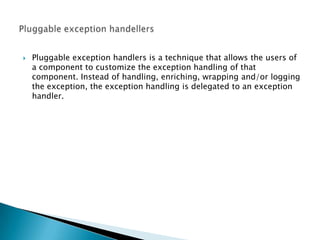
   Pluggable exception handlers is a technique that allows the users of
    a component to customize the exception handling of that
    component. Instead of handling, enriching, wrapping and/or logging
    the exception, the exception handling is delegated to an exception
    handler.
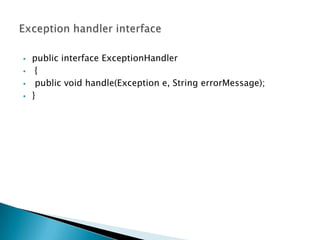
   public interface ExceptionHandler
    {
    public void handle(Exception e, String errorMessage);
   }
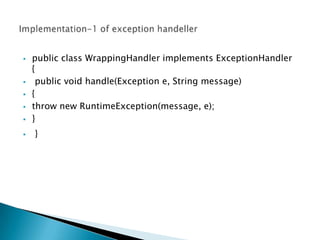
   public class WrappingHandler implements ExceptionHandler
    {
    public void handle(Exception e, String message)
   {
   throw new RuntimeException(message, e);
   }
   }
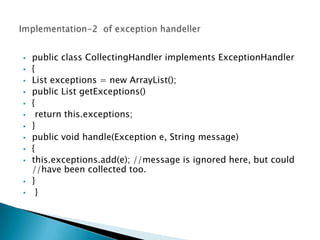
   public class CollectingHandler implements ExceptionHandler
   {
   List exceptions = new ArrayList();
   public List getExceptions()
   {
    return this.exceptions;
   }
   public void handle(Exception e, String message)
   {
   this.exceptions.add(e); //message is ignored here, but could
    //have been collected too.
   }
    }
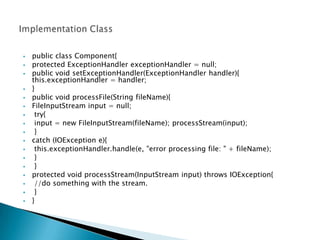
   public class Component{
   protected ExceptionHandler exceptionHandler = null;
   public void setExceptionHandler(ExceptionHandler handler){
    this.exceptionHandler = handler;
   }
   public void processFile(String fileName){
   FileInputStream input = null;
    try{
    input = new FileInputStream(fileName); processStream(input);
    }
   catch (IOException e){
    this.exceptionHandler.handle(e, "error processing file: " + fileName);
    }
    }
   protected void processStream(InputStream input) throws IOException{
    //do something with the stream.
    }
   }
   Pluggable exception handlers are most effective in situations
    where the exceptions occurring can be handled sensibly in
    different ways. For instance, when validating an XML
    document, or an HTML form, you may not always want to
    stop the validation at the first validation error. In some
    situations you might want to continue validation to catch all
    validation exceptions thrown, and show them all to the user
    at the same time. This saves the user from having to correct
    an error, validate, correct error, validate over and over again.
    All errors can be caught and corrected in one iteration.
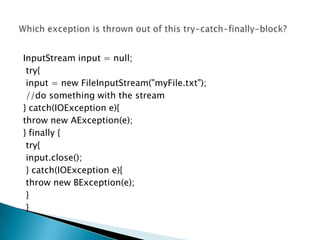
InputStream input = null;
 try{
 input = new FileInputStream("myFile.txt");
 //do something with the stream
} catch(IOException e){
throw new AException(e);
} finally {
 try{
 input.close();
 } catch(IOException e){
 throw new BException(e);
 }
 }
   The last exception thrown in a try-catch-finally block is the
    exception that will be propagated up the call stack. All earlier
    exceptions will disappear.
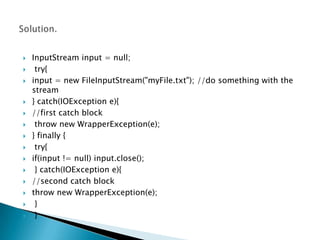
   InputStream input = null;
    try{
   input = new FileInputStream("myFile.txt"); //do something with the
    stream
   } catch(IOException e){
   //first catch block
    throw new WrapperException(e);
   } finally {
    try{
   if(input != null) input.close();
    } catch(IOException e){
   //second catch block
   throw new WrapperException(e);
    }
    }
Exception

Exception

  • 1.
    [Effective Java byJoshua Bloch]
  • 3.
    try {  int i = 0;  while(true)  range[i++].climb();  } catch(ArrayIndexOutOfBoundsException e) {  }
  • 4.
    Because exceptions are designed for exceptional circumstances, they should only be used for exceptional behaviors and should not drive the control flow of any program.  In the presence of an unrelated bug, the loop can fail silently and mask the bug.  the computation in the body of the loop may invoke a method that performs an out-of-bounds access to some unrelated array, and kill the execution silently.
  • 5.
    exceptions ;as the name suggests ,should be used only for exceptional conditions; they should never be used for ordinary control flow.
  • 6.
    An API must not force its clients to use exceptions for ordinary control flow.  A class with a “state-dependent” method that can be invoked only under certain unpredictable conditions should generally have a separate “state-testing” method indicating whether it is appropriate to invoke the state-dependent method.
  • 7.
    try {  Iterator<Foo> i = collection.iterator();  while(true) {  Foo foo = i.next();  ...  }  } catch (NoSuchElementException e) {  }  ---vs----  for (Iterator<Foo> i = collection.iterator(); i.hasNext(); ) {  Foo foo = i.next();  ...  } 
  • 10.
    when exception happens if client code cannot do anything ,make it an unchecked exception  If client code can take some useful recovery action based on information in exception, make it a checked exception
  • 11.
    By throwing a checked exception, you force the caller to handle the exception in a catch clause or to propagate it outward.  Each checked exception that a method is declared to throw is therefore a potent indication to the API user that the associated condition is a possible outcome of invoking the method.
  • 12.
    public void dataAccessCode()  {  try{  ..some code that throws SQLException }  catch(SQLException ex){  ex.printStacktrace();  }  }
  • 13.
    public void dataAccessCode()  {  try{  ..some code that throws SQLException  }  catch(SQLException ex){  throw new RuntimeException(ex);  }  }
  • 14.
    import javax.swing.JOptionPane; public class DialogBoxInput { public static void main( String [] args ) { // declare and initialize variables that will be // assigned values in the try block int n = 0; boolean goodInput = false; // flag variable // priming read String s = JOptionPane.showInputDialog( null, "Enter an integer" ); do { try { // attempt to convert the String to an int n = Integer.parseInt( s ); goodInput = true; } catch ( NumberFormatException nfe ) { s = JOptionPane.showInputDialog( null, s + " is not an integer. " + "Enter an integer" ); } } while ( !goodInput ); JOptionPane.showMessageDialog( null, "The integer is " + n ); } }
  • 16.
    Checked exceptions should be used if it allows the API user to recover from the exceptions.  One technique for turning a checked exception into an unchecked exception is to break the method that throws the exception into two methods, the first of which returns a boolean that indicates whether the exception would be thrown. This API refactoring transforms the calling sequence from this:
  • 17.
    Invocation with checked exception.  try {  obj.action(args);  } catch(TheCheckedException e) {  // Handle exceptional condition  ...  }  ---vs---  Invocation with state-testing method and unchecked exception.  if (obj.actionPermitted(args)) {  obj.action(args);  } else {  // Handle exceptional condition  ...  }
  • 18.
    if an object is to be accessed concurrently without external synchronization or it is subject to externally induced state transitions, this refactoring is inappropriate, as the object’s state may change between the invocations of actionPermitted and action.
  • 20.
    Makes our API easier to learn and use because it matches established conventions with which programmers are already familiar.  Programs using our API are easier to read because they aren’t cluttered with unfamiliar exceptions.  Fewer exception classes mean a smaller memory footprint and less time spent loading classes
  • 22.
    Higher layers should catch lower-level exceptions and, in their place, throw exceptions that can be explained in terms of the higher-level abstraction
  • 23.
    public E get(int index) {  ListIterator<E> i = listIterator(index);  try {  return i.next();  } catch(NoSuchElementException e) {  throw new IndexOutOfBoundsException("Index: " + index);  }  }
  • 24.
    try {  // Use lower-level abstraction to do our bidding  } catch (LowerLevelException cause) {  throw new HigherLevelException(cause);  }  The higher-level exception’s constructor passes the cause to a chaining-aware superclass constructor, so it is ultimately passed to one of Throwable’s chaining aware constructors, such as Throwable(Throwable).
  • 25.
    Where possible, the best way to deal with exceptions from lower layers is to avoid them, by ensuring that lower-level methods succeed. Sometimes you can do this by checking the validity of the higher-level method’s parameters before passing them on to lower layers.
  • 27.
    Always declare checked exceptions individually, and document precisely the conditions under which each one is thrown using the Javadoc @throws tag.  Use the Javadoc @throws tag to document each unchecked exception that a method can throw, but do not use the throws keyword to include unchecked exceptions in the method declaration.  If an exception is thrown by many methods in a class for the same reason,it is acceptable to document the exception in the class’s documentation comment
  • 28.
    To capture the failure, the detail message of an exception should contain the values of all parameters and fields that “contributed to the exception.”  One way to ensure that exceptions contain adequate failure-capture information in their detail messages is to require this information in their constructors instead of a string detail message.
  • 29.
    /**  * Construct an IndexOutOfBoundsException.  *  * @param lowerBound the lowest legal index value.  * @param upperBound the highest legal index value plus one.  * @param index the actual index value.  */  public IndexOutOfBoundsException(int lowerBound, int upperBound,  int index) {  super("Lower bound: " + lowerBound +  ", Upper bound: " + upperBound +  ", Index: " + index);  // Save failure information for programmatic access  this.lowerBound = lowerBound;  this.upperBound = upperBound;  this.index = index;  }
  • 30.
    It is more important to provide such accessor methods on checked exceptions than on unchecked exceptions, because the failure capture information could be useful in recovering from the failure
  • 32.
    a failed method invocation should leave the object in the state that it was in prior to the invocation.  Some of the methods check parameters for validity before performing the operation. This causes any exception to get thrown before object modification commences.
  • 33.
    public Object pop() {  if (size == 0)  throw new EmptyStackException();  Object result = elements[--size];  elements[size] = null; // Eliminate obsolete reference  return result;  }
  • 34.
    Another approach to achieving failure atomicity is to write recovery code that intercepts a failure that occurs in the midst of an operation and causes the object to roll back its state to the point before the operation began.  To achieve failure atomicity is to perform the operation on a temporary copy of the object and to replace the contents of the object with the temporary copy once the operation is complete.
  • 36.
    try {  ...  } catch (SomeException e) {  } The purpose of exceptions is defeated here.
  • 37.
    Pluggable exception handlers is a technique that allows the users of a component to customize the exception handling of that component. Instead of handling, enriching, wrapping and/or logging the exception, the exception handling is delegated to an exception handler.
  • 38.
    public interface ExceptionHandler  {  public void handle(Exception e, String errorMessage);  }
  • 39.
    public class WrappingHandler implements ExceptionHandler {  public void handle(Exception e, String message)  {  throw new RuntimeException(message, e);  }  }
  • 40.
    public class CollectingHandler implements ExceptionHandler  {  List exceptions = new ArrayList();  public List getExceptions()  {  return this.exceptions;  }  public void handle(Exception e, String message)  {  this.exceptions.add(e); //message is ignored here, but could //have been collected too.  }  }
  • 41.
    public class Component{  protected ExceptionHandler exceptionHandler = null;  public void setExceptionHandler(ExceptionHandler handler){ this.exceptionHandler = handler;  }  public void processFile(String fileName){  FileInputStream input = null;  try{  input = new FileInputStream(fileName); processStream(input);  }  catch (IOException e){  this.exceptionHandler.handle(e, "error processing file: " + fileName);  }  }  protected void processStream(InputStream input) throws IOException{  //do something with the stream.  }  }
  • 42.
    Pluggable exception handlers are most effective in situations where the exceptions occurring can be handled sensibly in different ways. For instance, when validating an XML document, or an HTML form, you may not always want to stop the validation at the first validation error. In some situations you might want to continue validation to catch all validation exceptions thrown, and show them all to the user at the same time. This saves the user from having to correct an error, validate, correct error, validate over and over again. All errors can be caught and corrected in one iteration.
  • 43.
    InputStream input =null; try{ input = new FileInputStream("myFile.txt"); //do something with the stream } catch(IOException e){ throw new AException(e); } finally { try{ input.close(); } catch(IOException e){ throw new BException(e); } }
  • 44.
    The last exception thrown in a try-catch-finally block is the exception that will be propagated up the call stack. All earlier exceptions will disappear.
  • 45.
    InputStream input = null;  try{  input = new FileInputStream("myFile.txt"); //do something with the stream  } catch(IOException e){  //first catch block  throw new WrapperException(e);  } finally {  try{  if(input != null) input.close();  } catch(IOException e){  //second catch block  throw new WrapperException(e);  }  }

Editor's Notes