1
Software Development LifeSoftware Development Life
CycleCycle
• Main issues:
 Discussion of different life cycle models
 Maintenance or evolution
Not this life cycleNot this life cycle
IntroductionIntroduction
• software development projects are large and complex
• a phased approach to control it is necessary
• traditional models are document-driven: there is a new
pile of paper after each phase is completed
• evolutionary models recognize that much of what is
called maintenance is inevitable
• latest fashion: agile methods, eXtreme Programming
• life cycle models can be explicitly modeled, in a process
modeling language
4
Simple life cycle modelSimple life cycle model problem
reqs specification
requirements engineering
design
design
implementation
system
testing
working system
PointPoint to ponder #1to ponder #1
• Why does the model look like this?
• Is this how we go about?
Simple Life Cycle ModelSimple Life Cycle Model
• document driven, planning driven, heavyweight
• milestones are reached if the appropriate documentation is
delivered (e.g., requirements specification, design
specification, program, test document)
• much planning upfront, often heavy contracts are signed
• problems
o feedback is not taken into account
o maintenance does not imply evolution
WaterfallWaterfall
ModelModel
reqs engineering
design
implementation
testing
maintenance
V & V
V & V
V & V
V & V
V & V
Another waterfall modelAnother waterfall model
testing
implementation
design
requirement
s
engineering
feedback
V-ModelV-Model
reqs eng
det. design
global design
coding
unit testing
integration
testing
acceptance
testing
Waterfall Model (cntd)Waterfall Model (cntd)
• includes iteration and feedback
• validation (are we building the right system?) and
verification (are we building the system right?) after each
step
• user requirements are fixed as early as possible
• problems
o too rigid
o developers cannot move between various abstraction
levels
Activity versus phaseActivity versus phase
Design Implementation
Integration
testing
Acceptance
testing
Integration
testing
Implementation
(& unit testing)
Design
Phase
Activity
4.7
6.9
49.2
43.4
70.3
34.1
26.1
15.9
10.3
25.8
6.9
6.4
Lightweight (agile) approachesLightweight (agile) approaches
• prototyping
• incremental development
• RAD, DSDM
• XP
The Agile ManifestoThe Agile Manifesto
• Individuals and interactions over processes and
tools
• Working software over comprehensive
documentation
• Customer collaboration over contract negotiation
• Responding to change over following a plan
PrototypingPrototyping
• requirements elicitation is difficult
o software is developed because the present situation is unsatisfactory
o however, the desirable new situation is as yet unknown
• prototyping is used to obtain the requirements of
some aspects of the system
• prototyping should be a relatively cheap process
o use rapid prototyping languages and tools
o not all functionality needs to be implemented
o production quality is not required
Prototyping as a tool forPrototyping as a tool for requirements engineeringrequirements engineering
reqs engineering
designdesign
implementationimplementation
testingtesting
maintenance
Prototyping (cntd)Prototyping (cntd)
• throwaway prototyping: the n-th prototype is
followed by a waterfall-like process (as depicted
on previous slide)
• evolutionary prototyping: the nth prototype is
delivered
Point to ponder #2Point to ponder #2
What are the pros and cons of the two approaches?
Prototyping, advantagesPrototyping, advantages
• The resulting system is easier to use
• User needs are better accommodated
• The resulting system has fewer features
• Problems are detected earlier
• The design is of higher quality
• The resulting system is easier to maintain
• The development incurs less effort
Prototyping, disadvantagesPrototyping, disadvantages
• The resulting system has more features
• The performance of the resulting system is worse
• The design is of less quality
• The resulting system is harder to maintain
• The prototyping approach requires more
experienced team members
Prototyping, recommendationsPrototyping, recommendations
• the users and the designers must be well aware of
the issues and the pitfalls
• use prototyping when the requirements are unclear
• prototyping needs to be planned and controlled as
well
Incremental DevelopmentIncremental Development
• a software system is delivered in small increments,
thereby avoiding the Big Bang effect
• the waterfall model is employed in each phase
• the user is closely involved in directing the next steps
• incremental development prevents over
functionality
RAD: Rapid Application DevelopmentRAD: Rapid Application Development
• evolutionary development, with time boxes: fixed time
frames within which activities are done;
• time frame is decided upon first, then one tries to realize as
much as possible within that time frame;
• other elements: Joint Requirements Planning (JRD) and Joint
Application Design (JAD), workshops in which users
participate;
• requirements prioritization through a triage;
• development in a SWAT team: Skilled Workers with
Advanced Tools
DSDMDSDM
• Dynamic Systems Development Method, #1 RAD
framework in UK
• Fundamental idea: fix time and resources (timebox),
adjust functionality accordingly
• One needs to be a member of the DSDM
consortium
DSDM phasesDSDM phases
• Feasibility: delivers feasibility report and outline plan,
optionally fast prototype (few weeks)
• Business study: analyze characteristics of business and
technology (in workshops), delivers a.o. System
Architecture Definition
• Functional model iteration: timeboxed iterative,
incremental phase, yields requirements
• Design and build iteration
• Implementation: transfer to production environment
DSDM practicesDSDM practices
• Active user involvement is imperative
• Empowered teams
• Frequent delivery of products
• Acceptance determined by fitness for business purpose
• Iterative, incremental development
• All changes are reversible
• Requirements baselined at high level
• Testing integrated in life cycle
• Collaborative, cooperative approach shared by all
stakeholders is essential
XP – eXtreme ProgrammingXP – eXtreme Programming
•Everything is done in small steps
•The system always compiles, always runs
•Client as the center of development team
•Developers have same responsibility w.r.t. software
and methodology
13 practices of XP13 practices of XP
• Whole team: client part of
the team
• Metaphor: common analogy
for the system
• The planning game, based
on user stories
• Simple design
• Small releases (e.g. 2 weeks)
• Customer tests
• Pair programming
• Test-driven development:
tests developed first
• Design improvement
(refactoring)
• Collective code ownership
• Continuous integration:
system always runs
• Sustainable pace: no
overtime
• Coding standards
RUPRUP
• Rational Unified Process
• Complement to UML (Unified Modeling Language)
• Iterative approach for object-oriented systems,
strongly embraces use cases for modeling
requirements
• Tool-supported (UML-tools, ClearCase)
RUP phasesRUP phases
• Inception: establish scope, boundaries, critical use
cases, candidate architectures, schedule and cost
estimates
• Elaboration: foundation of architecture, establish
tool support, get al use cases
• Construction: manufacturing process, one or more
releases
• Transition: release to user community, often several
releases
Differences for developersDifferences for developers
• Agile: knowledgeable, collocated, collaborative
• Heavyweight: plan-driven, adequate skills, access
to external knowledge
Differences for customersDifferences for customers
• Agile: dedicated, knowledgeable, collocated,
collaborative, representative, empowered
• Heavyweight: access to knowledgeable,
collaborative, representative, empowered
customers
Differences for requirementsDifferences for requirements
• Agile: largely emergent, rapid change
• Heavyweight: knowable early, largely stable
Differences for architectureDifferences for architecture
•Agile: designed for current requirements
•Heavyweight: designed for current and foreseeable
requirements
Differences for sizeDifferences for size
• Agile: smaller teams and products
• Heavyweight: larger teams and products
Differences for primary objectiveDifferences for primary objective
• Agile: rapid value
• Heavyweight: high assurance
Essence of MDAEssence of MDA
• Platform Independent Model (PIM)
• Model transformation and refinement
• Resulting in a Platform Specific Model (PSM)
Maintenance or EvolutionMaintenance or Evolution
• some observations
o systems are not built from scratch
o there is time pressure on maintenance
• the five laws of software evolution
o law of continuing change
o law of increasingly complexity
o law of program evolution
o law of invariant work rate
o law of incremental growth limit
Software Product LinesSoftware Product Lines
• developers are not inclined to make a
maintainable and reusable product, it has
additional costs
• this viewpoint is changed somewhat if the product
family is the focus of attention rather than
producing a single version of a product
• two processes result: domain engineering, and
application engineering
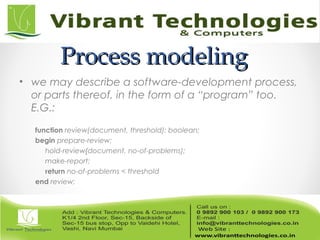
Process modelingProcess modeling
• we may describe a software-development process,
or parts thereof, in the form of a “program” too.
E.G.:
function review(document, threshold): boolean;
begin prepare-review;
hold-review{document, no-of-problems);
make-report;
return no-of-problems < threshold
end review;
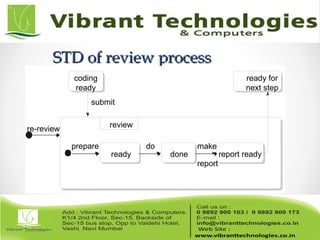
STD of review processSTD of review process
coding
ready
ready for
next step
submit
re-review
review
prepare
ready
do
done
make
report
report ready
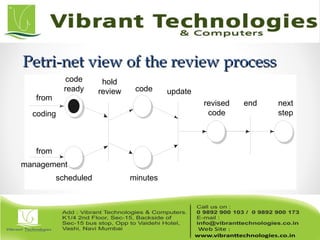
Petri-net view of the review processPetri-net view of the review process
hold
review update
end
from
coding
from
management
scheduled
code
ready
minutes
code
revised
code
next
step
Caveats of process modelingCaveats of process modeling
• not all aspects of software development can be
caught in an algorithm
• a model is a model, thus a simplification of reality
• progression of stages differs from what is actually
done
• some processes (e.g. learning the domain) tend to
be ignored
• no support for transfer across projects
SummarySummary
• Traditional models focus on control of the process
• There is no one-size-fits-all model; each situation
requires its own approach
• A pure project approach inhibits reuse and
maintenance
• There has been quite some attention for process
modeling, and tools based on such process
models
ThankThank You !!!You !!!
For More Information click below link:
Follow Us on:
http://vibranttechnologies.co.in/software-testing-classes-in-mumba

Manual Software testing - software development life cycle

  • 1.
  • 2.
    Software Development LifeSoftwareDevelopment Life CycleCycle • Main issues:  Discussion of different life cycle models  Maintenance or evolution
  • 3.
    Not this lifecycleNot this life cycle
  • 4.
    IntroductionIntroduction • software developmentprojects are large and complex • a phased approach to control it is necessary • traditional models are document-driven: there is a new pile of paper after each phase is completed • evolutionary models recognize that much of what is called maintenance is inevitable • latest fashion: agile methods, eXtreme Programming • life cycle models can be explicitly modeled, in a process modeling language 4
  • 5.
    Simple life cyclemodelSimple life cycle model problem reqs specification requirements engineering design design implementation system testing working system
  • 6.
    PointPoint to ponder#1to ponder #1 • Why does the model look like this? • Is this how we go about?
  • 7.
    Simple Life CycleModelSimple Life Cycle Model • document driven, planning driven, heavyweight • milestones are reached if the appropriate documentation is delivered (e.g., requirements specification, design specification, program, test document) • much planning upfront, often heavy contracts are signed • problems o feedback is not taken into account o maintenance does not imply evolution
  • 8.
  • 9.
    Another waterfall modelAnotherwaterfall model testing implementation design requirement s engineering feedback
  • 10.
    V-ModelV-Model reqs eng det. design globaldesign coding unit testing integration testing acceptance testing
  • 11.
    Waterfall Model (cntd)WaterfallModel (cntd) • includes iteration and feedback • validation (are we building the right system?) and verification (are we building the system right?) after each step • user requirements are fixed as early as possible • problems o too rigid o developers cannot move between various abstraction levels
  • 12.
    Activity versus phaseActivityversus phase Design Implementation Integration testing Acceptance testing Integration testing Implementation (& unit testing) Design Phase Activity 4.7 6.9 49.2 43.4 70.3 34.1 26.1 15.9 10.3 25.8 6.9 6.4
  • 13.
    Lightweight (agile) approachesLightweight(agile) approaches • prototyping • incremental development • RAD, DSDM • XP
  • 14.
    The Agile ManifestoTheAgile Manifesto • Individuals and interactions over processes and tools • Working software over comprehensive documentation • Customer collaboration over contract negotiation • Responding to change over following a plan
  • 15.
    PrototypingPrototyping • requirements elicitationis difficult o software is developed because the present situation is unsatisfactory o however, the desirable new situation is as yet unknown • prototyping is used to obtain the requirements of some aspects of the system • prototyping should be a relatively cheap process o use rapid prototyping languages and tools o not all functionality needs to be implemented o production quality is not required
  • 16.
    Prototyping as atool forPrototyping as a tool for requirements engineeringrequirements engineering reqs engineering designdesign implementationimplementation testingtesting maintenance
  • 17.
    Prototyping (cntd)Prototyping (cntd) •throwaway prototyping: the n-th prototype is followed by a waterfall-like process (as depicted on previous slide) • evolutionary prototyping: the nth prototype is delivered
  • 18.
    Point to ponder#2Point to ponder #2 What are the pros and cons of the two approaches?
  • 19.
    Prototyping, advantagesPrototyping, advantages •The resulting system is easier to use • User needs are better accommodated • The resulting system has fewer features • Problems are detected earlier • The design is of higher quality • The resulting system is easier to maintain • The development incurs less effort
  • 20.
    Prototyping, disadvantagesPrototyping, disadvantages •The resulting system has more features • The performance of the resulting system is worse • The design is of less quality • The resulting system is harder to maintain • The prototyping approach requires more experienced team members
  • 21.
    Prototyping, recommendationsPrototyping, recommendations •the users and the designers must be well aware of the issues and the pitfalls • use prototyping when the requirements are unclear • prototyping needs to be planned and controlled as well
  • 22.
    Incremental DevelopmentIncremental Development •a software system is delivered in small increments, thereby avoiding the Big Bang effect • the waterfall model is employed in each phase • the user is closely involved in directing the next steps • incremental development prevents over functionality
  • 23.
    RAD: Rapid ApplicationDevelopmentRAD: Rapid Application Development • evolutionary development, with time boxes: fixed time frames within which activities are done; • time frame is decided upon first, then one tries to realize as much as possible within that time frame; • other elements: Joint Requirements Planning (JRD) and Joint Application Design (JAD), workshops in which users participate; • requirements prioritization through a triage; • development in a SWAT team: Skilled Workers with Advanced Tools
  • 24.
    DSDMDSDM • Dynamic SystemsDevelopment Method, #1 RAD framework in UK • Fundamental idea: fix time and resources (timebox), adjust functionality accordingly • One needs to be a member of the DSDM consortium
  • 25.
    DSDM phasesDSDM phases •Feasibility: delivers feasibility report and outline plan, optionally fast prototype (few weeks) • Business study: analyze characteristics of business and technology (in workshops), delivers a.o. System Architecture Definition • Functional model iteration: timeboxed iterative, incremental phase, yields requirements • Design and build iteration • Implementation: transfer to production environment
  • 26.
    DSDM practicesDSDM practices •Active user involvement is imperative • Empowered teams • Frequent delivery of products • Acceptance determined by fitness for business purpose • Iterative, incremental development • All changes are reversible • Requirements baselined at high level • Testing integrated in life cycle • Collaborative, cooperative approach shared by all stakeholders is essential
  • 27.
    XP – eXtremeProgrammingXP – eXtreme Programming •Everything is done in small steps •The system always compiles, always runs •Client as the center of development team •Developers have same responsibility w.r.t. software and methodology
  • 28.
    13 practices ofXP13 practices of XP • Whole team: client part of the team • Metaphor: common analogy for the system • The planning game, based on user stories • Simple design • Small releases (e.g. 2 weeks) • Customer tests • Pair programming • Test-driven development: tests developed first • Design improvement (refactoring) • Collective code ownership • Continuous integration: system always runs • Sustainable pace: no overtime • Coding standards
  • 29.
    RUPRUP • Rational UnifiedProcess • Complement to UML (Unified Modeling Language) • Iterative approach for object-oriented systems, strongly embraces use cases for modeling requirements • Tool-supported (UML-tools, ClearCase)
  • 30.
    RUP phasesRUP phases •Inception: establish scope, boundaries, critical use cases, candidate architectures, schedule and cost estimates • Elaboration: foundation of architecture, establish tool support, get al use cases • Construction: manufacturing process, one or more releases • Transition: release to user community, often several releases
  • 31.
    Differences for developersDifferencesfor developers • Agile: knowledgeable, collocated, collaborative • Heavyweight: plan-driven, adequate skills, access to external knowledge
  • 32.
    Differences for customersDifferencesfor customers • Agile: dedicated, knowledgeable, collocated, collaborative, representative, empowered • Heavyweight: access to knowledgeable, collaborative, representative, empowered customers
  • 33.
    Differences for requirementsDifferencesfor requirements • Agile: largely emergent, rapid change • Heavyweight: knowable early, largely stable
  • 34.
    Differences for architectureDifferencesfor architecture •Agile: designed for current requirements •Heavyweight: designed for current and foreseeable requirements
  • 35.
    Differences for sizeDifferencesfor size • Agile: smaller teams and products • Heavyweight: larger teams and products
  • 36.
    Differences for primaryobjectiveDifferences for primary objective • Agile: rapid value • Heavyweight: high assurance
  • 37.
    Essence of MDAEssenceof MDA • Platform Independent Model (PIM) • Model transformation and refinement • Resulting in a Platform Specific Model (PSM)
  • 38.
    Maintenance or EvolutionMaintenanceor Evolution • some observations o systems are not built from scratch o there is time pressure on maintenance • the five laws of software evolution o law of continuing change o law of increasingly complexity o law of program evolution o law of invariant work rate o law of incremental growth limit
  • 39.
    Software Product LinesSoftwareProduct Lines • developers are not inclined to make a maintainable and reusable product, it has additional costs • this viewpoint is changed somewhat if the product family is the focus of attention rather than producing a single version of a product • two processes result: domain engineering, and application engineering
  • 40.
    Process modelingProcess modeling •we may describe a software-development process, or parts thereof, in the form of a “program” too. E.G.: function review(document, threshold): boolean; begin prepare-review; hold-review{document, no-of-problems); make-report; return no-of-problems < threshold end review;
  • 41.
    STD of reviewprocessSTD of review process coding ready ready for next step submit re-review review prepare ready do done make report report ready
  • 42.
    Petri-net view ofthe review processPetri-net view of the review process hold review update end from coding from management scheduled code ready minutes code revised code next step
  • 43.
    Caveats of processmodelingCaveats of process modeling • not all aspects of software development can be caught in an algorithm • a model is a model, thus a simplification of reality • progression of stages differs from what is actually done • some processes (e.g. learning the domain) tend to be ignored • no support for transfer across projects
  • 44.
    SummarySummary • Traditional modelsfocus on control of the process • There is no one-size-fits-all model; each situation requires its own approach • A pure project approach inhibits reuse and maintenance • There has been quite some attention for process modeling, and tools based on such process models
  • 45.
    ThankThank You !!!You!!! For More Information click below link: Follow Us on: http://vibranttechnologies.co.in/software-testing-classes-in-mumba

Editor's Notes

  • #8 Important point to make: this is a management instrument, to control progress, rather than a development model
  • #9 The waterfall model emphasizes iteration, caused by verification and validation steps. This model became widely known after Boehm’s 1976 article, but goes back to the sixties. The model is meant for salmon, not for people
  • #10 This is Escher’s picture from the cover
  • #13 This is from Zelkowitz 88. The rows denote the actual activity, of designing, implementation, etc. The columns denote the (official) phases. So during the implementation phase, about 34% of the time is still spent on design. Note the findings of Guindon: design is an opportunistic process, whereby designers hop up and down between different levels of abstraction
  • #14 XP = eXtreme Programming DSDM = soort geformaliseerde RAD RUP: zware methode iteratief Open Source: beetje vreemde eend in de bijt, maar trekt veel aandacht bij de overheid
  • #15 Agility: readiness for motion”, “nimbleness” (= behendigheid”)
  • #16 Of the old-fashioned pushdown telephone,about 2000 prototypes were developed: with different arrangements of the keys, different sizes of the keys, different weights of the receiver, etc.
  • #21 Not that some entries on these lists are the same, I.e. some things are listed as both an advantage and as a disadvantage.
  • #23 Overfunctionality: bells and whistles are hard to judge. In this type of process, they are postponed to the next iteration, so not developed if not really needed.
  • #24 Triage: split requirements in 3 sets: to be done now, to be done later, and things that will be done now if time permits it. SWAT teams are discussed in chapter 5 as well, a bit. RAD has much in common with the Scandinavian school, because they both value the role of users in the development process.
  • #28 Ontstaan zo rond 1998. Maar bouwt naturlijk wel voort op eerdere ontwikkelingen: AD, evolutionair ontwikkelen ed, spiraal model, scandinavische school, fysische omgeving programmeurs, zoals onderzocht bij bv IBM (telefoon uit)
  • #29 Voraf wel korte vorbereiding, met beetje architectuur, maar niet echt veel. Team zonder bazen, met client er midden in Metafoor: desktop bv. Planning gebaseerd op scenarios, en soort “kunst”maat: bv story kost 4 bLUBS. En deze week maken we 20 BLUBS. Aan het eind van de week kijken of dat klopt, en je idee van de omvang van een BLUB bijstellen. In design alleen stoppen wat je nodig hebt; de wereld verandert toch; aardige metFOO HIER: ELKE DAG KAART OPZETTEN EN WEER VOORSPELLEN, IPV EEN KEER PER WEEK. Client evalueert elke release, en stelt zonodig bij; bepaalt prioriteiten volgende stories, etc. Pair programming: piloot en copiloot; je kunt het van elkaar overnemen, enz. Ipv eerst code schrijven, schrijf je eerst de tests Overwerk leidt tot burnout, fouten, meer overwerk. Team neemt een of andere standaard aan.
  • #32 Volgende reeks slides geven aantal globale verschillen aan
  • #33 Bij de laatste: dat hoop je maar; defensie voorbeeld van Gerrit
  • #38 Platform is e.g. .NET, CORBA, hardware topology, etc. One can then define a transformation (refinement) from the PIM to one or more platform specific models. E.g. Java,
  • #39 So there is a gradual difference between development and evolution, where the emphasis is on different things. A green field situation is seldom found in software development. So: design for change; continuing change: if a system is used, it changes, until it becomes cost-effective to replace the whole system increasing complexity: entropy increases program evolution: growth rate is self-regulating (see next slide) invariant work rate: a few extra people don’t make a big difference (Brooks Law, see also chapter 7) incremental growth limit: system “determines” its own growth rate, if you go too fast, you get into trouble Explanation in terms of progressive and anti-regressive activities
  • #41 Here, the review process is described in terms of the activities that have to be done
  • #42 This is the same review process, but now emphasis is on the states, and state transitions. This figures uses the UML notation for state diagrams
  • #43 Petri nets allow for the modeling of nondeterminism and parallellism. Petri nets have places (the circles), which are either marked or unmarked. A transition if a vertical line. Transitions have inputs and outputs, the arrows. If all input paces to a transition are marked, in may “fire”. All marks are then removed form the input places, and all output places are marked. So, in the above exmple, the review can only be held if the code is ready for review, and management has scheduled the review.
  • #44 So what tends to be modeled are the “easy” parts. As for stages versus what is really done, see earlier slide with the numbers from Zelkowitz.