Software DevelopmentSoftware Development
Life Cycle (SDLC)Life Cycle (SDLC)
SDLC ModelSDLC Model
A framework that describes the activities
performed at each stage of a software
development project.
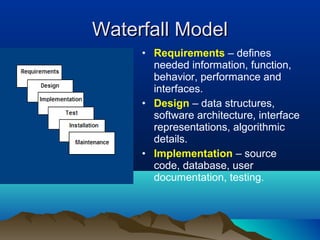
Waterfall ModelWaterfall Model
• Requirements – defines
needed information, function,
behavior, performance and
interfaces.
• Design – data structures,
software architecture, interface
representations, algorithmic
details.
• Implementation – source
code, database, user
documentation, testing.
Waterfall StrengthsWaterfall Strengths
• Easy to understand, easy to use
• Provides structure to inexperienced staff
• Milestones are well understood
• Sets requirements stability
• Good for management control (plan, staff, track)
• Works well when quality is more important than
cost or schedule
Waterfall DeficienciesWaterfall Deficiencies
• All requirements must be known upfront
• Deliverables created for each phase are
considered frozen – inhibits flexibility
• Can give a false impression of progress
• Does not reflect problem-solving nature of
software development – iterations of phases
• Integration is one big bang at the end
• Little opportunity for customer to preview the
system (until it may be too late)
When to use the Waterfall ModelWhen to use the Waterfall Model
• Requirements are very well known
• Product definition is stable
• Technology is understood
• New version of an existing product
• Porting an existing product to a new platform.
V-Shaped SDLC ModelV-Shaped SDLC Model
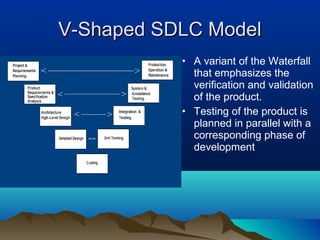
• A variant of the Waterfall
that emphasizes the
verification and validation
of the product.
• Testing of the product is
planned in parallel with a
corresponding phase of
development
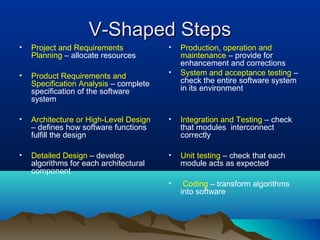
V-Shaped StepsV-Shaped Steps
• Project and Requirements
Planning – allocate resources
• Product Requirements and
Specification Analysis – complete
specification of the software
system
• Architecture or High-Level Design
– defines how software functions
fulfill the design
• Detailed Design – develop
algorithms for each architectural
component
• Production, operation and
maintenance – provide for
enhancement and corrections
• System and acceptance testing –
check the entire software system
in its environment
• Integration and Testing – check
that modules interconnect
correctly
• Unit testing – check that each
module acts as expected
• Coding – transform algorithms
into software
V-Shaped StrengthsV-Shaped Strengths
• Emphasize planning for verification and
validation of the product in early stages of
product development
• Each deliverable must be testable
• Project management can track progress
by milestones
• Easy to use
V-Shaped WeaknessesV-Shaped Weaknesses
• Does not easily handle concurrent events
• Does not handle iterations or phases
• Does not easily handle dynamic changes
in requirements
• Does not contain risk analysis activities
When to use the V-Shaped ModelWhen to use the V-Shaped Model
• Excellent choice for systems requiring
high reliability – hospital patient control
applications
• All requirements are known up-front
• When it can be modified to handle
changing requirements beyond analysis
phase
• Solution and technology are known
Structured Evolutionary PrototypingStructured Evolutionary Prototyping
ModelModel
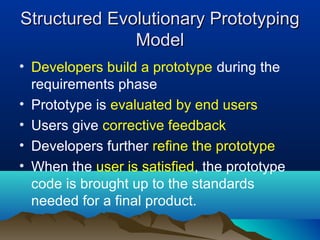
• Developers build a prototype during the
requirements phase
• Prototype is evaluated by end users
• Users give corrective feedback
• Developers further refine the prototype
• When the user is satisfied, the prototype
code is brought up to the standards
needed for a final product.
Structured Evolutionary PrototypingStructured Evolutionary Prototyping
StepsSteps
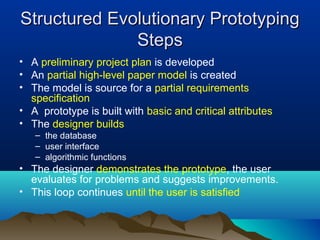
• A preliminary project plan is developed
• An partial high-level paper model is created
• The model is source for a partial requirements
specification
• A prototype is built with basic and critical attributes
• The designer builds
– the database
– user interface
– algorithmic functions
• The designer demonstrates the prototype, the user
evaluates for problems and suggests improvements.
• This loop continues until the user is satisfied
Structured Evolutionary PrototypingStructured Evolutionary Prototyping
StrengthsStrengths
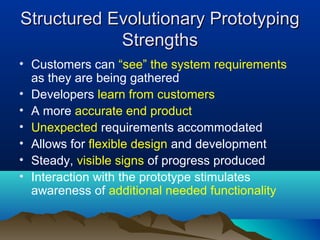
• Customers can “see” the system requirements
as they are being gathered
• Developers learn from customers
• A more accurate end product
• Unexpected requirements accommodated
• Allows for flexible design and development
• Steady, visible signs of progress produced
• Interaction with the prototype stimulates
awareness of additional needed functionality
Structured Evolutionary PrototypingStructured Evolutionary Prototyping
WeaknessesWeaknesses
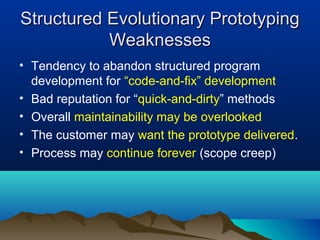
• Tendency to abandon structured program
development for “code-and-fix” development
• Bad reputation for “quick-and-dirty” methods
• Overall maintainability may be overlooked
• The customer may want the prototype delivered.
• Process may continue forever (scope creep)
When to useWhen to use
Structured Evolutionary PrototypingStructured Evolutionary Prototyping
• Requirements are unstable or have to be
clarified
• As the requirements clarification stage of a
waterfall model
• Develop user interfaces
• Short-lived demonstrations
• New, original development
• With the analysis and design portions of object-
oriented development.
Rapid Application Model (RAD)Rapid Application Model (RAD)
• Requirements planning phase (a workshop
utilizing structured discussion of business
problems)
• User description phase – automated tools
capture information from users
• Construction phase – productivity tools, such as
code generators, screen generators, etc. inside
a time-box. (“Do until done”)
• Cutover phase -- installation of the system, user
acceptance testing and user training
RAD StrengthsRAD Strengths
• Reduced cycle time and improved productivity
with fewer people means lower costs
• Time-box approach mitigates cost and schedule
risk
• Customer involved throughout the complete
cycle minimizes risk of not achieving customer
satisfaction and business needs
• Focus moves from documentation to code
(WYSIWYG).
• Uses modeling concepts to capture information
about business, data, and processes.
RAD WeaknessesRAD Weaknesses
• Accelerated development process must give
quick responses to the user
• Risk of never achieving closure
• Hard to use with legacy systems
• Requires a system that can be modularized
• Developers and customers must be committed
to rapid-fire activities in an abbreviated time
frame.
When to use RADWhen to use RAD
• Reasonably well-known requirements
• User involved throughout the life cycle
• Project can be time-boxed
• Functionality delivered in increments
• High performance not required
• Low technical risks
• System can be modularized
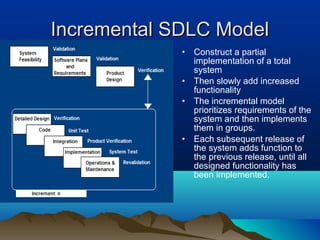
Incremental SDLC ModelIncremental SDLC Model
• Construct a partial
implementation of a total
system
• Then slowly add increased
functionality
• The incremental model
prioritizes requirements of the
system and then implements
them in groups.
• Each subsequent release of
the system adds function to
the previous release, until all
designed functionality has
been implemented.
Incremental Model StrengthsIncremental Model Strengths
• Develop high-risk or major functions first
• Each release delivers an operational product
• Customer can respond to each build
• Uses “divide and conquer” breakdown of tasks
• Lowers initial delivery cost
• Initial product delivery is faster
• Customers get important functionality early
• Risk of changing requirements is reduced
Incremental Model WeaknessesIncremental Model Weaknesses
• Requires good planning and design
• Requires early definition of a complete
and fully functional system to allow for the
definition of increments
• Well-defined module interfaces are
required (some will be developed long
before others)
• Total cost of the complete system is not
lower
When to use the Incremental ModelWhen to use the Incremental Model
• Risk, funding, schedule, program complexity, or
need for early realization of benefits.
• Most of the requirements are known up-front but
are expected to evolve over time
• A need to get basic functionality to the market
early
• On projects which have lengthy development
schedules
• On a project with new technology
Spiral SDLC ModelSpiral SDLC Model
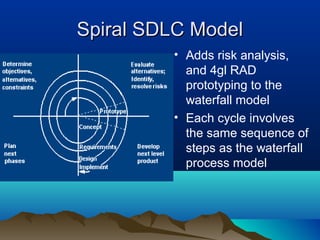
• Adds risk analysis,
and 4gl RAD
prototyping to the
waterfall model
• Each cycle involves
the same sequence of
steps as the waterfall
process model
Spiral QuadrantSpiral Quadrant
Determine objectives, alternatives and constraintsDetermine objectives, alternatives and constraints
• Objectives: functionality, performance,
hardware/software interface, critical success factors, etc.
• Alternatives: build, reuse, buy, sub-contract, etc.
• Constraints: cost, schedule, interface, etc.
Spiral QuadrantSpiral Quadrant
Evaluate alternatives, identify and resolve risksEvaluate alternatives, identify and resolve risks
• Study alternatives relative to objectives and constraints
• Identify risks (lack of experience, new technology, tight
schedules, poor process, etc.
• Resolve risks (evaluate if money could be lost by
continuing system development
Spiral QuadrantSpiral Quadrant
Develop next-level productDevelop next-level product
• Typical activites:
– Create a design
– Review design
– Develop code
– Inspect code
– Test product
Spiral QuadrantSpiral Quadrant
Plan next phasePlan next phase
• Typical activities
– Develop project plan
– Develop configuration management plan
– Develop a test plan
– Develop an installation plan
Spiral Model StrengthsSpiral Model Strengths
• Provides early indication of insurmountable
risks, without much cost
• Users see the system early because of rapid
prototyping tools
• Critical high-risk functions are developed first
• The design does not have to be perfect
• Users can be closely tied to all lifecycle steps
• Early and frequent feedback from users
• Cumulative costs assessed frequently
Spiral Model WeaknessesSpiral Model Weaknesses
• Time spent for evaluating risks too large for small or low-
risk projects
• Time spent planning, resetting objectives, doing risk
analysis and prototyping may be excessive
• The model is complex
• Risk assessment expertise is required
• Spiral may continue indefinitely
• Developers must be reassigned during non-development
phase activities
• May be hard to define objective, verifiable milestones
that indicate readiness to proceed through the next
iteration
When to use Spiral ModelWhen to use Spiral Model
• When creation of a prototype is appropriate
• When costs and risk evaluation is important
• For medium to high-risk projects
• Long-term project commitment unwise because
of potential changes to economic priorities
• Users are unsure of their needs
• Requirements are complex
• New product line
• Significant changes are expected (research and
exploration)
Agile SDLC’sAgile SDLC’s
• Speed up or bypass one or more life cycle
phases
• Usually less formal and reduced scope
• Used for time-critical applications
• Used in organizations that employ
disciplined methods
Quality – the degree to which the softwareQuality – the degree to which the software
satisfies stated and implied requirementssatisfies stated and implied requirements
• Absence of system crashes
• Correspondence between the software and the users’
expectations
• Performance to specified requirements
Quality must be controlled because it lowers production
speed, increases maintenance costs and can adversely
affect business
Quality Assurance PlanQuality Assurance Plan
• The plan for quality assurance activities should be in
writing
• Decide if a separate group should perform the quality
assurance activities
• Some elements that should be considered by the plan
are: defect tracking, unit testing, source-code tracking,
technical reviews, integration testing and system testing.
Quality Assurance PlanQuality Assurance Plan
• Defect tracing – keeps track of each defect found, its
source, when it was detected, when it was resolved, how
it was resolved, etc
• Unit testing – each individual module is tested
• Source code tracing – step through source code line by
line
• Technical reviews – completed work is reviewed by
peers
• Integration testing -- exercise new code in combination
with code that already has been integrated
• System testing – execution of the software for the
purpose of finding defects.

IT Software Development Life Cycle

  • 1.
    Software DevelopmentSoftware Development LifeCycle (SDLC)Life Cycle (SDLC)
  • 2.
    SDLC ModelSDLC Model Aframework that describes the activities performed at each stage of a software development project.
  • 3.
    Waterfall ModelWaterfall Model •Requirements – defines needed information, function, behavior, performance and interfaces. • Design – data structures, software architecture, interface representations, algorithmic details. • Implementation – source code, database, user documentation, testing.
  • 4.
    Waterfall StrengthsWaterfall Strengths •Easy to understand, easy to use • Provides structure to inexperienced staff • Milestones are well understood • Sets requirements stability • Good for management control (plan, staff, track) • Works well when quality is more important than cost or schedule
  • 5.
    Waterfall DeficienciesWaterfall Deficiencies •All requirements must be known upfront • Deliverables created for each phase are considered frozen – inhibits flexibility • Can give a false impression of progress • Does not reflect problem-solving nature of software development – iterations of phases • Integration is one big bang at the end • Little opportunity for customer to preview the system (until it may be too late)
  • 6.
    When to usethe Waterfall ModelWhen to use the Waterfall Model • Requirements are very well known • Product definition is stable • Technology is understood • New version of an existing product • Porting an existing product to a new platform.
  • 7.
    V-Shaped SDLC ModelV-ShapedSDLC Model • A variant of the Waterfall that emphasizes the verification and validation of the product. • Testing of the product is planned in parallel with a corresponding phase of development
  • 8.
    V-Shaped StepsV-Shaped Steps •Project and Requirements Planning – allocate resources • Product Requirements and Specification Analysis – complete specification of the software system • Architecture or High-Level Design – defines how software functions fulfill the design • Detailed Design – develop algorithms for each architectural component • Production, operation and maintenance – provide for enhancement and corrections • System and acceptance testing – check the entire software system in its environment • Integration and Testing – check that modules interconnect correctly • Unit testing – check that each module acts as expected • Coding – transform algorithms into software
  • 9.
    V-Shaped StrengthsV-Shaped Strengths •Emphasize planning for verification and validation of the product in early stages of product development • Each deliverable must be testable • Project management can track progress by milestones • Easy to use
  • 10.
    V-Shaped WeaknessesV-Shaped Weaknesses •Does not easily handle concurrent events • Does not handle iterations or phases • Does not easily handle dynamic changes in requirements • Does not contain risk analysis activities
  • 11.
    When to usethe V-Shaped ModelWhen to use the V-Shaped Model • Excellent choice for systems requiring high reliability – hospital patient control applications • All requirements are known up-front • When it can be modified to handle changing requirements beyond analysis phase • Solution and technology are known
  • 12.
    Structured Evolutionary PrototypingStructuredEvolutionary Prototyping ModelModel • Developers build a prototype during the requirements phase • Prototype is evaluated by end users • Users give corrective feedback • Developers further refine the prototype • When the user is satisfied, the prototype code is brought up to the standards needed for a final product.
  • 13.
    Structured Evolutionary PrototypingStructuredEvolutionary Prototyping StepsSteps • A preliminary project plan is developed • An partial high-level paper model is created • The model is source for a partial requirements specification • A prototype is built with basic and critical attributes • The designer builds – the database – user interface – algorithmic functions • The designer demonstrates the prototype, the user evaluates for problems and suggests improvements. • This loop continues until the user is satisfied
  • 14.
    Structured Evolutionary PrototypingStructuredEvolutionary Prototyping StrengthsStrengths • Customers can “see” the system requirements as they are being gathered • Developers learn from customers • A more accurate end product • Unexpected requirements accommodated • Allows for flexible design and development • Steady, visible signs of progress produced • Interaction with the prototype stimulates awareness of additional needed functionality
  • 15.
    Structured Evolutionary PrototypingStructuredEvolutionary Prototyping WeaknessesWeaknesses • Tendency to abandon structured program development for “code-and-fix” development • Bad reputation for “quick-and-dirty” methods • Overall maintainability may be overlooked • The customer may want the prototype delivered. • Process may continue forever (scope creep)
  • 16.
    When to useWhento use Structured Evolutionary PrototypingStructured Evolutionary Prototyping • Requirements are unstable or have to be clarified • As the requirements clarification stage of a waterfall model • Develop user interfaces • Short-lived demonstrations • New, original development • With the analysis and design portions of object- oriented development.
  • 17.
    Rapid Application Model(RAD)Rapid Application Model (RAD) • Requirements planning phase (a workshop utilizing structured discussion of business problems) • User description phase – automated tools capture information from users • Construction phase – productivity tools, such as code generators, screen generators, etc. inside a time-box. (“Do until done”) • Cutover phase -- installation of the system, user acceptance testing and user training
  • 18.
    RAD StrengthsRAD Strengths •Reduced cycle time and improved productivity with fewer people means lower costs • Time-box approach mitigates cost and schedule risk • Customer involved throughout the complete cycle minimizes risk of not achieving customer satisfaction and business needs • Focus moves from documentation to code (WYSIWYG). • Uses modeling concepts to capture information about business, data, and processes.
  • 19.
    RAD WeaknessesRAD Weaknesses •Accelerated development process must give quick responses to the user • Risk of never achieving closure • Hard to use with legacy systems • Requires a system that can be modularized • Developers and customers must be committed to rapid-fire activities in an abbreviated time frame.
  • 20.
    When to useRADWhen to use RAD • Reasonably well-known requirements • User involved throughout the life cycle • Project can be time-boxed • Functionality delivered in increments • High performance not required • Low technical risks • System can be modularized
  • 21.
    Incremental SDLC ModelIncrementalSDLC Model • Construct a partial implementation of a total system • Then slowly add increased functionality • The incremental model prioritizes requirements of the system and then implements them in groups. • Each subsequent release of the system adds function to the previous release, until all designed functionality has been implemented.
  • 22.
    Incremental Model StrengthsIncrementalModel Strengths • Develop high-risk or major functions first • Each release delivers an operational product • Customer can respond to each build • Uses “divide and conquer” breakdown of tasks • Lowers initial delivery cost • Initial product delivery is faster • Customers get important functionality early • Risk of changing requirements is reduced
  • 23.
    Incremental Model WeaknessesIncrementalModel Weaknesses • Requires good planning and design • Requires early definition of a complete and fully functional system to allow for the definition of increments • Well-defined module interfaces are required (some will be developed long before others) • Total cost of the complete system is not lower
  • 24.
    When to usethe Incremental ModelWhen to use the Incremental Model • Risk, funding, schedule, program complexity, or need for early realization of benefits. • Most of the requirements are known up-front but are expected to evolve over time • A need to get basic functionality to the market early • On projects which have lengthy development schedules • On a project with new technology
  • 25.
    Spiral SDLC ModelSpiralSDLC Model • Adds risk analysis, and 4gl RAD prototyping to the waterfall model • Each cycle involves the same sequence of steps as the waterfall process model
  • 26.
    Spiral QuadrantSpiral Quadrant Determineobjectives, alternatives and constraintsDetermine objectives, alternatives and constraints • Objectives: functionality, performance, hardware/software interface, critical success factors, etc. • Alternatives: build, reuse, buy, sub-contract, etc. • Constraints: cost, schedule, interface, etc.
  • 27.
    Spiral QuadrantSpiral Quadrant Evaluatealternatives, identify and resolve risksEvaluate alternatives, identify and resolve risks • Study alternatives relative to objectives and constraints • Identify risks (lack of experience, new technology, tight schedules, poor process, etc. • Resolve risks (evaluate if money could be lost by continuing system development
  • 28.
    Spiral QuadrantSpiral Quadrant Developnext-level productDevelop next-level product • Typical activites: – Create a design – Review design – Develop code – Inspect code – Test product
  • 29.
    Spiral QuadrantSpiral Quadrant Plannext phasePlan next phase • Typical activities – Develop project plan – Develop configuration management plan – Develop a test plan – Develop an installation plan
  • 30.
    Spiral Model StrengthsSpiralModel Strengths • Provides early indication of insurmountable risks, without much cost • Users see the system early because of rapid prototyping tools • Critical high-risk functions are developed first • The design does not have to be perfect • Users can be closely tied to all lifecycle steps • Early and frequent feedback from users • Cumulative costs assessed frequently
  • 31.
    Spiral Model WeaknessesSpiralModel Weaknesses • Time spent for evaluating risks too large for small or low- risk projects • Time spent planning, resetting objectives, doing risk analysis and prototyping may be excessive • The model is complex • Risk assessment expertise is required • Spiral may continue indefinitely • Developers must be reassigned during non-development phase activities • May be hard to define objective, verifiable milestones that indicate readiness to proceed through the next iteration
  • 32.
    When to useSpiral ModelWhen to use Spiral Model • When creation of a prototype is appropriate • When costs and risk evaluation is important • For medium to high-risk projects • Long-term project commitment unwise because of potential changes to economic priorities • Users are unsure of their needs • Requirements are complex • New product line • Significant changes are expected (research and exploration)
  • 33.
    Agile SDLC’sAgile SDLC’s •Speed up or bypass one or more life cycle phases • Usually less formal and reduced scope • Used for time-critical applications • Used in organizations that employ disciplined methods
  • 34.
    Quality – thedegree to which the softwareQuality – the degree to which the software satisfies stated and implied requirementssatisfies stated and implied requirements • Absence of system crashes • Correspondence between the software and the users’ expectations • Performance to specified requirements Quality must be controlled because it lowers production speed, increases maintenance costs and can adversely affect business
  • 35.
    Quality Assurance PlanQualityAssurance Plan • The plan for quality assurance activities should be in writing • Decide if a separate group should perform the quality assurance activities • Some elements that should be considered by the plan are: defect tracking, unit testing, source-code tracking, technical reviews, integration testing and system testing.
  • 36.
    Quality Assurance PlanQualityAssurance Plan • Defect tracing – keeps track of each defect found, its source, when it was detected, when it was resolved, how it was resolved, etc • Unit testing – each individual module is tested • Source code tracing – step through source code line by line • Technical reviews – completed work is reviewed by peers • Integration testing -- exercise new code in combination with code that already has been integrated • System testing – execution of the software for the purpose of finding defects.