Software Engineering
UML Diagrams
Unified Modeling Language (UML)
The Unified Modeling Language (UML) is a standard language for
specifying, visualizing, constructing and documenting the artifacts
of software systems, as well as for business modeling and other
non-software systems.
The UML represents a collection of best engineering practices that
have proven successful in the modeling of large and complex
systems.
The “4+1 View” of a UML Model
Development View
Process View Physical View
Use Cases/
Scenarios
Logical View
Class diagrams,
Sequence diagrams
Component diagrams
Deployment diagrams Deployment diagrams
Use Case diagrams,
Sequence diagrams
Unified Modeling Language (UML)
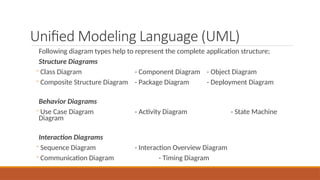
Following diagram types help to represent the complete application structure;
Structure Diagrams
- Class Diagram - Component Diagram - Object Diagram
- Composite Structure Diagram - Package Diagram - Deployment Diagram
Behavior Diagrams
- Use Case Diagram - Activity Diagram - State Machine
Diagram
Interaction Diagrams
- Sequence Diagram - Interaction Overview Diagram
- Communication Diagram - Timing Diagram
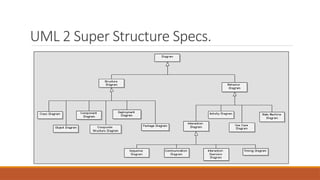
UML 2 Super Structure Specs.
System Behavior
THE DEVIL IS IN THE DETAILS….
The First Step…
To develop a properly working system we need to know how the
system will behave and react to different situations.
It is important to clearly identify the system behavior and confirm it
with the users, stakeholders and clients
What is System Behavior ?
◦System behavior is how a system acts and reacts
❑The outwardly visible and testable activity of a system
◦System behavior is captured in use cases
◦ They describe the system, its environment, and the relationship between the
system and its environment
Major Concepts in Use-Case Modeling
◦ An actor represents anything that interacts with the
system
◦ A use case is a sequence of transactions performed
by a system, which yields a measurable result of
values for a particular actor
Actor
Use-Case
What is a Use-Case Model ?
◦ A use-case model is a model of the system’s intended functions (use cases) and
its surroundings (actors)
◦ Actors represent users and/or any system that may interact with the system you
are building
◦ Use cases serve as a unifying thread throughout system development
◦ The same use-case model is used in requirements analysis, design, and test
The most important role of a use-case model is to communicate
the system’s functionality and behavior to the customer or end user.
Benefits of a Use-Case Model
◦ The use case model
◦ Is used to communicate with the end users and domain experts
◦ Provides buy-in at an early stage of system development
◦ Insures a mutual understanding of the requirements
◦ Is used to identify
◦ Who will interact with the system and what the system should do
◦ What interfaces the system should have
◦ Is used to verify
◦ All requirements are captured
◦ That the developers have understood the requirements
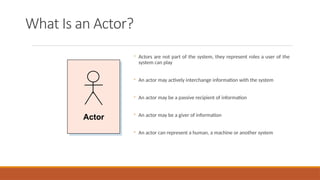
What Is an Actor?
◦ Actors are not part of the system, they represent roles a user of the
system can play
◦ An actor may actively interchange information with the system
◦ An actor may be a passive recipient of information
◦ An actor may be a giver of information
◦ An actor can represent a human, a machine or another system
Actor
Finding Actors: Useful Questions
◦ Who is interested in a certain requirement?
◦ Where in the organization is the system used?
◦ Who will supply the system with this information, use this information, remove this
information?
◦ Who will use this function?
◦ Who will support and maintain the system?
◦ Does the system use an external resource?
◦ What actors do the use cases need?
◦ Does one actor play several different roles? Do several actors play the same role?
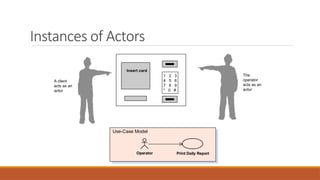
Instances of Actors
1 2 3
4 5 6
7 8 9
* 0 #
Insert card
A client
acts as an
actor
The
operator
acts as an
actor
Use-Case Model
Operator Print Daily Report
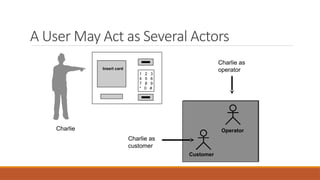
A User May Act as Several Actors
1 2 3
4 5 6
7 8 9
* 0 #
Insert card
Charlie as
operator
Customer
Operator
Charlie as
customer
Charlie
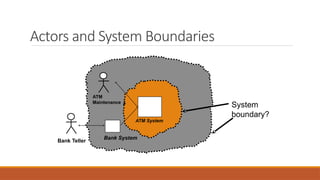
Actors and System Boundaries
ATM
Maintenance
Bank Teller
System
boundary?
ATM System
Bank System
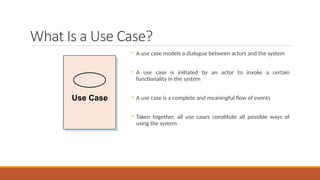
What Is a Use Case?
◦ A use case models a dialogue between actors and the system
◦ A use case is initiated by an actor to invoke a certain
functionality in the system
◦ A use case is a complete and meaningful flow of events
◦ Taken together, all use cases constitute all possible ways of
using the system
Use Case
Functional And Non Functional Requirement
Identification
◦ Functional requirements describe system services or functions. It’s
a statements of the services that the system should provide.
◦ Non-functional requirements is a constraint on the system or on
the development process. It’s the constraints on the services and
functions offered by the system
◦ Functional requirements describe what the system should do.
◦ Non-functional requirements describe how the system works
Functional and Non Functional Requirement
Example
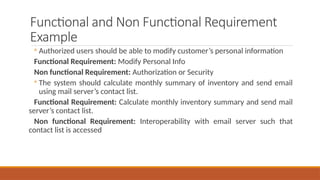
◦ Authorized users should be able to modify customer’s personal information
Functional Requirement: Modify Personal Info
Non functional Requirement: Authorization or Security
◦ The system should calculate monthly summary of inventory and send email
using mail server’s contact list.
Functional Requirement: Calculate monthly inventory summary and send mail
server’s contact list.
Non functional Requirement: Interoperability with email server such that
contact list is accessed
Finding Use Cases: Useful Questions
◦ What are the tasks of this actor?
◦ Will the actor create, store, change, remove or read information in the system?
◦ What use case will create, store, change, remove, or read, this information?
◦ Will the actor need to inform the system about sudden, external changes?
◦ Does the actor need to be informed about certain occurrences in the system?
◦ Does the system supply the business with the correct behavior?
◦ What use cases will support and maintain the system?
◦ Can all functional requirements be performed by the use cases?
Sources of Information for Use Cases
◦ System specifications/problem statement
◦ Domain relevant literature
◦ Interviews with domain experts
◦ Personal knowledge of the domain
◦ Legacy systems
Who Reads Use-Case Documentation?
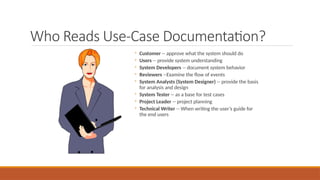
◦ Customer -- approve what the system should do
◦ Users -- provide system understanding
◦ System Developers -- document system behavior
◦ Reviewers --Examine the flow of events
◦ System Analysts (System Designer) -- provide the basis
for analysis and design
◦ System Tester -- as a base for test cases
◦ Project Leader -- project planning
◦ Technical Writer -- When writing the user’s guide for
the end users
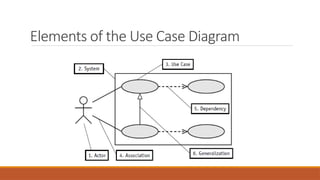
Elements of the Use Case Diagram
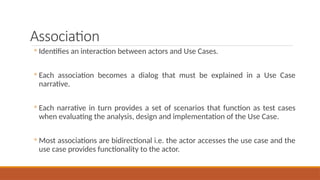
Association
◦ Identifies an interaction between actors and Use Cases.
◦ Each association becomes a dialog that must be explained in a Use Case
narrative.
◦ Each narrative in turn provides a set of scenarios that function as test cases
when evaluating the analysis, design and implementation of the Use Case.
◦ Most associations are bidirectional i.e. the actor accesses the use case and the
use case provides functionality to the actor.
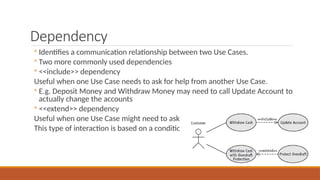
Dependency
◦ Identifies a communication relationship between two Use Cases.
◦ Two more commonly used dependencies
◦ <<include>> dependency
Useful when one Use Case needs to ask for help from another Use Case.
◦ E.g. Deposit Money and Withdraw Money may need to call Update Account to
actually change the accounts
◦ <<extend>> dependency
Useful when one Use Case might need to ask for help from another Use Case.
This type of interaction is based on a condition
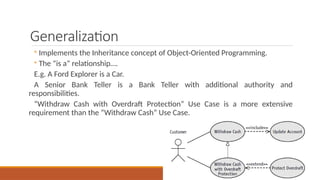
Generalization
◦ Implements the Inheritance concept of Object-Oriented Programming.
◦ The “is a” relationship….
E.g. A Ford Explorer is a Car.
A Senior Bank Teller is a Bank Teller with additional authority and
responsibilities.
“Withdraw Cash with Overdraft Protection” Use Case is a more extensive
requirement than the “Withdraw Cash” Use Case.
E Voting System
Consider an online voting machine, on which voters can see a list of candidates
and select one to vote for. The machine should check that each voter is eligible
to vote. The electoral registrar will also want to print a summary of the total
votes for each candidate and (separately) a list of the voters who have voted,
and a list of those who haven’t. In the case of a dispute, a machine should also
list a complete record of who voted for whom but only a judge can use this
function
Make use case diagram regarding the given statement
Course Registration Example
At the beginning of each semester students may request a course catalogue
containing a list of course offerings for the semester. Information about each
course, such as professor, department, and prerequisites will be included to help
students make informed decisions.
The new system will allow students to select four course offerings for the coming
semester. In addition, each student will indicate two alternative choices in case a
course offering becomes filled or canceled. No course offering will have more
than ten students. No course offering will have fewer than three students. A
course offering with fewer than three students will be canceled. Once the
registration process is completed for a student, the registration system sends
information to the billing system so the student can be billed for the semester.
Course Registration Example
Professors must be able to access the on-line system to indicate which
courses they will be teaching. They will also need to see which students
signed up for their course offerings.
For each semester, there is a period of time that students can change their
schedule. Students must be able to access the system during this time to
add or drop courses.
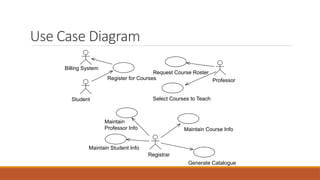
Actors in the Course Registration
The actors are
◦ Student
◦ Professor
◦ Billing System
◦ Registrar
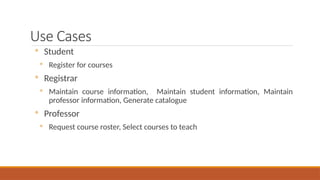
Use Cases
◦ Student
◦ Register for courses
◦ Registrar
◦ Maintain course information, Maintain student information, Maintain
professor information, Generate catalogue
◦ Professor
◦ Request course roster, Select courses to teach
Use Case Diagram
Student
Billing System
Register for Courses
Request Course Roster
Select Courses to Teach
Professor
Maintain Student Info
Maintain
Professor Info Maintain Course Info
Generate Catalogue
Registrar
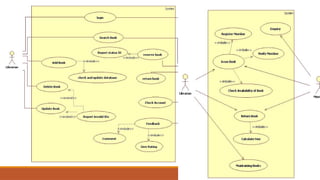
Library Management System
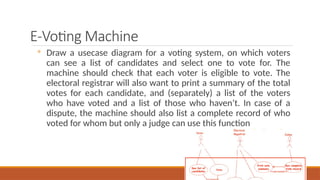
E-Voting Machine
◦ Draw a usecase diagram for a voting system, on which voters
can see a list of candidates and select one to vote for. The
machine should check that each voter is eligible to vote. The
electoral registrar will also want to print a summary of the total
votes for each candidate, and (separately) a list of the voters
who have voted and a list of those who haven’t. In case of a
dispute, the machine should also list a complete record of who
voted for whom but only a judge can use this function
A person wants to visit a concert with his family, He has
informed that the tickets are limited there so book the
tickets online from MyConcertApp, When a person book
his ticket and have paid for it then he will get a digital
pass

USE case diagrams.ppt.pptx..............

  • 1.
  • 2.
    Unified Modeling Language(UML) The Unified Modeling Language (UML) is a standard language for specifying, visualizing, constructing and documenting the artifacts of software systems, as well as for business modeling and other non-software systems. The UML represents a collection of best engineering practices that have proven successful in the modeling of large and complex systems.
  • 3.
    The “4+1 View”of a UML Model Development View Process View Physical View Use Cases/ Scenarios Logical View Class diagrams, Sequence diagrams Component diagrams Deployment diagrams Deployment diagrams Use Case diagrams, Sequence diagrams
  • 4.
    Unified Modeling Language(UML) Following diagram types help to represent the complete application structure; Structure Diagrams - Class Diagram - Component Diagram - Object Diagram - Composite Structure Diagram - Package Diagram - Deployment Diagram Behavior Diagrams - Use Case Diagram - Activity Diagram - State Machine Diagram Interaction Diagrams - Sequence Diagram - Interaction Overview Diagram - Communication Diagram - Timing Diagram
  • 5.
    UML 2 SuperStructure Specs.
  • 6.
    System Behavior THE DEVILIS IN THE DETAILS….
  • 7.
    The First Step… Todevelop a properly working system we need to know how the system will behave and react to different situations. It is important to clearly identify the system behavior and confirm it with the users, stakeholders and clients
  • 8.
    What is SystemBehavior ? ◦System behavior is how a system acts and reacts ❑The outwardly visible and testable activity of a system ◦System behavior is captured in use cases ◦ They describe the system, its environment, and the relationship between the system and its environment
  • 9.
    Major Concepts inUse-Case Modeling ◦ An actor represents anything that interacts with the system ◦ A use case is a sequence of transactions performed by a system, which yields a measurable result of values for a particular actor Actor Use-Case
  • 10.
    What is aUse-Case Model ? ◦ A use-case model is a model of the system’s intended functions (use cases) and its surroundings (actors) ◦ Actors represent users and/or any system that may interact with the system you are building ◦ Use cases serve as a unifying thread throughout system development ◦ The same use-case model is used in requirements analysis, design, and test The most important role of a use-case model is to communicate the system’s functionality and behavior to the customer or end user.
  • 11.
    Benefits of aUse-Case Model ◦ The use case model ◦ Is used to communicate with the end users and domain experts ◦ Provides buy-in at an early stage of system development ◦ Insures a mutual understanding of the requirements ◦ Is used to identify ◦ Who will interact with the system and what the system should do ◦ What interfaces the system should have ◦ Is used to verify ◦ All requirements are captured ◦ That the developers have understood the requirements
  • 12.
    What Is anActor? ◦ Actors are not part of the system, they represent roles a user of the system can play ◦ An actor may actively interchange information with the system ◦ An actor may be a passive recipient of information ◦ An actor may be a giver of information ◦ An actor can represent a human, a machine or another system Actor
  • 13.
    Finding Actors: UsefulQuestions ◦ Who is interested in a certain requirement? ◦ Where in the organization is the system used? ◦ Who will supply the system with this information, use this information, remove this information? ◦ Who will use this function? ◦ Who will support and maintain the system? ◦ Does the system use an external resource? ◦ What actors do the use cases need? ◦ Does one actor play several different roles? Do several actors play the same role?
  • 14.
    Instances of Actors 12 3 4 5 6 7 8 9 * 0 # Insert card A client acts as an actor The operator acts as an actor Use-Case Model Operator Print Daily Report
  • 15.
    A User MayAct as Several Actors 1 2 3 4 5 6 7 8 9 * 0 # Insert card Charlie as operator Customer Operator Charlie as customer Charlie
  • 16.
    Actors and SystemBoundaries ATM Maintenance Bank Teller System boundary? ATM System Bank System
  • 17.
    What Is aUse Case? ◦ A use case models a dialogue between actors and the system ◦ A use case is initiated by an actor to invoke a certain functionality in the system ◦ A use case is a complete and meaningful flow of events ◦ Taken together, all use cases constitute all possible ways of using the system Use Case
  • 18.
    Functional And NonFunctional Requirement Identification ◦ Functional requirements describe system services or functions. It’s a statements of the services that the system should provide. ◦ Non-functional requirements is a constraint on the system or on the development process. It’s the constraints on the services and functions offered by the system ◦ Functional requirements describe what the system should do. ◦ Non-functional requirements describe how the system works
  • 19.
    Functional and NonFunctional Requirement Example ◦ Authorized users should be able to modify customer’s personal information Functional Requirement: Modify Personal Info Non functional Requirement: Authorization or Security ◦ The system should calculate monthly summary of inventory and send email using mail server’s contact list. Functional Requirement: Calculate monthly inventory summary and send mail server’s contact list. Non functional Requirement: Interoperability with email server such that contact list is accessed
  • 20.
    Finding Use Cases:Useful Questions ◦ What are the tasks of this actor? ◦ Will the actor create, store, change, remove or read information in the system? ◦ What use case will create, store, change, remove, or read, this information? ◦ Will the actor need to inform the system about sudden, external changes? ◦ Does the actor need to be informed about certain occurrences in the system? ◦ Does the system supply the business with the correct behavior? ◦ What use cases will support and maintain the system? ◦ Can all functional requirements be performed by the use cases?
  • 21.
    Sources of Informationfor Use Cases ◦ System specifications/problem statement ◦ Domain relevant literature ◦ Interviews with domain experts ◦ Personal knowledge of the domain ◦ Legacy systems
  • 22.
    Who Reads Use-CaseDocumentation? ◦ Customer -- approve what the system should do ◦ Users -- provide system understanding ◦ System Developers -- document system behavior ◦ Reviewers --Examine the flow of events ◦ System Analysts (System Designer) -- provide the basis for analysis and design ◦ System Tester -- as a base for test cases ◦ Project Leader -- project planning ◦ Technical Writer -- When writing the user’s guide for the end users
  • 23.
    Elements of theUse Case Diagram
  • 24.
    Association ◦ Identifies aninteraction between actors and Use Cases. ◦ Each association becomes a dialog that must be explained in a Use Case narrative. ◦ Each narrative in turn provides a set of scenarios that function as test cases when evaluating the analysis, design and implementation of the Use Case. ◦ Most associations are bidirectional i.e. the actor accesses the use case and the use case provides functionality to the actor.
  • 25.
    Dependency ◦ Identifies acommunication relationship between two Use Cases. ◦ Two more commonly used dependencies ◦ <<include>> dependency Useful when one Use Case needs to ask for help from another Use Case. ◦ E.g. Deposit Money and Withdraw Money may need to call Update Account to actually change the accounts ◦ <<extend>> dependency Useful when one Use Case might need to ask for help from another Use Case. This type of interaction is based on a condition
  • 26.
    Generalization ◦ Implements theInheritance concept of Object-Oriented Programming. ◦ The “is a” relationship…. E.g. A Ford Explorer is a Car. A Senior Bank Teller is a Bank Teller with additional authority and responsibilities. “Withdraw Cash with Overdraft Protection” Use Case is a more extensive requirement than the “Withdraw Cash” Use Case.
  • 27.
    E Voting System Consideran online voting machine, on which voters can see a list of candidates and select one to vote for. The machine should check that each voter is eligible to vote. The electoral registrar will also want to print a summary of the total votes for each candidate and (separately) a list of the voters who have voted, and a list of those who haven’t. In the case of a dispute, a machine should also list a complete record of who voted for whom but only a judge can use this function Make use case diagram regarding the given statement
  • 28.
    Course Registration Example Atthe beginning of each semester students may request a course catalogue containing a list of course offerings for the semester. Information about each course, such as professor, department, and prerequisites will be included to help students make informed decisions. The new system will allow students to select four course offerings for the coming semester. In addition, each student will indicate two alternative choices in case a course offering becomes filled or canceled. No course offering will have more than ten students. No course offering will have fewer than three students. A course offering with fewer than three students will be canceled. Once the registration process is completed for a student, the registration system sends information to the billing system so the student can be billed for the semester.
  • 29.
    Course Registration Example Professorsmust be able to access the on-line system to indicate which courses they will be teaching. They will also need to see which students signed up for their course offerings. For each semester, there is a period of time that students can change their schedule. Students must be able to access the system during this time to add or drop courses.
  • 30.
    Actors in theCourse Registration The actors are ◦ Student ◦ Professor ◦ Billing System ◦ Registrar
  • 31.
    Use Cases ◦ Student ◦Register for courses ◦ Registrar ◦ Maintain course information, Maintain student information, Maintain professor information, Generate catalogue ◦ Professor ◦ Request course roster, Select courses to teach
  • 32.
    Use Case Diagram Student BillingSystem Register for Courses Request Course Roster Select Courses to Teach Professor Maintain Student Info Maintain Professor Info Maintain Course Info Generate Catalogue Registrar
  • 33.
  • 34.
    E-Voting Machine ◦ Drawa usecase diagram for a voting system, on which voters can see a list of candidates and select one to vote for. The machine should check that each voter is eligible to vote. The electoral registrar will also want to print a summary of the total votes for each candidate, and (separately) a list of the voters who have voted and a list of those who haven’t. In case of a dispute, the machine should also list a complete record of who voted for whom but only a judge can use this function
  • 35.
    A person wantsto visit a concert with his family, He has informed that the tickets are limited there so book the tickets online from MyConcertApp, When a person book his ticket and have paid for it then he will get a digital pass

Editor's Notes

  • #3  Rational’s view of architecture contains 5 perspectives to accommodate the variety of concerns with which architects must deal. Inside each box representing a view is listed the system qualities that are of most concern within that view. Underneath each box, primary stakeholders of each view are listed.
  • #16 Actors are outside the boundaries of the system so determining the actors provides a good process for bounding the system being built. This allows the analysts to concentrate on the system to be developed and not spend needless time working on things outside the scope of the system. This also provides a means to identify the system external interfaces which need to be worked early in the development cycle.
  • #22 The readers of the Use-Case Description varies from system to system (project to project). You may find your reads among this, maybe you will have others. It is important to keep who the reads are in mind during all the work with the document, to focus on the right contents, level and way of describing, e.g. words to use.
  • #28 This problem will be used as examples throughout the course. It is the same problem that appears in the Successfully Applying the Booch and OMT Methods book.