©Ian Sommerville 2004 Software Engineering, 7th edition. Chapter 11 Slide 1
Architectural Design
©Ian Sommerville 2004 Software Engineering, 7th edition. Chapter 11 Slide 2
Objectives
● To introduce architectural design and to
discuss its importance
● To explain the architectural design decisions
that have to be made
● To introduce three complementary
architectural styles covering organisation,
decomposition and control
● To discuss reference architectures are used
to communicate and compare architectures
©Ian Sommerville 2004 Software Engineering, 7th edition. Chapter 11 Slide 3
Topics covered
● Architectural design decisions
● System organisation
● Decomposition styles
● Control styles
● Reference architectures
©Ian Sommerville 2004 Software Engineering, 7th edition. Chapter 11 Slide 4
Software architecture
● The design process for identifying the sub-
systems making up a system and the
framework for sub-system control and
communication is architectural design.
● The output of this design process is a
description of the software architecture.
©Ian Sommerville 2004 Software Engineering, 7th edition. Chapter 11 Slide 5
Architectural design
● An early stage of the system design process.
● Represents the link between specification
and design processes.
● Often carried out in parallel with some
specification activities.
● It involves identifying major system
components and their communications.
©Ian Sommerville 2004 Software Engineering, 7th edition. Chapter 11 Slide 6
Advantages of explicit architecture
● Stakeholder communication
• Architecture may be used as a focus of
discussion by system stakeholders.
● System analysis
• Means that analysis of whether the system can
meet its non-functional requirements is
possible.
● Large-scale reuse
• The architecture may be reusable across a
range of systems.
©Ian Sommerville 2004 Software Engineering, 7th edition. Chapter 11 Slide 7
Architecture and system characteristics
● Performance
• Localise critical operations and minimise communications.
Use large rather than fine-grain components.
● Security
• Use a layered architecture with critical assets in the inner
layers.
● Safety
• Localise safety-critical features in a small number of sub-
systems.
● Availability
• Include redundant components and mechanisms for fault
tolerance.
● Maintainability
• Use fine-grain, replaceable components.
©Ian Sommerville 2004 Software Engineering, 7th edition. Chapter 11 Slide 8
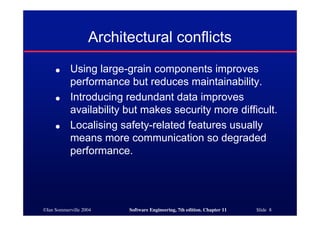
Architectural conflicts
● Using large-grain components improves
performance but reduces maintainability.
● Introducing redundant data improves
availability but makes security more difficult.
● Localising safety-related features usually
means more communication so degraded
performance.
©Ian Sommerville 2004 Software Engineering, 7th edition. Chapter 11 Slide 9
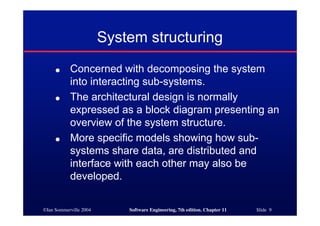
System structuring
● Concerned with decomposing the system
into interacting sub-systems.
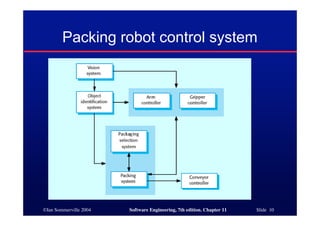
● The architectural design is normally
expressed as a block diagram presenting an
overview of the system structure.
● More specific models showing how sub-
systems share data, are distributed and
interface with each other may also be
developed.
©Ian Sommerville 2004 Software Engineering, 7th edition. Chapter 11 Slide 10
Packing robot control system
©Ian Sommerville 2004 Software Engineering, 7th edition. Chapter 11 Slide 11
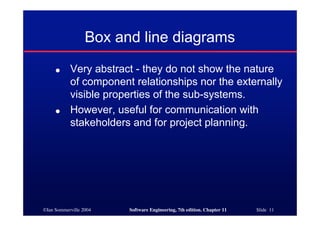
Box and line diagrams
● Very abstract - they do not show the nature
of component relationships nor the externally
visible properties of the sub-systems.
● However, useful for communication with
stakeholders and for project planning.
©Ian Sommerville 2004 Software Engineering, 7th edition. Chapter 11 Slide 12
Architectural design decisions
● Architectural design is a creative process so
the process differs depending on the type of
system being developed.
● However, a number of common decisions
span all design processes.
©Ian Sommerville 2004 Software Engineering, 7th edition. Chapter 11 Slide 13
Architectural design decisions
● Is there a generic application architecture that can
be used?
● How will the system be distributed?
● What architectural styles are appropriate?
● What approach will be used to structure the system?
● How will the system be decomposed into modules?
● What control strategy should be used?
● How will the architectural design be evaluated?
● How should the architecture be documented?
©Ian Sommerville 2004 Software Engineering, 7th edition. Chapter 11 Slide 14
Architecture reuse
● Systems in the same domain often have
similar architectures that reflect domain
concepts.
● Application product lines are built around a
core architecture with variants that satisfy
particular customer requirements.
● Application architectures are covered in
Chapter 13 and product lines in Chapter 18.
©Ian Sommerville 2004 Software Engineering, 7th edition. Chapter 11 Slide 15
Architectural styles
● The architectural model of a system may
conform to a generic architectural model or
style.
● An awareness of these styles can simplify
the problem of defining system architectures.
● However, most large systems are
heterogeneous and do not follow a single
architectural style.
©Ian Sommerville 2004 Software Engineering, 7th edition. Chapter 11 Slide 16
Architectural models
● Used to document an architectural design.
● Static structural model that shows the major system
components.
● Dynamic process model that shows the process
structure of the system.
● Interface model that defines sub-system interfaces.
● Relationships model such as a data-flow model that
shows sub-system relationships.
● Distribution model that shows how sub-systems are
distributed across computers.
©Ian Sommerville 2004 Software Engineering, 7th edition. Chapter 11 Slide 17
System organisation
● Reflects the basic strategy that is used to
structure a system.
● Three organisational styles are widely used:
• A shared data repository style;
• A shared services and servers style;
• An abstract machine or layered style.
©Ian Sommerville 2004 Software Engineering, 7th edition. Chapter 11 Slide 18
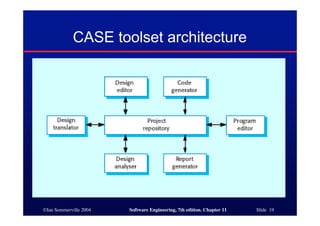
The repository model
● Sub-systems must exchange data. This may
be done in two ways:
• Shared data is held in a central database or
repository and may be accessed by all sub-
systems;
• Each sub-system maintains its own database
and passes data explicitly to other sub-systems.
● When large amounts of data are to be
shared, the repository model of sharing is
most commonly used.
©Ian Sommerville 2004 Software Engineering, 7th edition. Chapter 11 Slide 19
CASE toolset architecture
©Ian Sommerville 2004 Software Engineering, 7th edition. Chapter 11 Slide 20
Repository model characteristics
● Advantages
• Efficient way to share large amounts of data;
• Sub-systems need not be concerned with how data is
produced Centralised management e.g. backup, security,
etc.
• Sharing model is published as the repository schema.
● Disadvantages
• Sub-systems must agree on a repository data model.
Inevitably a compromise;
• Data evolution is difficult and expensive;
• No scope for specific management policies;
• Difficult to distribute efficiently.
©Ian Sommerville 2004 Software Engineering, 7th edition. Chapter 11 Slide 21
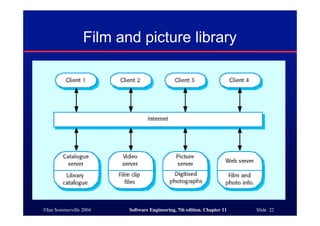
Client-server model
● Distributed system model which shows how
data and processing is distributed across a
range of components.
● Set of stand-alone servers which provide
specific services such as printing, data
management, etc.
● Set of clients which call on these services.
● Network which allows clients to access
servers.
©Ian Sommerville 2004 Software Engineering, 7th edition. Chapter 11 Slide 22
Film and picture library
©Ian Sommerville 2004 Software Engineering, 7th edition. Chapter 11 Slide 23
Client-server characteristics
● Advantages
• Distribution of data is straightforward;
• Makes effective use of networked systems. May require
cheaper hardware;
• Easy to add new servers or upgrade existing servers.
● Disadvantages
• No shared data model so sub-systems use different data
organisation. Data interchange may be inefficient;
• Redundant management in each server;
• No central register of names and services - it may be hard
to find out what servers and services are available.
©Ian Sommerville 2004 Software Engineering, 7th edition. Chapter 11 Slide 24
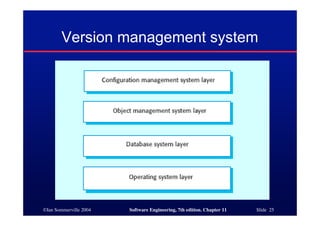
Abstract machine (layered) model
● Used to model the interfacing of sub-systems.
● Organises the system into a set of layers (or abstract
machines) each of which provide a set of services.
● Supports the incremental development of sub-
systems in different layers. When a layer interface
changes, only the adjacent layer is affected.
● However, often artificial to structure systems in this
way.
©Ian Sommerville 2004 Software Engineering, 7th edition. Chapter 11 Slide 25
Version management system
©Ian Sommerville 2004 Software Engineering, 7th edition. Chapter 11 Slide 26
Modular decomposition styles
● Styles of decomposing sub-systems into
modules.
● No rigid distinction between system
organisation and modular decomposition.
©Ian Sommerville 2004 Software Engineering, 7th edition. Chapter 11 Slide 27
Sub-systems and modules
● A sub-system is a system in its own right
whose operation is independent of the
services provided by other sub-systems.
● A module is a system component that
provides services to other components but
would not normally be considered as a
separate system.
©Ian Sommerville 2004 Software Engineering, 7th edition. Chapter 11 Slide 28
Modular decomposition
● Another structural level where sub-systems are
decomposed into modules.
● Two modular decomposition models covered
• An object model where the system is decomposed into
interacting object;
• A pipeline or data-flow model where the system is
decomposed into functional modules which transform
inputs to outputs.
● If possible, decisions about concurrency should be
delayed until modules are implemented.
©Ian Sommerville 2004 Software Engineering, 7th edition. Chapter 11 Slide 29
Object models
● Structure the system into a set of loosely
coupled objects with well-defined interfaces.
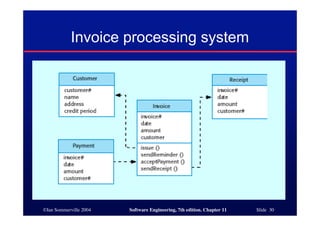
● Object-oriented decomposition is concerned
with identifying object classes, their attributes
and operations.
● When implemented, objects are created from
these classes and some control model used
to coordinate object operations.
©Ian Sommerville 2004 Software Engineering, 7th edition. Chapter 11 Slide 30
Invoice processing system
©Ian Sommerville 2004 Software Engineering, 7th edition. Chapter 11 Slide 31
Object model advantages
● Objects are loosely coupled so their
implementation can be modified without
affecting other objects.
● The objects may reflect real-world entities.
● OO implementation languages are widely
used.
● However, object interface changes may
cause problems and complex entities may
be hard to represent as objects.
©Ian Sommerville 2004 Software Engineering, 7th edition. Chapter 11 Slide 32
Function-oriented pipelining
● Functional transformations process their
inputs to produce outputs.
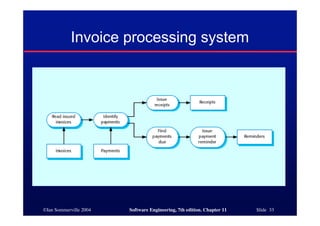
● May be referred to as a pipe and filter model
(as in UNIX shell).
● Variants of this approach are very common.
When transformations are sequential, this is
a batch sequential model which is
extensively used in data processing systems.
● Not really suitable for interactive systems.
©Ian Sommerville 2004 Software Engineering, 7th edition. Chapter 11 Slide 33
Invoice processing system
©Ian Sommerville 2004 Software Engineering, 7th edition. Chapter 11 Slide 34
Pipeline model advantages
● Supports transformation reuse.
● Intuitive organisation for stakeholder
communication.
● Easy to add new transformations.
● Relatively simple to implement as either a
concurrent or sequential system.
● However, requires a common format for data
transfer along the pipeline and difficult to
support event-based interaction.
©Ian Sommerville 2004 Software Engineering, 7th edition. Chapter 11 Slide 35
Control styles
● Are concerned with the control flow between
sub-systems. Distinct from the system
decomposition model.
● Centralised control
• One sub-system has overall responsibility for
control and starts and stops other sub-systems.
● Event-based control
• Each sub-system can respond to externally
generated events from other sub-systems or the
system’s environment.
©Ian Sommerville 2004 Software Engineering, 7th edition. Chapter 11 Slide 36
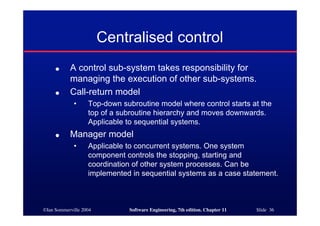
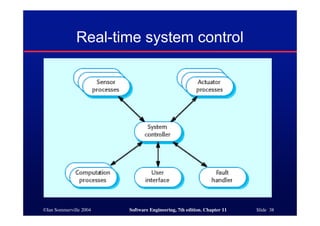
Centralised control
● A control sub-system takes responsibility for
managing the execution of other sub-systems.
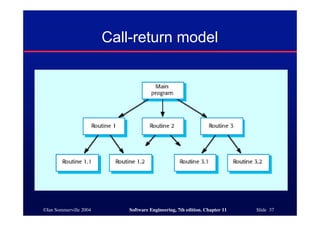
● Call-return model
• Top-down subroutine model where control starts at the
top of a subroutine hierarchy and moves downwards.
Applicable to sequential systems.
● Manager model
• Applicable to concurrent systems. One system
component controls the stopping, starting and
coordination of other system processes. Can be
implemented in sequential systems as a case statement.
©Ian Sommerville 2004 Software Engineering, 7th edition. Chapter 11 Slide 37
Call-return model
©Ian Sommerville 2004 Software Engineering, 7th edition. Chapter 11 Slide 38
Real-time system control
©Ian Sommerville 2004 Software Engineering, 7th edition. Chapter 11 Slide 39
Event-driven systems
● Driven by externally generated events where the
timing of the event is outwith the control of the sub-
systems which process the event.
● Two principal event-driven models
• Broadcast models. An event is broadcast to all sub-
systems. Any sub-system which can handle the event
may do so;
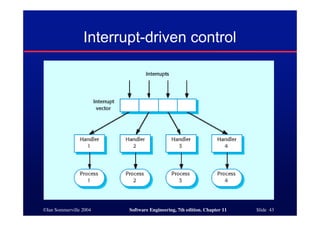
• Interrupt-driven models. Used in real-time systems where
interrupts are detected by an interrupt handler and passed
to some other component for processing.
● Other event driven models include spreadsheets
and production systems.
©Ian Sommerville 2004 Software Engineering, 7th edition. Chapter 11 Slide 40
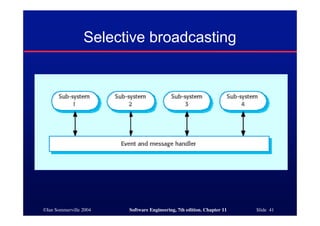
Broadcast model
● Effective in integrating sub-systems on different
computers in a network.
● Sub-systems register an interest in specific events.
When these occur, control is transferred to the sub-
system which can handle the event.
● Control policy is not embedded in the event and
message handler. Sub-systems decide on events of
interest to them.
● However, sub-systems don’t know if or when an
event will be handled.
©Ian Sommerville 2004 Software Engineering, 7th edition. Chapter 11 Slide 41
Selective broadcasting
©Ian Sommerville 2004 Software Engineering, 7th edition. Chapter 11 Slide 42
Interrupt-driven systems
● Used in real-time systems where fast
response to an event is essential.
● There are known interrupt types with a
handler defined for each type.
● Each type is associated with a memory
location and a hardware switch causes
transfer to its handler.
● Allows fast response but complex to program
and difficult to validate.
©Ian Sommerville 2004 Software Engineering, 7th edition. Chapter 11 Slide 43
Interrupt-driven control
©Ian Sommerville 2004 Software Engineering, 7th edition. Chapter 11 Slide 44
Reference architectures
● Architectural models may be specific to some
application domain.
● Two types of domain-specific model
• Generic models which are abstractions from a number of
real systems and which encapsulate the principal
characteristics of these systems. Covered in Chapter 13.
• Reference models which are more abstract, idealised
model. Provide a means of information about that class of
system and of comparing different architectures.
● Generic models are usually bottom-up models;
Reference models are top-down models.
©Ian Sommerville 2004 Software Engineering, 7th edition. Chapter 11 Slide 45
Reference architectures
● Reference models are derived from a study
of the application domain rather than from
existing systems.
● May be used as a basis for system
implementation or to compare different
systems. It acts as a standard against which
systems can be evaluated.
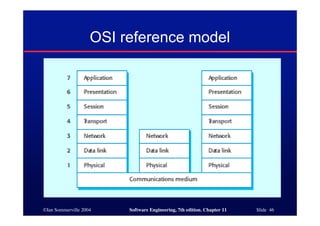
● OSI model is a layered model for
communication systems.
©Ian Sommerville 2004 Software Engineering, 7th edition. Chapter 11 Slide 46
OSI reference model
©Ian Sommerville 2004 Software Engineering, 7th edition. Chapter 11 Slide 47
Case reference model
● Data repository services
• Storage and management of data items.
● Data integration services
• Managing groups of entities.
● Task management services
• Definition and enaction of process models.
● Messaging services
• Tool-tool and tool-environment communication.
● User interface services
• User interface development.
©Ian Sommerville 2004 Software Engineering, 7th edition. Chapter 11 Slide 48
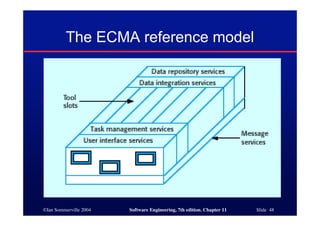
The ECMA reference model
©Ian Sommerville 2004 Software Engineering, 7th edition. Chapter 11 Slide 49
Key points
● The software architecture is the fundamental
framework for structuring the system.
● Architectural design decisions include decisions on
the application architecture, the distribution and the
architectural styles to be used.
● Different architectural models such as a structural
model, a control model and a decomposition model
may be developed.
● System organisational models include repository
models, client-server models and abstract machine
models.
©Ian Sommerville 2004 Software Engineering, 7th edition. Chapter 11 Slide 50
Key points
● Modular decomposition models include
object models and pipelining models.
● Control models include centralised control
and event-driven models.
● Reference architectures may be used to
communicate domain-specific architectures
and to assess and compare architectural
designs.
©Ian Sommerville 2004 Software Engineering, 7th edition. Chapter 11 Slide 51
Architectural models
● Different architectural models may be
produced during the design process
● Each model presents different perspectives
on the architecture
©Ian Sommerville 2004 Software Engineering, 7th edition. Chapter 11 Slide 52
Architecture attributes
● Performance
• Localise operations to minimise sub-system communication
● Security
• Use a layered architecture with critical assets in inner layers
● Safety
• Isolate safety-critical components
● Availability
• Include redundant components in the architecture
● Maintainability
• Use fine-grain, self-contained components

Software Engineering - Ch11

  • 1.
    ©Ian Sommerville 2004Software Engineering, 7th edition. Chapter 11 Slide 1 Architectural Design
  • 2.
    ©Ian Sommerville 2004Software Engineering, 7th edition. Chapter 11 Slide 2 Objectives ● To introduce architectural design and to discuss its importance ● To explain the architectural design decisions that have to be made ● To introduce three complementary architectural styles covering organisation, decomposition and control ● To discuss reference architectures are used to communicate and compare architectures
  • 3.
    ©Ian Sommerville 2004Software Engineering, 7th edition. Chapter 11 Slide 3 Topics covered ● Architectural design decisions ● System organisation ● Decomposition styles ● Control styles ● Reference architectures
  • 4.
    ©Ian Sommerville 2004Software Engineering, 7th edition. Chapter 11 Slide 4 Software architecture ● The design process for identifying the sub- systems making up a system and the framework for sub-system control and communication is architectural design. ● The output of this design process is a description of the software architecture.
  • 5.
    ©Ian Sommerville 2004Software Engineering, 7th edition. Chapter 11 Slide 5 Architectural design ● An early stage of the system design process. ● Represents the link between specification and design processes. ● Often carried out in parallel with some specification activities. ● It involves identifying major system components and their communications.
  • 6.
    ©Ian Sommerville 2004Software Engineering, 7th edition. Chapter 11 Slide 6 Advantages of explicit architecture ● Stakeholder communication • Architecture may be used as a focus of discussion by system stakeholders. ● System analysis • Means that analysis of whether the system can meet its non-functional requirements is possible. ● Large-scale reuse • The architecture may be reusable across a range of systems.
  • 7.
    ©Ian Sommerville 2004Software Engineering, 7th edition. Chapter 11 Slide 7 Architecture and system characteristics ● Performance • Localise critical operations and minimise communications. Use large rather than fine-grain components. ● Security • Use a layered architecture with critical assets in the inner layers. ● Safety • Localise safety-critical features in a small number of sub- systems. ● Availability • Include redundant components and mechanisms for fault tolerance. ● Maintainability • Use fine-grain, replaceable components.
  • 8.
    ©Ian Sommerville 2004Software Engineering, 7th edition. Chapter 11 Slide 8 Architectural conflicts ● Using large-grain components improves performance but reduces maintainability. ● Introducing redundant data improves availability but makes security more difficult. ● Localising safety-related features usually means more communication so degraded performance.
  • 9.
    ©Ian Sommerville 2004Software Engineering, 7th edition. Chapter 11 Slide 9 System structuring ● Concerned with decomposing the system into interacting sub-systems. ● The architectural design is normally expressed as a block diagram presenting an overview of the system structure. ● More specific models showing how sub- systems share data, are distributed and interface with each other may also be developed.
  • 10.
    ©Ian Sommerville 2004Software Engineering, 7th edition. Chapter 11 Slide 10 Packing robot control system
  • 11.
    ©Ian Sommerville 2004Software Engineering, 7th edition. Chapter 11 Slide 11 Box and line diagrams ● Very abstract - they do not show the nature of component relationships nor the externally visible properties of the sub-systems. ● However, useful for communication with stakeholders and for project planning.
  • 12.
    ©Ian Sommerville 2004Software Engineering, 7th edition. Chapter 11 Slide 12 Architectural design decisions ● Architectural design is a creative process so the process differs depending on the type of system being developed. ● However, a number of common decisions span all design processes.
  • 13.
    ©Ian Sommerville 2004Software Engineering, 7th edition. Chapter 11 Slide 13 Architectural design decisions ● Is there a generic application architecture that can be used? ● How will the system be distributed? ● What architectural styles are appropriate? ● What approach will be used to structure the system? ● How will the system be decomposed into modules? ● What control strategy should be used? ● How will the architectural design be evaluated? ● How should the architecture be documented?
  • 14.
    ©Ian Sommerville 2004Software Engineering, 7th edition. Chapter 11 Slide 14 Architecture reuse ● Systems in the same domain often have similar architectures that reflect domain concepts. ● Application product lines are built around a core architecture with variants that satisfy particular customer requirements. ● Application architectures are covered in Chapter 13 and product lines in Chapter 18.
  • 15.
    ©Ian Sommerville 2004Software Engineering, 7th edition. Chapter 11 Slide 15 Architectural styles ● The architectural model of a system may conform to a generic architectural model or style. ● An awareness of these styles can simplify the problem of defining system architectures. ● However, most large systems are heterogeneous and do not follow a single architectural style.
  • 16.
    ©Ian Sommerville 2004Software Engineering, 7th edition. Chapter 11 Slide 16 Architectural models ● Used to document an architectural design. ● Static structural model that shows the major system components. ● Dynamic process model that shows the process structure of the system. ● Interface model that defines sub-system interfaces. ● Relationships model such as a data-flow model that shows sub-system relationships. ● Distribution model that shows how sub-systems are distributed across computers.
  • 17.
    ©Ian Sommerville 2004Software Engineering, 7th edition. Chapter 11 Slide 17 System organisation ● Reflects the basic strategy that is used to structure a system. ● Three organisational styles are widely used: • A shared data repository style; • A shared services and servers style; • An abstract machine or layered style.
  • 18.
    ©Ian Sommerville 2004Software Engineering, 7th edition. Chapter 11 Slide 18 The repository model ● Sub-systems must exchange data. This may be done in two ways: • Shared data is held in a central database or repository and may be accessed by all sub- systems; • Each sub-system maintains its own database and passes data explicitly to other sub-systems. ● When large amounts of data are to be shared, the repository model of sharing is most commonly used.
  • 19.
    ©Ian Sommerville 2004Software Engineering, 7th edition. Chapter 11 Slide 19 CASE toolset architecture
  • 20.
    ©Ian Sommerville 2004Software Engineering, 7th edition. Chapter 11 Slide 20 Repository model characteristics ● Advantages • Efficient way to share large amounts of data; • Sub-systems need not be concerned with how data is produced Centralised management e.g. backup, security, etc. • Sharing model is published as the repository schema. ● Disadvantages • Sub-systems must agree on a repository data model. Inevitably a compromise; • Data evolution is difficult and expensive; • No scope for specific management policies; • Difficult to distribute efficiently.
  • 21.
    ©Ian Sommerville 2004Software Engineering, 7th edition. Chapter 11 Slide 21 Client-server model ● Distributed system model which shows how data and processing is distributed across a range of components. ● Set of stand-alone servers which provide specific services such as printing, data management, etc. ● Set of clients which call on these services. ● Network which allows clients to access servers.
  • 22.
    ©Ian Sommerville 2004Software Engineering, 7th edition. Chapter 11 Slide 22 Film and picture library
  • 23.
    ©Ian Sommerville 2004Software Engineering, 7th edition. Chapter 11 Slide 23 Client-server characteristics ● Advantages • Distribution of data is straightforward; • Makes effective use of networked systems. May require cheaper hardware; • Easy to add new servers or upgrade existing servers. ● Disadvantages • No shared data model so sub-systems use different data organisation. Data interchange may be inefficient; • Redundant management in each server; • No central register of names and services - it may be hard to find out what servers and services are available.
  • 24.
    ©Ian Sommerville 2004Software Engineering, 7th edition. Chapter 11 Slide 24 Abstract machine (layered) model ● Used to model the interfacing of sub-systems. ● Organises the system into a set of layers (or abstract machines) each of which provide a set of services. ● Supports the incremental development of sub- systems in different layers. When a layer interface changes, only the adjacent layer is affected. ● However, often artificial to structure systems in this way.
  • 25.
    ©Ian Sommerville 2004Software Engineering, 7th edition. Chapter 11 Slide 25 Version management system
  • 26.
    ©Ian Sommerville 2004Software Engineering, 7th edition. Chapter 11 Slide 26 Modular decomposition styles ● Styles of decomposing sub-systems into modules. ● No rigid distinction between system organisation and modular decomposition.
  • 27.
    ©Ian Sommerville 2004Software Engineering, 7th edition. Chapter 11 Slide 27 Sub-systems and modules ● A sub-system is a system in its own right whose operation is independent of the services provided by other sub-systems. ● A module is a system component that provides services to other components but would not normally be considered as a separate system.
  • 28.
    ©Ian Sommerville 2004Software Engineering, 7th edition. Chapter 11 Slide 28 Modular decomposition ● Another structural level where sub-systems are decomposed into modules. ● Two modular decomposition models covered • An object model where the system is decomposed into interacting object; • A pipeline or data-flow model where the system is decomposed into functional modules which transform inputs to outputs. ● If possible, decisions about concurrency should be delayed until modules are implemented.
  • 29.
    ©Ian Sommerville 2004Software Engineering, 7th edition. Chapter 11 Slide 29 Object models ● Structure the system into a set of loosely coupled objects with well-defined interfaces. ● Object-oriented decomposition is concerned with identifying object classes, their attributes and operations. ● When implemented, objects are created from these classes and some control model used to coordinate object operations.
  • 30.
    ©Ian Sommerville 2004Software Engineering, 7th edition. Chapter 11 Slide 30 Invoice processing system
  • 31.
    ©Ian Sommerville 2004Software Engineering, 7th edition. Chapter 11 Slide 31 Object model advantages ● Objects are loosely coupled so their implementation can be modified without affecting other objects. ● The objects may reflect real-world entities. ● OO implementation languages are widely used. ● However, object interface changes may cause problems and complex entities may be hard to represent as objects.
  • 32.
    ©Ian Sommerville 2004Software Engineering, 7th edition. Chapter 11 Slide 32 Function-oriented pipelining ● Functional transformations process their inputs to produce outputs. ● May be referred to as a pipe and filter model (as in UNIX shell). ● Variants of this approach are very common. When transformations are sequential, this is a batch sequential model which is extensively used in data processing systems. ● Not really suitable for interactive systems.
  • 33.
    ©Ian Sommerville 2004Software Engineering, 7th edition. Chapter 11 Slide 33 Invoice processing system
  • 34.
    ©Ian Sommerville 2004Software Engineering, 7th edition. Chapter 11 Slide 34 Pipeline model advantages ● Supports transformation reuse. ● Intuitive organisation for stakeholder communication. ● Easy to add new transformations. ● Relatively simple to implement as either a concurrent or sequential system. ● However, requires a common format for data transfer along the pipeline and difficult to support event-based interaction.
  • 35.
    ©Ian Sommerville 2004Software Engineering, 7th edition. Chapter 11 Slide 35 Control styles ● Are concerned with the control flow between sub-systems. Distinct from the system decomposition model. ● Centralised control • One sub-system has overall responsibility for control and starts and stops other sub-systems. ● Event-based control • Each sub-system can respond to externally generated events from other sub-systems or the system’s environment.
  • 36.
    ©Ian Sommerville 2004Software Engineering, 7th edition. Chapter 11 Slide 36 Centralised control ● A control sub-system takes responsibility for managing the execution of other sub-systems. ● Call-return model • Top-down subroutine model where control starts at the top of a subroutine hierarchy and moves downwards. Applicable to sequential systems. ● Manager model • Applicable to concurrent systems. One system component controls the stopping, starting and coordination of other system processes. Can be implemented in sequential systems as a case statement.
  • 37.
    ©Ian Sommerville 2004Software Engineering, 7th edition. Chapter 11 Slide 37 Call-return model
  • 38.
    ©Ian Sommerville 2004Software Engineering, 7th edition. Chapter 11 Slide 38 Real-time system control
  • 39.
    ©Ian Sommerville 2004Software Engineering, 7th edition. Chapter 11 Slide 39 Event-driven systems ● Driven by externally generated events where the timing of the event is outwith the control of the sub- systems which process the event. ● Two principal event-driven models • Broadcast models. An event is broadcast to all sub- systems. Any sub-system which can handle the event may do so; • Interrupt-driven models. Used in real-time systems where interrupts are detected by an interrupt handler and passed to some other component for processing. ● Other event driven models include spreadsheets and production systems.
  • 40.
    ©Ian Sommerville 2004Software Engineering, 7th edition. Chapter 11 Slide 40 Broadcast model ● Effective in integrating sub-systems on different computers in a network. ● Sub-systems register an interest in specific events. When these occur, control is transferred to the sub- system which can handle the event. ● Control policy is not embedded in the event and message handler. Sub-systems decide on events of interest to them. ● However, sub-systems don’t know if or when an event will be handled.
  • 41.
    ©Ian Sommerville 2004Software Engineering, 7th edition. Chapter 11 Slide 41 Selective broadcasting
  • 42.
    ©Ian Sommerville 2004Software Engineering, 7th edition. Chapter 11 Slide 42 Interrupt-driven systems ● Used in real-time systems where fast response to an event is essential. ● There are known interrupt types with a handler defined for each type. ● Each type is associated with a memory location and a hardware switch causes transfer to its handler. ● Allows fast response but complex to program and difficult to validate.
  • 43.
    ©Ian Sommerville 2004Software Engineering, 7th edition. Chapter 11 Slide 43 Interrupt-driven control
  • 44.
    ©Ian Sommerville 2004Software Engineering, 7th edition. Chapter 11 Slide 44 Reference architectures ● Architectural models may be specific to some application domain. ● Two types of domain-specific model • Generic models which are abstractions from a number of real systems and which encapsulate the principal characteristics of these systems. Covered in Chapter 13. • Reference models which are more abstract, idealised model. Provide a means of information about that class of system and of comparing different architectures. ● Generic models are usually bottom-up models; Reference models are top-down models.
  • 45.
    ©Ian Sommerville 2004Software Engineering, 7th edition. Chapter 11 Slide 45 Reference architectures ● Reference models are derived from a study of the application domain rather than from existing systems. ● May be used as a basis for system implementation or to compare different systems. It acts as a standard against which systems can be evaluated. ● OSI model is a layered model for communication systems.
  • 46.
    ©Ian Sommerville 2004Software Engineering, 7th edition. Chapter 11 Slide 46 OSI reference model
  • 47.
    ©Ian Sommerville 2004Software Engineering, 7th edition. Chapter 11 Slide 47 Case reference model ● Data repository services • Storage and management of data items. ● Data integration services • Managing groups of entities. ● Task management services • Definition and enaction of process models. ● Messaging services • Tool-tool and tool-environment communication. ● User interface services • User interface development.
  • 48.
    ©Ian Sommerville 2004Software Engineering, 7th edition. Chapter 11 Slide 48 The ECMA reference model
  • 49.
    ©Ian Sommerville 2004Software Engineering, 7th edition. Chapter 11 Slide 49 Key points ● The software architecture is the fundamental framework for structuring the system. ● Architectural design decisions include decisions on the application architecture, the distribution and the architectural styles to be used. ● Different architectural models such as a structural model, a control model and a decomposition model may be developed. ● System organisational models include repository models, client-server models and abstract machine models.
  • 50.
    ©Ian Sommerville 2004Software Engineering, 7th edition. Chapter 11 Slide 50 Key points ● Modular decomposition models include object models and pipelining models. ● Control models include centralised control and event-driven models. ● Reference architectures may be used to communicate domain-specific architectures and to assess and compare architectural designs.
  • 51.
    ©Ian Sommerville 2004Software Engineering, 7th edition. Chapter 11 Slide 51 Architectural models ● Different architectural models may be produced during the design process ● Each model presents different perspectives on the architecture
  • 52.
    ©Ian Sommerville 2004Software Engineering, 7th edition. Chapter 11 Slide 52 Architecture attributes ● Performance • Localise operations to minimise sub-system communication ● Security • Use a layered architecture with critical assets in inner layers ● Safety • Isolate safety-critical components ● Availability • Include redundant components in the architecture ● Maintainability • Use fine-grain, self-contained components