LEADING THROUGH KNOWLEDGE
1st
Term Designed and Developed by the Curriculum Development Department of School |Page 1
Class:Three Subject: English At Work Unit # 02 Topic: It’s a Mouse
na
SYNOPSIS
A. Planner Status
Revisedas follows:
 Time and days adjustment
 Methodology adjustment
B. Teaching aids: board, marker, duster, book, worksheets, pictures
C. Total periods required: 22
Periods Class work Proposed Homework
Period 1+2 Brain storming + worksheet 2(a)
Period 3+4 Practical
Period 5 Notes
Period 6 Brain storming + worksheet 2(b)
Period 7+8+9 Brain storming + practical + reading
Period 10+11+12 Brain storming + practical + reading Revise class work
Period 13+14+15 Brain storming + practical + Q/A Revise class work
Period 16 Practical
Period 17+18 Q/A + Book exercise
Period 19+20 Revision
Period 21 Leading Through Knowledge
Period 22 Evaluation
D. Detail of written work
Via board Via notebooks Via book No. of worksheets
Q/A Q/A Exercises 2
E. Smart-Leading Through Activity (For 2nd Term)
S Social Values
M Monetary Approach
A Applied Skills
R Role in / for life
T
Team Project
Project No. ____ Group No. ___
Roll No. ____ to Roll No. _____
Role Inculcation: 1. Be proactive 2. Begin with the end in
mind 3. Put first things first 4. Think win-win 5. Seek first to
understand, then to be understood 6. Synergize 7. Sharpen
the saw 8. From effectiveness to greatness
LEADING THROUGH KNOWLEDGE
Class: Three Subject: Computer Unit # 02 Topic: It’s a Mouse
Learning Time: Large Normal Short
LEADING THROUGH KNOWLEDGE
1st
Term Designed and Developed by the Curriculum Development Department of School |Page 2
Class:Three Subject: English At Work Unit # 02 Topic: It’s a Mouse
Time Allocated: 80min
(Period 1+2)
Objective:
To enable the students to understand what is a mouse and what are its uses
Approach:
The teacher will show the picture of a real mouse and a computer mouse to the students and
encourage them to find out the similarities and differences between the real mouse and the mouse of
the computer (Venn diagram).
Methodology:
The teacher will encourage the students to understand that some parts of a computer mouse look like
a real mouse i.e. the tail of the real mouse looks like the cable of the computer mouse. The ears of the
real mouse look like the buttons of the mouse of a computer. The teacher will encourage the students
to tell why a computer mouse is called a mouse. Reading of page no. 10 + 11+12 will be done with
understanding. The teacher will explain the content. Uses of a mouse will be shared in the bubble
map.
Activity:
The students will check the work of their partners.
Evaluation:
From questioning
Q.1 What is dragging?
Q.2 What is click?
Q.3 What are the uses of a mouse?
Teaching aids:
Board, marker, duster, worksheet no. 2(a), picture of the real mouse
Home Work:
Wrap up:
With the recap of the lesson.
Time Allocated: 80 min
(Period 3+4)
Will be the practical day where the students will be taught how to hold a mouse and
how to move it. They will be toldabout click, double click, dragging and placing the
icons.
Time Allocated: 40 min
(Period 5)
Objective:
To enable the students to express their learning in the written form
Approach: (2 min)
The teacher will ask questions related to the topic read in the class
Methodology: (20 min)
Real
Mouse
Computer
Mouse
LEADING THROUGH KNOWLEDGE
1st
Term Designed and Developed by the Curriculum Development Department of School |Page 3
Class:Three Subject: English At Work Unit # 02 Topic: It’s a Mouse
She will introduce questions on the board and encourage the students to write answers on the board. After
correction they will write these on their note book.
Q1: What is click?
Ans: Quickly pressing and releasing the mouse button once is called click.
We can either click on the left or right mouse button.
Q2: What is double click?
Ans: Quickly pressing and releasing the left mouse button twice is called double click. This method is used to open
an application
Evaluation: (5 min)
From the written work
Teaching aids:
Board, marker, duster, book
Home Work:
Revise class work
Wrap up:
With the display of the written work
Time Allocated: 40 min
(Period 6)
Objective:
To enable the students to understand the use of different drawing tools
Approach: (2 min)
The teacher will ask the students do they like drawing pictures?
Methodology: (20 min)
 The teacher will ask the students to name the things they use to draw the pictures. She will encourage them to
enlist the things on the board.
 After this she will tell them that they can draw pictures on the computer also. The teacher will show MS paint
from Accessories Menu and open it there. She will then show drawing tools to the students and tell them that
tools show as a picture are called icons. The teachers will then show different drawing icons to the students
and tell them about their uses practically.
Activity: (5 min)
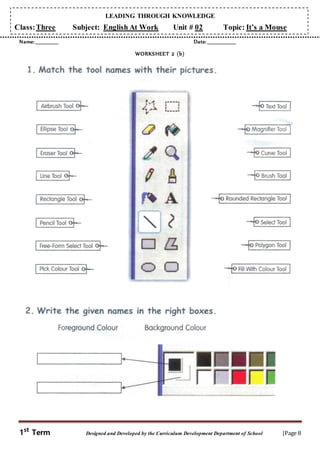
Worksheets 2(b) will be discussed and solved.
Evaluation:
From the written work
Teaching aids:
Board, marker, duster, computer, worksheet
Wrap up:
The students will be encouraged to share their learning+ (LTK Q. 1,2 3 ofEI)
Time Allocated: 120 min
(Period 7+8+9)
Objective:
To enable the students to learn how to draw curve lines, how to save a drawing and how to exit paints and
read page no. 13,14 and page no. 15 of the book with understanding.
Approach:
The teacher will encourage the students to share their learning about MS. Paint.
Methodology:
 The teacher will take the students to the lab. Where they will do practical based on page no. 13, 14 and 15
of their books. They will be encouraged to speak about the procedures.
 The teacher will encourage the students to read page no. 14 and 15 of the book with understanding.
LEADING THROUGH KNOWLEDGE
1st
Term Designed and Developed by the Curriculum Development Department of School |Page 4
Class:Three Subject: English At Work Unit # 02 Topic: It’s a Mouse
Activities:
i. The teacher will show the pictures of different drawing tools to the students and encourage them to name
these and explain the uses.
ii. The students will be encouraged to present the procedures.
Teaching aids:
Boards, marker, duster, book, computer
Evaluation:
From activities
Home Work:
Wrap up:
Withthe shortsummaryof the lesson+(LTK Q.1,2 3 of MI)
Time Allocated: 120 min
(Period 10+11+12)
Objective:
To enable the students to understand and learn how to open a drawing and how to maximize a window
(practical)
Approach:
The teacher will encourage the students to share what they know about Microsoft Paint.
Methodology:
She will now ask them can you make changes in the picture or drawing you draw on a piece of paper. She will
ask them to share how they do it. After this she will ask them can we bring a change in the picture / drawing
we made on a computer. She will then tell them that we can do this. She will take them to the lab and will
enable them to do the task individually. After practical, reading of page no. 16+17+18 will be done and these
pages will be well explained.
Evaluation:
From questioning
Q.1 Can we redisplay the window at any time?
Q.2 How we can maximize a window?
Teaching aids:
Board, marker, duster, book, computer
Home Work:
Wrap up:
With the summary of the lesson
Time Allocated: 120 min
(Period 13+14+15)
Objective:
The enable the students to understand the uses of different tools
To enable the students to complete written work related to Micro soft paint.
Approach:
The teacher will show the pictures of different drawing tools to the students and encourage them to name
these. The teacher will involve the students in the practical use of pencil tool, brush tool, spray tool.
Methodology:
Question no. 1 will be introduced on the board and the students will be encouraged to answer this
question. After correction the students will do written work on the note books.
Evaluation:
From the written work
LEADING THROUGH KNOWLEDGE
1st
Term Designed and Developed by the Curriculum Development Department of School |Page 5
Class:Three Subject: English At Work Unit # 02 Topic: It’s a Mouse
Teaching aids:
Pictures, board, marker, duster, book
Home Work:
Revise class work.
Wrap up:
Withthe displayof the writtenwork
Q 1. Write down the uses of these tools:
Pencil tool, spray tool, brush tool
Pencil tool: It is used to draw free hand thin and wavy lines.
Brush tool: it is used to draw free hand wavy lines of different thickness.
Spray tool: It is used to distribute copies of an object much like an airbrush would paint drops.
Time Allocated: 40 min
(Period 16)
Will be the practical day the students will do practical given on page no. 22
Time Allocated: 80 min
(Period 17+18)
Objective:
To enable the students to express their learning regarding the lesson in writing
Approach: (2 min)
The teacher will encourage the students to share their knowledge regarding Microsoft Paint.
The teacher will encourage the students to share how they can draw a mango by using Microsoft Paint.
Methodology: (20 min)
The teacher will then encourage the students to write the steps on the board. After correction, the students will
write it on their note books in the form of a question.
Q2: Howcan you draw a mango on micro soft paint?
After this page no. 23will be shared and solved.
Teaching aids:
Board, marker, duster, book
Evaluation:
From the written work
Home Work:
Prepare unit for evaluation.
Wrap up:
With the tips for home work + (LTK Q. 5,6,7,8 ofMI)
(Period 19+20)
will be used for revision
(Period 21)
will be used for Leading Through Knowledge
(Period 22)
will be used for evaluation
Name: _____________ Date: ________________
LEADING THROUGH KNOWLEDGE
1st
Term Designed and Developed by the Curriculum Development Department of School |Page 6
Class:Three Subject: English At Work Unit # 02 Topic: It’s a Mouse
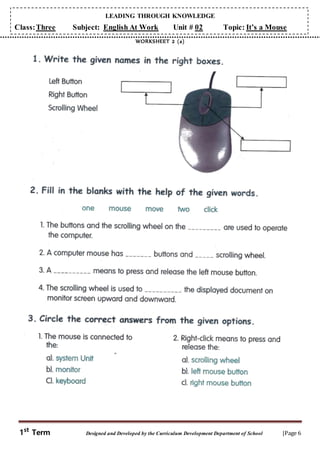
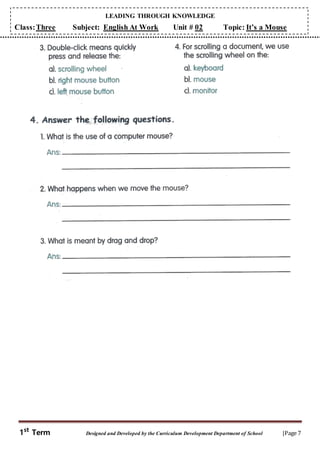
WORKSHEET 2 (a)
LEADING THROUGH KNOWLEDGE
1st
Term Designed and Developed by the Curriculum Development Department of School |Page 7
Class:Three Subject: English At Work Unit # 02 Topic: It’s a Mouse
LEADING THROUGH KNOWLEDGE
1st
Term Designed and Developed by the Curriculum Development Department of School |Page 8
Class:Three Subject: English At Work Unit # 02 Topic: It’s a Mouse
Name: _____________ Date: ________________
WORKSHEET 2 (b)
LEADING THROUGH KNOWLEDGE
1st
Term Designed and Developed by the Curriculum Development Department of School |Page 9
Class:Three Subject: English At Work Unit # 02 Topic: It’s a Mouse
Primary Level
Emotional Intelligence (EI)
Emotion Information Knowledge
Accomplished, Familiar, Indifferent
Calibrated
Celebration Multiple Intelligences (MI)
Gifted, Sustaining, Unspecific
Calibrated
Celebration
A F I G S U
Self Awareness
Q1.Are you aware of different painting tools?
(Period 6)
Visual /Spatial
Q1. Explain the shape of a mouse.
Self- Regulation
Q2. How often do you paint on a computer?
(Period 6)
Verbal / Linguistic
Q2. What is double click?
Motivation
Q3. Learn computer skills to keep pace with the
world. (Period 6)
Logical / Mathematical
Q3. How a computer mouse looks like a real
computer?
Empathy
Q4. Compare your life with the ignorant people in
the past.
Bodily / Kinesthetic
Q4. How you can use a mouse?
Social Skill
Q5. How can you build good relations by using
Microsoft Paint?
Musical
Q5. Have you heard any sound when the
computer is turn on? (Period 18)
Total (Column Summation)
Interpersonal
Q6. How we should behave in a computer lab?
(Period 18)
% age (Column Summation / 5  Class
strength) 100
Intrapersonal
Q7. Do you like painting? (Period 18)
Hints (EI):
1. Open ended
2. Open ended
3. It tells us what is going around us.
4. Open ended
5. I can draw cards for the sick one etc.
Naturalist
Q8. Compare yourself with a computer.
(Period 18)
Existentialist
Q9. Should we be thankful to Allah for
enabling us to use modern technology?
Total (Column Summation)
% age (Column Summation / 9  Class
strength) 100
REMARKS (EI): Hints (MI):
1. Open ended
2. Quickly pressing and releasing the left mouse button
twice is called double click
3. Open ended
4. Open ended
5. Open ended
6. Should not make noise and use computers carefully.
7. Open ended
8. Open ended
9. Open ended
Calibrated Celebration conducted on ---------------
Calibrated Celebration submitted* on ---------------
REMARKS (MI):
LEADING THROUGH KNOWLEDGE
1st
Term Designed and Developed by the Curriculum Development Department of School |Page 10
Class:Three Subject: English At Work Unit # 02 Topic: It’s a Mouse
Name: _____________________________ Date: _______________
Total marks: ___________________ Obtained Marks: _________________
Evaluation Sheet
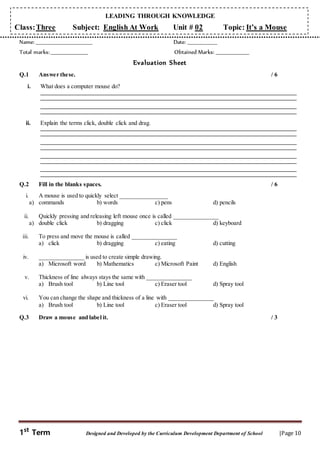
Q.1 Answer these. / 6
i. What does a computer mouse do?
ii. Explain the terms click, double click and drag.
Q.2 Fill in the blanks spaces. / 6
i. A mouse is used to quickly select ________________
a) commands b) words c) pens d) pencils
ii. Quickly pressing and releasing left mouse once is called _______________
a) double click b) dragging c) click d) keyboard
iii. To press and move the mouse is called _______________
a) click b) dragging c) eating d) cutting
iv. _______________ is used to create simple drawing.
a) Microsoft word b) Mathematics c) Microsoft Paint d) English
v. Thickness of line always stays the same with _______________
a) Brush tool b) Line tool c) Eraser tool d) Spray tool
vi. You can change the shape and thickness of a line with _______________
a) Brush tool b) Line tool c) Eraser tool d) Spray tool
Q.3 Draw a mouse and label it. / 3

ch 02 --its a mouse

  • 1.
    LEADING THROUGH KNOWLEDGE 1st TermDesigned and Developed by the Curriculum Development Department of School |Page 1 Class:Three Subject: English At Work Unit # 02 Topic: It’s a Mouse na SYNOPSIS A. Planner Status Revisedas follows:  Time and days adjustment  Methodology adjustment B. Teaching aids: board, marker, duster, book, worksheets, pictures C. Total periods required: 22 Periods Class work Proposed Homework Period 1+2 Brain storming + worksheet 2(a) Period 3+4 Practical Period 5 Notes Period 6 Brain storming + worksheet 2(b) Period 7+8+9 Brain storming + practical + reading Period 10+11+12 Brain storming + practical + reading Revise class work Period 13+14+15 Brain storming + practical + Q/A Revise class work Period 16 Practical Period 17+18 Q/A + Book exercise Period 19+20 Revision Period 21 Leading Through Knowledge Period 22 Evaluation D. Detail of written work Via board Via notebooks Via book No. of worksheets Q/A Q/A Exercises 2 E. Smart-Leading Through Activity (For 2nd Term) S Social Values M Monetary Approach A Applied Skills R Role in / for life T Team Project Project No. ____ Group No. ___ Roll No. ____ to Roll No. _____ Role Inculcation: 1. Be proactive 2. Begin with the end in mind 3. Put first things first 4. Think win-win 5. Seek first to understand, then to be understood 6. Synergize 7. Sharpen the saw 8. From effectiveness to greatness LEADING THROUGH KNOWLEDGE Class: Three Subject: Computer Unit # 02 Topic: It’s a Mouse Learning Time: Large Normal Short
  • 2.
    LEADING THROUGH KNOWLEDGE 1st TermDesigned and Developed by the Curriculum Development Department of School |Page 2 Class:Three Subject: English At Work Unit # 02 Topic: It’s a Mouse Time Allocated: 80min (Period 1+2) Objective: To enable the students to understand what is a mouse and what are its uses Approach: The teacher will show the picture of a real mouse and a computer mouse to the students and encourage them to find out the similarities and differences between the real mouse and the mouse of the computer (Venn diagram). Methodology: The teacher will encourage the students to understand that some parts of a computer mouse look like a real mouse i.e. the tail of the real mouse looks like the cable of the computer mouse. The ears of the real mouse look like the buttons of the mouse of a computer. The teacher will encourage the students to tell why a computer mouse is called a mouse. Reading of page no. 10 + 11+12 will be done with understanding. The teacher will explain the content. Uses of a mouse will be shared in the bubble map. Activity: The students will check the work of their partners. Evaluation: From questioning Q.1 What is dragging? Q.2 What is click? Q.3 What are the uses of a mouse? Teaching aids: Board, marker, duster, worksheet no. 2(a), picture of the real mouse Home Work: Wrap up: With the recap of the lesson. Time Allocated: 80 min (Period 3+4) Will be the practical day where the students will be taught how to hold a mouse and how to move it. They will be toldabout click, double click, dragging and placing the icons. Time Allocated: 40 min (Period 5) Objective: To enable the students to express their learning in the written form Approach: (2 min) The teacher will ask questions related to the topic read in the class Methodology: (20 min) Real Mouse Computer Mouse
  • 3.
    LEADING THROUGH KNOWLEDGE 1st TermDesigned and Developed by the Curriculum Development Department of School |Page 3 Class:Three Subject: English At Work Unit # 02 Topic: It’s a Mouse She will introduce questions on the board and encourage the students to write answers on the board. After correction they will write these on their note book. Q1: What is click? Ans: Quickly pressing and releasing the mouse button once is called click. We can either click on the left or right mouse button. Q2: What is double click? Ans: Quickly pressing and releasing the left mouse button twice is called double click. This method is used to open an application Evaluation: (5 min) From the written work Teaching aids: Board, marker, duster, book Home Work: Revise class work Wrap up: With the display of the written work Time Allocated: 40 min (Period 6) Objective: To enable the students to understand the use of different drawing tools Approach: (2 min) The teacher will ask the students do they like drawing pictures? Methodology: (20 min)  The teacher will ask the students to name the things they use to draw the pictures. She will encourage them to enlist the things on the board.  After this she will tell them that they can draw pictures on the computer also. The teacher will show MS paint from Accessories Menu and open it there. She will then show drawing tools to the students and tell them that tools show as a picture are called icons. The teachers will then show different drawing icons to the students and tell them about their uses practically. Activity: (5 min) Worksheets 2(b) will be discussed and solved. Evaluation: From the written work Teaching aids: Board, marker, duster, computer, worksheet Wrap up: The students will be encouraged to share their learning+ (LTK Q. 1,2 3 ofEI) Time Allocated: 120 min (Period 7+8+9) Objective: To enable the students to learn how to draw curve lines, how to save a drawing and how to exit paints and read page no. 13,14 and page no. 15 of the book with understanding. Approach: The teacher will encourage the students to share their learning about MS. Paint. Methodology:  The teacher will take the students to the lab. Where they will do practical based on page no. 13, 14 and 15 of their books. They will be encouraged to speak about the procedures.  The teacher will encourage the students to read page no. 14 and 15 of the book with understanding.
  • 4.
    LEADING THROUGH KNOWLEDGE 1st TermDesigned and Developed by the Curriculum Development Department of School |Page 4 Class:Three Subject: English At Work Unit # 02 Topic: It’s a Mouse Activities: i. The teacher will show the pictures of different drawing tools to the students and encourage them to name these and explain the uses. ii. The students will be encouraged to present the procedures. Teaching aids: Boards, marker, duster, book, computer Evaluation: From activities Home Work: Wrap up: Withthe shortsummaryof the lesson+(LTK Q.1,2 3 of MI) Time Allocated: 120 min (Period 10+11+12) Objective: To enable the students to understand and learn how to open a drawing and how to maximize a window (practical) Approach: The teacher will encourage the students to share what they know about Microsoft Paint. Methodology: She will now ask them can you make changes in the picture or drawing you draw on a piece of paper. She will ask them to share how they do it. After this she will ask them can we bring a change in the picture / drawing we made on a computer. She will then tell them that we can do this. She will take them to the lab and will enable them to do the task individually. After practical, reading of page no. 16+17+18 will be done and these pages will be well explained. Evaluation: From questioning Q.1 Can we redisplay the window at any time? Q.2 How we can maximize a window? Teaching aids: Board, marker, duster, book, computer Home Work: Wrap up: With the summary of the lesson Time Allocated: 120 min (Period 13+14+15) Objective: The enable the students to understand the uses of different tools To enable the students to complete written work related to Micro soft paint. Approach: The teacher will show the pictures of different drawing tools to the students and encourage them to name these. The teacher will involve the students in the practical use of pencil tool, brush tool, spray tool. Methodology: Question no. 1 will be introduced on the board and the students will be encouraged to answer this question. After correction the students will do written work on the note books. Evaluation: From the written work
  • 5.
    LEADING THROUGH KNOWLEDGE 1st TermDesigned and Developed by the Curriculum Development Department of School |Page 5 Class:Three Subject: English At Work Unit # 02 Topic: It’s a Mouse Teaching aids: Pictures, board, marker, duster, book Home Work: Revise class work. Wrap up: Withthe displayof the writtenwork Q 1. Write down the uses of these tools: Pencil tool, spray tool, brush tool Pencil tool: It is used to draw free hand thin and wavy lines. Brush tool: it is used to draw free hand wavy lines of different thickness. Spray tool: It is used to distribute copies of an object much like an airbrush would paint drops. Time Allocated: 40 min (Period 16) Will be the practical day the students will do practical given on page no. 22 Time Allocated: 80 min (Period 17+18) Objective: To enable the students to express their learning regarding the lesson in writing Approach: (2 min) The teacher will encourage the students to share their knowledge regarding Microsoft Paint. The teacher will encourage the students to share how they can draw a mango by using Microsoft Paint. Methodology: (20 min) The teacher will then encourage the students to write the steps on the board. After correction, the students will write it on their note books in the form of a question. Q2: Howcan you draw a mango on micro soft paint? After this page no. 23will be shared and solved. Teaching aids: Board, marker, duster, book Evaluation: From the written work Home Work: Prepare unit for evaluation. Wrap up: With the tips for home work + (LTK Q. 5,6,7,8 ofMI) (Period 19+20) will be used for revision (Period 21) will be used for Leading Through Knowledge (Period 22) will be used for evaluation Name: _____________ Date: ________________
  • 6.
    LEADING THROUGH KNOWLEDGE 1st TermDesigned and Developed by the Curriculum Development Department of School |Page 6 Class:Three Subject: English At Work Unit # 02 Topic: It’s a Mouse WORKSHEET 2 (a)
  • 7.
    LEADING THROUGH KNOWLEDGE 1st TermDesigned and Developed by the Curriculum Development Department of School |Page 7 Class:Three Subject: English At Work Unit # 02 Topic: It’s a Mouse
  • 8.
    LEADING THROUGH KNOWLEDGE 1st TermDesigned and Developed by the Curriculum Development Department of School |Page 8 Class:Three Subject: English At Work Unit # 02 Topic: It’s a Mouse Name: _____________ Date: ________________ WORKSHEET 2 (b)
  • 9.
    LEADING THROUGH KNOWLEDGE 1st TermDesigned and Developed by the Curriculum Development Department of School |Page 9 Class:Three Subject: English At Work Unit # 02 Topic: It’s a Mouse Primary Level Emotional Intelligence (EI) Emotion Information Knowledge Accomplished, Familiar, Indifferent Calibrated Celebration Multiple Intelligences (MI) Gifted, Sustaining, Unspecific Calibrated Celebration A F I G S U Self Awareness Q1.Are you aware of different painting tools? (Period 6) Visual /Spatial Q1. Explain the shape of a mouse. Self- Regulation Q2. How often do you paint on a computer? (Period 6) Verbal / Linguistic Q2. What is double click? Motivation Q3. Learn computer skills to keep pace with the world. (Period 6) Logical / Mathematical Q3. How a computer mouse looks like a real computer? Empathy Q4. Compare your life with the ignorant people in the past. Bodily / Kinesthetic Q4. How you can use a mouse? Social Skill Q5. How can you build good relations by using Microsoft Paint? Musical Q5. Have you heard any sound when the computer is turn on? (Period 18) Total (Column Summation) Interpersonal Q6. How we should behave in a computer lab? (Period 18) % age (Column Summation / 5  Class strength) 100 Intrapersonal Q7. Do you like painting? (Period 18) Hints (EI): 1. Open ended 2. Open ended 3. It tells us what is going around us. 4. Open ended 5. I can draw cards for the sick one etc. Naturalist Q8. Compare yourself with a computer. (Period 18) Existentialist Q9. Should we be thankful to Allah for enabling us to use modern technology? Total (Column Summation) % age (Column Summation / 9  Class strength) 100 REMARKS (EI): Hints (MI): 1. Open ended 2. Quickly pressing and releasing the left mouse button twice is called double click 3. Open ended 4. Open ended 5. Open ended 6. Should not make noise and use computers carefully. 7. Open ended 8. Open ended 9. Open ended Calibrated Celebration conducted on --------------- Calibrated Celebration submitted* on --------------- REMARKS (MI): LEADING THROUGH KNOWLEDGE
  • 10.
    LEADING THROUGH KNOWLEDGE 1st TermDesigned and Developed by the Curriculum Development Department of School |Page 10 Class:Three Subject: English At Work Unit # 02 Topic: It’s a Mouse Name: _____________________________ Date: _______________ Total marks: ___________________ Obtained Marks: _________________ Evaluation Sheet Q.1 Answer these. / 6 i. What does a computer mouse do? ii. Explain the terms click, double click and drag. Q.2 Fill in the blanks spaces. / 6 i. A mouse is used to quickly select ________________ a) commands b) words c) pens d) pencils ii. Quickly pressing and releasing left mouse once is called _______________ a) double click b) dragging c) click d) keyboard iii. To press and move the mouse is called _______________ a) click b) dragging c) eating d) cutting iv. _______________ is used to create simple drawing. a) Microsoft word b) Mathematics c) Microsoft Paint d) English v. Thickness of line always stays the same with _______________ a) Brush tool b) Line tool c) Eraser tool d) Spray tool vi. You can change the shape and thickness of a line with _______________ a) Brush tool b) Line tool c) Eraser tool d) Spray tool Q.3 Draw a mouse and label it. / 3