COMPUTER ORGANIZATION AND
ARCHITECTURE
UNIT I
UNIT I
Architecture: An Overview
Functional units of a Digital Computer – Translation from a High level
language to Hardware Language – Technology – Performance – Power
wall – Uniprocessor to multiprocessor – Instructions: Operations and
Operands – Instruction Set: RISC and CISC - Representing Instructions
– Logical Operations – ARM Addressing for 32-bit Immediate and more
complex addressing modes.
COMPUTER ORGANISATION AND
ARCHITECTURE
 The components from which computers are built,
i.e., computer organization.
 In contrast, computer architecture is the science of
integrating those components to achieve a level of
functionality and performance.
 It is as if computer organization examines the
lumber, bricks, nails, and other building material
 While computer architecture looks at the design of
the house.
Basic Terminology
 Computer
 A device that accepts input,
processes data, stores data, and
produces output, all according to a
series of stored instructions.
 Hardware
 Includes the electronic and
mechanical devices that process the
data; refers to the computer as well
as peripheral devices.
 Software
 A computer program that tells
the computer how to perform
particular tasks.
 Network
 Two or more computers and
other devices that are
connected, for the purpose of
sharing data and programs.
 Peripheral devices
 Used to expand the computer’s
input, output and storage
capabilities.
Basic Terminology
 Input
 Whatever is put into a computer system.
 Data
 Refers to the symbols that represent facts, objects, or ideas.
 Information
 The results of the computer storing data as bits and bytes; the words, numbers, sounds, and graphics.
 Output
 Consists of the processing results produced by a computer.
 Processing
 Manipulation of the data in many ways.
 Memory
 Area of the computer that temporarily holds data waiting to be processed, stored, or output.
 Storage
 Area of the computer that holds data on a permanent basis when it is not immediately needed for processing.
Basic Terminology
•Assembly language program (ALP) – Programs are written using
mnemonics
•Mnemonic – Instruction will be in the form of English like form
•Assembler – is a software which converts ALP to MLL (Machine Level
Language)
•HLL (High Level Language) – Programs are written using English like
statements
•Compiler - Convert HLL to MLL, does this job by reading source
program at once
Basic Terminology
•Interpreter – Converts HLL to MLL, does this job statement by
statement
•System software – Program routines which aid the user in the
execution of programs eg: Assemblers, Compilers
•Operating system – Collection of routines responsible for
controlling and coordinating all the activities in a computer
system
Computing Systems
Computers have two kinds of components:
 Hardware, consisting of its physical devices (CPU,
memory, bus, storage devices, ...)
 Software, consisting of the programs it has (Operating
system, applications, utilities, ...)
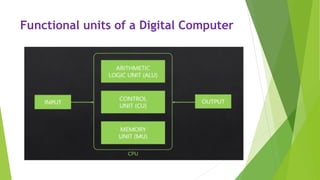
Functional units of a Digital Computer
 Input Unit
 Output Unit
 Central processing Unit (ALU and Control Units)
 Memory
 Bus Structure
Functional units of a Digital Computer
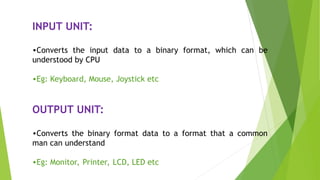
INPUT UNIT:
•Converts the input data to a binary format, which can be
understood by CPU
•Eg: Keyboard, Mouse, Joystick etc
OUTPUT UNIT:
•Converts the binary format data to a format that a common
man can understand
•Eg: Monitor, Printer, LCD, LED etc
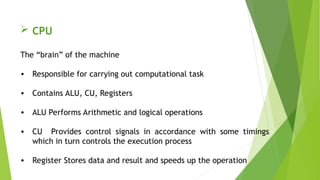
 CPU
The “brain” of the machine
• Responsible for carrying out computational task
• Contains ALU, CU, Registers
• ALU Performs Arithmetic and logical operations
• CU Provides control signals in accordance with some timings
which in turn controls the execution process
• Register Stores data and result and speeds up the operation
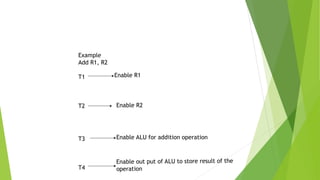
Example
Add R1, R2
T1
T2
T3
T4
Enable R1
Enable R2
Enable ALU for addition operation
Enable out put of ALU to store result of the
operation
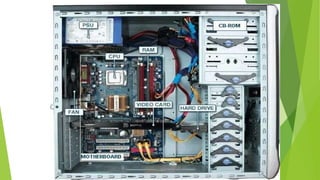
MEMORY
•Stores data, results, programs
Two class of storage
(i) Primary (ii) Secondary
•Two types are RAM or R/W memory and ROM read only memory
•ROM is used to store data and program which is not going to change.
•Secondary storage is used for bulk storage or mass storage
COMPONENTS OF A COMPUTER SYSTEM
 Technology
 Performance
 Power Wall
Technology
• Processor and memory are now available at better price than
the olden day’s
• Processors and memory have improved at an incredible rate
computers are designed better every time.
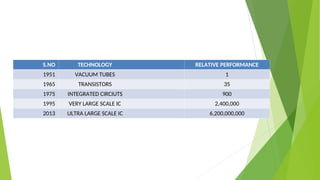
S.NO TECHNOLOGY RELATIVE PERFORMANCE
1951 VACUUM TUBES 1
1965 TRANSISTORS 35
1975 INTEGRATED CIRCIUTS 900
1995 VERY LARGE SCALE IC 2,400,000
2013 ULTRA LARGE SCALE IC 6,200,000,000
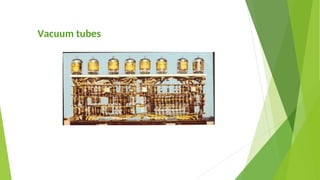
Vacuum tubes
• John von neumann designed a computer EDVAC( electronic discrete
variable computer)
• Used to perform various of computation 5000 additions and
subtraction per sec
• Made up of 18000 vacuum tubes
• Data are stored in single read-write memory
• Execution occurs in sequential fashion from 1 inst to next
• Wt: 30 tons, power consumption -140 kw
Vacuum tubes
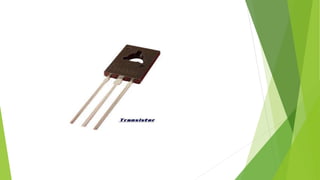
Transistors
• It is a smaller than the other device and consume less
power, high speed, more memory storage and size is small.
• It helps to handle both floating point and fixed point
operation.
• Separate i/o processor
• Support higher level programming languages.
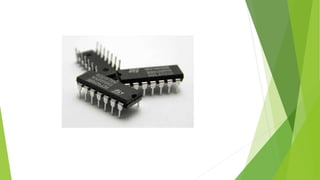
Integrated circuits
• Low cost, fast processor, development of memory chips.
• Allows to increase memory size and number of i/o ports.
• Magnetic core memories are replaced ICM(memory)
• Microprogramming, parallel processing, sharing resources.
• Microprogramming simplifies the cpu design and increase the
flexibility.
• Parallel processing was introduced to increase effective speed at
which program could be executed.
Integrated circuits cont(..)
• 1964: ibm system/360 planned family of computer
• Identical instruction set and operating system,
increase speed, i/o ports, memory size, cost- from
lower family to higher,
• Different models run the same software with
different price/performance.
• Mini computer: OEM(original equipment
manufacturer, bus structure.
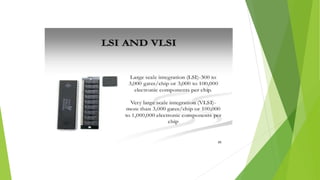
VLSI (very large scale integrated circuits)
• Uses LSI and VLSI for computer design
• It is possible to manufacture entire cpu, main memory into
single IC
• That can be implemented in PC and high performance
parallel processor.
• Concept supported are concurrency, pipeline, cache, and
virtual memories
• This evolved to produce the high performance computing.
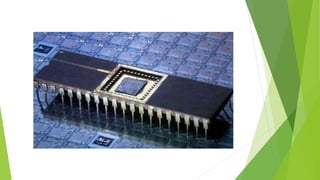
ULSI
• Ultra large scale integration: embedding
millions of transistors on a single silicon
semiconductor microchip.
• ULSI has large computation and memory
powers from the microchip
UNIT I Basic terminology COMPUTER ARCHI.ppt

UNIT I Basic terminology COMPUTER ARCHI.ppt

  • 1.
  • 2.
    UNIT I Architecture: AnOverview Functional units of a Digital Computer – Translation from a High level language to Hardware Language – Technology – Performance – Power wall – Uniprocessor to multiprocessor – Instructions: Operations and Operands – Instruction Set: RISC and CISC - Representing Instructions – Logical Operations – ARM Addressing for 32-bit Immediate and more complex addressing modes.
  • 3.
    COMPUTER ORGANISATION AND ARCHITECTURE The components from which computers are built, i.e., computer organization.  In contrast, computer architecture is the science of integrating those components to achieve a level of functionality and performance.  It is as if computer organization examines the lumber, bricks, nails, and other building material  While computer architecture looks at the design of the house.
  • 4.
    Basic Terminology  Computer A device that accepts input, processes data, stores data, and produces output, all according to a series of stored instructions.  Hardware  Includes the electronic and mechanical devices that process the data; refers to the computer as well as peripheral devices.  Software  A computer program that tells the computer how to perform particular tasks.  Network  Two or more computers and other devices that are connected, for the purpose of sharing data and programs.  Peripheral devices  Used to expand the computer’s input, output and storage capabilities.
  • 5.
    Basic Terminology  Input Whatever is put into a computer system.  Data  Refers to the symbols that represent facts, objects, or ideas.  Information  The results of the computer storing data as bits and bytes; the words, numbers, sounds, and graphics.  Output  Consists of the processing results produced by a computer.  Processing  Manipulation of the data in many ways.  Memory  Area of the computer that temporarily holds data waiting to be processed, stored, or output.  Storage  Area of the computer that holds data on a permanent basis when it is not immediately needed for processing.
  • 6.
    Basic Terminology •Assembly languageprogram (ALP) – Programs are written using mnemonics •Mnemonic – Instruction will be in the form of English like form •Assembler – is a software which converts ALP to MLL (Machine Level Language) •HLL (High Level Language) – Programs are written using English like statements •Compiler - Convert HLL to MLL, does this job by reading source program at once
  • 7.
    Basic Terminology •Interpreter –Converts HLL to MLL, does this job statement by statement •System software – Program routines which aid the user in the execution of programs eg: Assemblers, Compilers •Operating system – Collection of routines responsible for controlling and coordinating all the activities in a computer system
  • 8.
    Computing Systems Computers havetwo kinds of components:  Hardware, consisting of its physical devices (CPU, memory, bus, storage devices, ...)  Software, consisting of the programs it has (Operating system, applications, utilities, ...)
  • 9.
    Functional units ofa Digital Computer  Input Unit  Output Unit  Central processing Unit (ALU and Control Units)  Memory  Bus Structure
  • 10.
    Functional units ofa Digital Computer
  • 11.
    INPUT UNIT: •Converts theinput data to a binary format, which can be understood by CPU •Eg: Keyboard, Mouse, Joystick etc OUTPUT UNIT: •Converts the binary format data to a format that a common man can understand •Eg: Monitor, Printer, LCD, LED etc
  • 12.
     CPU The “brain”of the machine • Responsible for carrying out computational task • Contains ALU, CU, Registers • ALU Performs Arithmetic and logical operations • CU Provides control signals in accordance with some timings which in turn controls the execution process • Register Stores data and result and speeds up the operation
  • 13.
    Example Add R1, R2 T1 T2 T3 T4 EnableR1 Enable R2 Enable ALU for addition operation Enable out put of ALU to store result of the operation
  • 14.
    MEMORY •Stores data, results,programs Two class of storage (i) Primary (ii) Secondary •Two types are RAM or R/W memory and ROM read only memory •ROM is used to store data and program which is not going to change. •Secondary storage is used for bulk storage or mass storage
  • 18.
    COMPONENTS OF ACOMPUTER SYSTEM  Technology  Performance  Power Wall
  • 19.
    Technology • Processor andmemory are now available at better price than the olden day’s • Processors and memory have improved at an incredible rate computers are designed better every time.
  • 20.
    S.NO TECHNOLOGY RELATIVEPERFORMANCE 1951 VACUUM TUBES 1 1965 TRANSISTORS 35 1975 INTEGRATED CIRCIUTS 900 1995 VERY LARGE SCALE IC 2,400,000 2013 ULTRA LARGE SCALE IC 6,200,000,000
  • 21.
    Vacuum tubes • Johnvon neumann designed a computer EDVAC( electronic discrete variable computer) • Used to perform various of computation 5000 additions and subtraction per sec • Made up of 18000 vacuum tubes • Data are stored in single read-write memory • Execution occurs in sequential fashion from 1 inst to next • Wt: 30 tons, power consumption -140 kw
  • 22.
  • 23.
    Transistors • It isa smaller than the other device and consume less power, high speed, more memory storage and size is small. • It helps to handle both floating point and fixed point operation. • Separate i/o processor • Support higher level programming languages.
  • 25.
    Integrated circuits • Lowcost, fast processor, development of memory chips. • Allows to increase memory size and number of i/o ports. • Magnetic core memories are replaced ICM(memory) • Microprogramming, parallel processing, sharing resources. • Microprogramming simplifies the cpu design and increase the flexibility. • Parallel processing was introduced to increase effective speed at which program could be executed.
  • 26.
    Integrated circuits cont(..) •1964: ibm system/360 planned family of computer • Identical instruction set and operating system, increase speed, i/o ports, memory size, cost- from lower family to higher, • Different models run the same software with different price/performance. • Mini computer: OEM(original equipment manufacturer, bus structure.
  • 28.
    VLSI (very largescale integrated circuits) • Uses LSI and VLSI for computer design • It is possible to manufacture entire cpu, main memory into single IC • That can be implemented in PC and high performance parallel processor. • Concept supported are concurrency, pipeline, cache, and virtual memories • This evolved to produce the high performance computing.
  • 30.
    ULSI • Ultra largescale integration: embedding millions of transistors on a single silicon semiconductor microchip. • ULSI has large computation and memory powers from the microchip