System and Application
Software
What Is HardwareAnd Software
• Hardware
All physical contents of computer are hardware. This form is given to
all electrical and mechanical devices attached to the computer for the
purpose of input, process, and storage and outputoperations
• Software
SoftwareisageneraltermusedforcomputerPrograms.A computer
programisaplanned,stepbystepsetof instructionsthatdirectsthe
computerwhattodo andhow to do
Types of Software
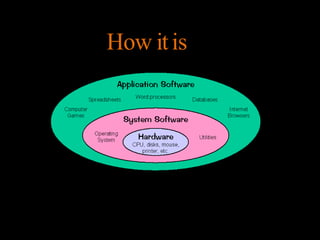
• SystemSoftware
– Theprograms directlyrelatedtothecomputer
hardwareandperformtasksassociatedwith
controllingandutilizingcomputerhardware
• ApplicationSoftware
– An applicationisajobor taskauserwantsto
accomplishthroughacomputer.
–Applicationsoftwareareprogramsthathelpa user
performaspecificjob.
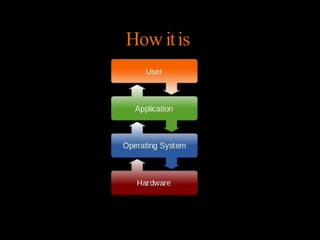
How itis
How itis
SystemSoftware
– System software is computer software designed to operate
the computer hardware, to provide basic functionality, and to
provide a platform for running application software.
– System software includes device drivers, operating systems,
servers, utilities, and window systems.
– System software is responsible for managing a variety of
independent hardware components, so that they can work
together harmoniously.
SystemSoftware
System controlprograms
• controlstheexecutionofprograms,managethestorage&processing resourcesof
thecomputer&performothermanagement & monitoring function.
• Themostimportant oftheseprogramsistheoperatingsystem.
System support programs
provide routine service functions to the other computer programs &
computer users: E.g. Utilities, libraries,
Ex:T
ext editors, language translators such as BASIC interpreter
System Development Programs
• Theyassistsinthecreationofcomputerprograms. Examplesof system
development are–
Types
• Operating Systems (OS):
– Examples: Windows, macOS, Linux, Unix, Android, iOS
– Operating systems manage hardware resources, provide essential
services (such as file management, memory management, and process
management), and act as an interface between applications and
hardware.
• Device Drivers:
– Examples: Printer drivers, graphics card drivers, network drivers
– Device drivers enable communication between the operating system
and hardware devices, allowing them to function properly.
• Utilities:
– Examples: Disk defragmenters, antivirus software, backup tools
– Utilities perform various system management tasks such as disk
maintenance, security, and data backup.
Scenario-based Examples
• Operating System (OS):
Scenario: Sarah boots up her computer. The operating system, such
as Windows 10, loads first. It manages hardware resources, provides
a graphical user interface (GUI), and enables Sarah to interact with
her computer. She navigates through files, launches applications,
and performs various tasks seamlessly due to the OS's management
of resources.
• Device Drivers:
Scenario: John installs a new graphics card on his computer. Upon
installation, the operating system detects the new hardware but
requires specific device drivers to properly communicate with the
graphics card. John installs the graphics card drivers provided by the
manufacturer, allowing the operating system to utilize the graphics
card's capabilities effectively.
Applicationsoftware
• Application software are the softwarethat are designed to
satisfya particular need of a particularenvironment.
• Allsoftwareprepared by us in thecomputer lab.
• Examples of applicationsoftware are-student record
software,railway reservation software,income taxsoftware,
word processors etc.
• Examples include enterprise software,accounting software,
office suites,graphicssoftware and mediaplayers.
Types
• Productivity Software:
– Examples: Microsoft Office (Word, Excel, PowerPoint), Google Workspace (Docs, Sheets, Slides), Adobe
Creative Suite (Photoshop, Illustrator, Premiere)
– Productivity software helps users create, edit, and manage documents, spreadsheets, presentations, and
multimedia content.
• Communication Software:
– Examples: Email clients (Outlook, Thunderbird), instant messaging apps (WhatsApp, Slack), video
conferencing tools (Zoom, Skype)
– Communication software facilitates communication and collaboration between users through various
channels such as email, instant messaging, and video conferencing.
• Entertainment Software:
– Examples: Video games, multimedia players (VLC, iTunes), streaming services (Netflix, Spotify)
– Entertainment software provides users with recreational activities such as gaming, watching videos, listening
to music, and accessing online content.
• Business Software:
– Examples: Enterprise resource planning (ERP) systems, customer relationship management (CRM) software,
accounting software (QuickBooks, Xero)
– Business software helps organizations streamline their operations, manage resources, and support business
processes.
• Educational Software:
– Examples: Learning management systems (LMS), educational games, interactive tutorials
– Educational software assists in teaching and learning activities, providing educational content, assessments,
and instructional resources.
Applicationsoftware
• Opera(Web Browser)
• MicrosoftWord (Word Processing)
• Microsoft Excel(Spreadsheetsoftware)
• MySQL (DatabaseSoftware)
• Microsoft Powerpoint(Presentation Software)
• iTunes(Music /SoundSoftware)
• VLCMedia Player(Audio/VideoSoftware)
• World ofWarcraft(GameSoftware)
• AdobePhotoshop(Graphics Software)
Scenario-based Examples
• Microsoft Office Suite:
Scenario: David works in an office and needs to create a
presentation for an upcoming meeting. He uses Microsoft
PowerPoint, a component of the Microsoft Office suite, to create
engaging slides with text, images, and animations. After
completing the presentation, David saves the file and shares it
with his colleagues via email.
• Adobe Photoshop:
Scenario: Lisa, a graphic designer, receives a client's request to
design a company logo. She uses Adobe Photoshop, a powerful
image editing software, to create a visually appealing logo with
custom graphics and effects. After finalizing the design, Lisa
exports the logo in various formats for the client's use.

system and application software are used in computer.

  • 1.
  • 2.
    What Is HardwareAndSoftware • Hardware All physical contents of computer are hardware. This form is given to all electrical and mechanical devices attached to the computer for the purpose of input, process, and storage and outputoperations • Software SoftwareisageneraltermusedforcomputerPrograms.A computer programisaplanned,stepbystepsetof instructionsthatdirectsthe computerwhattodo andhow to do
  • 3.
    Types of Software •SystemSoftware – Theprograms directlyrelatedtothecomputer hardwareandperformtasksassociatedwith controllingandutilizingcomputerhardware • ApplicationSoftware – An applicationisajobor taskauserwantsto accomplishthroughacomputer. –Applicationsoftwareareprogramsthathelpa user performaspecificjob.
  • 4.
  • 5.
  • 6.
    SystemSoftware – System softwareis computer software designed to operate the computer hardware, to provide basic functionality, and to provide a platform for running application software. – System software includes device drivers, operating systems, servers, utilities, and window systems. – System software is responsible for managing a variety of independent hardware components, so that they can work together harmoniously.
  • 7.
    SystemSoftware System controlprograms • controlstheexecutionofprograms,managethestorage&processingresourcesof thecomputer&performothermanagement & monitoring function. • Themostimportant oftheseprogramsistheoperatingsystem. System support programs provide routine service functions to the other computer programs & computer users: E.g. Utilities, libraries, Ex:T ext editors, language translators such as BASIC interpreter System Development Programs • Theyassistsinthecreationofcomputerprograms. Examplesof system development are–
  • 8.
    Types • Operating Systems(OS): – Examples: Windows, macOS, Linux, Unix, Android, iOS – Operating systems manage hardware resources, provide essential services (such as file management, memory management, and process management), and act as an interface between applications and hardware. • Device Drivers: – Examples: Printer drivers, graphics card drivers, network drivers – Device drivers enable communication between the operating system and hardware devices, allowing them to function properly. • Utilities: – Examples: Disk defragmenters, antivirus software, backup tools – Utilities perform various system management tasks such as disk maintenance, security, and data backup.
  • 9.
    Scenario-based Examples • OperatingSystem (OS): Scenario: Sarah boots up her computer. The operating system, such as Windows 10, loads first. It manages hardware resources, provides a graphical user interface (GUI), and enables Sarah to interact with her computer. She navigates through files, launches applications, and performs various tasks seamlessly due to the OS's management of resources. • Device Drivers: Scenario: John installs a new graphics card on his computer. Upon installation, the operating system detects the new hardware but requires specific device drivers to properly communicate with the graphics card. John installs the graphics card drivers provided by the manufacturer, allowing the operating system to utilize the graphics card's capabilities effectively.
  • 10.
    Applicationsoftware • Application softwareare the softwarethat are designed to satisfya particular need of a particularenvironment. • Allsoftwareprepared by us in thecomputer lab. • Examples of applicationsoftware are-student record software,railway reservation software,income taxsoftware, word processors etc. • Examples include enterprise software,accounting software, office suites,graphicssoftware and mediaplayers.
  • 11.
    Types • Productivity Software: –Examples: Microsoft Office (Word, Excel, PowerPoint), Google Workspace (Docs, Sheets, Slides), Adobe Creative Suite (Photoshop, Illustrator, Premiere) – Productivity software helps users create, edit, and manage documents, spreadsheets, presentations, and multimedia content. • Communication Software: – Examples: Email clients (Outlook, Thunderbird), instant messaging apps (WhatsApp, Slack), video conferencing tools (Zoom, Skype) – Communication software facilitates communication and collaboration between users through various channels such as email, instant messaging, and video conferencing. • Entertainment Software: – Examples: Video games, multimedia players (VLC, iTunes), streaming services (Netflix, Spotify) – Entertainment software provides users with recreational activities such as gaming, watching videos, listening to music, and accessing online content. • Business Software: – Examples: Enterprise resource planning (ERP) systems, customer relationship management (CRM) software, accounting software (QuickBooks, Xero) – Business software helps organizations streamline their operations, manage resources, and support business processes. • Educational Software: – Examples: Learning management systems (LMS), educational games, interactive tutorials – Educational software assists in teaching and learning activities, providing educational content, assessments, and instructional resources.
  • 12.
    Applicationsoftware • Opera(Web Browser) •MicrosoftWord (Word Processing) • Microsoft Excel(Spreadsheetsoftware) • MySQL (DatabaseSoftware) • Microsoft Powerpoint(Presentation Software) • iTunes(Music /SoundSoftware) • VLCMedia Player(Audio/VideoSoftware) • World ofWarcraft(GameSoftware) • AdobePhotoshop(Graphics Software)
  • 13.
    Scenario-based Examples • MicrosoftOffice Suite: Scenario: David works in an office and needs to create a presentation for an upcoming meeting. He uses Microsoft PowerPoint, a component of the Microsoft Office suite, to create engaging slides with text, images, and animations. After completing the presentation, David saves the file and shares it with his colleagues via email. • Adobe Photoshop: Scenario: Lisa, a graphic designer, receives a client's request to design a company logo. She uses Adobe Photoshop, a powerful image editing software, to create a visually appealing logo with custom graphics and effects. After finalizing the design, Lisa exports the logo in various formats for the client's use.