SWITCHING - STP
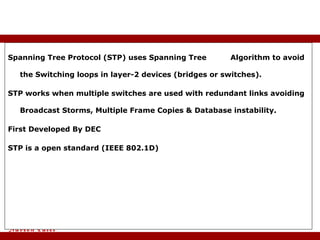
Spanning Tree Protocol (STP) uses Spanning Tree  Algorithm to avoid  the Switching loops in layer-2 devices (bridges or switches). STP works when multiple switches are used with redundant links avoiding Broadcast Storms, Multiple Frame Copies & Database instability. First Developed By DEC STP is a open standard (IEEE 802.1D) Spanning Tree Protocol
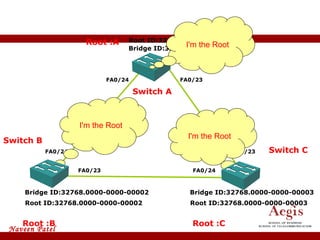
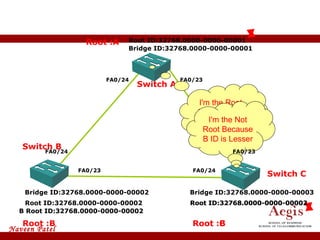
Switch D Spanning Tree Protocol Root :B Root :A Root :C Root ID:32768.0000-0000-00001 Root ID:32768.0000-0000-00003 Root ID:32768.0000-0000-00002 Bridge ID:32768.0000-0000-00001 Bridge ID:32768.0000-0000-00002 Bridge ID:32768.0000-0000-00003 FA0/23 Switch C Switch A FA0/24 FA0/24 FA0/23 FA0/24 FA0/23 I'm the Root I'm the Root I'm the Root Switch B
Spanning Tree Protocol Root :B Root :A Root :C Root ID:32768.0000-0000-00001 Root ID:32768.0000-0000-00003 Root ID:32768.0000-0000-00002 Bridge ID:32768.0000-0000-00001 Bridge ID:32768.0000-0000-00002 Bridge ID:32768.0000-0000-00003 Switch B Switch C Switch A I'm the Root Because MY ID is Lesser  I'm the Not Root Because B ID is Lesser  B Root ID:32768.0000-0000-00002 B Root ID:32768.0000-0000-00002 B Root ID:32768.0000-0000-00002 Root ID:32768.0000-0000-00002 Root :B FA0/23 FA0/24 FA0/24 FA0/23 FA0/24 FA0/23
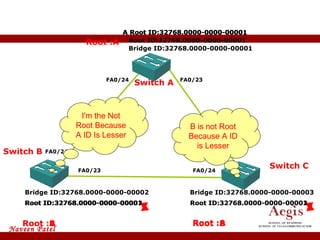
Switch D Spanning Tree Protocol Root :B Root :A Root :B Root ID:32768.0000-0000-00001 Root ID:32768.0000-0000-00002 Root ID:32768.0000-0000-00002 Bridge ID:32768.0000-0000-00001 Bridge ID:32768.0000-0000-00002 Bridge ID:32768.0000-0000-00003 Switch B Switch   C Switch A A Root ID:32768.0000-0000-00001 A Root ID:32768.0000-0000-00001 A Root ID:32768.0000-0000-00001 Root :A Root :A Root ID:32768.0000-0000-00001 Root ID:32768.0000-0000-00001 FA0/23 FA0/24 FA0/24 FA0/23 FA0/24 B is not Root Because A ID is Lesser I'm the Not Root Because A ID Is Lesser
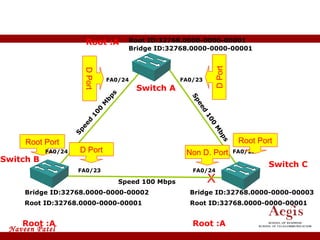
Bridge ID:32768.0000-0000-00001 Bridge ID:32768.0000-0000-00002 Bridge ID:32768.0000-0000-00003 Switch B Switch C Switch A Root :A Root ID:32768.0000-0000-00001 Root :A Root :A Root ID:32768.0000-0000-00001 Root ID:32768.0000-0000-00001 Spanning Tree Protocol Speed 100 Mbps Speed 100 Mbps Speed 100 Mbps Root Port  D Port D Port Non D. Port X FA0/23 FA0/24 FA0/24 FA0/23 FA0/24 FA0/23 Root Port  D Port
BPDU  All switches exchange information through what is called as Bridge Protocol Data Units (BPDUs) BPDUs contain a lot of information to help the switches determine the topology and any loops that result from that topology. BPDUs are sent every 2 sec Bridge ID Each switch has a unique identifier called a Bridge ID or Switch ID Bridge ID = Priority + MAC address of the switch When a switch advertises a BPDU , they place their switch id in these BPDUs. STP Terminology
Root Bridge  The bridge with the Best (Lowest) ID.  Out of all the switches in the network , one is elected as a  root bridge that becomes the focal point in the network. Non-Root bridge   All Switches other than the Root Bridge are Non-Root Bridges STP Terminology
Designated port   Either a port On a root bridge or a port that has been  determined as having the best (lower) cost.  A designated port will always in Forward Mode Root port  The link directly connected to the root bridge, or the  shortest path to the root bridge.  Priority and Alternatives if Conflict occurred.  Root port with the least cost (Speed) connecting to the root bridge. The bridge with the Best (Lowest) Switch ID. Lowest Physical Port Number. Only One root port will Be in Bridge or switch. Non Designated port All the Port or ports which are blocked by STP to avoid switching loop. A Non Designated port Will Always in Blocked Mode. STP Terminology
Disable - No Limits. Blocking - 20 Sec Or No Limits. Listening  - 15 Sec. Learning - 15 Sec.  Forwarding - No Limits. Switch  - Port States
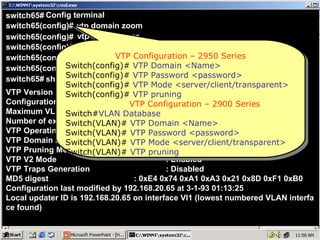
VTP is a CISCO proprietary protocol used to share the VLAN configurations with multiple switches. Information will be passed only if switches connected with FastEthernet or higher ports.  Note: Switches Should be configure with same Domain Name. Domain Names are not Case sensitive. Virtual LAN Trunking Protocol
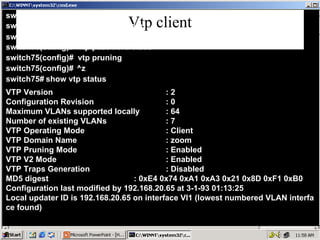
VTP Mode are of three types : Server Mode –  A Switch configured in Server mode can Add , Modify  and Delete VLAN’s –  A Default VTP mode for all switches Client  Mode –  A switch configured in Client mode cannot  Add , Modify and Delete its VLAN configurations –  Doesn’t store its VLAN configuration information in the NVRAM. Instead , learns it from the server every time it boots up Transparent Mode –  A switch configured in a Transparent Mode  can  Add , Modify and Delete VLAN configurations. Changes in one transparent switch will not affect any other switch. VTP Modes
VTP Messages Advertisement Request Subset Advertisement  Summary Advertisement
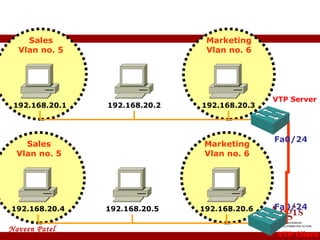
VLAN Trunking Protocol Configuration 192.168.20.1 192.168.20.2 192.168.20.3 192.168.20.4 192.168.20.5 192.168.20.6 Fa0/24 Fa0/24 VTP Server VTP Client Marketing Vlan no. 6 Sales Vlan no. 5 Marketing Vlan no. 6 Sales Vlan no. 5
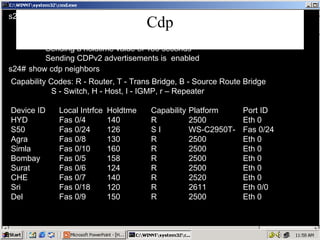
CDP Cisco Property Protocol. CDP is enable by default in All Cisco Networking Devices. CDP Advertisement are send through all the ports by default. CDP Advertisement are send every 60 second. Advertisement are send via multicast.
Once the Layer 1 is Active CDP Sends the information to its neighbor. It can be used for Layer 1, layer 2, layer 3 troubleshooting. Information Logical Address (if define).  Hostname (given by hostname command). Hardware Platform. IOS Version. Interface Type and Interface Number of local and remote device connected. Advantages Of CDP
CDP Can be used only between Cisco Devices. Information about only directly connected neighbors can be known. Can be used to troubleshoot only between two Cisco devices not any other like Pc To switch.  Disadvantages Of CDP
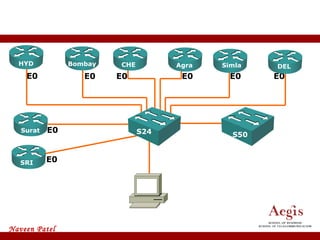
CDP E0 E0 E0 E0 E0 E0 E0 E0 HYD CHE Bombay Agra Simla DEL Surat CHE SRI S24 S50
 
switch65# Config terminal switch65(config)# vtp domain zoom switch65(config)# switch65(config)# vtp mode server vtp password cisco switch65(config)# ^z switch65# show vtp status switch65(config)# vtp pruning VTP Version  : 2 Configuration Revision  : 0 Maximum VLANs supported locally  : 64 Number of existing VLANs  : 7 VTP Operating Mode  : Server VTP Domain Name  : zoom VTP Pruning Mode  : Enabled VTP V2 Mode  : Enabled VTP Traps Generation  : Disabled MD5 digest  : 0xE4 0x74 0xA1 0xA3 0x21 0x8D 0xF1 0xB0 Configuration last modified by 192.168.20.65 at 3-1-93 01:13:25 Local updater ID is 192.168.20.65 on interface Vl1 (lowest numbered VLAN interfa ce found) VTP Configuration – 2950 Series Switch(config)#   VTP Domain <Name> Switch(config)#  VTP Password <password> Switch(config)#  VTP Mode <server/client/transparent> Switch(config)#  VTP pruning VTP Configuration – 2900 Series Switch# VLAN Database Switch(VLAN)#  VTP Domain <Name> Switch(VLAN)#  VTP Password <password> Switch(VLAN)#  VTP Mode <server/client/transparent> Switch(VLAN)#  VTP pruning
Vtp client switch75# Config terminal switch75(config)# vtp domain zoom switch75(config)# switch75(config)# vtp mode Client vtp password cisco switch75(config)# ^z switch75# show vtp status switch75(config)# vtp pruning VTP Version  : 2 Configuration Revision  : 0 Maximum VLANs supported locally  : 64 Number of existing VLANs  : 7 VTP Operating Mode  : Client VTP Domain Name  : zoom VTP Pruning Mode  : Enabled VTP V2 Mode  : Enabled VTP Traps Generation  : Disabled MD5 digest  : 0xE4 0x74 0xA1 0xA3 0x21 0x8D 0xF1 0xB0 Configuration last modified by 192.168.20.65 at 3-1-93 01:13:25 Local updater ID is 192.168.20.65 on interface Vl1 (lowest numbered VLAN interfa ce found)
Cdp Capability Codes: R - Router, T - Trans Bridge, B - Source Route Bridge S - Switch, H - Host, I - IGMP, r – Repeater Device ID Local Intrfce Holdtme Capability Platform Port ID HYD Fas 0/4 140 R 2500 Eth 0 S50 Fas 0/24 126 S I WS-C2950T- Fas 0/24 Agra Fas 0/8 130 R 2500 Eth 0 Simla Fas 0/10 160 R 2500 Eth 0 Bombay Fas 0/5 158 R 2500 Eth 0 Surat Fas 0/6 124 R 2500 Eth 0 CHE Fas 0/7 140 R 2520 Eth 0 Sri Fas 0/18 120 R 2611 Eth 0/0 Del Fas 0/9 150 R 2500 Eth 0 s24# Global CDP information: Sending CDP packets every 60 seconds Sending a holdtime value of 180 seconds Sending CDPv2 advertisements is  enabled s24# show cdp neighbors show cdp
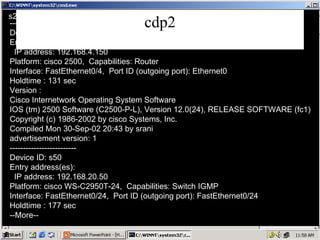
cdp2 s24# show cdp neighbors detail  ------------------------- Device ID: HYD Entry address(es): IP address: 192.168.4.150 Platform: cisco 2500,  Capabilities: Router Interface: FastEthernet0/4,  Port ID (outgoing port): Ethernet0 Holdtime : 131 sec Version :  Cisco Internetwork Operating System Software IOS (tm) 2500 Software (C2500-P-L), Version 12.0(24), RELEASE SOFTWARE (fc1) Copyright (c) 1986-2002 by cisco Systems, Inc. Compiled Mon 30-Sep-02 20:43 by srani advertisement version: 1 ------------------------- Device ID: s50 Entry address(es): IP address: 192.168.20.50 Platform: cisco WS-C2950T-24,  Capabilities: Switch IGMP Interface: FastEthernet0/24,  Port ID (outgoing port): FastEthernet0/24 Holdtime : 177 sec --More--
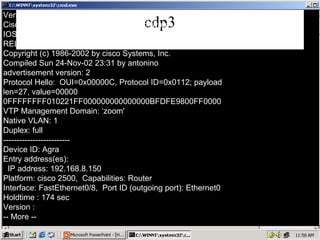
cdp3 Version : Cisco Internetwork Operating System Software IOS (tm) C2950 Software (C2950-I6Q4L2-M), Version 12.1(12c)EA1, RELEASE SOFTWA (fc1) Copyright (c) 1986-2002 by cisco Systems, Inc. Compiled Sun 24-Nov-02 23:31 by antonino advertisement version: 2 Protocol Hello:  OUI=0x00000C, Protocol ID=0x0112; payload len=27, value=00000 0FFFFFFFF010221FF000000000000000BFDFE9800FF0000 VTP Management Domain: ‘zoom' Native VLAN: 1 Duplex: full ------------------------- Device ID: Agra Entry address(es): IP address: 192.168.8.150 Platform: cisco 2500,  Capabilities: Router Interface: FastEthernet0/8,  Port ID (outgoing port): Ethernet0 Holdtime : 174 sec Version : -- More --
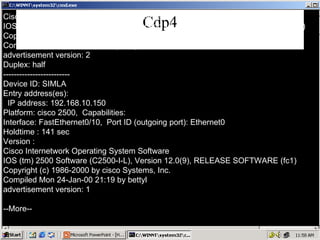
Cdp4 Cisco Internetwork Operating System Software IOS (tm) 2500 Software (C2500-I-L), Version 12.1(12b), RELEASE SOFTWARE (fc1) Copyright (c) 1986-2002 by cisco Systems, Inc. Compiled Fri 01-Feb-02 07:30 by kellythw advertisement version: 2 Duplex: half ------------------------- Device ID: SIMLA Entry address(es): IP address: 192.168.10.150 Platform: cisco 2500,  Capabilities: Interface: FastEthernet0/10,  Port ID (outgoing port): Ethernet0 Holdtime : 141 sec Version : Cisco Internetwork Operating System Software IOS (tm) 2500 Software (C2500-I-L), Version 12.0(9), RELEASE SOFTWARE (fc1) Copyright (c) 1986-2000 by cisco Systems, Inc. Compiled Mon 24-Jan-00 21:19 by bettyl advertisement version: 1 --More--
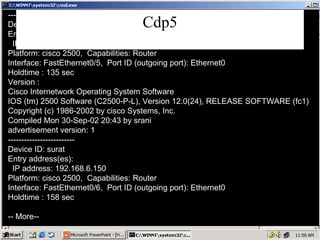
Cdp5 ------------------------- Device ID: Bombay Entry address(es): IP address: 192.168.5.150 Platform: cisco 2500,  Capabilities: Router Interface: FastEthernet0/5,  Port ID (outgoing port): Ethernet0 Holdtime : 135 sec Version : Cisco Internetwork Operating System Software IOS (tm) 2500 Software (C2500-P-L), Version 12.0(24), RELEASE SOFTWARE (fc1) Copyright (c) 1986-2002 by cisco Systems, Inc. Compiled Mon 30-Sep-02 20:43 by srani advertisement version: 1 ------------------------- Device ID: surat Entry address(es): IP address: 192.168.6.150 Platform: cisco 2500,  Capabilities: Router Interface: FastEthernet0/6,  Port ID (outgoing port): Ethernet0 Holdtime : 158 sec -- More--
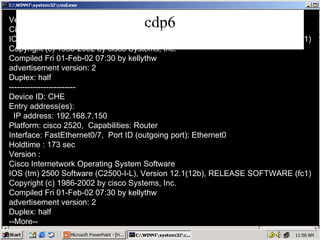
cdp6 Version : Cisco Internetwork Operating System Software IOS (tm) 2500 Software (C2500-I-L), Version 12.1(12b), RELEASE SOFTWARE (fc1) Copyright (c) 1986-2002 by cisco Systems, Inc. Compiled Fri 01-Feb-02 07:30 by kellythw advertisement version: 2 Duplex: half ------------------------- Device ID: CHE Entry address(es): IP address: 192.168.7.150 Platform: cisco 2520,  Capabilities: Router Interface: FastEthernet0/7,  Port ID (outgoing port): Ethernet0 Holdtime : 173 sec Version : Cisco Internetwork Operating System Software IOS (tm) 2500 Software (C2500-I-L), Version 12.1(12b), RELEASE SOFTWARE (fc1) Copyright (c) 1986-2002 by cisco Systems, Inc. Compiled Fri 01-Feb-02 07:30 by kellythw advertisement version: 2 Duplex: half --More--
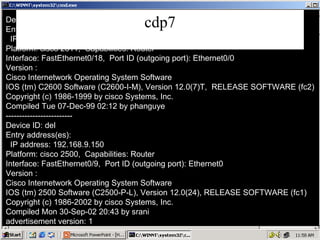
cdp7 Device ID: sri Entry address(es): IP address: 192.168.11.150 Platform: cisco 2611,  Capabilities: Router Interface: FastEthernet0/18,  Port ID (outgoing port): Ethernet0/0 Version : Cisco Internetwork Operating System Software IOS (tm) C2600 Software (C2600-I-M), Version 12.0(7)T,  RELEASE SOFTWARE (fc2) Copyright (c) 1986-1999 by cisco Systems, Inc. Compiled Tue 07-Dec-99 02:12 by phanguye ------------------------- Device ID: del Entry address(es): IP address: 192.168.9.150 Platform: cisco 2500,  Capabilities: Router Interface: FastEthernet0/9,  Port ID (outgoing port): Ethernet0 Version : Cisco Internetwork Operating System Software IOS (tm) 2500 Software (C2500-P-L), Version 12.0(24), RELEASE SOFTWARE (fc1) Copyright (c) 1986-2002 by cisco Systems, Inc. Compiled Mon 30-Sep-02 20:43 by srani advertisement version: 1
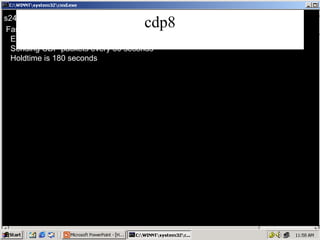
cdp8 s24#   show cdp interface fa 0/24   FastEthernet0/24 is up, line protocol is up Encapsulation ARPA Sending CDP packets every 60 seconds Holdtime is 180 seconds
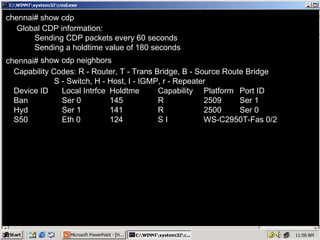
chennai#   chennai#   Global CDP information: Sending CDP packets every 60 seconds Sending a holdtime value of 180 seconds Capability Codes: R - Router, T - Trans Bridge, B - Source Route Bridge S - Switch, H - Host, I - IGMP, r - Repeater Device ID Local Intrfce Holdtme Capability Platform Port ID Ban Ser 0 145 R 2509 Ser 1 Hyd Ser 1 141 R 2500 Ser 0 S50 Eth 0 124 S I WS-C2950T-Fas 0/2 show cdp show cdp neighbors
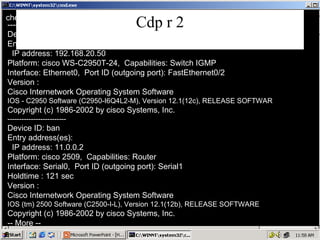
Cdp r 2 chennai#   show cdp neighbors  detail  ------------------------- Device ID: s50 Entry address(es): IP address: 192.168.20.50 Platform: cisco WS-C2950T-24,  Capabilities: Switch IGMP Interface: Ethernet0,  Port ID (outgoing port): FastEthernet0/2 Version : Cisco Internetwork Operating System Software IOS - C2950 Software (C2950-I6Q4L2-M), Version 12.1(12c), RELEASE SOFTWAR Copyright (c) 1986-2002 by cisco Systems, Inc. ------------------------- Device ID: ban Entry address(es): IP address: 11.0.0.2 Platform: cisco 2509,  Capabilities: Router Interface: Serial0,  Port ID (outgoing port): Serial1 Holdtime : 121 sec Version : Cisco Internetwork Operating System Software IOS (tm) 2500 Software (C2500-I-L), Version 12.1(12b), RELEASE SOFTWARE Copyright (c) 1986-2002 by cisco Systems, Inc. -- More --
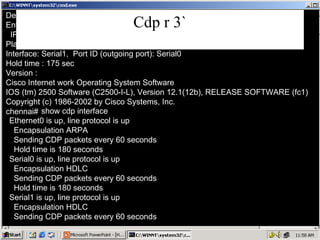
Cdp r 3` Device ID: hyd Entry address (es): IP address: 10.0.0.1 Platform: Cisco 2500,  Capabilities: Router Interface: Serial1,  Port ID (outgoing port): Serial0 Hold time : 175 sec Version : Cisco Internet work Operating System Software IOS (tm) 2500 Software (C2500-I-L), Version 12.1(12b), RELEASE SOFTWARE (fc1) Copyright (c) 1986-2002 by Cisco Systems, Inc. show cdp interface Ethernet0 is up, line protocol is up Encapsulation ARPA Sending CDP packets every 60 seconds Hold time is 180 seconds Serial0 is up, line protocol is up Encapsulation HDLC Sending CDP packets every 60 seconds Hold time is 180 seconds Serial1 is up, line protocol is up Encapsulation HDLC Sending CDP packets every 60 seconds chennai#

ACIT - CCNA Training Course Topic - Switch Stp ACIT

  • 1.
  • 2.
    Spanning Tree Protocol(STP) uses Spanning Tree Algorithm to avoid the Switching loops in layer-2 devices (bridges or switches). STP works when multiple switches are used with redundant links avoiding Broadcast Storms, Multiple Frame Copies & Database instability. First Developed By DEC STP is a open standard (IEEE 802.1D) Spanning Tree Protocol
  • 3.
    Switch D SpanningTree Protocol Root :B Root :A Root :C Root ID:32768.0000-0000-00001 Root ID:32768.0000-0000-00003 Root ID:32768.0000-0000-00002 Bridge ID:32768.0000-0000-00001 Bridge ID:32768.0000-0000-00002 Bridge ID:32768.0000-0000-00003 FA0/23 Switch C Switch A FA0/24 FA0/24 FA0/23 FA0/24 FA0/23 I'm the Root I'm the Root I'm the Root Switch B
  • 4.
    Spanning Tree ProtocolRoot :B Root :A Root :C Root ID:32768.0000-0000-00001 Root ID:32768.0000-0000-00003 Root ID:32768.0000-0000-00002 Bridge ID:32768.0000-0000-00001 Bridge ID:32768.0000-0000-00002 Bridge ID:32768.0000-0000-00003 Switch B Switch C Switch A I'm the Root Because MY ID is Lesser I'm the Not Root Because B ID is Lesser B Root ID:32768.0000-0000-00002 B Root ID:32768.0000-0000-00002 B Root ID:32768.0000-0000-00002 Root ID:32768.0000-0000-00002 Root :B FA0/23 FA0/24 FA0/24 FA0/23 FA0/24 FA0/23
  • 5.
    Switch D SpanningTree Protocol Root :B Root :A Root :B Root ID:32768.0000-0000-00001 Root ID:32768.0000-0000-00002 Root ID:32768.0000-0000-00002 Bridge ID:32768.0000-0000-00001 Bridge ID:32768.0000-0000-00002 Bridge ID:32768.0000-0000-00003 Switch B Switch C Switch A A Root ID:32768.0000-0000-00001 A Root ID:32768.0000-0000-00001 A Root ID:32768.0000-0000-00001 Root :A Root :A Root ID:32768.0000-0000-00001 Root ID:32768.0000-0000-00001 FA0/23 FA0/24 FA0/24 FA0/23 FA0/24 B is not Root Because A ID is Lesser I'm the Not Root Because A ID Is Lesser
  • 6.
    Bridge ID:32768.0000-0000-00001 BridgeID:32768.0000-0000-00002 Bridge ID:32768.0000-0000-00003 Switch B Switch C Switch A Root :A Root ID:32768.0000-0000-00001 Root :A Root :A Root ID:32768.0000-0000-00001 Root ID:32768.0000-0000-00001 Spanning Tree Protocol Speed 100 Mbps Speed 100 Mbps Speed 100 Mbps Root Port D Port D Port Non D. Port X FA0/23 FA0/24 FA0/24 FA0/23 FA0/24 FA0/23 Root Port D Port
  • 7.
    BPDU Allswitches exchange information through what is called as Bridge Protocol Data Units (BPDUs) BPDUs contain a lot of information to help the switches determine the topology and any loops that result from that topology. BPDUs are sent every 2 sec Bridge ID Each switch has a unique identifier called a Bridge ID or Switch ID Bridge ID = Priority + MAC address of the switch When a switch advertises a BPDU , they place their switch id in these BPDUs. STP Terminology
  • 8.
    Root Bridge The bridge with the Best (Lowest) ID. Out of all the switches in the network , one is elected as a root bridge that becomes the focal point in the network. Non-Root bridge All Switches other than the Root Bridge are Non-Root Bridges STP Terminology
  • 9.
    Designated port Either a port On a root bridge or a port that has been determined as having the best (lower) cost. A designated port will always in Forward Mode Root port The link directly connected to the root bridge, or the shortest path to the root bridge. Priority and Alternatives if Conflict occurred. Root port with the least cost (Speed) connecting to the root bridge. The bridge with the Best (Lowest) Switch ID. Lowest Physical Port Number. Only One root port will Be in Bridge or switch. Non Designated port All the Port or ports which are blocked by STP to avoid switching loop. A Non Designated port Will Always in Blocked Mode. STP Terminology
  • 10.
    Disable - NoLimits. Blocking - 20 Sec Or No Limits. Listening - 15 Sec. Learning - 15 Sec. Forwarding - No Limits. Switch - Port States
  • 11.
    VTP is aCISCO proprietary protocol used to share the VLAN configurations with multiple switches. Information will be passed only if switches connected with FastEthernet or higher ports. Note: Switches Should be configure with same Domain Name. Domain Names are not Case sensitive. Virtual LAN Trunking Protocol
  • 12.
    VTP Mode areof three types : Server Mode – A Switch configured in Server mode can Add , Modify and Delete VLAN’s – A Default VTP mode for all switches Client Mode – A switch configured in Client mode cannot Add , Modify and Delete its VLAN configurations – Doesn’t store its VLAN configuration information in the NVRAM. Instead , learns it from the server every time it boots up Transparent Mode – A switch configured in a Transparent Mode can Add , Modify and Delete VLAN configurations. Changes in one transparent switch will not affect any other switch. VTP Modes
  • 13.
    VTP Messages AdvertisementRequest Subset Advertisement Summary Advertisement
  • 14.
    VLAN Trunking ProtocolConfiguration 192.168.20.1 192.168.20.2 192.168.20.3 192.168.20.4 192.168.20.5 192.168.20.6 Fa0/24 Fa0/24 VTP Server VTP Client Marketing Vlan no. 6 Sales Vlan no. 5 Marketing Vlan no. 6 Sales Vlan no. 5
  • 15.
    CDP Cisco PropertyProtocol. CDP is enable by default in All Cisco Networking Devices. CDP Advertisement are send through all the ports by default. CDP Advertisement are send every 60 second. Advertisement are send via multicast.
  • 16.
    Once the Layer1 is Active CDP Sends the information to its neighbor. It can be used for Layer 1, layer 2, layer 3 troubleshooting. Information Logical Address (if define). Hostname (given by hostname command). Hardware Platform. IOS Version. Interface Type and Interface Number of local and remote device connected. Advantages Of CDP
  • 17.
    CDP Can beused only between Cisco Devices. Information about only directly connected neighbors can be known. Can be used to troubleshoot only between two Cisco devices not any other like Pc To switch. Disadvantages Of CDP
  • 18.
    CDP E0 E0E0 E0 E0 E0 E0 E0 HYD CHE Bombay Agra Simla DEL Surat CHE SRI S24 S50
  • 19.
  • 20.
    switch65# Config terminalswitch65(config)# vtp domain zoom switch65(config)# switch65(config)# vtp mode server vtp password cisco switch65(config)# ^z switch65# show vtp status switch65(config)# vtp pruning VTP Version : 2 Configuration Revision : 0 Maximum VLANs supported locally : 64 Number of existing VLANs : 7 VTP Operating Mode : Server VTP Domain Name : zoom VTP Pruning Mode : Enabled VTP V2 Mode : Enabled VTP Traps Generation : Disabled MD5 digest : 0xE4 0x74 0xA1 0xA3 0x21 0x8D 0xF1 0xB0 Configuration last modified by 192.168.20.65 at 3-1-93 01:13:25 Local updater ID is 192.168.20.65 on interface Vl1 (lowest numbered VLAN interfa ce found) VTP Configuration – 2950 Series Switch(config)# VTP Domain <Name> Switch(config)# VTP Password <password> Switch(config)# VTP Mode <server/client/transparent> Switch(config)# VTP pruning VTP Configuration – 2900 Series Switch# VLAN Database Switch(VLAN)# VTP Domain <Name> Switch(VLAN)# VTP Password <password> Switch(VLAN)# VTP Mode <server/client/transparent> Switch(VLAN)# VTP pruning
  • 21.
    Vtp client switch75#Config terminal switch75(config)# vtp domain zoom switch75(config)# switch75(config)# vtp mode Client vtp password cisco switch75(config)# ^z switch75# show vtp status switch75(config)# vtp pruning VTP Version : 2 Configuration Revision : 0 Maximum VLANs supported locally : 64 Number of existing VLANs : 7 VTP Operating Mode : Client VTP Domain Name : zoom VTP Pruning Mode : Enabled VTP V2 Mode : Enabled VTP Traps Generation : Disabled MD5 digest : 0xE4 0x74 0xA1 0xA3 0x21 0x8D 0xF1 0xB0 Configuration last modified by 192.168.20.65 at 3-1-93 01:13:25 Local updater ID is 192.168.20.65 on interface Vl1 (lowest numbered VLAN interfa ce found)
  • 22.
    Cdp Capability Codes:R - Router, T - Trans Bridge, B - Source Route Bridge S - Switch, H - Host, I - IGMP, r – Repeater Device ID Local Intrfce Holdtme Capability Platform Port ID HYD Fas 0/4 140 R 2500 Eth 0 S50 Fas 0/24 126 S I WS-C2950T- Fas 0/24 Agra Fas 0/8 130 R 2500 Eth 0 Simla Fas 0/10 160 R 2500 Eth 0 Bombay Fas 0/5 158 R 2500 Eth 0 Surat Fas 0/6 124 R 2500 Eth 0 CHE Fas 0/7 140 R 2520 Eth 0 Sri Fas 0/18 120 R 2611 Eth 0/0 Del Fas 0/9 150 R 2500 Eth 0 s24# Global CDP information: Sending CDP packets every 60 seconds Sending a holdtime value of 180 seconds Sending CDPv2 advertisements is enabled s24# show cdp neighbors show cdp
  • 23.
    cdp2 s24# showcdp neighbors detail ------------------------- Device ID: HYD Entry address(es): IP address: 192.168.4.150 Platform: cisco 2500, Capabilities: Router Interface: FastEthernet0/4, Port ID (outgoing port): Ethernet0 Holdtime : 131 sec Version : Cisco Internetwork Operating System Software IOS (tm) 2500 Software (C2500-P-L), Version 12.0(24), RELEASE SOFTWARE (fc1) Copyright (c) 1986-2002 by cisco Systems, Inc. Compiled Mon 30-Sep-02 20:43 by srani advertisement version: 1 ------------------------- Device ID: s50 Entry address(es): IP address: 192.168.20.50 Platform: cisco WS-C2950T-24, Capabilities: Switch IGMP Interface: FastEthernet0/24, Port ID (outgoing port): FastEthernet0/24 Holdtime : 177 sec --More--
  • 24.
    cdp3 Version :Cisco Internetwork Operating System Software IOS (tm) C2950 Software (C2950-I6Q4L2-M), Version 12.1(12c)EA1, RELEASE SOFTWA (fc1) Copyright (c) 1986-2002 by cisco Systems, Inc. Compiled Sun 24-Nov-02 23:31 by antonino advertisement version: 2 Protocol Hello: OUI=0x00000C, Protocol ID=0x0112; payload len=27, value=00000 0FFFFFFFF010221FF000000000000000BFDFE9800FF0000 VTP Management Domain: ‘zoom' Native VLAN: 1 Duplex: full ------------------------- Device ID: Agra Entry address(es): IP address: 192.168.8.150 Platform: cisco 2500, Capabilities: Router Interface: FastEthernet0/8, Port ID (outgoing port): Ethernet0 Holdtime : 174 sec Version : -- More --
  • 25.
    Cdp4 Cisco InternetworkOperating System Software IOS (tm) 2500 Software (C2500-I-L), Version 12.1(12b), RELEASE SOFTWARE (fc1) Copyright (c) 1986-2002 by cisco Systems, Inc. Compiled Fri 01-Feb-02 07:30 by kellythw advertisement version: 2 Duplex: half ------------------------- Device ID: SIMLA Entry address(es): IP address: 192.168.10.150 Platform: cisco 2500, Capabilities: Interface: FastEthernet0/10, Port ID (outgoing port): Ethernet0 Holdtime : 141 sec Version : Cisco Internetwork Operating System Software IOS (tm) 2500 Software (C2500-I-L), Version 12.0(9), RELEASE SOFTWARE (fc1) Copyright (c) 1986-2000 by cisco Systems, Inc. Compiled Mon 24-Jan-00 21:19 by bettyl advertisement version: 1 --More--
  • 26.
    Cdp5 ------------------------- DeviceID: Bombay Entry address(es): IP address: 192.168.5.150 Platform: cisco 2500, Capabilities: Router Interface: FastEthernet0/5, Port ID (outgoing port): Ethernet0 Holdtime : 135 sec Version : Cisco Internetwork Operating System Software IOS (tm) 2500 Software (C2500-P-L), Version 12.0(24), RELEASE SOFTWARE (fc1) Copyright (c) 1986-2002 by cisco Systems, Inc. Compiled Mon 30-Sep-02 20:43 by srani advertisement version: 1 ------------------------- Device ID: surat Entry address(es): IP address: 192.168.6.150 Platform: cisco 2500, Capabilities: Router Interface: FastEthernet0/6, Port ID (outgoing port): Ethernet0 Holdtime : 158 sec -- More--
  • 27.
    cdp6 Version :Cisco Internetwork Operating System Software IOS (tm) 2500 Software (C2500-I-L), Version 12.1(12b), RELEASE SOFTWARE (fc1) Copyright (c) 1986-2002 by cisco Systems, Inc. Compiled Fri 01-Feb-02 07:30 by kellythw advertisement version: 2 Duplex: half ------------------------- Device ID: CHE Entry address(es): IP address: 192.168.7.150 Platform: cisco 2520, Capabilities: Router Interface: FastEthernet0/7, Port ID (outgoing port): Ethernet0 Holdtime : 173 sec Version : Cisco Internetwork Operating System Software IOS (tm) 2500 Software (C2500-I-L), Version 12.1(12b), RELEASE SOFTWARE (fc1) Copyright (c) 1986-2002 by cisco Systems, Inc. Compiled Fri 01-Feb-02 07:30 by kellythw advertisement version: 2 Duplex: half --More--
  • 28.
    cdp7 Device ID:sri Entry address(es): IP address: 192.168.11.150 Platform: cisco 2611, Capabilities: Router Interface: FastEthernet0/18, Port ID (outgoing port): Ethernet0/0 Version : Cisco Internetwork Operating System Software IOS (tm) C2600 Software (C2600-I-M), Version 12.0(7)T, RELEASE SOFTWARE (fc2) Copyright (c) 1986-1999 by cisco Systems, Inc. Compiled Tue 07-Dec-99 02:12 by phanguye ------------------------- Device ID: del Entry address(es): IP address: 192.168.9.150 Platform: cisco 2500, Capabilities: Router Interface: FastEthernet0/9, Port ID (outgoing port): Ethernet0 Version : Cisco Internetwork Operating System Software IOS (tm) 2500 Software (C2500-P-L), Version 12.0(24), RELEASE SOFTWARE (fc1) Copyright (c) 1986-2002 by cisco Systems, Inc. Compiled Mon 30-Sep-02 20:43 by srani advertisement version: 1
  • 29.
    cdp8 s24# show cdp interface fa 0/24 FastEthernet0/24 is up, line protocol is up Encapsulation ARPA Sending CDP packets every 60 seconds Holdtime is 180 seconds
  • 30.
    chennai# chennai# Global CDP information: Sending CDP packets every 60 seconds Sending a holdtime value of 180 seconds Capability Codes: R - Router, T - Trans Bridge, B - Source Route Bridge S - Switch, H - Host, I - IGMP, r - Repeater Device ID Local Intrfce Holdtme Capability Platform Port ID Ban Ser 0 145 R 2509 Ser 1 Hyd Ser 1 141 R 2500 Ser 0 S50 Eth 0 124 S I WS-C2950T-Fas 0/2 show cdp show cdp neighbors
  • 31.
    Cdp r 2chennai# show cdp neighbors detail ------------------------- Device ID: s50 Entry address(es): IP address: 192.168.20.50 Platform: cisco WS-C2950T-24, Capabilities: Switch IGMP Interface: Ethernet0, Port ID (outgoing port): FastEthernet0/2 Version : Cisco Internetwork Operating System Software IOS - C2950 Software (C2950-I6Q4L2-M), Version 12.1(12c), RELEASE SOFTWAR Copyright (c) 1986-2002 by cisco Systems, Inc. ------------------------- Device ID: ban Entry address(es): IP address: 11.0.0.2 Platform: cisco 2509, Capabilities: Router Interface: Serial0, Port ID (outgoing port): Serial1 Holdtime : 121 sec Version : Cisco Internetwork Operating System Software IOS (tm) 2500 Software (C2500-I-L), Version 12.1(12b), RELEASE SOFTWARE Copyright (c) 1986-2002 by cisco Systems, Inc. -- More --
  • 32.
    Cdp r 3`Device ID: hyd Entry address (es): IP address: 10.0.0.1 Platform: Cisco 2500, Capabilities: Router Interface: Serial1, Port ID (outgoing port): Serial0 Hold time : 175 sec Version : Cisco Internet work Operating System Software IOS (tm) 2500 Software (C2500-I-L), Version 12.1(12b), RELEASE SOFTWARE (fc1) Copyright (c) 1986-2002 by Cisco Systems, Inc. show cdp interface Ethernet0 is up, line protocol is up Encapsulation ARPA Sending CDP packets every 60 seconds Hold time is 180 seconds Serial0 is up, line protocol is up Encapsulation HDLC Sending CDP packets every 60 seconds Hold time is 180 seconds Serial1 is up, line protocol is up Encapsulation HDLC Sending CDP packets every 60 seconds chennai#