Chapter 2: Spanning Tree
CCNP Enterprise: Core Networking
2
© 2016 Cisco and/or its affiliates. All rights reserved. Cisco Confidential
Chapter 2 Content
• Spanning Tree Protocol Fundamentals - an overview of how switches become
aware of other switches and prevent loops.
•Rapid Spanning Tree Protocol - the improvements made to STP for faster
convergence.
3
© 2016 Cisco and/or its affiliates. All rights reserved. Cisco Confidential
Spanning Tree Protocol
Fundamentals
• enables switches to become aware of other switches through the
advertisement and receipt of BPDUs.
• STP operates by selecting a master switch and running a tree-based
algorithm to identify which redundant ports should not forward traffic.
4
© 2016 Cisco and/or its affiliates. All rights reserved. Cisco Confidential
Spanning Tree Versions
• 802.1D, the original specification
• Per-VLAN Spanning Tree (PVST)
• PVST+
• 802.1W (RSTP)
• 802.1S (MST)
Note: Catalyst switches now operate in PVST+, RSTP, and MST modes.
All three of these modes are backward compatible with 802.1D.
5
© 2016 Cisco and/or its affiliates. All rights reserved. Cisco Confidential
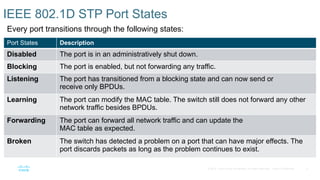
IEEE 802.1D STP Port States
Every port transitions through the following states:
Port States Description
Disabled The port is in an administratively shut down.
Blocking The port is enabled, but not forwarding any traffic.
Listening The port has transitioned from a blocking state and can now send or
receive only BPDUs.
Learning The port can modify the MAC table. The switch still does not forward any other
network traffic besides BPDUs.
Forwarding The port can forward all network traffic and can update the
MAC table as expected.
Broken The switch has detected a problem on a port that can have major effects. The
port discards packets as long as the problem continues to exist.
6
© 2016 Cisco and/or its affiliates. All rights reserved. Cisco Confidential
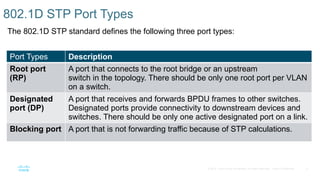
802.1D STP Port Types
The 802.1D STP standard defines the following three port types:
Port Types Description
Root port
(RP)
A port that connects to the root bridge or an upstream
switch in the topology. There should be only one root port per VLAN
on a switch.
Designated
port (DP)
A port that receives and forwards BPDU frames to other switches.
Designated ports provide connectivity to downstream devices and
switches. There should be only one active designated port on a link.
Blocking port A port that is not forwarding traffic because of STP calculations.
7
© 2016 Cisco and/or its affiliates. All rights reserved. Cisco Confidential
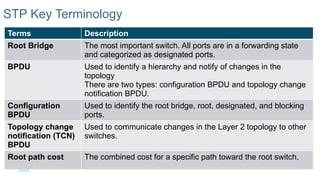
STP Key Terminology
Terms Description
Root Bridge The most important switch. All ports are in a forwarding state
and categorized as designated ports.
BPDU Used to identify a hierarchy and notify of changes in the
topology
There are two types: configuration BPDU and topology change
notification BPDU.
Configuration
BPDU
Used to identify the root bridge, root, designated, and blocking
ports.
Topology change
notification (TCN)
BPDU
Used to communicate changes in the Layer 2 topology to other
switches.
Root path cost The combined cost for a specific path toward the root switch.
8
© 2016 Cisco and/or its affiliates. All rights reserved. Cisco Confidential
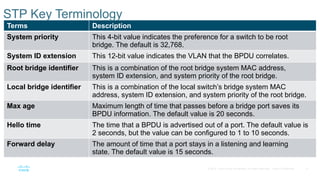
STP Key Terminology
Terms Description
System priority This 4-bit value indicates the preference for a switch to be root
bridge. The default is 32,768.
System ID extension This 12-bit value indicates the VLAN that the BPDU correlates.
Root bridge identifier This is a combination of the root bridge system MAC address,
system ID extension, and system priority of the root bridge.
Local bridge identifier This is a combination of the local switch’s bridge system MAC
address, system ID extension, and system priority of the root bridge.
Max age Maximum length of time that passes before a bridge port saves its
BPDU information. The default value is 20 seconds.
Hello time The time that a BPDU is advertised out of a port. The default value is
2 seconds, but the value can be configured to 1 to 10 seconds.
Forward delay The amount of time that a port stays in a listening and learning
state. The default value is 15 seconds.
9
© 2016 Cisco and/or its affiliates. All rights reserved. Cisco Confidential
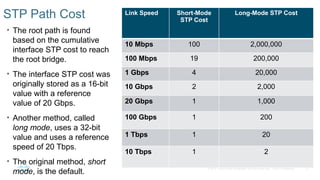
STP Path Cost
• The root path is found
based on the cumulative
interface STP cost to reach
the root bridge.
• The interface STP cost was
originally stored as a 16-bit
value with a reference
value of 20 Gbps.
• Another method, called
long mode, uses a 32-bit
value and uses a reference
speed of 20 Tbps.
• The original method, short
mode, is the default.
Link Speed Short-Mode
STP Cost
Long-Mode STP Cost
10 Mbps 100 2,000,000
100 Mbps 19 200,000
1 Gbps 4 20,000
10 Gbps 2 2,000
20 Gbps 1 1,000
100 Gbps 1 200
1 Tbps 1 20
10 Tbps 1 2
10
© 2016 Cisco and/or its affiliates. All rights reserved. Cisco Confidential
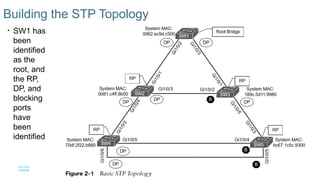
Building the STP Topology
• SW1 has
been
identified
as the
root, and
the RP,
DP, and
blocking
ports
have
been
identified
11
© 2016 Cisco and/or its affiliates. All rights reserved. Cisco Confidential
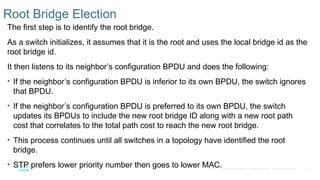
Root Bridge Election
The first step is to identify the root bridge.
As a switch initializes, it assumes that it is the root and uses the local bridge id as the
root bridge id.
It then listens to its neighbor’s configuration BPDU and does the following:
• If the neighbor’s configuration BPDU is inferior to its own BPDU, the switch ignores
that BPDU.
• If the neighbor’s configuration BPDU is preferred to its own BPDU, the switch
updates its BPDUs to include the new root bridge ID along with a new root path
cost that correlates to the total path cost to reach the new root bridge.
• This process continues until all switches in a topology have identified the root
bridge.
• STP prefers lower priority number then goes to lower MAC.
12
© 2016 Cisco and/or its affiliates. All rights reserved. Cisco Confidential
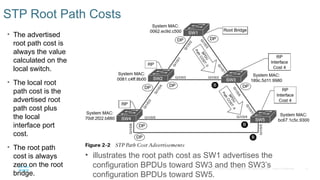
STP Root Path Costs
• The advertised
root path cost is
always the value
calculated on the
local switch.
• The local root
path cost is the
advertised root
path cost plus
the local
interface port
cost.
• The root path
cost is always
zero on the root
bridge.
• illustrates the root path cost as SW1 advertises the
configuration BPDUs toward SW3 and then SW3’s
configuration BPDUs toward SW5.
13
© 2016 Cisco and/or its affiliates. All rights reserved. Cisco Confidential
Locating Root Ports
Once the Root Bridge is found, the switch must determine its Root Port.
The RP is selected using the following logic:
1. The interface associated to lowest path cost is more preferred.
2. The interface associated to the lowest system priority of the advertising switch is
preferred next.
3. The interface associated to the lowest system MAC of the advertising switch is
preferred next.
4. When multiple links are associated to the same switch, the lowest port priority
from the advertising switch is preferred.
5. When multiple links are associated to the same switch, the lower port number
from the advertising switch is preferred.
14
© 2016 Cisco and/or its affiliates. All rights reserved. Cisco Confidential
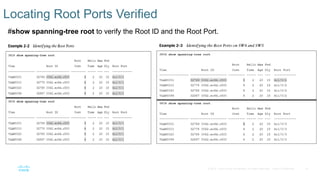
Locating Root Ports Verified
#show spanning-tree root to verify the Root ID and the Root Port.
15
© 2016 Cisco and/or its affiliates. All rights reserved. Cisco Confidential
Locating Blocked Designated Switch Ports
The RPs have been identified and all other ports are considered designated ports. If two non-root
switches are connected to each other on their designated ports, one port must be set to a
blocking state to prevent a forwarding loop.
1. The interface is a designated port and must not be considered an RP.
2. The switch with the lower path cost to the root bridge forwards, and the one with the higher
path cost blocks. If they tie, they move on to the next step.
3. The system priority of the local switch is compared to the system priority of the remote switch.
The local port is moved to a blocking state if the remote system priority is lower than that of
the local switch. If they tie, they move on to the next step.
4. The system MAC of the local switch compared to the system priority of the remote switch. The
local designated port is moved to a blocking state if the remote system MAC lower than that
of the local switch. If the links are connected to the same switch, they move on to the next
step.
16
© 2016 Cisco and/or its affiliates. All rights reserved. Cisco Confidential
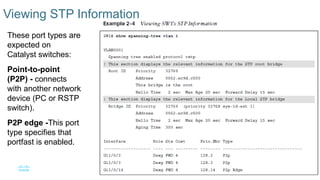
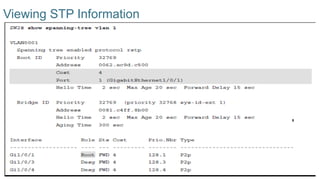
Viewing STP Information
These port types are
expected on
Catalyst switches:
Point-to-point
(P2P) - connects
with another network
device (PC or RSTP
switch).
P2P edge -This port
type specifies that
portfast is enabled.
17
© 2016 Cisco and/or its affiliates. All rights reserved. Cisco Confidential
Viewing STP Information
18
© 2016 Cisco and/or its affiliates. All rights reserved. Cisco Confidential
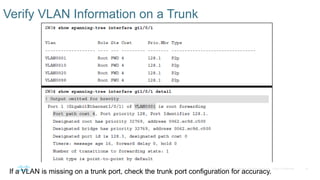
Verify VLAN Information on a Trunk
If a VLAN is missing on a trunk port, check the trunk port configuration for accuracy.
19
© 2016 Cisco and/or its affiliates. All rights reserved. Cisco Confidential
STP Topology Changes
BPDUs always flow from the root bridge toward the edge switches, unless there are
changes in the topology.
• The switch that detects a link status change sends a TCN BPDU toward the root
bridge out of its RP.
• If an upstream switch receives the TCN, it sends out an ack and forwards the TCN
out its RP to the root bridge.
• Upon receipt of the TCN, the root bridge creates a new configuration BPDU with the
Topology Change flag set, and it is then flooded to all the switches.
• When switches receive this, they set their MAC address timer to a default 15
seconds. Then the device flushes its MAC table if has not heard from a device in
that last 15 seconds.
• TCNs are generated on a VLAN basis, so the impact of TCNs directly correlates to
the number of hosts in a VLAN.
20
© 2016 Cisco and/or its affiliates. All rights reserved. Cisco Confidential
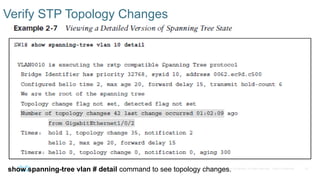
Verify STP Topology Changes
show spanning-tree vlan # detail command to see topology changes.
21
© 2016 Cisco and/or its affiliates. All rights reserved. Cisco Confidential
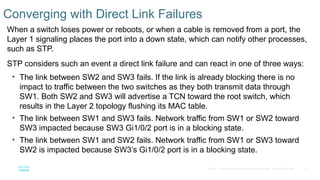
Converging with Direct Link Failures
When a switch loses power or reboots, or when a cable is removed from a port, the
Layer 1 signaling places the port into a down state, which can notify other processes,
such as STP.
STP considers such an event a direct link failure and can react in one of three ways:
• The link between SW2 and SW3 fails. If the link is already blocking there is no
impact to traffic between the two switches as they both transmit data through
SW1. Both SW2 and SW3 will advertise a TCN toward the root switch, which
results in the Layer 2 topology flushing its MAC table.
• The link between SW1 and SW3 fails. Network traffic from SW1 or SW2 toward
SW3 impacted because SW3 Gi1/0/2 port is in a blocking state.
• The link between SW1 and SW2 fails. Network traffic from SW1 or SW3 toward
SW2 is impacted because SW3’s Gi1/0/2 port is in a blocking state.
22
© 2016 Cisco and/or its affiliates. All rights reserved. Cisco Confidential
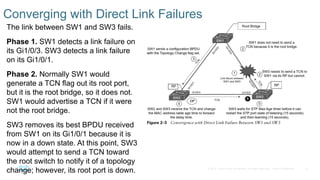
Converging with Direct Link Failures
The link between SW1 and SW3 fails.
Phase 1. SW1 detects a link failure on
its Gi1/0/3. SW3 detects a link failure
on its Gi1/0/1.
Phase 2. Normally SW1 would
generate a TCN flag out its root port,
but it is the root bridge, so it does not.
SW1 would advertise a TCN if it were
not the root bridge.
SW3 removes its best BPDU received
from SW1 on its Gi1/0/1 because it is
now in a down state. At this point, SW3
would attempt to send a TCN toward
the root switch to notify it of a topology
change; however, its root port is down.
23
© 2016 Cisco and/or its affiliates. All rights reserved. Cisco Confidential
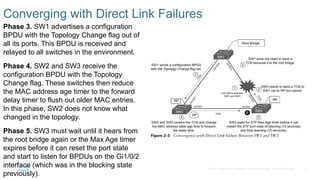
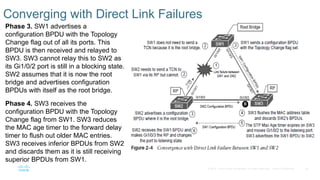
Converging with Direct Link Failures
Phase 3. SW1 advertises a configuration
BPDU with the Topology Change flag out of
all its ports. This BPDU is received and
relayed to all switches in the environment.
Phase 4. SW2 and SW3 receive the
configuration BPDU with the Topology
Change flag. These switches then reduce
the MAC address age timer to the forward
delay timer to flush out older MAC entries.
In this phase, SW2 does not know what
changed in the topology.
Phase 5. SW3 must wait until it hears from
the root bridge again or the Max Age timer
expires before it can reset the port state
and start to listen for BPDUs on the Gi1/0/2
interface (which was in the blocking state
previously).
24
© 2016 Cisco and/or its affiliates. All rights reserved. Cisco Confidential
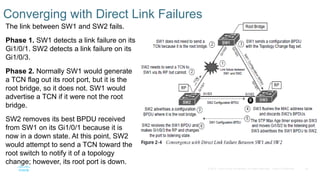
Converging with Direct Link Failures
The link between SW1 and SW2 fails.
Phase 1. SW1 detects a link failure on its
Gi1/0/1. SW2 detects a link failure on its
Gi1/0/3.
Phase 2. Normally SW1 would generate
a TCN flag out its root port, but it is the
root bridge, so it does not. SW1 would
advertise a TCN if it were not the root
bridge.
SW2 removes its best BPDU received
from SW1 on its Gi1/0/1 because it is
now in a down state. At this point, SW2
would attempt to send a TCN toward the
root switch to notify it of a topology
change; however, its root port is down.
25
© 2016 Cisco and/or its affiliates. All rights reserved. Cisco Confidential
Converging with Direct Link Failures
Phase 3. SW1 advertises a
configuration BPDU with the Topology
Change flag out of all its ports. This
BPDU is then received and relayed to
SW3. SW3 cannot relay this to SW2 as
its Gi1/0/2 port is still in a blocking state.
SW2 assumes that it is now the root
bridge and advertises configuration
BPDUs with itself as the root bridge.
Phase 4. SW3 receives the
configuration BPDU with the Topology
Change flag from SW1. SW3 reduces
the MAC age timer to the forward delay
timer to flush out older MAC entries.
SW3 receives inferior BPDUs from SW2
and discards them as it is still receiving
superior BPDUs from SW1.
26
© 2016 Cisco and/or its affiliates. All rights reserved. Cisco Confidential
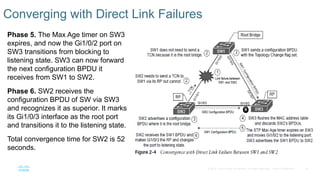
Converging with Direct Link Failures
Phase 5. The Max Age timer on SW3
expires, and now the Gi1/0/2 port on
SW3 transitions from blocking to
listening state. SW3 can now forward
the next configuration BPDU it
receives from SW1 to SW2.
Phase 6. SW2 receives the
configuration BPDU of SW via SW3
and recognizes it as superior. It marks
its Gi1/0/3 interface as the root port
and transitions it to the listening state.
Total convergence time for SW2 is 52
seconds.
27
© 2016 Cisco and/or its affiliates. All rights reserved. Cisco Confidential
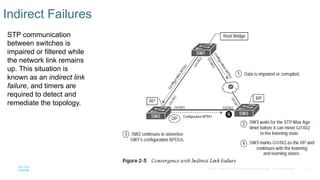
Indirect Failures
STP communication
between switches is
impaired or filtered while
the network link remains
up. This situation is
known as an indirect link
failure, and timers are
required to detect and
remediate the topology.
28
© 2016 Cisco and/or its affiliates. All rights reserved. Cisco Confidential
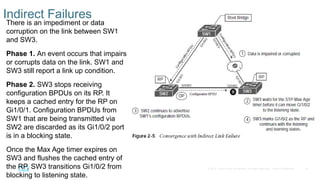
Indirect Failures
There is an impediment or data
corruption on the link between SW1
and SW3.
Phase 1. An event occurs that impairs
or corrupts data on the link. SW1 and
SW3 still report a link up condition.
Phase 2. SW3 stops receiving
configuration BPDUs on its RP. It
keeps a cached entry for the RP on
Gi1/0/1. Configuration BPDUs from
SW1 that are being transmitted via
SW2 are discarded as its Gi1/0/2 port
is in a blocking state.
Once the Max Age timer expires on
SW3 and flushes the cached entry of
the RP, SW3 transitions Gi1/0/2 from
blocking to listening state.
29
© 2016 Cisco and/or its affiliates. All rights reserved. Cisco Confidential
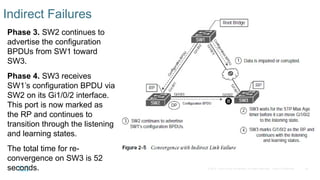
Indirect Failures
Phase 3. SW2 continues to
advertise the configuration
BPDUs from SW1 toward
SW3.
Phase 4. SW3 receives
SW1’s configuration BPDU via
SW2 on its Gi1/0/2 interface.
This port is now marked as
the RP and continues to
transition through the listening
and learning states.
The total time for re-
convergence on SW3 is 52
seconds.
30
© 2016 Cisco and/or its affiliates. All rights reserved. Cisco Confidential
Rapid Spanning Tree Protocol
• IEEE 802.1D has only one topology tree and a slower convergence
which can be problematic.
• RSTP IEEE 802.1W reduces the number of port states to be faster and
more efficient.
31
© 2016 Cisco and/or its affiliates. All rights reserved. Cisco Confidential
Rapid Spanning Tree Port States
Larger environments with multiple VLANs need different STP topologies for traffic
engineering purposes.
• Cisco created the proprietary Per-VLAN Spanning Tree (PVST) and Per-VLAN
Spanning Tree Plus (PVST+)
• RSTP IEEE 802.1W reduces the number of port states to three:
Port States Description
Discarding The switch port is enabled, but the port is not forwarding any traffic
to ensure that a loop is not created.
Learning The switch port modifies the MAC address table. The switch still does
not forward any other network traffic besides BPDUs.
Forwarding The switch port forwards all network traffic and updates the MAC
address table as expected.
32
© 2016 Cisco and/or its affiliates. All rights reserved. Cisco Confidential
Rapid Spanning Tree Port Roles
RSTP defines the following port roles:
Port Roles Description
Root port
(RP):
A port that connects to the root bridge or an upstream switch. There
should be only one root port per VLAN.
Designated
port (DP):
A port that receives and forwards BPDU frames to other switches.
Designated ports provide connectivity to downstream devices and
switches. There should be only one active designated port on a link.
Alternate
port:
A port that provides alternate connectivity toward the root
switch through a different switch.
Backup port: A port that provides link redundancy toward the current root
switch. A backup port exists only when multiple links connect
between the same switches.
33
© 2016 Cisco and/or its affiliates. All rights reserved. Cisco Confidential
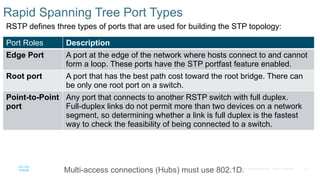
Rapid Spanning Tree Port Types
RSTP defines three types of ports that are used for building the STP topology:
Port Roles Description
Edge Port A port at the edge of the network where hosts connect to and cannot
form a loop. These ports have the STP portfast feature enabled.
Root port A port that has the best path cost toward the root bridge. There can
be only one root port on a switch.
Point-to-Point
port
Any port that connects to another RSTP switch with full duplex.
Full-duplex links do not permit more than two devices on a network
segment, so determining whether a link is full duplex is the fastest
way to check the feasibility of being connected to a switch.
Multi-access connections (Hubs) must use 802.1D.
34
© 2016 Cisco and/or its affiliates. All rights reserved. Cisco Confidential
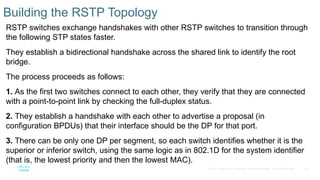
Building the RSTP Topology
RSTP switches exchange handshakes with other RSTP switches to transition through
the following STP states faster.
They establish a bidirectional handshake across the shared link to identify the root
bridge.
The process proceeds as follows:
1. As the first two switches connect to each other, they verify that they are connected
with a point-to-point link by checking the full-duplex status.
2. They establish a handshake with each other to advertise a proposal (in
configuration BPDUs) that their interface should be the DP for that port.
3. There can be only one DP per segment, so each switch identifies whether it is the
superior or inferior switch, using the same logic as in 802.1D for the system identifier
(that is, the lowest priority and then the lowest MAC).
35
© 2016 Cisco and/or its affiliates. All rights reserved. Cisco Confidential
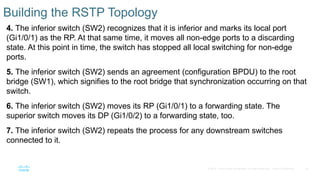
Building the RSTP Topology
4. The inferior switch (SW2) recognizes that it is inferior and marks its local port
(Gi1/0/1) as the RP. At that same time, it moves all non-edge ports to a discarding
state. At this point in time, the switch has stopped all local switching for non-edge
ports.
5. The inferior switch (SW2) sends an agreement (configuration BPDU) to the root
bridge (SW1), which signifies to the root bridge that synchronization occurring on that
switch.
6. The inferior switch (SW2) moves its RP (Gi1/0/1) to a forwarding state. The
superior switch moves its DP (Gi1/0/2) to a forwarding state, too.
7. The inferior switch (SW2) repeats the process for any downstream switches
connected to it.

ENCOR_Chapter_2_Spanning_Tree presentation

  • 1.
    Chapter 2: SpanningTree CCNP Enterprise: Core Networking
  • 2.
    2 © 2016 Ciscoand/or its affiliates. All rights reserved. Cisco Confidential Chapter 2 Content • Spanning Tree Protocol Fundamentals - an overview of how switches become aware of other switches and prevent loops. •Rapid Spanning Tree Protocol - the improvements made to STP for faster convergence.
  • 3.
    3 © 2016 Ciscoand/or its affiliates. All rights reserved. Cisco Confidential Spanning Tree Protocol Fundamentals • enables switches to become aware of other switches through the advertisement and receipt of BPDUs. • STP operates by selecting a master switch and running a tree-based algorithm to identify which redundant ports should not forward traffic.
  • 4.
    4 © 2016 Ciscoand/or its affiliates. All rights reserved. Cisco Confidential Spanning Tree Versions • 802.1D, the original specification • Per-VLAN Spanning Tree (PVST) • PVST+ • 802.1W (RSTP) • 802.1S (MST) Note: Catalyst switches now operate in PVST+, RSTP, and MST modes. All three of these modes are backward compatible with 802.1D.
  • 5.
    5 © 2016 Ciscoand/or its affiliates. All rights reserved. Cisco Confidential IEEE 802.1D STP Port States Every port transitions through the following states: Port States Description Disabled The port is in an administratively shut down. Blocking The port is enabled, but not forwarding any traffic. Listening The port has transitioned from a blocking state and can now send or receive only BPDUs. Learning The port can modify the MAC table. The switch still does not forward any other network traffic besides BPDUs. Forwarding The port can forward all network traffic and can update the MAC table as expected. Broken The switch has detected a problem on a port that can have major effects. The port discards packets as long as the problem continues to exist.
  • 6.
    6 © 2016 Ciscoand/or its affiliates. All rights reserved. Cisco Confidential 802.1D STP Port Types The 802.1D STP standard defines the following three port types: Port Types Description Root port (RP) A port that connects to the root bridge or an upstream switch in the topology. There should be only one root port per VLAN on a switch. Designated port (DP) A port that receives and forwards BPDU frames to other switches. Designated ports provide connectivity to downstream devices and switches. There should be only one active designated port on a link. Blocking port A port that is not forwarding traffic because of STP calculations.
  • 7.
    7 © 2016 Ciscoand/or its affiliates. All rights reserved. Cisco Confidential STP Key Terminology Terms Description Root Bridge The most important switch. All ports are in a forwarding state and categorized as designated ports. BPDU Used to identify a hierarchy and notify of changes in the topology There are two types: configuration BPDU and topology change notification BPDU. Configuration BPDU Used to identify the root bridge, root, designated, and blocking ports. Topology change notification (TCN) BPDU Used to communicate changes in the Layer 2 topology to other switches. Root path cost The combined cost for a specific path toward the root switch.
  • 8.
    8 © 2016 Ciscoand/or its affiliates. All rights reserved. Cisco Confidential STP Key Terminology Terms Description System priority This 4-bit value indicates the preference for a switch to be root bridge. The default is 32,768. System ID extension This 12-bit value indicates the VLAN that the BPDU correlates. Root bridge identifier This is a combination of the root bridge system MAC address, system ID extension, and system priority of the root bridge. Local bridge identifier This is a combination of the local switch’s bridge system MAC address, system ID extension, and system priority of the root bridge. Max age Maximum length of time that passes before a bridge port saves its BPDU information. The default value is 20 seconds. Hello time The time that a BPDU is advertised out of a port. The default value is 2 seconds, but the value can be configured to 1 to 10 seconds. Forward delay The amount of time that a port stays in a listening and learning state. The default value is 15 seconds.
  • 9.
    9 © 2016 Ciscoand/or its affiliates. All rights reserved. Cisco Confidential STP Path Cost • The root path is found based on the cumulative interface STP cost to reach the root bridge. • The interface STP cost was originally stored as a 16-bit value with a reference value of 20 Gbps. • Another method, called long mode, uses a 32-bit value and uses a reference speed of 20 Tbps. • The original method, short mode, is the default. Link Speed Short-Mode STP Cost Long-Mode STP Cost 10 Mbps 100 2,000,000 100 Mbps 19 200,000 1 Gbps 4 20,000 10 Gbps 2 2,000 20 Gbps 1 1,000 100 Gbps 1 200 1 Tbps 1 20 10 Tbps 1 2
  • 10.
    10 © 2016 Ciscoand/or its affiliates. All rights reserved. Cisco Confidential Building the STP Topology • SW1 has been identified as the root, and the RP, DP, and blocking ports have been identified
  • 11.
    11 © 2016 Ciscoand/or its affiliates. All rights reserved. Cisco Confidential Root Bridge Election The first step is to identify the root bridge. As a switch initializes, it assumes that it is the root and uses the local bridge id as the root bridge id. It then listens to its neighbor’s configuration BPDU and does the following: • If the neighbor’s configuration BPDU is inferior to its own BPDU, the switch ignores that BPDU. • If the neighbor’s configuration BPDU is preferred to its own BPDU, the switch updates its BPDUs to include the new root bridge ID along with a new root path cost that correlates to the total path cost to reach the new root bridge. • This process continues until all switches in a topology have identified the root bridge. • STP prefers lower priority number then goes to lower MAC.
  • 12.
    12 © 2016 Ciscoand/or its affiliates. All rights reserved. Cisco Confidential STP Root Path Costs • The advertised root path cost is always the value calculated on the local switch. • The local root path cost is the advertised root path cost plus the local interface port cost. • The root path cost is always zero on the root bridge. • illustrates the root path cost as SW1 advertises the configuration BPDUs toward SW3 and then SW3’s configuration BPDUs toward SW5.
  • 13.
    13 © 2016 Ciscoand/or its affiliates. All rights reserved. Cisco Confidential Locating Root Ports Once the Root Bridge is found, the switch must determine its Root Port. The RP is selected using the following logic: 1. The interface associated to lowest path cost is more preferred. 2. The interface associated to the lowest system priority of the advertising switch is preferred next. 3. The interface associated to the lowest system MAC of the advertising switch is preferred next. 4. When multiple links are associated to the same switch, the lowest port priority from the advertising switch is preferred. 5. When multiple links are associated to the same switch, the lower port number from the advertising switch is preferred.
  • 14.
    14 © 2016 Ciscoand/or its affiliates. All rights reserved. Cisco Confidential Locating Root Ports Verified #show spanning-tree root to verify the Root ID and the Root Port.
  • 15.
    15 © 2016 Ciscoand/or its affiliates. All rights reserved. Cisco Confidential Locating Blocked Designated Switch Ports The RPs have been identified and all other ports are considered designated ports. If two non-root switches are connected to each other on their designated ports, one port must be set to a blocking state to prevent a forwarding loop. 1. The interface is a designated port and must not be considered an RP. 2. The switch with the lower path cost to the root bridge forwards, and the one with the higher path cost blocks. If they tie, they move on to the next step. 3. The system priority of the local switch is compared to the system priority of the remote switch. The local port is moved to a blocking state if the remote system priority is lower than that of the local switch. If they tie, they move on to the next step. 4. The system MAC of the local switch compared to the system priority of the remote switch. The local designated port is moved to a blocking state if the remote system MAC lower than that of the local switch. If the links are connected to the same switch, they move on to the next step.
  • 16.
    16 © 2016 Ciscoand/or its affiliates. All rights reserved. Cisco Confidential Viewing STP Information These port types are expected on Catalyst switches: Point-to-point (P2P) - connects with another network device (PC or RSTP switch). P2P edge -This port type specifies that portfast is enabled.
  • 17.
    17 © 2016 Ciscoand/or its affiliates. All rights reserved. Cisco Confidential Viewing STP Information
  • 18.
    18 © 2016 Ciscoand/or its affiliates. All rights reserved. Cisco Confidential Verify VLAN Information on a Trunk If a VLAN is missing on a trunk port, check the trunk port configuration for accuracy.
  • 19.
    19 © 2016 Ciscoand/or its affiliates. All rights reserved. Cisco Confidential STP Topology Changes BPDUs always flow from the root bridge toward the edge switches, unless there are changes in the topology. • The switch that detects a link status change sends a TCN BPDU toward the root bridge out of its RP. • If an upstream switch receives the TCN, it sends out an ack and forwards the TCN out its RP to the root bridge. • Upon receipt of the TCN, the root bridge creates a new configuration BPDU with the Topology Change flag set, and it is then flooded to all the switches. • When switches receive this, they set their MAC address timer to a default 15 seconds. Then the device flushes its MAC table if has not heard from a device in that last 15 seconds. • TCNs are generated on a VLAN basis, so the impact of TCNs directly correlates to the number of hosts in a VLAN.
  • 20.
    20 © 2016 Ciscoand/or its affiliates. All rights reserved. Cisco Confidential Verify STP Topology Changes show spanning-tree vlan # detail command to see topology changes.
  • 21.
    21 © 2016 Ciscoand/or its affiliates. All rights reserved. Cisco Confidential Converging with Direct Link Failures When a switch loses power or reboots, or when a cable is removed from a port, the Layer 1 signaling places the port into a down state, which can notify other processes, such as STP. STP considers such an event a direct link failure and can react in one of three ways: • The link between SW2 and SW3 fails. If the link is already blocking there is no impact to traffic between the two switches as they both transmit data through SW1. Both SW2 and SW3 will advertise a TCN toward the root switch, which results in the Layer 2 topology flushing its MAC table. • The link between SW1 and SW3 fails. Network traffic from SW1 or SW2 toward SW3 impacted because SW3 Gi1/0/2 port is in a blocking state. • The link between SW1 and SW2 fails. Network traffic from SW1 or SW3 toward SW2 is impacted because SW3’s Gi1/0/2 port is in a blocking state.
  • 22.
    22 © 2016 Ciscoand/or its affiliates. All rights reserved. Cisco Confidential Converging with Direct Link Failures The link between SW1 and SW3 fails. Phase 1. SW1 detects a link failure on its Gi1/0/3. SW3 detects a link failure on its Gi1/0/1. Phase 2. Normally SW1 would generate a TCN flag out its root port, but it is the root bridge, so it does not. SW1 would advertise a TCN if it were not the root bridge. SW3 removes its best BPDU received from SW1 on its Gi1/0/1 because it is now in a down state. At this point, SW3 would attempt to send a TCN toward the root switch to notify it of a topology change; however, its root port is down.
  • 23.
    23 © 2016 Ciscoand/or its affiliates. All rights reserved. Cisco Confidential Converging with Direct Link Failures Phase 3. SW1 advertises a configuration BPDU with the Topology Change flag out of all its ports. This BPDU is received and relayed to all switches in the environment. Phase 4. SW2 and SW3 receive the configuration BPDU with the Topology Change flag. These switches then reduce the MAC address age timer to the forward delay timer to flush out older MAC entries. In this phase, SW2 does not know what changed in the topology. Phase 5. SW3 must wait until it hears from the root bridge again or the Max Age timer expires before it can reset the port state and start to listen for BPDUs on the Gi1/0/2 interface (which was in the blocking state previously).
  • 24.
    24 © 2016 Ciscoand/or its affiliates. All rights reserved. Cisco Confidential Converging with Direct Link Failures The link between SW1 and SW2 fails. Phase 1. SW1 detects a link failure on its Gi1/0/1. SW2 detects a link failure on its Gi1/0/3. Phase 2. Normally SW1 would generate a TCN flag out its root port, but it is the root bridge, so it does not. SW1 would advertise a TCN if it were not the root bridge. SW2 removes its best BPDU received from SW1 on its Gi1/0/1 because it is now in a down state. At this point, SW2 would attempt to send a TCN toward the root switch to notify it of a topology change; however, its root port is down.
  • 25.
    25 © 2016 Ciscoand/or its affiliates. All rights reserved. Cisco Confidential Converging with Direct Link Failures Phase 3. SW1 advertises a configuration BPDU with the Topology Change flag out of all its ports. This BPDU is then received and relayed to SW3. SW3 cannot relay this to SW2 as its Gi1/0/2 port is still in a blocking state. SW2 assumes that it is now the root bridge and advertises configuration BPDUs with itself as the root bridge. Phase 4. SW3 receives the configuration BPDU with the Topology Change flag from SW1. SW3 reduces the MAC age timer to the forward delay timer to flush out older MAC entries. SW3 receives inferior BPDUs from SW2 and discards them as it is still receiving superior BPDUs from SW1.
  • 26.
    26 © 2016 Ciscoand/or its affiliates. All rights reserved. Cisco Confidential Converging with Direct Link Failures Phase 5. The Max Age timer on SW3 expires, and now the Gi1/0/2 port on SW3 transitions from blocking to listening state. SW3 can now forward the next configuration BPDU it receives from SW1 to SW2. Phase 6. SW2 receives the configuration BPDU of SW via SW3 and recognizes it as superior. It marks its Gi1/0/3 interface as the root port and transitions it to the listening state. Total convergence time for SW2 is 52 seconds.
  • 27.
    27 © 2016 Ciscoand/or its affiliates. All rights reserved. Cisco Confidential Indirect Failures STP communication between switches is impaired or filtered while the network link remains up. This situation is known as an indirect link failure, and timers are required to detect and remediate the topology.
  • 28.
    28 © 2016 Ciscoand/or its affiliates. All rights reserved. Cisco Confidential Indirect Failures There is an impediment or data corruption on the link between SW1 and SW3. Phase 1. An event occurs that impairs or corrupts data on the link. SW1 and SW3 still report a link up condition. Phase 2. SW3 stops receiving configuration BPDUs on its RP. It keeps a cached entry for the RP on Gi1/0/1. Configuration BPDUs from SW1 that are being transmitted via SW2 are discarded as its Gi1/0/2 port is in a blocking state. Once the Max Age timer expires on SW3 and flushes the cached entry of the RP, SW3 transitions Gi1/0/2 from blocking to listening state.
  • 29.
    29 © 2016 Ciscoand/or its affiliates. All rights reserved. Cisco Confidential Indirect Failures Phase 3. SW2 continues to advertise the configuration BPDUs from SW1 toward SW3. Phase 4. SW3 receives SW1’s configuration BPDU via SW2 on its Gi1/0/2 interface. This port is now marked as the RP and continues to transition through the listening and learning states. The total time for re- convergence on SW3 is 52 seconds.
  • 30.
    30 © 2016 Ciscoand/or its affiliates. All rights reserved. Cisco Confidential Rapid Spanning Tree Protocol • IEEE 802.1D has only one topology tree and a slower convergence which can be problematic. • RSTP IEEE 802.1W reduces the number of port states to be faster and more efficient.
  • 31.
    31 © 2016 Ciscoand/or its affiliates. All rights reserved. Cisco Confidential Rapid Spanning Tree Port States Larger environments with multiple VLANs need different STP topologies for traffic engineering purposes. • Cisco created the proprietary Per-VLAN Spanning Tree (PVST) and Per-VLAN Spanning Tree Plus (PVST+) • RSTP IEEE 802.1W reduces the number of port states to three: Port States Description Discarding The switch port is enabled, but the port is not forwarding any traffic to ensure that a loop is not created. Learning The switch port modifies the MAC address table. The switch still does not forward any other network traffic besides BPDUs. Forwarding The switch port forwards all network traffic and updates the MAC address table as expected.
  • 32.
    32 © 2016 Ciscoand/or its affiliates. All rights reserved. Cisco Confidential Rapid Spanning Tree Port Roles RSTP defines the following port roles: Port Roles Description Root port (RP): A port that connects to the root bridge or an upstream switch. There should be only one root port per VLAN. Designated port (DP): A port that receives and forwards BPDU frames to other switches. Designated ports provide connectivity to downstream devices and switches. There should be only one active designated port on a link. Alternate port: A port that provides alternate connectivity toward the root switch through a different switch. Backup port: A port that provides link redundancy toward the current root switch. A backup port exists only when multiple links connect between the same switches.
  • 33.
    33 © 2016 Ciscoand/or its affiliates. All rights reserved. Cisco Confidential Rapid Spanning Tree Port Types RSTP defines three types of ports that are used for building the STP topology: Port Roles Description Edge Port A port at the edge of the network where hosts connect to and cannot form a loop. These ports have the STP portfast feature enabled. Root port A port that has the best path cost toward the root bridge. There can be only one root port on a switch. Point-to-Point port Any port that connects to another RSTP switch with full duplex. Full-duplex links do not permit more than two devices on a network segment, so determining whether a link is full duplex is the fastest way to check the feasibility of being connected to a switch. Multi-access connections (Hubs) must use 802.1D.
  • 34.
    34 © 2016 Ciscoand/or its affiliates. All rights reserved. Cisco Confidential Building the RSTP Topology RSTP switches exchange handshakes with other RSTP switches to transition through the following STP states faster. They establish a bidirectional handshake across the shared link to identify the root bridge. The process proceeds as follows: 1. As the first two switches connect to each other, they verify that they are connected with a point-to-point link by checking the full-duplex status. 2. They establish a handshake with each other to advertise a proposal (in configuration BPDUs) that their interface should be the DP for that port. 3. There can be only one DP per segment, so each switch identifies whether it is the superior or inferior switch, using the same logic as in 802.1D for the system identifier (that is, the lowest priority and then the lowest MAC).
  • 35.
    35 © 2016 Ciscoand/or its affiliates. All rights reserved. Cisco Confidential Building the RSTP Topology 4. The inferior switch (SW2) recognizes that it is inferior and marks its local port (Gi1/0/1) as the RP. At that same time, it moves all non-edge ports to a discarding state. At this point in time, the switch has stopped all local switching for non-edge ports. 5. The inferior switch (SW2) sends an agreement (configuration BPDU) to the root bridge (SW1), which signifies to the root bridge that synchronization occurring on that switch. 6. The inferior switch (SW2) moves its RP (Gi1/0/1) to a forwarding state. The superior switch moves its DP (Gi1/0/2) to a forwarding state, too. 7. The inferior switch (SW2) repeats the process for any downstream switches connected to it.