Digital EDU Learning Platform Dev
App Case Study
Abel Alvarez
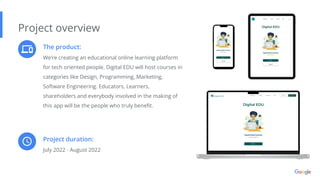
The product:
We’re creating an educational online learning platform
for tech oriented people. Digital EDU will host courses in
categories like Design, Programming, Marketing,
Software Engineering. Educators, Learners,
shareholders and everybody involved in the making of
this app will be the people who truly benefit.
Project overview
Project duration:
July 2022 - August 2022
The problem:
There are not enough online learning
platforms hosting technically specific material
in a fun and educational way.
Project overview
The goal:
Our application platform solves that problem
by understanding the user and delivering
content that is suitably specific to their needs
in a fast, safe, and convenient manner.
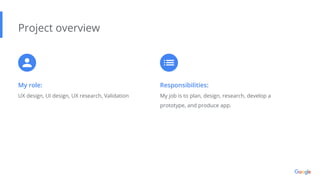
My role:
UX design, UI design, UX research, Validation
Project overview
Responsibilities:
My job is to plan, design, research, develop a
prototype, and produce app.
Understanding
the user
● User research
● Personas
● Problem statements
● Competitive audit
● Ideation
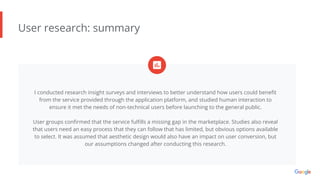
User research: summary
I conducted research insight surveys and interviews to better understand how users could benefit
from the service provided through the application platform, and studied human interaction to
ensure it met the needs of non-technical users before launching to the general public.
User groups confirmed that the service fulfills a missing gap in the marketplace. Studies also reveal
that users need an easy process that they can follow that has limited, but obvious options available
to select. It was assumed that aesthetic design would also have an impact on user conversion, but
our assumptions changed after conducting this research.
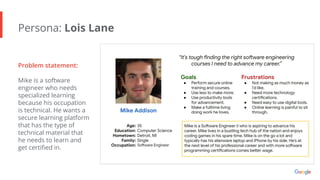
Persona: Lois Lane
Problem statement:
Mike is a software
engineer who needs
specialized learning
because his occupation
is technical. He wants a
secure learning platform
that has the type of
technical material that
he needs to learn and
get certified in.
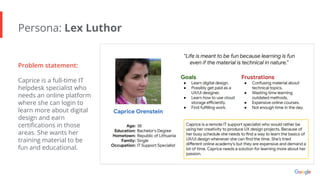
Persona: Lex Luthor
Problem statement:
Caprice is a full-time IT
helpdesk specialist who
needs an online platform
where she can login to
learn more about digital
design and earn
certifications in those
areas. She wants her
training material to be
fun and educational.
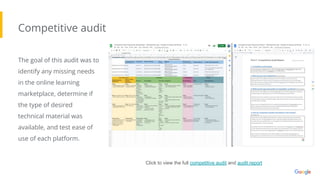
Competitive audit
The goal of this audit was to
identify any missing needs
in the online learning
marketplace, determine if
the type of desired
technical material was
available, and test ease of
use of each platform.
Click to view the full competitive audit and audit report
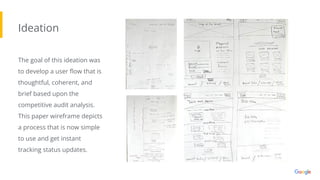
Ideation
The goal of this ideation was
to develop a user flow that is
thoughtful, coherent, and
brief based upon the
competitive audit analysis.
This paper wireframe depicts
a process that is now simple
to use and get instant
tracking status updates.
● Digital wireframes
● Low-fidelity prototype
● Usability studies
Starting
the design
Digital wireframes
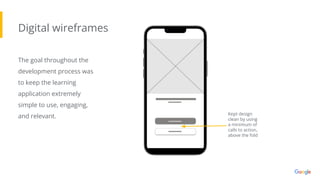
The goal throughout the
development process was
to keep the learning
application extremely
simple to use, engaging,
and relevant. Kept design
clean by using
a minimum of
calls to action,
above the fold
Low-fidelity prototype
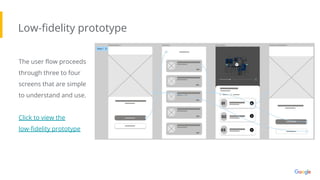
The user flow proceeds
through three to four
screens that are simple
to understand and use.
Click to view the
low-fidelity prototype
Usability study: parameters
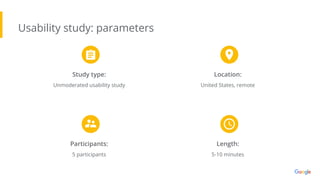
Study type:
Unmoderated usability study
Location:
United States, remote
Participants:
5 participants
Length:
5-10 minutes
Usability study: findings
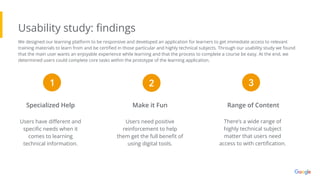
There’s a wide range of
highly technical subject
matter that users need
access to with certification.
Range of Content
Make it Fun
Specialized Help
Users need positive
reinforcement to help
them get the full benefit of
using digital tools.
Users have different and
specific needs when it
comes to learning
technical information.
1 2 3
We designed our learning platform to be responsive and developed an application for learners to get immediate access to relevant
training materials to learn from and be certified in those particular and highly technical subjects. Through our usability study we found
that the main user wants an enjoyable experience while learning and that the process to complete a course be easy. At the end, we
determined users could complete core tasks within the prototype of the learning application.
● Mockups
● High-fidelity prototype
● Accessibility
Refining
the design
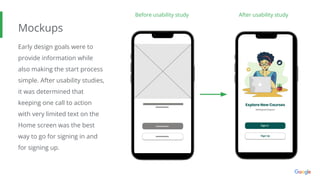
Mockups
Early design goals were to
provide information while
also making the start process
simple. After usability studies,
it was determined that
keeping one call to action
with very limited text on the
Home screen was the best
way to go for signing in and
for signing up.
Before usability study After usability study
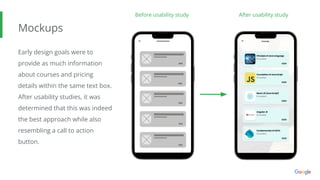
Mockups
Early design goals were to
provide as much information
about courses and pricing
details within the same text box.
After usability studies, it was
determined that this was indeed
the best approach while also
resembling a call to action
button.
Before usability study After usability study
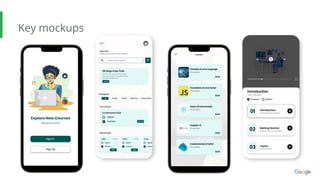
Key mockups
High-fidelity
prototype
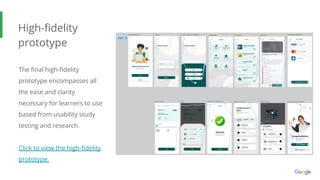
The final high-fidelity
prototype encompasses all
the ease and clarity
necessary for learners to use
based from usability study
testing and research.
Click to view the high-fidelity
prototype.
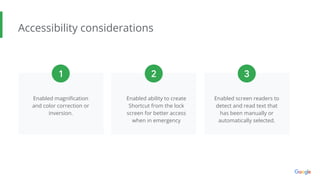
Accessibility considerations
Enabled magnification
and color correction or
inversion.
Enabled ability to create
Shortcut from the lock
screen for better access
when in emergency
1 2 3
Enabled screen readers to
detect and read text that
has been manually or
automatically selected.
● Information architecture
● Responsive design
Responsive Design
Hierarchical Sitemap
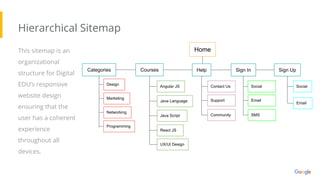
This sitemap is an
organizational
structure for Digital
EDU’s responsive
website design
ensuring that the
user has a coherent
experience
throughout all
devices.
Home
Categories Courses Help Sign In Sign Up
Design
Programming
Networking
Marketing
Java Language
Java Script
React JS
Angular JS
UX/UI Design
Contact Us
Support
Community
Social
Email
SMS
Social
Email
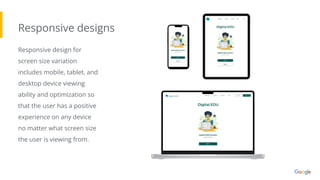
Responsive designs
Responsive design for
screen size variation
includes mobile, tablet, and
desktop device viewing
ability and optimization so
that the user has a positive
experience on any device
no matter what screen size
the user is viewing from.
● Takeaways
● Next steps
Going forward
Takeaways
Impact:
As the designer of this learning application, I
feel that this new learning platform provides
people in need specific technical education and
learning credentials.
What I learned:
I’ve learned that ideas are limitless and in
today's world, it’s possible to realize them
nearly instantly. In an organized and appealing
manner, a presentation can inspire an exact
prototype and full scale product.
“I need one place I can go to get updated about new
certifications available in my field so I can improve my
professional status and earn more income. This app
looks like it can do that for me. At this point, no matter
what the cost, it’ll be worth it.” - Shilo, New Jersey
Next steps
Conduct more usability
studies to reshape the
learning platform
application.
Conduct A/B testing.
Expand categories and
courses to include more
variety and pints of sale.
1 2 3
LinkedIn
Email
Thank you for reviewing the Digital EDU learning
application case study, No.3.
Feel free to contact me if you have any questions.

Case Study 3 - Portfolio Project Final - Google UX Design Certificate

  • 1.
    Digital EDU LearningPlatform Dev App Case Study Abel Alvarez
  • 2.
    The product: We’re creatingan educational online learning platform for tech oriented people. Digital EDU will host courses in categories like Design, Programming, Marketing, Software Engineering. Educators, Learners, shareholders and everybody involved in the making of this app will be the people who truly benefit. Project overview Project duration: July 2022 - August 2022
  • 3.
    The problem: There arenot enough online learning platforms hosting technically specific material in a fun and educational way. Project overview The goal: Our application platform solves that problem by understanding the user and delivering content that is suitably specific to their needs in a fast, safe, and convenient manner.
  • 4.
    My role: UX design,UI design, UX research, Validation Project overview Responsibilities: My job is to plan, design, research, develop a prototype, and produce app.
  • 5.
    Understanding the user ● Userresearch ● Personas ● Problem statements ● Competitive audit ● Ideation
  • 6.
    User research: summary Iconducted research insight surveys and interviews to better understand how users could benefit from the service provided through the application platform, and studied human interaction to ensure it met the needs of non-technical users before launching to the general public. User groups confirmed that the service fulfills a missing gap in the marketplace. Studies also reveal that users need an easy process that they can follow that has limited, but obvious options available to select. It was assumed that aesthetic design would also have an impact on user conversion, but our assumptions changed after conducting this research.
  • 7.
    Persona: Lois Lane Problemstatement: Mike is a software engineer who needs specialized learning because his occupation is technical. He wants a secure learning platform that has the type of technical material that he needs to learn and get certified in.
  • 8.
    Persona: Lex Luthor Problemstatement: Caprice is a full-time IT helpdesk specialist who needs an online platform where she can login to learn more about digital design and earn certifications in those areas. She wants her training material to be fun and educational.
  • 9.
    Competitive audit The goalof this audit was to identify any missing needs in the online learning marketplace, determine if the type of desired technical material was available, and test ease of use of each platform. Click to view the full competitive audit and audit report
  • 10.
    Ideation The goal ofthis ideation was to develop a user flow that is thoughtful, coherent, and brief based upon the competitive audit analysis. This paper wireframe depicts a process that is now simple to use and get instant tracking status updates.
  • 11.
    ● Digital wireframes ●Low-fidelity prototype ● Usability studies Starting the design
  • 12.
    Digital wireframes The goalthroughout the development process was to keep the learning application extremely simple to use, engaging, and relevant. Kept design clean by using a minimum of calls to action, above the fold
  • 13.
    Low-fidelity prototype The userflow proceeds through three to four screens that are simple to understand and use. Click to view the low-fidelity prototype
  • 14.
    Usability study: parameters Studytype: Unmoderated usability study Location: United States, remote Participants: 5 participants Length: 5-10 minutes
  • 15.
    Usability study: findings There’sa wide range of highly technical subject matter that users need access to with certification. Range of Content Make it Fun Specialized Help Users need positive reinforcement to help them get the full benefit of using digital tools. Users have different and specific needs when it comes to learning technical information. 1 2 3 We designed our learning platform to be responsive and developed an application for learners to get immediate access to relevant training materials to learn from and be certified in those particular and highly technical subjects. Through our usability study we found that the main user wants an enjoyable experience while learning and that the process to complete a course be easy. At the end, we determined users could complete core tasks within the prototype of the learning application.
  • 16.
    ● Mockups ● High-fidelityprototype ● Accessibility Refining the design
  • 17.
    Mockups Early design goalswere to provide information while also making the start process simple. After usability studies, it was determined that keeping one call to action with very limited text on the Home screen was the best way to go for signing in and for signing up. Before usability study After usability study
  • 18.
    Mockups Early design goalswere to provide as much information about courses and pricing details within the same text box. After usability studies, it was determined that this was indeed the best approach while also resembling a call to action button. Before usability study After usability study
  • 19.
  • 20.
    High-fidelity prototype The final high-fidelity prototypeencompasses all the ease and clarity necessary for learners to use based from usability study testing and research. Click to view the high-fidelity prototype.
  • 21.
    Accessibility considerations Enabled magnification andcolor correction or inversion. Enabled ability to create Shortcut from the lock screen for better access when in emergency 1 2 3 Enabled screen readers to detect and read text that has been manually or automatically selected.
  • 22.
    ● Information architecture ●Responsive design Responsive Design
  • 23.
    Hierarchical Sitemap This sitemapis an organizational structure for Digital EDU’s responsive website design ensuring that the user has a coherent experience throughout all devices. Home Categories Courses Help Sign In Sign Up Design Programming Networking Marketing Java Language Java Script React JS Angular JS UX/UI Design Contact Us Support Community Social Email SMS Social Email
  • 24.
    Responsive designs Responsive designfor screen size variation includes mobile, tablet, and desktop device viewing ability and optimization so that the user has a positive experience on any device no matter what screen size the user is viewing from.
  • 25.
    ● Takeaways ● Nextsteps Going forward
  • 26.
    Takeaways Impact: As the designerof this learning application, I feel that this new learning platform provides people in need specific technical education and learning credentials. What I learned: I’ve learned that ideas are limitless and in today's world, it’s possible to realize them nearly instantly. In an organized and appealing manner, a presentation can inspire an exact prototype and full scale product. “I need one place I can go to get updated about new certifications available in my field so I can improve my professional status and earn more income. This app looks like it can do that for me. At this point, no matter what the cost, it’ll be worth it.” - Shilo, New Jersey
  • 27.
    Next steps Conduct moreusability studies to reshape the learning platform application. Conduct A/B testing. Expand categories and courses to include more variety and pints of sale. 1 2 3
  • 28.
    LinkedIn Email Thank you forreviewing the Digital EDU learning application case study, No.3. Feel free to contact me if you have any questions.