Cinitime – Movie Ticket Booking App
Thirumalaiboobathi
The product:
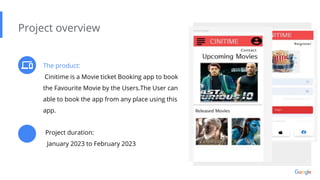
Cinitime is a Movie ticket Booking app to book
the Favourite Movie by the Users.The User can
able to book the app from any place using this
app.
Project overview
Project duration:
January 2023 to February 2023
Preview of selected
polished designs.
The problem:
Busy workers and commuters lack the time
necessary to book the ticket
Project overview
The goal:
Idesign an app to Book movie ticket that allows
users to easily book the ticket for thir favourite
movies..
My role:
Ux designer designing an app for Cinitime
from conception of Booking
Project overview
Responsibilities:
Conducting interviews, paper and digital
wireframing, low and high-fidelity prototyping,
conducting usability studies, accounting for
accessibility, and iterating on designs.
c
Understanding
the user
● User research
● Personas
● Problem statements
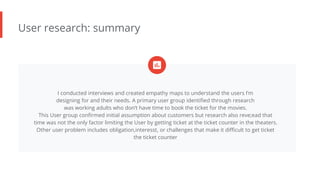
User research: summary
I conducted interviews and created empathy maps to understand the users I’m
designing for and their needs. A primary user group identified through research
was working adults who don’t have time to book the ticket for the movies.
This User group confirmed initial assumption about customers but research also reve;ead that
time was not the only factor limiting the User by getting ticket at the ticket counter in the theaters.
Other user problem includes obligation,interesst, or challenges that make it difficult to get ticket
the ticket counter
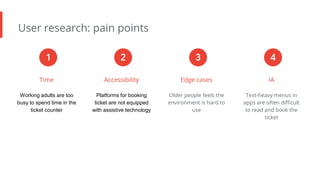
User research: pain points
Time
Working adults are too
busy to spend time in the
ticket counter
Accessibility
Platforms for booking
ticket are not equipped
with assistive technology
Edge cases
Older people feels the
environment is hard to
use
IA
Text-heavy menus in
apps are often difficult
to read and book the
ticket
1 2 3 4
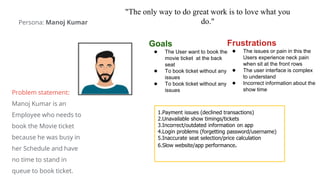
"The only way to do great work is to love what you
do."
Goals
● The User want to book the
movie ticket at the back
seat
● To book ticket without any
issues
● To book ticket without any
issues
Frustrations
● The issues or pain in this the
Users experience neck pain
when sit at the front rows
● The user interface is complex
to understand
● Incorrect information about the
show time
1.Payment issues (declined transactions)
2.Unavailable show timings/tickets
3.Incorrect/outdated information on app
4.Login problems (forgetting password/username)
5.Inaccurate seat selection/price calculation
6.Slow website/app performance.
Persona: Manoj Kumar
Problem statement:
Manoj Kumar is an
Employee who needs to
book the Movie ticket
because he was busy in
her Schedule and have
no time to stand in
queue to book ticket.
● Paper wireframes
● Digital wireframes
● Low-fidelity prototype
● Usability studies
Starting
the design
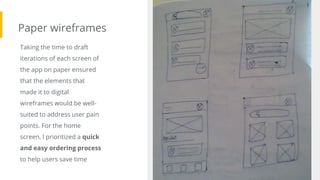
Paper wireframes
Taking the time to draft
iterations of each screen of
the app on paper ensured
that the elements that
made it to digital
wireframes would be well-
suited to address user pain
points. For the home
screen, I prioritized a quick
and easy ordering process
to help users save time
Image of paper
wireframes including
five different
versions of the same
screen and one
image of the new,
refined version
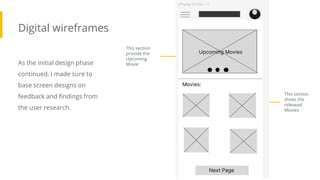
Digital wireframes
As the initial design phase
continued, I made sure to
base screen designs on
feedback and findings from
the user research.
This section
provide the
Upcoming
Movie
Insert first wireframe
example that
demonstrates design
thinking aligned with
user research This section
shoes the
relesead
Movies
Digital wireframes
[]This digital wireframe is
used to select the date and
the showtime of the movie
The movie
selected by the
User
Insert second
wireframe example that
demonstrates design
thinking aligned with
user research This section
used to select
the date and
show time
ovieof the m
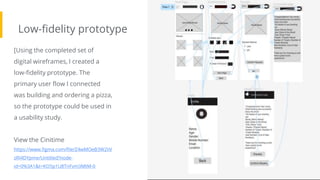
Low-fidelity prototype
Screenshot of
prototype with
connections or
prototype GIF
[Using the completed set of
digital wireframes, I created a
low-fidelity prototype. The
primary user flow I connected
was building and ordering a pizza,
so the prototype could be used in
a usability study.
View the Cinitime
https://www.figma.com/file/Z4wMOeB3W2IiV
zRI4DYpme/Untitled?node-
id=0%3A1&t=KO5p1U8TnFvm3MtM-0
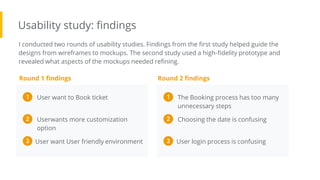
Usability study: findings
I conducted two rounds of usability studies. Findings from the first study helped guide the
designs from wireframes to mockups. The second study used a high-fidelity prototype and
revealed what aspects of the mockups needed refining.
Round 1 findings
The Booking process has too many
unnecessary steps
1
Choosing the date is confusing
2
Round 2 findings
User login process is confusing
3
User want to Book ticket
1
Userwants more customization
option
2
User want User friendly environment
3
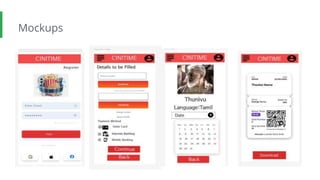
● Mockups
● High-fidelity prototype
● Accessibility
Refining
the design
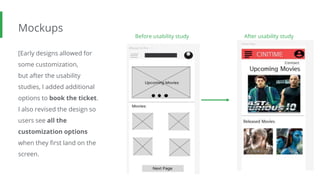
Mockups
[Early designs allowed for
some customization,
but after the usability
studies, I added additional
options to book the ticket.
I also revised the design so
users see all the
customization options
when they first land on the
screen.
Image of
selected
screen before
usability study
Before usability study After usability study
Image of
selected
screen after
usability study
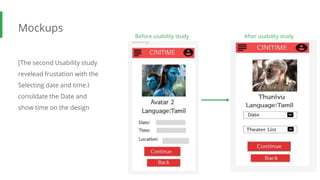
Mockups
[The second Usability study
revelead frustation with the
Selecting date and time.I
consildate the Date and
show time on the design
Before usability study After usability study
Image of
selected
screen before
usability study
Image of
selected
screen after
usability study
Mockups
Main
mockup
screen for
display
Main
mockup
screen for
display
Main
mockup
screen for
display
Main
mockup
screen for
display
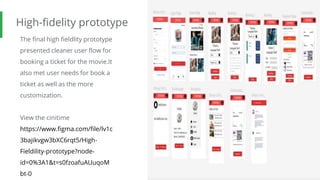
High-fidelity prototype
The final high fieldlity prototype
presented cleaner user flow for
booking a ticket for the movie.It
also met user needs for book a
ticket as well as the more
customization.
View the cinitime
https://www.figma.com/file/lv1c
3bajikvgw3bXC6rqt5/High-
Fieldility-prototype?node-
id=0%3A1&t=s0fzoafuAUuqoM
bt-0
Screenshot of
prototype with
connections or
prototype GIF
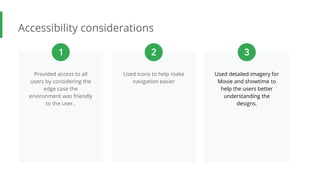
Accessibility considerations
Provided access to all
users by considering the
edge case the
environment was friendly
to the user..
Used Icons to help make
navigation easier
Used detailed imagery for
Movie and showtime to
help the users better
understanding the
designs.
1 2 3
● Takeaways
● Next steps
Going forward
Takeaways
Impact:
The app makes Users feel like Cinitime really thinks
about how to meet their needs.
One quote from peer feedback:
“the app made it so easy to book my Movie ticket I
would definitely use this app as a got to for a good
movie”.
What I learned:
IWhile designing the Cinitime app, I learned
that the first ideas for the app are only the
beginning of the process. Usability studies and
peer feedback influenced each iteration of the
app’s designs.
Next steps
Conduct another round of
usability studies to
validate whether the pain
points users experienced
have been effectively
addressed.
Conduct more user
research to determine
any new areas of need.
Conduct another Usability
study to add extra
feature to order snacks
from the app.
1 2 3
Let’s connect!
Thank you for your time reviewing my work on the Zia’s Pizza app! If you’d like to
see more or get in touch, my contact information is provided below.
LinkedIn: www.linkedin.com/in/thirumalaiboobathi-b-902a51233
Thank you!

Case study.pptx

  • 1.
    Cinitime – MovieTicket Booking App Thirumalaiboobathi
  • 2.
    The product: Cinitime isa Movie ticket Booking app to book the Favourite Movie by the Users.The User can able to book the app from any place using this app. Project overview Project duration: January 2023 to February 2023 Preview of selected polished designs.
  • 3.
    The problem: Busy workersand commuters lack the time necessary to book the ticket Project overview The goal: Idesign an app to Book movie ticket that allows users to easily book the ticket for thir favourite movies..
  • 4.
    My role: Ux designerdesigning an app for Cinitime from conception of Booking Project overview Responsibilities: Conducting interviews, paper and digital wireframing, low and high-fidelity prototyping, conducting usability studies, accounting for accessibility, and iterating on designs. c
  • 5.
    Understanding the user ● Userresearch ● Personas ● Problem statements
  • 6.
    User research: summary Iconducted interviews and created empathy maps to understand the users I’m designing for and their needs. A primary user group identified through research was working adults who don’t have time to book the ticket for the movies. This User group confirmed initial assumption about customers but research also reve;ead that time was not the only factor limiting the User by getting ticket at the ticket counter in the theaters. Other user problem includes obligation,interesst, or challenges that make it difficult to get ticket the ticket counter
  • 7.
    User research: painpoints Time Working adults are too busy to spend time in the ticket counter Accessibility Platforms for booking ticket are not equipped with assistive technology Edge cases Older people feels the environment is hard to use IA Text-heavy menus in apps are often difficult to read and book the ticket 1 2 3 4
  • 8.
    "The only wayto do great work is to love what you do." Goals ● The User want to book the movie ticket at the back seat ● To book ticket without any issues ● To book ticket without any issues Frustrations ● The issues or pain in this the Users experience neck pain when sit at the front rows ● The user interface is complex to understand ● Incorrect information about the show time 1.Payment issues (declined transactions) 2.Unavailable show timings/tickets 3.Incorrect/outdated information on app 4.Login problems (forgetting password/username) 5.Inaccurate seat selection/price calculation 6.Slow website/app performance. Persona: Manoj Kumar Problem statement: Manoj Kumar is an Employee who needs to book the Movie ticket because he was busy in her Schedule and have no time to stand in queue to book ticket.
  • 9.
    ● Paper wireframes ●Digital wireframes ● Low-fidelity prototype ● Usability studies Starting the design
  • 10.
    Paper wireframes Taking thetime to draft iterations of each screen of the app on paper ensured that the elements that made it to digital wireframes would be well- suited to address user pain points. For the home screen, I prioritized a quick and easy ordering process to help users save time Image of paper wireframes including five different versions of the same screen and one image of the new, refined version
  • 11.
    Digital wireframes As theinitial design phase continued, I made sure to base screen designs on feedback and findings from the user research. This section provide the Upcoming Movie Insert first wireframe example that demonstrates design thinking aligned with user research This section shoes the relesead Movies
  • 12.
    Digital wireframes []This digitalwireframe is used to select the date and the showtime of the movie The movie selected by the User Insert second wireframe example that demonstrates design thinking aligned with user research This section used to select the date and show time ovieof the m
  • 13.
    Low-fidelity prototype Screenshot of prototypewith connections or prototype GIF [Using the completed set of digital wireframes, I created a low-fidelity prototype. The primary user flow I connected was building and ordering a pizza, so the prototype could be used in a usability study. View the Cinitime https://www.figma.com/file/Z4wMOeB3W2IiV zRI4DYpme/Untitled?node- id=0%3A1&t=KO5p1U8TnFvm3MtM-0
  • 14.
    Usability study: findings Iconducted two rounds of usability studies. Findings from the first study helped guide the designs from wireframes to mockups. The second study used a high-fidelity prototype and revealed what aspects of the mockups needed refining. Round 1 findings The Booking process has too many unnecessary steps 1 Choosing the date is confusing 2 Round 2 findings User login process is confusing 3 User want to Book ticket 1 Userwants more customization option 2 User want User friendly environment 3
  • 15.
    ● Mockups ● High-fidelityprototype ● Accessibility Refining the design
  • 16.
    Mockups [Early designs allowedfor some customization, but after the usability studies, I added additional options to book the ticket. I also revised the design so users see all the customization options when they first land on the screen. Image of selected screen before usability study Before usability study After usability study Image of selected screen after usability study
  • 17.
    Mockups [The second Usabilitystudy revelead frustation with the Selecting date and time.I consildate the Date and show time on the design Before usability study After usability study Image of selected screen before usability study Image of selected screen after usability study
  • 18.
  • 19.
    High-fidelity prototype The finalhigh fieldlity prototype presented cleaner user flow for booking a ticket for the movie.It also met user needs for book a ticket as well as the more customization. View the cinitime https://www.figma.com/file/lv1c 3bajikvgw3bXC6rqt5/High- Fieldility-prototype?node- id=0%3A1&t=s0fzoafuAUuqoM bt-0 Screenshot of prototype with connections or prototype GIF
  • 20.
    Accessibility considerations Provided accessto all users by considering the edge case the environment was friendly to the user.. Used Icons to help make navigation easier Used detailed imagery for Movie and showtime to help the users better understanding the designs. 1 2 3
  • 21.
    ● Takeaways ● Nextsteps Going forward
  • 22.
    Takeaways Impact: The app makesUsers feel like Cinitime really thinks about how to meet their needs. One quote from peer feedback: “the app made it so easy to book my Movie ticket I would definitely use this app as a got to for a good movie”. What I learned: IWhile designing the Cinitime app, I learned that the first ideas for the app are only the beginning of the process. Usability studies and peer feedback influenced each iteration of the app’s designs.
  • 23.
    Next steps Conduct anotherround of usability studies to validate whether the pain points users experienced have been effectively addressed. Conduct more user research to determine any new areas of need. Conduct another Usability study to add extra feature to order snacks from the app. 1 2 3
  • 24.
    Let’s connect! Thank youfor your time reviewing my work on the Zia’s Pizza app! If you’d like to see more or get in touch, my contact information is provided below. LinkedIn: www.linkedin.com/in/thirumalaiboobathi-b-902a51233
  • 25.