Information Architecture Technique
Card Sorting
Why use Card Sorting
Method for Addressing Problems of Find-ability
Product Team asks,

‘Where does this piece of content or functionality belong?’


UX Team asks,

‘Where would the user START this task?


User asks,

‘Where do I find what I’m looking for?’
Problems of Find-ability
What is Information Architecture?
5 Planes of User Experience
Skeleton
Scope
Strategy
Surface
1
2 3
Structure
Skeleton
Scope
Strategy
Surface
1
2 3
Structure
5 Planes of User Experience
Information
Architecture
Card Sorting Overview
• Each piece of content or functionality is converted to a ‘Card’
• Cards are organized into groups by participants
• Participant’s responses are analyzed to better understand the user’s
mental model
• Analysis provides recommendations for improved organization, labeling,
and find-ability
Card Sorting Overview
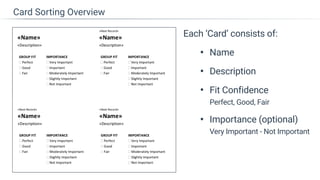
Each ‘Card’ consists of:
• Name
• Description
• Fit Confidence

Perfect, Good, Fair
• Importance (optional)

Very Important - Not Important
Card Sorting Overview
Two Primary Methods
Open Card Sort vs Closed Card Sort
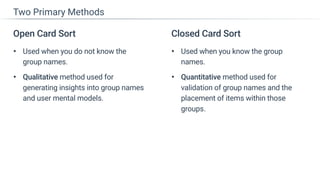
Closed Card Sort
• Used when you know the group
names.
• Quantitative method used for
validation of group names and the
placement of items within those
groups.
Two Primary Methods
Open Card Sort
• Used when you do not know the
group names.
• Qualitative method used for
generating insights into group names
and user mental models.
Open Card Sort
Method
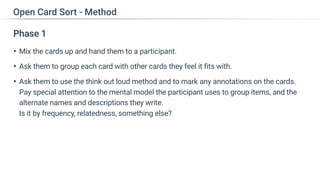
Phase 1
• Mix the cards up and hand them to a participant.
• Ask them to group each card with other cards they feel it fits with.
• Ask them to use the think out loud method and to mark any annotations on the cards.

Pay special attention to the mental model the participant uses to group items, and the
alternate names and descriptions they write.

Is it by frequency, relatedness, something else?
Open Card Sort - Method
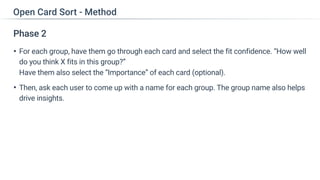
Phase 2
• For each group, have them go through each card and select the fit confidence. “How well
do you think X fits in this group?”

Have them also select the “Importance” of each card (optional).
• Then, ask each user to come up with a name for each group. The group name also helps
drive insights.
Open Card Sort - Method
Open Card Sort
Analysis
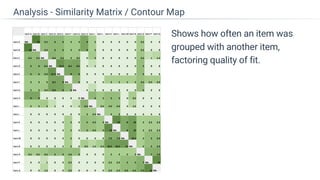
Shows how often an item was
grouped with another item,
factoring quality of fit.
Analysis - Similarity Matrix / Contour Map
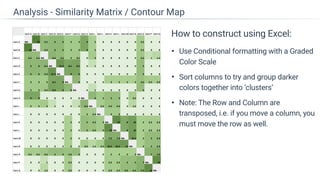
How to construct using Excel:
• Each sheet is a new participant’s matrix
with a total sheet which sums the cell
across participants.
• For each cell, if the two items were in the
same group, average their fit confidence.

e.g. If Item A was a Perfect Fit and Item B
was a Good fit, mark a 2.5 in that cell.
• Note: A Perfect has a value of 3,

good has a 2, and fair has a 1.
Analysis - Similarity Matrix / Contour Map
How to construct using Excel:
• Use Conditional formatting with a Graded
Color Scale
• Sort columns to try and group darker
colors together into ‘clusters’
• Note: The Row and Column are
transposed, i.e. if you move a column, you
must move the row as well.
Analysis - Similarity Matrix / Contour Map
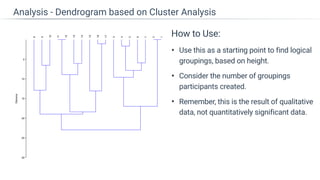
Shows the relationship between
features.
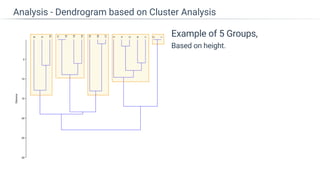
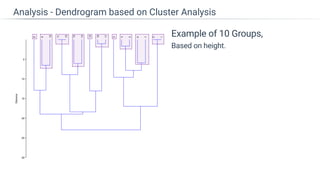
Larger the height, less connected the item.

e.g. 11 and 12 are tightly connected.

15 is loosely connected to16 and 17.
Analysis - Dendrogram based on Cluster Analysis
How to Use:
• Use this as a starting point to find logical
groupings, based on height.
• Consider the number of groupings
participants created.
• Remember, this is the result of qualitative
data, not quantitatively significant data.
Analysis - Dendrogram based on Cluster Analysis
Example of 5 Groups,

Based on height.
Analysis - Dendrogram based on Cluster Analysis
Example of 3 Groups,

Based on height.
Analysis - Dendrogram based on Cluster Analysis
Example of 10 Groups,

Based on height.
Analysis - Dendrogram based on Cluster Analysis
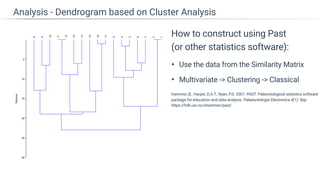
How to construct using Past

(or other statistics software):
• Use the data from the Similarity Matrix
• Multivariate -> Clustering -> Classical
Analysis - Dendrogram based on Cluster Analysis
Hammer, Ø., Harper, D.A.T., Ryan, P.D. 2001. PAST: Paleontological statistics software
package for education and data analysis. Palaeontologia Electronica 4(1): 9pp.
https://folk.uio.no/ohammer/past/
Closed Card Sort
Methods
Method 1
• Similar to the Open Card Sort Method with one exception.
• Create Pre-defined Header Groups which the participants place cards into.
Closed Card Sort - Methods
Method 2 - Survey
Create a survey where each item has a
single selection of each group name.
For each item, capture attributes such
as importance or confidence
(optional).
Closed Card Sort - Methods
Closed Card Sort
Method 2 - Analysis
Shows the percentage of
participants that grouped an item
into a particular category.
Analysis - Correlation Table
How to construct using Excel:
• For each cell, calculate the percentage of
participants that selected an item for
each group compared to other groups.
• Color code based on the percentages.
• Green highlight indicates the highest percentage
each item received.
• Red highlight indicates percentages over the
margins of error (e.g. 10%) that were not the highest
percentage for that feature. This indicates lower
agreement.
• For each group, sort based on the items
that contained the highest percentage
Analysis - Similarity Matrix / Contour Map
Shows the average importance participants assigned to each item.

The higher the value, the more important it is to the participants.
Analysis - Item Importance Chart (optional)
Results
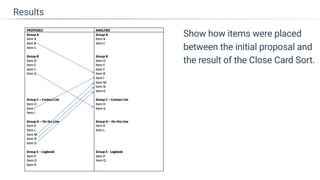
Show how items were placed
between the initial proposal and
the result of the Close Card Sort.
Results
Summary
• If problems of find-ability exist, Card Sorting can solve these pain points
• To gain insights into those pain points, use an Open Card Sort method.

To validate pain points or solutions, use a Closed Card Sort method.
• Analysis of a Card Sort will help craft better item names or groupings.
• Better naming and grouping will increase the use of features or content.
• An increase in the use of features or content provides business value to
the organization, which can be validated through analytics.
Summary

Card Sorting- Information Architecture Technique

  • 1.
  • 2.
    Why use CardSorting Method for Addressing Problems of Find-ability
  • 3.
    Product Team asks,
 ‘Wheredoes this piece of content or functionality belong?’ 
 UX Team asks,
 ‘Where would the user START this task? 
 User asks,
 ‘Where do I find what I’m looking for?’ Problems of Find-ability
  • 4.
    What is InformationArchitecture?
  • 5.
    5 Planes ofUser Experience Skeleton Scope Strategy Surface 1 2 3 Structure
  • 6.
    Skeleton Scope Strategy Surface 1 2 3 Structure 5 Planesof User Experience Information Architecture
  • 7.
  • 8.
    • Each pieceof content or functionality is converted to a ‘Card’ • Cards are organized into groups by participants • Participant’s responses are analyzed to better understand the user’s mental model • Analysis provides recommendations for improved organization, labeling, and find-ability Card Sorting Overview
  • 9.
    Each ‘Card’ consistsof: • Name • Description • Fit Confidence
 Perfect, Good, Fair • Importance (optional)
 Very Important - Not Important Card Sorting Overview
  • 10.
    Two Primary Methods OpenCard Sort vs Closed Card Sort
  • 11.
    Closed Card Sort •Used when you know the group names. • Quantitative method used for validation of group names and the placement of items within those groups. Two Primary Methods Open Card Sort • Used when you do not know the group names. • Qualitative method used for generating insights into group names and user mental models.
  • 12.
  • 13.
    Phase 1 • Mixthe cards up and hand them to a participant. • Ask them to group each card with other cards they feel it fits with. • Ask them to use the think out loud method and to mark any annotations on the cards.
 Pay special attention to the mental model the participant uses to group items, and the alternate names and descriptions they write.
 Is it by frequency, relatedness, something else? Open Card Sort - Method
  • 14.
    Phase 2 • Foreach group, have them go through each card and select the fit confidence. “How well do you think X fits in this group?”
 Have them also select the “Importance” of each card (optional). • Then, ask each user to come up with a name for each group. The group name also helps drive insights. Open Card Sort - Method
  • 15.
  • 16.
    Shows how oftenan item was grouped with another item, factoring quality of fit. Analysis - Similarity Matrix / Contour Map
  • 17.
    How to constructusing Excel: • Each sheet is a new participant’s matrix with a total sheet which sums the cell across participants. • For each cell, if the two items were in the same group, average their fit confidence.
 e.g. If Item A was a Perfect Fit and Item B was a Good fit, mark a 2.5 in that cell. • Note: A Perfect has a value of 3,
 good has a 2, and fair has a 1. Analysis - Similarity Matrix / Contour Map
  • 18.
    How to constructusing Excel: • Use Conditional formatting with a Graded Color Scale • Sort columns to try and group darker colors together into ‘clusters’ • Note: The Row and Column are transposed, i.e. if you move a column, you must move the row as well. Analysis - Similarity Matrix / Contour Map
  • 19.
    Shows the relationshipbetween features. Larger the height, less connected the item.
 e.g. 11 and 12 are tightly connected.
 15 is loosely connected to16 and 17. Analysis - Dendrogram based on Cluster Analysis
  • 20.
    How to Use: •Use this as a starting point to find logical groupings, based on height. • Consider the number of groupings participants created. • Remember, this is the result of qualitative data, not quantitatively significant data. Analysis - Dendrogram based on Cluster Analysis
  • 21.
    Example of 5Groups,
 Based on height. Analysis - Dendrogram based on Cluster Analysis
  • 22.
    Example of 3Groups,
 Based on height. Analysis - Dendrogram based on Cluster Analysis
  • 23.
    Example of 10Groups,
 Based on height. Analysis - Dendrogram based on Cluster Analysis
  • 24.
    How to constructusing Past
 (or other statistics software): • Use the data from the Similarity Matrix • Multivariate -> Clustering -> Classical Analysis - Dendrogram based on Cluster Analysis Hammer, Ø., Harper, D.A.T., Ryan, P.D. 2001. PAST: Paleontological statistics software package for education and data analysis. Palaeontologia Electronica 4(1): 9pp. https://folk.uio.no/ohammer/past/
  • 25.
  • 26.
    Method 1 • Similarto the Open Card Sort Method with one exception. • Create Pre-defined Header Groups which the participants place cards into. Closed Card Sort - Methods
  • 27.
    Method 2 -Survey Create a survey where each item has a single selection of each group name. For each item, capture attributes such as importance or confidence (optional). Closed Card Sort - Methods
  • 28.
  • 29.
    Shows the percentageof participants that grouped an item into a particular category. Analysis - Correlation Table
  • 30.
    How to constructusing Excel: • For each cell, calculate the percentage of participants that selected an item for each group compared to other groups. • Color code based on the percentages. • Green highlight indicates the highest percentage each item received. • Red highlight indicates percentages over the margins of error (e.g. 10%) that were not the highest percentage for that feature. This indicates lower agreement. • For each group, sort based on the items that contained the highest percentage Analysis - Similarity Matrix / Contour Map
  • 31.
    Shows the averageimportance participants assigned to each item.
 The higher the value, the more important it is to the participants. Analysis - Item Importance Chart (optional)
  • 32.
  • 33.
    Show how itemswere placed between the initial proposal and the result of the Close Card Sort. Results
  • 34.
  • 35.
    • If problemsof find-ability exist, Card Sorting can solve these pain points • To gain insights into those pain points, use an Open Card Sort method.
 To validate pain points or solutions, use a Closed Card Sort method. • Analysis of a Card Sort will help craft better item names or groupings. • Better naming and grouping will increase the use of features or content. • An increase in the use of features or content provides business value to the organization, which can be validated through analytics. Summary