UTC-N

Overview of Campus Networks Design

1
Overview
Read Chapter 1 for further information and
explanations
Much of the information in this chapter will
become clearer throughout the semester as
this chapter is meant to introduce you to
some of the topics we will be discussing later.
The design models used in this chapter is not
a template for network design. It should be
used as a foundation for discussion of
concepts and a vehicle for addressing various
issues.
2
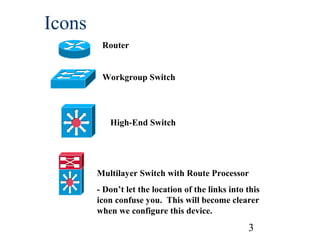
Icons
Router
Workgroup Switch

High-End Switch

Multilayer Switch with Route Processor
- Don’t let the location of the links into this
icon confuse you. This will become clearer
when we configure this device.

3
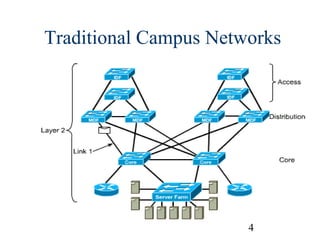
Traditional Campus Networks

4
Traditional Campus Networks
Campus Network
A building or group of buildings connected into one
enterprise network that consists of or more LANs.
The company usually owns the physical wires
deployed in the campus.
Generally uses LAN technologies.
Generally deploy a campus design that is optimized
for the fastest functional architecture over existing
wire.

5
Traditional Campus Networks
Network Administrator Challenges
LAN run effectively and efficiently
Availability and performance impacted by the amount
of bandwidth in the network
Understand, implement and manage traffic flow
Current Issues
Broadcasts: IP ARP requests
Emerging Issues
Multicast traffic (traffic propagated to a specific group
of users on a subnet), video conferencing, multimedia
traffic
Security and traffic flow
6
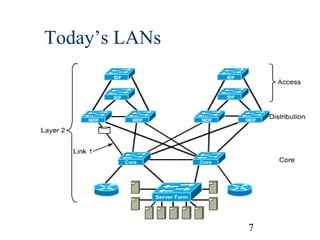
Today’s LANs

7
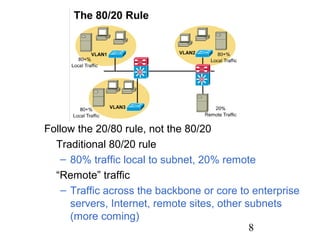
Follow the 20/80 rule, not the 80/20
Traditional 80/20 rule
– 80% traffic local to subnet, 20% remote
“Remote” traffic
– Traffic across the backbone or core to enterprise
servers, Internet, remote sites, other subnets
(more coming)
8
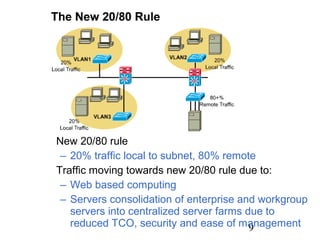
New 20/80 rule
– 20% traffic local to subnet, 80% remote
Traffic moving towards new 20/80 rule due to:
– Web based computing
– Servers consolidation of enterprise and workgroup
servers into centralized server farms due to
reduced TCO, security and ease of management
9
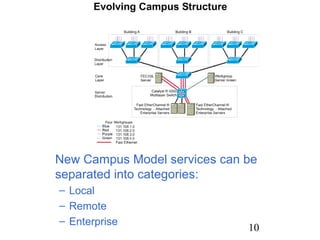
New Campus Model services can be
separated into categories:
– Local
– Remote
– Enterprise

10
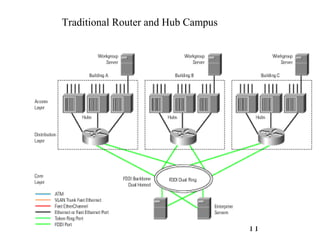
Traditional Router and Hub Campus

11
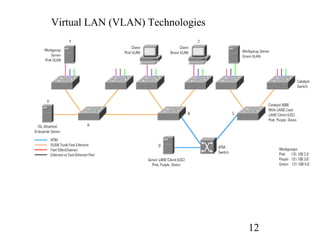
Virtual LAN (VLAN) Technologies

12
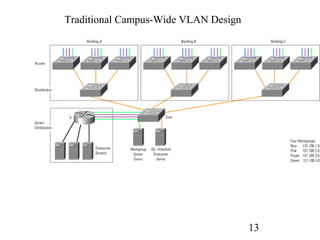
Traditional Campus-Wide VLAN Design

13
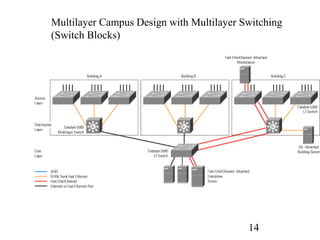
Multilayer Campus Design with Multilayer Switching
(Switch Blocks)

14
(FYI: Review) Because Layer 3 switching is used in the
distribution layer of the multilayer model, this is where
many of the characteristic advantages of routing apply.
The distribution layer forms a broadcast boundary so that
broadcasts don't pass from a building to the backbone or
vice-versa. Value-added features of the Cisco IOS
software apply at the distribution layer. For example, the
distribution-layer switches cache information about Novell
servers and respond to Get Nearest Server queries from
Novell clients in the building. Another example is
forwarding Dynamic Host Configuration Protocol (DHCP)
messages from mobile IP workstations to a DHCP server.

15
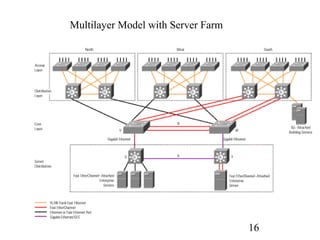
Multilayer Model with Server Farm

16
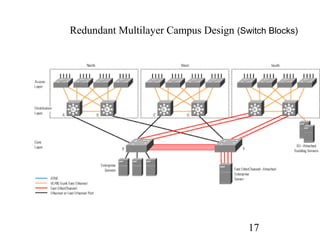
Redundant Multilayer Campus Design (Switch Blocks)

17
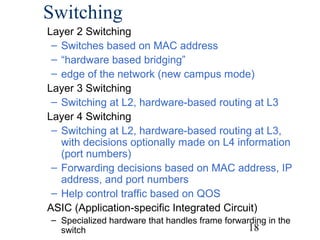
Switching
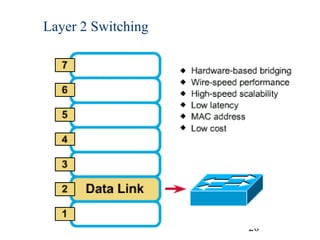
Layer 2 Switching
– Switches based on MAC address
– “hardware based bridging”
– edge of the network (new campus mode)
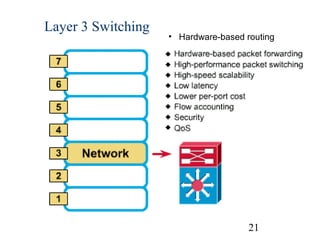
Layer 3 Switching
– Switching at L2, hardware-based routing at L3
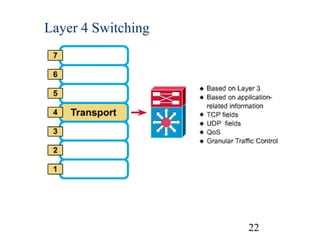
Layer 4 Switching
– Switching at L2, hardware-based routing at L3,
with decisions optionally made on L4 information
(port numbers)
– Forwarding decisions based on MAC address, IP
address, and port numbers
– Help control traffic based on QOS
ASIC (Application-specific Integrated Circuit)
– Specialized hardware that handles frame forwarding in the
18
switch
Router versus Switch
Router typically performs softwarebased packet switching (process of
looking it up first in the routing tables)
Switch typically performs hardwarebased frame switching (ASIC)

19
Layer 2 Switching

20
Layer 3 Switching

• Hardware-based routing

21
Layer 4 Switching

22
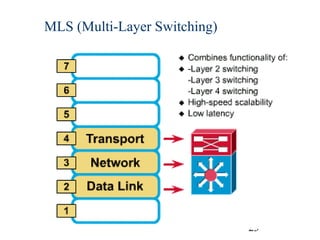
MLS (Multi-Layer Switching)

23
MLS
Cisco’ specialized form of switching and
routing, not generic L3 routing/L2
switching
Multilayer Switches can operate at
Layers 2, 3, and 4
cannot be performed using our CCNP
lab equipment (Catalyst 4006 switches
and 2620 routers)
“route once, switch many”
24
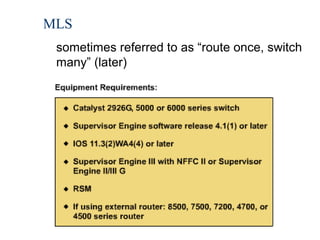
MLS
sometimes referred to as “route once, switch
many” (later)

25
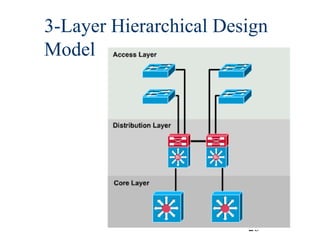
3-Layer Hierarchical Design
Model

26
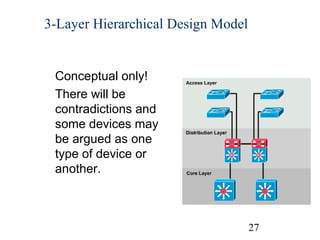
3-Layer Hierarchical Design Model

Conceptual only!
There will be
contradictions and
some devices may
be argued as one
type of device or
another.

27
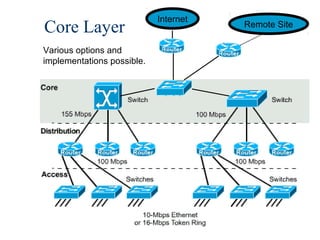
Core Layer

Internet

Remote Site

Various options and
implementations possible.

28
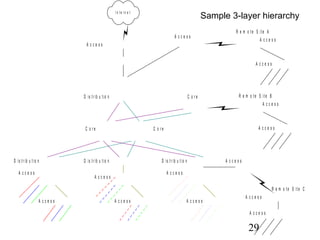
In te r n e t

Sample 3-layer hierarchy
A ccess

R e m o te S ite A
A ccess

A ccess

A ccess

D is t r ib u t io n

C o re

R e m o t e S it e B
A ccess

C o re

D is t r ib u t io n
A ccess

A ccess

C o re

D is t r ib u t io n

D is t r ib u t io n

A ccess

A ccess

A ccess

R e m o t e S it e C
A ccess

A ccess

A ccess

A ccess
A ccess

29
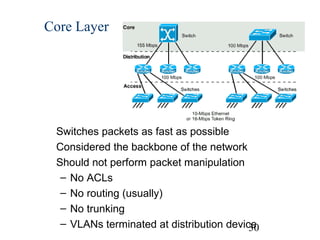
Core Layer

Switches packets as fast as possible
Considered the backbone of the network
Should not perform packet manipulation
– No ACLs
– No routing (usually)
– No trunking
– VLANs terminated at distribution device
30
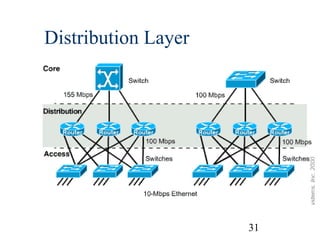
Distribution Layer

31
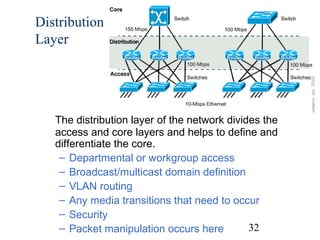
Distribution
Layer

The distribution layer of the network divides the
access and core layers and helps to define and
differentiate the core.
– Departmental or workgroup access
– Broadcast/multicast domain definition
– VLAN routing
– Any media transitions that need to occur
– Security
32
– Packet manipulation occurs here
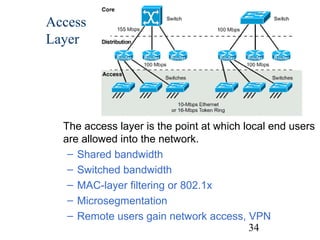
Access Layer

33
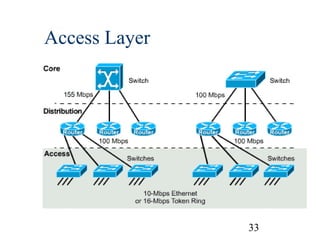
Access
Layer

The access layer is the point at which local end users
are allowed into the network.
– Shared bandwidth
– Switched bandwidth
– MAC-layer filtering or 802.1x
– Microsegmentation
– Remote users gain network access, VPN
34
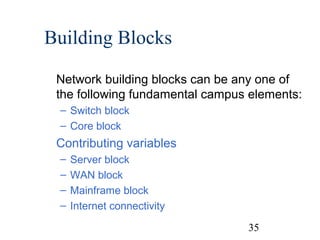
Building Blocks
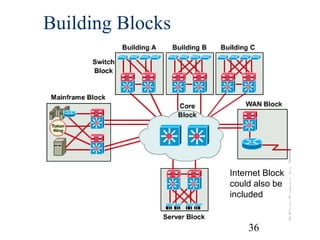
Network building blocks can be any one of
the following fundamental campus elements:
– Switch block
– Core block

Contributing variables
–
–
–
–

Server block
WAN block
Mainframe block
Internet connectivity
35
Building Blocks

Internet Block
could also be
included

36
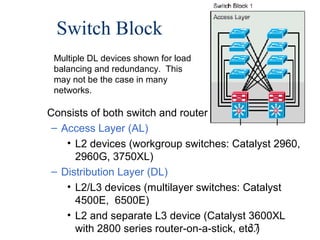
Switch Block
Multiple DL devices shown for load
balancing and redundancy. This
may not be the case in many
networks.

Consists of both switch and router functions.
– Access Layer (AL)
• L2 devices (workgroup switches: Catalyst 2960,
2960G, 3750XL)
– Distribution Layer (DL)
• L2/L3 devices (multilayer switches: Catalyst
4500E, 6500E)
• L2 and separate L3 device (Catalyst 3600XL
37
with 2800 series router-on-a-stick, etc.)
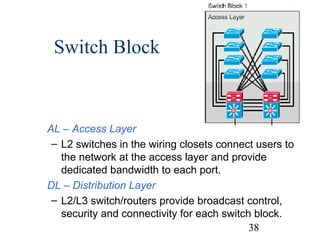
Switch Block

AL – Access Layer
– L2 switches in the wiring closets connect users to
the network at the access layer and provide
dedicated bandwidth to each port.
DL – Distribution Layer
– L2/L3 switch/routers provide broadcast control,
security and connectivity for each switch block.
38
Switch Block
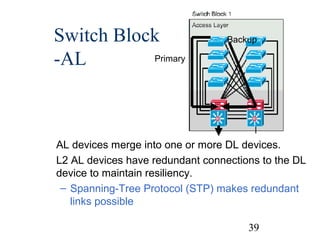
Primary
-AL

Backup

AL devices merge into one or more DL devices.
L2 AL devices have redundant connections to the DL
device to maintain resiliency.
– Spanning-Tree Protocol (STP) makes redundant
links possible
39
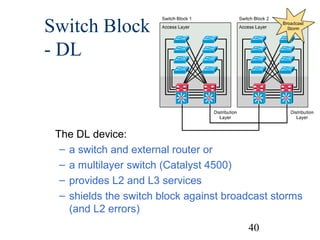
Switch Block
- DL

The DL device:
– a switch and external router or
– a multilayer switch (Catalyst 4500)
– provides L2 and L3 services
– shields the switch block against broadcast storms
(and L2 errors)
40
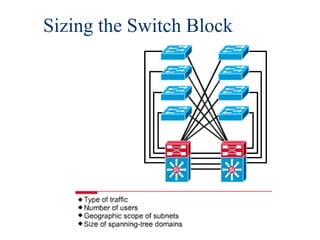
Sizing the Switch Block

41
Sizing the Switch Block
A switch block is too large if:
– A traffic bottleneck occurs in the routers at
the distribution layer because of intensive
CPU processing resulting from policybased filters
– Broadcast or multicast traffic slows down
the switches and routers

42
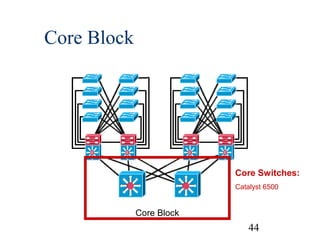
Core Block
A core is required when there are two or more switch
blocks, otherwise the core or backbone is between
the distribution switch and the perimeter router.
The core block is responsible for transferring crosscampus traffic without any processor-intensive
operations.
All the traffic going to and from the switch blocks,
server blocks, the Internet, and the wide-area
network must pass through the core.

43
Core Block

Core Switches:
Catalyst 6500

Core Block

44
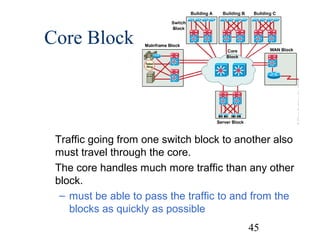
Core Block

Traffic going from one switch block to another also
must travel through the core.
The core handles much more traffic than any other
block.
– must be able to pass the traffic to and from the
blocks as quickly as possible
45
Core Block
Cisco 6500 supports:
– up to 384 10/100 Ethernet
– 192 100FX Fast Ethernet
– 8 OC12 ATM
– up to 130 Gigabit Ethernet ports
– switching bandwidth up to 256 Gbps
– scalable multilayer switching up to 170
Mpps.
46
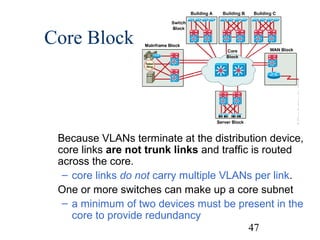
Core Block

Because VLANs terminate at the distribution device,
core links are not trunk links and traffic is routed
across the core.
– core links do not carry multiple VLANs per link.
One or more switches can make up a core subnet
– a minimum of two devices must be present in the
core to provide redundancy
47
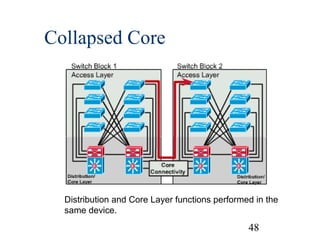
Collapsed Core

Distribution and Core Layer functions performed in the
same device.

48
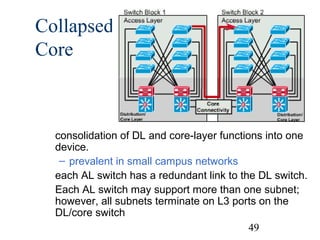
Collapsed
Core

consolidation of DL and core-layer functions into one
device.
– prevalent in small campus networks
each AL switch has a redundant link to the DL switch.
Each AL switch may support more than one subnet;
however, all subnets terminate on L3 ports on the
DL/core switch
49
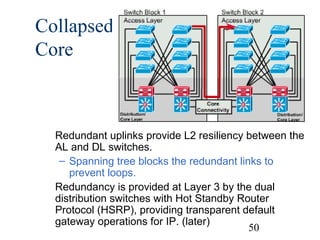
Collapsed
Core

Redundant uplinks provide L2 resiliency between the
AL and DL switches.
– Spanning tree blocks the redundant links to
prevent loops.
Redundancy is provided at Layer 3 by the dual
distribution switches with Hot Standby Router
Protocol (HSRP), providing transparent default
gateway operations for IP. (later)
50
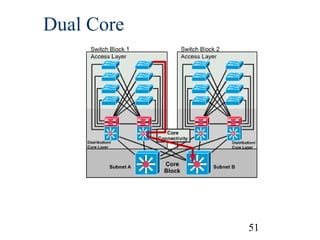
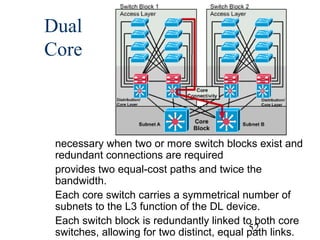
Dual Core

51
Dual
Core

necessary when two or more switch blocks exist and
redundant connections are required
provides two equal-cost paths and twice the
bandwidth.
Each core switch carries a symmetrical number of
subnets to the L3 function of the DL device.
Each switch block is redundantly linked to both core
52
switches, allowing for two distinct, equal path links.
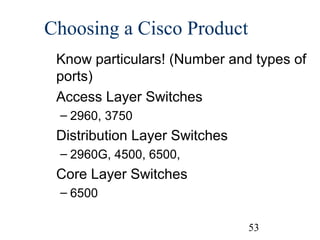
Choosing a Cisco Product
Know particulars! (Number and types of
ports)
Access Layer Switches
– 2960, 3750

Distribution Layer Switches
– 2960G, 4500, 6500,

Core Layer Switches
– 6500
53

Campas network design overview

  • 1.
    UTC-N Overview of CampusNetworks Design 1
  • 2.
    Overview Read Chapter 1for further information and explanations Much of the information in this chapter will become clearer throughout the semester as this chapter is meant to introduce you to some of the topics we will be discussing later. The design models used in this chapter is not a template for network design. It should be used as a foundation for discussion of concepts and a vehicle for addressing various issues. 2
  • 3.
    Icons Router Workgroup Switch High-End Switch MultilayerSwitch with Route Processor - Don’t let the location of the links into this icon confuse you. This will become clearer when we configure this device. 3
  • 4.
  • 5.
    Traditional Campus Networks CampusNetwork A building or group of buildings connected into one enterprise network that consists of or more LANs. The company usually owns the physical wires deployed in the campus. Generally uses LAN technologies. Generally deploy a campus design that is optimized for the fastest functional architecture over existing wire. 5
  • 6.
    Traditional Campus Networks NetworkAdministrator Challenges LAN run effectively and efficiently Availability and performance impacted by the amount of bandwidth in the network Understand, implement and manage traffic flow Current Issues Broadcasts: IP ARP requests Emerging Issues Multicast traffic (traffic propagated to a specific group of users on a subnet), video conferencing, multimedia traffic Security and traffic flow 6
  • 7.
  • 8.
    Follow the 20/80rule, not the 80/20 Traditional 80/20 rule – 80% traffic local to subnet, 20% remote “Remote” traffic – Traffic across the backbone or core to enterprise servers, Internet, remote sites, other subnets (more coming) 8
  • 9.
    New 20/80 rule –20% traffic local to subnet, 80% remote Traffic moving towards new 20/80 rule due to: – Web based computing – Servers consolidation of enterprise and workgroup servers into centralized server farms due to reduced TCO, security and ease of management 9
  • 10.
    New Campus Modelservices can be separated into categories: – Local – Remote – Enterprise 10
  • 11.
  • 12.
    Virtual LAN (VLAN)Technologies 12
  • 13.
  • 14.
    Multilayer Campus Designwith Multilayer Switching (Switch Blocks) 14
  • 15.
    (FYI: Review) BecauseLayer 3 switching is used in the distribution layer of the multilayer model, this is where many of the characteristic advantages of routing apply. The distribution layer forms a broadcast boundary so that broadcasts don't pass from a building to the backbone or vice-versa. Value-added features of the Cisco IOS software apply at the distribution layer. For example, the distribution-layer switches cache information about Novell servers and respond to Get Nearest Server queries from Novell clients in the building. Another example is forwarding Dynamic Host Configuration Protocol (DHCP) messages from mobile IP workstations to a DHCP server. 15
  • 16.
    Multilayer Model withServer Farm 16
  • 17.
    Redundant Multilayer CampusDesign (Switch Blocks) 17
  • 18.
    Switching Layer 2 Switching –Switches based on MAC address – “hardware based bridging” – edge of the network (new campus mode) Layer 3 Switching – Switching at L2, hardware-based routing at L3 Layer 4 Switching – Switching at L2, hardware-based routing at L3, with decisions optionally made on L4 information (port numbers) – Forwarding decisions based on MAC address, IP address, and port numbers – Help control traffic based on QOS ASIC (Application-specific Integrated Circuit) – Specialized hardware that handles frame forwarding in the 18 switch
  • 19.
    Router versus Switch Routertypically performs softwarebased packet switching (process of looking it up first in the routing tables) Switch typically performs hardwarebased frame switching (ASIC) 19
  • 20.
  • 21.
    Layer 3 Switching •Hardware-based routing 21
  • 22.
  • 23.
  • 24.
    MLS Cisco’ specialized formof switching and routing, not generic L3 routing/L2 switching Multilayer Switches can operate at Layers 2, 3, and 4 cannot be performed using our CCNP lab equipment (Catalyst 4006 switches and 2620 routers) “route once, switch many” 24
  • 25.
    MLS sometimes referred toas “route once, switch many” (later) 25
  • 26.
  • 27.
    3-Layer Hierarchical DesignModel Conceptual only! There will be contradictions and some devices may be argued as one type of device or another. 27
  • 28.
    Core Layer Internet Remote Site Variousoptions and implementations possible. 28
  • 29.
    In te rn e t Sample 3-layer hierarchy A ccess R e m o te S ite A A ccess A ccess A ccess D is t r ib u t io n C o re R e m o t e S it e B A ccess C o re D is t r ib u t io n A ccess A ccess C o re D is t r ib u t io n D is t r ib u t io n A ccess A ccess A ccess R e m o t e S it e C A ccess A ccess A ccess A ccess A ccess 29
  • 30.
    Core Layer Switches packetsas fast as possible Considered the backbone of the network Should not perform packet manipulation – No ACLs – No routing (usually) – No trunking – VLANs terminated at distribution device 30
  • 31.
  • 32.
    Distribution Layer The distribution layerof the network divides the access and core layers and helps to define and differentiate the core. – Departmental or workgroup access – Broadcast/multicast domain definition – VLAN routing – Any media transitions that need to occur – Security 32 – Packet manipulation occurs here
  • 33.
  • 34.
    Access Layer The access layeris the point at which local end users are allowed into the network. – Shared bandwidth – Switched bandwidth – MAC-layer filtering or 802.1x – Microsegmentation – Remote users gain network access, VPN 34
  • 35.
    Building Blocks Network buildingblocks can be any one of the following fundamental campus elements: – Switch block – Core block Contributing variables – – – – Server block WAN block Mainframe block Internet connectivity 35
  • 36.
  • 37.
    Switch Block Multiple DLdevices shown for load balancing and redundancy. This may not be the case in many networks. Consists of both switch and router functions. – Access Layer (AL) • L2 devices (workgroup switches: Catalyst 2960, 2960G, 3750XL) – Distribution Layer (DL) • L2/L3 devices (multilayer switches: Catalyst 4500E, 6500E) • L2 and separate L3 device (Catalyst 3600XL 37 with 2800 series router-on-a-stick, etc.)
  • 38.
    Switch Block AL –Access Layer – L2 switches in the wiring closets connect users to the network at the access layer and provide dedicated bandwidth to each port. DL – Distribution Layer – L2/L3 switch/routers provide broadcast control, security and connectivity for each switch block. 38
  • 39.
    Switch Block Primary -AL Backup AL devicesmerge into one or more DL devices. L2 AL devices have redundant connections to the DL device to maintain resiliency. – Spanning-Tree Protocol (STP) makes redundant links possible 39
  • 40.
    Switch Block - DL TheDL device: – a switch and external router or – a multilayer switch (Catalyst 4500) – provides L2 and L3 services – shields the switch block against broadcast storms (and L2 errors) 40
  • 41.
  • 42.
    Sizing the SwitchBlock A switch block is too large if: – A traffic bottleneck occurs in the routers at the distribution layer because of intensive CPU processing resulting from policybased filters – Broadcast or multicast traffic slows down the switches and routers 42
  • 43.
    Core Block A coreis required when there are two or more switch blocks, otherwise the core or backbone is between the distribution switch and the perimeter router. The core block is responsible for transferring crosscampus traffic without any processor-intensive operations. All the traffic going to and from the switch blocks, server blocks, the Internet, and the wide-area network must pass through the core. 43
  • 44.
  • 45.
    Core Block Traffic goingfrom one switch block to another also must travel through the core. The core handles much more traffic than any other block. – must be able to pass the traffic to and from the blocks as quickly as possible 45
  • 46.
    Core Block Cisco 6500supports: – up to 384 10/100 Ethernet – 192 100FX Fast Ethernet – 8 OC12 ATM – up to 130 Gigabit Ethernet ports – switching bandwidth up to 256 Gbps – scalable multilayer switching up to 170 Mpps. 46
  • 47.
    Core Block Because VLANsterminate at the distribution device, core links are not trunk links and traffic is routed across the core. – core links do not carry multiple VLANs per link. One or more switches can make up a core subnet – a minimum of two devices must be present in the core to provide redundancy 47
  • 48.
    Collapsed Core Distribution andCore Layer functions performed in the same device. 48
  • 49.
    Collapsed Core consolidation of DLand core-layer functions into one device. – prevalent in small campus networks each AL switch has a redundant link to the DL switch. Each AL switch may support more than one subnet; however, all subnets terminate on L3 ports on the DL/core switch 49
  • 50.
    Collapsed Core Redundant uplinks provideL2 resiliency between the AL and DL switches. – Spanning tree blocks the redundant links to prevent loops. Redundancy is provided at Layer 3 by the dual distribution switches with Hot Standby Router Protocol (HSRP), providing transparent default gateway operations for IP. (later) 50
  • 51.
  • 52.
    Dual Core necessary when twoor more switch blocks exist and redundant connections are required provides two equal-cost paths and twice the bandwidth. Each core switch carries a symmetrical number of subnets to the L3 function of the DL device. Each switch block is redundantly linked to both core 52 switches, allowing for two distinct, equal path links.
  • 53.
    Choosing a CiscoProduct Know particulars! (Number and types of ports) Access Layer Switches – 2960, 3750 Distribution Layer Switches – 2960G, 4500, 6500, Core Layer Switches – 6500 53