
Magnifez Technologies| training@magnifez.com | +91 8008 048 446
Reporting with Dynamics 365
 Dynamics 365 provides out-of-box reports for analysing your business
data.
 Dynamics 365 reports are based on SQL Server Reporting Services (SSRS).
 The report definition (data and layout) of Dynamics 365 CRM reports
contained in an RDL file.
 Report builders can customize existing OOB reports or create a custom
report from scratch.
 There are two types of reports in Dynamics 365: SQL Based and Fetch
based.
Magnifez Technologies| training@magnifez.com | +91 8008 048 446
Types of Reports in Dynamics 365
SQL Based Reports
 Use SQL queries to securely retrieve data from filtered views
 Default reports that are shipped with Dynamics 365 are SQL-based reports.
Fetch Based Reports
 Use FetchXML queries to retrieve data for reports.
 Can deploy fetch-based reports to Dynamics 365 CRM Online as well as
on-premises.
 All reports that are created using the Report Wizard are Fetch-based
Magnifez Technologies| training@magnifez.com | +91 8008 048 446
Tools used for Reporting
 Microsoft Visual studio 2015 or above
 SSDT – Sql Server Data Tools for VS 2015.
 Earlier known as Business Intelligent Development Studio (BIDS)
 Dynamics 365 Report Authoring Extension for FetchXML reports
Magnifez Technologies| training@magnifez.com | +91 8008 048 446
Steps involved in Developing SSRS Reports
 Install SSDT in Visual Studio
 Create a new Report Project.
 Connect to the Data Source – Database
 Write the query – SQL based / Fetch Based
 Build the report.
 Deploy the report with Dynamics 365
Magnifez Technologies| training@magnifez.com | +91 8008 048 446
Create a New Data Source
Create a connection to the Database
to generate report.
Mention following:
 Data Source Name.
 Connection String: Dynamics 365
CRM Online String.
 Data Source Type:
• Microsoft Dynamics 365 Fetch
Magnifez Technologies| training@magnifez.com | +91 8008 048 446
Create a DataSet
Develop a query to retrieve the data
from filtered views.
Dataset : FetchXML Query.
Magnifez Technologies| training@magnifez.com | +91 8008 048 446
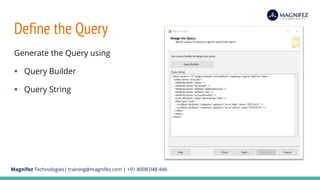
Define the Query
Generate the Query using
 Query Builder
 Query String
Magnifez Technologies| training@magnifez.com | +91 8008 048 446
Select Report Type
Select Report Type:
 Tabular
 Matrix
Magnifez Technologies| training@magnifez.com | +91 8008 048 446
Preview Report
Preview Report
And Make necessary changes.
Save as RDL file.

Developing dynamics 365 reports in dynamics 365

  • 1.
  • 2.
    Magnifez Technologies| training@magnifez.com| +91 8008 048 446 Reporting with Dynamics 365  Dynamics 365 provides out-of-box reports for analysing your business data.  Dynamics 365 reports are based on SQL Server Reporting Services (SSRS).  The report definition (data and layout) of Dynamics 365 CRM reports contained in an RDL file.  Report builders can customize existing OOB reports or create a custom report from scratch.  There are two types of reports in Dynamics 365: SQL Based and Fetch based.
  • 3.
    Magnifez Technologies| training@magnifez.com| +91 8008 048 446 Types of Reports in Dynamics 365 SQL Based Reports  Use SQL queries to securely retrieve data from filtered views  Default reports that are shipped with Dynamics 365 are SQL-based reports. Fetch Based Reports  Use FetchXML queries to retrieve data for reports.  Can deploy fetch-based reports to Dynamics 365 CRM Online as well as on-premises.  All reports that are created using the Report Wizard are Fetch-based
  • 4.
    Magnifez Technologies| training@magnifez.com| +91 8008 048 446 Tools used for Reporting  Microsoft Visual studio 2015 or above  SSDT – Sql Server Data Tools for VS 2015.  Earlier known as Business Intelligent Development Studio (BIDS)  Dynamics 365 Report Authoring Extension for FetchXML reports
  • 5.
    Magnifez Technologies| training@magnifez.com| +91 8008 048 446 Steps involved in Developing SSRS Reports  Install SSDT in Visual Studio  Create a new Report Project.  Connect to the Data Source – Database  Write the query – SQL based / Fetch Based  Build the report.  Deploy the report with Dynamics 365
  • 6.
    Magnifez Technologies| training@magnifez.com| +91 8008 048 446 Create a New Data Source Create a connection to the Database to generate report. Mention following:  Data Source Name.  Connection String: Dynamics 365 CRM Online String.  Data Source Type: • Microsoft Dynamics 365 Fetch
  • 7.
    Magnifez Technologies| training@magnifez.com| +91 8008 048 446 Create a DataSet Develop a query to retrieve the data from filtered views. Dataset : FetchXML Query.
  • 8.
    Magnifez Technologies| training@magnifez.com| +91 8008 048 446 Define the Query Generate the Query using  Query Builder  Query String
  • 9.
    Magnifez Technologies| training@magnifez.com| +91 8008 048 446 Select Report Type Select Report Type:  Tabular  Matrix
  • 10.
    Magnifez Technologies| training@magnifez.com| +91 8008 048 446 Preview Report Preview Report And Make necessary changes. Save as RDL file.