

Canvas Apps
for the
Model-driven
Mind
Jukka Niiranen
Power Platform Saturday Oslo
24.8.2019
Photo by Denny Luan on Unsplash
Agenda
• The PowerApps plan for world domination
• Current reality: Canvas vs. Model-driven apps
• Demo: what can a citizen developer build?
• Tips for building Canvas apps on CDS
• A platform for Makers or for Developers?
Quick intro
• From Helsinki, Finland
• MS Business Applications Product Lead at
Elisa
• Finland’s largest telco & Office 365
partner
• 400 professionals in IT Services
• 30 in MS Business Applications
• Microsoft MVP since 2013
• Blogging at survivingcrm.com
• Tweeting at @jukkan
• No-code XRM guy since 2005
• Started building Canvas apps 1 year ago
The PowerApps
plan for world
domination
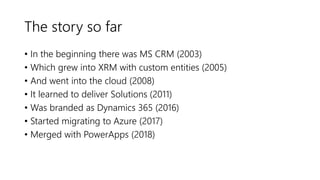
The story so far
• In the beginning there was MS CRM (2003)
• Which grew into XRM with custom entities (2005)
• And went into the cloud (2008)
• It learned to deliver Solutions (2011)
• Was branded as Dynamics 365 (2016)
• Started migrating to Azure (2017)
• Merged with PowerApps (2018)
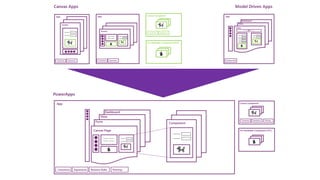
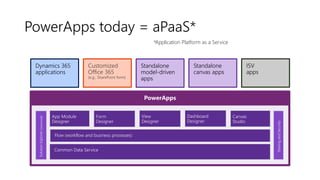
PowerApps today = aPaaS*
PowerApps
Entity Designer
App Module
Designer
Form
Designer
View
Designer
Dashboard
Designer
Flow (workflow and business processes)
Canvas
Studio
Common Data Service
SolutionExplorer(advanced)
Dynamics 365
applications
Standalone
canvas apps
Customized
Office 365
(e.g., SharePoint form)
Standalone
model-driven
apps
SharingandSecurity
ISV
apps
*Application Platform as a Service
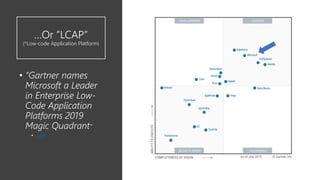
…Or ”LCAP”
(*Low-code Application Platform)
• “Gartner names
Microsoft a Leader
in Enterprise Low-
Code Application
Platforms 2019
Magic Quadrant”
• Link
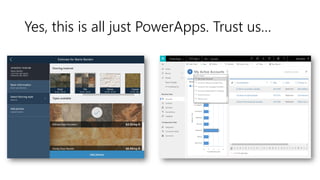
Yes, this is all just PowerApps. Trust us…
The REAL Unified
Client?
“Artificial limitations in app
features will be removed, so that
choosing [File - New App] will
give you model or canvas
experiences and everything will
work across both.”
- Charles Lamanna
https://www.nz365guy.com/power-platform-changes-and-
answering-community-questions-with-charles-lamanna/
1 + 1 + Portals = …1?
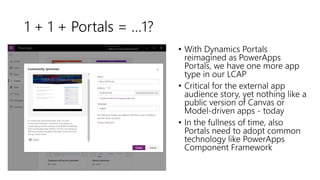
• With Dynamics Portals
reimagined as PowerApps
Portals, we have one more app
type in our LCAP
• Critical for the external app
audience story, yet nothing like a
public version of Canvas or
Model-driven apps - today
• In the fullness of time, also
Portals need to adopt common
technology like PowerApps
Component Framework
Future form factors?
https://twitter.com/clamanna/status/1118760501679235072
Current State:
Canvas
vs.
Model
Photo by Ralph Blvmberg on Unsplash
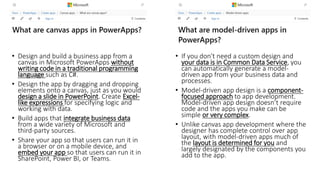
• Design and build a business app from a
canvas in Microsoft PowerApps without
writing code in a traditional programming
language such as C#.
• Design the app by dragging and dropping
elements onto a canvas, just as you would
design a slide in PowerPoint. Create Excel-
like expressions for specifying logic and
working with data.
• Build apps that integrate business data
from a wide variety of Microsoft and
third-party sources.
• Share your app so that users can run it in
a browser or on a mobile device, and
embed your app so that users can run it in
SharePoint, Power BI, or Teams.
• If you don't need a custom design and
your data is in Common Data Service, you
can automatically generate a model-
driven app from your business data and
processes.
• Model-driven app design is a component-
focused approach to app development.
Model-driven app design doesn’t require
code and the apps you make can be
simple or very complex.
• Unlike canvas app development where the
designer has complete control over app
layout, with model-driven apps much of
the layout is determined for you and
largely designated by the components you
add to the app.
The Real shift
in thinking
Old world
• Apps are an afterthought
• Systems are defined primarily as a data
model
• Users are trained to understand how the
system works
New world
• Apps are the sole purpose
• Data flows in & out from various different
sources
• Apps are designed to fit the way how the
users work
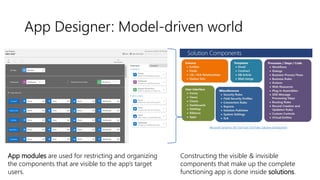
App Designer: Model-driven world
Microsoft Dynamics 365 FastTrack TechTalks: Solution Development
App modules are used for restricting and organizing
the components that are visible to the app’s target
users.
Constructing the visible & invisible
components that make up the complete
functioning app is done inside solutions.
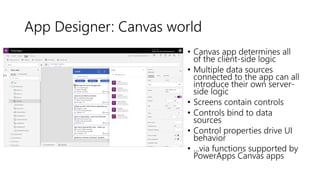
App Designer: Canvas world
• Canvas app determines all
of the client-side logic
• Multiple data sources
connected to the app can all
introduce their own server-
side logic
• Screens contain controls
• Controls bind to data
sources
• Control properties drive UI
behavior
• ...via functions supported by
PowerApps Canvas apps
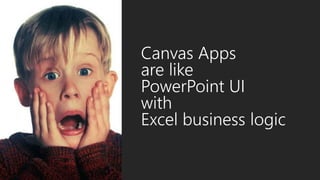
Canvas Apps
are like
PowerPoint UI
with
Excel business logic
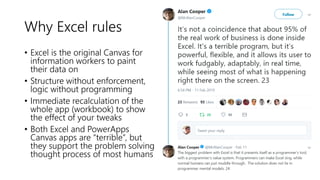
Why Excel rules
• Excel is the original Canvas for
information workers to paint
their data on
• Structure without enforcement,
logic without programming
• Immediate recalculation of the
whole app (workbook) to show
the effect of your tweaks
• Both Excel and PowerApps
Canvas apps are “terrible”, but
they support the problem solving
thought process of most humans
Demo time!
Now it’s…
Tips for building
Canvas
apps on CDS data
Photo by Fas Khan on Unsplash
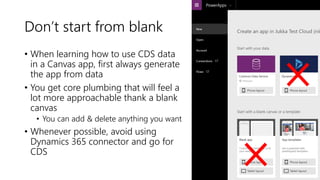
Don’t start from blank
• When learning how to use CDS data
in a Canvas app, first always generate
the app from data
• You get core plumbing that will feel a
lot more approachable thank a blank
canvas
• You can add & delete anything you want
• Whenever possible, avoid using
Dynamics 365 connector and go for
CDS
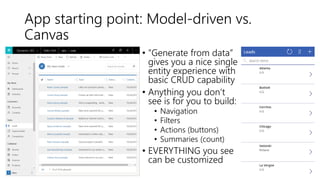
App starting point: Model-driven vs.
Canvas
• ”Generate from data”
gives you a nice single
entity experience with
basic CRUD capability
• Anything you don’t
see is for you to build:
• Navigation
• Filters
• Actions (buttons)
• Summaries (count)
• EVERYTHING you see
can be customized
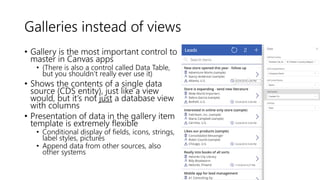
Galleries instead of views
• Gallery is the most important control to
master in Canvas apps
• (There is also a control called Data Table,
but you shouldn’t really ever use it)
• Shows the contents of a single data
source (CDS entity), just like a view
would, but it’s not just a database view
with columns
• Presentation of data in the gallery item
template is extremely flexible
• Conditional display of fields, icons, strings,
label styles, pictures
• Append data from other sources, also
other systems
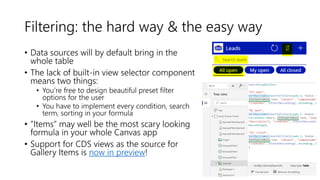
Filtering: the hard way & the easy way
• Data sources will by default bring in the
whole table
• The lack of built-in view selector component
means two things:
• You’re free to design beautiful preset filter
options for the user
• You have to implement every condition, search
term, sorting in your formula
• ”Items” may well be the most scary looking
formula in your whole Canvas app
• Support for CDS views as the source for
Gallery Items is now in preview!
No context = everything is
universally referenceable
• The biggest conceptual difference to Model-driven apps is
that you’re never “in” any entity or any record
• Whichever control or variable you point to in your formula
is the source of record context
• AccountGallery.Selected, CurrentUser,
First(LeadsCollection)
• The whole app on every screen is recalculated after any
change made by the user
Photo by Varya Lapina on Unsplash
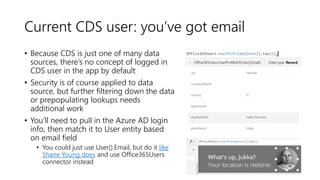
Current CDS user: you’ve got email
• Because CDS is just one of many data
sources, there’s no concept of logged in
CDS user in the app by default
• Security is of course applied to data
source, but further filtering down the data
or prepopulating lookups needs
additional work
• You’ll need to pull in the Azure AD login
info, then match it to User entity based
on email field
• You could just use User().Email, but do it like
Shane Young does and use Office365Users
connector instead
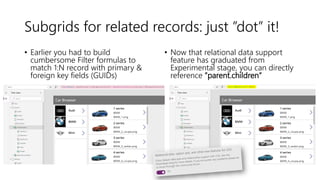
Subgrids for related records: just ”dot” it!
• Earlier you had to build
cumbersome Filter formulas to
match 1:N record with primary &
foreign key fields (GUIDs)
• Now that relational data support
feature has graduated from
Experimental stage, you can directly
reference ”parent.children”
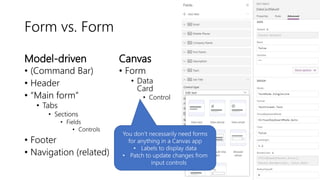
Form vs. Form
Model-driven
• (Command Bar)
• Header
• “Main form”
• Tabs
• Sections
• Fields
• Controls
• Footer
• Navigation (related)
Canvas
• Form
• Data
Card
• Control
You don’t necessarily need forms
for anything in a Canvas app
• Labels to display data
• Patch to update changes from
input controls
Conditional formatting
• Compared to the static format of data inside Model-driven apps,
the rich expressions of Canvas apps were born to highlight
important data
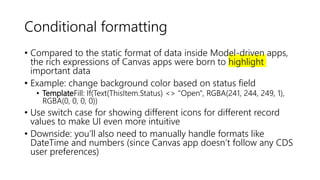
• Example: change background color based on status field
• TemplateFill: If(Text(ThisItem.Status) <> "Open", RGBA(241, 244, 249, 1),
RGBA(0, 0, 0, 0))
• Use switch case for showing different icons for different record
values to make UI even more intuitive
• Downside: you’ll also need to manually handle formats like
DateTime and numbers (since Canvas app doesn’t follow any CDS
user preferences)
Search is great!
(except…)
• Instant filtering of gallery results
once the user starts typing into the
text input field
• Can match the search string with
multiple fields concurrently
• Combine text search with filters set
in other controls
• Except: you can’t search from
complex lookups like ”Customer”
• Dirty hack: copy lookup values to
shadow text fields on CDS side
Photo by Anthony Martino on Unsplash
XRM pain points that can be
addressed in Canvas apps
• Unaware of user’s context: every entity &
command is shown all the time
• Flat navigation structure: everything app area is
seemingly of equal importance
• Pain of reducing choices: hiding actions from
the user is laborious
• Lack of guidance: hard to take users through a
predetermined path (RIP Dialogs)
Photo by Francisco Gonzalez on Unsplash
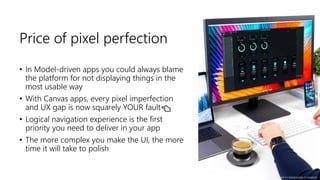
Price of pixel perfection
• In Model-driven apps you could always blame
the platform for not displaying things in the
most usable way
• With Canvas apps, every pixel imperfection
and UX gap is now squarely YOUR fault👈
• Logical navigation experience is the first
priority you need to deliver in your app
• The more complex you make the UI, the more
time it will take to polish
Photo by Daniel Korpai on Unsplash
Remember to play
around with your
apps
• Use temporary labels, galleries to see your
data change as your formulas evolve
• Store stuff in variables, collections to reach
your final composition
• Use a tablet layout for more side-by-side
screen estate, even if you’re targeting
phone screens in final app
• Keep a proper text editor like Notepad++
available at all times to copy & paste the
pieces together
• Have the PowerApps Formula Reference
documentation page on a browser tab
Photo by Taelynn Christopher on Unsplash
A platform
for Makers
or for
Developers?
Photo by Austin Distel on Unsplash
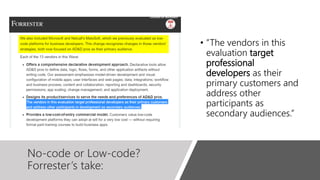
No-code or Low-code?
Forrester’s take:
• ”The vendors in this
evaluation target
professional
developers as their
primary customers and
address other
participants as
secondary audiences.”
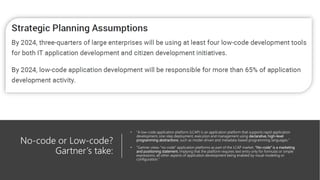
No-code or Low-code?
Gartner’s take:
• ”A low-code application platform (LCAP) is an application platform that supports rapid application
development, one-step deployment, execution and management using declarative, high-level
programming abstractions, such as model-driven and metadata-based programming languages.”
• “Gartner views “no-code” application platforms as part of the LCAP market. “No-code” is a marketing
and positioning statement, implying that the platform requires text entry only for formulas or simple
expressions, all other aspects of application development being enabled by visual modeling or
configuration.”
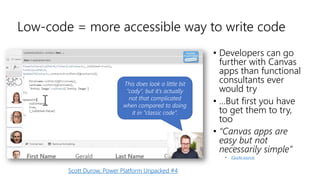
Low-code = more accessible way to write code
This does look a little bit
”cody”, but it’s actually
not that complicated
when compared to doing
it in ”classic code”.
Scott Durow, Power Platform Unpacked #4
• Developers can go
further with Canvas
apps than functional
consultants ever
would try
• …But first you have
to get them to try,
too
• “Canvas apps are
easy but not
necessarily simple”
• (Quote source)
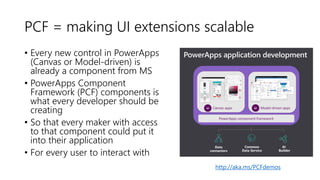
PCF = making UI extensions scalable
• Every new control in PowerApps
(Canvas or Model-driven) is
already a component from MS
• PowerApps Component
Framework (PCF) components is
what every developer should be
creating
• So that every maker with access
to that component could put it
into their application
• For every user to interact with
http://aka.ms/PCFdemos
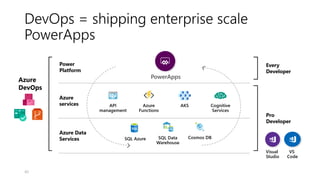
DevOps = shipping enterprise scale
PowerApps
40
We are all
App Makers.
Thanks for listening!

Canvas Apps for the Model-driven mind

  • 1.
    Canvas Apps for the Model-driven Mind JukkaNiiranen Power Platform Saturday Oslo 24.8.2019 Photo by Denny Luan on Unsplash
  • 2.
    Agenda • The PowerAppsplan for world domination • Current reality: Canvas vs. Model-driven apps • Demo: what can a citizen developer build? • Tips for building Canvas apps on CDS • A platform for Makers or for Developers?
  • 3.
    Quick intro • FromHelsinki, Finland • MS Business Applications Product Lead at Elisa • Finland’s largest telco & Office 365 partner • 400 professionals in IT Services • 30 in MS Business Applications • Microsoft MVP since 2013 • Blogging at survivingcrm.com • Tweeting at @jukkan • No-code XRM guy since 2005 • Started building Canvas apps 1 year ago
  • 4.
    The PowerApps plan forworld domination
  • 5.
    The story sofar • In the beginning there was MS CRM (2003) • Which grew into XRM with custom entities (2005) • And went into the cloud (2008) • It learned to deliver Solutions (2011) • Was branded as Dynamics 365 (2016) • Started migrating to Azure (2017) • Merged with PowerApps (2018)
  • 6.
    PowerApps today =aPaaS* PowerApps Entity Designer App Module Designer Form Designer View Designer Dashboard Designer Flow (workflow and business processes) Canvas Studio Common Data Service SolutionExplorer(advanced) Dynamics 365 applications Standalone canvas apps Customized Office 365 (e.g., SharePoint form) Standalone model-driven apps SharingandSecurity ISV apps *Application Platform as a Service
  • 7.
    …Or ”LCAP” (*Low-code ApplicationPlatform) • “Gartner names Microsoft a Leader in Enterprise Low- Code Application Platforms 2019 Magic Quadrant” • Link
  • 8.
    Yes, this isall just PowerApps. Trust us…
  • 9.
    The REAL Unified Client? “Artificiallimitations in app features will be removed, so that choosing [File - New App] will give you model or canvas experiences and everything will work across both.” - Charles Lamanna https://www.nz365guy.com/power-platform-changes-and- answering-community-questions-with-charles-lamanna/
  • 11.
    1 + 1+ Portals = …1? • With Dynamics Portals reimagined as PowerApps Portals, we have one more app type in our LCAP • Critical for the external app audience story, yet nothing like a public version of Canvas or Model-driven apps - today • In the fullness of time, also Portals need to adopt common technology like PowerApps Component Framework
  • 12.
  • 13.
    Current State: Canvas vs. Model Photo byRalph Blvmberg on Unsplash
  • 14.
    • Design andbuild a business app from a canvas in Microsoft PowerApps without writing code in a traditional programming language such as C#. • Design the app by dragging and dropping elements onto a canvas, just as you would design a slide in PowerPoint. Create Excel- like expressions for specifying logic and working with data. • Build apps that integrate business data from a wide variety of Microsoft and third-party sources. • Share your app so that users can run it in a browser or on a mobile device, and embed your app so that users can run it in SharePoint, Power BI, or Teams. • If you don't need a custom design and your data is in Common Data Service, you can automatically generate a model- driven app from your business data and processes. • Model-driven app design is a component- focused approach to app development. Model-driven app design doesn’t require code and the apps you make can be simple or very complex. • Unlike canvas app development where the designer has complete control over app layout, with model-driven apps much of the layout is determined for you and largely designated by the components you add to the app.
  • 15.
    The Real shift inthinking Old world • Apps are an afterthought • Systems are defined primarily as a data model • Users are trained to understand how the system works New world • Apps are the sole purpose • Data flows in & out from various different sources • Apps are designed to fit the way how the users work
  • 16.
    App Designer: Model-drivenworld Microsoft Dynamics 365 FastTrack TechTalks: Solution Development App modules are used for restricting and organizing the components that are visible to the app’s target users. Constructing the visible & invisible components that make up the complete functioning app is done inside solutions.
  • 17.
    App Designer: Canvasworld • Canvas app determines all of the client-side logic • Multiple data sources connected to the app can all introduce their own server- side logic • Screens contain controls • Controls bind to data sources • Control properties drive UI behavior • ...via functions supported by PowerApps Canvas apps
  • 18.
    Canvas Apps are like PowerPointUI with Excel business logic
  • 19.
    Why Excel rules •Excel is the original Canvas for information workers to paint their data on • Structure without enforcement, logic without programming • Immediate recalculation of the whole app (workbook) to show the effect of your tweaks • Both Excel and PowerApps Canvas apps are “terrible”, but they support the problem solving thought process of most humans
  • 20.
  • 21.
    Tips for building Canvas appson CDS data Photo by Fas Khan on Unsplash
  • 22.
    Don’t start fromblank • When learning how to use CDS data in a Canvas app, first always generate the app from data • You get core plumbing that will feel a lot more approachable thank a blank canvas • You can add & delete anything you want • Whenever possible, avoid using Dynamics 365 connector and go for CDS
  • 23.
    App starting point:Model-driven vs. Canvas • ”Generate from data” gives you a nice single entity experience with basic CRUD capability • Anything you don’t see is for you to build: • Navigation • Filters • Actions (buttons) • Summaries (count) • EVERYTHING you see can be customized
  • 24.
    Galleries instead ofviews • Gallery is the most important control to master in Canvas apps • (There is also a control called Data Table, but you shouldn’t really ever use it) • Shows the contents of a single data source (CDS entity), just like a view would, but it’s not just a database view with columns • Presentation of data in the gallery item template is extremely flexible • Conditional display of fields, icons, strings, label styles, pictures • Append data from other sources, also other systems
  • 25.
    Filtering: the hardway & the easy way • Data sources will by default bring in the whole table • The lack of built-in view selector component means two things: • You’re free to design beautiful preset filter options for the user • You have to implement every condition, search term, sorting in your formula • ”Items” may well be the most scary looking formula in your whole Canvas app • Support for CDS views as the source for Gallery Items is now in preview!
  • 26.
    No context =everything is universally referenceable • The biggest conceptual difference to Model-driven apps is that you’re never “in” any entity or any record • Whichever control or variable you point to in your formula is the source of record context • AccountGallery.Selected, CurrentUser, First(LeadsCollection) • The whole app on every screen is recalculated after any change made by the user Photo by Varya Lapina on Unsplash
  • 27.
    Current CDS user:you’ve got email • Because CDS is just one of many data sources, there’s no concept of logged in CDS user in the app by default • Security is of course applied to data source, but further filtering down the data or prepopulating lookups needs additional work • You’ll need to pull in the Azure AD login info, then match it to User entity based on email field • You could just use User().Email, but do it like Shane Young does and use Office365Users connector instead
  • 28.
    Subgrids for relatedrecords: just ”dot” it! • Earlier you had to build cumbersome Filter formulas to match 1:N record with primary & foreign key fields (GUIDs) • Now that relational data support feature has graduated from Experimental stage, you can directly reference ”parent.children”
  • 29.
    Form vs. Form Model-driven •(Command Bar) • Header • “Main form” • Tabs • Sections • Fields • Controls • Footer • Navigation (related) Canvas • Form • Data Card • Control You don’t necessarily need forms for anything in a Canvas app • Labels to display data • Patch to update changes from input controls
  • 30.
    Conditional formatting • Comparedto the static format of data inside Model-driven apps, the rich expressions of Canvas apps were born to highlight important data • Example: change background color based on status field • TemplateFill: If(Text(ThisItem.Status) <> "Open", RGBA(241, 244, 249, 1), RGBA(0, 0, 0, 0)) • Use switch case for showing different icons for different record values to make UI even more intuitive • Downside: you’ll also need to manually handle formats like DateTime and numbers (since Canvas app doesn’t follow any CDS user preferences)
  • 31.
    Search is great! (except…) •Instant filtering of gallery results once the user starts typing into the text input field • Can match the search string with multiple fields concurrently • Combine text search with filters set in other controls • Except: you can’t search from complex lookups like ”Customer” • Dirty hack: copy lookup values to shadow text fields on CDS side Photo by Anthony Martino on Unsplash
  • 32.
    XRM pain pointsthat can be addressed in Canvas apps • Unaware of user’s context: every entity & command is shown all the time • Flat navigation structure: everything app area is seemingly of equal importance • Pain of reducing choices: hiding actions from the user is laborious • Lack of guidance: hard to take users through a predetermined path (RIP Dialogs) Photo by Francisco Gonzalez on Unsplash
  • 33.
    Price of pixelperfection • In Model-driven apps you could always blame the platform for not displaying things in the most usable way • With Canvas apps, every pixel imperfection and UX gap is now squarely YOUR fault👈 • Logical navigation experience is the first priority you need to deliver in your app • The more complex you make the UI, the more time it will take to polish Photo by Daniel Korpai on Unsplash
  • 34.
    Remember to play aroundwith your apps • Use temporary labels, galleries to see your data change as your formulas evolve • Store stuff in variables, collections to reach your final composition • Use a tablet layout for more side-by-side screen estate, even if you’re targeting phone screens in final app • Keep a proper text editor like Notepad++ available at all times to copy & paste the pieces together • Have the PowerApps Formula Reference documentation page on a browser tab Photo by Taelynn Christopher on Unsplash
  • 35.
    A platform for Makers orfor Developers? Photo by Austin Distel on Unsplash
  • 36.
    No-code or Low-code? Forrester’stake: • ”The vendors in this evaluation target professional developers as their primary customers and address other participants as secondary audiences.”
  • 37.
    No-code or Low-code? Gartner’stake: • ”A low-code application platform (LCAP) is an application platform that supports rapid application development, one-step deployment, execution and management using declarative, high-level programming abstractions, such as model-driven and metadata-based programming languages.” • “Gartner views “no-code” application platforms as part of the LCAP market. “No-code” is a marketing and positioning statement, implying that the platform requires text entry only for formulas or simple expressions, all other aspects of application development being enabled by visual modeling or configuration.”
  • 38.
    Low-code = moreaccessible way to write code This does look a little bit ”cody”, but it’s actually not that complicated when compared to doing it in ”classic code”. Scott Durow, Power Platform Unpacked #4 • Developers can go further with Canvas apps than functional consultants ever would try • …But first you have to get them to try, too • “Canvas apps are easy but not necessarily simple” • (Quote source)
  • 39.
    PCF = makingUI extensions scalable • Every new control in PowerApps (Canvas or Model-driven) is already a component from MS • PowerApps Component Framework (PCF) components is what every developer should be creating • So that every maker with access to that component could put it into their application • For every user to interact with http://aka.ms/PCFdemos
  • 40.
    DevOps = shippingenterprise scale PowerApps 40
  • 41.
    We are all AppMakers. Thanks for listening!