Name________________________________________              Date______________________
Mrs. Labuski & Mrs. Portsmore Per________                 Scientific Calculator


Make 3 observations about the calculator.

1.


2.


3.


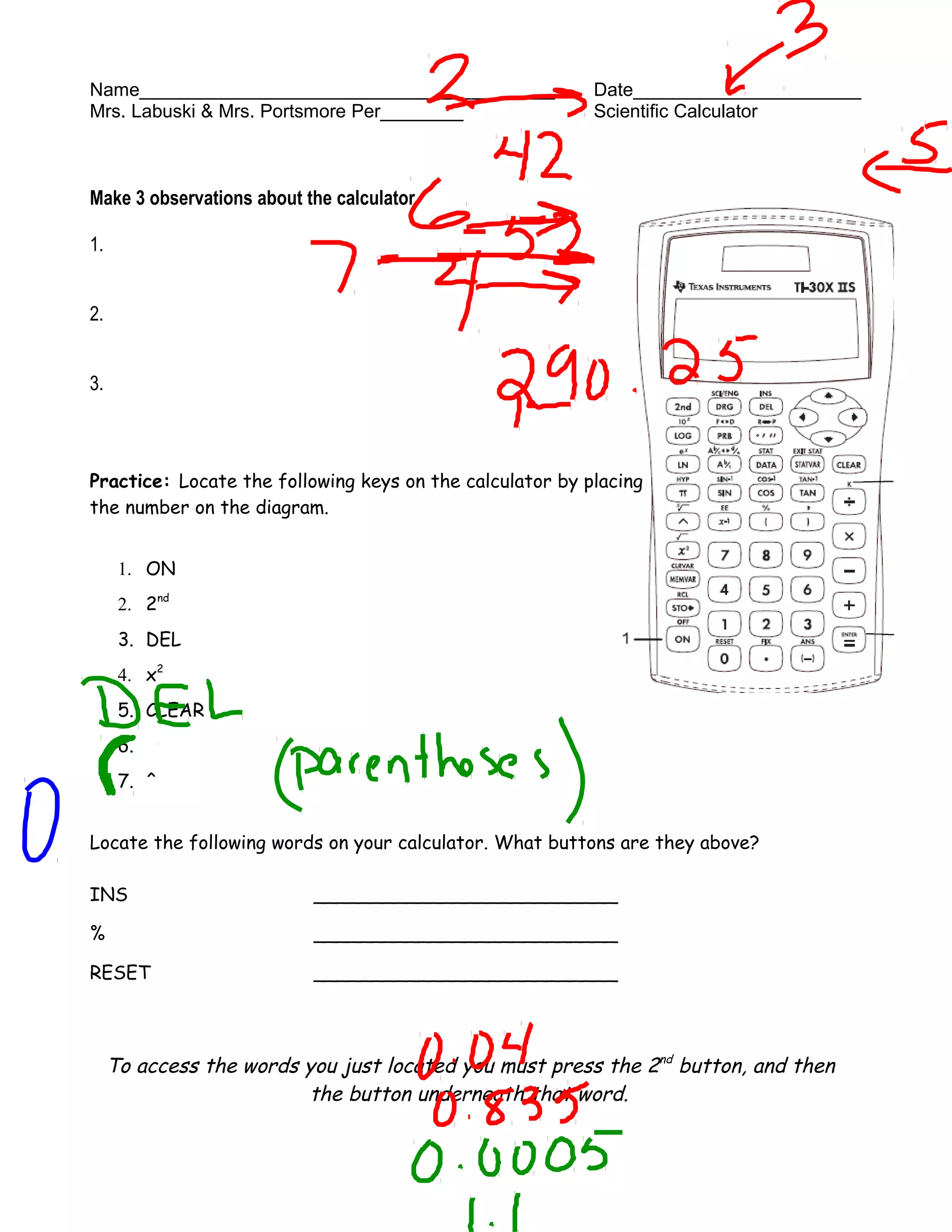
Practice: Locate the following keys on the calculator by placing
the number on the diagram.


      1. ON
      2. 2nd
      3. DEL
      4. x2
      5. CLEAR
      6.     π


      7. ^


Locate the following words on your calculator. What buttons are they above?

INS                        __________________________

%                          __________________________

RESET                      __________________________


     To access the words you just located you must press the 2nd button, and then
                         the button underneath that word.
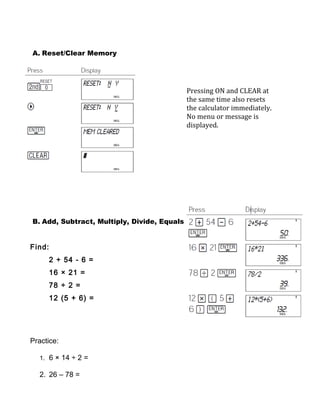
A. Reset/Clear Memory


                                             Pressing ON and CLEAR at
                                             the same time also resets
                                             the calculator immediately.
                                             No menu or message is
                                             displayed.


B. Add, Subtract, Multiply, Divide, Equals


Find:
        2 + 54 - 6 =
        16 × 21 =
        78 ÷ 2 =
        12 (5 + 6) =


Practice:

  1. 6 × 14 ÷ 2 =

  2. 26 – 78 =
3. 9 + 45 × 12.5 ÷ 2 =
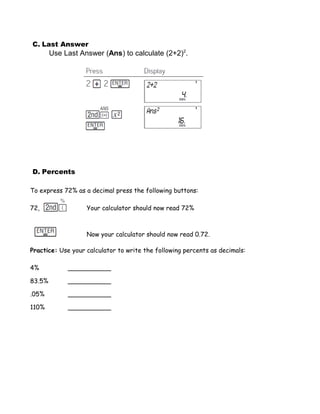
C. Last Answer
        Use Last Answer (Ans) to calculate (2+2)2.


D. Percents

To express 72% as a decimal press the following buttons:

72,                Your calculator should now read 72%


                   Now your calculator should now read 0.72.

Practice: Use your calculator to write the following percents as decimals:

4%           ___________

83.5%        ___________

.05%         ___________

110%         ___________
E. SYNTAX ERROR

Type the following buttons into your calculator:
7,+,+,8, ENTER

What appears on your calculator? Why do you think that happened?


When your calculator reads “_____________” that means you have made a
____________.

While the calculator still reads “SYNTAX Error” press the CLEAR button. Where is the
cursor now?______________________________________________________.


   By pressing the CLEAR button the calculator will take you to where the mistake
  was. For example, we pressed the plus sign too many times which is why the cursor
                        is flashing over the second plus sign.


While the cursor is flashing press the DEL button. What happened?
_____________________________________________________________.
Now press ENTER.
Your calculator should now read 15.


         The DEL button will erase whatever symbol/number the cursor is flashing over.


Practice: Type the following “incorrect” buttons into your calculator. Use the methods
you just learned to correct your mistake.

You meant to write 8-9, but instead you incorrectly typed 8,-,-,9

You meant to write 20÷4, but instead you incorrectly typed 20,*,/,4

Did you notice that in order to get rid of the multiplication sign you had to press the
left arrow located near the top right corner of the calculator?


 The Left/Right arrows allow you to move around in an expression that you typed in.

Calculator intro day 1

  • 1.
    Name________________________________________ Date______________________ Mrs. Labuski & Mrs. Portsmore Per________ Scientific Calculator Make 3 observations about the calculator. 1. 2. 3. Practice: Locate the following keys on the calculator by placing the number on the diagram. 1. ON 2. 2nd 3. DEL 4. x2 5. CLEAR 6. π 7. ^ Locate the following words on your calculator. What buttons are they above? INS __________________________ % __________________________ RESET __________________________ To access the words you just located you must press the 2nd button, and then the button underneath that word.
  • 2.
    A. Reset/Clear Memory Pressing ON and CLEAR at the same time also resets the calculator immediately. No menu or message is displayed. B. Add, Subtract, Multiply, Divide, Equals Find: 2 + 54 - 6 = 16 × 21 = 78 ÷ 2 = 12 (5 + 6) = Practice: 1. 6 × 14 ÷ 2 = 2. 26 – 78 =
  • 3.
    3. 9 +45 × 12.5 ÷ 2 =
  • 4.
    C. Last Answer Use Last Answer (Ans) to calculate (2+2)2. D. Percents To express 72% as a decimal press the following buttons: 72, Your calculator should now read 72% Now your calculator should now read 0.72. Practice: Use your calculator to write the following percents as decimals: 4% ___________ 83.5% ___________ .05% ___________ 110% ___________
  • 5.
    E. SYNTAX ERROR Typethe following buttons into your calculator: 7,+,+,8, ENTER What appears on your calculator? Why do you think that happened? When your calculator reads “_____________” that means you have made a ____________. While the calculator still reads “SYNTAX Error” press the CLEAR button. Where is the cursor now?______________________________________________________. By pressing the CLEAR button the calculator will take you to where the mistake was. For example, we pressed the plus sign too many times which is why the cursor is flashing over the second plus sign. While the cursor is flashing press the DEL button. What happened? _____________________________________________________________. Now press ENTER. Your calculator should now read 15. The DEL button will erase whatever symbol/number the cursor is flashing over. Practice: Type the following “incorrect” buttons into your calculator. Use the methods you just learned to correct your mistake. You meant to write 8-9, but instead you incorrectly typed 8,-,-,9 You meant to write 20÷4, but instead you incorrectly typed 20,*,/,4 Did you notice that in order to get rid of the multiplication sign you had to press the left arrow located near the top right corner of the calculator? The Left/Right arrows allow you to move around in an expression that you typed in.