SCIENTIFIC
CALCULATOR
OPERATIONGUIDE
SCIENTIFIC
CALCULATOR
OPERATIONGUIDE
<W Series>
1
CONTENTS
HOW TOOPERATE
Read Before Using
Key layout/Reset switch 2
Display pattern 3
Display format 3
Exponent display 4
Angular unit 5
Function and Key Operation
ON/OFF, entry correction keys 6
Data entry keys 7
Random key
Modify key
8
Basic arithmetic keys, parentheses 10
Percent 11
Inverse, square, cube, xth power of y,
square root, cube root, xth root of y 12
10 to the power of x, common logarithm 13
e to the power of x, natural logarithm 14
Factorials 15
Permutations, combinations 16
Time calculation 17
Fractional calculations 18
Memory calculations 19
Last answer memory 20
Trigonometric functions 21
Arc trigonometric functions 22
Hyperbolic functions 23
Coordinate conversion 24
25
STATISTICS FUNCTION
Binary, pental, octal, decimal, and
hexadecimal operations (N-base)
Data input and correction 26
“ANS” keys for 1-variable statistics 27
“ANS” keys for 2-variable statistics 31
9
~
2
How to Operate
2nd function key
Pressingthis key will enable the functions
written in orange above the calculator
buttons.
ON/C, OFF key
Direct function
Mode key
This calculator can operate in three different
modes as follows.
<Example>
W ritten in orange above
the ON/C key
<Power on> <Power off>
1 . K E Y L AY OU T
If the calculator fails to operate normally,
press the reset switch on the back to
reinitialise the unit. The display format
and calculation mode will return to their
initial settings.
RESET
2 . R E S E T S W I T C H
Reset switch RESET
2nd function
N OT E:
Pressingthe reset switch
will erase any data stored
in memory.
≈Read B efore Using≈
This operation guide has been written based on the EL-531W , EL-509W , and EL-531W H
models. Some functions described here are not featured on other models. In addition,
key operations and symbols on the display may differ accordingto the model.
•Mode = 0;normal mode for
performingnormal arithmetic
and function calculations.
[Normal mode]
•Mode = 1;STAT-0 mode for
performing1-variable statisti-
cal calculations.
[STAT-0 mode]
•Mode = 1; STAT-1–6 mode
for performing2-variable
statistical calculations.
[STAT-1–6 mode]
W hen changingto the statistical sub-mode,
press the correspondingnumber key after
performingthe operation to select the statistics
mode (press ).
(LINE): Linear regression calculation
(QUAD): Quadratic regression calculation
(EXP): Exponential regression calculation
(LOG): Logarithmic regression calculation
(PW R): Power regression calculation
(INV): Inverse regression calculation
3
For convenient and easy operation, this model can be used in one of four display modes.
The selected display status is shown in the upper part of the display (Format Indicator).
Note: If more 0’s (zeros) than needed are displayed when the ON/C key is pressed, check
whether or not the calculator is set to a Special Display Format.
• Floatingdecimal point format (no symbol is displayed)
Valid values beyond the maximum range are displayed in the form of a [10-digit
(mantissa) + 2-digit (exponent)]
• Fixed decimal point format (FIX is displayed)
Displays the fractional part of the calculation result accordingto the specified
number of decimal places.
• Scientific notation (SCI is displayed)
Frequently used in science to handle extremely small or large numbers.
• Engineeringscientific notation (ENG is displayed)
Convenient for convertingbetween different units.
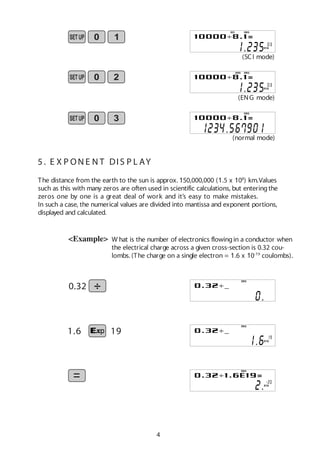
(specifies normal mode)
<Example> Let’s compare the display result of
[10000 8. 1 =] in each display format.
4 . DIS P L AY F OR MAT A N D
DE C IMA L S E T T IN G F U N C T I ON
3 . DIS P L AY PAT T E R N
Initial display
DEG
The actual display does not appear like this.
This illustration is for explanatory purposes only.
10000 8.1
(normal mode)
DEG
Note: The calculator has two settings for displayinga
floatingpoint number: NORM1 (default setting) and
NORM2. In each display setting, a number is
automatically displayed in scientific notation outside a
preset range:
• NORM1: 0.000000001 x 9999999999
• NORM2: 0.01 x 9999999999
(FIX modeTAB = 3)
DEGFIX
4
5 . E X P ON E N T DIS P L AY
The distance from the earth to the sun is approx. 150,000,000 (1.5 x 10⁸
) km.Values
such as this with many zeros are often used in scientific calculations, but enteringthe
zeros one by one is a great deal of work and it’s easy to make mistakes.
In such a case, the numerical values are divided into mantissa and exponent portions,
displayed and calculated.
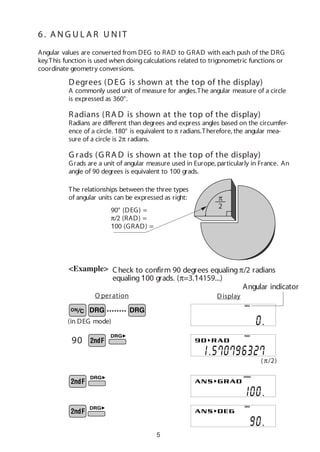
<Example> W hat is the number of electronics flowingin a conductor when
the electrical charge across a given cross-section is 0.32 cou-
lombs. (The charge on a single electron = 1.6 x 10⁻¹⁹
coulombs).
0.32
DEG
(SCI mode)
SCI DEG
X10
(ENG mode)
ENG DEG
X10
(normal mode)
DEG
191.6
DEG
X10
DEG
X10
5
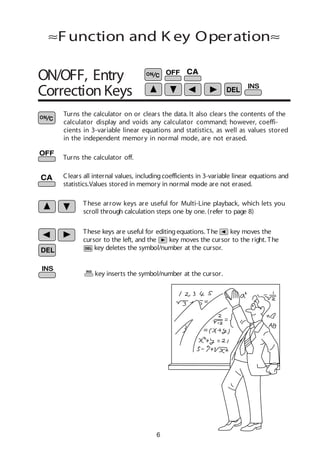
Angular values are converted from DEG to RAD to GRAD with each push of the DRG
key.This function is used when doingcalculations related to trigonometric functions or
coordinate geometry conversions.
(π/2)
<Example>
6 . A N G U L A R U N IT
(in DEG mode)
••••••••
O peration Display
90° (DEG) =
π/2 (RAD) =
100 (GRAD) =
π
2
The relationships between the three types
of angular units can be expressed as right:
Check to confirm 90 degrees equalingπ/2 radians
equaling100 grads. (π=3.14159...)
90
DEG
RAD
GRAD
DEG
Angular indicator
Degrees (DEG is shown at the top of the display)
A commonly used unit of measure for angles.The angular measure of a circle
is expressed as 360°.
Radians (RA D is shown at the top of the display)
Radians are different than degrees and express angles based on the circumfer-
ence of a circle. 180° is equivalent to π radians.Therefore, the angular mea-
sure of a circle is 2π radians.
G rads (G RA D is shown at the top of the display)
Grads are a unit of angular measure used in Europe, particularly in France. An
angle of 90 degrees is equivalent to 100 grads.
6
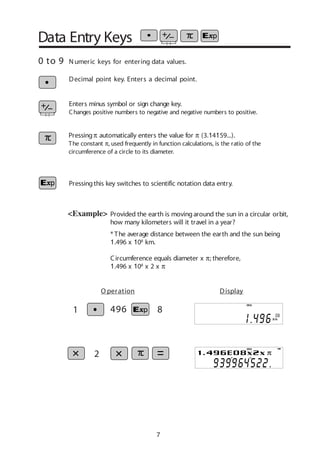
Turns the calculator on or clears the data. It also clears the contents of the
calculator display and voids any calculator command; however, coeffi-
cients in 3-variable linear equations and statistics, as well as values stored
in the independent memory in normal mode, are not erased.
Turns the calculator off.
Clears all internal values, includingcoefficients in 3-variable linear equations and
statistics.Values stored in memory in normal mode are not erased.
These arrow keys are useful for Multi-Line playback, which lets you
scroll through calculation steps one by one. (refer to page 8)
These keys are useful for editingequations. The key moves the
cursor to the left, and the key moves the cursor to the right. The
key deletes the symbol/number at the cursor.
ON/OFF, Entry
Correction Keys
≈Function and K ey Operation≈
key inserts the symbol/number at the cursor.
7
Data Entry Keys
Provided the earth is movingaround the sun in a circular orbit,
how many kilometers will it travel in a year?
* The average distance between the earth and the sun being
1.496 x 10⁸
km.
Circumference equals diameter x π; therefore,
1.496 x 108
x 2 x π
0 to 9
Pressingπ automatically enters the value for π (3.14159...).
The constant π, used frequently in function calculations, is the ratio of the
circumference of a circle to its diameter.
<Example>
Numeric keys for entering data values.
Decimal point key. Enters a decimal point.
Enters minus symbol or sign change key.
Changes positive numbers to negative and negative numbers to positive.
Pressingthis key switches to scientific notation data entry.
O peration Display
2
1 496 8
DEG
X10
DEG
8
Random
Generates random numbers.
Random numbers are three-decimal-place values between 0.000 and 0.999.Usingthis
function enables the user to obtain unbiased samplingdata derived from random
values generated by the calculator.
<Example>
A PPLIC AT IO N S:
Building sample sets for statistics or research.
0. * * * (A random number has been generated.)
[ Random Dice]
To simulate a die-rolling, a random integer between 1 and 6 can be generated by
pressing . To generate the next random dice number, press .
[ Random C oin]
To simulate a coin flip, 0 (heads) or 1 (tails) can be randomly generated by pressing
. To generate the next random coin number, press .
[ Random Integer]
An integer between 0 and 99 can be generated randomly by pressing .
To generate the next random integer, press .
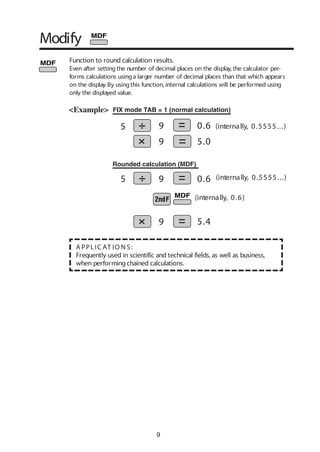
9
Function to round calculation results.
Even after settingthe number of decimal places on the display, the calculator per-
forms calculations usinga larger number of decimal places than that which appears
on the display. By usingthis function, internal calculations will be performed using
only the displayed value.
A PPLIC AT IO N S:
Frequently used in scientific and technical fields, as well as business,
when performingchained calculations.
<Example>
Rounded calculation (MDF)
FIX mode TAB = 1 (normal calculation)
5.0
0.6
0.6
5.4
5 9
9
5 9
9
Modify
(internally, 0.6)
(internally, 0.5555...)
10
Basic Arithmetic
Keys, Parentheses
Used to specify calculations in which certain operations have precedence.
You can make addition and subtraction operations have precedence over
multiplication and division by enclosingthem in parentheses.
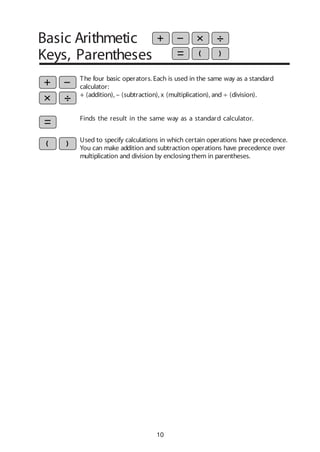
The four basic operators. Each is used in the same way as a standard
calculator:
+ (addition), – (subtraction), x (multiplication), and ÷ (division).
Finds the result in the same way as a standard calculator.
11
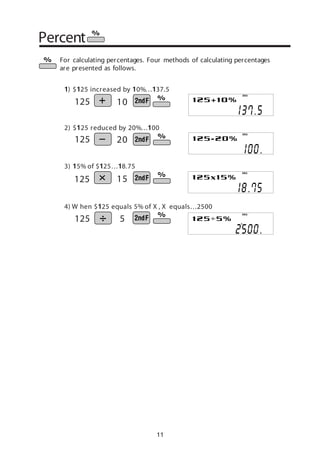
For calculating percentages. Four methods of calculating percentages
are presented as follows.
1) $125 increased by 10%…137.5
2) $125 reduced by 20%…100
3) 15% of $125…18.75
4) W hen $125 equals 5% of X , X equals…2500
125 10
125 20
125 15
125 5
Percent
DEG
DEG
DEG
DEG
12
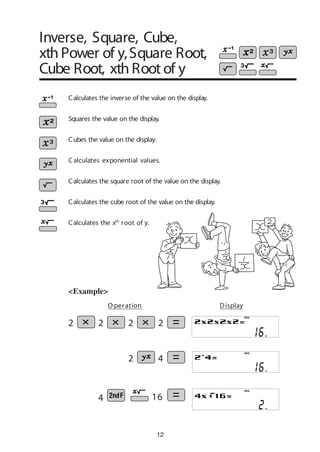
<Example>
Calculates the square root of the value on the display.
Calculates the inverse of the value on the display.
Squares the value on the display.
Cubes the value on the display.
Calculates the cube root of the value on the display.
Calculates the xth
root of y.
2 4
4 16
DEG
DEG
DEG
O peration Display
C alculates exponential values.
2 2 2 2
Inverse, Square, Cube,
xth Power of y,Square Root,
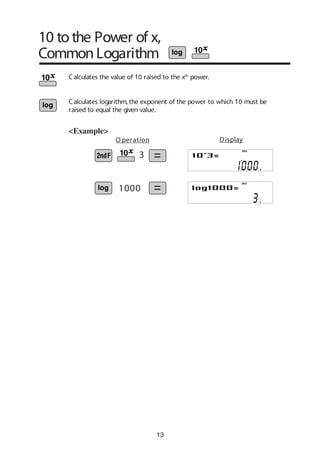
Cube Root, xth Root of y
13
10 to the Power of x,
Common Logarithm
<Example>
Calculates the value of 10 raised to the xth
power.
Calculates logarithm, the exponent of the power to which 10 must be
raised to equal the given value.
1000
3
O peration Display
DEG
DEG
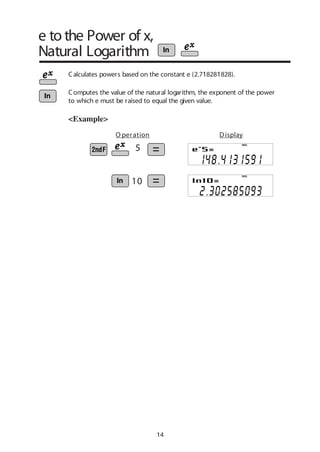
14
e to the Power of x,
Natural Logarithm
Calculates powers based on the constant e (2.718281828).
<Example>
5
10
O peration Display
DEG
DEG
Computes the value of the natural logarithm, the exponent of the power
to which e must be raised to equal the given value.
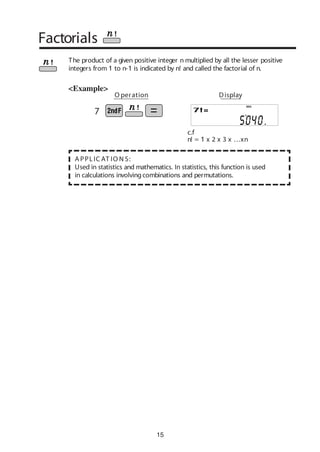
15
Factorials
The product of a given positive integer n multiplied by all the lesser positive
integers from 1 to n-1 is indicated by n! and called the factorial of n.
A PPLIC AT IO N S:
Used in statistics and mathematics. In statistics, this function is used
in calculations involvingcombinations and permutations.
<Example>
c.f
n! = 1 x 2 x 3 x …xn
O peration Display
DEG
7
6 4
6 4
16
A PPLIC AT IO N S:
Used in statistics (probability calculations) and in simulation hypoth-
eses in fields such as medicine, pharmaceutics, and physics. Also,
can be used to determine the chances of winning in lotteries.
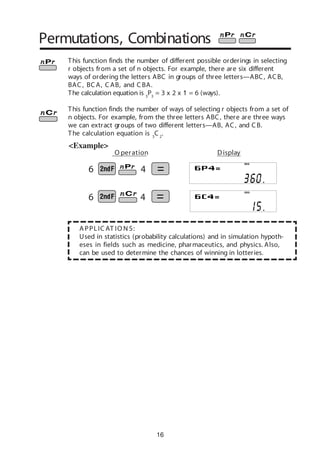
Permutations, Combinations
<Example>
This function finds the number of different possible orderings in selecting
r objects from a set of n objects. For example, there are six different
ways of ordering the letters ABC in groups of three letters—ABC, ACB,
BAC , BC A, C AB, and C BA.
The calculation equation is 3
P3
= 3 x 2 x 1 = 6 (ways).
This function finds the number of ways of selecting r objects from a set of
n objects. For example, from the three letters ABC, there are three ways
we can extract groups of two different letters—AB, AC, and CB.
The calculation equation is 3
C 2
.
DEG
DEG
O peration Display
17
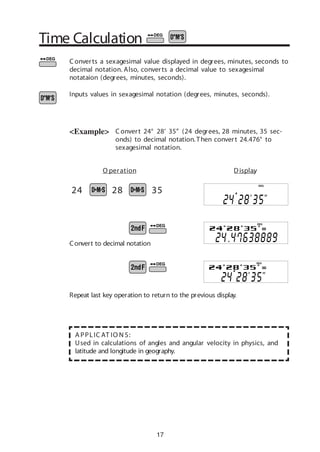
Time Calculation
C onvert 24° 28’ 35” (24 degrees, 28 minutes, 35 sec-
onds) to decimal notation.Then convert 24.476° to
sexagesimal notation.
C onverts a sexagesimal value displayed in degrees, minutes, seconds to
decimal notation. Also, converts a decimal value to sexagesimal
notataion (degrees, minutes, seconds).
Inputs values in sexagesimal notation (degrees, minutes, seconds).
<Example>
A PPLIC AT IO N S:
Used in calculations of angles and angular velocity in physics, and
latitude and longitude in geography.
24 28 35
O peration Display
Repeat last key operation to return to the previous display.
Convert to decimal notation
DEG
DEG
DEG
18
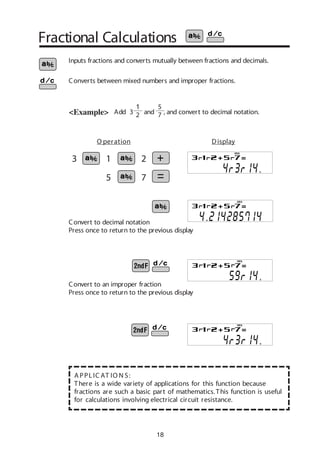
Fractional Calculations
Add 3 and , and convert to decimal notation.<Example>
Inputs fractions and converts mutually between fractions and decimals.
Converts between mixed numbers and improper fractions.
3 1 2
5 7
Convert to an improper fraction
Press once to return to the previous display
Convert to decimal notation
Press once to return to the previous display
A PPLIC AT IO N S:
There is a wide variety of applications for this function because
fractions are such a basic part of mathematics.This function is useful
for calculations involving electrical circuit resistance.
DEG
DEG
DEG
O peration Display
DEG
1
2
5
7
19
Stores displayed values in memories A~F, X,Y, M.
Recalls values stored inA~F, X,Y, M.
Adds the displayed value to the value in the independent memory M.
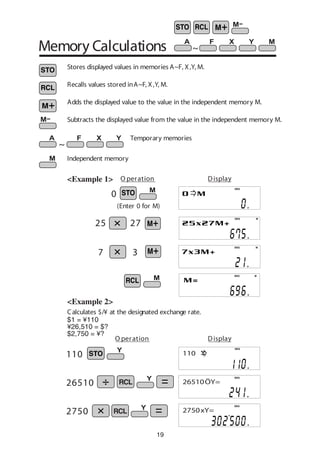
Memory Calculations
<Example 1>
25 27
7 3
DEG
MDEG
MDEG
MDEG
O peration Display
~
Temporary memories
~
(Enter 0 for M)
0
<Example 2>
Subtracts the displayed value from the value in the independent memory M.
Independent memory
O peration Display
Calculates $/¥ at the designated exchange rate.
110
26510
2750
$1 = ¥110
¥26,510 = $?
$2,750 = ¥?
DEG
110 Y
DEG
26510ÖY=
DEG
2750xY=
20
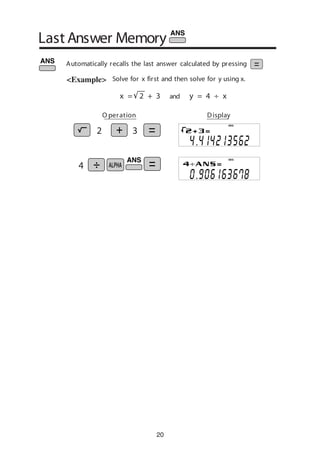
Solve for x first and then solve for y using x.
Last Answer Memory
<Example>
y = 4 ÷ xandx = 2 + 3
O peration Display
DEG
DEG
2 3
4
Automatically recalls the last answer calculated by pressing
21
The angle from a point 15 meters from
a buildingto the highest floor of the
buildingis 45°. How tall is the building?
Trigonometric Functions
[DEG mode]
V
A PPLIC AT IO N S:
Trigonometric functions are useful in mathematics and various engineering
calculations.They are often used in astronomical observations, civil engi-
neeringand in calculations involvingelectrical circuits, as well as in calcula-
tions for physics such as parabolic motion and wave motion.
C alculates the sine of an angle.
C alculates the cosine of an angle.
C alculates the tangent of an angle.
<Example>
45 15
iew point
1 5
O peration Display
sinθ =
b
a
tanθ =
b
c
cosθ =
c
a
a
c
b
θ
DEG
Trigonometric functions determine the ratio of three sides
of a right triangle. The combinations of the three sides are
sin, cos, and tan. Their relations are:
22
Arc trigonometric functions, the inverse of trigonomet-
ric functions, are used to determine an angle from ratios
of a right triangle.The combinations of the three sides
are sin-1
, cos-1
, and tan-1
.Their relations are;
Arc Trigonometric Functions
[DEG mode]
(arc sine) Determines an angle based on the ratio
b/a of two sides of a right triangle.
(arc cosine) Determines an angle based on the ratio
c/a for two sides of a right triangle.
(arc tangent) Determines an angle based on the
ratio a/b for two sides of a right triangle.
<Example>
At what angle should an airplane climb in order
to climb 80 meters in 100 meters?
80
100
O peration Display
θ = sin-1 b
a
θ = cos-1
c
a
θ = tan-1
b
c
c
a
b
θ
DEG
23
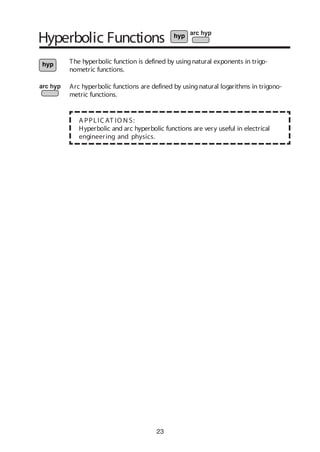
Hyperbolic Functions
The hyperbolic function is defined by usingnatural exponents in trigo-
nometric functions.
A PPLIC AT IO N S:
Hyperbolic and arc hyperbolic functions are very useful in electrical
engineering and physics.
Arc hyperbolic functions are defined by usingnatural logarithms in trigono-
metric functions.
24
Coordinate Conversion
Rectangular coordinates
P (x,y)
y
xo
y
x
y
P (r,θ)
xo
r
Polar coordinates
θ
Converts rectangular coordinates to polar coordinates (x, y r, θ)
Converts polar coordinates to rectangular coordinates (r, θ x, y)
Splits data used for dual-variable data input.
Displays r, θ and x, y. (Cx y or r θ)
←
←
←←
<Example> Determine the polar coordinates (r, θ) when the rectangu-
lar coordinates of Point P are (x = 7, y = 3).
[ DEG mode]
A PPLIC AT IO N S:
Coordinate conversion is often used in mathematics and engineering, espe-
cially for impedance calculations in electronics and electrical engineering.
7 3
7.6 23.2
O peration Display
DEG
DEG
DEG
DEG
←←
25
Binary, Pental, Octal,
Decimal, andHexadecimal
Operations (N-Base)
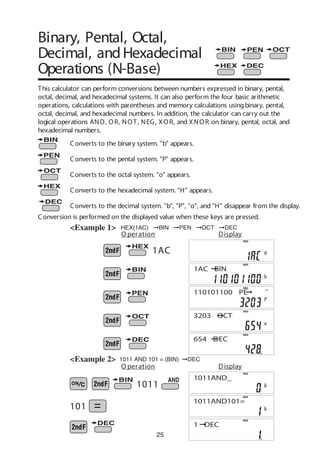
This calculator can perform conversions between numbers expressed in binary, pental,
octal, decimal, and hexadecimal systems. It can also perform the four basic arithmetic
operations, calculations with parentheses and memory calculations usingbinary, pental,
octal, decimal, and hexadecimal numbers. In addition, the calculator can carry out the
logical operations AND, OR, NOT, NEG, XOR, and XNOR on binary, pental, octal, and
hexadecimal numbers.
Converts to the binary system. "b" appears.
Converts to the pental system. "P" appears.
Converts to the octal system. "o" appears.
Converts to the hexadecimal system. "H" appears.
Converts to the decimal system. "b", "P", "o", and "H" disappear from the display.
Conversion is performed on the displayed value when these keys are pressed.
<Example 1>
O peration Display
HEX(1AC) ©BIN ©PEN ©OCT ©DEC
1011 AND 101 = (BIN) ©DEC<Example 2>
DEG
3203©OCT
DEG
654©DEC
DEG
DEG
1011AND_
DEG
1011AND101=
DEG
1©DEC
1AC
1011
101
O peration Display
DEG
110101100©PE
DEG
1AC©BIN
26
DEG STAT
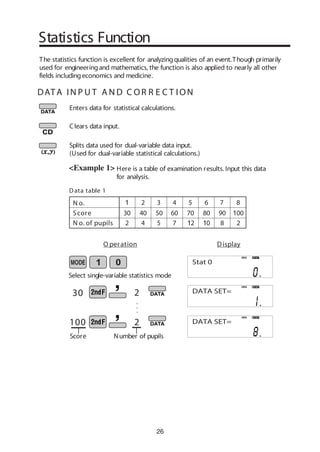
Here is a table of examination results. Input this data
for analysis.
<Example 1>
Enters data for statistical calculations.
Clears data input.
Splits data used for dual-variable data input.
(Used for dual-variable statistical calculations.)
30 2
100 2
.
.
.
O peration Display
N o. 1 2 3 4 5 6 7 8
Score 30 40 50 60 70 80 90 100
N o. of pupils 2 4 5 7 12 10 8 2
Data table 1
Select single-variable statistics mode
The statistics function is excellent for analyzingqualities of an event.Though primarily
used for engineeringand mathematics, the function is also applied to nearly all other
fields includingeconomics and medicine.
Statistics Function
DEG STAT
Score Number of pupils
DAT A I N P U T A N D C OR R E C T ION
DEG STAT
Stat 0
DATA SET=
DATA SET=
27
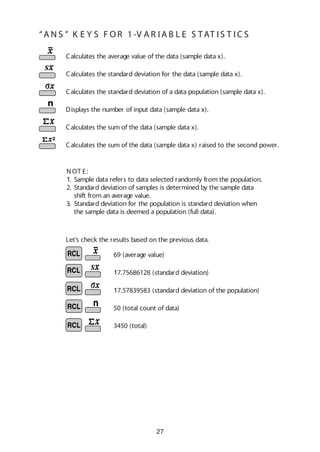
Calculates the average value of the data (sample data x).
Calculates the standard deviation for the data (sample data x).
Calculates the standard deviation of a data population (sample data x).
Displays the number of input data (sample data x).
Calculates the sum of the data (sample data x).
Calculates the sum of the data (sample data x) raised to the second power.
Let’s check the results based on the previous data.
69 (average value)
17.75686128 (standard deviation)
17.57839583 (standard deviation of the population)
50 (total count of data)
3450 (total)
N OT E:
1. Sample data refers to data selected randomly from the population.
2. Standard deviation of samples is determined by the sample data
shift from an average value.
3. Standard deviation for the population is standard deviation when
the sample data is deemed a population (full data).
“A N S ” K E Y S F OR 1 -V A R I A B L E S TAT I S T IC S
28
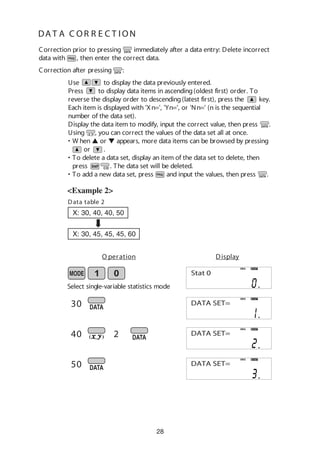
DA T A C OR R E C T ION
<Example 2>
30
40
50
2
O peration Display
Select single-variable statistics mode
DEG STAT
Stat 0
DEG STAT
DATA SET=
Correction after pressing :
Correction prior to pressing immediately after a data entry: Delete incorrect
data with , then enter the correct data.
Use to display the data previously entered.
Press to display data items in ascending(oldest first) order. To
reverse the display order to descending(latest first), press the key.
Each item is displayed with 'Xn=', 'Yn=', or 'Nn=' (n is the sequential
number of the data set).
Display the data item to modify, input the correct value, then press .
Using , you can correct the values of the data set all at once.
• W hen L or M appears, more data items can be browsed by pressing
or .
• To delete a data set, display an item of the data set to delete, then
press . The data set will be deleted.
• To add a new data set, press and input the values, then press .
Data table 2
X: 30, 40, 40, 50
X: 30, 45, 45, 45, 60
DEG STAT
DATA SET=
DEG STAT
DATA SET=
29
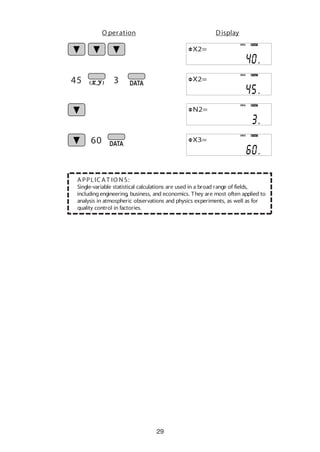
A PPLIC A T IO N S:
Single-variable statistical calculations are used in a broad range of fields,
includingengineering, business, and economics. They are most often applied to
analysis in atmospheric observations and physics experiments, as well as for
quality control in factories.
45
60
3
O peration Display
DEG STAT
X2=
DEG STAT
X2=
DEG STAT
N2=
DEG STAT
X3=
30
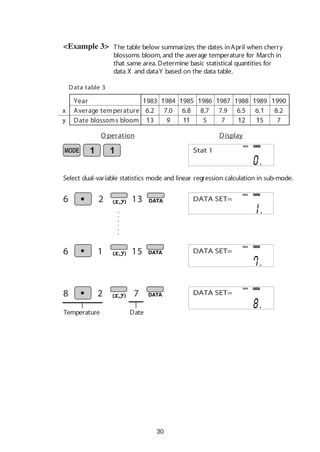
The table below summarizes the dates inApril when cherry
blossoms bloom, and the average temperature for March in
that same area. Determine basic statistical quantities for
data X and dataY based on the data table.
<Example 3>
6 2 13
Data table 3
Select dual-variable statistics mode and linear regression calculation in sub-mode.
Year 1983 1984 1985 1986 1987 1988 1989 1990
Average temperature 6.2 7.0 6.8 8.7 7.9 6.5 6.1 8.2
Date blossoms bloom 13 9 11 5 7 12 15 7
x
y
DEG STAT
DEG STAT
DateTemperature
6 15
8 2 7
DEG STAT
.
.
.
.
.
.
DEG STAT
O peration Display
Stat 1
DATA SET=
DATA SET=
DATA SET=
1
31
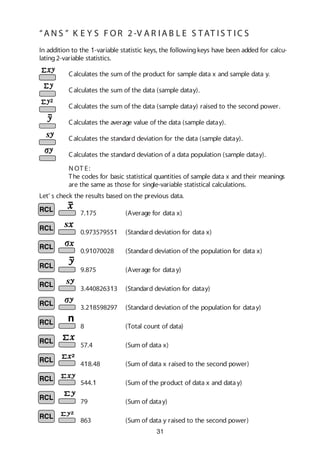
7.175 (Average for data x)
0.973579551 (Standard deviation for data x)
0.91070028 (Standard deviation of the population for data x)
9.875 (Average for datay)
3.440826313 (Standard deviation for datay)
3.218598297 (Standard deviation of the population for datay)
8 (Total count of data)
57.4 (Sum of data x)
418.48 (Sum of data x raised to the second power)
544.1 (Sum of the product of data x and data y)
79 (Sum of datay)
863 (Sum of data y raised to the second power)
Let’ s check the results based on the previous data.
Calculates the sum of the product for sample data x and sample data y.
Calculates the sum of the data (sample datay).
Calculates the sum of the data (sample datay) raised to the second power.
Calculates the average value of the data (sample datay).
In addition to the 1-variable statistic keys, the followingkeys have been added for calcu-
lating2-variable statistics.
Calculates the standard deviation of a data population (sample datay).
Calculates the standard deviation for the data (sample datay).
N OT E:
The codes for basic statistical quantities of sample data x and their meanings
are the same as those for single-variable statistical calculations.
“A N S ” K E Y S F OR 2 -V A R I A B L E S TAT I S T IC S
©SHARP CORP. (MAR. '05)

Calculator scientific

  • 1.
  • 2.
    1 CONTENTS HOW TOOPERATE Read BeforeUsing Key layout/Reset switch 2 Display pattern 3 Display format 3 Exponent display 4 Angular unit 5 Function and Key Operation ON/OFF, entry correction keys 6 Data entry keys 7 Random key Modify key 8 Basic arithmetic keys, parentheses 10 Percent 11 Inverse, square, cube, xth power of y, square root, cube root, xth root of y 12 10 to the power of x, common logarithm 13 e to the power of x, natural logarithm 14 Factorials 15 Permutations, combinations 16 Time calculation 17 Fractional calculations 18 Memory calculations 19 Last answer memory 20 Trigonometric functions 21 Arc trigonometric functions 22 Hyperbolic functions 23 Coordinate conversion 24 25 STATISTICS FUNCTION Binary, pental, octal, decimal, and hexadecimal operations (N-base) Data input and correction 26 “ANS” keys for 1-variable statistics 27 “ANS” keys for 2-variable statistics 31 9 ~
  • 3.
    2 How to Operate 2ndfunction key Pressingthis key will enable the functions written in orange above the calculator buttons. ON/C, OFF key Direct function Mode key This calculator can operate in three different modes as follows. <Example> W ritten in orange above the ON/C key <Power on> <Power off> 1 . K E Y L AY OU T If the calculator fails to operate normally, press the reset switch on the back to reinitialise the unit. The display format and calculation mode will return to their initial settings. RESET 2 . R E S E T S W I T C H Reset switch RESET 2nd function N OT E: Pressingthe reset switch will erase any data stored in memory. ≈Read B efore Using≈ This operation guide has been written based on the EL-531W , EL-509W , and EL-531W H models. Some functions described here are not featured on other models. In addition, key operations and symbols on the display may differ accordingto the model. •Mode = 0;normal mode for performingnormal arithmetic and function calculations. [Normal mode] •Mode = 1;STAT-0 mode for performing1-variable statisti- cal calculations. [STAT-0 mode] •Mode = 1; STAT-1–6 mode for performing2-variable statistical calculations. [STAT-1–6 mode] W hen changingto the statistical sub-mode, press the correspondingnumber key after performingthe operation to select the statistics mode (press ). (LINE): Linear regression calculation (QUAD): Quadratic regression calculation (EXP): Exponential regression calculation (LOG): Logarithmic regression calculation (PW R): Power regression calculation (INV): Inverse regression calculation
  • 4.
    3 For convenient andeasy operation, this model can be used in one of four display modes. The selected display status is shown in the upper part of the display (Format Indicator). Note: If more 0’s (zeros) than needed are displayed when the ON/C key is pressed, check whether or not the calculator is set to a Special Display Format. • Floatingdecimal point format (no symbol is displayed) Valid values beyond the maximum range are displayed in the form of a [10-digit (mantissa) + 2-digit (exponent)] • Fixed decimal point format (FIX is displayed) Displays the fractional part of the calculation result accordingto the specified number of decimal places. • Scientific notation (SCI is displayed) Frequently used in science to handle extremely small or large numbers. • Engineeringscientific notation (ENG is displayed) Convenient for convertingbetween different units. (specifies normal mode) <Example> Let’s compare the display result of [10000 8. 1 =] in each display format. 4 . DIS P L AY F OR MAT A N D DE C IMA L S E T T IN G F U N C T I ON 3 . DIS P L AY PAT T E R N Initial display DEG The actual display does not appear like this. This illustration is for explanatory purposes only. 10000 8.1 (normal mode) DEG Note: The calculator has two settings for displayinga floatingpoint number: NORM1 (default setting) and NORM2. In each display setting, a number is automatically displayed in scientific notation outside a preset range: • NORM1: 0.000000001 x 9999999999 • NORM2: 0.01 x 9999999999 (FIX modeTAB = 3) DEGFIX
  • 5.
    4 5 . EX P ON E N T DIS P L AY The distance from the earth to the sun is approx. 150,000,000 (1.5 x 10⁸ ) km.Values such as this with many zeros are often used in scientific calculations, but enteringthe zeros one by one is a great deal of work and it’s easy to make mistakes. In such a case, the numerical values are divided into mantissa and exponent portions, displayed and calculated. <Example> W hat is the number of electronics flowingin a conductor when the electrical charge across a given cross-section is 0.32 cou- lombs. (The charge on a single electron = 1.6 x 10⁻¹⁹ coulombs). 0.32 DEG (SCI mode) SCI DEG X10 (ENG mode) ENG DEG X10 (normal mode) DEG 191.6 DEG X10 DEG X10
  • 6.
    5 Angular values areconverted from DEG to RAD to GRAD with each push of the DRG key.This function is used when doingcalculations related to trigonometric functions or coordinate geometry conversions. (π/2) <Example> 6 . A N G U L A R U N IT (in DEG mode) •••••••• O peration Display 90° (DEG) = π/2 (RAD) = 100 (GRAD) = π 2 The relationships between the three types of angular units can be expressed as right: Check to confirm 90 degrees equalingπ/2 radians equaling100 grads. (π=3.14159...) 90 DEG RAD GRAD DEG Angular indicator Degrees (DEG is shown at the top of the display) A commonly used unit of measure for angles.The angular measure of a circle is expressed as 360°. Radians (RA D is shown at the top of the display) Radians are different than degrees and express angles based on the circumfer- ence of a circle. 180° is equivalent to π radians.Therefore, the angular mea- sure of a circle is 2π radians. G rads (G RA D is shown at the top of the display) Grads are a unit of angular measure used in Europe, particularly in France. An angle of 90 degrees is equivalent to 100 grads.
  • 7.
    6 Turns the calculatoron or clears the data. It also clears the contents of the calculator display and voids any calculator command; however, coeffi- cients in 3-variable linear equations and statistics, as well as values stored in the independent memory in normal mode, are not erased. Turns the calculator off. Clears all internal values, includingcoefficients in 3-variable linear equations and statistics.Values stored in memory in normal mode are not erased. These arrow keys are useful for Multi-Line playback, which lets you scroll through calculation steps one by one. (refer to page 8) These keys are useful for editingequations. The key moves the cursor to the left, and the key moves the cursor to the right. The key deletes the symbol/number at the cursor. ON/OFF, Entry Correction Keys ≈Function and K ey Operation≈ key inserts the symbol/number at the cursor.
  • 8.
    7 Data Entry Keys Providedthe earth is movingaround the sun in a circular orbit, how many kilometers will it travel in a year? * The average distance between the earth and the sun being 1.496 x 10⁸ km. Circumference equals diameter x π; therefore, 1.496 x 108 x 2 x π 0 to 9 Pressingπ automatically enters the value for π (3.14159...). The constant π, used frequently in function calculations, is the ratio of the circumference of a circle to its diameter. <Example> Numeric keys for entering data values. Decimal point key. Enters a decimal point. Enters minus symbol or sign change key. Changes positive numbers to negative and negative numbers to positive. Pressingthis key switches to scientific notation data entry. O peration Display 2 1 496 8 DEG X10 DEG
  • 9.
    8 Random Generates random numbers. Randomnumbers are three-decimal-place values between 0.000 and 0.999.Usingthis function enables the user to obtain unbiased samplingdata derived from random values generated by the calculator. <Example> A PPLIC AT IO N S: Building sample sets for statistics or research. 0. * * * (A random number has been generated.) [ Random Dice] To simulate a die-rolling, a random integer between 1 and 6 can be generated by pressing . To generate the next random dice number, press . [ Random C oin] To simulate a coin flip, 0 (heads) or 1 (tails) can be randomly generated by pressing . To generate the next random coin number, press . [ Random Integer] An integer between 0 and 99 can be generated randomly by pressing . To generate the next random integer, press .
  • 10.
    9 Function to roundcalculation results. Even after settingthe number of decimal places on the display, the calculator per- forms calculations usinga larger number of decimal places than that which appears on the display. By usingthis function, internal calculations will be performed using only the displayed value. A PPLIC AT IO N S: Frequently used in scientific and technical fields, as well as business, when performingchained calculations. <Example> Rounded calculation (MDF) FIX mode TAB = 1 (normal calculation) 5.0 0.6 0.6 5.4 5 9 9 5 9 9 Modify (internally, 0.6) (internally, 0.5555...) (internally, 0.5555...)
  • 11.
    10 Basic Arithmetic Keys, Parentheses Usedto specify calculations in which certain operations have precedence. You can make addition and subtraction operations have precedence over multiplication and division by enclosingthem in parentheses. The four basic operators. Each is used in the same way as a standard calculator: + (addition), – (subtraction), x (multiplication), and ÷ (division). Finds the result in the same way as a standard calculator.
  • 12.
    11 For calculating percentages.Four methods of calculating percentages are presented as follows. 1) $125 increased by 10%…137.5 2) $125 reduced by 20%…100 3) 15% of $125…18.75 4) W hen $125 equals 5% of X , X equals…2500 125 10 125 20 125 15 125 5 Percent DEG DEG DEG DEG
  • 13.
    12 <Example> Calculates the squareroot of the value on the display. Calculates the inverse of the value on the display. Squares the value on the display. Cubes the value on the display. Calculates the cube root of the value on the display. Calculates the xth root of y. 2 4 4 16 DEG DEG DEG O peration Display C alculates exponential values. 2 2 2 2 Inverse, Square, Cube, xth Power of y,Square Root, Cube Root, xth Root of y
  • 14.
    13 10 to thePower of x, Common Logarithm <Example> Calculates the value of 10 raised to the xth power. Calculates logarithm, the exponent of the power to which 10 must be raised to equal the given value. 1000 3 O peration Display DEG DEG
  • 15.
    14 e to thePower of x, Natural Logarithm Calculates powers based on the constant e (2.718281828). <Example> 5 10 O peration Display DEG DEG Computes the value of the natural logarithm, the exponent of the power to which e must be raised to equal the given value.
  • 16.
    15 Factorials The product ofa given positive integer n multiplied by all the lesser positive integers from 1 to n-1 is indicated by n! and called the factorial of n. A PPLIC AT IO N S: Used in statistics and mathematics. In statistics, this function is used in calculations involvingcombinations and permutations. <Example> c.f n! = 1 x 2 x 3 x …xn O peration Display DEG 7
  • 17.
    6 4 6 4 16 APPLIC AT IO N S: Used in statistics (probability calculations) and in simulation hypoth- eses in fields such as medicine, pharmaceutics, and physics. Also, can be used to determine the chances of winning in lotteries. Permutations, Combinations <Example> This function finds the number of different possible orderings in selecting r objects from a set of n objects. For example, there are six different ways of ordering the letters ABC in groups of three letters—ABC, ACB, BAC , BC A, C AB, and C BA. The calculation equation is 3 P3 = 3 x 2 x 1 = 6 (ways). This function finds the number of ways of selecting r objects from a set of n objects. For example, from the three letters ABC, there are three ways we can extract groups of two different letters—AB, AC, and CB. The calculation equation is 3 C 2 . DEG DEG O peration Display
  • 18.
    17 Time Calculation C onvert24° 28’ 35” (24 degrees, 28 minutes, 35 sec- onds) to decimal notation.Then convert 24.476° to sexagesimal notation. C onverts a sexagesimal value displayed in degrees, minutes, seconds to decimal notation. Also, converts a decimal value to sexagesimal notataion (degrees, minutes, seconds). Inputs values in sexagesimal notation (degrees, minutes, seconds). <Example> A PPLIC AT IO N S: Used in calculations of angles and angular velocity in physics, and latitude and longitude in geography. 24 28 35 O peration Display Repeat last key operation to return to the previous display. Convert to decimal notation DEG DEG DEG
  • 19.
    18 Fractional Calculations Add 3and , and convert to decimal notation.<Example> Inputs fractions and converts mutually between fractions and decimals. Converts between mixed numbers and improper fractions. 3 1 2 5 7 Convert to an improper fraction Press once to return to the previous display Convert to decimal notation Press once to return to the previous display A PPLIC AT IO N S: There is a wide variety of applications for this function because fractions are such a basic part of mathematics.This function is useful for calculations involving electrical circuit resistance. DEG DEG DEG O peration Display DEG 1 2 5 7
  • 20.
    19 Stores displayed valuesin memories A~F, X,Y, M. Recalls values stored inA~F, X,Y, M. Adds the displayed value to the value in the independent memory M. Memory Calculations <Example 1> 25 27 7 3 DEG MDEG MDEG MDEG O peration Display ~ Temporary memories ~ (Enter 0 for M) 0 <Example 2> Subtracts the displayed value from the value in the independent memory M. Independent memory O peration Display Calculates $/¥ at the designated exchange rate. 110 26510 2750 $1 = ¥110 ¥26,510 = $? $2,750 = ¥? DEG 110 Y DEG 26510ÖY= DEG 2750xY=
  • 21.
    20 Solve for xfirst and then solve for y using x. Last Answer Memory <Example> y = 4 ÷ xandx = 2 + 3 O peration Display DEG DEG 2 3 4 Automatically recalls the last answer calculated by pressing
  • 22.
    21 The angle froma point 15 meters from a buildingto the highest floor of the buildingis 45°. How tall is the building? Trigonometric Functions [DEG mode] V A PPLIC AT IO N S: Trigonometric functions are useful in mathematics and various engineering calculations.They are often used in astronomical observations, civil engi- neeringand in calculations involvingelectrical circuits, as well as in calcula- tions for physics such as parabolic motion and wave motion. C alculates the sine of an angle. C alculates the cosine of an angle. C alculates the tangent of an angle. <Example> 45 15 iew point 1 5 O peration Display sinθ = b a tanθ = b c cosθ = c a a c b θ DEG Trigonometric functions determine the ratio of three sides of a right triangle. The combinations of the three sides are sin, cos, and tan. Their relations are:
  • 23.
    22 Arc trigonometric functions,the inverse of trigonomet- ric functions, are used to determine an angle from ratios of a right triangle.The combinations of the three sides are sin-1 , cos-1 , and tan-1 .Their relations are; Arc Trigonometric Functions [DEG mode] (arc sine) Determines an angle based on the ratio b/a of two sides of a right triangle. (arc cosine) Determines an angle based on the ratio c/a for two sides of a right triangle. (arc tangent) Determines an angle based on the ratio a/b for two sides of a right triangle. <Example> At what angle should an airplane climb in order to climb 80 meters in 100 meters? 80 100 O peration Display θ = sin-1 b a θ = cos-1 c a θ = tan-1 b c c a b θ DEG
  • 24.
    23 Hyperbolic Functions The hyperbolicfunction is defined by usingnatural exponents in trigo- nometric functions. A PPLIC AT IO N S: Hyperbolic and arc hyperbolic functions are very useful in electrical engineering and physics. Arc hyperbolic functions are defined by usingnatural logarithms in trigono- metric functions.
  • 25.
    24 Coordinate Conversion Rectangular coordinates P(x,y) y xo y x y P (r,θ) xo r Polar coordinates θ Converts rectangular coordinates to polar coordinates (x, y r, θ) Converts polar coordinates to rectangular coordinates (r, θ x, y) Splits data used for dual-variable data input. Displays r, θ and x, y. (Cx y or r θ) ← ← ←← <Example> Determine the polar coordinates (r, θ) when the rectangu- lar coordinates of Point P are (x = 7, y = 3). [ DEG mode] A PPLIC AT IO N S: Coordinate conversion is often used in mathematics and engineering, espe- cially for impedance calculations in electronics and electrical engineering. 7 3 7.6 23.2 O peration Display DEG DEG DEG DEG ←←
  • 26.
    25 Binary, Pental, Octal, Decimal,andHexadecimal Operations (N-Base) This calculator can perform conversions between numbers expressed in binary, pental, octal, decimal, and hexadecimal systems. It can also perform the four basic arithmetic operations, calculations with parentheses and memory calculations usingbinary, pental, octal, decimal, and hexadecimal numbers. In addition, the calculator can carry out the logical operations AND, OR, NOT, NEG, XOR, and XNOR on binary, pental, octal, and hexadecimal numbers. Converts to the binary system. "b" appears. Converts to the pental system. "P" appears. Converts to the octal system. "o" appears. Converts to the hexadecimal system. "H" appears. Converts to the decimal system. "b", "P", "o", and "H" disappear from the display. Conversion is performed on the displayed value when these keys are pressed. <Example 1> O peration Display HEX(1AC) ©BIN ©PEN ©OCT ©DEC 1011 AND 101 = (BIN) ©DEC<Example 2> DEG 3203©OCT DEG 654©DEC DEG DEG 1011AND_ DEG 1011AND101= DEG 1©DEC 1AC 1011 101 O peration Display DEG 110101100©PE DEG 1AC©BIN
  • 27.
    26 DEG STAT Here isa table of examination results. Input this data for analysis. <Example 1> Enters data for statistical calculations. Clears data input. Splits data used for dual-variable data input. (Used for dual-variable statistical calculations.) 30 2 100 2 . . . O peration Display N o. 1 2 3 4 5 6 7 8 Score 30 40 50 60 70 80 90 100 N o. of pupils 2 4 5 7 12 10 8 2 Data table 1 Select single-variable statistics mode The statistics function is excellent for analyzingqualities of an event.Though primarily used for engineeringand mathematics, the function is also applied to nearly all other fields includingeconomics and medicine. Statistics Function DEG STAT Score Number of pupils DAT A I N P U T A N D C OR R E C T ION DEG STAT Stat 0 DATA SET= DATA SET=
  • 28.
    27 Calculates the averagevalue of the data (sample data x). Calculates the standard deviation for the data (sample data x). Calculates the standard deviation of a data population (sample data x). Displays the number of input data (sample data x). Calculates the sum of the data (sample data x). Calculates the sum of the data (sample data x) raised to the second power. Let’s check the results based on the previous data. 69 (average value) 17.75686128 (standard deviation) 17.57839583 (standard deviation of the population) 50 (total count of data) 3450 (total) N OT E: 1. Sample data refers to data selected randomly from the population. 2. Standard deviation of samples is determined by the sample data shift from an average value. 3. Standard deviation for the population is standard deviation when the sample data is deemed a population (full data). “A N S ” K E Y S F OR 1 -V A R I A B L E S TAT I S T IC S
  • 29.
    28 DA T AC OR R E C T ION <Example 2> 30 40 50 2 O peration Display Select single-variable statistics mode DEG STAT Stat 0 DEG STAT DATA SET= Correction after pressing : Correction prior to pressing immediately after a data entry: Delete incorrect data with , then enter the correct data. Use to display the data previously entered. Press to display data items in ascending(oldest first) order. To reverse the display order to descending(latest first), press the key. Each item is displayed with 'Xn=', 'Yn=', or 'Nn=' (n is the sequential number of the data set). Display the data item to modify, input the correct value, then press . Using , you can correct the values of the data set all at once. • W hen L or M appears, more data items can be browsed by pressing or . • To delete a data set, display an item of the data set to delete, then press . The data set will be deleted. • To add a new data set, press and input the values, then press . Data table 2 X: 30, 40, 40, 50 X: 30, 45, 45, 45, 60 DEG STAT DATA SET= DEG STAT DATA SET=
  • 30.
    29 A PPLIC AT IO N S: Single-variable statistical calculations are used in a broad range of fields, includingengineering, business, and economics. They are most often applied to analysis in atmospheric observations and physics experiments, as well as for quality control in factories. 45 60 3 O peration Display DEG STAT X2= DEG STAT X2= DEG STAT N2= DEG STAT X3=
  • 31.
    30 The table belowsummarizes the dates inApril when cherry blossoms bloom, and the average temperature for March in that same area. Determine basic statistical quantities for data X and dataY based on the data table. <Example 3> 6 2 13 Data table 3 Select dual-variable statistics mode and linear regression calculation in sub-mode. Year 1983 1984 1985 1986 1987 1988 1989 1990 Average temperature 6.2 7.0 6.8 8.7 7.9 6.5 6.1 8.2 Date blossoms bloom 13 9 11 5 7 12 15 7 x y DEG STAT DEG STAT DateTemperature 6 15 8 2 7 DEG STAT . . . . . . DEG STAT O peration Display Stat 1 DATA SET= DATA SET= DATA SET= 1
  • 32.
    31 7.175 (Average fordata x) 0.973579551 (Standard deviation for data x) 0.91070028 (Standard deviation of the population for data x) 9.875 (Average for datay) 3.440826313 (Standard deviation for datay) 3.218598297 (Standard deviation of the population for datay) 8 (Total count of data) 57.4 (Sum of data x) 418.48 (Sum of data x raised to the second power) 544.1 (Sum of the product of data x and data y) 79 (Sum of datay) 863 (Sum of data y raised to the second power) Let’ s check the results based on the previous data. Calculates the sum of the product for sample data x and sample data y. Calculates the sum of the data (sample datay). Calculates the sum of the data (sample datay) raised to the second power. Calculates the average value of the data (sample datay). In addition to the 1-variable statistic keys, the followingkeys have been added for calcu- lating2-variable statistics. Calculates the standard deviation of a data population (sample datay). Calculates the standard deviation for the data (sample datay). N OT E: The codes for basic statistical quantities of sample data x and their meanings are the same as those for single-variable statistical calculations. “A N S ” K E Y S F OR 2 -V A R I A B L E S TAT I S T IC S
  • 33.