Building your first Windows
 Phone 7 application for
        SharePoint

     Joris.Poelmans@gmail.com
Sponsors
  Venue Sponsor


  Platinum Sponsors


  Gold Premium Sponsors


  Gold Sponsors
About me
• Unit Manager at RealDolmen
• Working with SharePoint since 2001
• MVP SharePoint Server since 2005
• Blog - http://jopx.blogspot.com
• Twitter – jopxtwits
• Co-author
   • SharePoint Server 2007, the definitive guide (O’Reilly, 2007)
   • Real World SharePoint 2007 (Wrox, 2007)
   • Real World SharePoint 2010 (Wrox, 2010)
@JOPXTWITS
#SPSBE34
Agenda
• Getting started
• Why authentication matters…
• Exploring different remote APIs in FBA scenario
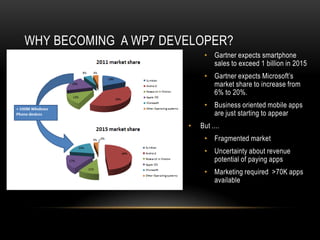
WHY BECOMING A WP7 DEVELOPER?
                           • Gartner expects smartphone
                             sales to exceed 1 billion in 2015
                           • Gartner expects Microsoft’s
                             market share to increase from
                             6% to 20%.
                           • Business oriented mobile apps
                             are just starting to appear
                      •   But ....
                           • Fragmented market
                           • Uncertainty about revenue
                             potential of paying apps
                           • Marketing required >70K apps
                             available
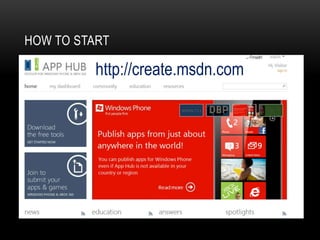
HOW TO START

          http://create.msdn.com
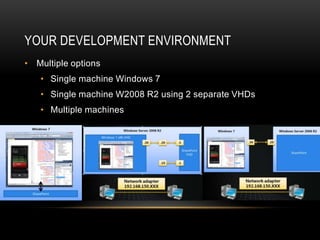
YOUR DEVELOPMENT ENVIRONMENT
• Multiple options
   • Single machine Windows 7
   • Single machine W2008 R2 using 2 separate VHDs
   • Multiple machines
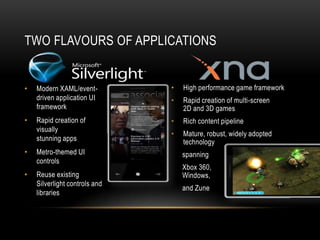
TWO FLAVOURS OF APPLICATIONS


•   Modern XAML/event-         •   High performance game framework
    driven application UI      •   Rapid creation of multi-screen
    framework                      2D and 3D games
•   Rapid creation of          •   Rich content pipeline
    visually
                               •   Mature, robust, widely adopted
    stunning apps                  technology
•   Metro-themed UI                spanning
    controls
                                   Xbox 360,
•   Reuse existing                 Windows,
    Silverlight controls and
                                   and Zune
    libraries
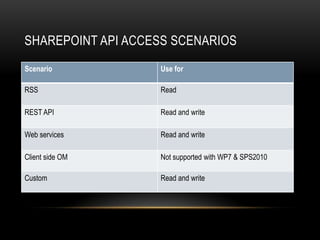
SHAREPOINT API ACCESS SCENARIOS
Scenario           Use for

RSS                Read

REST API           Read and write

Web services       Read and write

Client side OM     Not supported with WP7 & SPS2010

Custom             Read and write
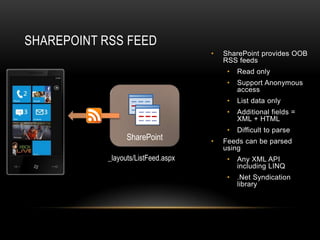
SHAREPOINT RSS FEED
                      •   SharePoint provides OOB
                          RSS feeds
                           •   Read only
                           •   Support Anonymous
                               access
                           •   List data only
                           •   Additional fields =
                               XML + HTML
                           •   Difficult to parse
                      •   Feeds can be parsed
                          using
                           •   Any XML API
                               including LINQ
                           •   .Net Syndication
                               library
Demo


  Integrating with SharePoint using
  RSS/ATOM feeds
Agenda
• Getting started
• Why authentication matters …
• Exploring different remote APIs in FBA scenario
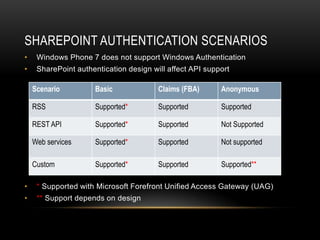
SHAREPOINT AUTHENTICATION SCENARIOS
•    Windows Phone 7 does not support Windows Authentication
•    SharePoint authentication design will affect API support

    Scenario          Basic             Claims (FBA)      Anonymous

    RSS               Supported*        Supported         Supported

    REST API          Supported*        Supported         Not Supported

    Web services      Supported*        Supported         Not supported

    Custom            Supported*        Supported         Supported**

•    * Supported with Microsoft Forefront Unified Access Gateway (UAG)
•    ** Support depends on design
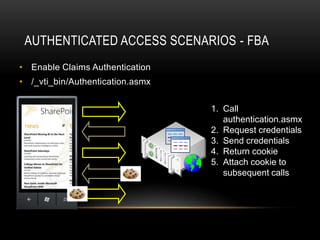
AUTHENTICATED ACCESS SCENARIOS - FBA
• Enable Claims Authentication
• /_vti_bin/Authentication.asmx


                   1              1. Call
                                     authentication.asmx
                   2              2. Request credentials
                                  3. Send credentials
                   3              4. Return cookie
                                  5. Attach cookie to
                   4                 subsequent calls

                   5
Demo


  Working with Form Based Authentication
Agenda
• Getting started
• Why authentication matters …
• Exploring different remote APIs in FBA scenario
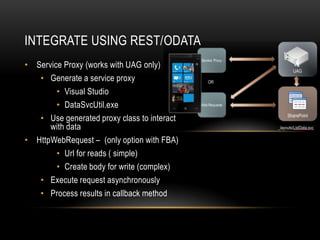
INTEGRATE USING REST/ODATA
• Service Proxy (works with UAG only)
   • Generate a service proxy
        • Visual Studio
        • DataSvcUtil.exe
   • Use generated proxy class to interact
      with data
• HttpWebRequest – (only option with FBA)
        • Url for reads ( simple)
        • Create body for write (complex)
   • Execute request asynchronously
   • Process results in callback method
Demo


  Integrating with SharePoint REST APIs
INTEGRATE USING WEB SERVICES
• Service Proxy
   • Generate a service proxy
   • Use generated proxy class to interact with data


• HttpWebRequest and SOAP
   • Create SOAP request and HttpWebRequest
   • Execute request asynchronously
   • Process results in callback method
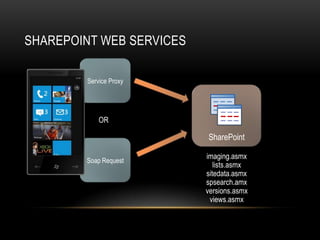
SHAREPOINT WEB SERVICES


                          imaging.asmx


                          spsearch.amx
                          versions.asmx
Demo


  Integrating with SharePoint using Lists
  web service
SHAREPOINT USER AND SOCIAL DATA USING
WEB SERVICES
• Use Search.asmx and UserProfileService.asmx
• SocialDataService.asmx
   • Read and manage
       • Comments or Notes
       • Tags
       • Ratings
Demo


  Integrating with SharePoint using social
  web services
SUMMARY
• Authentication makes WP7 integration with SharePoint quite
  troublesome ...
• ... But using the ā€œSharePoint 2010 and Windows Phone 7
  Training Kitā€ – you can get started quite quickly
• Build WP7 apps to extend your SharePoint business solutions
  – don’t try to build a generic solution.
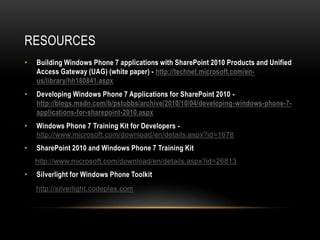
RESOURCES
•   Building Windows Phone 7 applications with SharePoint 2010 Products and Unified
    Access Gateway (UAG) (white paper) - http://technet.microsoft.com/en-
    us/library/hh180841.aspx
•   Developing Windows Phone 7 Applications for SharePoint 2010 -
    http://blogs.msdn.com/b/pstubbs/archive/2010/10/04/developing-windows-phone-7-
    applications-for-sharepoint-2010.aspx
•   Windows Phone 7 Training Kit for Developers -
    http://www.microsoft.com/download/en/details.aspx?id=1678
•   SharePoint 2010 and Windows Phone 7 Training Kit
    http://www.microsoft.com/download/en/details.aspx?id=26813
•   Silverlight for Windows Phone Toolkit
    http://silverlight.codeplex.com

Building your first Windows Phone 7 application for SharePoint

  • 1.
    Building your firstWindows Phone 7 application for SharePoint Joris.Poelmans@gmail.com
  • 2.
    Sponsors VenueSponsor Platinum Sponsors Gold Premium Sponsors Gold Sponsors
  • 3.
    About me • UnitManager at RealDolmen • Working with SharePoint since 2001 • MVP SharePoint Server since 2005 • Blog - http://jopx.blogspot.com • Twitter – jopxtwits • Co-author • SharePoint Server 2007, the definitive guide (O’Reilly, 2007) • Real World SharePoint 2007 (Wrox, 2007) • Real World SharePoint 2010 (Wrox, 2010)
  • 4.
  • 5.
    Agenda • Getting started •Why authentication matters… • Exploring different remote APIs in FBA scenario
  • 6.
    WHY BECOMING AWP7 DEVELOPER? • Gartner expects smartphone sales to exceed 1 billion in 2015 • Gartner expects Microsoft’s market share to increase from 6% to 20%. • Business oriented mobile apps are just starting to appear • But .... • Fragmented market • Uncertainty about revenue potential of paying apps • Marketing required >70K apps available
  • 7.
    HOW TO START http://create.msdn.com
  • 8.
    YOUR DEVELOPMENT ENVIRONMENT •Multiple options • Single machine Windows 7 • Single machine W2008 R2 using 2 separate VHDs • Multiple machines
  • 9.
    TWO FLAVOURS OFAPPLICATIONS • Modern XAML/event- • High performance game framework driven application UI • Rapid creation of multi-screen framework 2D and 3D games • Rapid creation of • Rich content pipeline visually • Mature, robust, widely adopted stunning apps technology • Metro-themed UI spanning controls Xbox 360, • Reuse existing Windows, Silverlight controls and and Zune libraries
  • 10.
    SHAREPOINT API ACCESSSCENARIOS Scenario Use for RSS Read REST API Read and write Web services Read and write Client side OM Not supported with WP7 & SPS2010 Custom Read and write
  • 11.
    SHAREPOINT RSS FEED • SharePoint provides OOB RSS feeds • Read only • Support Anonymous access • List data only • Additional fields = XML + HTML • Difficult to parse • Feeds can be parsed using • Any XML API including LINQ • .Net Syndication library
  • 12.
    Demo Integratingwith SharePoint using RSS/ATOM feeds
  • 13.
    Agenda • Getting started •Why authentication matters … • Exploring different remote APIs in FBA scenario
  • 14.
    SHAREPOINT AUTHENTICATION SCENARIOS • Windows Phone 7 does not support Windows Authentication • SharePoint authentication design will affect API support Scenario Basic Claims (FBA) Anonymous RSS Supported* Supported Supported REST API Supported* Supported Not Supported Web services Supported* Supported Not supported Custom Supported* Supported Supported** • * Supported with Microsoft Forefront Unified Access Gateway (UAG) • ** Support depends on design
  • 15.
    AUTHENTICATED ACCESS SCENARIOS- FBA • Enable Claims Authentication • /_vti_bin/Authentication.asmx 1 1. Call authentication.asmx 2 2. Request credentials 3. Send credentials 3 4. Return cookie 5. Attach cookie to 4 subsequent calls 5
  • 16.
    Demo Workingwith Form Based Authentication
  • 17.
    Agenda • Getting started •Why authentication matters … • Exploring different remote APIs in FBA scenario
  • 18.
    INTEGRATE USING REST/ODATA •Service Proxy (works with UAG only) • Generate a service proxy • Visual Studio • DataSvcUtil.exe • Use generated proxy class to interact with data • HttpWebRequest – (only option with FBA) • Url for reads ( simple) • Create body for write (complex) • Execute request asynchronously • Process results in callback method
  • 19.
    Demo Integratingwith SharePoint REST APIs
  • 20.
    INTEGRATE USING WEBSERVICES • Service Proxy • Generate a service proxy • Use generated proxy class to interact with data • HttpWebRequest and SOAP • Create SOAP request and HttpWebRequest • Execute request asynchronously • Process results in callback method
  • 21.
    SHAREPOINT WEB SERVICES imaging.asmx spsearch.amx versions.asmx
  • 22.
    Demo Integratingwith SharePoint using Lists web service
  • 23.
    SHAREPOINT USER ANDSOCIAL DATA USING WEB SERVICES • Use Search.asmx and UserProfileService.asmx • SocialDataService.asmx • Read and manage • Comments or Notes • Tags • Ratings
  • 24.
    Demo Integratingwith SharePoint using social web services
  • 25.
    SUMMARY • Authentication makesWP7 integration with SharePoint quite troublesome ... • ... But using the ā€œSharePoint 2010 and Windows Phone 7 Training Kitā€ – you can get started quite quickly • Build WP7 apps to extend your SharePoint business solutions – don’t try to build a generic solution.
  • 26.
    RESOURCES • Building Windows Phone 7 applications with SharePoint 2010 Products and Unified Access Gateway (UAG) (white paper) - http://technet.microsoft.com/en- us/library/hh180841.aspx • Developing Windows Phone 7 Applications for SharePoint 2010 - http://blogs.msdn.com/b/pstubbs/archive/2010/10/04/developing-windows-phone-7- applications-for-sharepoint-2010.aspx • Windows Phone 7 Training Kit for Developers - http://www.microsoft.com/download/en/details.aspx?id=1678 • SharePoint 2010 and Windows Phone 7 Training Kit http://www.microsoft.com/download/en/details.aspx?id=26813 • Silverlight for Windows Phone Toolkit http://silverlight.codeplex.com