Brian Sherman
Senior Developer
Building Value-Added Integrations with Autodesk’s
IoT APIs
Allan O’Leary
Product Manager
© 2016 Autodesk
Follow: @AutodeskForge
Follow the conference: #ForgeDevCon
About the Speakers
Brian Sherman
• Senior Software Engineer
• Worked on the Fusion
Connect team for 2 years
• Computer Science degree
from UC Berkeley
© 2016 Autodesk
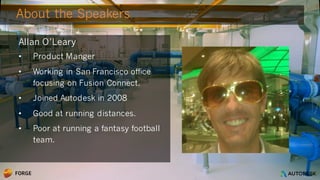
About the Speakers
Allan O’Leary
• Product Manger
• Working in San Francisco office
focusing on Fusion Connect.
• Joined Autodesk in 2008
• Good at running distances.
• Poor at running a fantasy football
team.
© 2016 Autodesk
Learning Objectives
• Overview of the Fusion Connect API
• Getting Started with a Fusion Connect App
• Fusion Connect API Methods
• Example application
© 2016 Autodesk
Overview
Fusion Connect API
© 2016 Autodesk
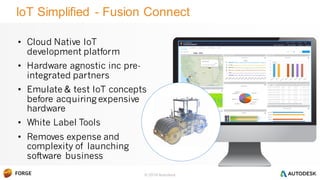
IoT Simplified - Fusion Connect
• Cloud Native IoT
development platform
• Hardware agnostic inc pre-
integrated partners
• Emulate & test IoT concepts
before acquiring expensive
hardware
• White Label Tools
• Removes expense and
complexity of launching
software business
Roller A016
© 2016 Autodesk
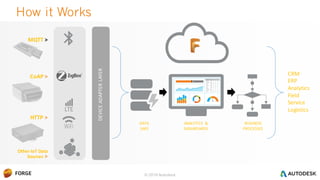
How it Works
CRM
ERP
Analytics
Field
Service
Logistics
MQTT >
CoAP >
HTTP >
Other IoT Data
Sources >
ANALYTICS &
DASHBOARDS
BUSINESS
PROCESSES
DATA
LAKE
DEVICEADAPTERLAYER
© 2016 Autodesk© 2016 Autodesk
• Cloud native device adaptor and message queueing
• Support for several standard device protocols
• Device creation through input API methods
• Options for message processing and storage
• Extract message data to build IoT applications
Fusion Connect API
© 2016 Autodesk
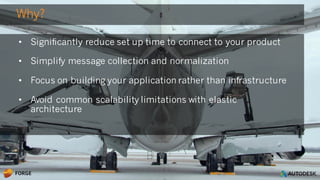
• Significantly reduce set up time to connect to your product
• Simplify message collection and normalization
• Focus on building your application rather than infrastructure
• Avoid common scalability limitations with elastic
architecture
Why?
© 2016 Autodesk
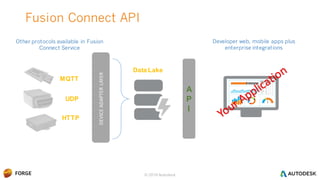
Fusion Connect API
MQTT
UDP
HTTP
Data Lake
A
P
I
Developer web, mobile apps plus
enterprise integrations
Other protocols available in Fusion
Connect Service
DEVICEADAPTERLAYER
© 2016 Autodesk
Getting Started
Fusion Connect App
© 2016 Autodesk
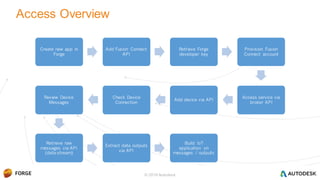
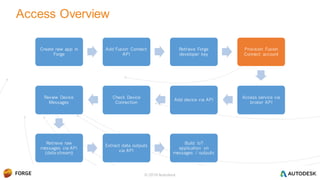
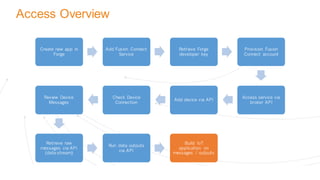
Access Overview
Create new app in
Forge
Add Fusion Connect
API
Retrieve Forge
developer key
Provision Fusion
Connect account
Access service via
broker API
Add device via API
Check Device
Connection
Review Device
Messages
Retrieve raw
messages via API
(data-stream)
Extract data outputs
via API
Build IoT
application on
messages / outputs
© 2016 Autodesk
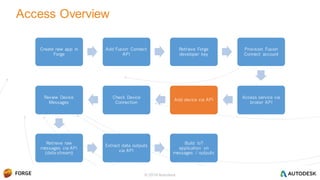
Access Overview
Create new app in
Forge
Add Fusion Connect
API
Retrieve Forge
developer key
Provision Fusion
Connect account
Access service via
broker API
Add device via API
Check Device
Connection
Review Device
Messages
Retrieve raw
messages via API
(data-stream)
Extract data outputs
via API
Build IoT
application on
messages / outputs
© 2016 Autodesk
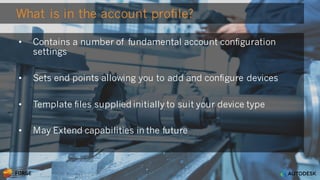
What is in the account profile?
• Contains a number of fundamental account configuration
settings
• Sets end points allowing you to add and configure devices
• Template files supplied initially to suit your device type
• May Extend capabilities in the future
© 2016 Autodesk
Create new app in
Forge
Add Fusion Connect
API
Retrieve Forge
developer key
Provision Fusion
Connect account
Access service via
broker API
Add device via API
Check Device
Connection
Review Device
Messages
Retrieve raw
messages via API
(data-stream)
Extract data outputs
via API
Build IoT
application on
messages / outputs
Access Overview
© 2016 Autodesk
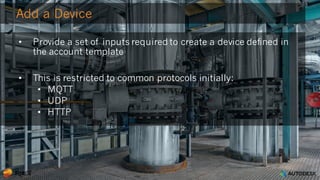
Add a Device
• Provide a set of inputs required to create a device defined in
the account template
• This is restricted to common protocols initially:
• MQTT
• UDP
• HTTP
Access Overview
Create new app in
Forge
Add Fusion Connect
Service
Retrieve Forge
developer key
Provision Fusion
Connect account
Access service via
broker API
Add device via API
Check Device
Connection
Review Device
Messages
Retrieve raw
messages via API
(data-stream)
Run data outputs
via API
Build IoT
application on
messages / outputs
© 2016 Autodesk
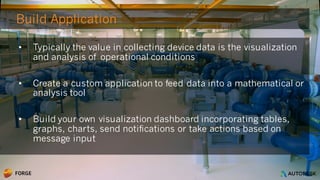
Build Application
• Typically the value in collecting device data is the visualization
and analysis of operational conditions
• Create a custom application to feed data into a mathematical or
analysis tool
• Build your own visualization dashboard incorporating tables,
graphs, charts, send notifications or take actions based on
message input
© 2016 Autodesk
Methods
Fusion Connect API
© 2016 Autodesk
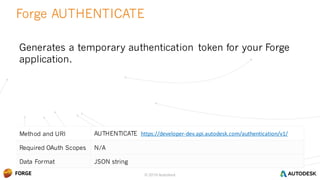
Method and URI AUTHENTICATE https://developer-dev.api.autodesk.com/authentication/v1/
Required OAuth Scopes N/A
Data Format JSON string
Forge AUTHENTICATE
© 2016 Autodesk
Generates a temporary authentication token for your Forge
application.
© 2016 Autodesk
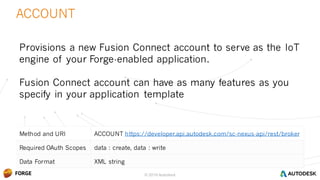
Method and URI ACCOUNT https://developer.api.autodesk.com/sc-nexus-api/rest/broker
Required OAuth Scopes data : create, data : write
Data Format XML string
ACCOUNT
© 2016 Autodesk
Provisions a new Fusion Connect account to serve as the IoT
engine of your Forge-enabled application.
Fusion Connect account can have as many features as you
specify in your application template
© 2016 Autodesk
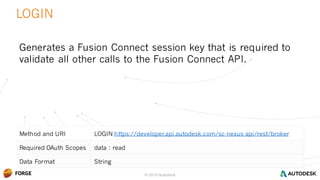
Method and URI LOGIN https://developer.api.autodesk.com/sc-nexus-api/rest/broker
Required OAuth Scopes data : read
Data Format String
LOGIN
© 2016 Autodesk
Generates a Fusion Connect session key that is required to
validate all other calls to the Fusion Connect API.
© 2016 Autodesk
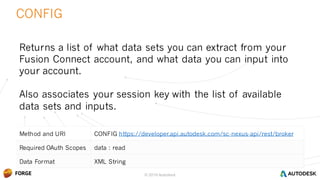
Method and URI CONFIG https://developer.api.autodesk.com/sc-nexus-api/rest/broker
Required OAuth Scopes data : read
Data Format XML String
CONFIG
© 2016 Autodesk
Returns a list of what data sets you can extract from your
Fusion Connect account, and what data you can input into
your account.
Also associates your session key with the list of available
data sets and inputs.
© 2016 Autodesk
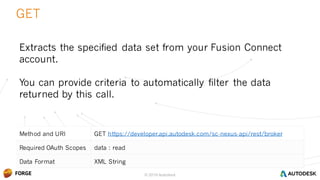
Method and URI GET https://developer.api.autodesk.com/sc-nexus-api/rest/broker
Required OAuth Scopes data : read
Data Format XML String
GET
© 2016 Autodesk
Extracts the specified data set from your Fusion Connect
account.
You can provide criteria to automatically filter the data
returned by this call.
© 2016 Autodesk
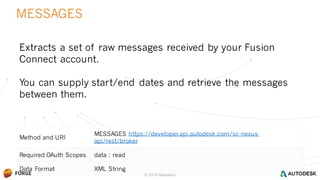
Method and URI
MESSAGES https://developer.api.autodesk.com/sc-nexus-
api/rest/broker
Required OAuth Scopes data : read
Data Format XML String
MESSAGES
© 2016 Autodesk
Extracts a set of raw messages received by your Fusion
Connect account.
You can supply start/end dates and retrieve the messages
between them.
© 2016 Autodesk
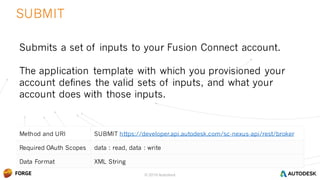
Method and URI SUBMIT https://developer.api.autodesk.com/sc-nexus-api/rest/broker
Required OAuth Scopes data : read, data : write
Data Format XML String
SUBMIT
© 2016 Autodesk
Submits a set of inputs to your Fusion Connect account.
The application template with which you provisioned your
account defines the valid sets of inputs, and what your
account does with those inputs.
© 2016 Autodesk
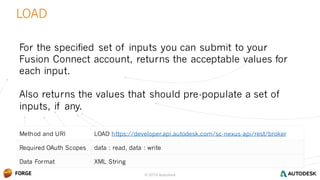
Method and URI LOAD https://developer.api.autodesk.com/sc-nexus-api/rest/broker
Required OAuth Scopes data : read, data : write
Data Format XML String
LOAD
© 2016 Autodesk
For the specified set of inputs you can submit to your
Fusion Connect account, returns the acceptable values for
each input.
Also returns the values that should pre-populate a set of
inputs, if any.
© 2016 Autodesk
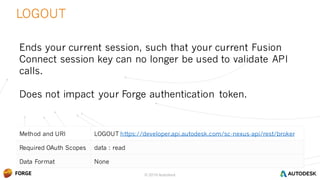
Method and URI LOGOUT https://developer.api.autodesk.com/sc-nexus-api/rest/broker
Required OAuth Scopes data : read
Data Format None
LOGOUT
© 2016 Autodesk
Ends your current session, such that your current Fusion
Connect session key can no longer be used to validate API
calls.
Does not impact your Forge authentication token.
© 2016 Autodesk
Example
IoT Application
© 2016 Autodesk
 Receives JSON-encoded data over MQTT, up to 5 text fields, 5 integer fields, 5
decimal fields.
 Monitors Devices that have been registered with the account, and allows them
to be grouped together under Customers that own them
 Exposes two data sets beyond the raw message stream: one containing the
current status of each registered device, and another listing the customers that
own all registered devices.
 Accepts three sets of inputs, tagged “Add Device”, “Add Customer”, and “Edit
Customer”.
The Sample Account
© 2016 Autodesk
It’s Still Private for now:
Email iotforge@fusionconnect.io
to get access
We can provide additional documentation and guidance on
your initial implementation of the API from here.
Want access to Fusion Connect API?
© 2016 Autodesk
Developer.Autodesk.com
Forge.Autodesk.com
@AutodeskForge
Facebook.com/adskForge
Get Started!
© 2016 Autodesk
Forge - DevCon 2016: Building Value-Added Integrations with Autodesk’s IoT APIs

Forge - DevCon 2016: Building Value-Added Integrations with Autodesk’s IoT APIs

  • 1.
    Brian Sherman Senior Developer BuildingValue-Added Integrations with Autodesk’s IoT APIs Allan O’Leary Product Manager
  • 2.
    © 2016 Autodesk Follow:@AutodeskForge Follow the conference: #ForgeDevCon
  • 3.
    About the Speakers BrianSherman • Senior Software Engineer • Worked on the Fusion Connect team for 2 years • Computer Science degree from UC Berkeley
  • 4.
    © 2016 Autodesk Aboutthe Speakers Allan O’Leary • Product Manger • Working in San Francisco office focusing on Fusion Connect. • Joined Autodesk in 2008 • Good at running distances. • Poor at running a fantasy football team.
  • 5.
    © 2016 Autodesk LearningObjectives • Overview of the Fusion Connect API • Getting Started with a Fusion Connect App • Fusion Connect API Methods • Example application
  • 6.
  • 7.
    © 2016 Autodesk IoTSimplified - Fusion Connect • Cloud Native IoT development platform • Hardware agnostic inc pre- integrated partners • Emulate & test IoT concepts before acquiring expensive hardware • White Label Tools • Removes expense and complexity of launching software business Roller A016
  • 8.
    © 2016 Autodesk Howit Works CRM ERP Analytics Field Service Logistics MQTT > CoAP > HTTP > Other IoT Data Sources > ANALYTICS & DASHBOARDS BUSINESS PROCESSES DATA LAKE DEVICEADAPTERLAYER
  • 9.
    © 2016 Autodesk©2016 Autodesk • Cloud native device adaptor and message queueing • Support for several standard device protocols • Device creation through input API methods • Options for message processing and storage • Extract message data to build IoT applications Fusion Connect API
  • 10.
    © 2016 Autodesk •Significantly reduce set up time to connect to your product • Simplify message collection and normalization • Focus on building your application rather than infrastructure • Avoid common scalability limitations with elastic architecture Why?
  • 11.
    © 2016 Autodesk FusionConnect API MQTT UDP HTTP Data Lake A P I Developer web, mobile apps plus enterprise integrations Other protocols available in Fusion Connect Service DEVICEADAPTERLAYER
  • 12.
    © 2016 Autodesk GettingStarted Fusion Connect App
  • 13.
    © 2016 Autodesk AccessOverview Create new app in Forge Add Fusion Connect API Retrieve Forge developer key Provision Fusion Connect account Access service via broker API Add device via API Check Device Connection Review Device Messages Retrieve raw messages via API (data-stream) Extract data outputs via API Build IoT application on messages / outputs
  • 14.
    © 2016 Autodesk AccessOverview Create new app in Forge Add Fusion Connect API Retrieve Forge developer key Provision Fusion Connect account Access service via broker API Add device via API Check Device Connection Review Device Messages Retrieve raw messages via API (data-stream) Extract data outputs via API Build IoT application on messages / outputs
  • 15.
    © 2016 Autodesk Whatis in the account profile? • Contains a number of fundamental account configuration settings • Sets end points allowing you to add and configure devices • Template files supplied initially to suit your device type • May Extend capabilities in the future
  • 16.
    © 2016 Autodesk Createnew app in Forge Add Fusion Connect API Retrieve Forge developer key Provision Fusion Connect account Access service via broker API Add device via API Check Device Connection Review Device Messages Retrieve raw messages via API (data-stream) Extract data outputs via API Build IoT application on messages / outputs Access Overview
  • 17.
    © 2016 Autodesk Adda Device • Provide a set of inputs required to create a device defined in the account template • This is restricted to common protocols initially: • MQTT • UDP • HTTP
  • 18.
    Access Overview Create newapp in Forge Add Fusion Connect Service Retrieve Forge developer key Provision Fusion Connect account Access service via broker API Add device via API Check Device Connection Review Device Messages Retrieve raw messages via API (data-stream) Run data outputs via API Build IoT application on messages / outputs
  • 19.
    © 2016 Autodesk BuildApplication • Typically the value in collecting device data is the visualization and analysis of operational conditions • Create a custom application to feed data into a mathematical or analysis tool • Build your own visualization dashboard incorporating tables, graphs, charts, send notifications or take actions based on message input
  • 20.
  • 21.
    © 2016 Autodesk Methodand URI AUTHENTICATE https://developer-dev.api.autodesk.com/authentication/v1/ Required OAuth Scopes N/A Data Format JSON string Forge AUTHENTICATE © 2016 Autodesk Generates a temporary authentication token for your Forge application.
  • 22.
    © 2016 Autodesk Methodand URI ACCOUNT https://developer.api.autodesk.com/sc-nexus-api/rest/broker Required OAuth Scopes data : create, data : write Data Format XML string ACCOUNT © 2016 Autodesk Provisions a new Fusion Connect account to serve as the IoT engine of your Forge-enabled application. Fusion Connect account can have as many features as you specify in your application template
  • 23.
    © 2016 Autodesk Methodand URI LOGIN https://developer.api.autodesk.com/sc-nexus-api/rest/broker Required OAuth Scopes data : read Data Format String LOGIN © 2016 Autodesk Generates a Fusion Connect session key that is required to validate all other calls to the Fusion Connect API.
  • 24.
    © 2016 Autodesk Methodand URI CONFIG https://developer.api.autodesk.com/sc-nexus-api/rest/broker Required OAuth Scopes data : read Data Format XML String CONFIG © 2016 Autodesk Returns a list of what data sets you can extract from your Fusion Connect account, and what data you can input into your account. Also associates your session key with the list of available data sets and inputs.
  • 25.
    © 2016 Autodesk Methodand URI GET https://developer.api.autodesk.com/sc-nexus-api/rest/broker Required OAuth Scopes data : read Data Format XML String GET © 2016 Autodesk Extracts the specified data set from your Fusion Connect account. You can provide criteria to automatically filter the data returned by this call.
  • 26.
    © 2016 Autodesk Methodand URI MESSAGES https://developer.api.autodesk.com/sc-nexus- api/rest/broker Required OAuth Scopes data : read Data Format XML String MESSAGES © 2016 Autodesk Extracts a set of raw messages received by your Fusion Connect account. You can supply start/end dates and retrieve the messages between them.
  • 27.
    © 2016 Autodesk Methodand URI SUBMIT https://developer.api.autodesk.com/sc-nexus-api/rest/broker Required OAuth Scopes data : read, data : write Data Format XML String SUBMIT © 2016 Autodesk Submits a set of inputs to your Fusion Connect account. The application template with which you provisioned your account defines the valid sets of inputs, and what your account does with those inputs.
  • 28.
    © 2016 Autodesk Methodand URI LOAD https://developer.api.autodesk.com/sc-nexus-api/rest/broker Required OAuth Scopes data : read, data : write Data Format XML String LOAD © 2016 Autodesk For the specified set of inputs you can submit to your Fusion Connect account, returns the acceptable values for each input. Also returns the values that should pre-populate a set of inputs, if any.
  • 29.
    © 2016 Autodesk Methodand URI LOGOUT https://developer.api.autodesk.com/sc-nexus-api/rest/broker Required OAuth Scopes data : read Data Format None LOGOUT © 2016 Autodesk Ends your current session, such that your current Fusion Connect session key can no longer be used to validate API calls. Does not impact your Forge authentication token.
  • 30.
  • 31.
    © 2016 Autodesk Receives JSON-encoded data over MQTT, up to 5 text fields, 5 integer fields, 5 decimal fields.  Monitors Devices that have been registered with the account, and allows them to be grouped together under Customers that own them  Exposes two data sets beyond the raw message stream: one containing the current status of each registered device, and another listing the customers that own all registered devices.  Accepts three sets of inputs, tagged “Add Device”, “Add Customer”, and “Edit Customer”. The Sample Account © 2016 Autodesk
  • 32.
    It’s Still Privatefor now: Email iotforge@fusionconnect.io to get access We can provide additional documentation and guidance on your initial implementation of the API from here. Want access to Fusion Connect API? © 2016 Autodesk
  • 33.