Kean Walmsley
Platform Architect & Evangelist, Autodesk Research
Collaborative VR using Google Cardboard and the
Forge Viewer
@AutodeskForge
#ForgeDevCon
About me
• 20 years at Autodesk in 4 countries
• 10 years blogging at http://autode.sk/ttif
• 9 years tweeting at @keanw
• Current role is in Autodesk Research
• Focused on IoT and VR
To participate in the experiment…
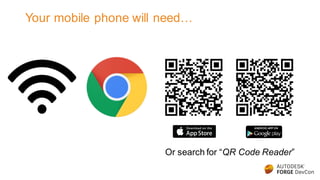
Your mobile phone will need…
Or search for “QR Code Reader”
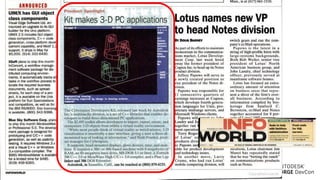
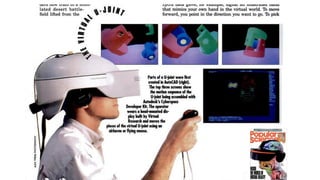
VR comes of age
© 2016 Autodesk
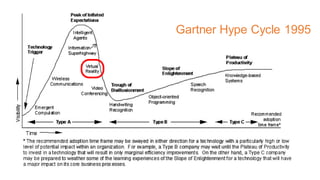
Gartner Hype Cycle 1995
© 2016 Autodesk
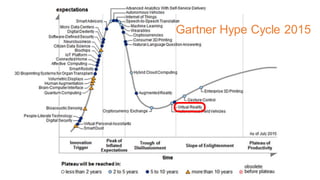
Gartner Hype Cycle 2015
© 2016 Autodesk
© 2016 Autodesk
Using the Autodesk Viewer to implement VR
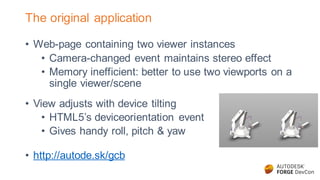
The original application
• Web-page containing two viewer instances
• Camera-changed event maintains stereo effect
• Memory inefficient: better to use two viewports on a
single viewer/scene
• View adjusts with device tilting
• HTML5’s deviceorientation event
• Gives handy roll, pitch & yaw
• http://autode.sk/gcb
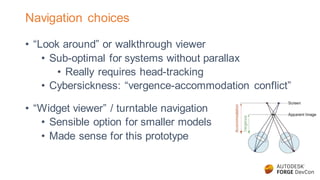
Navigation choices
• “Look around” or walkthrough viewer
• Sub-optimal for systems without parallax
• Really requires head-tracking
• Cybersickness: “vergence-accommodation conflict”
• “Widget viewer” / turntable navigation
• Sensible option for smaller models
• Made sense for this prototype
VR has serious challenges around user input
• Opportunities around gesture-based input
• Leap Motion has an Oculus mount & Android SDK
• Webcam-based hand tracking may also be good
enough
• Voice is often greatly overlooked
• In many ways a natural way to interact within VR
• No need to worry about displaying hands virtually
Adding speech recognition
• Google Chrome has a Speech Recognition API
• Requires an internet connection
• Handy JavaScript wrapper called Annyang
• Easy to register commands for common operations
• EXPLODE, COMBINE, zoom IN and OUT
• FRONT, BACK, LEFT, RIGHT, TOP, BOTTOM
• http://autode.sk/gcbv (https://youtu.be/0csk5bK8Iyk)
Using mobile VR SDKs with our web-based viewer
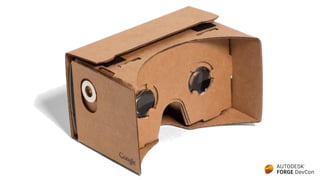
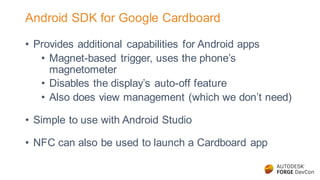
Android SDK for Google Cardboard
• Provides additional capabilities for Android apps
• Magnet-based trigger, uses the phone’s
magnetometer
• Disables the display’s auto-off feature
• Also does view management (which we don’t need)
• Simple to use with Android Studio
• NFC can also be used to launch a Cardboard app
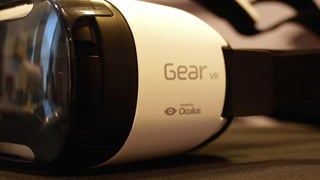
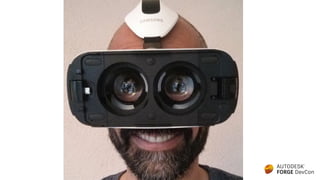
Oculus Mobile SDK for the Samsung Gear VR
• Great optics – wider field of view
• Low latency/more responsive due to additional IMU
• It doesn’t use the phone’s
• Adds more UI capabilities
• Touchpad on the side + Bluetooth gamepad
• No longer a walled garden
• Samsung has a WebVR-capable browser
• Works with Samsung Galaxy Note 5 or S6/S7
• A bargain at $99 (plus phone)
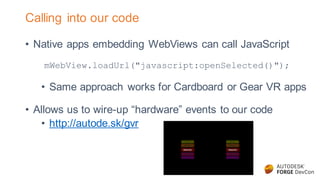
Calling into our code
• Native apps embedding WebViews can call JavaScript
mWebView.loadUrl("javascript:openSelected()");
• Same approach works for Cardboard or Gear VR apps
• Allows us to wire-up “hardware” events to our code
• http://autode.sk/gvr
Daydream
• Latest entrant into the mobile VR space
• Announced at Google I/O 2016
• Based on Android N, requires high-end phone hardware
• Nexus 6P is the closest currently available
• A new Wiimote-like controller is mandated
• Could be a major step in democratizing VR
Implementing collaborative features in web-based VR
User input in VR is tricky, remember?
• Another approach is to let someone else guide you…
• Your teacher, professor, architect, engineer or doctor
• What if they could lead you/a group through a virtual
environment?
• VR becomes more social, more personal
• Building walkthroughs, site flythroughs
• Google has “Expeditions” for virtual fieldtrips
The Internet has a key role to play
• The web enables collaboration and inter-device comms
• Existing infrastructure makes this easy
• Forge Viewer is a great place to implement this
• Web-based, 3D visualization technology
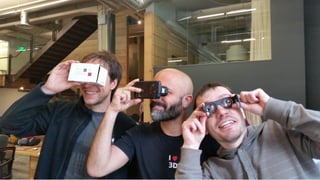
• Pre-integrated with Google Cardboard (as we’ve just
seen)
• The basis for Autodesk’s entry in last year’s VR Hackathon
in San Francisco
The “VR Party” team’s project
• Allow a master web-page to control a number of clients
• Master page embeds the full “GUI” viewer
• Clients have a stereo view on the same model
• The master propagates certain operations
• Isolate, Show, Hide, Explode, Section and Zoom
• Importantly not camera/target position changes
How does it work?
• Unique session created when master page loads
• Custom QR code presented for clients to scan
• GUI viewer events capture interesting operations
• Transmitted to the back-end via Web Sockets
• Passed on to connected clients
• Applied in the client’s viewer(s)
• Page close/disconnect cleans up session state
• Informs clients of disconnection
Technologies
• HTML5, JavaScript, CSS3, jQuery
• Forge Viewer (Three.js & WebGL)
• Node.js
• Socket.io
• GitHub for source control
• Heroku for hosting
• CloudFlare for SSL, DNS, caching
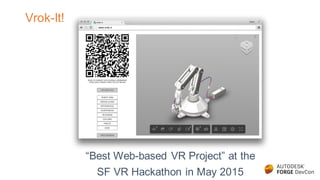
Vrok-It!
“Best Web-based VR Project” at the
SF VR Hackathon in May 2015
50% will fail
http://vrok.it
If you’re interested in going further…
• Try uploading your own models
• http://www.vrok.it
• http://www.vrok.it/v2 (WIP with single viewer)
• Clone the source from GitHub
• https://github.com/KeanW/vr-party
• Send feedback
• kean.walmsley@autodesk.com or @keanw
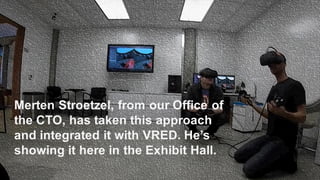
Merten Stroetzel, from our Office of
the CTO, has taken this approach
and integrated it with VRED. He’s
showing it here in the Exhibit Hall.
Future directions
• Tune the viewer for VR
• Complete the single viewer work
• Focus on supporting larger models
• Improve WebVR support
• Now uses pose info, not deviceorientation
• Test support with tethered headsets
• Oculus Rift CR, HTC Vive Pre
Forge - DevCon 2016: Collaborative VR using Google Cardboard & the View & Data API

Forge - DevCon 2016: Collaborative VR using Google Cardboard & the View & Data API

  • 1.
    Kean Walmsley Platform Architect& Evangelist, Autodesk Research Collaborative VR using Google Cardboard and the Forge Viewer
  • 2.
  • 3.
    About me • 20years at Autodesk in 4 countries • 10 years blogging at http://autode.sk/ttif • 9 years tweeting at @keanw • Current role is in Autodesk Research • Focused on IoT and VR
  • 4.
    To participate inthe experiment…
  • 5.
    Your mobile phonewill need… Or search for “QR Code Reader”
  • 6.
  • 9.
    © 2016 Autodesk GartnerHype Cycle 1995
  • 10.
    © 2016 Autodesk GartnerHype Cycle 2015
  • 11.
  • 12.
  • 13.
    Using the AutodeskViewer to implement VR
  • 14.
    The original application •Web-page containing two viewer instances • Camera-changed event maintains stereo effect • Memory inefficient: better to use two viewports on a single viewer/scene • View adjusts with device tilting • HTML5’s deviceorientation event • Gives handy roll, pitch & yaw • http://autode.sk/gcb
  • 15.
    Navigation choices • “Lookaround” or walkthrough viewer • Sub-optimal for systems without parallax • Really requires head-tracking • Cybersickness: “vergence-accommodation conflict” • “Widget viewer” / turntable navigation • Sensible option for smaller models • Made sense for this prototype
  • 16.
    VR has seriouschallenges around user input • Opportunities around gesture-based input • Leap Motion has an Oculus mount & Android SDK • Webcam-based hand tracking may also be good enough • Voice is often greatly overlooked • In many ways a natural way to interact within VR • No need to worry about displaying hands virtually
  • 17.
    Adding speech recognition •Google Chrome has a Speech Recognition API • Requires an internet connection • Handy JavaScript wrapper called Annyang • Easy to register commands for common operations • EXPLODE, COMBINE, zoom IN and OUT • FRONT, BACK, LEFT, RIGHT, TOP, BOTTOM • http://autode.sk/gcbv (https://youtu.be/0csk5bK8Iyk)
  • 18.
    Using mobile VRSDKs with our web-based viewer
  • 20.
    Android SDK forGoogle Cardboard • Provides additional capabilities for Android apps • Magnet-based trigger, uses the phone’s magnetometer • Disables the display’s auto-off feature • Also does view management (which we don’t need) • Simple to use with Android Studio • NFC can also be used to launch a Cardboard app
  • 23.
    Oculus Mobile SDKfor the Samsung Gear VR • Great optics – wider field of view • Low latency/more responsive due to additional IMU • It doesn’t use the phone’s • Adds more UI capabilities • Touchpad on the side + Bluetooth gamepad • No longer a walled garden • Samsung has a WebVR-capable browser • Works with Samsung Galaxy Note 5 or S6/S7 • A bargain at $99 (plus phone)
  • 24.
    Calling into ourcode • Native apps embedding WebViews can call JavaScript mWebView.loadUrl("javascript:openSelected()"); • Same approach works for Cardboard or Gear VR apps • Allows us to wire-up “hardware” events to our code • http://autode.sk/gvr
  • 25.
    Daydream • Latest entrantinto the mobile VR space • Announced at Google I/O 2016 • Based on Android N, requires high-end phone hardware • Nexus 6P is the closest currently available • A new Wiimote-like controller is mandated • Could be a major step in democratizing VR
  • 26.
  • 27.
    User input inVR is tricky, remember? • Another approach is to let someone else guide you… • Your teacher, professor, architect, engineer or doctor • What if they could lead you/a group through a virtual environment? • VR becomes more social, more personal • Building walkthroughs, site flythroughs • Google has “Expeditions” for virtual fieldtrips
  • 28.
    The Internet hasa key role to play • The web enables collaboration and inter-device comms • Existing infrastructure makes this easy • Forge Viewer is a great place to implement this • Web-based, 3D visualization technology • Pre-integrated with Google Cardboard (as we’ve just seen) • The basis for Autodesk’s entry in last year’s VR Hackathon in San Francisco
  • 30.
    The “VR Party”team’s project • Allow a master web-page to control a number of clients • Master page embeds the full “GUI” viewer • Clients have a stereo view on the same model • The master propagates certain operations • Isolate, Show, Hide, Explode, Section and Zoom • Importantly not camera/target position changes
  • 31.
    How does itwork? • Unique session created when master page loads • Custom QR code presented for clients to scan • GUI viewer events capture interesting operations • Transmitted to the back-end via Web Sockets • Passed on to connected clients • Applied in the client’s viewer(s) • Page close/disconnect cleans up session state • Informs clients of disconnection
  • 32.
    Technologies • HTML5, JavaScript,CSS3, jQuery • Forge Viewer (Three.js & WebGL) • Node.js • Socket.io • GitHub for source control • Heroku for hosting • CloudFlare for SSL, DNS, caching
  • 33.
    Vrok-It! “Best Web-based VRProject” at the SF VR Hackathon in May 2015
  • 34.
  • 35.
    If you’re interestedin going further… • Try uploading your own models • http://www.vrok.it • http://www.vrok.it/v2 (WIP with single viewer) • Clone the source from GitHub • https://github.com/KeanW/vr-party • Send feedback • kean.walmsley@autodesk.com or @keanw
  • 36.
    Merten Stroetzel, fromour Office of the CTO, has taken this approach and integrated it with VRED. He’s showing it here in the Exhibit Hall.
  • 37.
    Future directions • Tunethe viewer for VR • Complete the single viewer work • Focus on supporting larger models • Improve WebVR support • Now uses pose info, not deviceorientation • Test support with tethered headsets • Oculus Rift CR, HTC Vive Pre