
Liferay Maven SDK

Mika Koivisto
Senior Software Engineer
What is Maven?
  Project management tool
    Build, test, report, assemble, release
  Small core expandable with plugins
  Project Object Model (POM)
  Convention over configuration
  Dependency management
  Common lifecycle
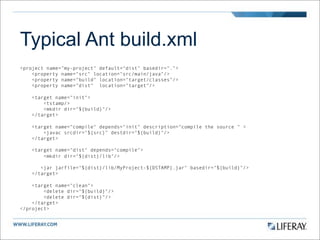
Typical Ant build.xml
<project name="my-project" default="dist" basedir=".">
    <property name="src" location="src/main/java"/>
    <property name="build" location="target/classes"/>
    <property name="dist" location="target"/>

    <target name="init">
        <tstamp/>
        <mkdir dir="${build}"/>
    </target>

    <target name="compile" depends="init" description="compile the source " >
        <javac srcdir="${src}" destdir="${build}"/>
    </target>

    <target name="dist" depends="compile">
        <mkdir dir="${dist}/lib"/>

       <jar jarfile="${dist}/lib/MyProject-${DSTAMP}.jar" basedir="${build}"/>
    </target>

    <target name="clean">
        <delete dir="${build}"/>
        <delete dir="${dist}"/>
    </target>
</project>
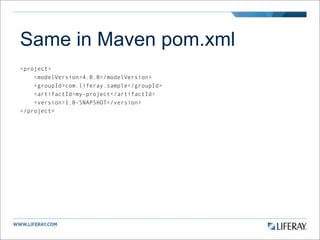
Same in Maven pom.xml
<project>
    <modelVersion>4.0.0</modelVersion>
    <groupId>com.liferay.sample</groupId>
    <artifactId>my-project</artifactId>
    <version>1.0-SNAPSHOT</version>
</project>
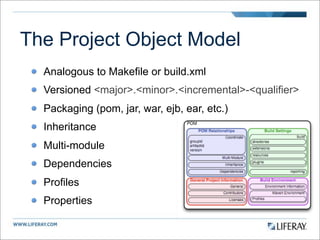
The Project Object Model
  Analogous to Makefile or build.xml
  Versioned <major>.<minor>.<incremental>-<qualifier>
  Packaging (pom, jar, war, ejb, ear, etc.)
  Inheritance
  Multi-module
  Dependencies
  Profiles
  Properties
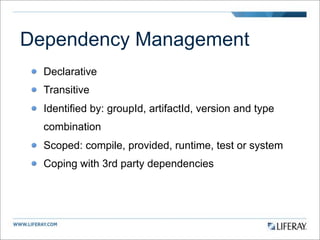
Dependency Management
  Declarative
  Transitive
  Identified by: groupId, artifactId, version and type
  combination
  Scoped: compile, provided, runtime, test or system
  Coping with 3rd party dependencies
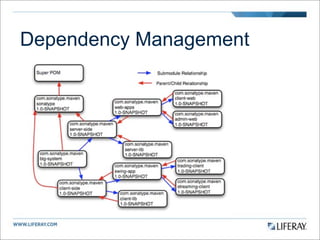
Dependency Management
Build Lifecycle
  Three standard lifecycles: clean, default and site
  Lifecycles have phases
  Goals are attached to phases
  Lifecycle phases differs based on package type
  Common goals:
    process-resources, compile
    process-test-resources, test-compile, test
    install, deploy
Repositories
  Place where all artifacts are stored
  Local
    Locate in USER_HOME/.m2/repository
    Cached copy of remote downloads
    May contain project locally built artifacts
  Remote
    Central (repo1.maven.org), internal or external
    Proxy or Cache
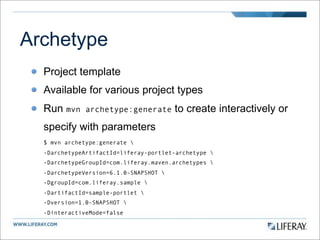
Archetype
  Project template
  Available for various project types
  Run mvn     archetype:generate        to create interactively or
  specify with parameters
  $ mvn archetype:generate 
  -DarchetypeArtifactId=liferay-portlet-archetype 
  -DarchetypeGroupId=com.liferay.maven.archetypes 
  -DarchetypeVersion=6.1.0-SNAPSHOT 
  -DgroupId=com.liferay.sample 
  -DartifactId=sample-portlet 
  -Dversion=1.0-SNAPSHOT 
  -DinteractiveMode=false
Liferay and Maven
  Goal is to make maven a first class citizen in Liferay
  plugin development (alternative to ant based sdk)
  No Liferay core will not be built with maven, for now :-)
  Inspired by a community members effort in 5.2.3 (Milen
  Dyankov)
  Mostly developed by Me and Thiago Moreira with
  community feedback and patches
Current state
  CE artifacts published to Central through Sonatypes
  repository
  Artifacts: portal-client, portal-impl, portal-service, portal-
  web, tunnel-web, util-bridges, util-java and util-taglib
  Artifacts include javadoc and source archives
  Archetypes for hook, ext, layouttpl, portlet,
  servicebuilder, theme and web
Current state
  Plugins: ExtBuilder, LangBuilder, PluginDeployer,
  PluginDirectDeployer, ServiceBuilder, ThemeMerger,
  ThumbnailBuilder and WSDDBuilder
  All plugins package in one maven plugin package
  liferay-maven-plugin
  Maven 2.2.x compatible
  Some issues with Maven 3.0.x
Liferay EE and Maven
  Problematic because EE artifacts are not published to
  public repositories
  Building EE artifacts from source also not possible
  because EE source does not have build scripts
  Solution: Provide prebuilt package with install script to
  install them in either local repository or internal remote
  repository like Sonatype Nexus
Installing artifacts locally
   In Liferay portal source (not needed once released)
   ant -f build-maven.xml zip-maven
   Unzip liferay-portal-maven-<version>.zip
   Install artifacts by running
   ant install
   Deploy to repository (optional)
     Edit lp.maven.repository.url in build.properties
     Run ant deploy
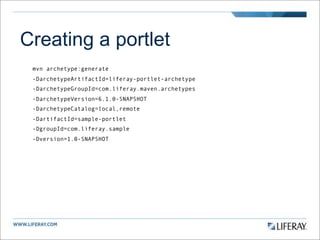
Creating a portlet
 mvn archetype:generate
 -DarchetypeArtifactId=liferay-portlet-archetype
 -DarchetypeGroupId=com.liferay.maven.archetypes
 -DarchetypeVersion=6.1.0-SNAPSHOT
 -DarchetypeCatalog=local,remote
 -DartifactId=sample-portlet
 -DgroupId=com.liferay.sample
 -Dversion=1.0-SNAPSHOT
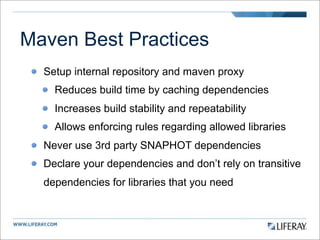
Maven Best Practices
  Setup internal repository and maven proxy
    Reduces build time by caching dependencies
    Increases build stability and repeatability
    Allows enforcing rules regarding allowed libraries
  Never use 3rd party SNAPHOT dependencies
  Declare your dependencies and don’t rely on transitive
  dependencies for libraries that you need
Resources
  Maven: The Complete Reference
  http://www.sonatype.com/books/mvnref-book/reference/

  Maven by Example
  http://www.sonatype.com/books/mvnex-book/reference/

  Maven homepage
  http://maven.apache.org

  My maven incubator - bleeding edge and some extras
  https://github.com/mikakoivisto/liferay-maven-incubation
Credits
 Figures from Maven: The Complete Reference by
 Sonatype, Inc.
 http://www.sonatype.com/books/mvnref-book/reference/
Thank You!

Liferay maven sdk

  • 1.
    Liferay Maven SDK MikaKoivisto Senior Software Engineer
  • 2.
    What is Maven? Project management tool Build, test, report, assemble, release Small core expandable with plugins Project Object Model (POM) Convention over configuration Dependency management Common lifecycle
  • 3.
    Typical Ant build.xml <projectname="my-project" default="dist" basedir="."> <property name="src" location="src/main/java"/> <property name="build" location="target/classes"/> <property name="dist" location="target"/> <target name="init"> <tstamp/> <mkdir dir="${build}"/> </target> <target name="compile" depends="init" description="compile the source " > <javac srcdir="${src}" destdir="${build}"/> </target> <target name="dist" depends="compile"> <mkdir dir="${dist}/lib"/> <jar jarfile="${dist}/lib/MyProject-${DSTAMP}.jar" basedir="${build}"/> </target> <target name="clean"> <delete dir="${build}"/> <delete dir="${dist}"/> </target> </project>
  • 4.
    Same in Mavenpom.xml <project> <modelVersion>4.0.0</modelVersion> <groupId>com.liferay.sample</groupId> <artifactId>my-project</artifactId> <version>1.0-SNAPSHOT</version> </project>
  • 5.
    The Project ObjectModel Analogous to Makefile or build.xml Versioned <major>.<minor>.<incremental>-<qualifier> Packaging (pom, jar, war, ejb, ear, etc.) Inheritance Multi-module Dependencies Profiles Properties
  • 6.
    Dependency Management Declarative Transitive Identified by: groupId, artifactId, version and type combination Scoped: compile, provided, runtime, test or system Coping with 3rd party dependencies
  • 7.
  • 8.
    Build Lifecycle Three standard lifecycles: clean, default and site Lifecycles have phases Goals are attached to phases Lifecycle phases differs based on package type Common goals: process-resources, compile process-test-resources, test-compile, test install, deploy
  • 9.
    Repositories Placewhere all artifacts are stored Local Locate in USER_HOME/.m2/repository Cached copy of remote downloads May contain project locally built artifacts Remote Central (repo1.maven.org), internal or external Proxy or Cache
  • 10.
    Archetype Projecttemplate Available for various project types Run mvn archetype:generate to create interactively or specify with parameters $ mvn archetype:generate -DarchetypeArtifactId=liferay-portlet-archetype -DarchetypeGroupId=com.liferay.maven.archetypes -DarchetypeVersion=6.1.0-SNAPSHOT -DgroupId=com.liferay.sample -DartifactId=sample-portlet -Dversion=1.0-SNAPSHOT -DinteractiveMode=false
  • 11.
    Liferay and Maven Goal is to make maven a first class citizen in Liferay plugin development (alternative to ant based sdk) No Liferay core will not be built with maven, for now :-) Inspired by a community members effort in 5.2.3 (Milen Dyankov) Mostly developed by Me and Thiago Moreira with community feedback and patches
  • 12.
    Current state CE artifacts published to Central through Sonatypes repository Artifacts: portal-client, portal-impl, portal-service, portal- web, tunnel-web, util-bridges, util-java and util-taglib Artifacts include javadoc and source archives Archetypes for hook, ext, layouttpl, portlet, servicebuilder, theme and web
  • 13.
    Current state Plugins: ExtBuilder, LangBuilder, PluginDeployer, PluginDirectDeployer, ServiceBuilder, ThemeMerger, ThumbnailBuilder and WSDDBuilder All plugins package in one maven plugin package liferay-maven-plugin Maven 2.2.x compatible Some issues with Maven 3.0.x
  • 14.
    Liferay EE andMaven Problematic because EE artifacts are not published to public repositories Building EE artifacts from source also not possible because EE source does not have build scripts Solution: Provide prebuilt package with install script to install them in either local repository or internal remote repository like Sonatype Nexus
  • 15.
    Installing artifacts locally In Liferay portal source (not needed once released) ant -f build-maven.xml zip-maven Unzip liferay-portal-maven-<version>.zip Install artifacts by running ant install Deploy to repository (optional) Edit lp.maven.repository.url in build.properties Run ant deploy
  • 16.
    Creating a portlet mvn archetype:generate -DarchetypeArtifactId=liferay-portlet-archetype -DarchetypeGroupId=com.liferay.maven.archetypes -DarchetypeVersion=6.1.0-SNAPSHOT -DarchetypeCatalog=local,remote -DartifactId=sample-portlet -DgroupId=com.liferay.sample -Dversion=1.0-SNAPSHOT
  • 17.
    Maven Best Practices Setup internal repository and maven proxy Reduces build time by caching dependencies Increases build stability and repeatability Allows enforcing rules regarding allowed libraries Never use 3rd party SNAPHOT dependencies Declare your dependencies and don’t rely on transitive dependencies for libraries that you need
  • 18.
    Resources Maven:The Complete Reference http://www.sonatype.com/books/mvnref-book/reference/ Maven by Example http://www.sonatype.com/books/mvnex-book/reference/ Maven homepage http://maven.apache.org My maven incubator - bleeding edge and some extras https://github.com/mikakoivisto/liferay-maven-incubation
  • 19.
    Credits Figures fromMaven: The Complete Reference by Sonatype, Inc. http://www.sonatype.com/books/mvnref-book/reference/
  • 20.