
1
1
How the Atlassian Plugin SDK Cured
Cancer and Reunited Soundgarden


Ben Speakmon

Developer Relations


                                     2
                                     2
Agenda
• Developer Relations
• Definitions
• Challenges in writing plugins
• How the SDK addresses them
• SDK in action
• Getting involved
• Wrap-up

                                  3
                                      3
Developer Relations
• Dedicated product team
 • Started in June 2009
 • Based in San Francisco
 • Two full-time developers

• In addition to the SDK…
 • plugins.atlassian.com
 • studio.plugins.atlassian.com
 • Developer documentation


                                  4
                                      4
What weʼve got to show for it
• First SDK release in October 2009 • February 2010 Doc Sprint
  at AtlasCamp                        • Completely new developer
 • 16 releases since                    documentation
                                      • 20 new tutorials
• plugins.atlassian.com
 • Over 500 plugins
 • 1.1 release has searching,
   performance, and RSS feed
   improvements


• studio.plugins.atlassian.com
                                                                   5
 • Over 500 hosted projects
                                                                       5
Definitions
• SDK – Software Development Kit
• Maven – Project management tool
 • Open source project at apache.org
 • Builds and Dependency management

• Plugin – Code that adds a feature to a product
 • Maven plugins extend Maven
 • Atlassian plugins extend Atlassian products


                                                   6
                                                       6
Plugin development challenges


• I made this half-pony half-monkey monster to please you
• But I get the feeling that you donʼt like it
• Whatʼs with all the screaming?
•                -- Jonathan Coulton, “Skullcrusher Mountain”


                                                                7
                                                                    7
Effective plugin development

• Different than product development
 • Work within someone elseʼs sandbox

• Three things that MUST be easy:
 • Starting the product
 • Configuring the product
 • Installing the plugin

                                        8
                                            8
Challenge #1: Starting the product
Product            Startup method
JIRA               bin/startup.sh or .bat (standalone) or WAR install into app.
                   server
Confluence         bin/startup.sh or .bat (standalone) or WAR install into app.
                   server
Bamboo             bamboo.sh or Win32 service or WAR install into app. server

Crowd              start_crowd.sh or .bat (standalone) or WAR install into app.
                   server
FishEye/Crucible   run.sh or .bat – no WAR version available


                                                                                  9
                                                                                      9
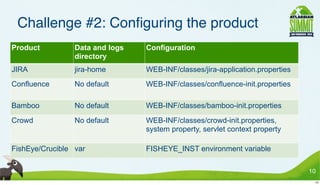
Challenge #2: Configuring the product
Product          Data and logs   Configuration
                 directory
JIRA             jira-home       WEB-INF/classes/jira-application.properties
Confluence       No default      WEB-INF/classes/confluence-init.properties

Bamboo           No default      WEB-INF/classes/bamboo-init.properties
Crowd            No default      WEB-INF/classes/crowd-init.properties,
                                 system property, servlet context property

FishEye/Crucible var             FISHEYE_INST environment variable

                                                                               10
                                                                                10
Challenge #3: Installing a plugin
Product           Plugin install methods
JIRA              Two plugin directories for different plugin systems, web interface

Confluence        Two plugin directories for different plugin systems, web interface,
                  plugin repository

Bamboo            Two plugin directories for different plugin systems

Crowd             One plugin directory (plugins 2 only)

FishEye/Crucible One plugin directory (plugins 2 only)


                                                                                        11
                                                                                         11
And if that wasnʼt enough…
Build systems
 • Maven 1 or 2? Ant?
 • Dependencies are really
   confusing
Starting a plugin project
 • Expert product knowledge
   required just to get started
 • Maven archetypes are too
   hard to use

                                  12
                                   12
It all adds up to…
Lots of small headaches
== big headache
 • Not your fault
 • Not your job to fix them
Slow code/test/debug cycle
Frustration
                             13
                              13
How the SDK deals with the challenges


•“What is happiness? The feeling
 that power is growing, that
 resistance is overcome.”
•          --Friedrich Nietzsche, LISP user

                                              14
                                               14
Challenge #1: Starting the product
Product            Startup method
JIRA               bin/startup.sh or .bat (standalone) or WAR install into app. server

Confluence         bin/startup.sh or .bat (standalone) or WAR install into app. server

Bamboo             bamboo.sh or Win32 service or WAR install into app. server

Crowd              start_crowd.sh or .bat (standalone) or WAR install into app. server

FishEye/Crucible   run.sh or .bat – no WAR version available


                                                                                         15
                                                                                          15
Challenge #1: Starting the product
Product            Startup method
JIRA               bin/startup.sh or .bat (standalone) or WAR install into app. server

Confluence         bin/startup.sh or .bat (standalone) or WAR install into app. server

Bamboo             bamboo.sh or Win32 service or WAR install into app. server

Crowd              start_crowd.sh or .bat (standalone) or WAR install into app. server

FishEye/Crucible   run.sh or .bat – no WAR version available


                                                                                         15
                                                                                          15
Challenge #1: Starting the product
Product            Startup method
JIRA               bin/startup.sh or .bat (standalone) or WAR install into app. server

Confluence         bin/startup.sh or .bat (standalone) or WAR install into app. server

Bamboo             bamboo.sh or Win32 service or WAR install into app. server

Crowd              start_crowd.sh or .bat (standalone) or WAR install into app. server

FishEye/Crucible   run.sh or .bat – no WAR version available


•                       atlas-run
                                                                                         15
                                                                                          15
Challenge #2: Configuring the product
Product            Data and logs   Configuration
                   directory
JIRA               jira-home       WEB-INF/classes/jira-application.properties
Confluence         No default      WEB-INF/classes/confluence-init.properties

Bamboo             No default      WEB-INF/classes/bamboo-init.properties
Crowd              No default      WEB-INF/classes/crowd-init.properties, system
                                   property, servlet context property

FishEye/Crucible   var             FISHEYE_INST environment variable


                                                                                   16
                                                                                    16
Challenge #2: Configuring the product
Product            Data and logs   Configuration
                   directory
JIRA               jira-home       WEB-INF/classes/jira-application.properties
Confluence         No default      WEB-INF/classes/confluence-init.properties

Bamboo             No default      WEB-INF/classes/bamboo-init.properties
Crowd              No default      WEB-INF/classes/crowd-init.properties, system
                                   property, servlet context property

FishEye/Crucible   var             FISHEYE_INST environment variable


                                                                                   16
                                                                                    16
Challenge #2: Configuring the product
Product            Data and logs   Configuration
                   directory
JIRA               jira-home       WEB-INF/classes/jira-application.properties
Confluence         No default      WEB-INF/classes/confluence-init.properties

Bamboo             No default      WEB-INF/classes/bamboo-init.properties
Crowd              No default      WEB-INF/classes/crowd-init.properties, system
                                   property, servlet context property

FishEye/Crucible   var             FISHEYE_INST environment variable

•                          Logs sent to console


                                                                                   16
                                                                                    16
Challenge #2: Configuring the product
Product            Data and logs   Configuration
                   directory
JIRA               jira-home       WEB-INF/classes/jira-application.properties
Confluence         No default      WEB-INF/classes/confluence-init.properties

Bamboo             No default      WEB-INF/classes/bamboo-init.properties
Crowd              No default      WEB-INF/classes/crowd-init.properties, system
                                   property, servlet context property

FishEye/Crucible   var             FISHEYE_INST environment variable

•                          Logs sent to console
•                  Preconfigured data directories
                                                                                   16
                                                                                    16
Challenge #3: Installing a plugin
Product           Plugin install methods
JIRA              Two plugin directories for different plugin systems, web interface
Confluence        Two plugin directories for different plugin systems, web interface,
                  plugin repository
Bamboo            Two plugin directories for different plugin systems
Crowd             One plugin directory (plugins 2 only)
FishEye/Crucible One plugin directory (plugins 2 only)


                                                                                        17
                                                                                         17
Challenge #3: Installing a plugin
Product           Plugin install methods
JIRA              Two plugin directories for different plugin systems, web interface
Confluence        Two plugin directories for different plugin systems, web interface,
                  plugin repository
Bamboo            Two plugin directories for different plugin systems
Crowd             One plugin directory (plugins 2 only)
FishEye/Crucible One plugin directory (plugins 2 only)


                                                                                        17
                                                                                         17
Challenge #3: Installing a plugin
    Product           Plugin install methods
    JIRA              Two plugin directories for different plugin systems, web interface
    Confluence        Two plugin directories for different plugin systems, web interface,
                      plugin repository
    Bamboo            Two plugin directories for different plugin systems
    Crowd             One plugin directory (plugins 2 only)
    FishEye/Crucible One plugin directory (plugins 2 only)


•             Automatic through atlas-run
                                                                                            17
                                                                                             17
SDK Design


•“You can get more of what you want
 with a kind word and a gun than you
 can with just a kind word.”
•                --Al Capone, project manager


                                                18
                                                 18
Atlassian Maven Plugins Suite
• Suite of Maven plugins
 • maven-jira-plugin, maven-confluence-plugin, etc.

• Common interface to products:
 • Handles installation and configuration

• Can be used independently of the SDK
 • Very handy if you already have a Maven system

                                                     19
                                                      19
Script shortcuts
Task                                        Maven command            Script shortcut
Start the product with the current plugin   mvn amps:run             atlas-run
preinstalled
Start the product with the current plugin   mvn amps:debug           atlas-debug
preinstalled and allow a debugger to
attach

Start JIRA on port 8243 and context         mvn amps:run             atlas-run
“myjira” with the current plugin            –Dproduct=jira           --product jira
preinstalled                                –Dcontext.path=/myjira   --context-path /myjira
                                            –Dhttp.port=8243         --http-port 8243

Run an arbitrary Maven command              mvn myplugin:mygoal      atlas-mvn myplugin:mygoal
                                            <parameters>             <parameters>


                                                                                                 20
                                                                                                  20
SDK in action


• A thousand moral paintings I can show
• That shall demonstrate these quick blows of Fortuneʼs
• More pregnantly than words.
•                                          Timon of Athens, I:i


                                                                  21
                                                                   21
30-second Plugin Creation™

• Creating a plugin is dirt simple!
 • atlas-create-<product>-plugin

• Executes a Maven archetype
• Automatically prompts for required information
• Created plugin works out of the box

                                                   22
                                                    22
Creating a new JIRA plugin


                             23
                              23
Creating a new JIRA plugin


                             23
                              23
Automatic resource reloading

Plugin web resources
 are monitored
 • Detects changes and
   automatically updates
Reinstall plugin for
 Java updates

                                24
                                 24
Changing a live gadget


                         25
                          25
Changing a live gadget


                         25
                          25
Boxed Maven

Contains a standalone,
 isolated Maven 2.1.0
 • Uses Atlassian repositories by
   default
 • No extra configuration needed

Usable on its own
 • atlas-mvn passes parameters
   and goals straight through

                                    26
                                     26
Getting involved


•Be the change you seek.
•          -- Atlassian Value the Fifth


                                          27
                                           27
Vital statistics
• The SDK is open source
 • Apache 2.0

• Frequent updates, both features and support for
  new releases
• Committers outside Atlassian
 • Preconfigured home directories - Jonathan Doklovic

                                                       28
                                                        28
Helping out"
• http://studio.atlassian.com/browse/AMPS
• Things YOU can help with right now:
 • Documentation
 • Testing on Windows

• Features YOU can help with:
 • Per-plugin storage
 • Integrated release process to PAC and Maven


                                                 29
                                                  29
AtlasCamp – October 2010


                           30
                            30
AtlasCamp – October 2010


                           30
                            30
AtlasCamp – October 2010


                           30
                            30
AtlasCamp – October 2010


                           30
                            30
AtlasCamp – October 2010


                           30
                            30
AtlasCamp – October 2010


                           30
                            30
Wrap-up
SDK makes plugin and gadget
 creation easier
Works in all products
Faster code/test/debug cycle
Tight integration with Atlassian build
 systems
Flexible enough to also work in your
 system


                                         31
                                          31
Resources
• Writing plugins: http://confluence.atlassian.com/x/CgbvCw
• Marketing for plugins: http://plugins.atlassian.com
• Hosting for plugins: http://studio.plugins.atlassian.com
• Developer forums: http://forums.atlassian.com
• Contact Developer Relations:
 • developer-relations@atlassian.com
 • irc.freenode.net #atlassiandev


                                                             32
                                                              32

How the Atlassian Plugin SDK Cured Cancer and Reunited Soundgarden - Atlassian Summit 2010

  • 1.
  • 2.
    How the AtlassianPlugin SDK Cured Cancer and Reunited Soundgarden Ben Speakmon Developer Relations 2 2
  • 3.
    Agenda • Developer Relations •Definitions • Challenges in writing plugins • How the SDK addresses them • SDK in action • Getting involved • Wrap-up 3 3
  • 4.
    Developer Relations • Dedicatedproduct team • Started in June 2009 • Based in San Francisco • Two full-time developers • In addition to the SDK… • plugins.atlassian.com • studio.plugins.atlassian.com • Developer documentation 4 4
  • 5.
    What weʼve gotto show for it • First SDK release in October 2009 • February 2010 Doc Sprint at AtlasCamp • Completely new developer • 16 releases since documentation • 20 new tutorials • plugins.atlassian.com • Over 500 plugins • 1.1 release has searching, performance, and RSS feed improvements • studio.plugins.atlassian.com 5 • Over 500 hosted projects 5
  • 6.
    Definitions • SDK –Software Development Kit • Maven – Project management tool • Open source project at apache.org • Builds and Dependency management • Plugin – Code that adds a feature to a product • Maven plugins extend Maven • Atlassian plugins extend Atlassian products 6 6
  • 7.
    Plugin development challenges •I made this half-pony half-monkey monster to please you • But I get the feeling that you donʼt like it • Whatʼs with all the screaming? • -- Jonathan Coulton, “Skullcrusher Mountain” 7 7
  • 8.
    Effective plugin development •Different than product development • Work within someone elseʼs sandbox • Three things that MUST be easy: • Starting the product • Configuring the product • Installing the plugin 8 8
  • 9.
    Challenge #1: Startingthe product Product Startup method JIRA bin/startup.sh or .bat (standalone) or WAR install into app. server Confluence bin/startup.sh or .bat (standalone) or WAR install into app. server Bamboo bamboo.sh or Win32 service or WAR install into app. server Crowd start_crowd.sh or .bat (standalone) or WAR install into app. server FishEye/Crucible run.sh or .bat – no WAR version available 9 9
  • 10.
    Challenge #2: Configuringthe product Product Data and logs Configuration directory JIRA jira-home WEB-INF/classes/jira-application.properties Confluence No default WEB-INF/classes/confluence-init.properties Bamboo No default WEB-INF/classes/bamboo-init.properties Crowd No default WEB-INF/classes/crowd-init.properties, system property, servlet context property FishEye/Crucible var FISHEYE_INST environment variable 10 10
  • 11.
    Challenge #3: Installinga plugin Product Plugin install methods JIRA Two plugin directories for different plugin systems, web interface Confluence Two plugin directories for different plugin systems, web interface, plugin repository Bamboo Two plugin directories for different plugin systems Crowd One plugin directory (plugins 2 only) FishEye/Crucible One plugin directory (plugins 2 only) 11 11
  • 12.
    And if thatwasnʼt enough… Build systems • Maven 1 or 2? Ant? • Dependencies are really confusing Starting a plugin project • Expert product knowledge required just to get started • Maven archetypes are too hard to use 12 12
  • 13.
    It all addsup to… Lots of small headaches == big headache • Not your fault • Not your job to fix them Slow code/test/debug cycle Frustration 13 13
  • 14.
    How the SDKdeals with the challenges •“What is happiness? The feeling that power is growing, that resistance is overcome.” • --Friedrich Nietzsche, LISP user 14 14
  • 15.
    Challenge #1: Startingthe product Product Startup method JIRA bin/startup.sh or .bat (standalone) or WAR install into app. server Confluence bin/startup.sh or .bat (standalone) or WAR install into app. server Bamboo bamboo.sh or Win32 service or WAR install into app. server Crowd start_crowd.sh or .bat (standalone) or WAR install into app. server FishEye/Crucible run.sh or .bat – no WAR version available 15 15
  • 16.
    Challenge #1: Startingthe product Product Startup method JIRA bin/startup.sh or .bat (standalone) or WAR install into app. server Confluence bin/startup.sh or .bat (standalone) or WAR install into app. server Bamboo bamboo.sh or Win32 service or WAR install into app. server Crowd start_crowd.sh or .bat (standalone) or WAR install into app. server FishEye/Crucible run.sh or .bat – no WAR version available 15 15
  • 17.
    Challenge #1: Startingthe product Product Startup method JIRA bin/startup.sh or .bat (standalone) or WAR install into app. server Confluence bin/startup.sh or .bat (standalone) or WAR install into app. server Bamboo bamboo.sh or Win32 service or WAR install into app. server Crowd start_crowd.sh or .bat (standalone) or WAR install into app. server FishEye/Crucible run.sh or .bat – no WAR version available • atlas-run 15 15
  • 18.
    Challenge #2: Configuringthe product Product Data and logs Configuration directory JIRA jira-home WEB-INF/classes/jira-application.properties Confluence No default WEB-INF/classes/confluence-init.properties Bamboo No default WEB-INF/classes/bamboo-init.properties Crowd No default WEB-INF/classes/crowd-init.properties, system property, servlet context property FishEye/Crucible var FISHEYE_INST environment variable 16 16
  • 19.
    Challenge #2: Configuringthe product Product Data and logs Configuration directory JIRA jira-home WEB-INF/classes/jira-application.properties Confluence No default WEB-INF/classes/confluence-init.properties Bamboo No default WEB-INF/classes/bamboo-init.properties Crowd No default WEB-INF/classes/crowd-init.properties, system property, servlet context property FishEye/Crucible var FISHEYE_INST environment variable 16 16
  • 20.
    Challenge #2: Configuringthe product Product Data and logs Configuration directory JIRA jira-home WEB-INF/classes/jira-application.properties Confluence No default WEB-INF/classes/confluence-init.properties Bamboo No default WEB-INF/classes/bamboo-init.properties Crowd No default WEB-INF/classes/crowd-init.properties, system property, servlet context property FishEye/Crucible var FISHEYE_INST environment variable • Logs sent to console 16 16
  • 21.
    Challenge #2: Configuringthe product Product Data and logs Configuration directory JIRA jira-home WEB-INF/classes/jira-application.properties Confluence No default WEB-INF/classes/confluence-init.properties Bamboo No default WEB-INF/classes/bamboo-init.properties Crowd No default WEB-INF/classes/crowd-init.properties, system property, servlet context property FishEye/Crucible var FISHEYE_INST environment variable • Logs sent to console • Preconfigured data directories 16 16
  • 22.
    Challenge #3: Installinga plugin Product Plugin install methods JIRA Two plugin directories for different plugin systems, web interface Confluence Two plugin directories for different plugin systems, web interface, plugin repository Bamboo Two plugin directories for different plugin systems Crowd One plugin directory (plugins 2 only) FishEye/Crucible One plugin directory (plugins 2 only) 17 17
  • 23.
    Challenge #3: Installinga plugin Product Plugin install methods JIRA Two plugin directories for different plugin systems, web interface Confluence Two plugin directories for different plugin systems, web interface, plugin repository Bamboo Two plugin directories for different plugin systems Crowd One plugin directory (plugins 2 only) FishEye/Crucible One plugin directory (plugins 2 only) 17 17
  • 24.
    Challenge #3: Installinga plugin Product Plugin install methods JIRA Two plugin directories for different plugin systems, web interface Confluence Two plugin directories for different plugin systems, web interface, plugin repository Bamboo Two plugin directories for different plugin systems Crowd One plugin directory (plugins 2 only) FishEye/Crucible One plugin directory (plugins 2 only) • Automatic through atlas-run 17 17
  • 25.
    SDK Design •“You canget more of what you want with a kind word and a gun than you can with just a kind word.” • --Al Capone, project manager 18 18
  • 26.
    Atlassian Maven PluginsSuite • Suite of Maven plugins • maven-jira-plugin, maven-confluence-plugin, etc. • Common interface to products: • Handles installation and configuration • Can be used independently of the SDK • Very handy if you already have a Maven system 19 19
  • 27.
    Script shortcuts Task Maven command Script shortcut Start the product with the current plugin mvn amps:run atlas-run preinstalled Start the product with the current plugin mvn amps:debug atlas-debug preinstalled and allow a debugger to attach Start JIRA on port 8243 and context mvn amps:run atlas-run “myjira” with the current plugin –Dproduct=jira --product jira preinstalled –Dcontext.path=/myjira --context-path /myjira –Dhttp.port=8243 --http-port 8243 Run an arbitrary Maven command mvn myplugin:mygoal atlas-mvn myplugin:mygoal <parameters> <parameters> 20 20
  • 28.
    SDK in action •A thousand moral paintings I can show • That shall demonstrate these quick blows of Fortuneʼs • More pregnantly than words. • Timon of Athens, I:i 21 21
  • 29.
    30-second Plugin Creation™ •Creating a plugin is dirt simple! • atlas-create-<product>-plugin • Executes a Maven archetype • Automatically prompts for required information • Created plugin works out of the box 22 22
  • 30.
    Creating a newJIRA plugin 23 23
  • 31.
    Creating a newJIRA plugin 23 23
  • 32.
    Automatic resource reloading Pluginweb resources are monitored • Detects changes and automatically updates Reinstall plugin for Java updates 24 24
  • 33.
    Changing a livegadget 25 25
  • 34.
    Changing a livegadget 25 25
  • 35.
    Boxed Maven Contains astandalone, isolated Maven 2.1.0 • Uses Atlassian repositories by default • No extra configuration needed Usable on its own • atlas-mvn passes parameters and goals straight through 26 26
  • 36.
    Getting involved •Be thechange you seek. • -- Atlassian Value the Fifth 27 27
  • 37.
    Vital statistics • TheSDK is open source • Apache 2.0 • Frequent updates, both features and support for new releases • Committers outside Atlassian • Preconfigured home directories - Jonathan Doklovic 28 28
  • 38.
    Helping out" • http://studio.atlassian.com/browse/AMPS •Things YOU can help with right now: • Documentation • Testing on Windows • Features YOU can help with: • Per-plugin storage • Integrated release process to PAC and Maven 29 29
  • 39.
  • 40.
  • 41.
  • 42.
  • 43.
  • 44.
  • 45.
    Wrap-up SDK makes pluginand gadget creation easier Works in all products Faster code/test/debug cycle Tight integration with Atlassian build systems Flexible enough to also work in your system 31 31
  • 46.
    Resources • Writing plugins:http://confluence.atlassian.com/x/CgbvCw • Marketing for plugins: http://plugins.atlassian.com • Hosting for plugins: http://studio.plugins.atlassian.com • Developer forums: http://forums.atlassian.com • Contact Developer Relations: • developer-relations@atlassian.com • irc.freenode.net #atlassiandev 32 32