

June 29, 2016
Secure Development on the
Salesforce Platform - Part 2
Forward-Looking Statement
Statement under the Private Securities Litigation Reform Act of 1995:
This presentation may contain forward-looking statements that involve risks, uncertainties, and assumptions. If any such uncertainties materialize
or if any of the assumptions proves incorrect, the results of salesforce.com, inc. could differ materially from the results expressed or implied by the
forward-looking statements we make. All statements other than statements of historical fact could be deemed forward-looking, including any
projections of product or service availability, subscriber growth, earnings, revenues, or other financial items and any statements regarding
strategies or plans of management for future operations, statements of belief, any statements concerning new, planned, or upgraded services or
technology developments and customer contracts or use of our services.
The risks and uncertainties referred to above include – but are not limited to – risks associated with developing and delivering new functionality for
our service, new products and services, our new business model, our past operating losses, possible fluctuations in our operating results and rate
of growth, interruptions or delays in our Web hosting, breach of our security measures, the outcome of any litigation, risks associated with
completed and any possible mergers and acquisitions, the immature market in which we operate, our relatively limited operating history, our ability
to expand, retain, and motivate our employees and manage our growth, new releases of our service and successful customer deployment, our
limited history reselling non-salesforce.com products, and utilization and selling to larger enterprise customers. Further information on potential
factors that could affect the financial results of salesforce.com, inc. is included in our annual report on Form 10-K for the most recent fiscal year
and in our quarterly report on Form 10-Q for the most recent fiscal quarter. These documents and others containing important disclosures are
available on the SEC Filings section of the Investor Information section of our Web site.
Any unreleased services or features referenced in this or other presentations, press releases or public statements are not currently available and
may not be delivered on time or at all. Customers who purchase our services should make the purchase decisions based upon features that are
currently available. Salesforce.com, inc. assumes no obligation and does not intend to update these forward-looking statements.
Go Social!
Salesforce Developers
The video will be posted to YouTube & the
webinar recap page (same URL as registration).This webinar is being recorded!
@salesforcedevs / #forcewebinar
▪ Don’t wait until the end to ask your question!
– Technical support will answer questions starting now.
▪ Respect Q&A etiquette
– Please don’t repeat questions. The support team is working
their way down the queue.
▪ Stick around for live Q&A at the end
– Speakers will tackle more questions at the end, time-
allowing.
▪ Head to Developer Forums
– More questions? Visit developer.salesforce.com/forums
Have Questions?
Agenda
1. Overview of our sample app
2. XSS (Cross-Site Scripting)
– Reflected
– Stored
– DOM
3.Open Redirect
4.CSRF (Cross-Site Request Forgery)
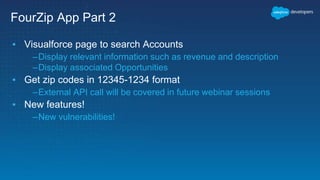
FourZip App Part 2
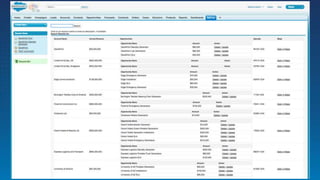
▪ Visualforce page to search Accounts
–Display relevant information such as revenue and description
–Display associated Opportunities
▪ Get zip codes in 12345-1234 format
–External API call will be covered in future webinar sessions
▪ New features!
–New vulnerabilities!
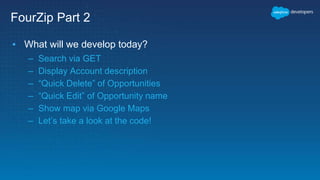
FourZip Part 2
▪ What will we develop today?
– Search via GET
– Display Account description
– “Quick Delete” of Opportunities
– “Quick Edit” of Opportunity name
– Show map via Google Maps
– Let’s take a look at the code!
Cross-Site Scripting
What is Cross Site Scripting?
XSS is a web vulnerability where an attacker can insert
unauthorized JavaScript into a web page viewed by other users
 User input is displayed on the page
 Poor separation between user input (data) and code
 Improper sanitization
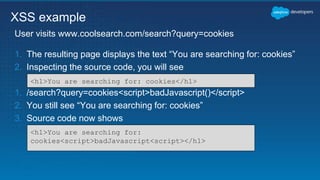
1. The resulting page displays the text “You are searching for: cookies”
2. Inspecting the source code, you will see
1. /search?query=cookies<script>badJavascript()</script>
2. You still see “You are searching for: cookies”
3. Source code now shows
User visits www.coolsearch.com/search?query=cookies
XSS example
<h1>You are searching for: cookies</h1>
<h1>You are searching for:
cookies<script>badJavascript<script></h1>
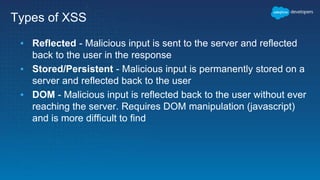
Types of XSS
▪ Reflected - Malicious input is sent to the server and reflected
back to the user in the response
▪ Stored/Persistent - Malicious input is permanently stored on a
server and reflected back to the user
▪ DOM - Malicious input is reflected back to the user without ever
reaching the server. Requires DOM manipulation (javascript)
and is more difficult to find
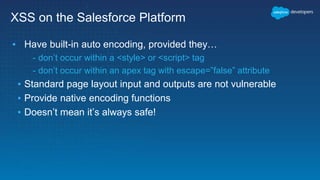
XSS on the Salesforce Platform
▪ Have built-in auto encoding, provided they…
- don’t occur within a <style> or <script> tag
- don’t occur within an apex tag with escape=”false” attribute
▪ Standard page layout input and outputs are not vulnerable
▪ Provide native encoding functions
▪ Doesn’t mean it’s always safe!
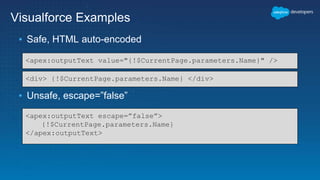
Visualforce Examples
▪ Safe, HTML auto-encoded
▪ Unsafe, escape=”false”
<apex:outputText value="{!$CurrentPage.parameters.Name}" />
<div> {!$CurrentPage.parameters.Name} </div>
<apex:outputText escape=”false”>
{!$CurrentPage.parameters.Name}
</apex:outputText>
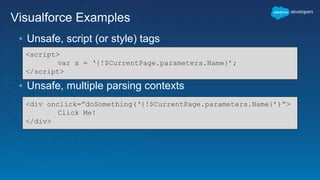
Visualforce Examples
▪ Unsafe, script (or style) tags
▪ Unsafe, multiple parsing contexts
<script>
var x = ‘{!$CurrentPage.parameters.Name}’;
</script>
<div onclick=”doSomething(‘{!$CurrentPage.parameters.Name}’)”>
Click Me!
</div>
Reflected XSS demo
escape=”false” attribute in apex outputText
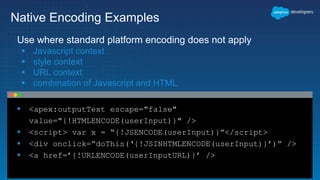
 <apex:outputText escape="false"
value="{!HTMLENCODE(userInput)}" />
 <script> var x = “{!JSENCODE(userInput)}”</script>
 <div onclick=”doThis(‘{!JSINHTMLENCODE(userInput)}’)” />
 <a href=’{!URLENCODE(userInputURL)}’ />
Native Encoding Examples
Use where standard platform encoding does not apply
 Javascript context
 style context
 URL context
 combination of Javascript and HTML
Reflected XSS Fix
Let’s fix the vulnerability and demo the fix
Stored XSS demo
Javascript in Account description
Stored XSS Fix
DOM XSS demo
Javascript update Opportunity
name using innerHTML
DOM XSS Fix
Best Practices for XSS
▪ Never trust user input
▪ Be aware of context!
▪ Use native encoding functions
–HTMLENCODE
–JSENCODE
–JSINHTMLENCODE
–URLENCODE
Open Redirect
What is open redirect?
▪ When an application performs an automatic redirect to a URL
contained within a URL parameter without any validation.
▪ Commonly used in phishing attacks to get unsuspecting users to
malicious websites.
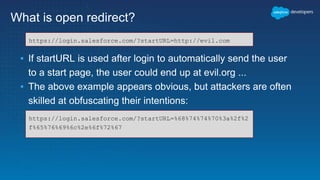
What is open redirect?
▪ If startURL is used after login to automatically send the user
to a start page, the user could end up at evil.org ...
▪ The above example appears obvious, but attackers are often
skilled at obfuscating their intentions:
https://login.salesforce.com/?startURL=http://evil.com
https://login.salesforce.com/?startURL=%68%74%74%70%3a%2f%2
f%65%76%69%6c%2e%6f%72%67
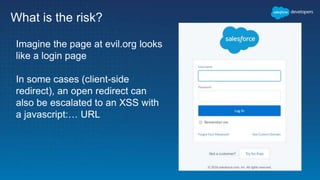
What is the risk?
Imagine the page at evil.org looks
like a login page
In some cases (client-side
redirect), an open redirect can
also be escalated to an XSS with
a javascript:… URL
Open Redirects on the Force.com Platform
▪ Wherever possible, platform protects from open redirects.
▪ Predefined URL parameters are validated to ensure they do not redirect
to an external domain:
– retURL
– saveURL
– cancelURL
▪ Due to the extensibility and flexibility of the Visualforce and Apex
programming languages, it is possible to create open redirects in your
custom code.
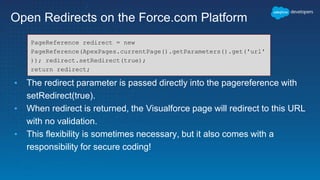
Open Redirects on the Force.com Platform
▪ The redirect parameter is passed directly into the pagereference with
setRedirect(true).
▪ When redirect is returned, the Visualforce page will redirect to this URL
with no validation.
▪ This flexibility is sometimes necessary, but it also comes with a
responsibility for secure coding!
PageReference redirect = new
PageReference(ApexPages.currentPage().getParameters().get('url'
)); redirect.setRedirect(true);
return redirect;
Open Redirect demo
Open Redirect Mitigations
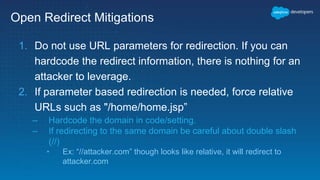
1. Do not use URL parameters for redirection. If you can
hardcode the redirect information, there is nothing for an
attacker to leverage.
2. If parameter based redirection is needed, force relative
URLs such as "/home/home.jsp”
– Hardcode the domain in code/setting.
– If redirecting to the same domain be careful about double slash
(//)
• Ex: “//attacker.com” though looks like relative, it will redirect to
attacker.com
Open Redirect Mitigations
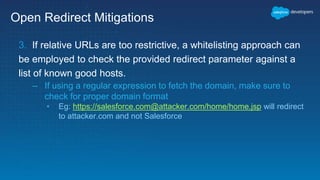
3. If relative URLs are too restrictive, a whitelisting approach can
be employed to check the provided redirect parameter against a
list of known good hosts.
– If using a regular expression to fetch the domain, make sure to
check for proper domain format
• Eg: https://salesforce.com@attacker.com/home/home.jsp will redirect
to attacker.com and not Salesforce
Open Redirect Mitigations
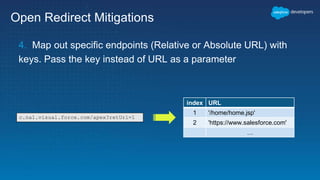
4. Map out specific endpoints (Relative or Absolute URL) with
keys. Pass the key instead of URL as a parameter
index URL
1 '/home/home.jsp'
2 'https://www.salesforce.com'
…
c.na1.visual.force.com/apex?retUrl=1
Open Redirect Fix
Let’s fix the vulnerability and demo the fix
CSRF
Cross-Site Request Forgery
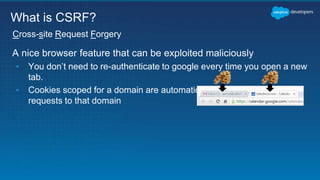
A nice browser feature that can be exploited maliciously
▪ You don’t need to re-authenticate to google every time you open a new
tab.
▪ Cookies scoped for a domain are automatically sent along any new
requests to that domain
Cross-site Request Forgery
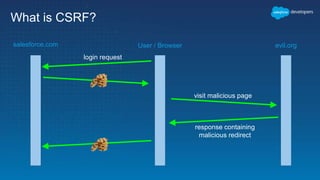
What is CSRF?
What is CSRF?
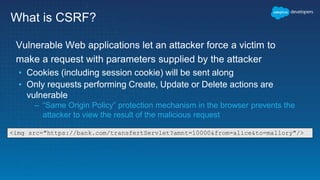
Vulnerable Web applications let an attacker force a victim to
make a request with parameters supplied by the attacker
▪ Cookies (including session cookie) will be sent along
▪ Only requests performing Create, Update or Delete actions are
vulnerable
– “Same Origin Policy” protection mechanism in the browser prevents the
attacker to view the result of the malicious request
<img src="https://bank.com/transfertServlet?amnt=10000&from=alice&to=mallory"/>
What is CSRF?
User / Browsersalesforce.com evil.org
login request
visit malicious page
response containing
malicious redirect
CSRF Prevention
▪ State changing web operations should be accompanied by a
secret that isn’t sent automatically like Cookies.
▪ These secrets are called CSRF tokens.
▪ CSRF tokens are typically included in the DOM or in custom
HTTP headers
▪ The tokens should be unique per user per session. The server
should validate the token before each state changing request
Salesforce Platform Protections
▪ All POST requests are protected against CSRF by default on the
platform.
▪ Every time an apex form is loaded, the platform includes a
_CONFIRMATIONTOKEN in the form and the token is validated
on submit.
▪ Make sure no state changing operations are performed on page
load
CSRF demo
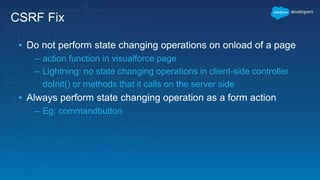
CSRF Fix
▪ Do not perform state changing operations on onload of a page
– action function in visualforce page
– Lightning: no state changing operations in client-side controller
doInit() or methods that it calls on the server side
▪ Always perform state changing operation as a form action
– Eg: commandbutton
CSRF Fix
Let’s fix the vulnerability and demo the fix
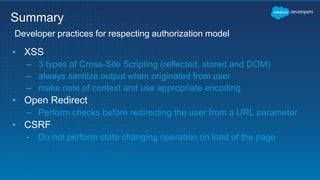
▪ XSS
– 3 types of Cross-Site Scripting (reflected, stored and DOM)
– always sanitize output when originated from user
– make note of context and use appropriate encoding
▪ Open Redirect
– Perform checks before redirecting the user from a URL parameter
▪ CSRF
- Do not perform state changing operation on load of the page
Developer practices for respecting authorization model
Summary
Additional Resources
Secure Coding Guidelines
https://developer.salesforce.com/page/Secure_Coding_Guideline
Secure Coding - XSS
https://developer.salesforce.com/page/Secure_Coding_Cross_Site_Scripting
Secure Coding - Open Redirect
https://developer.salesforce.com/page/Secure_Coding_Arbitrary_Redirect
Secure Coding - CSRF
https://developer.salesforce.com/page/Secure_Coding_Cross_Site_Request_Forger
y
Salesforce Developer Security Forum
https://developer.salesforce.com/forums
Survey
Your feedback is crucial to the success
of our webinar programs. Thank you!
http://bit.ly/SecureDevelopment2
Q & A
Share Your Feedback: http://bit.ly/SecureDevelopment2
Join the conversation:
@salesforcedevs
@SecureCloudDev
Thank You

Secure Development on the Salesforce Platform - Part 2

  • 1.
    June 29, 2016 SecureDevelopment on the Salesforce Platform - Part 2
  • 2.
    Forward-Looking Statement Statement underthe Private Securities Litigation Reform Act of 1995: This presentation may contain forward-looking statements that involve risks, uncertainties, and assumptions. If any such uncertainties materialize or if any of the assumptions proves incorrect, the results of salesforce.com, inc. could differ materially from the results expressed or implied by the forward-looking statements we make. All statements other than statements of historical fact could be deemed forward-looking, including any projections of product or service availability, subscriber growth, earnings, revenues, or other financial items and any statements regarding strategies or plans of management for future operations, statements of belief, any statements concerning new, planned, or upgraded services or technology developments and customer contracts or use of our services. The risks and uncertainties referred to above include – but are not limited to – risks associated with developing and delivering new functionality for our service, new products and services, our new business model, our past operating losses, possible fluctuations in our operating results and rate of growth, interruptions or delays in our Web hosting, breach of our security measures, the outcome of any litigation, risks associated with completed and any possible mergers and acquisitions, the immature market in which we operate, our relatively limited operating history, our ability to expand, retain, and motivate our employees and manage our growth, new releases of our service and successful customer deployment, our limited history reselling non-salesforce.com products, and utilization and selling to larger enterprise customers. Further information on potential factors that could affect the financial results of salesforce.com, inc. is included in our annual report on Form 10-K for the most recent fiscal year and in our quarterly report on Form 10-Q for the most recent fiscal quarter. These documents and others containing important disclosures are available on the SEC Filings section of the Investor Information section of our Web site. Any unreleased services or features referenced in this or other presentations, press releases or public statements are not currently available and may not be delivered on time or at all. Customers who purchase our services should make the purchase decisions based upon features that are currently available. Salesforce.com, inc. assumes no obligation and does not intend to update these forward-looking statements.
  • 3.
    Go Social! Salesforce Developers SalesforceDevelopers Salesforce Developers The video will be posted to YouTube & the webinar recap page (same URL as registration).This webinar is being recorded! @salesforcedevs / #forcewebinar
  • 4.
    ▪ Don’t waituntil the end to ask your question! – Technical support will answer questions starting now. ▪ Respect Q&A etiquette – Please don’t repeat questions. The support team is working their way down the queue. ▪ Stick around for live Q&A at the end – Speakers will tackle more questions at the end, time- allowing. ▪ Head to Developer Forums – More questions? Visit developer.salesforce.com/forums Have Questions?
  • 5.
    Agenda 1. Overview ofour sample app 2. XSS (Cross-Site Scripting) – Reflected – Stored – DOM 3.Open Redirect 4.CSRF (Cross-Site Request Forgery)
  • 6.
    FourZip App Part2 ▪ Visualforce page to search Accounts –Display relevant information such as revenue and description –Display associated Opportunities ▪ Get zip codes in 12345-1234 format –External API call will be covered in future webinar sessions ▪ New features! –New vulnerabilities!
  • 7.
    FourZip Part 2 ▪What will we develop today? – Search via GET – Display Account description – “Quick Delete” of Opportunities – “Quick Edit” of Opportunity name – Show map via Google Maps – Let’s take a look at the code!
  • 9.
  • 10.
    What is CrossSite Scripting? XSS is a web vulnerability where an attacker can insert unauthorized JavaScript into a web page viewed by other users  User input is displayed on the page  Poor separation between user input (data) and code  Improper sanitization
  • 11.
    1. The resultingpage displays the text “You are searching for: cookies” 2. Inspecting the source code, you will see 1. /search?query=cookies<script>badJavascript()</script> 2. You still see “You are searching for: cookies” 3. Source code now shows User visits www.coolsearch.com/search?query=cookies XSS example <h1>You are searching for: cookies</h1> <h1>You are searching for: cookies<script>badJavascript<script></h1>
  • 12.
    Types of XSS ▪Reflected - Malicious input is sent to the server and reflected back to the user in the response ▪ Stored/Persistent - Malicious input is permanently stored on a server and reflected back to the user ▪ DOM - Malicious input is reflected back to the user without ever reaching the server. Requires DOM manipulation (javascript) and is more difficult to find
  • 13.
    XSS on theSalesforce Platform ▪ Have built-in auto encoding, provided they… - don’t occur within a <style> or <script> tag - don’t occur within an apex tag with escape=”false” attribute ▪ Standard page layout input and outputs are not vulnerable ▪ Provide native encoding functions ▪ Doesn’t mean it’s always safe!
  • 14.
    Visualforce Examples ▪ Safe,HTML auto-encoded ▪ Unsafe, escape=”false” <apex:outputText value="{!$CurrentPage.parameters.Name}" /> <div> {!$CurrentPage.parameters.Name} </div> <apex:outputText escape=”false”> {!$CurrentPage.parameters.Name} </apex:outputText>
  • 15.
    Visualforce Examples ▪ Unsafe,script (or style) tags ▪ Unsafe, multiple parsing contexts <script> var x = ‘{!$CurrentPage.parameters.Name}’; </script> <div onclick=”doSomething(‘{!$CurrentPage.parameters.Name}’)”> Click Me! </div>
  • 16.
    Reflected XSS demo escape=”false”attribute in apex outputText
  • 17.
     <apex:outputText escape="false" value="{!HTMLENCODE(userInput)}"/>  <script> var x = “{!JSENCODE(userInput)}”</script>  <div onclick=”doThis(‘{!JSINHTMLENCODE(userInput)}’)” />  <a href=’{!URLENCODE(userInputURL)}’ /> Native Encoding Examples Use where standard platform encoding does not apply  Javascript context  style context  URL context  combination of Javascript and HTML
  • 18.
    Reflected XSS Fix Let’sfix the vulnerability and demo the fix
  • 19.
    Stored XSS demo Javascriptin Account description
  • 20.
  • 21.
    DOM XSS demo Javascriptupdate Opportunity name using innerHTML
  • 22.
  • 23.
    Best Practices forXSS ▪ Never trust user input ▪ Be aware of context! ▪ Use native encoding functions –HTMLENCODE –JSENCODE –JSINHTMLENCODE –URLENCODE
  • 24.
  • 25.
    What is openredirect? ▪ When an application performs an automatic redirect to a URL contained within a URL parameter without any validation. ▪ Commonly used in phishing attacks to get unsuspecting users to malicious websites.
  • 26.
    What is openredirect? ▪ If startURL is used after login to automatically send the user to a start page, the user could end up at evil.org ... ▪ The above example appears obvious, but attackers are often skilled at obfuscating their intentions: https://login.salesforce.com/?startURL=http://evil.com https://login.salesforce.com/?startURL=%68%74%74%70%3a%2f%2 f%65%76%69%6c%2e%6f%72%67
  • 27.
    What is therisk? Imagine the page at evil.org looks like a login page In some cases (client-side redirect), an open redirect can also be escalated to an XSS with a javascript:… URL
  • 28.
    Open Redirects onthe Force.com Platform ▪ Wherever possible, platform protects from open redirects. ▪ Predefined URL parameters are validated to ensure they do not redirect to an external domain: – retURL – saveURL – cancelURL ▪ Due to the extensibility and flexibility of the Visualforce and Apex programming languages, it is possible to create open redirects in your custom code.
  • 29.
    Open Redirects onthe Force.com Platform ▪ The redirect parameter is passed directly into the pagereference with setRedirect(true). ▪ When redirect is returned, the Visualforce page will redirect to this URL with no validation. ▪ This flexibility is sometimes necessary, but it also comes with a responsibility for secure coding! PageReference redirect = new PageReference(ApexPages.currentPage().getParameters().get('url' )); redirect.setRedirect(true); return redirect;
  • 30.
  • 31.
    Open Redirect Mitigations 1.Do not use URL parameters for redirection. If you can hardcode the redirect information, there is nothing for an attacker to leverage. 2. If parameter based redirection is needed, force relative URLs such as "/home/home.jsp” – Hardcode the domain in code/setting. – If redirecting to the same domain be careful about double slash (//) • Ex: “//attacker.com” though looks like relative, it will redirect to attacker.com
  • 32.
    Open Redirect Mitigations 3.If relative URLs are too restrictive, a whitelisting approach can be employed to check the provided redirect parameter against a list of known good hosts. – If using a regular expression to fetch the domain, make sure to check for proper domain format • Eg: https://salesforce.com@attacker.com/home/home.jsp will redirect to attacker.com and not Salesforce
  • 33.
    Open Redirect Mitigations 4.Map out specific endpoints (Relative or Absolute URL) with keys. Pass the key instead of URL as a parameter index URL 1 '/home/home.jsp' 2 'https://www.salesforce.com' … c.na1.visual.force.com/apex?retUrl=1
  • 34.
    Open Redirect Fix Let’sfix the vulnerability and demo the fix
  • 35.
  • 36.
    A nice browserfeature that can be exploited maliciously ▪ You don’t need to re-authenticate to google every time you open a new tab. ▪ Cookies scoped for a domain are automatically sent along any new requests to that domain Cross-site Request Forgery What is CSRF?
  • 37.
    What is CSRF? VulnerableWeb applications let an attacker force a victim to make a request with parameters supplied by the attacker ▪ Cookies (including session cookie) will be sent along ▪ Only requests performing Create, Update or Delete actions are vulnerable – “Same Origin Policy” protection mechanism in the browser prevents the attacker to view the result of the malicious request <img src="https://bank.com/transfertServlet?amnt=10000&from=alice&to=mallory"/>
  • 38.
    What is CSRF? User/ Browsersalesforce.com evil.org login request visit malicious page response containing malicious redirect
  • 39.
    CSRF Prevention ▪ Statechanging web operations should be accompanied by a secret that isn’t sent automatically like Cookies. ▪ These secrets are called CSRF tokens. ▪ CSRF tokens are typically included in the DOM or in custom HTTP headers ▪ The tokens should be unique per user per session. The server should validate the token before each state changing request
  • 40.
    Salesforce Platform Protections ▪All POST requests are protected against CSRF by default on the platform. ▪ Every time an apex form is loaded, the platform includes a _CONFIRMATIONTOKEN in the form and the token is validated on submit. ▪ Make sure no state changing operations are performed on page load
  • 41.
  • 42.
    CSRF Fix ▪ Donot perform state changing operations on onload of a page – action function in visualforce page – Lightning: no state changing operations in client-side controller doInit() or methods that it calls on the server side ▪ Always perform state changing operation as a form action – Eg: commandbutton
  • 43.
    CSRF Fix Let’s fixthe vulnerability and demo the fix
  • 44.
    ▪ XSS – 3types of Cross-Site Scripting (reflected, stored and DOM) – always sanitize output when originated from user – make note of context and use appropriate encoding ▪ Open Redirect – Perform checks before redirecting the user from a URL parameter ▪ CSRF - Do not perform state changing operation on load of the page Developer practices for respecting authorization model Summary
  • 45.
    Additional Resources Secure CodingGuidelines https://developer.salesforce.com/page/Secure_Coding_Guideline Secure Coding - XSS https://developer.salesforce.com/page/Secure_Coding_Cross_Site_Scripting Secure Coding - Open Redirect https://developer.salesforce.com/page/Secure_Coding_Arbitrary_Redirect Secure Coding - CSRF https://developer.salesforce.com/page/Secure_Coding_Cross_Site_Request_Forger y Salesforce Developer Security Forum https://developer.salesforce.com/forums
  • 46.
    Survey Your feedback iscrucial to the success of our webinar programs. Thank you! http://bit.ly/SecureDevelopment2
  • 47.
    Q & A ShareYour Feedback: http://bit.ly/SecureDevelopment2 Join the conversation: @salesforcedevs @SecureCloudDev
  • 48.