Scaling Developer Efforts with
Salesforce Marketing Cloud
August 2, 2018 | 10:00 a.m. PST
Nisha Baxi
Developer Marketing
Director
Salesforce
Dave Hacker
Senior Technical
Product Manager
Salesforce
Don Owens
Director, Product
Management for
Marketing Cloud
Salesforce
Allen Hoem
Senior Product
Manager, Messaging
Salesforce
Forward-Looking Statement
Statement under the Private Securities Litigation Reform Act of 1995:
This presentation may contain forward-looking statements that involve risks, uncertainties, and assumptions. If any
such uncertainties materialize or if any of the assumptions proves incorrect, the results of salesforce.com, inc.
could differ materially from the results expressed or implied by the forward-looking statements we make. All
statements other than statements of historical fact could be deemed forward-looking, including any projections of
product or service availability, subscriber growth, earnings, revenues, or other financial items and any statements
regarding strategies or plans of management for future operations, statements of belief, any statements
concerning new, planned, or upgraded services or technology developments and customer contracts or use of our
services.
The risks and uncertainties referred to above include – but are not limited to – risks associated with developing
and delivering new functionality for our service, new products and services, our new business model, our past
operating losses, possible fluctuations in our operating results and rate of growth, interruptions or delays in our
Web hosting, breach of our security measures, the outcome of any litigation, risks associated with completed and
any possible mergers and acquisitions, the immature market in which we operate, our relatively limited operating
history, our ability to expand, retain, and motivate our employees and manage our growth, new releases of our
service and successful customer deployment, our limited history reselling non-salesforce.com products, and
utilization and selling to larger enterprise customers. Further information on potential factors that could affect the
financial results of salesforce.com, inc. is included in our annual report on Form 10-K for the most recent fiscal year
and in our quarterly report on Form 10-Q for the most recent fiscal quarter. These documents and others
containing important disclosures are available on the SEC Filings section of the Investor Information section of our
Web site.
Any unreleased services or features referenced in this or other presentations, press releases or public statements
are not currently available and may not be delivered on time or at all. Customers who purchase our services should
make the purchase decisions based upon features that are currently available. salesforce.com, inc. assumes no
obligation and does not intend to update these forward-looking statements.
Go Social!
Salesforce Developers
The video will be posted to YouTube & the
webinar recap page (same URL as registration).
This webinar is being recorded!
@salesforcedevs / #SalesforceDX
Have Questions?
• Don’t wait until the end to ask your question!
– Technical support will answer questions starting now.
• Respect Q&A etiquette
– Please don’t repeat questions. The support team is working their
way down the queue.
• Stick around for live Q&A at the end
– Speakers will tackle more questions at the end, time-allowing
• Head to Developer Forums
– More questions? Visit developer.salesforce.com/forums
Agenda
• Building Your Data Model Best Practices
• Content Block SDK: Customize & Extend the Content Builder Platform
• Transactional Messaging: Getting the Most Out of Your API Sending
Building Your Data Model
Dave Hacker
Senior Technical Product Manager
Salesforce
Agenda
• Steps to creating a data model
• Code not clicks!
• Deep dive on data model steps
• Q & A
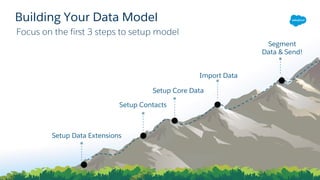
Focus on the first 3 steps to setup model
Building Your Data Model
Setup Data Extensions
Setup Contacts
Setup Core Data
Import Data
Segment
Data & Send!
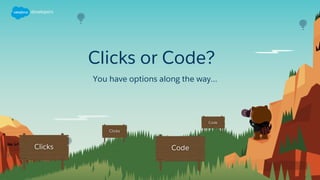
Clicks or Code?
You have options along the way…
Code not clicks!
Why? Not just because this is a developer webinar
• Saves you time with > 1 Business Unit
– Save time by running code against different BUs
• Automation makes it easier to promote from sandbox to
production
– Less error prone
– Faster than clicks
• Marketing Cloud is API-first
– Behind the scenes the UI is powered by APIs
– API is a super set of the UI
• Looks better on your resume
Why Code?
Code has a few advantages
Step 1: Data Extensions
Build data extension tables to hold data used to power journeys & other sends
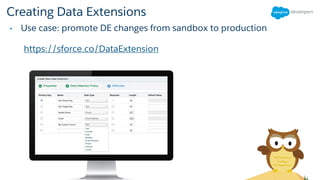
Creating Data Extensions
• Use case: promote DE changes from sandbox to production
https://sforce.co/DataExtension
Tip: Data Extensions Over Lists
• Completely customizable
• No limits on attributes
• Optimized for custom queries
Step 2: Contact Model
Take data extensions from step 1 and link into the contact model
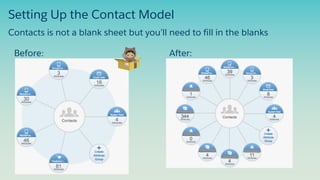
Setting Up the Contact Model
Before: After:
Contacts is not a blank sheet but you’ll need to fill in the blanks
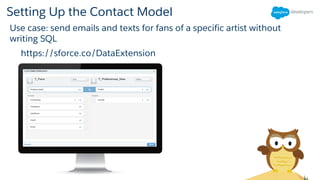
Setting Up the Contact Model
Use case: send emails and texts for fans of a specific artist without
writing SQL
https://sforce.co/DataExtension
Step 3: Sales & Service Model
Setup Sales & Service model to sync with Marketing Cloud for
cross-cloud use cases
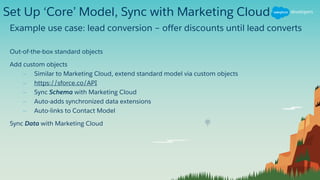
Set Up ‘Core’ Model, Sync with Marketing Cloud
Example use case: lead conversion – offer discounts until lead converts
Out-of-the-box standard objects
Add custom objects
– Similar to Marketing Cloud, extend standard model via custom objects
– https://sforce.co/API
– Sync Schema with Marketing Cloud
– Auto-adds synchronized data extensions
– Auto-links to Contact Model
Sync Data with Marketing Cloud
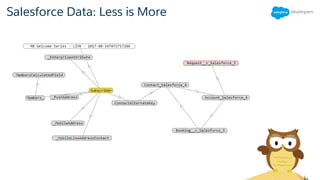
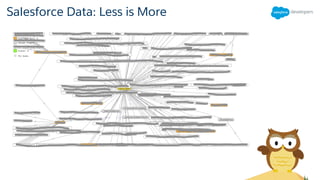
Salesforce Data: Less is More
Marketing Cloud is a Blank Sheet
Roadmap: OOB Standard Data Model
• Standard, out-of-the-box data model that is deeply integrated
• Provide needed APIs, UX and practices
• Align with core: sales & service
• Ability to package Salesforce industry (finserv, health,
government) models and ISV (communications, life sciences,
etc) models to AppExchange
Resources and Next Steps
• Power your Marketing with First Party Data
• Data Quality
Recommended Trailhead modules:
Content Block SDX
Don Owens
Director, Product Management for Marketing Cloud
Salesforce
Education
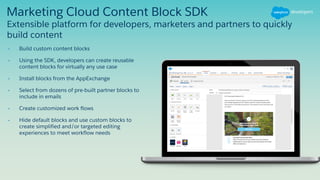
Marketing Cloud Content Block SDK
• Build custom content blocks
• Using the SDK, developers can create reusable
content blocks for virtually any use case
• Install blocks from the AppExchange
• Select from dozens of pre-built partner blocks to
include in emails
• Create customized work flows
• Hide default blocks and use custom blocks to
create simplified and/or targeted editing
experiences to meet workflow needs
Extensible platform for developers, marketers and partners to quickly
build content
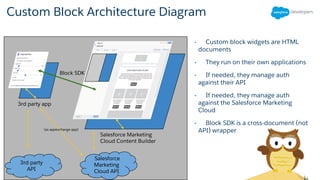
Custom Block Architecture Diagram
• Custom block widgets are HTML
documents
• They run on their own applications
• If needed, they manage auth
against their API
• If needed, they manage auth
against the Salesforce Marketing
Cloud
• Block SDK is a cross-document (not
API) wrapper
Block SDK
3rd party app
Salesforce Marketing
Cloud Content Builder
3rd party
API
Salesforce
Marketing
Cloud API
(as appexchange app)
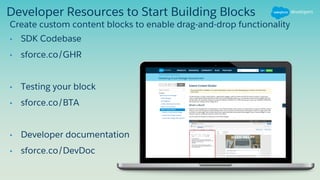
Developer Resources to Start Building Blocks
• SDK Codebase
• sforce.co/GHR
• Testing your block
• sforce.co/BTA
• Developer documentation
• sforce.co/DevDoc
Create custom content blocks to enable drag-and-drop functionality
Content Block SDX Demo
Transactional Messaging:
Getting the most out of
your API sending
Allen Hoem
Senior Product Manager, Messaging
Salesforce
Let’s Talk Transactional Messaging
and what it means to your brand
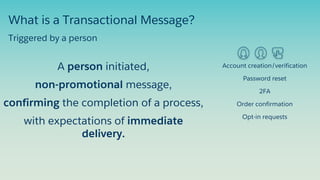
What is a Transactional Message?
A person initiated,
non-promotional message,
confirming the completion of a process,
with expectations of immediate
delivery.
Account creation/verification
Password reset
2FA
Order confirmation
Opt-in requests
Triggered by a person
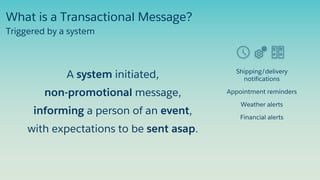
Shipping/delivery
notifications
Appointment reminders
Weather alerts
Financial alerts
Triggered by a system
What is a Transactional Message?
A system initiated,
non-promotional message,
informing a person of an event,
with expectations to be sent asap.
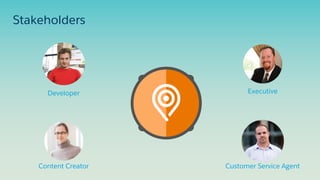
Stakeholders
Developer
Content Creator
Executive
Customer Service Agent
Are You Capitalizing on Transactional Messages?
• High engagement - upwards of 95%
• Customer loyalty - It’s always 1:1
• Opportunity to ask for feedback or a review or follow on social media
• Can extend the visibility of your brand
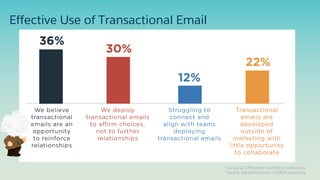
Effective Use of Transactional Email
Survey of 179 senior marketing executives
Source: MediaPost.com / CMOCouncil.org
Salesforce Marketing Cloud
Transactional Messaging
Salesforce Messaging APIs
• Complements Marketing, Automations, Journeys
• 360 view of a contact
• Multiple channels of engagement
• Shared audience and content management
• Reduces your cost to serve
• Platform uptime SLA
• Leader in enterprise B2C engagement
• World class support teams
Benefits
Salesforce Confidential - Not for External Distribution
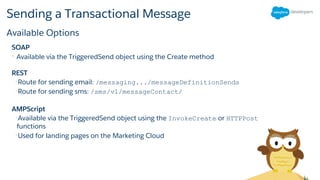
Sending a Transactional Message
SOAP
• Available via the TriggeredSend object using the Create method
REST
•Route for sending email: /messaging.../messageDefinitionSends
•Route for sending sms: /sms/v1/messageContact/
AMPScript
•Available via the TriggeredSend object using the InvokeCreate or HTTPPost
functions
•Used for landing pages on the Marketing Cloud
Available Options
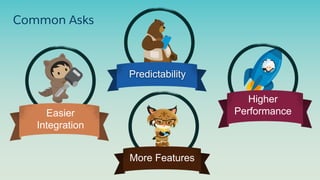
Easier
Integration
Higher
Performance
Predictability
More Features
Common Asks
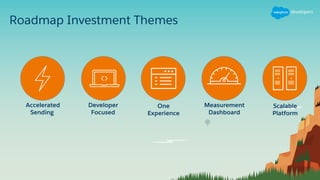
Roadmap Investment Themes
Accelerated
Sending
Developer
Focused
One
Experience
Measurement
Dashboard
Scalable
Platform
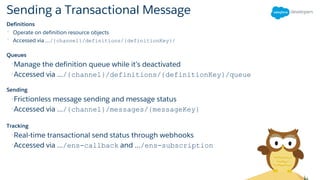
Sending a Transactional Message
Definitions
• Operate on definition resource objects
• Accessed via .../{channel}/definitions/{definitionKey}/
Queues
•Manage the definition queue while it’s deactivated
•Accessed via .../{channel}/definitions/{definitionKey}/queue
Sending
•Frictionless message sending and message status
•Accessed via .../{channel}/messages/{messageKey}
Tracking
•Real-time transactional send status through webhooks
•Accessed via .../ens-callback and .../ens-subscription
Sending email in 1-2-3
•## Create email definition
curl -X "POST"
"https://.../email/definitions/" 
-H 'Content-Type: application/json' 
-H 'Authorization: --token-- ' 
•-d $'{
"content": {
"customerKey": "34402ce9-8513-44e0-
8efa-9cc5cd11ef89"
},
"definitionKey": "shipping-confirm-v1",
"name": "My Definition with Attributes
v2",
"description": "Created via REST",
"subscriptions": {
"list": "test-list"
}
•## Create callback subscription
curl -X "POST" "https://.../ens-
subscriptions/" 
-H 'Content-Type: application/json' 
-H 'Authorization: --token-- ' 
•-d $'[
{
"subscriptionName": "demo-
subscription-email",
"eventCategoryTypes": [
"TxnSendEvents.EmailSent",
"TxnSendEvents.EmailNotSent",
“TxnSendEvents.EmailBounced"
],
"callbackId": "09c5d22d-9398-408c-
9192-268194d2014a"
}
•## Send email
curl -X "POST"
•"https://.../email/messages/" 
-H 'Content-Type: application/json' 
-H 'Authorization: --token-- ' 
•-d $'{
"definitionKey": "shipping-confirm-v1",
"recipient": {
"subscriberKey": "user208493",
"to": "user@example.com",
"attributes": {
"Last": "User",
"First": "Guest"
}
}
}'
API preview - subject to change
Sending SMS in 1-2-3
•## Create SMS definition
curl -X "POST"
"https://.../sms/definitions/" 
-H 'Content-Type: application/json' 
-H 'Authorization: --token-- ' 
•-d $'{
"definitionKey": "shipping-confirm-v1",
"name": "My Definition with Attributes
v2",
"description": "Created via REST",
subscriptions: {
• sms: {
• keyword: "YES"
• }
• }
•}’
•## Create callback subscription
•curl -X "POST" "https://.../ens-
subscriptions/" 
-H 'Content-Type: application/json' 
-H 'Authorization: --token-- ' 
•-d $'[
{
"subscriptionName": "demo-
subscription-sms",
"eventCategoryTypes": [
"TxnSendEvents.SmsSent",
"TxnSendEvents.SmsNotSent"
],
"callbackId": "09c5d22d-9398-408c-
9192-268194d3940a"
}
•]
•## Send sms
curl -X "POST"
•"https://.../sms/messages/" 
-H 'Content-Type: application/json' 
-H 'Authorization: --token-- ' 
•-d $'{
"definitionKey": "shipping-confirm-v1",
"recipient": {
"subscriberKey": "user208493",
"to": "12345556789",
"attributes": {
• "FirstName": "Guest",
• "LastName": "User"
• }
• "message": {
• "text": "This is a request message
example: %%FirstName%% %%LastName%%"
• },
•}'
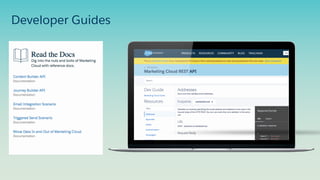
Developer Guides
Survey
Your feedback is crucial to the success of our
webinar programs. Please fill out the survey at
the end of the webinar. Thank you!
Q & A
Try Trailhead: trailhead.salesforce.com
Join the conversation: @salesforcedevs
Scaling Developer Efforts with Salesforce Marketing Cloud

Scaling Developer Efforts with Salesforce Marketing Cloud

  • 1.
    Scaling Developer Effortswith Salesforce Marketing Cloud August 2, 2018 | 10:00 a.m. PST Nisha Baxi Developer Marketing Director Salesforce Dave Hacker Senior Technical Product Manager Salesforce Don Owens Director, Product Management for Marketing Cloud Salesforce Allen Hoem Senior Product Manager, Messaging Salesforce
  • 2.
    Forward-Looking Statement Statement underthe Private Securities Litigation Reform Act of 1995: This presentation may contain forward-looking statements that involve risks, uncertainties, and assumptions. If any such uncertainties materialize or if any of the assumptions proves incorrect, the results of salesforce.com, inc. could differ materially from the results expressed or implied by the forward-looking statements we make. All statements other than statements of historical fact could be deemed forward-looking, including any projections of product or service availability, subscriber growth, earnings, revenues, or other financial items and any statements regarding strategies or plans of management for future operations, statements of belief, any statements concerning new, planned, or upgraded services or technology developments and customer contracts or use of our services. The risks and uncertainties referred to above include – but are not limited to – risks associated with developing and delivering new functionality for our service, new products and services, our new business model, our past operating losses, possible fluctuations in our operating results and rate of growth, interruptions or delays in our Web hosting, breach of our security measures, the outcome of any litigation, risks associated with completed and any possible mergers and acquisitions, the immature market in which we operate, our relatively limited operating history, our ability to expand, retain, and motivate our employees and manage our growth, new releases of our service and successful customer deployment, our limited history reselling non-salesforce.com products, and utilization and selling to larger enterprise customers. Further information on potential factors that could affect the financial results of salesforce.com, inc. is included in our annual report on Form 10-K for the most recent fiscal year and in our quarterly report on Form 10-Q for the most recent fiscal quarter. These documents and others containing important disclosures are available on the SEC Filings section of the Investor Information section of our Web site. Any unreleased services or features referenced in this or other presentations, press releases or public statements are not currently available and may not be delivered on time or at all. Customers who purchase our services should make the purchase decisions based upon features that are currently available. salesforce.com, inc. assumes no obligation and does not intend to update these forward-looking statements.
  • 3.
    Go Social! Salesforce Developers SalesforceDevelopers Salesforce Developers The video will be posted to YouTube & the webinar recap page (same URL as registration). This webinar is being recorded! @salesforcedevs / #SalesforceDX
  • 4.
    Have Questions? • Don’twait until the end to ask your question! – Technical support will answer questions starting now. • Respect Q&A etiquette – Please don’t repeat questions. The support team is working their way down the queue. • Stick around for live Q&A at the end – Speakers will tackle more questions at the end, time-allowing • Head to Developer Forums – More questions? Visit developer.salesforce.com/forums
  • 5.
    Agenda • Building YourData Model Best Practices • Content Block SDK: Customize & Extend the Content Builder Platform • Transactional Messaging: Getting the Most Out of Your API Sending
  • 6.
    Building Your DataModel Dave Hacker Senior Technical Product Manager Salesforce
  • 7.
    Agenda • Steps tocreating a data model • Code not clicks! • Deep dive on data model steps • Q & A
  • 8.
    Focus on thefirst 3 steps to setup model Building Your Data Model Setup Data Extensions Setup Contacts Setup Core Data Import Data Segment Data & Send!
  • 9.
    Clicks or Code? Youhave options along the way…
  • 10.
    Code not clicks! Why?Not just because this is a developer webinar
  • 11.
    • Saves youtime with > 1 Business Unit – Save time by running code against different BUs • Automation makes it easier to promote from sandbox to production – Less error prone – Faster than clicks • Marketing Cloud is API-first – Behind the scenes the UI is powered by APIs – API is a super set of the UI • Looks better on your resume Why Code? Code has a few advantages
  • 12.
    Step 1: DataExtensions Build data extension tables to hold data used to power journeys & other sends
  • 13.
    Creating Data Extensions •Use case: promote DE changes from sandbox to production https://sforce.co/DataExtension
  • 14.
    Tip: Data ExtensionsOver Lists • Completely customizable • No limits on attributes • Optimized for custom queries
  • 15.
    Step 2: ContactModel Take data extensions from step 1 and link into the contact model
  • 16.
    Setting Up theContact Model Before: After: Contacts is not a blank sheet but you’ll need to fill in the blanks
  • 17.
    Setting Up theContact Model Use case: send emails and texts for fans of a specific artist without writing SQL https://sforce.co/DataExtension
  • 18.
    Step 3: Sales& Service Model Setup Sales & Service model to sync with Marketing Cloud for cross-cloud use cases
  • 19.
    Set Up ‘Core’Model, Sync with Marketing Cloud Example use case: lead conversion – offer discounts until lead converts Out-of-the-box standard objects Add custom objects – Similar to Marketing Cloud, extend standard model via custom objects – https://sforce.co/API – Sync Schema with Marketing Cloud – Auto-adds synchronized data extensions – Auto-links to Contact Model Sync Data with Marketing Cloud
  • 20.
  • 21.
  • 22.
    Marketing Cloud isa Blank Sheet
  • 23.
    Roadmap: OOB StandardData Model • Standard, out-of-the-box data model that is deeply integrated • Provide needed APIs, UX and practices • Align with core: sales & service • Ability to package Salesforce industry (finserv, health, government) models and ISV (communications, life sciences, etc) models to AppExchange
  • 24.
    Resources and NextSteps • Power your Marketing with First Party Data • Data Quality Recommended Trailhead modules:
  • 25.
    Content Block SDX DonOwens Director, Product Management for Marketing Cloud Salesforce
  • 26.
    Education Marketing Cloud ContentBlock SDK • Build custom content blocks • Using the SDK, developers can create reusable content blocks for virtually any use case • Install blocks from the AppExchange • Select from dozens of pre-built partner blocks to include in emails • Create customized work flows • Hide default blocks and use custom blocks to create simplified and/or targeted editing experiences to meet workflow needs Extensible platform for developers, marketers and partners to quickly build content
  • 27.
    Custom Block ArchitectureDiagram • Custom block widgets are HTML documents • They run on their own applications • If needed, they manage auth against their API • If needed, they manage auth against the Salesforce Marketing Cloud • Block SDK is a cross-document (not API) wrapper Block SDK 3rd party app Salesforce Marketing Cloud Content Builder 3rd party API Salesforce Marketing Cloud API (as appexchange app)
  • 28.
    Developer Resources toStart Building Blocks • SDK Codebase • sforce.co/GHR • Testing your block • sforce.co/BTA • Developer documentation • sforce.co/DevDoc Create custom content blocks to enable drag-and-drop functionality
  • 29.
  • 30.
    Transactional Messaging: Getting themost out of your API sending Allen Hoem Senior Product Manager, Messaging Salesforce
  • 31.
    Let’s Talk TransactionalMessaging and what it means to your brand
  • 32.
    What is aTransactional Message? A person initiated, non-promotional message, confirming the completion of a process, with expectations of immediate delivery. Account creation/verification Password reset 2FA Order confirmation Opt-in requests Triggered by a person
  • 33.
    Shipping/delivery notifications Appointment reminders Weather alerts Financialalerts Triggered by a system What is a Transactional Message? A system initiated, non-promotional message, informing a person of an event, with expectations to be sent asap.
  • 34.
  • 35.
    Are You Capitalizingon Transactional Messages? • High engagement - upwards of 95% • Customer loyalty - It’s always 1:1 • Opportunity to ask for feedback or a review or follow on social media • Can extend the visibility of your brand
  • 36.
    Effective Use ofTransactional Email Survey of 179 senior marketing executives Source: MediaPost.com / CMOCouncil.org
  • 37.
  • 38.
    Salesforce Messaging APIs •Complements Marketing, Automations, Journeys • 360 view of a contact • Multiple channels of engagement • Shared audience and content management • Reduces your cost to serve • Platform uptime SLA • Leader in enterprise B2C engagement • World class support teams Benefits Salesforce Confidential - Not for External Distribution
  • 39.
    Sending a TransactionalMessage SOAP • Available via the TriggeredSend object using the Create method REST •Route for sending email: /messaging.../messageDefinitionSends •Route for sending sms: /sms/v1/messageContact/ AMPScript •Available via the TriggeredSend object using the InvokeCreate or HTTPPost functions •Used for landing pages on the Marketing Cloud Available Options
  • 40.
  • 41.
  • 42.
    Sending a TransactionalMessage Definitions • Operate on definition resource objects • Accessed via .../{channel}/definitions/{definitionKey}/ Queues •Manage the definition queue while it’s deactivated •Accessed via .../{channel}/definitions/{definitionKey}/queue Sending •Frictionless message sending and message status •Accessed via .../{channel}/messages/{messageKey} Tracking •Real-time transactional send status through webhooks •Accessed via .../ens-callback and .../ens-subscription
  • 43.
    Sending email in1-2-3 •## Create email definition curl -X "POST" "https://.../email/definitions/" -H 'Content-Type: application/json' -H 'Authorization: --token-- ' •-d $'{ "content": { "customerKey": "34402ce9-8513-44e0- 8efa-9cc5cd11ef89" }, "definitionKey": "shipping-confirm-v1", "name": "My Definition with Attributes v2", "description": "Created via REST", "subscriptions": { "list": "test-list" } •## Create callback subscription curl -X "POST" "https://.../ens- subscriptions/" -H 'Content-Type: application/json' -H 'Authorization: --token-- ' •-d $'[ { "subscriptionName": "demo- subscription-email", "eventCategoryTypes": [ "TxnSendEvents.EmailSent", "TxnSendEvents.EmailNotSent", “TxnSendEvents.EmailBounced" ], "callbackId": "09c5d22d-9398-408c- 9192-268194d2014a" } •## Send email curl -X "POST" •"https://.../email/messages/" -H 'Content-Type: application/json' -H 'Authorization: --token-- ' •-d $'{ "definitionKey": "shipping-confirm-v1", "recipient": { "subscriberKey": "user208493", "to": "user@example.com", "attributes": { "Last": "User", "First": "Guest" } } }' API preview - subject to change
  • 44.
    API preview -subject to change Sending SMS in 1-2-3 •## Create SMS definition curl -X "POST" "https://.../sms/definitions/" -H 'Content-Type: application/json' -H 'Authorization: --token-- ' •-d $'{ "definitionKey": "shipping-confirm-v1", "name": "My Definition with Attributes v2", "description": "Created via REST", subscriptions: { • sms: { • keyword: "YES" • } • } •}’ •## Create callback subscription •curl -X "POST" "https://.../ens- subscriptions/" -H 'Content-Type: application/json' -H 'Authorization: --token-- ' •-d $'[ { "subscriptionName": "demo- subscription-sms", "eventCategoryTypes": [ "TxnSendEvents.SmsSent", "TxnSendEvents.SmsNotSent" ], "callbackId": "09c5d22d-9398-408c- 9192-268194d3940a" } •] •## Send sms curl -X "POST" •"https://.../sms/messages/" -H 'Content-Type: application/json' -H 'Authorization: --token-- ' •-d $'{ "definitionKey": "shipping-confirm-v1", "recipient": { "subscriberKey": "user208493", "to": "12345556789", "attributes": { • "FirstName": "Guest", • "LastName": "User" • } • "message": { • "text": "This is a request message example: %%FirstName%% %%LastName%%" • }, •}'
  • 45.
  • 46.
    Survey Your feedback iscrucial to the success of our webinar programs. Please fill out the survey at the end of the webinar. Thank you!
  • 47.
    Q & A TryTrailhead: trailhead.salesforce.com Join the conversation: @salesforcedevs