


Developing a Web App with
Heroku Connect
Case Study https://sif.illuminate.org
Mars Hall
Customer Facing Architect, Heroku
@marsi
Hi! I’m Mars 👽💫🌎
• Web developer since 1997
• Integrated web sites/apps with Salesforce
countless times throughout the years
• Joined Heroku/Salesforce one-year ago
• Started out this journey knowing the basics of
Force.com REST API.
Becoming an icon
The San Francisco Bay Lights returned in 2016 as a permanent installation
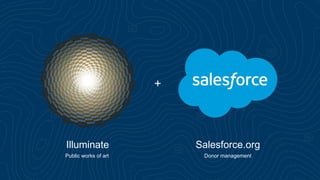
+
Illuminate Salesforce.org
Public works of art Donor management
Create personal connection with the art
Through dedication of individual Bay Lights
“Dedicated to my love”
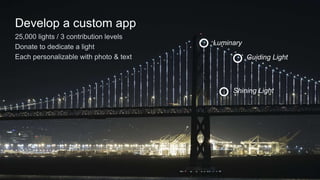
Develop a custom app
25,000 lights / 3 contribution levels
Donate to dedicate a light
Each personalizable with photo & text
Luminary
Guiding Light
Shining Light
Design requirements
Creativity thrives under constraints
Custom “Bay Lights” experience
Design requirements
• Dedicate Your Own Light call to action
• Realistic mapping of lights on bridge
• Beautiful, inspiring interaction
• Searchable
• Shareable
• Dedication keepsake/certificate
Integrate with existing technology
Design requirements
• Existing non-profit [NPSP] Salesforce org
• Donor/Donation data
• Admin UI
• Existing non-profit PayPal account
• Accept donations
Launch fast
Design requirements
• Five-week timeline
• Tiny development team
• Elegant, functional end-product
• Discover how far we can push the “Bay Lights” experience
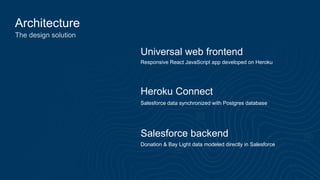
Architecture
The design solution
Universal web frontend
Heroku Connect
Salesforce backend
Responsive React JavaScript app developed on Heroku
Donation & Bay Light data modeled directly in Salesforce
Salesforce data synchronized with Postgres database
Simple can be harder than complex:
You have to work hard to get your thinking clean,
to make it simple.
— Steve Jobs
Live demo
https://sif.illuminate.org
• Bay Light dedications & search
• Deep zoom UI
• Donation & personalization
• Donor certificates
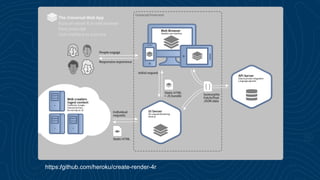
https://github.com/heroku/create-render-4r
Model the app’s data with Salesforce objects
Minimize the transformation of data
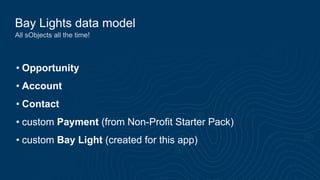
Bay Lights data model
All sObjects all the time!
• Opportunity
• Account
• Contact
• custom Payment (from Non-Profit Starter Pack)
• custom Bay Light (created for this app)
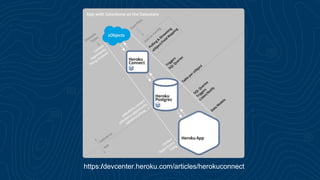
https://devcenter.heroku.com/articles/herokuconnect
Live demo
Heroku Connect Add-on
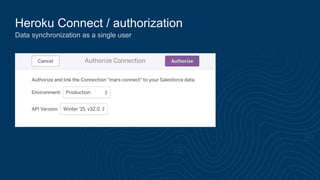
Heroku Connect / authorization
Data synchronization as a single user
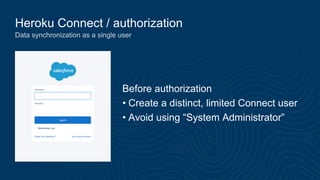
Heroku Connect / authorization
Data synchronization as a single user
Before authorization
• Create a distinct, limited Connect user
• Avoid using “System Administrator”
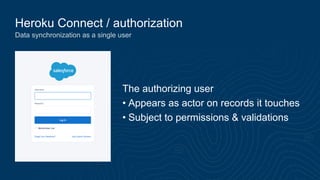
Heroku Connect / authorization
Data synchronization as a single user
The authorizing user
• Appears as actor on records it touches
• Subject to permissions & validations
Heroku Connect / data flow
Built on Force.com APIs: SOAP, bulk, & streaming
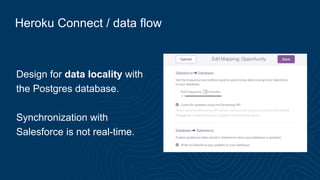
Heroku Connect / data flow
Design for data locality with
the Postgres database.
Synchronization with
Salesforce is not real-time.
Heroku Connect / data flow
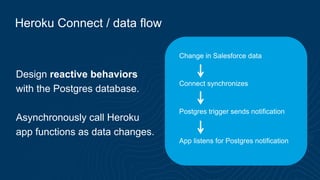
Design reactive behaviors
with the Postgres database.
Asynchronously call Heroku
app functions as data changes.
Change in Salesforce data
Connect synchronizes
Postgres trigger sends notification
App listens for Postgres notification
Heroku Connect / related objects
Synchronize records for master-detail, many-to-many, & lookup
Heroku Connect / related objects
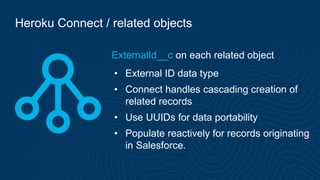
ExternalId__c on each related object
• External ID data type
• Connect handles cascading creation of
related records
• Use UUIDs for data portability
• Populate reactively for records originating
in Salesforce.
Iterating on the Salesforce data model
Enabling local development
Iterating on the Salesforce data model
• Modify the Salesforce setup
• Create or customize objects
• Update the Heroku Connect mapping
• Capture the Connect config
• Database structure from Postgres
• Connect mappings “config.json”
• Locally load the database structure
• Develop new functionality
Dev demo
Iterating on the data model
Add an “Anniversary Date” to Bay Light dedications.
• Add a custom field
• Update Connect mapping
• Capture Connect config & DB structure
• Load for local work
Pipelines & org integration
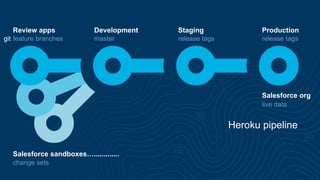
Test new Heroku app features with Salesforce
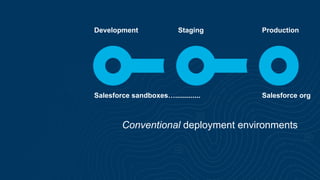
Conventional deployment environments
Development Staging Production
Salesforce sandboxes…............. Salesforce org
Development Staging Production
Heroku pipeline
Review apps
Salesforce sandboxes….............
Salesforce org
feature branches master release tags release tags
change sets
live data
git
Dev demo
Deploy app for testing
• Push to master (pipeline auto deploy)
• Load Connect config (depending on env)
• Demo the new feature
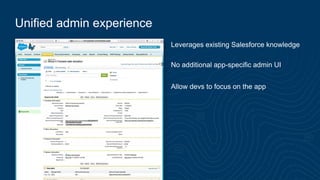
Unified admin experience
Salesforce as the admin UI
Unified admin experience
Leverages existing Salesforce knowledge
No additional app-specific admin UI
Allow devs to focus on the app
Unified admin demo
• Bay Light detail
• Secret personalization link
• PayPal transaction
thank y u
Mars Hall
Customer Facing Architect, Heroku
@marsi
Lighting up the Bay, Real-World App Cloud

Lighting up the Bay, Real-World App Cloud

  • 1.
    Developing a WebApp with Heroku Connect Case Study https://sif.illuminate.org Mars Hall Customer Facing Architect, Heroku @marsi
  • 2.
    Hi! I’m Mars👽💫🌎 • Web developer since 1997 • Integrated web sites/apps with Salesforce countless times throughout the years • Joined Heroku/Salesforce one-year ago • Started out this journey knowing the basics of Force.com REST API.
  • 3.
    Becoming an icon TheSan Francisco Bay Lights returned in 2016 as a permanent installation
  • 4.
  • 5.
    Create personal connectionwith the art Through dedication of individual Bay Lights “Dedicated to my love”
  • 6.
    Develop a customapp 25,000 lights / 3 contribution levels Donate to dedicate a light Each personalizable with photo & text Luminary Guiding Light Shining Light
  • 7.
  • 8.
    Custom “Bay Lights”experience Design requirements • Dedicate Your Own Light call to action • Realistic mapping of lights on bridge • Beautiful, inspiring interaction • Searchable • Shareable • Dedication keepsake/certificate
  • 9.
    Integrate with existingtechnology Design requirements • Existing non-profit [NPSP] Salesforce org • Donor/Donation data • Admin UI • Existing non-profit PayPal account • Accept donations
  • 10.
    Launch fast Design requirements •Five-week timeline • Tiny development team • Elegant, functional end-product • Discover how far we can push the “Bay Lights” experience
  • 11.
    Architecture The design solution Universalweb frontend Heroku Connect Salesforce backend Responsive React JavaScript app developed on Heroku Donation & Bay Light data modeled directly in Salesforce Salesforce data synchronized with Postgres database
  • 12.
    Simple can beharder than complex: You have to work hard to get your thinking clean, to make it simple. — Steve Jobs
  • 13.
    Live demo https://sif.illuminate.org • BayLight dedications & search • Deep zoom UI • Donation & personalization • Donor certificates
  • 14.
  • 15.
    Model the app’sdata with Salesforce objects Minimize the transformation of data
  • 16.
    Bay Lights datamodel All sObjects all the time! • Opportunity • Account • Contact • custom Payment (from Non-Profit Starter Pack) • custom Bay Light (created for this app)
  • 17.
  • 18.
  • 19.
    Heroku Connect /authorization Data synchronization as a single user
  • 20.
    Heroku Connect /authorization Data synchronization as a single user Before authorization • Create a distinct, limited Connect user • Avoid using “System Administrator”
  • 21.
    Heroku Connect /authorization Data synchronization as a single user The authorizing user • Appears as actor on records it touches • Subject to permissions & validations
  • 22.
    Heroku Connect /data flow Built on Force.com APIs: SOAP, bulk, & streaming
  • 23.
    Heroku Connect /data flow Design for data locality with the Postgres database. Synchronization with Salesforce is not real-time.
  • 24.
    Heroku Connect /data flow Design reactive behaviors with the Postgres database. Asynchronously call Heroku app functions as data changes. Change in Salesforce data Connect synchronizes Postgres trigger sends notification App listens for Postgres notification
  • 25.
    Heroku Connect /related objects Synchronize records for master-detail, many-to-many, & lookup
  • 26.
    Heroku Connect /related objects ExternalId__c on each related object • External ID data type • Connect handles cascading creation of related records • Use UUIDs for data portability • Populate reactively for records originating in Salesforce.
  • 27.
    Iterating on theSalesforce data model Enabling local development
  • 28.
    Iterating on theSalesforce data model • Modify the Salesforce setup • Create or customize objects • Update the Heroku Connect mapping • Capture the Connect config • Database structure from Postgres • Connect mappings “config.json” • Locally load the database structure • Develop new functionality
  • 29.
    Dev demo Iterating onthe data model Add an “Anniversary Date” to Bay Light dedications. • Add a custom field • Update Connect mapping • Capture Connect config & DB structure • Load for local work
  • 30.
    Pipelines & orgintegration Test new Heroku app features with Salesforce
  • 31.
    Conventional deployment environments DevelopmentStaging Production Salesforce sandboxes…............. Salesforce org
  • 32.
    Development Staging Production Herokupipeline Review apps Salesforce sandboxes…............. Salesforce org feature branches master release tags release tags change sets live data git
  • 33.
    Dev demo Deploy appfor testing • Push to master (pipeline auto deploy) • Load Connect config (depending on env) • Demo the new feature
  • 34.
  • 35.
    Unified admin experience Leveragesexisting Salesforce knowledge No additional app-specific admin UI Allow devs to focus on the app
  • 36.
    Unified admin demo •Bay Light detail • Secret personalization link • PayPal transaction
  • 37.
    thank y u MarsHall Customer Facing Architect, Heroku @marsi

Editor's Notes

  • #3 How many of you have built an app integrated with Salesforce via API? Did you build a (partial) sync solution?
  • #12 Talk about extending your Salesforce data
  • #14 Dedications & Search: https://sif.illuminate.org Donation: https://bay-lights-dev.herokuapp.com Personalization: https://bay-lights-dev.herokuapp.com/personalize/c7b2ebdf-3ba5-4f57-97ec-aecedf19f3c4
  • #18 “Bi-directional sync”
  • #19 https://dashboard-preview.heroku.com/apps
  • #37 Admin UI: https://cs22.salesforce.com/0061700000B9mzz