

Beyond Automated Testing
By: Andrew McNicol
& Zack Meyers
Agenda
~$ whoami
Overview
How to Go Beyond a
Scan
Testing Methodologies
Soft Skills
Planning
Organization
Reconnaissance
Mapping
Automated Testing
Manual Testing
Examples
Useful Resources
Reporting
Remediation Support
Useful Trainings and
Links
~$ whoami
Andrew McNicol (@primalsec)
Zack Meyers (@b3armunch)
We are Security Geeks
Red Team @BreakPoint Labs (@0xcc_labs)
Bloggers/Podcasters @Primal Security (@primalsec)
Certification Junkies (OSCE, OSCP, GWAPT, GPEN etc.)
Python, CTFs, Learning, long walks on the beach (
@AnnapolisSec)
Overview
Goal: To share our experiences with external security assessments
Motivation: Mostly frustration… How many of you have heard this?
Is the scan done? Can you scan us?
Automated Testing: Running a vulnerability scanner
Manual Testing: Everything else you do beyond the scope of the scan
According to a recent DHS report, 67% of high impact
vulnerabilities required manual testing to enumerate
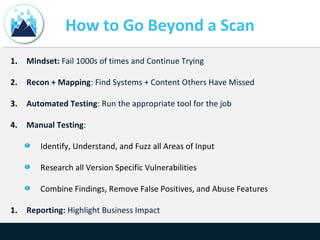
How to Go Beyond a Scan
1. Mindset: Fail 1000s of times and Continue Trying
2. Recon + Mapping: Find Systems + Content Others Have Missed
3. Automated Testing: Run the appropriate tool for the job
4. Manual Testing:
Identify, Understand, and Fuzz all Areas of Input
Research all Version Specific Vulnerabilities
Combine Findings, Remove False Positives, and Abuse Features
1. Reporting: Highlight Business Impact
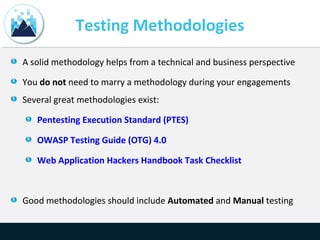
Testing Methodologies
A solid methodology helps from a technical and business perspective
You do not need to marry a methodology during your engagements
Several great methodologies exist:
Pentesting Execution Standard (PTES)
OWASP Testing Guide (OTG) 4.0
Web Application Hackers Handbook Task Checklist
Good methodologies should include Automated and Manual testing
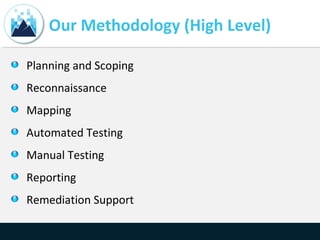
Our Methodology (High Level)
Planning and Scoping
Reconnaissance
Mapping
Automated Testing
Manual Testing
Reporting
Remediation Support
Soft Skills
Be confident and know that you will fail 1000s of times before you succeed…
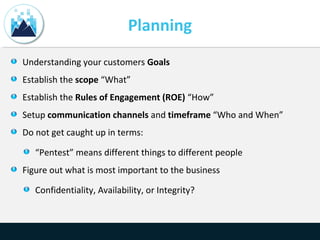
Planning
Understanding your customers Goals
Establish the scope “What”
Establish the Rules of Engagement (ROE) “How”
Setup communication channels and timeframe “Who and When”
Do not get caught up in terms:
“Pentest” means different things to different people
Figure out what is most important to the business
Confidentiality, Availability, or Integrity?
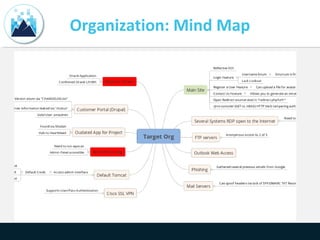
Organization: Mind Map
Reconnaissance
11
Reconnaissance
Goal: Given a company name, how can you map their footprint?
IP/Domain Research (Dig, whois, Google, etc.)
System Enumeration (Shodan, Censys.io, Masscan, Nmap)
Subdomain Enumeration (Google, Recon-ng, crt.sh, fierce.pl, etc.)
Tech Stack Enumeration (Whatweb, Wappalyzer, EyeWitness)
OSINT (emails, names, mergers, acquisitions, etc.)
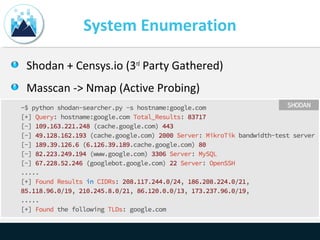
System Enumeration
Shodan + Censys.io (3rd
Party Gathered)
Masscan -> Nmap (Active Probing)
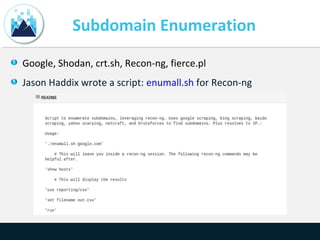
Subdomain Enumeration
Google, Shodan, crt.sh, Recon-ng, fierce.pl
Jason Haddix wrote a script: enumall.sh for Recon-ng
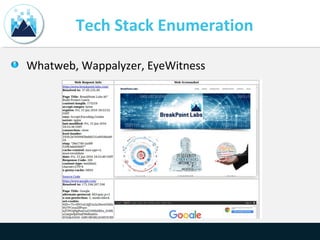
Tech Stack Enumeration
Whatweb, Wappalyzer, EyeWitness
OSINT
Customer Already Compromised?
Usernames, YouTube, Social Media, etc.
Posting on stack overflow, GitHub, Pastebin?
Can you find source code online?
Mapping
17
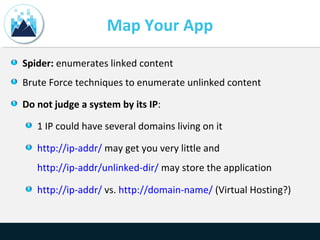
Map Your App
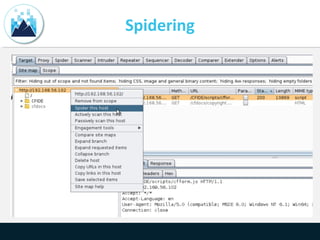
Spider: enumerates linked content
Brute Force techniques to enumerate unlinked content
Do not judge a system by its IP:
1 IP could have several domains living on it
http://ip-addr/ may get you very little and
http://ip-addr/unlinked-dir/ may store the application
http://ip-addr/ vs. http://domain-name/ (Virtual Hosting?)
Spidering
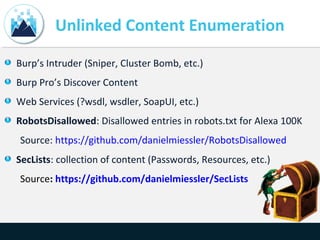
Unlinked Content Enumeration
Burp’s Intruder (Sniper, Cluster Bomb, etc.)
Burp Pro’s Discover Content
Web Services (?wsdl, wsdler, SoapUI, etc.)
RobotsDisallowed: Disallowed entries in robots.txt for Alexa 100K
Source: https://github.com/danielmiessler/RobotsDisallowed
SecLists: collection of content (Passwords, Resources, etc.)
Source: https://github.com/danielmiessler/SecLists
Automated Testing
21
Automated Testing
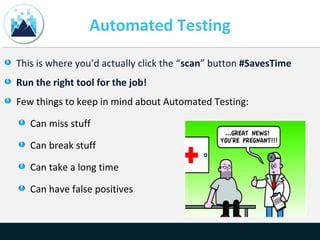
This is where you’d actually click the “scan” button #SavesTime
Run the right tool for the job!
Few things to keep in mind about Automated Testing:
Can miss stuff
Can break stuff
Can take a long time
Can have false positives
Manual Testing
23
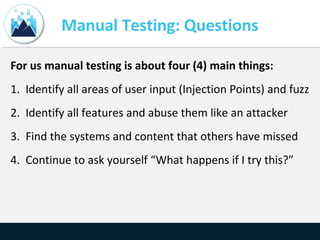
Manual Testing: Questions
For us manual testing is about four (4) main things:
1. Identify all areas of user input (Injection Points) and fuzz
2. Identify all features and abuse them like an attacker
3. Find the systems and content that others have missed
4. Continue to ask yourself “What happens if I try this?”
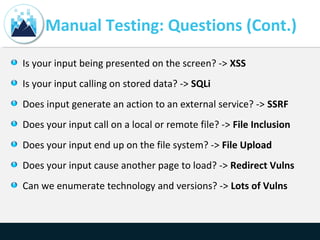
Manual Testing: Questions (Cont.)
Is your input being presented on the screen? -> XSS
Is your input calling on stored data? -> SQLi
Does input generate an action to an external service? -> SSRF
Does your input call on a local or remote file? -> File Inclusion
Does your input end up on the file system? -> File Upload
Does your input cause another page to load? -> Redirect Vulns
Can we enumerate technology and versions? -> Lots of Vulns
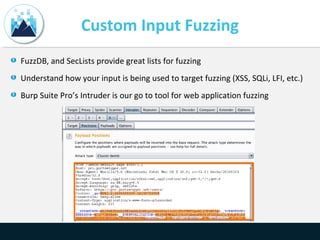
Custom Input Fuzzing
FuzzDB, and SecLists provide great lists for fuzzing
Understand how your input is being used to target fuzzing (XSS, SQLi, LFI, etc.)
Burp Suite Pro’s Intruder is our go to tool for web application fuzzing
Manual Testing Examples
We plan to walk through a few examples to
demonstrate some manual testing techniques
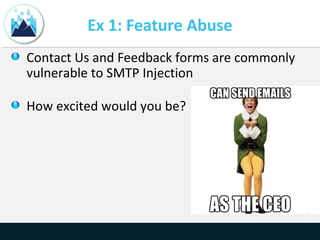
Ex 1: Feature Abuse
Contact Us and Feedback forms are commonly
vulnerable to SMTP Injection
How excited would you be?
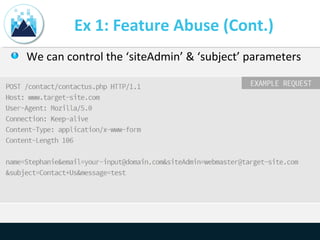
Ex 1: Feature Abuse (Cont.)
We can control the ‘siteAdmin’ & ‘subject’ parameters
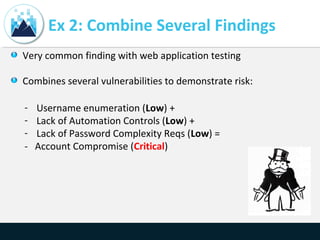
Ex 2: Combine Several Findings
Very common finding with web application testing
Combines several vulnerabilities to demonstrate risk:
- Username enumeration (Low) +
- Lack of Automation Controls (Low) +
- Lack of Password Complexity Reqs (Low) =
- Account Compromise (Critical)
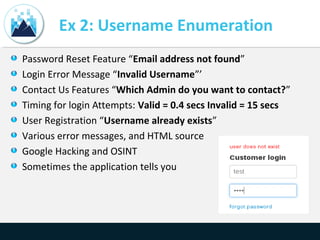
Ex 2: Username Enumeration
Password Reset Feature “Email address not found”
Login Error Message “Invalid Username”’
Contact Us Features “Which Admin do you want to contact?”
Timing for login Attempts: Valid = 0.4 secs Invalid = 15 secs
User Registration “Username already exists”
Various error messages, and HTML source
Google Hacking and OSINT
Sometimes the application tells you
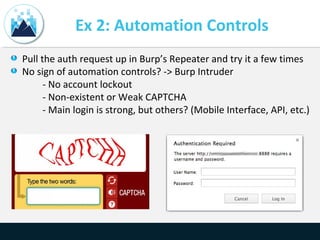
Ex 2: Automation Controls
Pull the auth request up in Burp’s Repeater and try it a few times
No sign of automation controls? -> Burp Intruder
- No account lockout
- Non-existent or Weak CAPTCHA
- Main login is strong, but others? (Mobile Interface, API, etc.)
Ex 2: Weak Passwords
We as humans are bad at passwords…here are some tricks:
- Password the same as username
- Variations of “password”: “p@ssw0rd”…
- Month+Year, Season+Year: winter2015…
- Company Name + year
- Keyboard Walks – PW Generator: “!QAZ2wsx”
Lots of wordlists out there, consider making a targeted wordlist
Research the targeted user’s interests and build lists around those
interests
Ex 3: Proxy -> FW Bypass
Let’s say you stumble upon a resource called ‘proxy.ashx’
You append a “?” to the end with URL to follow (proxy.ashx?
https://google.com)
This resource then loaded Google’s HTML content while remaining at our target
domain… so what should be do with our open redirect?
Spear Phishing Users: By appending a malicious link to the resource we could
distribute malware to unsuspecting victims
Firewall Bypass and Scanning: The application can be used to make arbitrary TCP
connections to any system(s) (Internal and External). We could potentially bypass
firewall restrictions to access other systems internal to their network
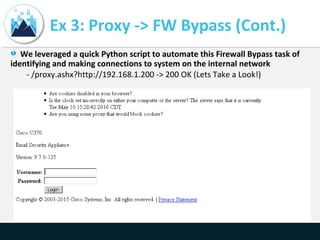
Ex 3: Proxy -> FW Bypass (Cont.)
We leveraged a quick Python script to automate this Firewall Bypass task of
identifying and making connections to system on the internal network
- /proxy.ashx?http://192.168.1.200 -> 200 OK (Lets Take a Look!)
Ex 4: File Inclusion to Shell
File Inclusion vulns can lead to code execution “php include()”
Sometimes they are limited to just file inclusion “php echo()”
• LFIs normally require you to get your input on disk then include
the affected resource (log poisoning)
• RFIs are normally easier to exploit as you can point them to an
external resource containing your code
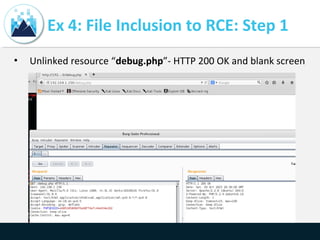
Ex 4: File Inclusion to RCE: Step 1
• Unlinked resource “debug.php”- HTTP 200 OK and blank screen
Ex 4: File Inclusion to RCE: Step 2
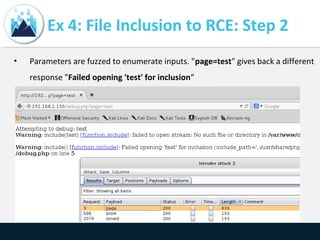
• Parameters are fuzzed to enumerate inputs. "page=test" gives back a different
response "Failed opening 'test' for inclusion”
Ex 4: File Inclusion to RCE: Step 3
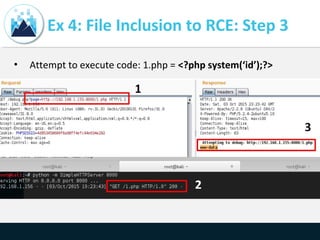
• Attempt to execute code: 1.php = <?php system(‘id’);?>
Ex 4: File Inclusion to RCE: Step 4
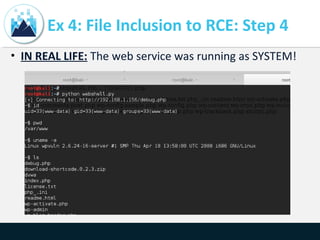
• IN REAL LIFE: The web service was running as SYSTEM!
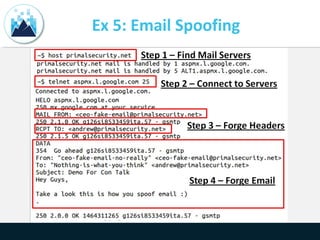
Ex 5: Email Spoofing
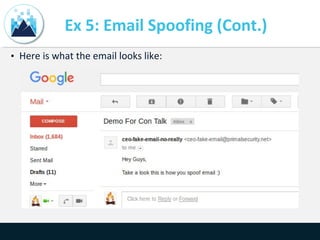
Ex 5: Email Spoofing (Cont.)
• Here is what the email looks like:
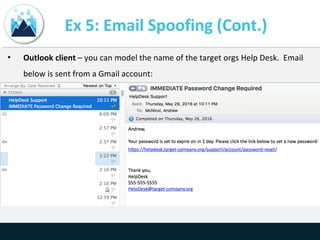
Ex 5: Email Spoofing (Cont.)
• Outlook client – you can model the name of the target orgs Help Desk. Email
below is sent from a Gmail account:
Ex 5: Email Spoofing (Cont.)
• Google Apps for Work – Has little security setup by
default
• The previous email examples abused Google Apps for
Work to spoof emails – very reliable technique
• Solution? Configure SPF/DKIM/DMARC TXT records
with your provider
• Very few people configure these in our experience
Reporting
45
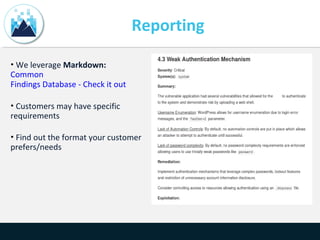
Reporting
• We leverage Markdown:
Common
Findings Database - Check it out
• Customers may have specific
requirements
• Find out the format your customer
prefers/needs
Reporting (Cont.)
Depending on your Rules of Engagement (ROE), consider this:
•If you can exploit: Cool write it up.
•If you can not exploit: Consider including an attacker scenario section “What
could have happened”
Also:
•Highlight Business Impact “What is important to your customer?”
•Include detailed write up on activity performed: “I Just Ran Nexpose!”
•Include High-level Summary
Offer Remediation Testing
• Offering remediation support to your customers after delivering the report is
like kicking the extra point after winning the game scoring touchdown
• Re-evaluating findings once they are deemed mitigated or resolved
• Can lead to additional testing and a stronger relationship with the customer
Useful Trainings & Links
• Free Training: Cybrary
• CTFs: Vulnhub, Past CTF Writeups, Pentester Lab
• Training: Offensive Security, GWAPT
• Book: Web Application Hackers Handbook
• Book: Black Hat Python
• Talk: How to Shot Web - Jason Haddix
• Talk: How to be an InfoSec Geek - Primal Security
• Talk: File in the hole! - Soroush Dalili
• Talk: Exploiting Deserialization Vulnerabilities in Java
• Talk: Polyglot Payloads in Practice - Marcus Niemietz
• Talk: Running Away From Security - Micah Hoffman
• Github Resource: Security Lists For Fun & Profit
Contact Us
Site: https://www.breakpoint-labs.com
Email: info@breakpoint-labs.com
Twitter: @0xcc_labs

BSidesDC 2016 Beyond Automated Testing

  • 1.
    Beyond Automated Testing By:Andrew McNicol & Zack Meyers
  • 2.
    Agenda ~$ whoami Overview How toGo Beyond a Scan Testing Methodologies Soft Skills Planning Organization Reconnaissance Mapping Automated Testing Manual Testing Examples Useful Resources Reporting Remediation Support Useful Trainings and Links
  • 3.
    ~$ whoami Andrew McNicol(@primalsec) Zack Meyers (@b3armunch) We are Security Geeks Red Team @BreakPoint Labs (@0xcc_labs) Bloggers/Podcasters @Primal Security (@primalsec) Certification Junkies (OSCE, OSCP, GWAPT, GPEN etc.) Python, CTFs, Learning, long walks on the beach ( @AnnapolisSec)
  • 4.
    Overview Goal: To shareour experiences with external security assessments Motivation: Mostly frustration… How many of you have heard this? Is the scan done? Can you scan us? Automated Testing: Running a vulnerability scanner Manual Testing: Everything else you do beyond the scope of the scan According to a recent DHS report, 67% of high impact vulnerabilities required manual testing to enumerate
  • 5.
    How to GoBeyond a Scan 1. Mindset: Fail 1000s of times and Continue Trying 2. Recon + Mapping: Find Systems + Content Others Have Missed 3. Automated Testing: Run the appropriate tool for the job 4. Manual Testing: Identify, Understand, and Fuzz all Areas of Input Research all Version Specific Vulnerabilities Combine Findings, Remove False Positives, and Abuse Features 1. Reporting: Highlight Business Impact
  • 6.
    Testing Methodologies A solidmethodology helps from a technical and business perspective You do not need to marry a methodology during your engagements Several great methodologies exist: Pentesting Execution Standard (PTES) OWASP Testing Guide (OTG) 4.0 Web Application Hackers Handbook Task Checklist Good methodologies should include Automated and Manual testing
  • 7.
    Our Methodology (HighLevel) Planning and Scoping Reconnaissance Mapping Automated Testing Manual Testing Reporting Remediation Support
  • 8.
    Soft Skills Be confidentand know that you will fail 1000s of times before you succeed…
  • 9.
    Planning Understanding your customersGoals Establish the scope “What” Establish the Rules of Engagement (ROE) “How” Setup communication channels and timeframe “Who and When” Do not get caught up in terms: “Pentest” means different things to different people Figure out what is most important to the business Confidentiality, Availability, or Integrity?
  • 10.
  • 11.
  • 12.
    Reconnaissance Goal: Given acompany name, how can you map their footprint? IP/Domain Research (Dig, whois, Google, etc.) System Enumeration (Shodan, Censys.io, Masscan, Nmap) Subdomain Enumeration (Google, Recon-ng, crt.sh, fierce.pl, etc.) Tech Stack Enumeration (Whatweb, Wappalyzer, EyeWitness) OSINT (emails, names, mergers, acquisitions, etc.)
  • 13.
    System Enumeration Shodan +Censys.io (3rd Party Gathered) Masscan -> Nmap (Active Probing)
  • 14.
    Subdomain Enumeration Google, Shodan,crt.sh, Recon-ng, fierce.pl Jason Haddix wrote a script: enumall.sh for Recon-ng
  • 15.
    Tech Stack Enumeration Whatweb,Wappalyzer, EyeWitness
  • 16.
    OSINT Customer Already Compromised? Usernames,YouTube, Social Media, etc. Posting on stack overflow, GitHub, Pastebin? Can you find source code online?
  • 17.
  • 18.
    Map Your App Spider:enumerates linked content Brute Force techniques to enumerate unlinked content Do not judge a system by its IP: 1 IP could have several domains living on it http://ip-addr/ may get you very little and http://ip-addr/unlinked-dir/ may store the application http://ip-addr/ vs. http://domain-name/ (Virtual Hosting?)
  • 19.
  • 20.
    Unlinked Content Enumeration Burp’sIntruder (Sniper, Cluster Bomb, etc.) Burp Pro’s Discover Content Web Services (?wsdl, wsdler, SoapUI, etc.) RobotsDisallowed: Disallowed entries in robots.txt for Alexa 100K Source: https://github.com/danielmiessler/RobotsDisallowed SecLists: collection of content (Passwords, Resources, etc.) Source: https://github.com/danielmiessler/SecLists
  • 21.
  • 22.
    Automated Testing This iswhere you’d actually click the “scan” button #SavesTime Run the right tool for the job! Few things to keep in mind about Automated Testing: Can miss stuff Can break stuff Can take a long time Can have false positives
  • 23.
  • 24.
    Manual Testing: Questions Forus manual testing is about four (4) main things: 1. Identify all areas of user input (Injection Points) and fuzz 2. Identify all features and abuse them like an attacker 3. Find the systems and content that others have missed 4. Continue to ask yourself “What happens if I try this?”
  • 25.
    Manual Testing: Questions(Cont.) Is your input being presented on the screen? -> XSS Is your input calling on stored data? -> SQLi Does input generate an action to an external service? -> SSRF Does your input call on a local or remote file? -> File Inclusion Does your input end up on the file system? -> File Upload Does your input cause another page to load? -> Redirect Vulns Can we enumerate technology and versions? -> Lots of Vulns
  • 26.
    Custom Input Fuzzing FuzzDB,and SecLists provide great lists for fuzzing Understand how your input is being used to target fuzzing (XSS, SQLi, LFI, etc.) Burp Suite Pro’s Intruder is our go to tool for web application fuzzing
  • 27.
    Manual Testing Examples Weplan to walk through a few examples to demonstrate some manual testing techniques
  • 28.
    Ex 1: FeatureAbuse Contact Us and Feedback forms are commonly vulnerable to SMTP Injection How excited would you be?
  • 29.
    Ex 1: FeatureAbuse (Cont.) We can control the ‘siteAdmin’ & ‘subject’ parameters
  • 30.
    Ex 2: CombineSeveral Findings Very common finding with web application testing Combines several vulnerabilities to demonstrate risk: - Username enumeration (Low) + - Lack of Automation Controls (Low) + - Lack of Password Complexity Reqs (Low) = - Account Compromise (Critical)
  • 31.
    Ex 2: UsernameEnumeration Password Reset Feature “Email address not found” Login Error Message “Invalid Username”’ Contact Us Features “Which Admin do you want to contact?” Timing for login Attempts: Valid = 0.4 secs Invalid = 15 secs User Registration “Username already exists” Various error messages, and HTML source Google Hacking and OSINT Sometimes the application tells you
  • 32.
    Ex 2: AutomationControls Pull the auth request up in Burp’s Repeater and try it a few times No sign of automation controls? -> Burp Intruder - No account lockout - Non-existent or Weak CAPTCHA - Main login is strong, but others? (Mobile Interface, API, etc.)
  • 33.
    Ex 2: WeakPasswords We as humans are bad at passwords…here are some tricks: - Password the same as username - Variations of “password”: “p@ssw0rd”… - Month+Year, Season+Year: winter2015… - Company Name + year - Keyboard Walks – PW Generator: “!QAZ2wsx” Lots of wordlists out there, consider making a targeted wordlist Research the targeted user’s interests and build lists around those interests
  • 34.
    Ex 3: Proxy-> FW Bypass Let’s say you stumble upon a resource called ‘proxy.ashx’ You append a “?” to the end with URL to follow (proxy.ashx? https://google.com) This resource then loaded Google’s HTML content while remaining at our target domain… so what should be do with our open redirect? Spear Phishing Users: By appending a malicious link to the resource we could distribute malware to unsuspecting victims Firewall Bypass and Scanning: The application can be used to make arbitrary TCP connections to any system(s) (Internal and External). We could potentially bypass firewall restrictions to access other systems internal to their network
  • 35.
    Ex 3: Proxy-> FW Bypass (Cont.) We leveraged a quick Python script to automate this Firewall Bypass task of identifying and making connections to system on the internal network - /proxy.ashx?http://192.168.1.200 -> 200 OK (Lets Take a Look!)
  • 36.
    Ex 4: FileInclusion to Shell File Inclusion vulns can lead to code execution “php include()” Sometimes they are limited to just file inclusion “php echo()” • LFIs normally require you to get your input on disk then include the affected resource (log poisoning) • RFIs are normally easier to exploit as you can point them to an external resource containing your code
  • 37.
    Ex 4: FileInclusion to RCE: Step 1 • Unlinked resource “debug.php”- HTTP 200 OK and blank screen
  • 38.
    Ex 4: FileInclusion to RCE: Step 2 • Parameters are fuzzed to enumerate inputs. "page=test" gives back a different response "Failed opening 'test' for inclusion”
  • 39.
    Ex 4: FileInclusion to RCE: Step 3 • Attempt to execute code: 1.php = <?php system(‘id’);?>
  • 40.
    Ex 4: FileInclusion to RCE: Step 4 • IN REAL LIFE: The web service was running as SYSTEM!
  • 41.
    Ex 5: EmailSpoofing
  • 42.
    Ex 5: EmailSpoofing (Cont.) • Here is what the email looks like:
  • 43.
    Ex 5: EmailSpoofing (Cont.) • Outlook client – you can model the name of the target orgs Help Desk. Email below is sent from a Gmail account:
  • 44.
    Ex 5: EmailSpoofing (Cont.) • Google Apps for Work – Has little security setup by default • The previous email examples abused Google Apps for Work to spoof emails – very reliable technique • Solution? Configure SPF/DKIM/DMARC TXT records with your provider • Very few people configure these in our experience
  • 45.
  • 46.
    Reporting • We leverageMarkdown: Common Findings Database - Check it out • Customers may have specific requirements • Find out the format your customer prefers/needs
  • 47.
    Reporting (Cont.) Depending onyour Rules of Engagement (ROE), consider this: •If you can exploit: Cool write it up. •If you can not exploit: Consider including an attacker scenario section “What could have happened” Also: •Highlight Business Impact “What is important to your customer?” •Include detailed write up on activity performed: “I Just Ran Nexpose!” •Include High-level Summary
  • 48.
    Offer Remediation Testing •Offering remediation support to your customers after delivering the report is like kicking the extra point after winning the game scoring touchdown • Re-evaluating findings once they are deemed mitigated or resolved • Can lead to additional testing and a stronger relationship with the customer
  • 49.
    Useful Trainings &Links • Free Training: Cybrary • CTFs: Vulnhub, Past CTF Writeups, Pentester Lab • Training: Offensive Security, GWAPT • Book: Web Application Hackers Handbook • Book: Black Hat Python • Talk: How to Shot Web - Jason Haddix • Talk: How to be an InfoSec Geek - Primal Security • Talk: File in the hole! - Soroush Dalili • Talk: Exploiting Deserialization Vulnerabilities in Java • Talk: Polyglot Payloads in Practice - Marcus Niemietz • Talk: Running Away From Security - Micah Hoffman • Github Resource: Security Lists For Fun & Profit
  • 50.
    Contact Us Site: https://www.breakpoint-labs.com Email:info@breakpoint-labs.com Twitter: @0xcc_labs