

Ransomware and commodity
malware, What can I do really to
prevent it? And how do I look to see
if my system has anything odd or
malicious?
Michael Gough – Founder
MalwareArchaeology.com
Who am I
• Blue Team Defender Ninja, Malware Archaeologist, Logoholic
• I love “properly” configured logs – they tell us Who, What, Where,
When and hopefully How
Creator of
“Windows Logging Cheat Sheet”
“Windows File Auditing Cheat Sheet”
“Windows Registry Auditing Cheat Sheet”
“Windows PowerShell Logging Cheat Sheet”
“Windows Splunk Logging Cheat Sheet”
“Malware Management Framework”
• Co-Creator of “Log-MD” – Log Malicious Discovery Tool
– With @Boettcherpwned – Brakeing Down Security PodCast
• @HackerHurricane also my Blog
MalwareArchaeology.com
RansomeWare
MalwareArchaeology.com
Ransomware
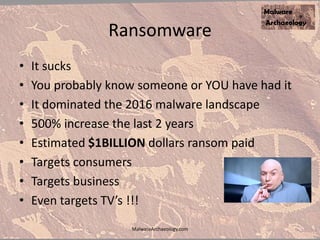
• It sucks
• You probably know someone or YOU have had it
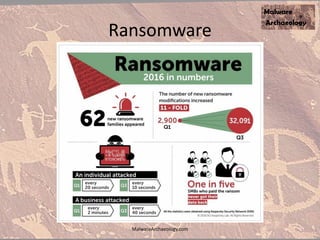
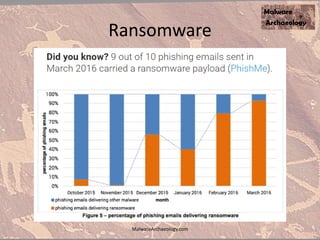
• It dominated the 2016 malware landscape
• 500% increase the last 2 years
• Estimated $1BILLION dollars ransom paid
• Targets consumers
• Targets business
• Even targets TV’s !!!
MalwareArchaeology.com
Ransomware
MalwareArchaeology.com
Ransomware
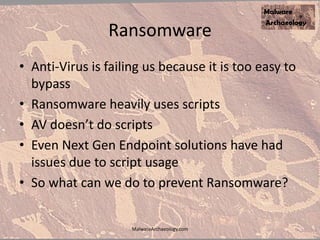
• Anti-Virus is failing us because it is too easy to
bypass
• Ransomware heavily uses scripts
• AV doesn’t do scripts
• Even Next Gen Endpoint solutions have had
issues due to script usage
• So what can we do to prevent Ransomware?
MalwareArchaeology.com
Ransomware
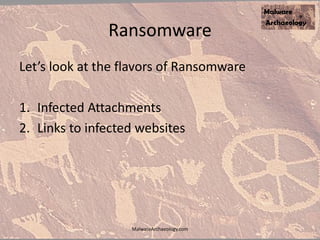
Let’s look at the flavors of Ransomware
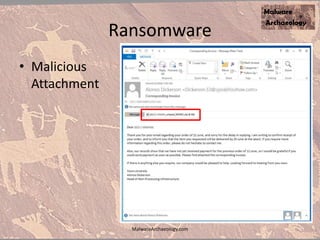
1. Infected Attachments
2. Links to infected websites
MalwareArchaeology.com
Ransomware
• Malicious
Attachment
MalwareArchaeology.com
Ransomware
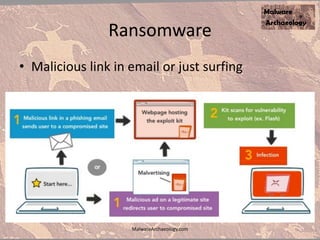
• Malicious link in email or just surfing
MalwareArchaeology.com
Ransomware Types
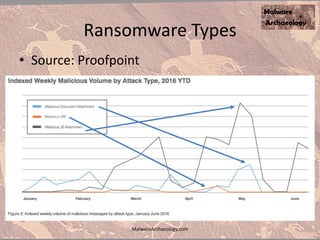
• Source: Proofpoint
MalwareArchaeology.com
Ransomware
MalwareArchaeology.com
Ransomware
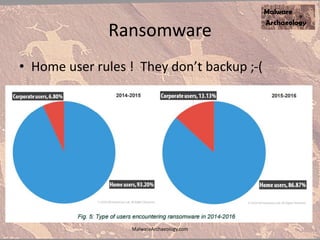
• Home user rules ! They don’t backup ;-(
MalwareArchaeology.com
Ransomware
MalwareArchaeology.com
Ransomware
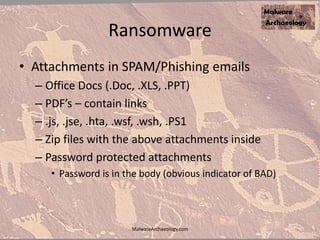
• Attachments in SPAM/Phishing emails
– Office Docs (.Doc, .XLS, .PPT)
– PDF’s – contain links
– .js, .jse, .hta, .wsf, .wsh, .PS1
– Zip files with the above attachments inside
– Password protected attachments
• Password is in the body (obvious indicator of BAD)
MalwareArchaeology.com
Ransomware
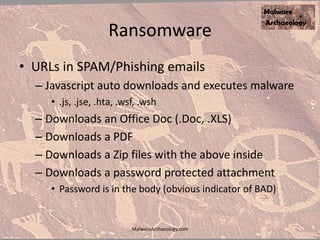
• URLs in SPAM/Phishing emails
– Javascript auto downloads and executes malware
• .js, .jse, .hta, .wsf, .wsh
– Downloads an Office Doc (.Doc, .XLS)
– Downloads a PDF
– Downloads a Zip files with the above inside
– Downloads a password protected attachment
• Password is in the body (obvious indicator of BAD)
MalwareArchaeology.com
Ransomware
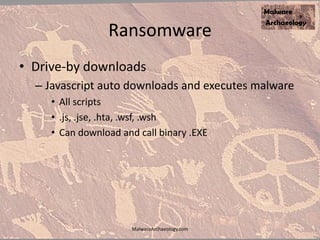
• Drive-by downloads
– Javascript auto downloads and executes malware
• All scripts
• .js, .jse, .hta, .wsf, .wsh
• Can download and call binary .EXE
MalwareArchaeology.com
Preventing
RansoWare
MalwareArchaeology.com
Ransomware
• Believe it or not you already have what you
need to stop ransomware dead cold – For
Windows
• And its FREE !!!!
• So how can we take the RANSOM out of
Ransomware?
MalwareArchaeology.com
Prevention
• Don’t enable Macro’s or Content EVER!!!! In
any Office Documents
• Actually let’s assume you do enable content,
because we can still stop ransomware
• We will go after what the payload actually is
and does and how Windows handles it
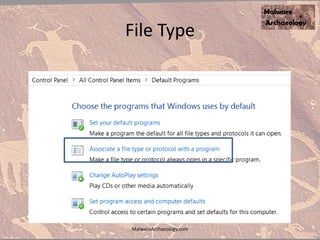
• The file extension that is executed when the
content is enabled is the key
MalwareArchaeology.com
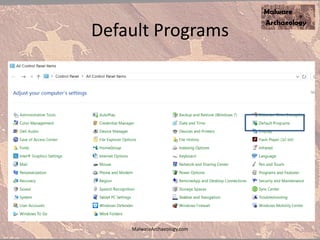
Default Programs
MalwareArchaeology.com
File Type
MalwareArchaeology.com
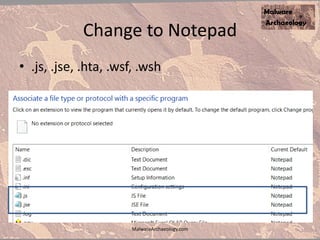
Change to Notepad
• .js, .jse, .hta, .wsf, .wsh
MalwareArchaeology.com
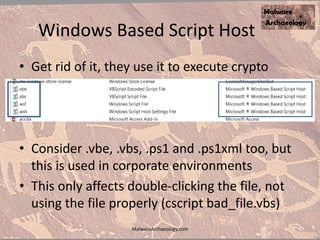
Windows Based Script Host
• Get rid of it, they use it to execute crypto
• Consider .vbe, .vbs, .ps1 and .ps1xml too, but
this is used in corporate environments
• This only affects double-clicking the file, not
using the file properly (cscript bad_file.vbs)
MalwareArchaeology.com
Corporate email
• Drop these file types at the email gateway and
you will block 90% or more of what users see
that gives them ransomware
• .js, .jse, .hta, .wsf, .wsh, .vbe, .vbs
• No reason these will be emailed to you, if so
just encrypt with a password, and do NOT
include the password in the body of the
message.
MalwareArchaeology.com
Gaps
• We are starting to see more encrypted
documents, but they have the password in the
body so obviously NOT secure
• If a user opens the fake email and opens the
file inside, then scripting can be used properly
– cscript some_bad.vbs
• Most will be Office documents and the Macro
and/or Content must be enabled
• Office 2013 and 2016 can break this FINALLY
MalwareArchaeology.com
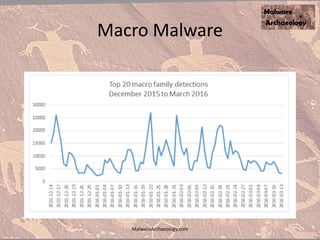
Macro Malware
MalwareArchaeology.com
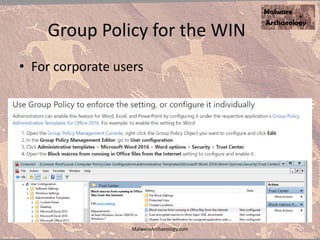
Group Policy for the WIN
• For corporate users
MalwareArchaeology.com
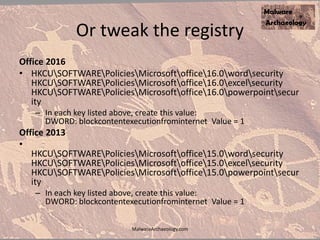
Or tweak the registry
Office 2016
• HKCUSOFTWAREPoliciesMicrosoftoffice16.0wordsecurity
HKCUSOFTWAREPoliciesMicrosoftoffice16.0excelsecurity
HKCUSOFTWAREPoliciesMicrosoftoffice16.0powerpointsecur
ity
– In each key listed above, create this value:
DWORD: blockcontentexecutionfrominternet Value = 1
Office 2013
•
HKCUSOFTWAREPoliciesMicrosoftoffice15.0wordsecurity
HKCUSOFTWAREPoliciesMicrosoftoffice15.0excelsecurity
HKCUSOFTWAREPoliciesMicrosoftoffice15.0powerpointsecur
ity
– In each key listed above, create this value:
DWORD: blockcontentexecutionfrominternet Value = 1
MalwareArchaeology.com
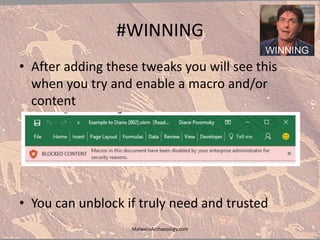
#WINNING
• After adding these tweaks you will see this
when you try and enable a macro and/or
content
• You can unblock if truly need and trusted
MalwareArchaeology.com
Ransomware Prevented
• If you do these simple things, which are all
FREE, you will curb ransomware infections by
90-95% or more
• This does not address malicious binaries .EXE
files or .DLL files
• Whitelisting with Software Restriction Policies
or AppBlocker will be needed for this
MalwareArchaeology.com
Whitelisting
MalwareArchaeology.com
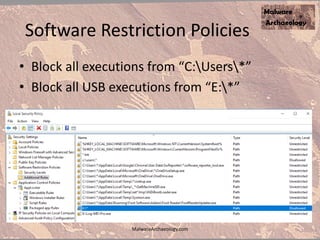
Software Restriction Policies
• Block all executions from “C:Users*”
• Block all USB executions from “E:*”
MalwareArchaeology.com
Software Restriction Policies
• If you set to block like I do, then when you try
to launch, install or an update runs, it will fail
• Generates an Event ID 866 in the Application
Log
• Copy the path that failed and create an
exception
• Be careful of over trusting generic paths
• Use a * to genericize an entry C:Users*
MalwareArchaeology.com
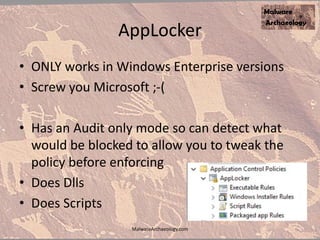
AppLocker
• ONLY works in Windows Enterprise versions
• Screw you Microsoft ;-(
• Has an Audit only mode so can detect what
would be blocked to allow you to tweak the
policy before enforcing
• Does Dlls
• Does Scripts
MalwareArchaeology.com
How to inspect a system
and improve logging
MalwareArchaeology.com
• The Log and Malicious Discovery tool
• Audits your system and produces a report
• Also shows failed items on the console
• Helps you configure proper audit logging
• ALL VERSIONS OF WINDOWS (Win 7 & up)
• Helps you enable what is valuable
• Compares to many industry standards
• CIS, USGCB and AU standards and “Windows
Logging Cheat Sheet”
MalwareArchaeology.com
Free Edition
• Collect 1-7 days of logs
• Over 20 reports
• Full filesystem Hash Baseline
• Full filesystem compare to Hash Baseline
• Full system Registry Baseline
• Full system compare to Registry Baseline
• Large Registry Key discovery
MalwareArchaeology.com
• Over 25 reports
• Interesting Artifacts report
• WhoIS resolution of IPs
• SRUM (netflow from/to a binary)
• AutoRuns report with whitelist and MD
• More Whitelisting
• Master-Digest to exclude hashes and files
MalwareArchaeology.com
Resources
• Websites
– MalwareArchaeology.com
– Log-MD.com The tool
• The “Windows Logging Cheat Sheet”
– MalwareArchaeology.com
• Malware Analysis Report links too
– To start your Malware Management program
MalwareArchaeology.com
Questions?
• You can find us at:
• @HackerHurricane
• @Boettcherpwned
• Log-MD.com
• MalwareArchaeology.com
• HackerHurricane.com (blog)
• http://www.slideshare.net
MalwareArchaeology.com

What can you do about ransomware

  • 1.
    Ransomware and commodity malware,What can I do really to prevent it? And how do I look to see if my system has anything odd or malicious? Michael Gough – Founder MalwareArchaeology.com MalwareArchaeology.com
  • 2.
    Who am I •Blue Team Defender Ninja, Malware Archaeologist, Logoholic • I love “properly” configured logs – they tell us Who, What, Where, When and hopefully How Creator of “Windows Logging Cheat Sheet” “Windows File Auditing Cheat Sheet” “Windows Registry Auditing Cheat Sheet” “Windows PowerShell Logging Cheat Sheet” “Windows Splunk Logging Cheat Sheet” “Malware Management Framework” • Co-Creator of “Log-MD” – Log Malicious Discovery Tool – With @Boettcherpwned – Brakeing Down Security PodCast • @HackerHurricane also my Blog MalwareArchaeology.com
  • 3.
  • 4.
    Ransomware • It sucks •You probably know someone or YOU have had it • It dominated the 2016 malware landscape • 500% increase the last 2 years • Estimated $1BILLION dollars ransom paid • Targets consumers • Targets business • Even targets TV’s !!! MalwareArchaeology.com
  • 5.
  • 6.
    Ransomware • Anti-Virus isfailing us because it is too easy to bypass • Ransomware heavily uses scripts • AV doesn’t do scripts • Even Next Gen Endpoint solutions have had issues due to script usage • So what can we do to prevent Ransomware? MalwareArchaeology.com
  • 7.
    Ransomware Let’s look atthe flavors of Ransomware 1. Infected Attachments 2. Links to infected websites MalwareArchaeology.com
  • 8.
  • 9.
    Ransomware • Malicious linkin email or just surfing MalwareArchaeology.com
  • 10.
    Ransomware Types • Source:Proofpoint MalwareArchaeology.com
  • 11.
  • 12.
    Ransomware • Home userrules ! They don’t backup ;-( MalwareArchaeology.com
  • 13.
  • 14.
    Ransomware • Attachments inSPAM/Phishing emails – Office Docs (.Doc, .XLS, .PPT) – PDF’s – contain links – .js, .jse, .hta, .wsf, .wsh, .PS1 – Zip files with the above attachments inside – Password protected attachments • Password is in the body (obvious indicator of BAD) MalwareArchaeology.com
  • 15.
    Ransomware • URLs inSPAM/Phishing emails – Javascript auto downloads and executes malware • .js, .jse, .hta, .wsf, .wsh – Downloads an Office Doc (.Doc, .XLS) – Downloads a PDF – Downloads a Zip files with the above inside – Downloads a password protected attachment • Password is in the body (obvious indicator of BAD) MalwareArchaeology.com
  • 16.
    Ransomware • Drive-by downloads –Javascript auto downloads and executes malware • All scripts • .js, .jse, .hta, .wsf, .wsh • Can download and call binary .EXE MalwareArchaeology.com
  • 17.
  • 18.
    Ransomware • Believe itor not you already have what you need to stop ransomware dead cold – For Windows • And its FREE !!!! • So how can we take the RANSOM out of Ransomware? MalwareArchaeology.com
  • 19.
    Prevention • Don’t enableMacro’s or Content EVER!!!! In any Office Documents • Actually let’s assume you do enable content, because we can still stop ransomware • We will go after what the payload actually is and does and how Windows handles it • The file extension that is executed when the content is enabled is the key MalwareArchaeology.com
  • 20.
  • 21.
  • 22.
    Change to Notepad •.js, .jse, .hta, .wsf, .wsh MalwareArchaeology.com
  • 23.
    Windows Based ScriptHost • Get rid of it, they use it to execute crypto • Consider .vbe, .vbs, .ps1 and .ps1xml too, but this is used in corporate environments • This only affects double-clicking the file, not using the file properly (cscript bad_file.vbs) MalwareArchaeology.com
  • 24.
    Corporate email • Dropthese file types at the email gateway and you will block 90% or more of what users see that gives them ransomware • .js, .jse, .hta, .wsf, .wsh, .vbe, .vbs • No reason these will be emailed to you, if so just encrypt with a password, and do NOT include the password in the body of the message. MalwareArchaeology.com
  • 25.
    Gaps • We arestarting to see more encrypted documents, but they have the password in the body so obviously NOT secure • If a user opens the fake email and opens the file inside, then scripting can be used properly – cscript some_bad.vbs • Most will be Office documents and the Macro and/or Content must be enabled • Office 2013 and 2016 can break this FINALLY MalwareArchaeology.com
  • 26.
  • 27.
    Group Policy forthe WIN • For corporate users MalwareArchaeology.com
  • 28.
    Or tweak theregistry Office 2016 • HKCUSOFTWAREPoliciesMicrosoftoffice16.0wordsecurity HKCUSOFTWAREPoliciesMicrosoftoffice16.0excelsecurity HKCUSOFTWAREPoliciesMicrosoftoffice16.0powerpointsecur ity – In each key listed above, create this value: DWORD: blockcontentexecutionfrominternet Value = 1 Office 2013 • HKCUSOFTWAREPoliciesMicrosoftoffice15.0wordsecurity HKCUSOFTWAREPoliciesMicrosoftoffice15.0excelsecurity HKCUSOFTWAREPoliciesMicrosoftoffice15.0powerpointsecur ity – In each key listed above, create this value: DWORD: blockcontentexecutionfrominternet Value = 1 MalwareArchaeology.com
  • 29.
    #WINNING • After addingthese tweaks you will see this when you try and enable a macro and/or content • You can unblock if truly need and trusted MalwareArchaeology.com
  • 30.
    Ransomware Prevented • Ifyou do these simple things, which are all FREE, you will curb ransomware infections by 90-95% or more • This does not address malicious binaries .EXE files or .DLL files • Whitelisting with Software Restriction Policies or AppBlocker will be needed for this MalwareArchaeology.com
  • 31.
  • 32.
    Software Restriction Policies •Block all executions from “C:Users*” • Block all USB executions from “E:*” MalwareArchaeology.com
  • 33.
    Software Restriction Policies •If you set to block like I do, then when you try to launch, install or an update runs, it will fail • Generates an Event ID 866 in the Application Log • Copy the path that failed and create an exception • Be careful of over trusting generic paths • Use a * to genericize an entry C:Users* MalwareArchaeology.com
  • 34.
    AppLocker • ONLY worksin Windows Enterprise versions • Screw you Microsoft ;-( • Has an Audit only mode so can detect what would be blocked to allow you to tweak the policy before enforcing • Does Dlls • Does Scripts MalwareArchaeology.com
  • 35.
    How to inspecta system and improve logging MalwareArchaeology.com
  • 36.
    • The Logand Malicious Discovery tool • Audits your system and produces a report • Also shows failed items on the console • Helps you configure proper audit logging • ALL VERSIONS OF WINDOWS (Win 7 & up) • Helps you enable what is valuable • Compares to many industry standards • CIS, USGCB and AU standards and “Windows Logging Cheat Sheet” MalwareArchaeology.com
  • 37.
    Free Edition • Collect1-7 days of logs • Over 20 reports • Full filesystem Hash Baseline • Full filesystem compare to Hash Baseline • Full system Registry Baseline • Full system compare to Registry Baseline • Large Registry Key discovery MalwareArchaeology.com
  • 38.
    • Over 25reports • Interesting Artifacts report • WhoIS resolution of IPs • SRUM (netflow from/to a binary) • AutoRuns report with whitelist and MD • More Whitelisting • Master-Digest to exclude hashes and files MalwareArchaeology.com
  • 39.
    Resources • Websites – MalwareArchaeology.com –Log-MD.com The tool • The “Windows Logging Cheat Sheet” – MalwareArchaeology.com • Malware Analysis Report links too – To start your Malware Management program MalwareArchaeology.com
  • 40.
    Questions? • You canfind us at: • @HackerHurricane • @Boettcherpwned • Log-MD.com • MalwareArchaeology.com • HackerHurricane.com (blog) • http://www.slideshare.net MalwareArchaeology.com