Grasping The LightSwitch Paradigm (The Taming of the Tool) Level:  Intermediate October 20, 2011 Andrew Brust CEO and Founder Blue Badge Insights
CEO and Founder, Blue Badge Insights Member, Microsoft BI Partner Advisory Council Microsoft Regional Director, MVP Co-chair VSLive! and over 16 years as a speaker Founder, Microsoft BI User Group of NYC http:// www.msbinyc.com Co-moderator, NYC .NET Developers Group http://www.nycdotnetdev.com “ Redmond Review” columnist for  Visual Studio Magazine  and  Redmond Developer News brustblog.com, Twitter: @andrewbrust Meet Andrew
The LightSwitch White Papers Go to microsoft.com/lightswitch and click on white paper links Or use these direct, shortened URLs: http://bit.ly/vslsoverview http://bit.ly/vslsfirstapp http://bit.ly/vslsdata http://bit.ly/vslsui http://bit.ly/vslsextensions Get these slides on SlideShare
Agenda Intro Basic Skills Advanced Techniques
INTRO
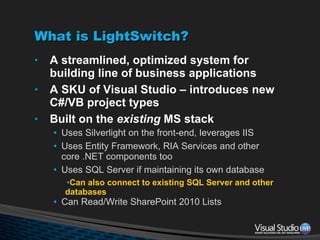
What is LightSwitch? A streamlined, optimized system for building line of business applications A SKU of Visual Studio – introduces new C#/VB project types Built on the  existing  MS stack Uses Silverlight on the front-end, leverages IIS Uses Entity Framework, RIA Services and other core .NET components too Uses SQL Server if maintaining its own database Can also connect to existing SQL Server and other databases Can Read/Write SharePoint 2010 Lists
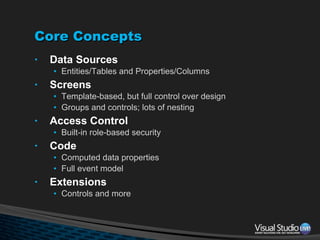
Core Concepts Data Sources Entities/Tables and Properties/Columns Screens Template-based, but full control over design Groups and controls; lots of nesting Access Control Built-in role-based security Code Computed data properties Full event model Extensions Controls and more
What’s Different? Model-driven No forms package.  Instead, you design screens schematically. Generic structures with specific implementations Business Types, not just data types Built-in export to Excel No requirement to code…and yet plenty of opportunity to do so
What Else is Different? Many things are  inferred: Screen scenarios Screen region layout Control types, and read-only equivalents Invoking your default detail screen when Summary Property clicked Impact of access control on UI The context-sensitive role of buttons (Command Bars) Very cloud-capable Works with Windows Azure and/or SQL Azure Might have the best deployment story in the stack
BASIC SKILLS
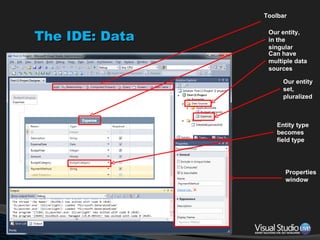
The IDE: Data Toolbar Can have multiple data sources Our entity, in the singular Our entity set, pluralized Entity type becomes field type Properties window
Business Types Imply UI, formatting, data validation Built-In: Phone Email Money Others can be added through extensions Business Types can be very useful when connecting to an  existing  database Just change underlying data type to business type in the data designer
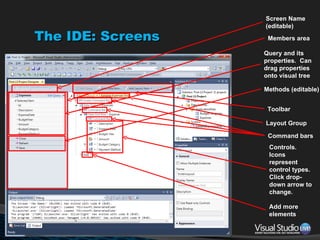
The IDE: Screens Members area Query and its properties.  Can drag properties onto visual tree Methods (editable) Toolbar Layout Group Controls. Icons represent control types.  Click drop-down arrow to change. Add more elements Screen Name (editable) Command bars
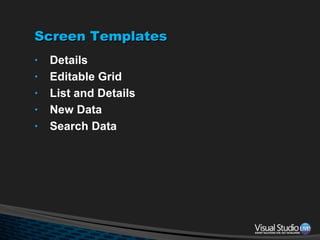
Screen Templates Details Editable Grid List and Details New Data Search Data
Adding an Entity And Building a Screen
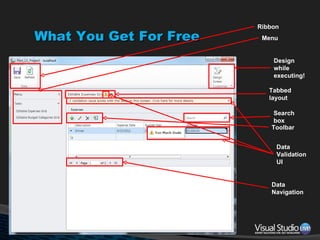
What You Get For Free Ribbon Menu Tabbed layout Toolbar Search box Data Navigation Design while executing! Data Validation UI
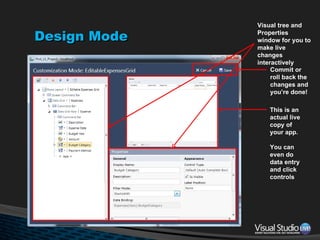
Design Mode Commit or  roll back the  changes and you’re done! This is an actual live copy of your app. You can even do data entry and click controls Visual tree and Properties window for you to make live changes interactively
Navigation The side bar menu is generated and updated automatically, as you add screens You can customize it though: Change order of items Add, remove or rename screens and groups Show/hide screens programmatically Using the  CanRun  event
Pop-ups Screens for creating and editing individual records are generated on-the-fly by LightSwitch See them by clicking the Edit or Add New buttons on the toolbar You can replace these generated screens with your own…
Parameterization and Loading Screens Through Code You can design your own screens for creating or editing single records & use them in place of the generated pop-up screens Use New Data and Details screen templates For New Data screen: You must put code in Add button’s  Execute  event handler: this.Application.Show ScreenName (); For Details screen: Set the “Use as Default Details Screen” option in the Add New Screen dialog box.
Navigation, Popups Buttons, Loading Screens
Data Validation You can easily add your own Validation in code. Click Custom Validation in the Properties window,  Put in conditional logic and pass a string to the  results.AddPropertyError  method. Use  AddEntityError  method for server-side validation when saving changes Or  AddPropertyResult  and  AddEntityResult  for info and warning messages Validation goes in data model, and flows into all screens.  Even generated ones.
The Event Model Types: General, Access Control Objects: Queries Data Sources Tables Properties (Fields), for validation Computed fields, for computation Screens Buttons ( Execute  and  CanExecute ) Menu items ( CanRun  event hook)
Data Validation
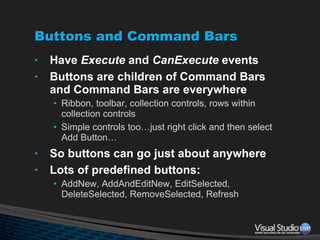
Buttons and Command Bars Have  Execute  and  CanExecute  events Buttons are children of Command Bars and Command Bars are everywhere Ribbon, toolbar, collection controls, rows within collection controls Simple controls too…just right click and then select Add Button… So buttons can go just about anywhere Lots of predefined buttons: AddNew, AddAndEditNew, EditSelected, DeleteSelected, RemoveSelected, Refresh
Ribbon Buttons
ADVANCED TECHNIQUES
Queries All screens’ data are fetched through queries You can edit these and add: Filter  Sort Parameter Group Also Support paging, sorting, search Set page size
Layout Screen layout is based on layout groups: Rows, Columns, Table, Tabs, Modal Window These are nest-able Scroll bars, splitter bars and relative sizing of screen region controllable through: Scroll Enabled, Alignment, Min/Max Height/Width, Is Row/Column Resizable properties provide
Queries and Layout
Search Built in to List and Data Grid controls Implemented automatically on all string fields Can be disabled at the property or entity level using  Is Searchable  property Support search  property on screen query Search-ability defined in the data model; respected by all screens Even the generated ones Search is rather brute force So don’t allow too many fields to be searchable
Access Control Optional Windows- or forms-based authentication You define: Groups, and their membership Named permissions, which you check programmatically in code Access control event hooks available for: Whether visible: Screens in the navigation menu Buttons Whether editable: Properties/fields,
Access Control
Extensions Controls Screen Templates Custom Data Sources Business Types Themes Shells
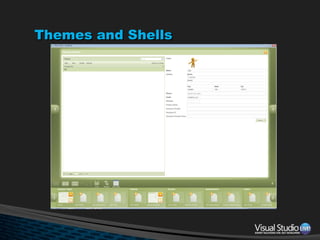
Themes and Shells
Extensions
Deployment Client is in-browser or desktop Middle tier on PC, server or Azure Deploy your database, or use existing db Work in SQL Server user instance mode + Express during dev, but deploy to SQL Server or SQL Azure. Or  stay  in Express!
Platform Shifts and Market Analysis Most LOB app tools give high productivity but low customization.  LS is different. Most are either frameworks or code generators.  LS is different. LS is model-driven. It renders Silverlight code/XAML today.  What about tomorrow?
Thank you [email_address] @andrewbrust  on twitter Want to get the free “Redmond Roundup Plus?” Text “bluebadge” to 22828

Grasping The LightSwitch Paradigm

  • 1.
    Grasping The LightSwitchParadigm (The Taming of the Tool) Level: Intermediate October 20, 2011 Andrew Brust CEO and Founder Blue Badge Insights
  • 2.
    CEO and Founder,Blue Badge Insights Member, Microsoft BI Partner Advisory Council Microsoft Regional Director, MVP Co-chair VSLive! and over 16 years as a speaker Founder, Microsoft BI User Group of NYC http:// www.msbinyc.com Co-moderator, NYC .NET Developers Group http://www.nycdotnetdev.com “ Redmond Review” columnist for Visual Studio Magazine and Redmond Developer News brustblog.com, Twitter: @andrewbrust Meet Andrew
  • 3.
    The LightSwitch WhitePapers Go to microsoft.com/lightswitch and click on white paper links Or use these direct, shortened URLs: http://bit.ly/vslsoverview http://bit.ly/vslsfirstapp http://bit.ly/vslsdata http://bit.ly/vslsui http://bit.ly/vslsextensions Get these slides on SlideShare
  • 4.
    Agenda Intro BasicSkills Advanced Techniques
  • 5.
  • 6.
    What is LightSwitch?A streamlined, optimized system for building line of business applications A SKU of Visual Studio – introduces new C#/VB project types Built on the existing MS stack Uses Silverlight on the front-end, leverages IIS Uses Entity Framework, RIA Services and other core .NET components too Uses SQL Server if maintaining its own database Can also connect to existing SQL Server and other databases Can Read/Write SharePoint 2010 Lists
  • 7.
    Core Concepts DataSources Entities/Tables and Properties/Columns Screens Template-based, but full control over design Groups and controls; lots of nesting Access Control Built-in role-based security Code Computed data properties Full event model Extensions Controls and more
  • 8.
    What’s Different? Model-drivenNo forms package. Instead, you design screens schematically. Generic structures with specific implementations Business Types, not just data types Built-in export to Excel No requirement to code…and yet plenty of opportunity to do so
  • 9.
    What Else isDifferent? Many things are inferred: Screen scenarios Screen region layout Control types, and read-only equivalents Invoking your default detail screen when Summary Property clicked Impact of access control on UI The context-sensitive role of buttons (Command Bars) Very cloud-capable Works with Windows Azure and/or SQL Azure Might have the best deployment story in the stack
  • 10.
  • 11.
    The IDE: DataToolbar Can have multiple data sources Our entity, in the singular Our entity set, pluralized Entity type becomes field type Properties window
  • 12.
    Business Types ImplyUI, formatting, data validation Built-In: Phone Email Money Others can be added through extensions Business Types can be very useful when connecting to an existing database Just change underlying data type to business type in the data designer
  • 13.
    The IDE: ScreensMembers area Query and its properties. Can drag properties onto visual tree Methods (editable) Toolbar Layout Group Controls. Icons represent control types. Click drop-down arrow to change. Add more elements Screen Name (editable) Command bars
  • 14.
    Screen Templates DetailsEditable Grid List and Details New Data Search Data
  • 15.
    Adding an EntityAnd Building a Screen
  • 16.
    What You GetFor Free Ribbon Menu Tabbed layout Toolbar Search box Data Navigation Design while executing! Data Validation UI
  • 17.
    Design Mode Commitor roll back the changes and you’re done! This is an actual live copy of your app. You can even do data entry and click controls Visual tree and Properties window for you to make live changes interactively
  • 18.
    Navigation The sidebar menu is generated and updated automatically, as you add screens You can customize it though: Change order of items Add, remove or rename screens and groups Show/hide screens programmatically Using the CanRun event
  • 19.
    Pop-ups Screens forcreating and editing individual records are generated on-the-fly by LightSwitch See them by clicking the Edit or Add New buttons on the toolbar You can replace these generated screens with your own…
  • 20.
    Parameterization and LoadingScreens Through Code You can design your own screens for creating or editing single records & use them in place of the generated pop-up screens Use New Data and Details screen templates For New Data screen: You must put code in Add button’s Execute event handler: this.Application.Show ScreenName (); For Details screen: Set the “Use as Default Details Screen” option in the Add New Screen dialog box.
  • 21.
  • 22.
    Data Validation Youcan easily add your own Validation in code. Click Custom Validation in the Properties window, Put in conditional logic and pass a string to the results.AddPropertyError method. Use AddEntityError method for server-side validation when saving changes Or AddPropertyResult and AddEntityResult for info and warning messages Validation goes in data model, and flows into all screens. Even generated ones.
  • 23.
    The Event ModelTypes: General, Access Control Objects: Queries Data Sources Tables Properties (Fields), for validation Computed fields, for computation Screens Buttons ( Execute and CanExecute ) Menu items ( CanRun event hook)
  • 24.
  • 25.
    Buttons and CommandBars Have Execute and CanExecute events Buttons are children of Command Bars and Command Bars are everywhere Ribbon, toolbar, collection controls, rows within collection controls Simple controls too…just right click and then select Add Button… So buttons can go just about anywhere Lots of predefined buttons: AddNew, AddAndEditNew, EditSelected, DeleteSelected, RemoveSelected, Refresh
  • 26.
  • 27.
  • 28.
    Queries All screens’data are fetched through queries You can edit these and add: Filter Sort Parameter Group Also Support paging, sorting, search Set page size
  • 29.
    Layout Screen layoutis based on layout groups: Rows, Columns, Table, Tabs, Modal Window These are nest-able Scroll bars, splitter bars and relative sizing of screen region controllable through: Scroll Enabled, Alignment, Min/Max Height/Width, Is Row/Column Resizable properties provide
  • 30.
  • 31.
    Search Built into List and Data Grid controls Implemented automatically on all string fields Can be disabled at the property or entity level using Is Searchable property Support search property on screen query Search-ability defined in the data model; respected by all screens Even the generated ones Search is rather brute force So don’t allow too many fields to be searchable
  • 32.
    Access Control OptionalWindows- or forms-based authentication You define: Groups, and their membership Named permissions, which you check programmatically in code Access control event hooks available for: Whether visible: Screens in the navigation menu Buttons Whether editable: Properties/fields,
  • 33.
  • 34.
    Extensions Controls ScreenTemplates Custom Data Sources Business Types Themes Shells
  • 35.
  • 36.
  • 37.
    Deployment Client isin-browser or desktop Middle tier on PC, server or Azure Deploy your database, or use existing db Work in SQL Server user instance mode + Express during dev, but deploy to SQL Server or SQL Azure. Or stay in Express!
  • 38.
    Platform Shifts andMarket Analysis Most LOB app tools give high productivity but low customization. LS is different. Most are either frameworks or code generators. LS is different. LS is model-driven. It renders Silverlight code/XAML today. What about tomorrow?
  • 39.
    Thank you [email_address]@andrewbrust on twitter Want to get the free “Redmond Roundup Plus?” Text “bluebadge” to 22828

Editor's Notes

  • #2 Visual Studio Live! Las Vegas 2011MGB 2003 © 2003 Microsoft Corporation. All rights reserved. This presentation is for informational purposes only. Microsoft makes no warranties, express or implied, in this summary.