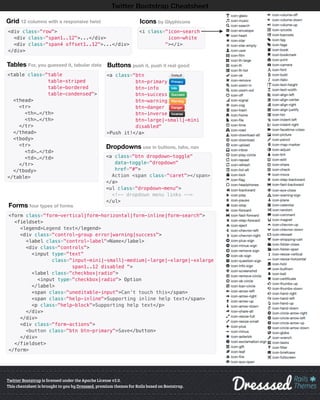
Dropdowns use in buttons, tabs, nav
Twitter Bootstrap is licensed under the Apache License v2.0.
This cheatsheet is brought to you by Dresssed, premium themes for Rails based on Bootstrap.
Twitter Bootstrap Cheatsheet
Grid 12 columns with a responsive twist
<div class="row">
<div class="span1..12">...</div>
<div class="span4 offset1..12">...</div>
</div>
Tables For, you guessed it, tabular data
<table class="table
table-striped
table-bordered
table-condensed">
<thead>
<tr>
<th>…</th>
<th>…</th>
</tr>
</thead>
<tbody>
<tr>
<td>…</td>
<td>…</td>
</tr>
</tbody>
</table>
Forms four types of forms
<form class="form-vertical|form-horizontal|form-inline|form-search">
<fieldset>
<legend>Legend text</legend>
<div class="control-group error|warning|success">
<label class="control-label">Name</label>
<div class="controls">
<input type="text"
class="input-mini|-small|-medium|-large|-xlarge|-xxlarge
span1..12 disabled ">
<label class="checkbox|radio">
<input type="checkbox|radio"> Option
</label>
<span class="uneditable-input">Can’t touch this</span>
<span class="help-inline">Supporting inline help text</span>
<p class="help-block">Supporting help text</p>
</div>
</div>
<div class="form-actions">
<button class="btn btn-primary">Save</button>
</div>
</fieldset>
</form>
Buttons push it, push it real good
<a class="btn
btn-primary
btn-info
btn-success
btn-warning
btn-danger
btn-inverse
btn-large|-small|-mini
disabled"
>Push it!</a>
<i class="icon-search
icon-white
"></i>
Icons by Glyphicons
<a class="btn dropdown-toggle"
data-toggle="dropdown"
href="#">
Action <span class="caret"></span>
</a>
<ul class="dropdown-menu">
<!-- dropdown menu links -->
</ul>

Bootstrap cheatsheet

  • 1.
    Dropdowns use inbuttons, tabs, nav Twitter Bootstrap is licensed under the Apache License v2.0. This cheatsheet is brought to you by Dresssed, premium themes for Rails based on Bootstrap. Twitter Bootstrap Cheatsheet Grid 12 columns with a responsive twist <div class="row"> <div class="span1..12">...</div> <div class="span4 offset1..12">...</div> </div> Tables For, you guessed it, tabular data <table class="table table-striped table-bordered table-condensed"> <thead> <tr> <th>…</th> <th>…</th> </tr> </thead> <tbody> <tr> <td>…</td> <td>…</td> </tr> </tbody> </table> Forms four types of forms <form class="form-vertical|form-horizontal|form-inline|form-search"> <fieldset> <legend>Legend text</legend> <div class="control-group error|warning|success"> <label class="control-label">Name</label> <div class="controls"> <input type="text" class="input-mini|-small|-medium|-large|-xlarge|-xxlarge span1..12 disabled "> <label class="checkbox|radio"> <input type="checkbox|radio"> Option </label> <span class="uneditable-input">Can’t touch this</span> <span class="help-inline">Supporting inline help text</span> <p class="help-block">Supporting help text</p> </div> </div> <div class="form-actions"> <button class="btn btn-primary">Save</button> </div> </fieldset> </form> Buttons push it, push it real good <a class="btn btn-primary btn-info btn-success btn-warning btn-danger btn-inverse btn-large|-small|-mini disabled" >Push it!</a> <i class="icon-search icon-white "></i> Icons by Glyphicons <a class="btn dropdown-toggle" data-toggle="dropdown" href="#"> Action <span class="caret"></span> </a> <ul class="dropdown-menu"> <!-- dropdown menu links --> </ul>