
TWITTER BOOTSTRAP

                    Presented By:
What is Twitter Bootstrap?
Twitter Bootstrap is a Sleek, intuitive, and powerful
front-end framework for faster and easier web
development. Twitter Bootstrap is a toolkit to
develop web apps and sites fast. It includes basic
CSS and HTML for creating Grids, Layouts,
Typography, Tables, Forms, Navigation, Alerts,
Popovers etc.
Features
• Bootstrap is open source and available on
  GitHub
• Set of user interface elements, layouts, and
  javascript tools
• Support HTML5 and CSS3
• Compatible with all major browsers
• Supports Responsive Design
• Provides well built set of jQuery plugins
Origin
• Developed by Mark Otto and Jacob Thornton at Twitter
• In August, 2011 Twitter released Bootstrap as open-
  source
• In February 2012, it became the most popular GitHub
  development project.
Structure
•   Grid System
•   Fluid Grid System
•   Layouts
•   Responsive Design
Grid System
The default Bootstrap grid system utilizes 12
columns, making for a 940px wide container without
responsive features enabled. With the responsive CSS
file added, the grid adapts to be 724px and 1170px
wide depending on your viewport. Below 767px
viewports, the columns become fluid and stack
vertically.
Fluid Grid System
The fluid grid system uses percents instead of pixels
for column widths. It has the same responsive
capabilities as our fixed grid system, ensuring proper
proportions for key screen resolutions and devices.
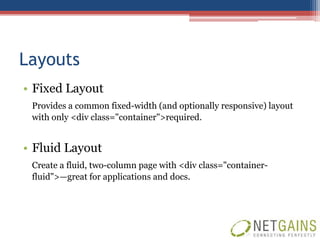
Layouts
• Fixed Layout
 Provides a common fixed-width (and optionally responsive) layout
 with only <div class="container">required.


• Fluid Layout
 Create a fluid, two-column page with <div class="container-
 fluid">—great for applications and docs.
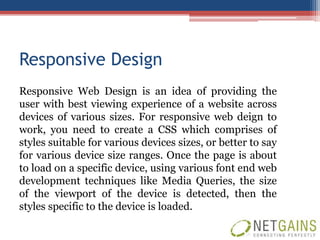
Responsive Design
Responsive Web Design is an idea of providing the
user with best viewing experience of a website across
devices of various sizes. For responsive web deign to
work, you need to create a CSS which comprises of
styles suitable for various devices sizes, or better to say
for various device size ranges. Once the page is about
to load on a specific device, using various font end web
development techniques like Media Queries, the size
of the viewport of the device is detected, then the
styles specific to the device is loaded.
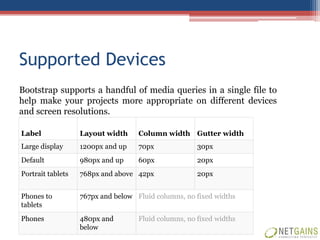
Supported Devices
Bootstrap supports a handful of media queries in a single file to
help make your projects more appropriate on different devices
and screen resolutions.

Label              Layout width     Column width Gutter width
Large display      1200px and up    70px              30px
Default            980px and up     60px              20px
Portrait tablets   768px and above 42px               20px


Phones to          767px and below Fluid columns, no fixed widths
tablets
Phones             480px and        Fluid columns, no fixed widths
                   below
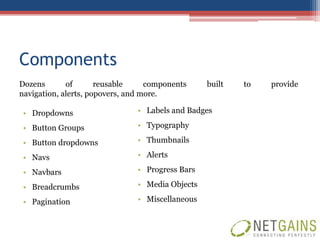
Components
Dozens       of       reusable     components    built   to   provide
navigation, alerts, popovers, and more.

 • Dropdowns                   • Labels and Badges

 • Button Groups               • Typography

 • Button dropdowns            • Thumbnails

 • Navs                        • Alerts

 • Navbars                     • Progress Bars

 • Breadcrumbs                 • Media Objects

 • Pagination                  • Miscellaneous
Javascript
The JavaScript components of Bootstrap are based on the
jQuery JavaScript library. Plugins are accordingly found in the jQuery
toolkit plugins. They provide additional user-interface elements such as
dialog, tooltips and carousels. They also extend the functionality of some
existing interface elements, including for example an auto-complete
function for input fields. Supported JavaScript Plugins:
 •   Modal                  •   Button
 •   Dropdown               •   Tooltip
 •   Scrollspy              •   Collapse
 •   Tab                    •   Carousel
 •   Tooltip                •   Typeahead
 •   Popover                •   Affix
 •   Alert
Reasons to Use Bootstrap
• Save Time
  The Bootstrap libraries offer readymade pieces of code that can pump life into a website.

• Customizable
  It lets you factor in your own needs and tailor your development project accordingly.

• Factor in the Design
  o Grid System
  o CSS Components
  o Javascript Plugins


• Consistency
  Since it works with a central set of development code, Bootstrap’s results are uniform across
  platforms.

• Updates
  Bootstrap is ever-evolving with updates coming out on a much more regular
  and constant basis.
Reasons to Use Bootstrap
• Integration
  Integration is simple, fast and easy to accomplish and once done you can play with your design to
  your heart’s content.


• Responsiveness
  Bootstrap adapts to the change in platforms with super speed and efficiency.


• Future Compatibility
  Bootstrap Comes equipped with many elements that are being considered the future of design
  itself. For example HTML5 and CSS3.


• The docs Talk
  Bootstrap gives you a head start because you don’t have to play with everything to learn and
  instead can find information on just about anything through the documentation.
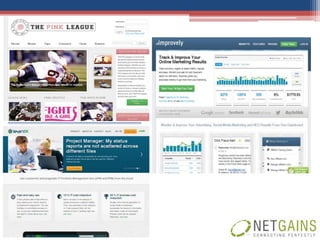
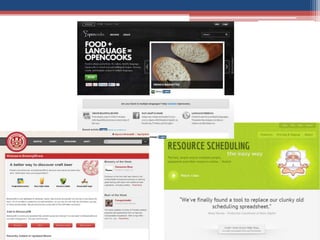
Sites Built With Twitter Bootstrap
NETGAINS AMERICA LLC
87 Wolfs Lane, 2nd Floor,
Pelham, New York – 10803
Office: +1 (917) 779-0480
Toll Free: +1 (866) 693-5132
W: www.netgainsamerica.com
E: biz@netgains.org

Twitter bootstrap1

  • 1.
    TWITTER BOOTSTRAP Presented By:
  • 2.
    What is TwitterBootstrap? Twitter Bootstrap is a Sleek, intuitive, and powerful front-end framework for faster and easier web development. Twitter Bootstrap is a toolkit to develop web apps and sites fast. It includes basic CSS and HTML for creating Grids, Layouts, Typography, Tables, Forms, Navigation, Alerts, Popovers etc.
  • 3.
    Features • Bootstrap isopen source and available on GitHub • Set of user interface elements, layouts, and javascript tools • Support HTML5 and CSS3 • Compatible with all major browsers • Supports Responsive Design • Provides well built set of jQuery plugins
  • 4.
    Origin • Developed byMark Otto and Jacob Thornton at Twitter • In August, 2011 Twitter released Bootstrap as open- source • In February 2012, it became the most popular GitHub development project.
  • 5.
    Structure • Grid System • Fluid Grid System • Layouts • Responsive Design
  • 6.
    Grid System The defaultBootstrap grid system utilizes 12 columns, making for a 940px wide container without responsive features enabled. With the responsive CSS file added, the grid adapts to be 724px and 1170px wide depending on your viewport. Below 767px viewports, the columns become fluid and stack vertically.
  • 7.
    Fluid Grid System Thefluid grid system uses percents instead of pixels for column widths. It has the same responsive capabilities as our fixed grid system, ensuring proper proportions for key screen resolutions and devices.
  • 8.
    Layouts • Fixed Layout Provides a common fixed-width (and optionally responsive) layout with only <div class="container">required. • Fluid Layout Create a fluid, two-column page with <div class="container- fluid">—great for applications and docs.
  • 9.
    Responsive Design Responsive WebDesign is an idea of providing the user with best viewing experience of a website across devices of various sizes. For responsive web deign to work, you need to create a CSS which comprises of styles suitable for various devices sizes, or better to say for various device size ranges. Once the page is about to load on a specific device, using various font end web development techniques like Media Queries, the size of the viewport of the device is detected, then the styles specific to the device is loaded.
  • 10.
    Supported Devices Bootstrap supportsa handful of media queries in a single file to help make your projects more appropriate on different devices and screen resolutions. Label Layout width Column width Gutter width Large display 1200px and up 70px 30px Default 980px and up 60px 20px Portrait tablets 768px and above 42px 20px Phones to 767px and below Fluid columns, no fixed widths tablets Phones 480px and Fluid columns, no fixed widths below
  • 11.
    Components Dozens of reusable components built to provide navigation, alerts, popovers, and more. • Dropdowns • Labels and Badges • Button Groups • Typography • Button dropdowns • Thumbnails • Navs • Alerts • Navbars • Progress Bars • Breadcrumbs • Media Objects • Pagination • Miscellaneous
  • 12.
    Javascript The JavaScript componentsof Bootstrap are based on the jQuery JavaScript library. Plugins are accordingly found in the jQuery toolkit plugins. They provide additional user-interface elements such as dialog, tooltips and carousels. They also extend the functionality of some existing interface elements, including for example an auto-complete function for input fields. Supported JavaScript Plugins: • Modal • Button • Dropdown • Tooltip • Scrollspy • Collapse • Tab • Carousel • Tooltip • Typeahead • Popover • Affix • Alert
  • 13.
    Reasons to UseBootstrap • Save Time The Bootstrap libraries offer readymade pieces of code that can pump life into a website. • Customizable It lets you factor in your own needs and tailor your development project accordingly. • Factor in the Design o Grid System o CSS Components o Javascript Plugins • Consistency Since it works with a central set of development code, Bootstrap’s results are uniform across platforms. • Updates Bootstrap is ever-evolving with updates coming out on a much more regular and constant basis.
  • 14.
    Reasons to UseBootstrap • Integration Integration is simple, fast and easy to accomplish and once done you can play with your design to your heart’s content. • Responsiveness Bootstrap adapts to the change in platforms with super speed and efficiency. • Future Compatibility Bootstrap Comes equipped with many elements that are being considered the future of design itself. For example HTML5 and CSS3. • The docs Talk Bootstrap gives you a head start because you don’t have to play with everything to learn and instead can find information on just about anything through the documentation.
  • 15.
    Sites Built WithTwitter Bootstrap
  • 18.
    NETGAINS AMERICA LLC 87Wolfs Lane, 2nd Floor, Pelham, New York – 10803 Office: +1 (917) 779-0480 Toll Free: +1 (866) 693-5132 W: www.netgainsamerica.com E: biz@netgains.org