BIOS, Linux and
Firmware Test Suite in-between

Alex Hung <alex.hung@canonical.com>
What is BIOS?
What is BIOS?

●

Basic Input/Output System (BIOS)

●

For most people, BIOS is
●

A flashing screen with riddles that shows up when they hit the powre button
What is BIOS?

●

And a blue screen when you press setup hotkey
BIOS is more than a blue screen...

●

Hardware initialization

●

Hardware self-test (POST - Power-on-Self-Test)

●

Customization for different OEM

●

Standardized APIs (UEFI)
●

●

●

Boot-time Services
Runtime Services

Power Management (ACPI)
●

●

●

Hardware description
Event handles (hotkeys)

Multi-OS supports
UEFI - Unified Extensible Firmware Interface

●

UEFI intends to replace the “legacy BIOS”.

●

UEFI is an interface between the operating system

Operating System /
UEFI Application

(OS) and the system firmware (BIOS).
●

UEFI provides boot-time and runtime services - a

UEFI

standard environment for booting an OS.
●

UEFI is a pure interface specification. Common
implementation includes:
Intel EDK2 (Tiano)

Firmware

AMI's Aptio

Phoenix SecureCore

Insyde H20

Hardware
UEFI's Advantages

●

Faster Boot Time

●

Support for Larger Disk Size

●

Protected Mode (real mode in legacy BIOS)

●

Standardized Services

●

UEFI Shell (DOS replacement)

●

Enhanced Security (Secure Boot)
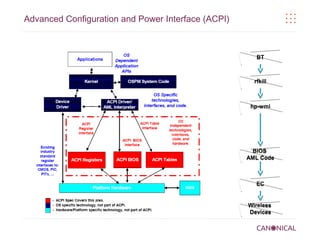
Advanced Configuration and Power Interface (ACPI)

●

ACPI was developed to establish industry interfaces enabling robust OS-directed
motherboard device configuration and power management.

●

APCI is an interface specification comprised of both software and hardware element.

●

In ACPI, the BIOS provides the OS with methods for directly controlling hardware.
●

ACPI uses ACPI Machine Language (AML) for implementing power event handlers.
What kind of information is defined in ACPI?

Power States
How does BIOS interact with
Linux Kernel?
Interaction between Linux Kernel and BIOS

●

UEFI runtime services

●

ACPI registers, tables and control methods
Advanced Configuration and Power Interface (ACPI)

BT

rfkill

hp-wmi

BIOS
AML Code

EC

Wireless
Devices
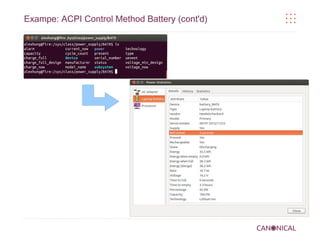
Exampe: ACPI Control Method Battery
Exampe: ACPI Control Method Battery (cont'd)
Exampe: ACPI Brightness

●

_BCL: Query List of Brightness Control Levels Supported

●

_BCM: Set the Brightness Level

●

_BQC: Brightness Query Current level
Exampe: ACPI Brightness Hotkey
Exampe: ACPI Brightness Hotkey (cont'd)
More Exampes

●

AC Adapters

(cat /sys/class/power_supply/AC/online)

●

CPU's power management (C States and P States)

●

Interrupt routing table

●

Memory allocation table

●

Thermal management (fan, critical shutdown and so on)

●

Wakeup from sleep (cat /proc/acpi/wakeup)

●

and many others

These are not BIOS-related (at least not often):
Audio distortion / no audio
VGA corruption
PCI devices
HDD-related
USB devices (slow bluetooth speed)
UEFI BIOS's Future

●

PC market is shrinking
●

Nightmare (BIOS) is going away...

●

WRONG!!!

●

ARM is adopting UEFI and ACPI (which merged to UEFI Forum)
●

“Moving ACPI into the UEFI Forum is probably one of the biggest changes in the
computing industry since the formation of the UEFI Forum in 2005”
Firmware Test Suite (FWTS)
What is FWTS?
FWTS is a Linux tool that automates
firmware checking. It aims to detect
bugs and to get firmware fixed.

What does FWTS test?

ACPI

CPU Configuration

Legacy/UEFI BIOS Interface

fwts comprises large set of fifty tests
that are designed to exercise and test

PCIe/PCI Configuration

different aspects of a machine's
firmware – including ACPI, UEFI,

Power Management

hardware configuration, power-saving
and so on.

System Configuration

Others
Getting FWTS
Installation
●

sudo apt-get install fwts

●

Development (stable) release:
●

●

sudo add-apt-repository ppa:firmware-testing-team/ppa-fwts-stable

Development (unstable) release:
●

sudo add-apt-repository ppa:firmware-testing-team/ppa-fwts-devel

Source code
●

Source code: git clone git://kernel.ubuntu.com/hwe/fwts.git
FWTS Examples
FWTS examples
Show tests
fwts --show-tests / fwts –show-tests-full
Scan ACPI Methods
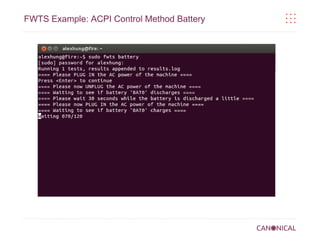
sudo fwts method
Execute UEFI tests (runtime services)
sudo fwts uefirtmisc uefirttime uefirtvariable
Scan CPU configuration
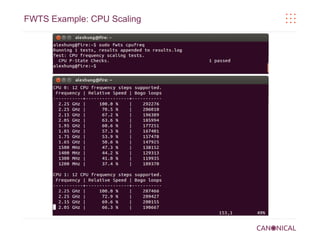
sudo fwts msr mtrr nx virt
Scan kernel log
sudo fwts klog
Run all batch tests
sudo fwts
FWTS Example: ACPI Control Method Battery
FWTS Example: CPU Scaling
Release Schedule

●

fwts is released monthly
●

●

New versioning: Year.Month.Minior_version: 13.06,13.07 and 13.08, 13.09(.01)

Release notes are available online
●

13.09.01 @ https://wiki.ubuntu.com/FirmwareTestSuite/ReleaseNotes/13.09.01

●

1x.0y @ https://wiki.ubuntu.com/FirmwareTestSuite/ReleaseNotes/1x.0y.00
Online Resource for fwts
Information for fwts
Architecture Supported:

x86 PC – full support
ARM – limited features
Information for fwts and fwts-live
Looking for more information?
fwts:
URL: https://wiki.ubuntu.com/Kernel/Reference/fwts
Mailing list: fwts-devel@lists.ubuntu.com
Thank you

BIOS, Linux and Firmware Test Suite in-between

  • 1.
    BIOS, Linux and FirmwareTest Suite in-between Alex Hung <alex.hung@canonical.com>
  • 2.
  • 3.
    What is BIOS? ● BasicInput/Output System (BIOS) ● For most people, BIOS is ● A flashing screen with riddles that shows up when they hit the powre button
  • 4.
    What is BIOS? ● Anda blue screen when you press setup hotkey
  • 5.
    BIOS is morethan a blue screen... ● Hardware initialization ● Hardware self-test (POST - Power-on-Self-Test) ● Customization for different OEM ● Standardized APIs (UEFI) ● ● ● Boot-time Services Runtime Services Power Management (ACPI) ● ● ● Hardware description Event handles (hotkeys) Multi-OS supports
  • 6.
    UEFI - UnifiedExtensible Firmware Interface ● UEFI intends to replace the “legacy BIOS”. ● UEFI is an interface between the operating system Operating System / UEFI Application (OS) and the system firmware (BIOS). ● UEFI provides boot-time and runtime services - a UEFI standard environment for booting an OS. ● UEFI is a pure interface specification. Common implementation includes: Intel EDK2 (Tiano) Firmware AMI's Aptio Phoenix SecureCore Insyde H20 Hardware
  • 7.
    UEFI's Advantages ● Faster BootTime ● Support for Larger Disk Size ● Protected Mode (real mode in legacy BIOS) ● Standardized Services ● UEFI Shell (DOS replacement) ● Enhanced Security (Secure Boot)
  • 8.
    Advanced Configuration andPower Interface (ACPI) ● ACPI was developed to establish industry interfaces enabling robust OS-directed motherboard device configuration and power management. ● APCI is an interface specification comprised of both software and hardware element. ● In ACPI, the BIOS provides the OS with methods for directly controlling hardware. ● ACPI uses ACPI Machine Language (AML) for implementing power event handlers.
  • 9.
    What kind ofinformation is defined in ACPI? Power States
  • 10.
    How does BIOSinteract with Linux Kernel?
  • 11.
    Interaction between LinuxKernel and BIOS ● UEFI runtime services ● ACPI registers, tables and control methods
  • 12.
    Advanced Configuration andPower Interface (ACPI) BT rfkill hp-wmi BIOS AML Code EC Wireless Devices
  • 13.
    Exampe: ACPI ControlMethod Battery
  • 14.
    Exampe: ACPI ControlMethod Battery (cont'd)
  • 15.
    Exampe: ACPI Brightness ● _BCL:Query List of Brightness Control Levels Supported ● _BCM: Set the Brightness Level ● _BQC: Brightness Query Current level
  • 16.
  • 17.
    Exampe: ACPI BrightnessHotkey (cont'd)
  • 18.
    More Exampes ● AC Adapters (cat/sys/class/power_supply/AC/online) ● CPU's power management (C States and P States) ● Interrupt routing table ● Memory allocation table ● Thermal management (fan, critical shutdown and so on) ● Wakeup from sleep (cat /proc/acpi/wakeup) ● and many others These are not BIOS-related (at least not often): Audio distortion / no audio VGA corruption PCI devices HDD-related USB devices (slow bluetooth speed)
  • 19.
    UEFI BIOS's Future ● PCmarket is shrinking ● Nightmare (BIOS) is going away... ● WRONG!!! ● ARM is adopting UEFI and ACPI (which merged to UEFI Forum) ● “Moving ACPI into the UEFI Forum is probably one of the biggest changes in the computing industry since the formation of the UEFI Forum in 2005”
  • 20.
  • 21.
    Firmware Test Suite(FWTS) What is FWTS? FWTS is a Linux tool that automates firmware checking. It aims to detect bugs and to get firmware fixed. What does FWTS test? ACPI CPU Configuration Legacy/UEFI BIOS Interface fwts comprises large set of fifty tests that are designed to exercise and test PCIe/PCI Configuration different aspects of a machine's firmware – including ACPI, UEFI, Power Management hardware configuration, power-saving and so on. System Configuration Others
  • 22.
    Getting FWTS Installation ● sudo apt-getinstall fwts ● Development (stable) release: ● ● sudo add-apt-repository ppa:firmware-testing-team/ppa-fwts-stable Development (unstable) release: ● sudo add-apt-repository ppa:firmware-testing-team/ppa-fwts-devel Source code ● Source code: git clone git://kernel.ubuntu.com/hwe/fwts.git
  • 23.
    FWTS Examples FWTS examples Showtests fwts --show-tests / fwts –show-tests-full Scan ACPI Methods sudo fwts method Execute UEFI tests (runtime services) sudo fwts uefirtmisc uefirttime uefirtvariable Scan CPU configuration sudo fwts msr mtrr nx virt Scan kernel log sudo fwts klog Run all batch tests sudo fwts
  • 24.
    FWTS Example: ACPIControl Method Battery
  • 25.
  • 26.
    Release Schedule ● fwts isreleased monthly ● ● New versioning: Year.Month.Minior_version: 13.06,13.07 and 13.08, 13.09(.01) Release notes are available online ● 13.09.01 @ https://wiki.ubuntu.com/FirmwareTestSuite/ReleaseNotes/13.09.01 ● 1x.0y @ https://wiki.ubuntu.com/FirmwareTestSuite/ReleaseNotes/1x.0y.00
  • 27.
  • 28.
    Information for fwts ArchitectureSupported: x86 PC – full support ARM – limited features
  • 29.
    Information for fwtsand fwts-live Looking for more information? fwts: URL: https://wiki.ubuntu.com/Kernel/Reference/fwts Mailing list: fwts-devel@lists.ubuntu.com
  • 30.