Blended Learning:
Finding the Right Mix
Dr Craig Bellamy
CSU Study Centre Melbourne
Margaret Redestowicz
CSU Study Centre Sydney
Overview
1. What is Blended Learning?
2. How may it improve or transform
teaching and learning?
3. Finding the right mix
4. Over to you!
What is Blended
Learning?
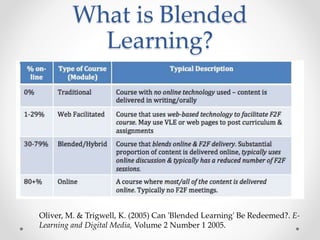
Oliver, M. & Trigwell, K. (2005) Can 'Blended Learning' Be Redeemed?. E-
Learning and Digital Media, Volume 2 Number 1 2005.
What is Blended
Learning?
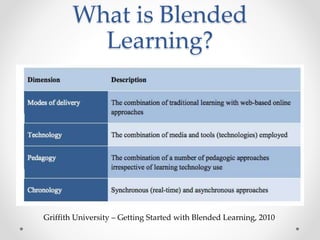
Griffith University – Getting Started with Blended Learning, 2010
What is Blended
Learning?
• Flexibility in the curriculum – synchronous and asynchronous
activities
• Technologies such as collaborative writing software to
quizzes, video conferring, screencast, virtual classrooms,
lecture capture and annotation to discussion boards
• Flipped classroom means lecture is asynchronous and
students watch in their own time, coming prepared to engage
in activities in class.
• Technology and the blended learning approach may enhance
the learning process at many different levels and stages ie.
assessment, resources and activities and inside and outside
the classroom
What is Blended
Learning?
• Blended courses integrate online with face-face instruction in
a planned, pedagogically valuable manner, and do not just
combine but trade-off face-to-face time with online
activity, or vice versa.
(Vignare 2007).
• Osguthorpe & Graham (2003) identified six goals when
designing blended environments:
1. pedagogical richness
2. access to knowledge
3. social interaction
4. personal agency
5. cost effectiveness
6. ease of revision
Design Considerations
• Understanding the Learners
Learners are different and individual. They prefer different learning
and delivery methods (i.e. Universal Design Principles)
• Understanding the Content
You need to fully understand the topics that make up your course,
and reasons why you cover them in a particular order.
• Understanding Learning Processes
You can utilise a wide range of teaching methods to accommodate
the differences in learners and the variety of course content.
• Understanding the Technology
Different tools allow different affordances but may have limitations in
certain environments. Too many tools may cause too much cognitive
load.
Finding the right mix
• Flexibility – time and place, multiple learning styles
• Repetition and review
• Persistence of materials and discussions
• Efficiencies for the teacher
• Aligned to learning goals and assessment tasks
• Peer learning and collaboration
• Personalisation and self-guided learning
• Authentic activities and workplace readiness
• Building digital literacy – staff and students
Finding the right mix
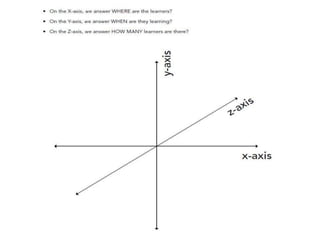
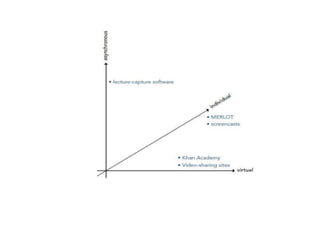
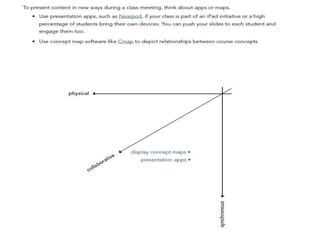
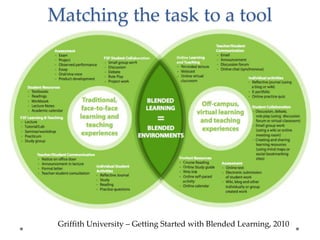
XYZ Framework
• On the X-axis, we answer WHERE are the learners?
• On the Y-axis, we answer WHEN are they learning?
• On the Z-axis, we answer HOW MANY learners are
there?
Griffith University – Getting Started with Blended Learning, 2010
Matching the task to a tool
UNSW - Learning outcomes x
technology tools matrix
• Desired learning outcomes (What?)
• Rationale (Why?)
• Relevant activities (How?)
• Potential technological tools
• Available from: https://teaching.unsw.edu.au/selecting-
technologies
Video
• Popular media for blended and flipped learning
• Affordances: Repeatable, interactive, narrative is
engaging, combines visual and audio channels,
authentic.
o Recorded lectures
o Voice over PowerPoint
o Short custom videos about a concept
o Talking head style overviews
o Existing materials from YouTube and Khan
Academy
o Student created videos – for assessment
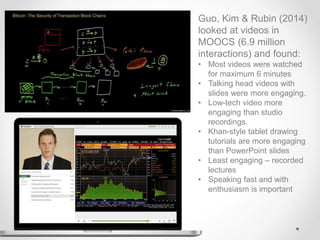
Guo, Kim & Rubin (2014)
looked at videos in
MOOCS (6.9 million
interactions) and found:
• Most videos were watched
for maximum 6 minutes
• Talking head videos with
slides were more engaging.
• Low-tech video more
engaging than studio
recordings.
• Khan-style tablet drawing
tutorials are more engaging
than PowerPoint slides
• Least engaging – recorded
lectures
• Speaking fast and with
enthusiasm is important
Communication Tools
• Announcements - asynchronous
• Discussion forums - asynchronous
• Live chat – synchronous
• Web conferencing - synchronous
• Virtual Classrooms (Adobe Connect at CSU) –
synchronous
Collaboration Tools
• Curation and annotation – Zotero, Scoop.it
• Wikis and Blogs – built into LMS or external
• Shared spaces – padlet, trello
• Google docs and apps
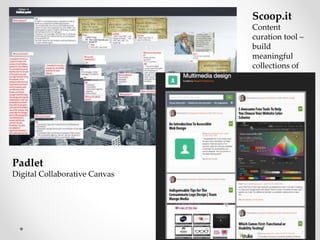
Padlet
Digital Collaborative Canvas
Scoop.it
Content
curation tool –
build
meaningful
collections of
resources
CSU Study Centres
• CSU Online Course Innovation Project - In 2013/2014
CSU moved their Distance Education (DE) offering from
paper-based to online.
• Study Centre F2F class times were cut from 4 hours to 3
hours
• Materials created by CSU with a DE focus
• Blended Learning with a “Pick and Mix” approach
• PD sessions – flipped classroom, LMS, online tools
• Short video recordings – mainly voice over PowerPoint.
CSU Study Centre
Approach
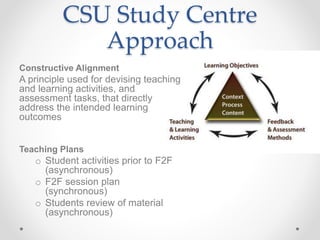
Constructive Alignment
A principle used for devising teaching
and learning activities, and
assessment tasks, that directly
address the intended learning
outcomes
Teaching Plans
o Student activities prior to F2F
(asynchronous)
o F2F session plan
(synchronous)
o Students review of material
(asynchronous)
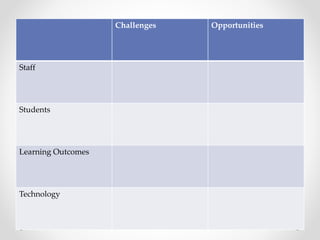
Challenges Opportunities
Staff
Students
Learning Outcomes
Technology
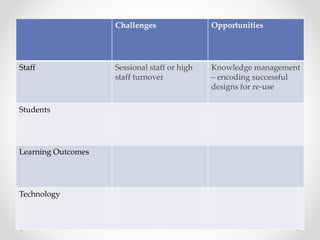
Challenges Opportunities
Staff Sessional staff or high
staff turnover
Knowledge management
– encoding successful
designs for re-use
Students
Learning Outcomes
Technology

Blended_Conference_pres_v4_MR

  • 1.
    Blended Learning: Finding theRight Mix Dr Craig Bellamy CSU Study Centre Melbourne Margaret Redestowicz CSU Study Centre Sydney
  • 2.
    Overview 1. What isBlended Learning? 2. How may it improve or transform teaching and learning? 3. Finding the right mix 4. Over to you!
  • 3.
    What is Blended Learning? Oliver,M. & Trigwell, K. (2005) Can 'Blended Learning' Be Redeemed?. E- Learning and Digital Media, Volume 2 Number 1 2005.
  • 4.
    What is Blended Learning? GriffithUniversity – Getting Started with Blended Learning, 2010
  • 5.
    What is Blended Learning? •Flexibility in the curriculum – synchronous and asynchronous activities • Technologies such as collaborative writing software to quizzes, video conferring, screencast, virtual classrooms, lecture capture and annotation to discussion boards • Flipped classroom means lecture is asynchronous and students watch in their own time, coming prepared to engage in activities in class. • Technology and the blended learning approach may enhance the learning process at many different levels and stages ie. assessment, resources and activities and inside and outside the classroom
  • 6.
    What is Blended Learning? •Blended courses integrate online with face-face instruction in a planned, pedagogically valuable manner, and do not just combine but trade-off face-to-face time with online activity, or vice versa. (Vignare 2007). • Osguthorpe & Graham (2003) identified six goals when designing blended environments: 1. pedagogical richness 2. access to knowledge 3. social interaction 4. personal agency 5. cost effectiveness 6. ease of revision
  • 7.
    Design Considerations • Understandingthe Learners Learners are different and individual. They prefer different learning and delivery methods (i.e. Universal Design Principles) • Understanding the Content You need to fully understand the topics that make up your course, and reasons why you cover them in a particular order. • Understanding Learning Processes You can utilise a wide range of teaching methods to accommodate the differences in learners and the variety of course content. • Understanding the Technology Different tools allow different affordances but may have limitations in certain environments. Too many tools may cause too much cognitive load.
  • 8.
    Finding the rightmix • Flexibility – time and place, multiple learning styles • Repetition and review • Persistence of materials and discussions • Efficiencies for the teacher • Aligned to learning goals and assessment tasks • Peer learning and collaboration • Personalisation and self-guided learning • Authentic activities and workplace readiness • Building digital literacy – staff and students
  • 9.
    Finding the rightmix XYZ Framework • On the X-axis, we answer WHERE are the learners? • On the Y-axis, we answer WHEN are they learning? • On the Z-axis, we answer HOW MANY learners are there?
  • 13.
    Griffith University –Getting Started with Blended Learning, 2010 Matching the task to a tool
  • 14.
    UNSW - Learningoutcomes x technology tools matrix • Desired learning outcomes (What?) • Rationale (Why?) • Relevant activities (How?) • Potential technological tools • Available from: https://teaching.unsw.edu.au/selecting- technologies
  • 15.
    Video • Popular mediafor blended and flipped learning • Affordances: Repeatable, interactive, narrative is engaging, combines visual and audio channels, authentic. o Recorded lectures o Voice over PowerPoint o Short custom videos about a concept o Talking head style overviews o Existing materials from YouTube and Khan Academy o Student created videos – for assessment
  • 16.
    Guo, Kim &Rubin (2014) looked at videos in MOOCS (6.9 million interactions) and found: • Most videos were watched for maximum 6 minutes • Talking head videos with slides were more engaging. • Low-tech video more engaging than studio recordings. • Khan-style tablet drawing tutorials are more engaging than PowerPoint slides • Least engaging – recorded lectures • Speaking fast and with enthusiasm is important
  • 17.
    Communication Tools • Announcements- asynchronous • Discussion forums - asynchronous • Live chat – synchronous • Web conferencing - synchronous • Virtual Classrooms (Adobe Connect at CSU) – synchronous
  • 18.
    Collaboration Tools • Curationand annotation – Zotero, Scoop.it • Wikis and Blogs – built into LMS or external • Shared spaces – padlet, trello • Google docs and apps
  • 19.
    Padlet Digital Collaborative Canvas Scoop.it Content curationtool – build meaningful collections of resources
  • 20.
    CSU Study Centres •CSU Online Course Innovation Project - In 2013/2014 CSU moved their Distance Education (DE) offering from paper-based to online. • Study Centre F2F class times were cut from 4 hours to 3 hours • Materials created by CSU with a DE focus • Blended Learning with a “Pick and Mix” approach • PD sessions – flipped classroom, LMS, online tools • Short video recordings – mainly voice over PowerPoint.
  • 21.
    CSU Study Centre Approach ConstructiveAlignment A principle used for devising teaching and learning activities, and assessment tasks, that directly address the intended learning outcomes Teaching Plans o Student activities prior to F2F (asynchronous) o F2F session plan (synchronous) o Students review of material (asynchronous)
  • 22.
  • 23.
    Challenges Opportunities Staff Sessionalstaff or high staff turnover Knowledge management – encoding successful designs for re-use Students Learning Outcomes Technology

Editor's Notes

  • #2 CB + MR
  • #3 CB
  • #4 CB
  • #5 CB
  • #6 CB The use of technology in education offers numerous opportunities to improve the teaching and learning process, depending on the particular teaching problem that is being addressed. The blended learning approach is a way of extending the classroom to ‘where and when’ students are actually accessing education, introducing flexibility into the curriculum. It is a blend of face-to-face teaching with technology-based teaching that can be the ‘best of both worlds’, but if done poorly, can be the worst of both worlds! There is an enormous list of educational technologies available for teaching and learning from collaborative writing software to quizzes, video conferring, screencast, virtual classrooms, lecture capture and annotation to discussion boards, in both synchronous and asynchronous time. The consideration of what technology is appropriate is guided by the learning outcomes of the particular lesson and subject combined with ‘where the students will access the content or activities’, ‘when they will access it’, and ‘how many students there are?’. Constructing content and activities to be used outside of the classroom, such as lecture materials, summaries of readings, or journal entries, is a way to prepare students for activities and discussion within the classroom. This is often termed a ‘flipped classroom’ because the lecture is delivered online in asynchronous time, meaning that students can view the video or other materials at their convenience and come prepared to the classroom for the learning activities. Technology and the blended learning approach may enhance the learning process at many different junctures including in terms of assessment (formative and summative), content and materials and activities either in or outside the classroom.
  • #7 CB
  • #8 MR
  • #9 MR
  • #10 CB
  • #11 CB
  • #12 CB
  • #14 MR https://www.griffith.edu.au/__data/assets/pdf_file/0004/267178/Getting_started_with_blended_learning_guide.pdf  
  • #15 MR
  • #16 MR Recorded lectures – repurposed from classroom – good for repetition, seems to only be effective for those who attended the original lecture Voice over PowerPoint – great for repetition, not very engaging but allows for student to rewatch the important points and watch in own order. Good for things like assignment explanations. Short custom videos about a concept – for example a recording of a maths problem being solved step by step. Setting up or using new software. Talking head style overviews – teacher in close-up giving a summary of a topic or explanation of an assignment. More engaging. Can be undispersed with slides. Existing materials from YouTube and Khan Academy – cheap, easy to access – must be reviewed for pedagogical value and framed with a structure to be useful. Student created videos – for assessment
  • #18 CB + MR
  • #19 CB
  • #21 Due to lack of involvement in the development of the online materials we took a “pick and mix” approach. Study Centre lecturers were free to choose which elements from the DE materials they would like to use in their teaching and whether they would use these elements online or in the classroom. We conducted PD sessions on flipped classrooms and other learning approaches such as Advance Organisers. We demonstrated free online tools such as polling tools, shared whiteboards, collaborative spaces (padlet, trello) and curation tools. We required lecturers to record 3 videos – a general introduction to the subject and introductions to each of the assignments. (Training was provided in video and voice-over-PowerPoint production) (Demonstrate: a successful site and a teaching plan)
  • #22 MR Teaching plans – a new concept for university lecturers but very familiar to teachers.
  • #23 CB + MR Best of both worlds or worst of both worlds Knowledge management – encoding successful designs for re-use BYOD, LMS, huge amount of free online content Increased motivation due to variety of resources Sessional staff or high staff turnover Wifi and technology limitations Technology knowledge and skills Student motivation to work outside of class time Workload can be increased
  • #24 CB + MR Best of both worlds or worst of both worlds Knowledge management – encoding successful designs for re-use BYOD, LMS, huge amount of free online content Increased motivation due to variety of resources Sessional staff or high staff turnover Wifi and technology limitations Technology knowledge and skills Student motivation to work outside of class time Workload can be increased