Contents

Throughout this presentation, we’ll be highlighting the following points:

Company Background
Current System
The issues with the Current System
The requirements of the envisioned Solution
Requirements Weighting
Why implement a computerised solution?
Solution A: off-the-shelf solution
Solution B: customised solution
Features Comparision
The Decision
Time for queries
Conclusion
Company Background

Medica is a private clinic offering a range of services to the general
public in Malta

It is made up from a receptionist, a librarian and 5 doctors

Services include clinic appointments, home visits and the ‘Working in
Good Shape’ scheme

Home visits are made between 8am and noon

The clinic is open from 2pm to 7pm whereby all doctors will be
available


                                                           The current system   3/16
Current System

The current system consists of a file system composed of folders which
contain A4 sized paper on which the doctor keeps his notes and the
patient information

These folders are colour coded, pink if the patient is a female or blue if
a male

The folders are also sorted alphabetically

A single folder contains all the medical records of a single patient,
including any correspondence between the doctor and specialists


                                                           Issues with current system   4/16
Current System – The Issues

The main problems with the current system are:
Require regular up-keeping: Sorting, re-sorting, damage prevention,
elimination of duplicates and other maintenance tasks
The files are liable to theft, intentional damage or destruction by fire or
other natural disasters
The system is prone to human errors
The folders occupy a lot of storage space
Maintenance is time consuming and requires specialised personnel to
keep and maintain records
Backups of records are non-existing and impractical
Obtaining statistics and reports is very cumbersome

                                                           The most desirable features   5/16
Proposed Solution – The Requirements

The following are the desirable features that would be needed in the
system:
•A secure method for storing patient details and medical information
•A feature to easily search for a particular patient record
•An easy way to track and schedule appointments and home visits
•Effective way of prescribing medication
•Doctor – patient encounter logging
•Backup and restore
•System user management
•Access to all data regardless of location

                                                              Requirements weighting   6/16
Requirements Weighting

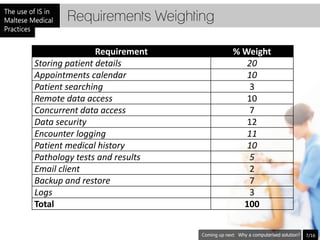
                Requirement     % Weight
Storing patient details            20
Appointments calendar              10
Patient searching                  3
Remote data access                 10
Concurrent data access             7
Data security                      12
Encounter logging                  11
Patient medical history            10
Pathology tests and results        5
Email client                       2
Backup and restore                 7
Logs                               3
Total                             100


                                 Why a computerised solution?   7/16
Why implement a computerised system?

Faster searching
User input can be validated, therefore increasing data accuracy
Reports can be generated instantly and statistics can be easily obtained
Keeping backups of the patient’s records is much easier and data can be
duplicated infinitely
Patient information can be accessed from practically anywhere,
provided the required hardware and software facilities are available
With a computer system, no employees are needed for the upkeep of
files as this job is performed automatically by the system
Space is also saved as the data is stored electronically


                                                            Solution A: Off-the-shelf? (pt1)   8/16
Solution A: go Off-the-Shelf?

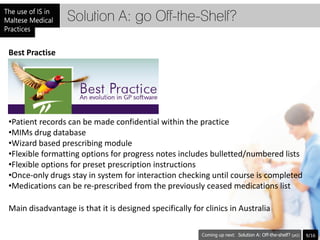
Best Practise


•Patient records can be made confidential within the practice
•MIMs drug database
•Wizard based prescribing module
•Flexible formatting options for progress notes includes bulletted/numbered lists
•Flexible options for preset prescription instructions
•Once-only drugs stay in system for interaction checking until course is completed
•Medications can be re-prescribed from the previously ceased medications list

Main disadvantage is that it is designed specifically for clinics in Australia

                                                                    Solution A: Off-the-shelf? (pt2)   9/16
Solution A: go Off-the-Shelf?

Private Practise Software
Stores and retrieves as well as edits patient's records with all the necessary details
One can view the whole clients log from when the client has registered with the system
A feature used to add and manage doctor's and patient's appointments and visits
A feature which allows you to design and develop your own clinical notes, charts and
diagrams. The feature also allows the user to attach a letter or prescription to and existing
letter
A feature that includes a comprehensive range of accounting features including invoicing,
insurance and other third-party billing
A feature that allows the doctor to create appointments, add reminders, send e-mails, etc
The ability to include a wide range of reports. One can output any report on the screen,
printer or export it depending on the criteria selected

Again, the main disadvantage is that it is designed specifically for clinics in the UK

                                                                         Solution B: Customised?   10/16
Solution B: or go Custom?

By going custom, we can develop a system which meets the majority if
not all of our requirements.

Such a system would be personalised and thus it ties in closely to our
method of working, increasing performance and effectiveness


                                                          Features Comparision   11/16
Features Comparision

Customised System
Advantages
Fully customisable : Software would be built to the extent needed by the clinic
More clear description of what needs to be done, as requirements analysis is drawn
forward in the beginning of the software life cycle
Training would be provided personally and not over videos, streaming or any other media,
so users would have a good idea on how to use the system
Local standards could be implemented
Although costly at first, in the long run it would pay up
Disadvantages
More or less, local standards would be put before abroad standards. This could be a
disadvantage as European standards may be implemented in our country
The expense would be high at first
More chance of bugs, on the contrary to off-the-shelf, as off-the-shelf software is widely
used
More time to implement, as the clinic has to wait for the software to be produced, unlike
the off-the-shelf were the software is brought instantly

                                                                       Features Comparision   12/16
Features Comparision

Off-the-shelf Software
Advantages
Reliability, since the off the shelf software is used by many
Many available add-ons which one may buy in order to increase the usability of the
software itself
Compared to custom software, low cost of ownership
Not platform specific
The hardware requirements for the software are kept to a minimum – no particular
hardware is needed
Disadvantages
Purchasing other third party software to maintain the software, like MS SQL for example
(Extra expenses to licenses)
The off-the-shelf software found is from abroad – this reduces contact to a minimum, and
support is always through a medium. No personal contact – which could lead to
misunderstandings in support
Extra general features could lead to confusing the practitioner
Since the software is general the customisability is kept to a minimum
Licenses are generally per user
                                                                     The Decision           13/16
The Decision

The factors below drove the clinic to choose the customised software
Software being fully customisable to the clinics needs since it is done
specifically for the clinic itself
Software being adequate for networks in case more clinics are integrated
to the network
Personal support and availability since the source provider would be local
Extensible, should the need for further features arise
Local and European Standards implemented in the software itself
Although the cost of ownership if steep at first, in the long run the
invested money will be redeemed


                                                            Prepare your questions   14/16
Queries?

Time for questions
If you have something unclear, kindly ask someone from our team.


                                                     Conclusion    15/16
Conclusion

The new system will elevate the Medica clinic service standard
which should directly affect operational efficiency, thus providing a
better experience for Medica's patients.
bis3000

bis3000

  • 2.
    Contents Throughout this presentation,we’ll be highlighting the following points: Company Background Current System The issues with the Current System The requirements of the envisioned Solution Requirements Weighting Why implement a computerised solution? Solution A: off-the-shelf solution Solution B: customised solution Features Comparision The Decision Time for queries Conclusion
  • 3.
    Company Background Medica isa private clinic offering a range of services to the general public in Malta It is made up from a receptionist, a librarian and 5 doctors Services include clinic appointments, home visits and the ‘Working in Good Shape’ scheme Home visits are made between 8am and noon The clinic is open from 2pm to 7pm whereby all doctors will be available The current system 3/16
  • 4.
    Current System The currentsystem consists of a file system composed of folders which contain A4 sized paper on which the doctor keeps his notes and the patient information These folders are colour coded, pink if the patient is a female or blue if a male The folders are also sorted alphabetically A single folder contains all the medical records of a single patient, including any correspondence between the doctor and specialists Issues with current system 4/16
  • 5.
    Current System –The Issues The main problems with the current system are: Require regular up-keeping: Sorting, re-sorting, damage prevention, elimination of duplicates and other maintenance tasks The files are liable to theft, intentional damage or destruction by fire or other natural disasters The system is prone to human errors The folders occupy a lot of storage space Maintenance is time consuming and requires specialised personnel to keep and maintain records Backups of records are non-existing and impractical Obtaining statistics and reports is very cumbersome The most desirable features 5/16
  • 6.
    Proposed Solution –The Requirements The following are the desirable features that would be needed in the system: •A secure method for storing patient details and medical information •A feature to easily search for a particular patient record •An easy way to track and schedule appointments and home visits •Effective way of prescribing medication •Doctor – patient encounter logging •Backup and restore •System user management •Access to all data regardless of location Requirements weighting 6/16
  • 7.
    Requirements Weighting Requirement % Weight Storing patient details 20 Appointments calendar 10 Patient searching 3 Remote data access 10 Concurrent data access 7 Data security 12 Encounter logging 11 Patient medical history 10 Pathology tests and results 5 Email client 2 Backup and restore 7 Logs 3 Total 100 Why a computerised solution? 7/16
  • 8.
    Why implement acomputerised system? Faster searching User input can be validated, therefore increasing data accuracy Reports can be generated instantly and statistics can be easily obtained Keeping backups of the patient’s records is much easier and data can be duplicated infinitely Patient information can be accessed from practically anywhere, provided the required hardware and software facilities are available With a computer system, no employees are needed for the upkeep of files as this job is performed automatically by the system Space is also saved as the data is stored electronically Solution A: Off-the-shelf? (pt1) 8/16
  • 9.
    Solution A: goOff-the-Shelf? Best Practise •Patient records can be made confidential within the practice •MIMs drug database •Wizard based prescribing module •Flexible formatting options for progress notes includes bulletted/numbered lists •Flexible options for preset prescription instructions •Once-only drugs stay in system for interaction checking until course is completed •Medications can be re-prescribed from the previously ceased medications list Main disadvantage is that it is designed specifically for clinics in Australia Solution A: Off-the-shelf? (pt2) 9/16
  • 10.
    Solution A: goOff-the-Shelf? Private Practise Software Stores and retrieves as well as edits patient's records with all the necessary details One can view the whole clients log from when the client has registered with the system A feature used to add and manage doctor's and patient's appointments and visits A feature which allows you to design and develop your own clinical notes, charts and diagrams. The feature also allows the user to attach a letter or prescription to and existing letter A feature that includes a comprehensive range of accounting features including invoicing, insurance and other third-party billing A feature that allows the doctor to create appointments, add reminders, send e-mails, etc The ability to include a wide range of reports. One can output any report on the screen, printer or export it depending on the criteria selected Again, the main disadvantage is that it is designed specifically for clinics in the UK Solution B: Customised? 10/16
  • 11.
    Solution B: orgo Custom? By going custom, we can develop a system which meets the majority if not all of our requirements. Such a system would be personalised and thus it ties in closely to our method of working, increasing performance and effectiveness Features Comparision 11/16
  • 12.
    Features Comparision Customised System Advantages Fullycustomisable : Software would be built to the extent needed by the clinic More clear description of what needs to be done, as requirements analysis is drawn forward in the beginning of the software life cycle Training would be provided personally and not over videos, streaming or any other media, so users would have a good idea on how to use the system Local standards could be implemented Although costly at first, in the long run it would pay up Disadvantages More or less, local standards would be put before abroad standards. This could be a disadvantage as European standards may be implemented in our country The expense would be high at first More chance of bugs, on the contrary to off-the-shelf, as off-the-shelf software is widely used More time to implement, as the clinic has to wait for the software to be produced, unlike the off-the-shelf were the software is brought instantly Features Comparision 12/16
  • 13.
    Features Comparision Off-the-shelf Software Advantages Reliability,since the off the shelf software is used by many Many available add-ons which one may buy in order to increase the usability of the software itself Compared to custom software, low cost of ownership Not platform specific The hardware requirements for the software are kept to a minimum – no particular hardware is needed Disadvantages Purchasing other third party software to maintain the software, like MS SQL for example (Extra expenses to licenses) The off-the-shelf software found is from abroad – this reduces contact to a minimum, and support is always through a medium. No personal contact – which could lead to misunderstandings in support Extra general features could lead to confusing the practitioner Since the software is general the customisability is kept to a minimum Licenses are generally per user The Decision 13/16
  • 14.
    The Decision The factorsbelow drove the clinic to choose the customised software Software being fully customisable to the clinics needs since it is done specifically for the clinic itself Software being adequate for networks in case more clinics are integrated to the network Personal support and availability since the source provider would be local Extensible, should the need for further features arise Local and European Standards implemented in the software itself Although the cost of ownership if steep at first, in the long run the invested money will be redeemed Prepare your questions 14/16
  • 15.
    Queries? Time for questions Ifyou have something unclear, kindly ask someone from our team. Conclusion 15/16
  • 16.
    Conclusion The new systemwill elevate the Medica clinic service standard which should directly affect operational efficiency, thus providing a better experience for Medica's patients.